 黑客技术
点击放大

项目说明
<h1 align="center">
<br>
<a href=" src=" alt="reconftw"></a>
<br>
reconFTW
<br>
</h1>
<p align="center">
<a href=" src=" alt="Release"></a>
<a href=" src=" alt="License"></a>
<a href=" src=" alt="Closed Issues"></a>
<a href=" src=" alt="Discord"></a>
<a href="/H5bAaw3YbzzmI5co"><img src=" alt="
<a href=" src=" alt="Twitter"></a>
</p>
<p align="center">
<a href=" src=" alt="Docs"></a>
<a href=" src=" alt="Bash Script"></a>
<a href=" src=" alt="Linux"></a>
<a href=" src=" alt="macOS"></a>
<a href=" src=" alt="GitHub"></a>
</p>
<p align="center">
<a href=" src=" alt="GitHub Actions"></a>
<a href=" src=" alt="Docker"></a>
<a href=" src=" alt="Terraform"></a>
<a href=" src=" alt="Ansible"></a>
<a href=" src=" alt="Go"></a>
<a href=" src=" alt="Python"></a>
</p>
<p align="center">
<a href=" src=" alt="Buy Me a Coffee"></a>
<a href=" src=" alt="GitHub Sponsors"></a>
<a href=" src=" alt="PayPal"></a>
</p>
reconFTW is a powerful automated reconnaissance 工具 designed for security researchers and penetration testers. It streamlines the process of gathering intelligence on a target by performing subdomain enumeration, scanning, OSINT and more. With a modular design, extensi options, and support for distributed scanning via AX 框架, reconFTW is built to deli results efficiently.
reconFTW le a wide range of techniques, including passive and acti discovery, web checks (e.g., XSS, SSRF, SQLi), OSINT, directory fuzzing, port scanning and screenshotting. It integrates with cutting-edge tools and APIs to maximize co and accuracy, ensuring you stay ahead in your reconnaissance efforts.
Key Features:
Disclaimer: Usage of reconFTW for attacking targets without prior consent is illegal. It is the user's responsibility to obey all applicable laws. The de assume no liability for misuse or damage caused by this 工具. Use responsibly.
---
📔 Table of Contents
- OSINT
- Subdomains
- Hosts
- Web Analysis
- Checks
- Extras
- Local Installation (PC/VPS/VM)
- Docker
- Terraform + Ansible
- Target Options
- Mode Options
- General Options
- Example Usage
- Makefile
- Manual
---
✨ Features
reconFTW is packed with features to make reconnaissance thorough and efficient. Below is a detailed breakdown of its capabilities, updated to reflect the latest functionality in the script and configuration.
OSINT
Subdomains
cloudhunter_* bucket artifacts were removed; use subdomains/cloud_enum_buckets_trufflehog.txt instead.Hosts
IP is enabled.Web Analysis
ws:// and wss:// endpoints.Checks
nuclei -dast templates o URLs and GF candidates for additional DAST co.Extras
--quick-rescan / QUICK_RESCAN).hotlist.txt) based on new findings.SHOW_COMMANDS to log every executed command into target logs for debugging.assets.jsonl for downstream automation when ASSET_STORE is enabled.report/report.json and report/index.html at end of scan.--health-check (also used by Docker HEALTHCHECK).--incremental).--adapti).STRUCTURED_LOGGING).--dry-run).--parallel, disable with --no-parallel).secrets.cfg, and Docker runtime secrets (see SECURITY.md).---
🏗️ Architecture
reconFTW uses a modular architecture. The main entry point (reconftw.sh) handles argument parsing and sources 8 specialized modules from the modules/ directory.
Directory Layout
Module Reference
| Module | Lines | Purpose |
|--------|------:|---------|
| core.sh | 1024 | Lifecycle management, logging, notifications, cleanup traps |
| modes.sh | 902 | Scan mode definitions, argument parsing, help output |
| subdomains.sh | 1938 | All subdomain enumeration functions |
| web.sh | 1712 | Web analysis, fuzzing, JS analysis, CMS detection |
| vulns.sh | 926 | scanning (XSS, SQLi, SSRF, etc.) |
| osint.sh | 500 | OSINT functions (WHOIS, emails, dorks, metadata) |
| utils.sh | 508 | Shared utilities, input sanitization, |
| axiom.sh | 143 | Ax/Axiom distributed fleet management |
The --source-only flag allows sourcing reconftw.sh without executing the main logic, enabling unit testing of indi functions.
---
💿 Installation
reconFTW supports multiple installation methods to suit different en. Ensure you ha disk space (at least 10 GB recommended) and a stable internet connection.
Quickstart
1) Clone and install
2) Run a scan (full + resume)
3) Minimal run (passi footprint)
> Tip: re-run ./install.sh --tools later to refresh the toolchain without reinstalling system packages.
Local Installation (PC/VPS/VM)
1. Prerequisites:
- Golang: Latest (install_golang enabled by default in reconftw.cfg).
- System Permissions: If not running as root, configure sudo to avoid prompts:
2. Steps:
3. Notes:
install.sh script installs dependencies, tools, and configures paths (GOROOT, GOPATH, PATH).install_golang=false in reconftw.cfg if Golang is already configured../install.sh --tools to refresh Go binaries, pipx packages, and repositories without touching system packages.Docker
1. Pull the Image:
2. Run the Container:
For a list of targets, bind the list file into the container and reference the in-container path:
3. View Results:
- Results are saved in the OutputFolder directory on the host (not inside the container).
4. Customization:
- Modify the Docker image or build your own; see the Docker Guide.
- To skip Ax tooling in custom builds, pass --build-arg INSTALL_AXIOM=false.
- Mount your notify config at ~/.config/notify/pro.yaml inside the container if you use notifications.
5. Secrets at Runtime:
Pass API keys and secrets — never bake them into the image:
See SECURITY.md for full secrets management guidance.
6. Health Check:
The Docker image includes a built-in HEALTHCHECK that runs ./reconftw.sh --health-check every 60 seconds. You can also run it manually:
Terraform + Ansible
---
Trying the v2 beta (Go rewrite)
reconFTW is being rewritten in Go. The rewrite ships as an opt-in pre-release: it is
listed on the releases page, and GitHub
ne releases/latest at a pre-release — so **if you do nothing, you keep getting
the bash release.** That is deliberate.
The Go binary is reconftw; the bash entry point is reconftw.sh. They do not o
each other, so you can keep both and fall back at any time.
The current beta is v5.0.0-beta.1. It is not served by releases/latest, so you
name the tag explicitly:
Pick the asset matching your platform from the
release page — Darwin
and arm64 builds, a static musl build, and .deb/.rpm packages are all published.
things that are explicitly not finished yet.
— the v2 beta feedback template. Bugs in the bash release still go to the normal Bug report.
🛠️ Troubleshooting
brew install bash, open a new terminal, and re-run ./install.sh.gtimeout via brew install coreutils. The scripts now detect and use it automatically.upgrade_tools=true in reconftw.cfg, execute ./install.sh --tools, or install the missing 工具 manually (the error will name it)./usr/local/bin. If you prefer not to, ensure ~/go/bin is in your PATH.~/nuclei-templates and re-run ./install.sh.🔑 API Checklist (Optional)
subfinder: ~/.config/subfinder/pro.yaml~/Tools/.github_tokens (one per line)~/Tools/.gitlab_tokens (one per line)WHOISXML_API in reconftw.cfg or env varasnmap): set PDCP_API_KEY in en (ASN_ENUM skips if unset)notify in ~/.config/notify/pro.yamlCOLLAB_SERVER env/cfg if usedXSS_SERVER env/cfg if used💾 Requirements
shellcheck and shfmt (optional) for make lint/make fmt⚙️ Configuration
The reconftw.cfg file controls the entire execution of reconFTW. It allows fine-grained customization of:
tools, resolvers, fuzz_wordlist).secrets.cfg (see SECURITY.md).OSINT, SUBDOMAINS_GENERAL, FFUF_THREADS, HTTPX_RATELIMIT).ADAPTI, MIN_RATE_LIMIT, MAX_RATE_LIMIT).INCREMENTAL_MODE).NOTIFY_CONFIG).AXIOM_FLEET_NAME, AXIOM_FLEET_COUNT, AXIOM_RESOL).AI_MODEL, AI_REPORT_PROFILE, AI_REPORT_TYPE, AI_MAX_CHARS_PER_FILE).QUICK_RESCAN, ASSET_STORE, CHUNK_LIMIT, HOTLIST_TOP, SHOW_COMMANDS).MIN_DISK_SPACE_GB), log rotation (MAX_LOG_FILES, MAX_LOG_AGE_DAYS), structured JSON logging (STRUCTURED_LOGGING).CACHE_MAX_AGE_DAYS).RESOL*), and DNS brute/resol defaults to disabled (DNS_*_TIMEOUT=0) with heartbeat progress.secrets.cfg for local o or en for CI/Docker (see SECURITY.md).Example Configuration:
DNS resol:
RESOLEOUT, RESOL, RESOL, and RESOL.DNS_BRUTE_TIMEOUT=0 and DNS_RESOL=0 disable hard-timeout by default (recommended for very large target sets). Heartbeat progress still prints every DNS_HEARTBEAT_INTER.Full Details: See the Configuration Guide.
---
🚀 Usage
reconFTW supports multiple modes and options for flexible reconnaissance. Use the -h flag to view the help menu.
Target Options
| Flag | Description |
| ---- | ------------------------------------------------------------ |
| -d | Single target domain (e.g., example.com) |
| -l | File with list of target domains (one per line) |
| -m | Multi-domain target (e.g., company name for related domains) |
| -x | Exclude subdomains (out-of-scope list) |
| -i | Include subdomains (in-scope list) |
Mode Options
| Flag | Description |
| ---- | --------------------------------------------------------------------- |
| -r | Recon: Full reconnaissance without acti |
| -s | Subdomains: Subdomain enumeration, web probing, and takeovers |
| -p | Passive: Passi only |
| -a | All: Full reconnaissance plus acti checks |
| -w | Web: checks on specific web targets |
| -n | OSINT: OSINT scan without subdomain enumeration or attacks |
| -z | Zen: Lightweight recon with basic checks and some |
| -c | Custom: Run a specific function (requires additional arguments) |
| -h | Show help menu |
General Options
| Flag | Description |
| ----------------- | -------------------------------------------------------- |
| --deep | Enable deep scanning (slower, ) |
| -f | Custom configuration file path |
| -o | Output directory for results |
| -v | Enable Ax distributed scanning |
| -- | O Ax fleet instance count for this run |
| -q | Set rate limit (requests per second) |
| -y | Enables AI results analysis |
| --check-tools | Exit if required tools are missing |
| --quick-rescan | Skip hea when no new subs/webs are found |
| --health-check | Run system health check and exit |
| --incremental | Only scan new findings since last run |
| --adapti | Automatically adjust rate limits on errors (429/503) |
| --dry-run | Show what would be executed without running commands |
| --parallel | Run independent functions in parallel (faster, more RAM) |
| --no-parallel | Force sequential execution even if parallel is enabled |
| --monitor | Continuous monitoring mode (single target; -w supports -l) |
| --monitor-interval | Minutes between monitor cycles |
| --monitor-cycles | Stop after N cycles (0 = infinite) |
| --report-only | Rebuild report artifacts without scanning |
| --refresh-cache | Force refresh of cached resolvers/wordlists |
| --export | Export artifacts: json, html, csv, or all |
Example Usage
1. Full Recon on a Single Target:
2. Recon on Multiple Targets:
3. Deep Recon ():
4. Parallel Mode (Faster, requires more RAM):
5. Force Sequential Mode:
6. Multi-Domain Recon:
7. Ax Integration:
8. Ax Integration with fleet o:
9. Full Recon with Attacks (YOLO Mode):
10. Show Help:
11. Force cache refresh:
12. Export all report artifacts:
13. Continuous monitoring (every 30m, 48 cycles):
14. Rebuild reports only (no scan):
Full Guide: See the Usage Guide.
---
☁️ Ax Framework Support (pre Axiom)
reconFTW integrates with Ax for distributed scanning, reducing execution time by distributing tasks across multiple cloud instances.
reconftw as the pro during Ax configuration (axiom-configure).AXIOM_FLEET_LAUNCH, AXIOM_FLEET_SHUTDOWN) or use an existing fleet.reconftw.cfg (AXIOM_FLEET_COUNT, AXIOM_FLEET_REGIONS, AXIOM_FLEET_NAME).Example:
Details: See the official Ax Docs and the attacksurge/ax repo.
---
💻 Faraday Support
reconFTW integrates with Faraday for web-based reporting and management.
faraday-cli, and configure the workspace in reconftw.cfg (FARADAY_WORKSPACE).FARADAY=true in reconftw.cfg.---
🧠 AI Integration
reconFTW uses AI to generate detailed reports from scan results with the 工具 reconftw_ai.
llama3:8b via AI_MODEL).AI_REPORT_TYPE).AI_REPORT_PROFILE).reconftw stores a machine-readable report in ai_result/reconftw_analysis.json.AI_MAX_CHARS_PER_FILE and AI_MAX_FILES_PER_CATEGORY.AI_REDACT and AI_STRICT.Example:
---
🗂️ Data Management
Manage scan data and API keys securely using a private repository.
When ASSET_STORE=true, reconFTW aggregates key findings into assets.jsonl during each run, making it easy to sync only actionable deltas to your private repo.
Makefile
Use the provided Makefile for easy repository management (requires GitHub CLI).
1. Bootstrap:
2. Sync with Upstream:
3. Upload Data:
4. Lint / Format Scripts:
5. Run Tests:
Manual
1. Create a private repository on GitHub/GitLab.
2. Clone and configure:
3. Upload Changes:
4. Update Tool:
---
🧪 Testing
reconFTW uses bats-core for automated testing.
Install bats-core
Running Tests
Test Directory Structure
Running Security Tests
Writing Tests
Tests use the --source-only pattern to load functions without executing the main script:
CI Pipeline
The GitHub Actions workflow (.github/workflows/tests.yml) runs on every push and pull request:
1. ShellCheck — lints reconftw.sh, modules/*.sh, and install.sh
2. Unit Tests — runs all tests/unit/*.bats files
3. Integration Tests — installs reconFTW and tool a
---
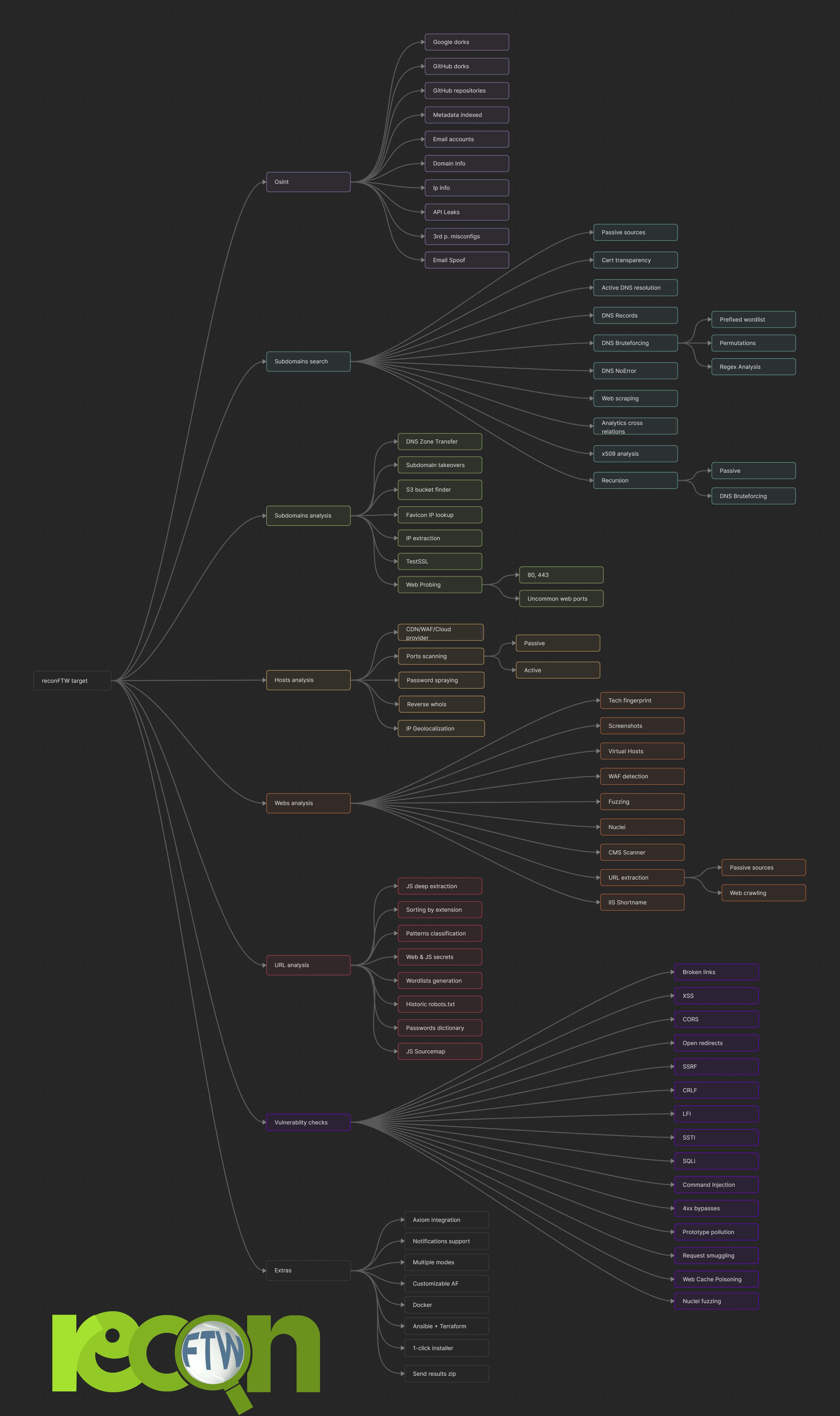
Mindmap/Workflow
!Mindmap
---
Sample video
!Video
---
🤝 How to Contribute
See CONTRIBUTING.md for the full contributing guide, including de setup, 代码 style, testing, and PR process.
Quick links:
dev branch)---
🔒 Security
For security policy, secrets management, and reporting, see SECURITY.md.
---
❓ Need Help?
---
💖 Support This Project
Support reconFTW’s de through:
<img src="
<a href=" src=" alt="DigitalOcean Referral Badge" /></a>
---
🙏 Thanks
Special thanks to the following services for supporting reconFTW:
---
📝 Changelog
See CHANGELOG.md for a detailed list of changes in each release.
---
🛠️ De
Project Structure
Running Tests
De Workflow
Contributing
See CONTRIBUTING.md for de guidelines and docs/ARCHITECTURE.md for technical details.
---
📜 License
reconFTW is licensed under the MIT License.
---
⭐ Star History
![Star History Chart]()
项目信息
开发语言:Shell
Star 数:8167
技术要点
该项目属于黑客技术方向的开源资源,代码结构清晰,适合安全研究人员学习参考。项目围绕reconFTW is a 工具 designed to perform automated recon on a target domain by running the best set of tools to perform scanning and finding out 展开,提供了可运行的实现,对理解相关安全机制、工具原理与攻防技术具有较高的研究价值。
从技术实现角度看,此类项目的核心在于对底层原理的深入理解与工程化落地。开发者在研究过程中可以结合官方文档与社区讨论,梳理项目的初始化流程、核心模块职责与数据流转,逐步掌握其中的技术细节与设计思路。
使用与学习建议
1. 下载源码压缩包,解压到本地环境。
2. 根据项目类型准备对应的运行环境与依赖。
3. 按照 README 中的步骤完成配置与部署。
4. 在隔离的测试环境中运行验证,避免影响生产系统。
免责声明
本资源来源于开源社区,仅供安全研究、技术学习与合法授权范围内的攻防演练使用,请勿用于任何非法或侵害他人权益的用途。使用本项目产生的一切后果由使用者自行承担。
| 资源标题 | reconftw - reconFTW是一个工具,旨在执行 |
| 所属分类 | 黑客技术 |
| 发布作者 | admin |
| 发布时间 | 2026-10-05 22:02:27 |
| 下载权限 | 免费下载 |
| 附件数量 | 2 个下载链接 |
| 浏览次数 | 532 |
| 讨论数量 | 0 |
| 主题状态 | 正常讨论中 |