 黑客技术
点击放大
项目说明


<di="center">
<img src="assets/logo_banner.png" alt="Decepticon Logo">
</div>
<h1 align="center">Decepticon — Autonomous Red Team Agent</h1>
<p align="center"><i>"Another AI hacker? Let us guess — it runs nmap and writes a report."</i></p>
<di="center">
<a href="
<img src=" alt="License: Apache 2.0">
</a>
<a href="
<img src=" alt="Stargazers">
</a>
<a href="
<img src=" alt="Contributors">
</a>
<br/>
<a href="
<img src=" alt="Join us on Discord">
</a>
<a href="
<img src=" alt="Website">
</a>
<a href="
<img src=" alt="Documentation">
</a>
<a href="
<img src=" alt="Li app">
</a>
</div>
<br/>
<di="center">
<video src=" width="800" controls></video>
</div>
<di="center">
☁️ Don't want to self-host? Decepticon is live in the cloud.
Skip the Docker setup — run autonomous red-team engagements right from your browser.
<a href="
<img src=" alt="Launch the live app at app.decepticon.red">
</a>
</div>
<di="center">
<video src=" width="800" controls></video>
</div>
---
Install
Prerequisites: Docker and Docker Compose v2.
Supported on macOS (Apple Silicon + Intel), Linux (amd64 + arm64), and Windows (amd64 + arm64) — native or via WSL2 (Ubuntu / Kali).
macOS / Linux / WSL2
The default start brings up the core management plane (LiteLLM, PostgreSQL, Neo4j, Skillogy, LangGraph, sandbox) and launches the terminal CLI. Specialist workloads (BloodHound CE, Sliver C2, Ghidra MCP, …) and the web dashboard come up on demand — the orchestrator spawns specialists via ops_start("ad") etc., and you bring up the dashboard from inside the CLI with /web (see Web Dashboard).
Windows (PowerShell, native)
→ Quick start · Full setup walkthrough
Use from Claude Code or Codex
After starting Decepticon, register its MCP 服务端 in your coding agent:
Use the command for the coding agent you ha, then rundecepticon skill install to add the operator guide to both agents. See the
external agent guide for the Agent Skill,
工具 workflow, and 源码 installation path.
Use as a library (pip)
Building on top of the agents — a product, a research integration, or a custom orchestrator? Install the SDK from PyPI:
decepticon is a client SDK: it ships the agent factories, middleware, tools, and skills, and routes LLM calls and sandbox execution to runtime services over HTTP (DECEPTICON_LLM__PROXY_URL, SANDBOX_URL). Running agents still needs those services — use the Docker stack above, or point the URLs at your own equi. See Decepticon as a library for the factory o surface, declarative PluginBundle plugins, and the safety gate.
---
💖 Support Decepticon
![Sponsor]()
We're building Decepticon toward an Offensi for the AI-dri landscape. If you believe in autonomous red teaming as a path to stronger defense, consider supporting the project.
---
Benchmark
<di="center">
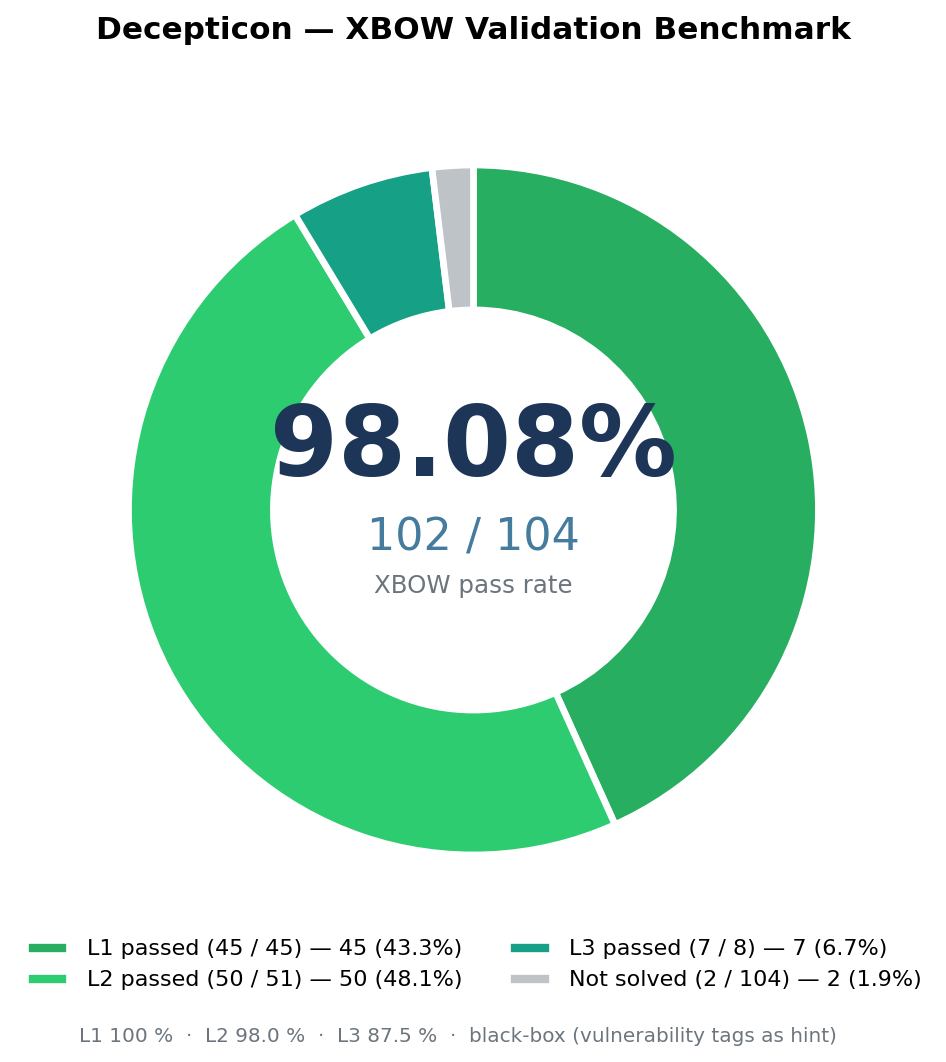
<img src="assets/benchmark/decepticon_donut.png" alt="Decepticon — XBOW pass rate 102/104 (98.08%)" width="560">
</div>
| Benchmark | Difficulty | Pass Rate |
|-----------|------------|-----------|
| XBOW | Easy (Level 1) | 45 / 45 (100 %) |
| XBOW | Medium (Level 2) | 50 / 51 (98.0 %) |
| XBOW | Hard (Level 3) | 7 / 8 (87.5 %) |
| XBOW | All levels | 102 / 104 (98.08 %) |
---
What is Decepticon?
The "AI + hacking" space is full of demos that run nmap and print a report. That's not what this is.
Decepticon is a professional autonomous Red Team agent. It executes realistic attack chains — reconnaissance, exploitation, pri escalation, lateral mo, C2 — the way a real ad would, not the way a scanner does.
But more importantly: it operates under the discipline that separates red teamers from script kiddies. Before a single packet leaves the wire, Decepticon generates a complete engagement package — RoE, ConOps, Deconfliction Plan, and OPPLAN with MITRE ATT&CK mapping — and every action runs inside those defined rules.
→ Engagement workflow deep dive
---
Why Decepticon?
Real kill chains, not checkbox scans. Decepticon reads an OPPLAN and pursues objecti whatever path opens up — pi, adapting, chaining techniques.
Interacti, actually. Real offensi are interactive (msfconsole, sli, e). Decepticon runs every command inside persistent tmux sessions with automatic prompt detection — so when a 工具 drops into an interacti, the agent sends follow-up commands without workarounds.
Hardened sandbox isolation. All commands run inside a Kali Linux sandbox on a dedicated operational 网络 (sandbox-net), separate from the management plane (decepticon-net). LangGraph drives the sandbox via the Docker socket. → Architecture
Offense ser. The planned Offensi loop will turn findings into defense impro through an attack → defend → cycle.
---
Architecture
<di="center">
<img src="assets/decepticon_infra.svg" alt="Decepticon Infrastructure" width="680">
</div>
Two-network design. The always-on management plane (LiteLLM, PostgreSQL, Skillogy, LangGraph) and the always-on sandbox plane stay up across the whole engagement; e else is dynamic-spawn — the Web dashboard comes up on /web from the CLI, and specialist workloads (BloodHound CE, Sliver C2, Ghidra MCP, …) come up only when the orchestrator calls ops_start(...) (see ADR-0006). Networks: management on decepticon-net; sandbox + C2 server + targets on sandbox-net. Neo4j is dual-homed so the agent (on management) can persist findings written from inside the sandbox.
→ Architecture deep dive · Knowledge graph
---
Agents
16 specialist agents organized by kill chain phase, with a fresh context window per objective — no accumulated noise.
Orchestration · Reconnaissance · Exploitation · Post-Exploitation · Research · Domain Specialists (AD, Cloud, Smart Contracts, Re, Analyst).
→ Full agent roster and middleware stack
---
Models & Pro
Tier-based, credentials-aware fallback chain. You declare which credentials you have in priority order; Decepticon builds the primary→fallback chain at every tier from there.
| Profile | Tier per agent | Use case |
|---------|----------------|----------|
| eco (default) | Per-agent (HIGH for orchestrator/exploiter/patcher/analyst, MID for execution, LOW for recon/soundwave) | Production |
| max | Every agent on HIGH | High-value targets |
| test | Every agent on LOW | De / CI |
Tier-mapped pro: Anthropic, OpenAI, Google Gemini, MiniMax, DeepSeek, xAI, Mistral, OpenRouter, Nvidia NIM, Ollama (local).
Subscription OAuth: Claude Max/Pro/Team, ChatGPT Pro/Plus/Team, Gemini Ad, Copilot Pro, SuperGrok, Perplexity Pro.
Configure via decepticon onboard. → Full model reference & fallback examples
---
Documentation
| Topic | Doc |
|-------|-----|
| Installation and first engagement | Getting Started |
| Complete setup, OAuth, pro, dashboard | Setup Guide |
| All CLI commands and keyboard shortcuts | CLI Reference |
| All make targets | Makefile Reference |
| Agent roster and middleware | Agents |
| Model profiles and fallback chain | Models |
| Skill system and format spec | Skills |
| Web dashboard features and setup | Web Dashboard |
| System architecture and 网络 isolation | Architecture |
| Neo4j knowledge graph | Knowledge Graph |
| End-to-end engagement workflow | Engagement Workflow |
| Offensi loop | Offensi |
| Contributing to Decepticon | Contributing |
---
Contributing
→ Contributing guide
---
Community
Join the Discord — ask questions, share engagement logs, discuss techniques.
---
Disclaimer
Do not use this project on any system or 网络 without explicit written authorization from the system owner. Unauthorized access to computer systems is illegal. You are solely responsible for your actions. The authors and contributors assume no liability for misuse.
---
License
Apache-2.0
---
<di="center">
<img src="assets/main.png" alt="Decepticon">
</div>
项目信息
开发语言:Python
Star 数:5664
技术要点
该项目属于黑客技术方向的开源资源,代码结构清晰,适合安全研究人员学习参考。项目围绕Autonomous Hacking Agent for Red Team展开,提供了可运行的实现,对理解相关安全机制、工具原理与攻防技术具有较高的研究价值。
从技术实现角度看,此类项目的核心在于对底层原理的深入理解与工程化落地。开发者在研究过程中可以结合官方文档与社区讨论,梳理项目的初始化流程、核心模块职责与数据流转,逐步掌握其中的技术细节与设计思路。
使用与学习建议
1. 下载源码压缩包,解压到本地环境。
2. 根据项目类型准备对应的运行环境与依赖。
3. 按照 README 中的步骤完成配置与部署。
4. 在隔离的测试环境中运行验证,避免影响生产系统。
免责声明
本资源来源于开源社区,仅供安全研究、技术学习与合法授权范围内的攻防演练使用,请勿用于任何非法或侵害他人权益的用途。使用本项目产生的一切后果由使用者自行承担。
| 资源标题 | 霸天虎 - 红队自主黑客代理 |
| 所属分类 | 黑客技术 |
| 发布作者 | admin |
| 发布时间 | 2026-10-05 22:03:00 |
| 下载权限 | 免费下载 |
| 附件数量 | 2 个下载链接 |
| 浏览次数 | 313 |
| 讨论数量 | 0 |
| 主题状态 | 正常讨论中 |