 黑客技术
点击放大
collisions - Hash collisions and exploitations
项目说明
Hash collisions and exploitations
By Ange Albertini and Marc Stevens.
FAQ (TL;DR)
Q: Is it possible to make a file get an arbitrary MD2/MD4/MD5/MD6/SHA1/SHA2/SHA3, or the same hash as another file?<br/>
A: No.
Q: Can one create 2 different files with the same hash?<br/>
A: With MD5, in a few seconds on a standard computer. With SHA1, it's possible but not practical for end-users (Complexity: 2^61.2 Price: $11k).
Q: Can one make 2 different files get the same hash by appending stuff?<br/>
A: With MD5, in a few hours on a standard computer. With SHA1, it's possible but not practical for end-users (Complexity: 2^63.4 Price: $45K)
Q: Will the 2 files remain valid?<br/>
A: In general, yes, as most file formats tolerate appended data. OTOH files signatures will be likely broken.
Q: Can one make 2 different files with arbitrary contents and the same hash?<br/>
A: Yes, it can be instant by relying on special file structures:<br/>
1. a special format header (or pair) with tricks, acting as a switch between 2 contents (some formats won't allow such tricks).<br/>
2. pre-computed collisions, based on the specific header(s).<br/>
3. two contents of specific formats, both presents after the collision (added after the computation).
Q: Which formats can I get instant MD5-colliding files pair for?<br/>
A: JPG, PNG, GIF, GZIP, Portable Executable, MP4, JPEG2000, PDF, DOCX/PPTX/XSLX, EPUB, 3MF, XPS. Just run the specific script.
Q: What about for SHA1?<br/>
A: For SHA1, JPG in a PDF is computed and implemented.
Q: What about formats already supported for MD5 (JPG, PNG...), but for SHA1 instead?<br/>
A: They're most likely supported with SHA1 too, but their collisions hasn't been computed.
Q: Are computations faster for similar (but different) contents?<br/>
A: No. Any tiny difference requires a full computation.
Q: Which formats don't have such shortcut?<br/>
A: ELF, Mach-O, Ja, TAR, ZIP (among others...)
Q: Are classic collisions (in a few hours) still possible with these formats?<br/>
A: Yes, as long as any amount of appended data is tolerated (ie likely not ZIP or Class).
Q: Do you provide examples of collisions?<br/>
A: Yes.
Table of Contents
- Identical prefix
- FastColl (MD5)
- UniColl (MD5)
- Shattered (SHA1)
- Chosen-prefix collisions
- HashClash (MD5)
- Shambles (SHA1)
- Attacks summary
- Standard strategy
- JPG
- custom scans
- PNG
- incompatibility
- GIF
- GZIP
- LZ4 / Zstandard
- Portable Executable
- MP4 and others
- JPEG2000
- JPG in PDF
- ZIP
- Zip-based formats
- Others
- Uncommon strategies
- MultiColls: multiple collisions chain
- Hashquines
-
- PolyColls: collisions of different file types
- PE - JPG
- PDF - PE
- PDF - PNG
- PileUps (multi-collision)
- PE - PNG - MP4 - PDF
- Use cases
- Gotta collide 'em all!
- Incriminating files
- Failures
- ELF
- Mach-O
- Ja
- TAR
- Exploitations summary
- Test files
- Safe hashes
Introduction
The goal is to explore extensively existing attacks - and show on the way how weak MD5 is (instant collisions of any JPG, PNG, PDF, MP4, PE...) -
and also explore in detail common file formats to determine
how they can be exploited with present or with future attacks.
Indeed, the same file format trick can be used on several hashes
(the same JPG tricks were used for MD5,
malicious SHA-1 and SHA1),
as long as the collisions follow the same byte patterns.
This document is not about new attacks (the most recent one was documented in 2012),
but about new forms of exploitations of existing attacks.
Status
Current status of known attacks:
- it's still even not practical with MD2 or MD4.
- works for simpler hashes(\*) <!-- Thanks Sven! -->
- examples: 1 ⟷ 2
- examples: 1 ⟷ 2
- read below
- get two different PDFs with the same SHA-1 to show a different picture: instant (the prefixes are already computed)
(\*) example with crypt - thanks Sven!
Attacks
MD5 and SHA1 work with blocks of 64 bytes.
If two contents A & B have the same hash, then appending the same contents C to both will keep the same hash.
Collisions work by inserting at a block boundary a number of computed collision blocks
that depends on what came before in the file.
These collision blocks are very random-looking with some minor differences
(that follow a specific pattern for each attack)
and they will introduce tiny differences while e
getting hashes the same value after these blocks.
These differences are abused to craft valid files with specific properties.
File formats also work top-down, and most of them work by byte-le.
Some 'comment' chunks can be inserted to align file chunks to block boundaries,
to align specific structures to collision blocks differences,
to hide the rest of the collision blocks randomness from the file parsers,
and to hide otherwise valid content from the parser (so that it will see another content).
These 'comment' chunks are often not officially real comments:
they are just used as data containers that are ignored by the parser
(for example, PNG chunks with a lowercase-starting ID are ancillary, not critical).
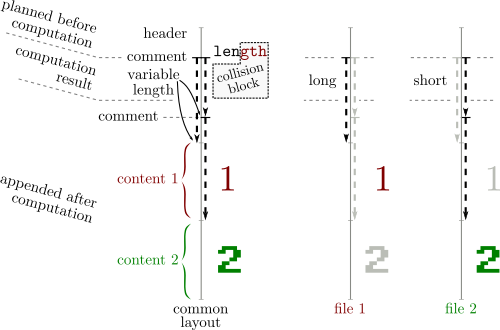
Most of the time, a difference in the collision blocks is used to modify the length of a comment chunk,
which is typically declared just before the data of this chunk:
in the gap between the smaller and the longer of this chunk,
another comment chunk is declared to jump over one file's content A.
After this file content A, just append another file content B.

Since file formats usually define a terminator that will make parsers stop after it,A will terminate parsing, which will make the appended content B ignored.
So typically at least two comments are needed - often three:
1. alignment
2. hide collision blocks
3. hide one file content (for re-usable collisions)
These common properties of file formats make it possible - they are not typically seen as weaknesses, but they can be detected or normalized out:
can be a by using two comments finishing at the same offsets.
However they can be all correct since the collision blocks declare chunks of different lengths -
so even if the chunk's data starts differently,
the chunk lengths are different
which prevents these constructs: you'd need to abuse a length, but also the length of the parent.
Identical prefix
1. Define an arbitrary prefix - its content and length don't matter.
2. The prefix is padded to the next 64-byte block.
3. Collision block(s) are computed depending on the prefix and appended.
Both sides are very random. The differences are predetermined by the attack.
4. After this[these] block[s], the hash value is the same despite the file differences.
5. Any arbitrary identical suffix can be added.
| Prefix | = | Prefix |
| :----: |:-:| :----: |
| Collision *A* | ≠ | Collision *B* |
| Suffix | = | Suffix |
Both files are almost identical (their content have only a few bits of differences)
Exploitation:
Bundle two contents, then either:
Two files with this structure:
| Prefix | = | Prefix |
| :----: |:-:| :----: |
| Collision *A* | ≠ | Collision *B* |
| A | = | ~~A~~ |
| ~~B~~ | = | B |
will show either A or B.
<img alt='identical prefix collisions' src=pics/identical.png width=350/>
FastColl (MD5)
Final in 2009.
FastColl difference mask:
The differences aren't near the start/end of the blocks, so it's very hard to exploit since you don't control any nearby byte.
A potential solution is to brute-force the surrounding bytes - cf PoCGTFO 14:10.
Examples:
With an empty prefix:
Other examples, with an identical prefix: 1 ⟷ 2
: there is a single-block MD5 collision but it takes fi of computation.
Here is a recording of a FastColl computation without any prefix
and another one with a prefix.
UniColl (MD5)
Documented in 2012, implemented in 2017
UniColl lets you control a few bytes in the collision blocks,
before and after the first difference, which makes it an identical-prefix collision with some controllable differences, almost like a chosen-prefix collision.
This is very handy, and e the difference can be very predictable:
in the case of m2+= 2^8 (a.k.a. N=1 / m2 9 in HashClash poc_no.sh script),
the difference is +1 on the 9th byte, which makes it very exploitable,
as you can e about the collision in your head:
the 9th character of that sentence will be replaced with the next one: 0 replaced by 1, a replaced by b..
Examples with N=1 and 20 bytes of set text in the collision blocks:
UniColl has less control than a true chosen-prefix collision,
but it's much faster especially since it takes only two blocks.
Here is a recording of a UniColl computation.
Shattered (SHA1)
Documented in 2013, computed in 2017.
PNG stores its length before the chunk type, so it won't work.
However it will work with JP2 files when they use the JFIF form (the same as JPG),
and likely MP4 and other atom/box formats if you use long lengths on 64bits
(in this case, they're placed *after* the atom type).
The difference between collision blocks of each side is this Xor mask:
<img alt='Shattered PoCs side by side' src=pics/shattered.png width=1000 />
Examples: PoC||GTFO 0x18 is using the computed SHA1 prefixes,
re-using the image directly from PDFLaTeX 源码 (see article 18:10),
but also checking the value of the prefixes in the HTML page (the file is polyglot, ZIP HTML and PDF).
Chosen-prefix collisions
They allow to collide any content.
| 𝓐 | ≠ | 𝔅 |
| :----: |:-:| :----: |
| Collision *A* | ≠ | Collision *B* |
1. take two arbitrary prefixes
2. pad the shortest to be as long as the longest. both are padded to the next block - minus 12 bytes
- these 12 bytes of random data will be added on both sides to randomize the birthday search
3. X near-collision blocks will be computed and appended.
The fewer blocks, the longer the computation.
Ex: 400 kHours for one block. 72 hours.cores for nine blocks with HashClash.
<img alt='chosen-prefix collisions' src=pics/chosen.png width=400/>
Chosen-prefix collisions are almighty, but they can take a long time just for a pair of files.
HashClash (MD5)
Final in 2009.
Examples: let's collide yes and no. It took three hours on 24 cores.
Here is a log of the whole operation.
Shambles (SHA-1)
Shambles is a very expensi collision that uses 9 blocks.
Each block has the same xor pattern as Shattered:
But even if Shattered is much easier to exploit than FastColl,
the constraints of the differences in the collision blocks are irrelevant
since Shambles is a Chosen Prefix Collision.
Attacks summary
Hash | Name | Date | Duration | Prefix type | Control near diff
---- | --------- | ---- | -------- | ----------- | -----------------
MD5 | FastColl | 2009 | 2s | Identical | none
| UniColl | 2012 | 7-40min | Identical | 4-10 bytes
| HashClash | 2009 | 72h | Chosen | n/a
| | | | |
SHA1 | Shattered | 2013 | 6500yr | Identical | prefix & suffix
| Shambles | 2020 | ? | Chosen | n/a
Exploitations
Identical prefix collisions is usually seen as (very) limited, but chosen-prefix is time consuming.
Another approach is to craft re-usable prefixes identical-prefix attack such as UniColl - or chosen-prefix to o some limitations - but re-use that prefix pair in combinations with two payloads like a classic identical prefix attack.
Once the prefix pair has been computed, it makes colliding two contents instant:
it's just a matter of massaging file data (according to specific file formats) so that it fits the file formats specifications and the precomputed prefix requirements.
Standard strategy
Classic collisions of two valid files with the same file type.
JPG
<img alt='a JPG file' src= width=500/>
Theoretical limitations and workarounds:
In practice, this is not necessary, so our collision can be generic: the only limitation is the size of the smallest image.
<img alt='comments over each image segments' src=pics/jpgcom1.png width=500/>
*comments over each image segments*
<img alt='how comments trampoline work' src=pics/jpgcom2.png width=500/>
*how comments trampoline work*
the actual compressed data is stored in the *Entropy Coded Segment* which doesn't respect its limitations:
its size is unknown in advance and grows beyond that limit.
It grows with the size of the image, making most of the file size in a baseline (non progressi.
To make the whole image fit into 64kb chunks, the easy way is to first try to save the image as progressi any software can do, and splits the ECS in typically up to six scans). The more ad way is to use *JPEGTran* with its 'wizard'
--scans command line parameter and define custom scans.There's no other restriction besides the scans segments,
so an MD5 collision of two arbitrary JPGs is *instant*, and needs no chosen-prefix collision, just UniColl.
With the script:
Examples:
<img alt='identical prefix collisions' src=examples/collision1.jpg height=200/> ⟷ <img alt='identical prefix collisions' src=examples/collision2.jpg height=200/>
#### custom scans
*2 MD5-colliding JPGs*
Here's an example of *JPEGTran* scans definition
to turn a 1944x2508 RGB image into a 100% JPG with 20 scans in which they all fit in 64kb.
Result:
<img alt='a 1944x2508 RGB image as a 100% JPG with 20 scans' src=examples/20scans.jpg width=300/>
*a 1944x2508 RGB image as a 100% JPG with 20 scans*
PNG
<img alt='a PNG file' src= width=500/>
Theoretical limitations and workarounds:
IHDR chunk,which should in theory be right after the signature (ie, before any potential comment),
so it would mean that we can only precompute collisions of images with the same meta data.
However, that chunk can actually be after a comment block (in the vast majority of readers, except Apple ones), so we can put the collision data before the header,
which enables to collide any pair of PNG with a single precomputation.
Since a PNG chunk has a length on four bytes, there's no need to modify the structure of either file: we can jump over a whole image in one go.
We can insert as many discarded chunks as we want, so we can add one for alignment, then one which length will be altered by a UniColl. so the length will be 00 75 and 01 75.
So an MD5 collision of two arbitrary PNG images is *instant*, with no prerequisite (no computation, just some minor file changes), and needs no chosen-prefix collision, just UniColl.
With the script:
Examples:
<img alt='identical prefix collisions' src=examples/collision1.png width=40% /> ⟷
<img alt='identical prefix collisions' src=examples/collision2.png width=40% />
*2 MD5-colliding PNGs with different properties*
Here is a recording of the whole operation.
!a recording of a uni (abusive) PNG collision
#### incompatibility
Most readers accept flawlessly PNG files that start with a chunk that is not IHDR.
However, some (such as Safari and Preview - any other?) don't tolerate it.
In this case, the image header and its properties (dimensions, color space) must be first, before any collision blocks.
In this case, both colliding files must have the same properties.
Again, UniColl is enough, and of course the computed prefix pair can be reused for any other pair of files with the same properties
Here is a script to collide any pair of such files that launches UniColl if needed to compute the prefix pair.
Examples:
<img alt='identical prefix collisions' src=examples/0a959025-1.png width=350/> ⟷
<img alt='identical prefix collisions' src=examples/0a959025-2.png width=350/>
<img alt='identical prefix collisions' src=examples/aac2423a-1.png width=350/> ⟷
<img alt='identical prefix collisions' src=examples/aac2423a-2.png width=350/>
*2 pairs of MD5-colliding PNGs with identical properties for maximum compatibility*
Here is a recording of the whole operation when UniColl is invoked,
!a recording of PNG UniColl collision
and another one when the prefix has been already computed.
!a recording of precomputed PNG collision
GIF
<img alt='a GIF file' src= width=500/>
GIF is tricky:
- if the file has a global palette, it is also stored before a comment is possible too.
However, the comment chunks follow a peculiar structure: it's a chain of <length:1> <data:length> until a null length is defined.
So it makes any non-null byte a valid 'jump forward'. Which makes it suitable to be used with FastColl,
as shown in PoC||GTFO 14:11.
So at least, even if we can't have a generic prefix, we can collide any pair of GIF of same metadata (dimensions, palette) and we only need a second of FastColl to compute its prefix.
Now the problem is that we can't jump over a whole image like PNG or over a big structure like JPG.
A possible workaround is to massage the compressed data or to chunk the image in tiny areas like in the case of the GIF hashquine,
but this is not optimal.
Another idea that works generically is that the image data is also stored using this length data sequence structure:
so if we take two GIFs with no animation, we only have to:
and end the same way: until a null length is encountered. Then the parser will meet the next frame, and display it.
With a minor setup (only a few hundred bytes of o), we can sled over any GIF image and work around the 256 bytes limitation.
This idea was suggested by Marc, and it's brilliant!
So in the end, the current GIF limitations for *instant* MD5 collisions are:
gifsicle --use-colormap webAn easy shortcut to normalize still GIF images is to make them animation frames of the same image,
then we can use a script to re-use or compute FastColl blocks to make a file pair that shows each of them.
Examples:
<img alt='identical prefix collisions' src=examples/collision1.gif width=350/> ⟷
<img alt='identical prefix collisions' src=examples/collision2.gif width=350/>
*2 MD5-colliding GIFs - pics by KidMoGraph*
Here is a recording of the whole operation.
!a recording of a GIF FastColl collision
GZIP
<img alt='a GZIP file' src= width=500/>
GZIP specs v4.3: RFC 1952 (1996).
1F 8B. If not matching the signature, the parsing will stop, which can be used to forcibly stop parsing between two payloads, but will trigger some warnings that might cause problems. Another strategy is to add one extra empty member at the end of the file, and make parsing of both payloads finish there - on the member or on its body.filename and file comment are null-terminated whereas the Extra field is size16-defined, therefore abusable. It's made of one or more subfield(s), with an ID and its own sublength, but subfields are not enforced - very few are officially defined.Therefore an empty gzip member with an extra field is a perfect parasite host.
If the top file is too big to fit in an extra field, then its uncompressed stream can be split in smaller files until they all fit in extra fields.
After the header of a member come its compressed body, its CRC32 and its uncompressed size (not enforced). Therefore an empty data body with its null CRC32 and size make a generic postwrap, which can even be shared by different member headers.
implementations rely on the uncompressed size of the last member instead of the sum of all members. So our collided files will show that they are null-sized, because these files finish with an empty member used as trampoline.
Here is a script to generate instant MD5 collisions of two GZip files. It's taking most of its time to decompress and recompress data if the input files are big - the collisions prefix are pre-computed. Splitting members without decompressing is not possible as the uncompressed CRC32 needs to be calculated.
A .tar.gz is just the gzip archive of a tar archive. It will work fine with gzipped tar, unlike tar itself.
Examples: collision1.tar.gz (Pacome) ⟷ collision2.tar.gz (Reg)
LZ4 / Zstandard
<img alt='an Zstandard file' src= width=500/>
<img alt='an LZ4 file' src= width=500/>
LZ4 and Zstandard are 2 different compression formats, with a similar o structure:
they're made of frames, each starting with a specific magic: 0xFD2FB528 for Zstandard frames, 0x184D2204 for Lz4 frames.
They also share the same 'skippable' TL, starting with 4 bytes *magics* in the range 0x184D2A50 - 0x184D2A5F, then the *Length* of the user data (4 bytes, little-endian), then the *User Data* itself.
These frames are entirely optional, of any length, and repeatable. The files can start with these frames. So these frames can be chained to make a perfect generic collision prefix, across 2 formats.
Here is a script to generate instant MD5 collisions of two Zstd/Lz4 files. Like Gzip, 2 different archives will be from the outside no matter the content: for example, a .cpio.zst.
Examples:
Portable Executable
<img alt='a PE file' src= width=600/>
The Portable Executable has a peculiar structure:
The DOS headers has no other role. DOS headers can be exchanged between executables.
beyond UniColl's reach: so only chosen-prefix collision is useful to collide PE files this way.
So the strategy is:
1. the PE header can be moved down to leave room for collision blocks after the DOS header.
2. The DOS header can be exploited ( collisions) to point to two different offsets, where two different PE headers will be moved.
3. The sections can be put next to each other, after the DOS/Collisions/Header1/Header2 structure. You just need to apply a delta to the offsets of the two section tables.
This means that it's possible to instantly collide any pair of PE executables. Even if they use different subsystems or architecture.
While executables collisions is usually trivial via any loader, this kind of exploitation here is transparent: the 代码 is identical and loaded at the same address.
Examples: tweakPNG.exe (GUI) ⟷ fastcoll.exe (CLI)
Here is a script to generate instant MD5 collisions of Windows Executables.
<img alt='collision of fastcoll.exe (CLI) and tweakPNG(界面)' src=pics/pe.png width=500/>
MP4 and others
This format's container is a sequence of Length Type Value chunks called Atoms.
The length is a 32 bit big-endian and covers itself, the type and the value, so the minimum normal length is 8
(the type is a 4 ASCII characters string).
If the length is null, then the atom takes the rest of the file - such as jp2c atoms in JP2 files.
If it's 1, then the Type is followed by a 64bit length, changing the atom to Type Length Value, making it compatible with other collisions like Shattered.
Some atoms contain other atoms: in this cases, they're called boxes. That's why this otherwise unnamed structure is called "atom/box".
This "atom/box" format used in MP4 is actually a derivate of Apple Quicktime,
and is used by many other formats (JP2, HEIF, F4V).
The first atom type is *usually* ftyp, which enables to differentiate the actual file format.
The format is quite permissive:
just chain free atoms, abuse one's length with UniColl, then jump over the first payload.
For MP4 files, the only thing to add is to adjust the stco (Sample Table - Chunk Offsets) or co64 (the 64 bit equi) tables, since they are absolute(!) offsets pointing to the mdat movie data - and they are actually enforced!
This gives a script that instantly collides any arbitrary video - and
as mentioned, it may work on other format than MP4.
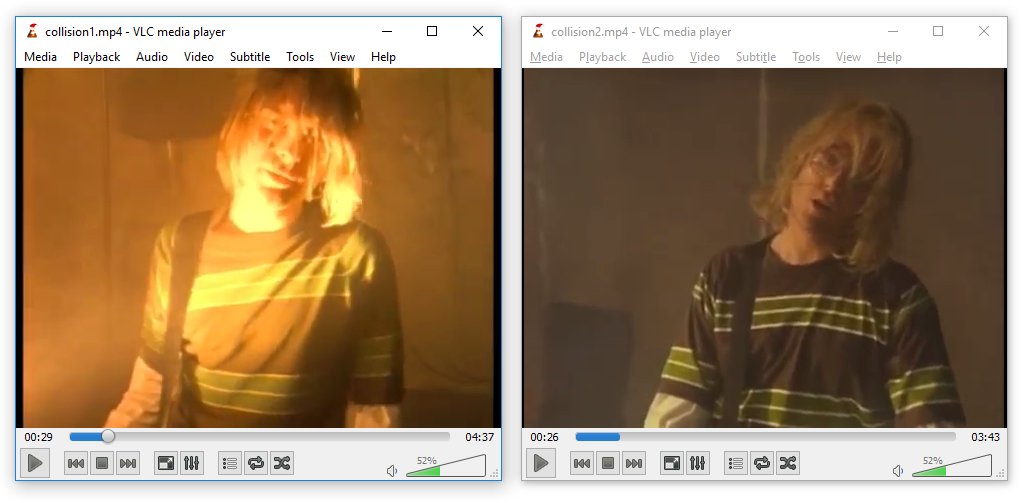
!Nirvana - Smells like Teen Spirit / Weird Al Yankovik - Smells like Nirvana
Examples ( by KidMoGraph):
<video width=300 controls> <源码 src="examples/collision1.mp4" type="video/mp4">🏭</video> ⟷ <video width=300 controls> <源码 src="examples/collision2.mp4" type="video/mp4">🛣️</video>
<video width=300 controls> <源码 src="examples/collisionl1.mp4" type="video/mp4">☀️</video> ⟷ <video width=300 controls> <源码 src="examples/collisionl2.mp4" type="video/mp4">🌙</video>
<video>!how it should look (but your markdown doesn't render video tags)</video>
Note that some (OS X, Safari, FireFox) don't allow a file that starts with an Atom that is not ftyp.
In this case, the prefix have to cover this, and it's not so generic, but besides it's the same strategy - only limited to a single file type.
#### JPEG2000
JPEG2000 files usually start with the Atom/Box structure like MP4,
then the last atom jp2c is typically until the end of the file (null length),
then from this point on it follows the JFIF structure, like JPEG (starting with FF 4F as a segment marker).
The pure-JFIF form is also tolerated, in which case collision is like JPEG:
Shattered-compatible, but with comments limited to 64Kb.
On the other hand, if you manipulate JPEG2000 files with the Atom/Box,
you don't have this limitation.
As mentioned before, if you're trying to collide this structure and
if there are more restriction - for example starting with a free atom is not tolerated by some format -
then you can compute another UniColl prefix pairs specific to this format:
JPEG2000 seems to enforce a 'jP ' atom first before the usual ftyp,
but besides, that's the only restriction: there's no need to relocate anything.
So the resulting script is e!
!Oded Goldreich / Neal Koblitz
Examples: collision1.jp2 ⟷ collision2.jp2
<img alt='a PDF file' src= width=300/>
about Shattered
Shattered exploitation was not a PDF trick, but a JPG trick in a PDF.
It only enabled a PDF to contain a JPG-compressed object that could have two different contents.
Both PDFs needed to be totally identical beside.
Note that the documents can be totally normal, and can just clip the collision JPG and display it in difference places, such as multi-page documents.
Examples: the Shattered paper, modified ⟷ the Shattered paper, original
<img alt='the Shattered paper using a colliding JPG in the authors' src=pics/shattereddoc1.png width=350/>
<img alt='the Shattered paper using a colliding JPG in a figure' src=pics/shattereddoc2.png width=350/>
*the Shattered paper using a colliding JPG in two places*
PDF collisions with MD5
With MD5 (and other collision patterns), we can do PDF collisions at document level,
with no restrictions at all on either file!
PDF has a very different structure from other file formats.
It uses object numbers and references to define a tree.
The whole document depends on the Root element.
<!--
digraph {
rankdir=LR;
root -> "catalog#1"
"catalog#1" -> "pages#2"
"pages#2" -> "page#3"
"page#3" -> "pages#2"
"page#3" -> "content#4"
"content#4" -> "Hello World!"
}
-->

This (valid) PDF
is equi to:
Tricks:
XREF table.So storing two document trees in the same file is OK.
We just need to make the root object refer to either root object of both documents.
So we just need to take two documents,
renumber objects and references so that there is no o,
craft a collision so that the element number referenced as Root object can be changed while keeping the same hash value,
which is a perfect fit for UniColl with N=1, and adjust the XREF table accordingly.
<!--
digraph {
rankdir=LR;
"trailer" -> "catalog#1" [color=green]
"catalog#1" -> "pages#2"
"pages#2" -> "page#3"
"page#3" -> "pages#2"
"page#3" -> "content#4"
"content#4" -> "Hello World!"
trailer -> "catalog#11" [<col>or=red, style=dashed]
"catalog#11" -> "pages#12"
"pages#12" -> "page#13"
"page#13" -> "pages#12"
"page#13" -> "content#14"
"content#14" -> "Bye World!";
}
-->

This way, we can safely collide any pair of PDFs, no matter the page numbers, dimensions, images...
comments
PDF can store foreign data in two ways:
\r and \n).This can be used inside a dictionary object, to modify for example an object reference, .
So this is a valid PDF object even if it contains binary collision blocks - just retry until you have no newline characters:
so it requires a chosen-prefix collision to modify the structure outside the containing stream object.
colliding text
The first case makes it possible to highlight the beauty of UniColl, a collision where differences are predictable,
so you can write poetry o data - thanks Jurph!
Rather than modifying the structure of the document and fool parsers,
we'll just use collision blocks directly to produce directly text,
with alternate reading!
Examples: poeMD5 A ⟷ poeMD5 B
<img alt='2 Poems colliding ' src=pics/poeMD5.png width=500/>
*A true cryptographic artistic creation :)*
(Note I screwed up with Adobe compatibility, but that's my fault, not UniColl's)
colliding document structure
Whether you use UniColl as inline comment or chosen-prefix in a dummy stream object, the strategy is similar:
shuffle objects numbers around, then make Root object point to different objects, so unlike Shattered, this means instant collision of any arbitrary pair of PDF, at document level.
A useful trick is that mutool clean output is reliably predictable,
so it can be used to normalize PDFs as input, and fix your merged PDF while keeping the important parts of the file unmodified.
MuTool doesn't discard bogus key/ - unless asked, and keep them in the same order,
so using fake dictionary entries such as /MD5_is /REALLY_dead_now__ is perfect to align things predictably without needing another kind of comments.
However it won't keep comments in dictionaries (so no inline-comment trick)
An easy way to do the object-shuffling operation without hassle is just to merge both PDF files
via mutool merge then split the /Pages object in two.
To make room for this object, just merge in front of the two documents a dummy PDF.
Optionally, create a fake reference to the dangling array
to prevent garbage collection from deleting the second set of pages.
Example:
with this script,
it takes less than a second to collide the two public PDF papers like Spectre and Meltdown:
Examples: spectre.pdf ⟷ meltdown.pdf
<img alt='identical prefix PDF collisions' src=pics/pdf.png width=600/>
Possible extension: chain UniColl blocks to also keep pairs of the non-critical objects
that can be referenced in the Root object - such as Outlines, Names, AcroForm and Additional Actions (AA) - in the original source files.
in PDFLaTeX
The previous techniques work with just a pair of PDF files,
but it's also possible to do it directly from TeX sources
PDFTeX operators.
You can define objects directly - including dummy key and for alignments - and define empty objects to reserve some object slots by including this at the very start of your TeX sources:
Don't forget to normalize PDFLaTeX output - with mutool for example - if needed:
PDFLaTeX is hard to get reproducible builds across distributions - you may even want to hook the time on execution to get the exact hash if required.
#### JPG in PDF
You could expect JPG to be only images, but in a PDF and some PDF readers (non browsers, such as Evince and Adobe Reader),
it can be used as page content just like any other embedded object, that is embedded in a JPEG image.
To store the JPEG data losslessly, store it as grayscale 100%, then either use a picture of single row/column,
or repeat the data line 8 times (since JPEG blocks are 8x8), and your data is stored losslessly and referenced by the PDF pages.
Examples of SHA-1 colliding two PDFs via JPEG page data (a grayscale picture rendering colors) as page content:
If ⟷ Shattered - the movie
<img alt='2 SHA-1 colliding PDFs with image data stored as JPG' src=pics/jpgpage.png width=700/>
*2 SHA-1 colliding PDFs with image data stored as JPG*
It's possible to reference the colliding JPG twice: as a page content, losslessly, which also refers to itself as a lossy image to be displayed.
Again, the image to be displayed is grayscale, but the page content can render some colors via PDF operators.
The top of the image shows the page content repeated 8 times.
Examples of SHA-1 colliding two PDFs via JPEG used as page data and picture to be displayed:
Skulls & Crossbones ⟷ Golden Axe
<img alt='2 SHA-1 collidings PDF with JPG used as image and page content' src=pics/dualjpg.png width=700/>
*2 SHA-1 colliding PDFs with JPG used as image and page content*
ZIP
TL;DR There's no generic re-usable collision for ZIP, but there is for ZIP-based format.
It should be possible to collide two files in 2h.core (36 times faster than chosen-prefix)
<img alt='a ZIP file' src= width=600/>
ZIP archives are a sandwich of 3 layers (at least).
First comes the files' content (sequence of Local File Header structures, one per archived file or directory),
then some index (again, a sequence of Central Directory),
then a single structure that points to this index (End Of Central Directory).
The order of these layers can't be mo.
Some parser only need the file content's structure, but that's not a correct way to parse and it can be abused.
Because of this required order, there's no generic prefix that could help for any collision.
non generic approach
Another approach could be to just merge both archives, with their merged layers, and using UniColl - but with N=2, which introduces a difference on the 4th byte - to kill the magic signature of the End of Central Directory.
This means one could collide two arbitrary ZIP with a single UniColl and 24 bytes of set prefix.
A typical End of Central Directory, which is 22 bytes if the comment is empty:
If we use this as prefix (pad the prefix to 16 bits) for UniColl and N=2, the difference is on the 4th byte, killing the magic .P .K 05 06 by changing it predictably to .P .K 05 86
This is not generic at all, but much faster than chosen-prefix collision:
A problem is that some parsers still parse ZIP files upside-down even if they should be parsed bottom-up:
a way to make sure that both files are properly parsed is to chain two UniColl blocks,
to enable/disable each End of Central Directory.
To prevent ZIP parsers from complaining about unused space,
one can abuse Extra Fields,
file comments in Central Directory and archi in End of Central Directory.
!diagram of ZIP collision
Example: here is an assembly 源码 that describes the structure of a dual ZIP,
that can host two different archi.
After two Unicoll computations, it gives the two colliding files:
collision1.zip ⟷ collision2.zip
#### Zip-based formats
Even if the Zip format itself can't be generically exploited like Gzip, some formats relying on Zip *can* be generically exploited inside Zip archives with a pre-defined structure. Some precautions have to be taken to make the Zip collision generic.
Some formats are multi-files stored in a Zip archive, and rely on a root file with a fixed filename that points to other files in the archive. Many of them are using XML or text for the root file, and storing other files as-is.
Idea
: make 2 files sets coexist in the same archive, and point to either set of files. A generic root can be stored first in the beginning of the file, but the collision blocks are stored outside of the file content, in the archi collisions have a very high entropy, it's impossible to exploit XML or ASCII-only files with collisions).
Steps:
1. Put 2 sets of files from 2 origins in the same archive - i.e. in different subdirectories.
1. Modify the root file to alternatively point to each set.
1. Since the timestamp, length and CRC of the root file are stored in both the Local File Header - before the file's contents - and in the Central Directory - after the file contents - these shouldn't change between the two of the files.
- If the length , all the pointers afterwards will vary, so an identical suffix wouldn't be possible.
- If the CRC32 is incorrect in the Central Directory, this copy of the value might be ignored by the parser, but forging a CRC32 to a constant value is helpful to avoid entirely the problem.
Forging the CRC by appending 4 random bytes will likely not be enough, as these root files are typically in XML or text with strict syntaxes, so they would become invalid.
CrcHack greatly helps with forging CRCs with arbitrary bits and no bruteforcing, making sure that the output file is ASCII, and that the modified bits are still in a comment.
4. Using the extra field of an extra dummy file -- e -- in the archi the root file is an elegant way to store Hashclash collision blocks: that way, the Zip archi a standard structure and can be easily manipulated afterwards, even with standard tools.
Extra Fields have no CRC32, and their 16 bits length is declared in the headers before. They ha own internal ID:2 Size:2 Data format but it's usually ignored, and are in both the Local File Header and in the Central Directory, but it can be absent from the Central Directory to keep the suffix identical after the collision blocks.
The presence of the extra file that covers the collision blocks in its extra field may have to be declared in the format structure, such as in the [Content_Types].xml file in an OOXML document. Other XML files in the suffix may have to be modified, as some formats required the use of absolute paths.
Here's the o structure of the generic exploit for a specific zip-based format:
So by predefining the root file contents and forging ASCII CRC32s, one can compute a generic re-usable Hashclash collision for a specific zip-based format.
Requirements summary
- contents are arbitrary XML
- padding is possible, even via XML comment, to reach the same length.
- CRC can be set () on each content.
Examples
#### CRC32
A minimal XML comment (ASCII-only) with a forged CRC32 (instant computation) with CrcHack.
Another example where you adjust the CRC with the case of an alphabetical message.
#### Collisions
zInsider is a script to instantly generate MD5 collisions of pairs of arbitrary documents using these ZIP+XML formats:
- 3D manufacturing format: 3mf
- XML Paper Specification: xps / oxps
To generate your own collision prefixes, here is a script to generate a root zip pair.
After computing collisions, use this other script to combine these roots pair with a common suffix.
A few collision PoCs:
Some formats with multiple files based on Zip can't be generically exploited:
META-INF/manifest.xml file has to mention every other file, so it can't be generic.META-INF/MANIFEST.mf file also has to mention every other file, with its hashes.Thanks to Philippe Lagadec for his help on Office file formats!
Others
Uncommon strategies
Collisions are usually about two valid files of the same type.
MultiColls: multiple collisions chain
Nothing prevents to chain several collision blocks,
and have more than two contents with the same hash value.
An example of that are *hashquines* - that shows their own MD5 value.
The PoCGTFO 14 file contains 609 FastColl collisions,
to do that through two file types in the same file.
#### Hashquines
Hashquines are files showing their own hash value. They are covered here.
A different strategy would be to kill the file type to bypass scanning as a corrupted file.
Just o the magic signature will be enough.
Appending both files (as valid or invalid) with a format
that doesn't need to be at offset 0 (archive, like ZIP/RAR/...) would reveal another file type.
This enables polyglot collisions without using a chosen-prefix collision:
1. use UniColl to enable or disable a magic signature, for example a PNG:
2. append a ZIP archive
While technically both files are a valid ZIP, since most parser return the first file type found and they start scanning at offset 0, they will see a different file type.
Examples:
<img alt='valid image' src=examples/png-valid.png width=300/> ⟷ invalid
PolyColls: collisions of different file types
It's also possible to have both side of a collision with different types to lower suspicion:
Attack scenario:
1. send holiday.jpg
2. get it whitelisted
3. send evil.exe, which has the same MD5.
In these cases, a chosen-prefix collision is required
if both file formats need to start at offset 0.
Some examples of polycoll layouts:
!pdf-jpg polyglot collision
*PDF/JPG polycoll*
!pe-png polyglot collision
*PE/PNG polycoll*
#### PE - JPG
Since a PE header is usually smaller than 0x500 bytes, it's a perfect fit for a JPG comment:
1. start with DOS/JPG headers
2. JPEG-comment jumps over PE Header
3. Put the full JPG image
4. Put the whole PE specifications
Once again, the collision is instant
Examples: fastcoll.exe ⟷ Marc.jpg
#### PDF - PE
Merging a PDF with a dummy file with mutool is a good generic way to reorder objects
and then get the first two objects discardable (dummy page and content),
which is a perfect fit for a hosting stream object of unknown length as 1 0,
and its length referenced further (after collision blocks) in the second object.
The only problem is that mutool will always inline the length - and remove the length reference,
so it has to be re-inserted in the PDF instead of the value,
but most reference 2 0 R will be smaller than hardcoded lengths.
Thankfully this can be fixed without altering any object offset,
so no need to patch the XREF.
Here's a script to, for example, instantly collide a PDF (Sumatra is lightweight and standalone) and a PDF document:
Examples: Poster.pdf ⟷ Sumatra.exe
!a PDF showing a PDF (itself showing a PDF) with the same MD5
*a PDF showing a PDF (itself showing a PDF) with the same MD5*
#### PDF - PNG
Similarly, it's possible to collide for example arbitrary PDF and PNG files with no restriction on either side. This is instant, re-usable and generic.
Examples: Hello.pdf ⟷ 1x1.png
PileUps (multi-collision)
Cryptographic collisions are not limited to two files!
As demonstrated in the Nostradamus experiment in 2008,
chaining collisions makes it possible to collide more than two files.
The first collisions can be identical or chosen-prefix, the next ones have to be chosen-prefix.
You can call them multi-collisions, I prefer *pileups* - it's shorter :)
#### PE - PNG - MP4 - PDF
Combining all pre acquired knowledge,
I used 3 chosen-prefix collisions to craft 4 different prefixes for different file types:
document (PDF), video (MP4), executable (PE) and image (PNG).
!diagram of a PE/PNG/MP4/PDF pileup
*diagram of a PE/PNG/MP4/PDF pileup*
This script is generic and instant:
!diagram of a PE/PNG/MP4/PDF pileup
Examples: commodore.pdf ⟷ diagram.png ⟷ kidmo.mp4 ⟷ sumatra18.exe
Since you may only distribute a single file
and it's impossible to guess the other prefix from it,
a solution is to embed all prefixes of the collision in Ja 代码
and insert it in your PoCs,
turning your files into HTML polyglots to easily share the related colliding files.
<img alt='HTML payload to generate extra colliding files' src=pics/polyglot.png width=600/>
The issue 19 of 'PoC or GTFO' is such a pileup and polyglot,
combining a 80-page document generated with PDFLaTeX, a PDF for Windows,
a PNG diagram and a short 'collision' MP4 video by KidMoGraph
with an HTML payload to generate the other files from the PDF release
(and a ZIP archive too):
<img alt='Diagram of the issue 19 of PoC or GTFO, a polyglot and pileup.' src=pics/pocorgtfo19.png width=700/>
Thanks to Rafał Hirsz for his permanent help on Ja.
Use cases
Better discard MD5 altogether, because file introspection is just too time-consuming and too risky!
Gotta collide 'em all!
Another use of instant, re-usable and generic collisions would be to hide any file of a given type - say PNG - behind dummy files (or the same file every time) - which is actually just by concatenating it to the same prefix after stripping the signature - you could even do that at library level!
From a strict parsing perspective,
all your files will show the same content,
and the e would be re as a file with the same MD5 as pre collected.
Let's take two files:
<img alt='MS 08-067' src=pics/trinity.png width=300/> ⟷
<img alt='MS 08-067' src=pics/ja.png width=300/>
and collide them with the same PNG.
They now show the same dummy image, and they're absolutely identical until the 2nd image at file level!
<img alt='MS 08-067' src=examples/gcea1.png width=200/> ⟷
<img alt='MS 08-067' src=examples/gcea2.png width=200/>
Their e is hidden behind a file with the same MD5 respectively.
Incriminating files
Another use case for collisions is to hide something incriminating inside something innocent,
but desirable: if the only thing to collect e is comparing weak hashes,
then you can't deny that you don't have the other file (showing incriminating content but hiding innocent content).
Softwares typically focus on (quick) parsing, not on detailed file analysis.
<img alt='different previews under different tabs of EnCase Forensic' src=pics/encase.png width=400/>
*an image showing different previews under different tabs of EnCase Forensic*
Failures
Not all formats can ha prefixes that can be re-used:
if some kind of data holder can't be inserted between the magic signature
and the standard headers that are critical and specific to each file,
then generic collisions are not possible.
Of course, one might still turn the old files into a new one,
and even use 代码 to branch out to two different payloads,
but it's more like porting payloads than colliding file structure.
ELF
<img alt='an ELF file' src= width=600/>
The ELF header is required at offset 0 and contains critical information such as 32b/64b,
endianness and ABI right from the beginning,
so it's impossible to have a uni prefix then collision blocks
before critical parameters that are specific to the original file.
Mach-O
<img alt='a Mach-O file' src= width=600/>
Mach-O don't e with the same magic for 32b (feedface) and 64b (feedfacf).
Soon after, there is the number and size of commands (such as segment definition, symtab, ,...).
Like ELF, re-usable collisions are not possible.
Ja
<img alt='a Ja file' src= width=600/>
Right from the start magic are located the (which can be troublesome)
but the constant pool count which is quite specific to each file,
so no uni collisions for all files.
However, many files still have a common and we can pad the shortest constant pool to the longest count.
First, insert a *UTF8 literal* to align information,
then declare another one with its length abused by a UniColl (the length is stored on 16 bytes as big endian).
However this will require 代码 manipulation since all pool indexes will be shifted.
Instant MD5 re-usable collisions of Ja should be possible, but require 代码 analysis and modification.
TAR
TL;DR No re-usable collision for TAR files, no other strategy than chosen-prefix.
<img alt='a TAR file' src= width=600/>
Tape Archives are a sequence of concatenated header and file contents, all aligned to 512 bytes.
There's no central structure to the whole file. So no global header or comment of any kind to abuse.
A trick would be to start a dummy file of length, but the length is always at the same offset, which is not compatible with UniColl, which means only chosen-prefix collisions is useful here.
Exploitations summary
Format | Generic? | FastColl | UniColl | Shattered | HashClash / Shambles
-------- | -------- | :------: | :-----: | --------- | :-------:
PDF | Y | | x | | x
JPG | Y (1) | | x | x (2) | x
GZ | Y | | x | | x
PNG | Y/N (3) | | x | | x
MP4 | Y (4) | | x | x (5) | x
PE | Y | | | | x
ZIP-based (6) | Y | | | | x
| | | | |
GIF | N | x | | | x
ZIP | N | | x (7) | | x
| | | | |
ELF | N | | | | x
TAR | N | | | | x
Mach-O | N | | | | x
Class | N | | | | x
1. JPG has some limitations on data that can be improved to some extend by manipulating scans encoding.
2. PDF w/ JPG is the initial implementation of the Shattered attack, but it's just a pure JPG trick in a PDF document.
3. PNG: Safari/Preview requires PNG to ha IHDR chunk in first 老虎机, before any collision block. Doing so prevents a generic prefix, in which case the collision is limited to specific dimensions, color space, BPP and interlacing.
4. Atom/Box formats like MP4 may work with the same prefix for different subformats. Some subformats like JPEG2000 or HEIF require extra grooming, but the exploit strategy is the same - it's just that the collision is not possible between sub-formats, only with a pair of prefix for a specific sub-format.
5. Atom/Box is Shattered-compatible when using 64bit lengths.
6. Some Zip-based formats can be generically exploited.
7. For better compatibility, ZIP needs two UniColl for a complete archive, and this collisions depend on both files contents.
Test files
Here are free (copyright-free, PII-free) test colliding pairs.
Detection
There are different ways to detect hash collisions in files.
1. Two files: if you have two or more files with different contents and the same hash, just diff them!
However, if you only have a single file, it can be difficult to tell if the file contains a hash collision.
2. File structure: analyse the file at block boundaries, and if you notice high entropy blocks and maybe identical prefix/suffix, you might be able to tell which collision it's using, but it's very error-prone. In the case of a chosen-prefix collision, it's might be impossible to spot as both files might be mostly different besides most of the collision blocks.
3. Hash computation: use an implementation (in C or Go) of Marc Stevens' DetectColl (cf his Counter-cryptanalysis paper). It only requires one file but it requires the collision to be in a working state (the exact prefix and its corresponding collision blocks) and it's slow.
DetectColl gi information about the collision itself, and shows *coll* next to the collided hash.
Example
With the Flame malware certificate:
Safe hashes
Since Detectcoll can identify blocks used for a hash collision, it can mitigate the collision via *safe hashes*: if a collision block is detected, it reprocesses it again to break the collision property. So DetectColl is able to tell different contents apart via the same hash function despite the collisions in the file.
In short:
Example with Wang's original collision from 2005:
Safe MD5 on these files:
Signatures
For simplicity, you can parse Detectcoll output with this script and have it match with known signatures more easily:
Multiple collisions
A minor drawback of safe hashes is that they prevent the detection of multiple collisions in the same file, but DetectColl can still detect collisions with 'standard' hashes.
Examples with PoCorGTFO 0x14 (a NES+PDF hashquine with an alternate co).
Safe hashes can only find one collision:
Unsafe hashes finds all of them:
If you check the last few collisions:
You can notice that the last one is not so close from the previous ones:
that's because the previous ones belong to the same image file for the hashquines,
while the last one is for the alternate cover.
References
Papers (about file formats exploitation):
- MD5 To Be Considered Harmful Someday - Dan Kaminsky
- Practical Attacks on Digital Signatures Using MD5 Message Digest - Ondredj Mikle
- A Note on Practical Value of Single Hash Collisions for Special File Formats - Max Gebhardt, Georg Illies, Werner Schindler
- Malicious Hashing: Eve’s of SHA-1 - Ange Albertini, Jean-Philippe Aumasson, Maria Eichlseder, Florian Mendel, Martin Schläffer
- The first collision for full SHA-1 - Marc Stevens, Elie Bursztein, Pierre Karpman, Ange Albertini, Yarik Markov
- Postscript that shows its own MD5 by Gregor "Greg" Kopf
- A PDF That Shows Its Own MD5 by Mako
- This GIF shows its own MD5! by Kristoffer "spq" Janke
- This PDF is an NES ROM that prints its own MD5 hash! by E, E
- Easy SHA-1 Colliding PDFs with PDFLaTeX. by Ange Albertini
- SHA-1 is a Shambles by Gaëtan Leurent, Thomas Peyrin
Presentations:
- slides
<img alt='Black Alps 2017 slides' src=pics/blackalps17.png width=350/>
- video
![Exploiting hash collisions Youtube video]()
- slides
<img alt='KILL MD5 slides' src=pics/KILLMD5.png width=350/>
- video
![Kill MD5 video]()
Workshop (CollTris):
- slides
<img width=350 src=pics/CollTris.png />
- video
<img width=350 src=pics/recording.jpg />
- materials
- sessions
- 2019/07/02 150p, Pass The Salt
- 2019/07/24 199p, Google
- 2019/08/19 208p, Google
- 2019/10/23 222p, Hack.lu
- 2019/11/07 225p, Black Alps
- 2019/12/03 229p, Google
CTF tasks:
<!-- - Not my digest from *Hack.lu CTF 2017*: not related to collisions, but solved by Marc himself :p -->
A common challenge for such CTF tasks is to not give a too big ad or handicap based on the amount of computing power each player has access to.
Credits
All this was possible thanks to Marc Stevens,
not only for his cryptographic contributions, but also for his permanent help and suggestions!
Thanks also to Philippe Teuwen for his extensi for file formats in general.
Conclusion
Kill MD5!
Unless you actively check for malformations or collisions blocks in files, don't use MD5!
It's not a cryptographic hash, it's a toy function!
<!-- pandoc -s -f gfm -t html README.md -o README.html -->
项目信息
开发语言:Python
Star 数:3404
技术要点
该项目属于黑客技术方向的开源资源,代码结构清晰,适合安全研究人员学习参考。项目围绕Hash collisions and exploitations展开,提供了可运行的实现,对理解相关安全机制、工具原理与攻防技术具有较高的研究价值。
从技术实现角度看,此类项目的核心在于对底层原理的深入理解与工程化落地。开发者在研究过程中可以结合官方文档与社区讨论,梳理项目的初始化流程、核心模块职责与数据流转,逐步掌握其中的技术细节与设计思路。
使用与学习建议
1. 下载源码压缩包,解压到本地环境。
2. 根据项目类型准备对应的运行环境与依赖。
3. 按照 README 中的步骤完成配置与部署。
4. 在隔离的测试环境中运行验证,避免影响生产系统。
免责声明
本资源来源于开源社区,仅供安全研究、技术学习与合法授权范围内的攻防演练使用,请勿用于任何非法或侵害他人权益的用途。使用本项目产生的一切后果由使用者自行承担。
| 资源标题 | collisions - Hash collisions and exploitations |
| 所属分类 | 黑客技术 |
| 发布作者 | admin |
| 发布时间 | 2026-10-05 22:09:44 |
| 下载权限 | 免费下载 |
| 附件数量 | 2 个下载链接 |
| 浏览次数 | 231 |
| 讨论数量 | 0 |
| 主题状态 | 正常讨论中 |