 黑客技术
点击放大
CMSeeK - CMS Detection and Exploitation suite - Scan WordPr

项目说明
<p align='center'>
<img src=" alt="Logo"> <br>
<a href=" src=" alt=""></a>
<a href=" src=" alt="Python "></a>
<a href=" src=" alt="GitHub stars" /></a>
<a href=" src=" alt="GitHub license" /></a>
<a href=" src=" alt="Twitter" /></a>
</p>
What is a CMS?
> A content management system (CMS) manages the creation and modification of digital content. It typically supports multiple users in a collaborati. Some noteable examples are: *WordPress, Joomla, Drupal etc*.
Release History
Changelog File
Functions Of CMSeek:
- Detects
- User Enumeration
- Plugins Enumeration
- Theme Enumeration
- Detects Users (3 Detection Methods)
- Looks for and much more!
- detection
- Backup files finder
- Admin page finder
- Core detection
- Directory listing check
- Config leak detection
- other checks
- Use pre made bruteforce modules or create your own and integrate with it
Requirements and Compatibility:
CMSeeK is built using python3, you will need python3 to run this 工具 and is compitable with unix based systems as of now. Windows support will be added later. CMSeeK relies on git for auto-update so make sure git is installed.
Installation and Usage:
It is fairly easy to use CMSeeK, just make sure you ha and git (just for cloning the repo) installed and use the following commands:
For guided scanning:
Else:
Help menu from the program:
Checking For Update:
You can check for update either from the main menu or use python3 cmseek.py --update to check for update and apply auto update.
P.S: Please make sure you have git installed, CMSeeK uses git to apply auto update.
Detection Methods:
CMSeek detects CMS via the following:
Supported CMSs:
CMSeeK currently can detect 170+ CMS. Check the list here: cmss.py file which is present in the cmseekdb directory.
All the cmss are stored in the following way:
Scan Result:
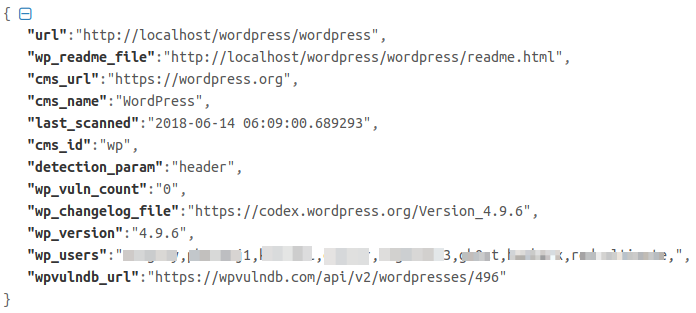
All of your scan results are stored in a json file named cms.json, you can find the logs inside the Result\<Target Site> directory, and as of the bruteforce results they're stored in a txt file under the site's result directory as well.
Here is an example of the json report log:
!Json Log
Bruteforce Modules:
CMSeek has a modular bruteforce system meaning you can add your custom made bruteforce modules to work with cmseek. A proper documentation for creating modules will be created shortly but in case you already figured out how to (pretty easy once you analyze the pre-made modules) all you need to do is this:
1. Add a comment exactly like this # <Name Of The CMS> Bruteforce module. This will help CMSeeK to know the name of the CMS using regex
2. Add another comment ### cmseekbruteforcemodule, this will help CMSeeK to know it is a module
3. Copy and paste the module in the brutecms directory under CMSeeK's directory
4. Open CMSeeK and Rebuild Cache using R as the input in the first menu.
5. If e is done right you'll see something like this (refer to screenshot below) and your module will be listed in bruteforce menu the next time you open CMSeeK.
<p align='center'>
<img alt="Cache Rebuild Screenshot" width="600px" src=" />
</p>
Need More Reasons To Use CMSeeK?
If not anything you can always enjoy exiting CMSeeK *(please don't)*, it will bid you goodbye in a random goodbye message in languages.
Also you can try reading comments in the 代码 those are pretty random and weird!!!
Screenshots:
<p align="center">
<img alt="Main Menu" src=" />
<br><em>Main Menu</em><br>
<img alt="Scan Result" src=" />
<br><em>Scan Result</em><br>
<img alt="WordPress Scan Result" src=" />
<br><em>WordPress Scan Result</em><br>
</p>
Guidelines for opening an issue:
Please make sure you have the following info attached when opening a new issue:
Issues without these informations might not be answered!
Disclaimer:
Usage of CMSeeK for testing or exploiting websites without prior mutual consistency can be considered as an illegal activity. It is the final user's responsibility to obey all applicable local, state and federal laws. Authors assume no liability and are not responsible for any misuse or damage caused by this program.
License:
CMSeeK is licensed under GNU General Public License v3.0
Follow Me :
Twitter
项目信息
开发语言:Python
Star 数:2579
技术要点
该项目属于黑客技术方向的开源资源,代码结构清晰,适合安全研究人员学习参考。项目围绕CMS Detection and Exploitation suite - Scan WordPress, Joomla, Drupal and over 180 other CMSs展开,提供了可运行的实现,对理解相关安全机制、工具原理与攻防技术具有较高的研究价值。
从技术实现角度看,此类项目的核心在于对底层原理的深入理解与工程化落地。开发者在研究过程中可以结合官方文档与社区讨论,梳理项目的初始化流程、核心模块职责与数据流转,逐步掌握其中的技术细节与设计思路。
使用与学习建议
1. 下载源码压缩包,解压到本地环境。
2. 根据项目类型准备对应的运行环境与依赖。
3. 按照 README 中的步骤完成配置与部署。
4. 在隔离的测试环境中运行验证,避免影响生产系统。
免责声明
本资源来源于开源社区,仅供安全研究、技术学习与合法授权范围内的攻防演练使用,请勿用于任何非法或侵害他人权益的用途。使用本项目产生的一切后果由使用者自行承担。
| 资源标题 | CMSeeK - CMS Detection and Exploitation suite - Scan WordPr |
| 所属分类 | 黑客技术 |
| 发布作者 | admin |
| 发布时间 | 2026-10-05 22:10:46 |
| 下载权限 | 免费下载 |
| 附件数量 | 2 个下载链接 |
| 浏览次数 | 420 |
| 讨论数量 | 0 |
| 主题状态 | 正常讨论中 |