 黑客技术
点击放大
ns-usbloader - Awoo Installer and GoldLeaf uploader of the NSPs (
项目说明
<h1 align="center"><img src="screenshots/ApplicationLogo.svg" alt="NS-USBloader" width="450px"/></h1>
!License !Releases !LatestVer ![status-badge]() ![Packaging status]()
NS-USBloader is:
* A PC-side installer for Huntereb/Awoo-Installer / other compatible installers (USB and 网络 supported) and XorTroll/Goldleaf (USB) NSP installer.
Alternative to default usb_install_pc.py, remote_install_pc.py, GoldTree/Quark.
* RCM payload 工具 that works on Windows, macOS (Intel and Apple Silicon) and Linux (x86, amd64 and Raspberry Pi ARM).
* It's a 工具 for creating split files!
* Also you can use it for merging split-files into one :)
Click here for Android ;)
With 界面 and cookies. Works on Windows, macOS and Linux.
Let's stay in touch:
#### → Independent source code storage
#### → Mirror, issues tracker, place to send PRs
#### → Nightly builds
Support/Donate
Sometimes I add new posts about this project on my blog page.
<img src="screenshots/1.png" alt="screenshot" width="250"/> <img src="screenshots/2.png" alt="screenshot" width="250"/>
<img src="screenshots/3.png" alt="screenshot" width="250"/> <img src="screenshots/4.png" alt="screenshot" width="250"/>
<img src="screenshots/5.png" alt="screenshot" width="250"/>
#### License
GNU General Public License 3, or (at your option) any later .
#### Used libraries & resources
* OpenJFX
* usb4java
* Few icons taken from: materialdesignicons.com
* Information, ideas and data from 'fusee-launcher' application
* Apache Commons CLI
List of awesome 代码 contributors, translators and other great people!
* Pablo Curiel (DarkMatterCore)
* wolfposd
* agungrbudiman
* Perfect algorithms and great examples taken from mrdude project mrdude2478/IPS_Patch_Creator
* French by Stephane Meden (JackFromNice)
* Italian by unbranched
* Korean by DDinghoya
* Portuguese by almircanella
* Spanish by /u/cokimaya007, Kuziel Alejandro
* Chinese (Simplified) by Huang YunKun (htynkn), FFT9 (XXgame Group)
* Chinese (Traditional) by qazrfv1234, FFT9 (XXgame Group)
* German by Swarsele
* by Hai Phan Nguyen (pnghai)
* Czech by Spenaat
* Arabic by eslamabdel
* Romanian by Călin Ilie
* Swedish by Daniel Nylander
* Japanese by kuragehime
* Ryukyuan languages by kuragehime
* Turkish language by Erimsaholut
* Serbian (Latin) translation BlytheScythe
* Catalan translation segured928
* Angelo Elias Dalzotto makes packages in AUR
* Phoenix[Msc] provides his shiny Mac M1 for debug
System requirements
brew install libusb)Supported Goldleaf
| Goldleaf | NS-USBloader |
|------------------|----------------------|
| v0.5 | v0.4 - v0.5.2, v0.8+ |
| v0.6 | none |
| v0.6.1 | v0.6 |
| v0.7 - 0.7.3 | v0.7+ |
| v0.8 - 0.9 | v1.0+ |
| v0.10 - 1.0.0 | v6.0+ |
| v1.1.0 - 1.1.1 | none |
| v1.2.0+ | v6.0+ |
where '+' means 'any next NS-USBloader '.
Awoo Installer and compatible applications support
Awoo Installer uses the same command-set (or '协议') to Adubbz/Tinfoil.
A lot of other forks/apps uses the same command-set. To stop speculating about the name it's now called 'Awoo'. It WAS called 'TinFoil' before. Not any more.
Usage
##### Linux:
1. Install JRE/JDK 8u60 or higher (openJDK is good. Oracle's one is also good). JavaFX not needed (it's embedded).
2. root # java -jar /path/to/NS-USBloader.jar
3. Optional: add user to 'udev' rules to use NS not-from-root-account
4. For RCM part
5. For HiDPI use scaling like ja.gtk.uiScale=150% -jar application.jar
##### Raspberry Pi
1. Install JDK: sudo apt install default-jdk
2. For UI install JavaFX: sudo apt install openjfx
3. See steps 3 and 4 from 'Linux' section to update 'udev'.
##### macOS
Double-click on downloaded .jar file. Follow instructions. Or see 'Linux' section.
Set 'Security & Privacy' settings if needed.
*Please note: JDK 19 is recommended for using on macOS. There are issues already reported from users on Mac with JDK 14.*
##### macOS on Apple Silicon (ARM)
Download application with -m1.jar postfix.
Manually install libusb with Homebrew by running brew install libusb in your Terminal.
##### Windows:
* Once application opens click on 'Gear' icon.
* Click 'Download and install drivers'
* Install drivers
#### And how to use it?
The first thing you should do it install Awoo (Huntereb) or Goldleaf (XorTroll) on your NS.
Take a look on app, find where is the option to install from USB and/or 网络. Maybe (very old) this article (about TinFoil) will be helpful.
#### In details
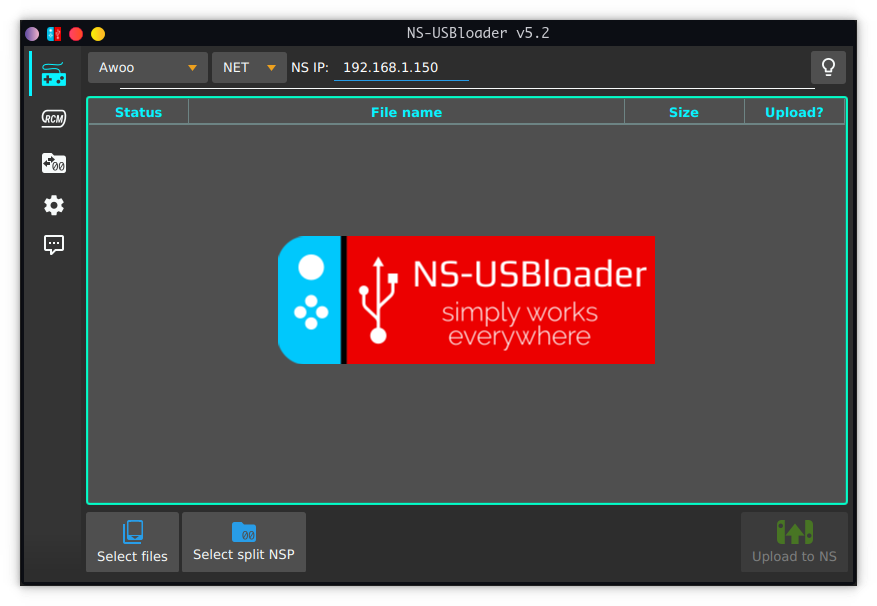
There are three tabs. First one is main.
##### 'Gamepad' tab.
At the top of you selecting from drop-down application and 协议 that you're going to use. For Goldleaf only USB is a. Lamp icon stands for switching themes (light or dark).
Then you may drag-n-drop files (split-files aka folders) to application or use 'Select NSP files' button. Multiple selection for files a. Click it again and select files from another folder it you want, it will be added into the table.
Table.
There you can select checkbox for files that will be sent to application (AW/GL). ~~Since Goldleaf v0.5 allow you only one file transmission per time, only one file is a for selection.~~
Also, you can use space to select/un-select files and 'delete' button for deleting. By right-mouse-click you can see context menu where you can delete one OR all items from the table.
For Goldleaf v0.6.1 and NS-USBloader v0.6 (and higher) you will have to use 'Explore content' -> 'Remote PC (via USB)' You will see two drives HOME:/ and VIRT:/. First drive is pointing to your home directory. Second one is reflection of what you' to table (first application tab). Also VIRT:/ drive ha functionality in comparison to HOME:/. E.g. you can't write files to this dri it's not a drive. But don't worry, it won't make any impact on Goldleaf or your NS if you try.
Also, for Goldleaf write files (from NS to PC): You have to 'Stop execution' properly before accessing files transferred from GL. Usually you have to wait 5sec or less. It will guarantee that your files properly written to PC.
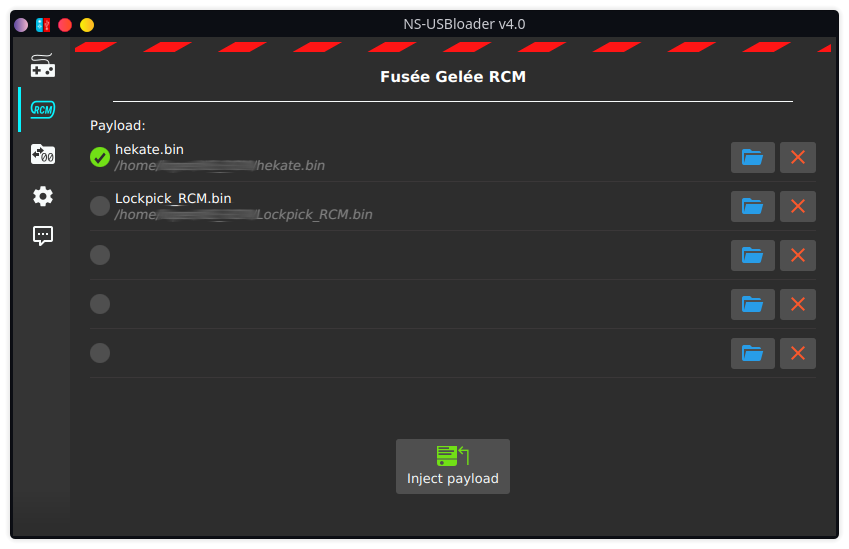
##### 'RCM' tab
On this tab you can select payloader like Hekate or LockPick_RCM and send it to NS. Drag-n-drop supported. Also some in-app for payload takes place ;)
##### 'Folder with arrows and zeroes' tab
On this tab you can split and merge files. Select 'Split' or 'Merge' and split (or merge). BTW Drag-n-drop supported.
##### 'Gears' tab.
Here you can configure settings for 网络 file transmission. Usually you shouldn't change anything. But it you're cool hacker, go ahead! The most interesting option here is 'Don't ser'. Architecture of the Awoo's NET part is working interesting way. When you select in Awoo 网络 NSP transfer, application will wait at port 2000 for the information about where should it take files from. Like '192.168.1.5:6060/my file.nsp'. Usually NS-USBloader ser by implementing simplified HTTP 服务端 and bringing it up and so on. But if this option selected, you can define path to remote location of the files. For example if you set in settings '192.168.4.2:80/ROMS/NS/' and add in table file 'my file.nsp' then NS-USBloader will simply tell Awoo "Hey, go take files from '192.168.4.2:80/ROMS/NS/my%20file.nsp' ". Of course you have to bring '192.168.4.2' host up and make file accessible from such address (just go install nginx). As I said, this feature is interesting, but I guess won't be popular.
Also here you can:
* Set 'Auto-check for updates' for checking for updates when application starts, or click button to if new released immediately.
* Set 'Show only *.nsp in Goldleaf' to filter all files displayed at HOME:/ drive. So only NSP files will appear.
##### 'Dialog with three dots' tab.
That's where all logs dropped. information about transmissions comes here.
##### CLI (command line interface)
To get help run `$ java -jar ns-usbloader-4.0.jar --help`
For more complex commands help use help argument after the fists key. For example:
Usage examples:
Other notes
'Status' = 'Uploaded' that appears in the table does not mean that file has been installed. It means that it has been sent to NS without any issues! That's what this app about.
Handling successful/failed installation is a purpose of the other side application: Awoo/Awoo-like or Goldleaf. And they don't provide any feedback interfaces so I can't detect success/failure.
#### What is this '-legacy' jar?!
JAR with NO postfixes recommended for Windows users, Linux users and macOS users who're using Mojave or later .
JAR with '-legacy' postfix is for macOS users who're still using OS X releases before (!) Mojave.
(It also works for Linux and for Windows, but sometimes it doesn't work for Windows and I don't know why).
We have this situation because of weird behaviour inside usb4ja used in this application for USB interactions. In '-legacy' it's v1.2.0 and in 'normal' it's v1.3.0
Translators!
If you want to see this app translated to your language, go grab this file and translate it.
If you're familiar with pull request, go ahead and create it! No worries if you are not. Just upload somewhere (like pastebin/google dri else). Create new issue and post a link. I'll grab it and add.
To convert files of any locale to readable format (and ) you can use this site
Support this app
If you like this app, just give a star (@ GitHub).
This is non-commercial project.
Thanks!
Appreciate assistance and support of both and Konstantin. Without you all this magic would not ha.
项目信息
开发语言:Java
Star 数:2337
技术要点
该项目属于黑客技术方向的开源资源,代码结构清晰,适合安全研究人员学习参考。项目围绕Awoo Installer and GoldLeaf uploader of the NSPs (and other files), RCM payload injector, application for split/merge files.展开,提供了可运行的实现,对理解相关安全机制、工具原理与攻防技术具有较高的研究价值。
从技术实现角度看,此类项目的核心在于对底层原理的深入理解与工程化落地。开发者在研究过程中可以结合官方文档与社区讨论,梳理项目的初始化流程、核心模块职责与数据流转,逐步掌握其中的技术细节与设计思路。
使用与学习建议
1. 下载源码压缩包,解压到本地环境。
2. 根据项目类型准备对应的运行环境与依赖。
3. 按照 README 中的步骤完成配置与部署。
4. 在隔离的测试环境中运行验证,避免影响生产系统。
免责声明
本资源来源于开源社区,仅供安全研究、技术学习与合法授权范围内的攻防演练使用,请勿用于任何非法或侵害他人权益的用途。使用本项目产生的一切后果由使用者自行承担。
| 资源标题 | ns-usbloader - Awoo Installer and GoldLeaf uploader of the NSPs ( |
| 所属分类 | 黑客技术 |
| 发布作者 | admin |
| 发布时间 | 2026-10-05 22:11:57 |
| 下载权限 | 免费下载 |
| 附件数量 | 2 个下载链接 |
| 浏览次数 | 349 |
| 讨论数量 | 0 |
| 主题状态 | 正常讨论中 |