 黑客技术
点击放大
Android_boot_image_editor - Parsing and re-packing Android boot.img/vbmeta.img
项目说明
Android_boot_image_editor
![CI]()
![License]()
A 工具 for reverse engineering Android ROM images.
Requirements
Make sure you ha+ and Python3.
* Linux / WSL: sudo apt install git de lz4 xz-utils zlib1g-de gcc g++ python3 python-is-python3 p7zip-full android-sdk-libsparse-utils erofs-utils
* Mac: brew install lz4 xz dtc
* Windows: Install openssl and de compiler with chocolatechoco install openssl dtc-msys2 zip vim gzip 7zip
Getting Started
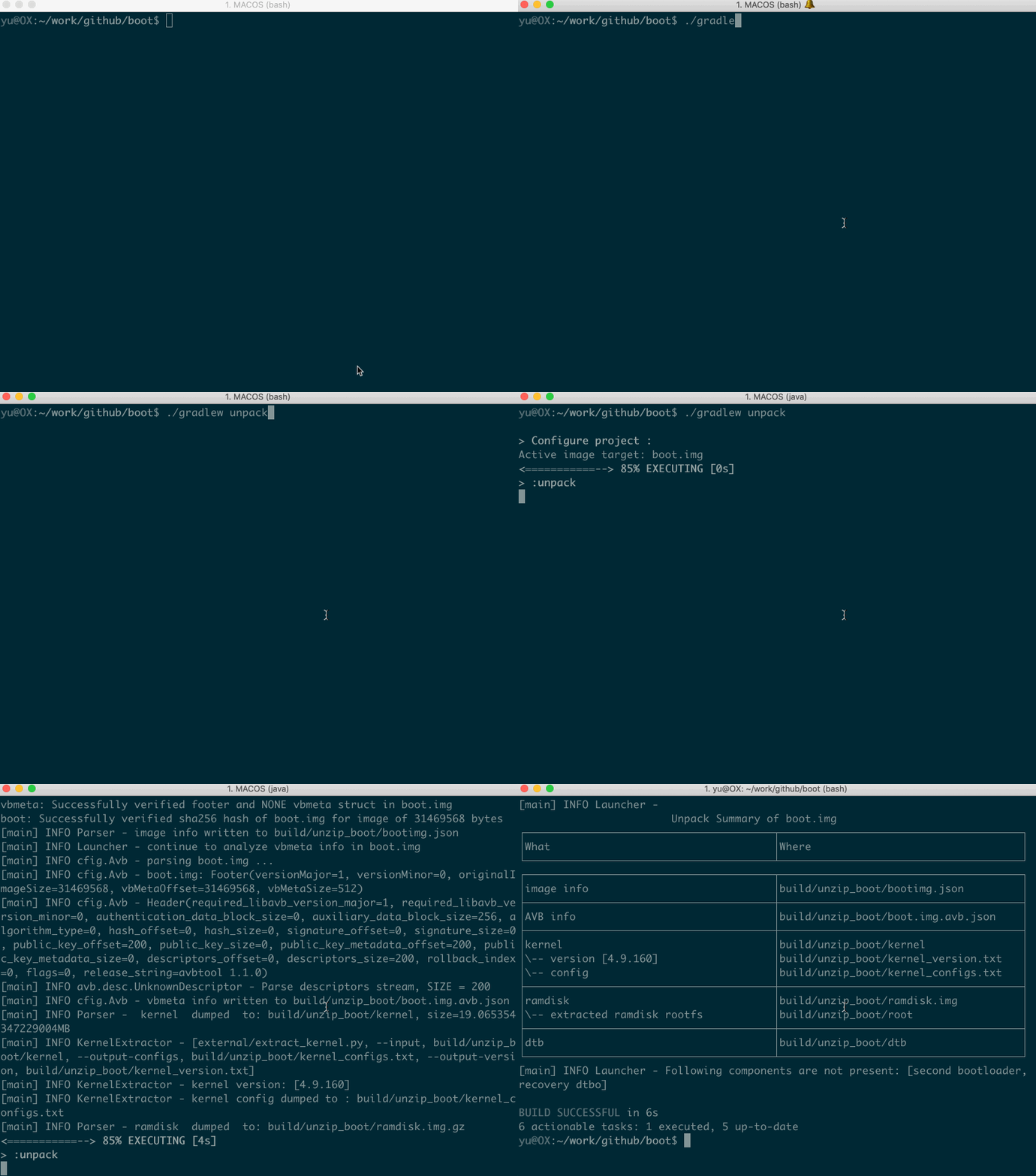
Put your boot.img to current directory, then start gradle 'unpack' task:
Your get the flattened kernel and /root filesystem under ./build/unzip\_boot:
build/unzip_boot/
├── boot.json (boot image info)
├── boot.avb.json (AVB only)
├── kernel
├── second (2nd bootloader, if exists)
├── dtb (dtb, if exists)
├── dtbo (dtbo, if exists)
└── root (extracted initramfs)
Then you can edit the actual file contents, like rootfs or kernel.
Now, pack the boot.img again
./gradlew pack
You get the repacked boot.img at $(CURDIR):
boot.img.signed
Well done you did it! The last step is to star this repo :smile
live demo
<!--  -->
<p align="center">
<img src=doc/op.gif width="615" height="492">
</p>
Supported ROM image types
| Image Type | file names | platforms | note |
| --------------- |----------------------------------------------------------------|-------------|-------------------------|
| boot | boot.img, init_boot.img, boot-debug.img, boot-test-harness.img | all | |
| boot | .img, .img, .img | all | |
| recovery | recovery.img, reco.img | all | |
| | .img, .img etc. | all | |
| dtbo | dtbo.img | linux & mac | |
| dtb | *.dtb | linux & mac | |
| sparse images | system.img, .img, product.img etc. | linux | |
| OTA payload | payload.bin | all | Windows git-bash |
Please note that the boot.img MUST follows AOSP boot flow, either Boot image signature in VBoot 1.0 or AVB HASH footer (a.k.a. AVB) in VBoot 2.0.
compatible devices
| Device Model | Manufacturer | Compatible | Android | Note |
|--------------------------------|--------------|----------------------|--------------------------|------|
| Pixel 7 (panther) | Google | Y | 13 (TQ2A.230505.002) <Br>2023)| |
| ADT-3 (adt3) | Askey/Google | Y | 12 (spp2.210219.010) | amlogic inside, <Br>Android TV |
| Pixel 3 (blueline) | Google | Y | 12 (spp2.210219.008, <Br>2021)| |
| Pixel 3 (blueline) | Google | Y | 11 (RP1A.200720.009, <Br>2020)| more ... |
| Pixel 3 (blueline) | Google | Y | Q preview (qpp2.190228.023, <Br>2019)| more ... |
| Redmi K30 4G (phoenix[n]) | XiaoMi | Y | 10 | by |
| TS10 | Topway | Y | 10 | car headunit, |
| Pixel XL (marlin) | HTC | Y | 9.0.0 (PPR2.180905.006, <Br>Sep 2018)| more ... |
| K3 (CPH1955) | OPPO | Y for recovery.img<Br> N for boot.img | Pie | more |
| Z18 (NX606J) | ZTE | Y | 8.1.0 | more... |
| Nexus 9 (/flounder) | HTC | Y(with some tricks) | 7.1.1 (N9F27M, Oct 2017) | tricks|
| Nexus 5x (bullhead) | LG | Y | 6.0.0_r12 (MDA89E) | |
| Moto X (2013) T-Mobile | Motorola | N | | |
| X7 (PD1602_A_3.12.8) | VIVO | N | ? | Issue 35 |
| Realme GT Neo 3 | Realme | N | 12 | Issue 105 |
more examples
<details>
<summary>working with recovery.img</summary>
Please remember to clean the work directory first.
</details>
<details>
<summary>working with .img</summary>
</details>
<details>
<summary>clean workspace</summary>
When you finished current work and need to clean the workspace for next image, it's a good idea to call the clear command:
</details>
<details>
<summary>working with boot.img and .img</summary>
If your .img contains hash of boot.img, you MUST update image together.
Your boot.img.signed and .img.signd will be updated together, then you can flash them to your device.
</details>
<details>
<summary>working with .img + .img (Pixel 5 etc.)</summary>
Most devices include hash descriptor of .img in .img, so if you need to modify .img, you need to update .img together.
Please note that to use 'gradle flash', your host machine must be connectted to your DUT with adb, and you already 'adb root'.
</details>
<details>
<summary>How to edit device tree blob(dtb) inside .img</summary>
If you want to edit the de blob in place:
During unpack stage, dtb will be dumped to file build/unzip_boot/dtb, dts will be decompiled to build/unzip_boot/dtb.dts.
You can edit dtb.dts directly, and it will be compiled to dtb duing repack stage.
If you just want to replace the dtb with the one that is compiled outside this 工具, please
</details>
<details>
<summary>How to pull device tree blob(dtb) from a rooted device</summary>
If you have a rooted device and want to pull /proc/de
This tool will copy dtc to the target device via adb, and dump the dtb and dts file. E you should get something like this
</details>
<details>
<summary>How to work edit device tree blob(dtb) file</summary>
If you have a dtb file and want to edit its content
This 工具 will decompile it and put the decompiled 源码 to build/unzip_boot.
</details>
<details>
<summary>working with system.img</summary>
You get system.img.unsparse, that's a plain ext4 filesystem data.
</details>
<details>
<summary>How to disable A</summary>
The idea is to set flag=2 in main .
Then flash .img.signed to your device.
</details>
<details>
<summary>How to merge init_boot.img into boot.img</summary>
* unpack init_boot.img and copy out "build/unzip_boot/root".
* clear workspace by gradle clear, then unpack boot.img
* copy back the "build/unzip_boot/root"
* edit build/unzip_boot/boot.json
ramdisk.size to 1ramdisk.file from "build/unzip_boot/ramdisk.img" to "build/unzip_boot/ramdisk.img.lz4"</details>
<details>
<summary>work with payload.bin</summary>
Usage:
Usage:
Example:
Note:
"build/payload/" will be deleted before each "unpack" task
</details>
<details>
<summary>work with apex images</summary>
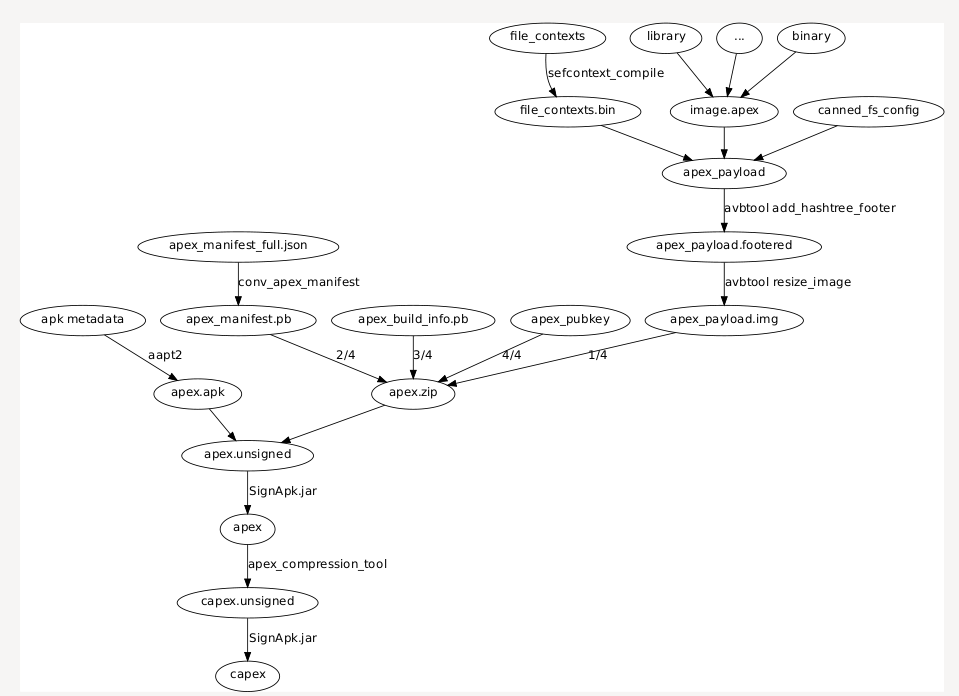
AOSP already has tools like apexer, deapexer, sign_apex.py, these should suffice the needs on .apex and .capex.
Refer to Issue
!image
</details>
<details>
<summary>How to work with .img</summary>
Then flash .img.signed and .img.signed to the device.
</details>
boot.img layout
Read boot layout of Android boot.img and \_boot.img.
Read misc layout of misc\.img
References and Acknowledgement
<details>
<summary>more ...</summary>
Android list
Android build-numbers
cpio & fs\_config<br>
AVB<br/>
boot\_signer<br/>
mkbootimg<br/>
boot header definition<br/>
kernel info extractor<br/>
mkdtboimg<br/>
libsparse<br/>
Android Nexus/Pixle factory images<br/>
</details>
项目信息
开发语言:Java
Star 数:1328
技术要点
该项目属于黑客技术方向的开源资源,代码结构清晰,适合安全研究人员学习参考。项目围绕Parsing and re-packing Android boot.img/.img/payload.bin, supporting Android 16展开,提供了可运行的实现,对理解相关安全机制、工具原理与攻防技术具有较高的研究价值。
从技术实现角度看,此类项目的核心在于对底层原理的深入理解与工程化落地。开发者在研究过程中可以结合官方文档与社区讨论,梳理项目的初始化流程、核心模块职责与数据流转,逐步掌握其中的技术细节与设计思路。
使用与学习建议
1. 下载源码压缩包,解压到本地环境。
2. 根据项目类型准备对应的运行环境与依赖。
3. 按照 README 中的步骤完成配置与部署。
4. 在隔离的测试环境中运行验证,避免影响生产系统。
免责声明
本资源来源于开源社区,仅供安全研究、技术学习与合法授权范围内的攻防演练使用,请勿用于任何非法或侵害他人权益的用途。使用本项目产生的一切后果由使用者自行承担。
| 资源标题 | Android_boot_image_editor - Parsing and re-packing Android boot.img/vbmeta.img |
| 所属分类 | 黑客技术 |
| 发布作者 | admin |
| 发布时间 | 2026-10-05 22:13:26 |
| 下载权限 | 免费下载 |
| 附件数量 | 2 个下载链接 |
| 浏览次数 | 447 |
| 讨论数量 | 0 |
| 主题状态 | 正常讨论中 |