 黑客技术
点击放大
s6_pcie_microblaze - PCI Express DIY hacking toolkit for Xilinx SP605.
项目说明
PCI Express DIY hacking toolkit
General information
Contents
SP605 board configuration
Software configuration
Examples
Using Python API
Practical DMA attacks
Option ROM attacks
Troubleshooting
Building project from the source code
General information
This repository contains a set of tools and proof of concepts related to PCI-E bus and DMA attacks. It includes HDL design that implements software controllable PCI-E gen 1.1 endpoint device for Xilinx SP605 E Kit with Spartan-6 FPGA. In comparison with popular USB3380EVB this design allows to operate with raw Transaction Le (TLP) of PCI-E bus and perform full 64-bit memory read/write operations. To demonstrate applied use cases of the design, there's a 工具 for pre-boot DMA attacks on UEFI based machines which allows to execute arbitrary UEFI DXE drivers during platform init.
There's a program that shows how to use pre-boot DMA attacks to inject Hyper-V VM exit handler backdoor into the security enabled Windows 10 and 11 running on UEFI Secure Boot enabled platform. Provided Hyper- PoC might be useful for reverse engineering and exploit de purposes, it provides an interface for inspecting of hypervisor state (VMCS, physical/ memory, registers, etc.) from the guest partition and perform guest to host attacks.
Another program shows how to use pre-boot DMA attacks to inject arbitrary user mode or kernel mode 代码 into the Windows operating system by hijacking of its boot process using Boot Backdoor. This program is also can work with DMA Shell − it's Boot Backdoor payload that allows to execute console commands over the rogue PCI-E device, transfer files and load 3-rd party executables into the target operating system at the runtime.
💾 Hyper- part of this project has many other features and deployment options than described in this document, you can use it separately from DMA attack tools e any special hardware: check its documentation
💾 Boot Backdoor part of this project has many other features and deployment options than described in this document, you can use it separately from DMA attack tools e any special hardware: check its documentation
💾 Python tools from this project and FPGA designs for SP605, ZC706 and PicoE also can be used to deploy SMM Backdoor Next Gen with pre-boot DMA attack. Check its documentation for more technical details.
🛠️ Python tools and payloads from this project, including Hyper- and Boot Backdoor, also can be used with Xilinx Zynq-7000 SoC based boards. There's a separate project of DMA attacks design for Xilinx ZC706 e kit.
🛠️ Python tools and payloads from this project, including Hyper- and Boot Backdoor, also can be used with PicoE board. There's a separate Pico DMA project − fully autonomous pre-boot DMA attack hardware implant for M.2 老虎机 that can run arbitrary UEFI DXE drivers as payload.
Contents
* s6_pcie_microblaze.xise − Xilinx ISE project file.
* microblaze/pcores/axis_pcie_/ − Custom peripheral module that allows connecting of PCI Express integrated endpoint block of Spartan-6 FPGA as raw TLP stream to MicroBlaze soft processor core.
* sdk/srec_bootloader_0/ − Simple bootloader for MicroBlaze soft processor, it using SREC image format and onboard linear flash memory of SP605 to load and store main MicroBlaze program.
* sdk/main_0/ − Main program for MicroBlaze soft processor, it forwards raw TLP packets of PCI-E bus into the TCP connection using onboard Ethernet port of SP605 and lwIP 网络 stack.
* python/pcie_lib.py − Python library to interact over the 网络 with main MicroBlaze program running on SP605 board, it implements low level and high le to work with TLP level of PCI-E from the Python 代码.
* python/pcie_mem.py − Command line program that dumps host RAM into the screen or output file by sending MRd TLPs.
* python/pcie_mem_scan.py − Command line program that scans target host for physical memory ranges accessible o bus, it's useful for a security audit of IOMMU enabled platforms (examples: 1, 2, 3, 4).
* python/uefi_backdoor_simple.py − Command line program for pre-boot DMA attack that injects dummy UEFI driver into the target machine boot sequence.
* python/uefi_backdoor_hv.py − Command line program for pre-boot DMA attack that injects Hyper-V VM exit handler backdoor into the target system boot sequence.
* python/uefi_backdoor_boot.py − Command line program for pre-boot DMA attack that injects Boot Backdoor into the target system boot sequence.
* python/payloads/DmaBackdoorSimple/ − 源码 代码 of dummy UEFI DXE driver to use with uefi_backdoor_simple.py.
* python/payloads/DmaBackdoorHv/ − 源码 代码 of UEFI DXE driver to use with uefi_backdoor_hv.py, it implements Hyper- functionality.
* python/payloads/DmaBackdoorBoot/ − 源码 代码 of UEFI DXE driver to use with uefi_backdoor_boot.py, it implements Boot Backdoor functionality.
SP605 board configuration
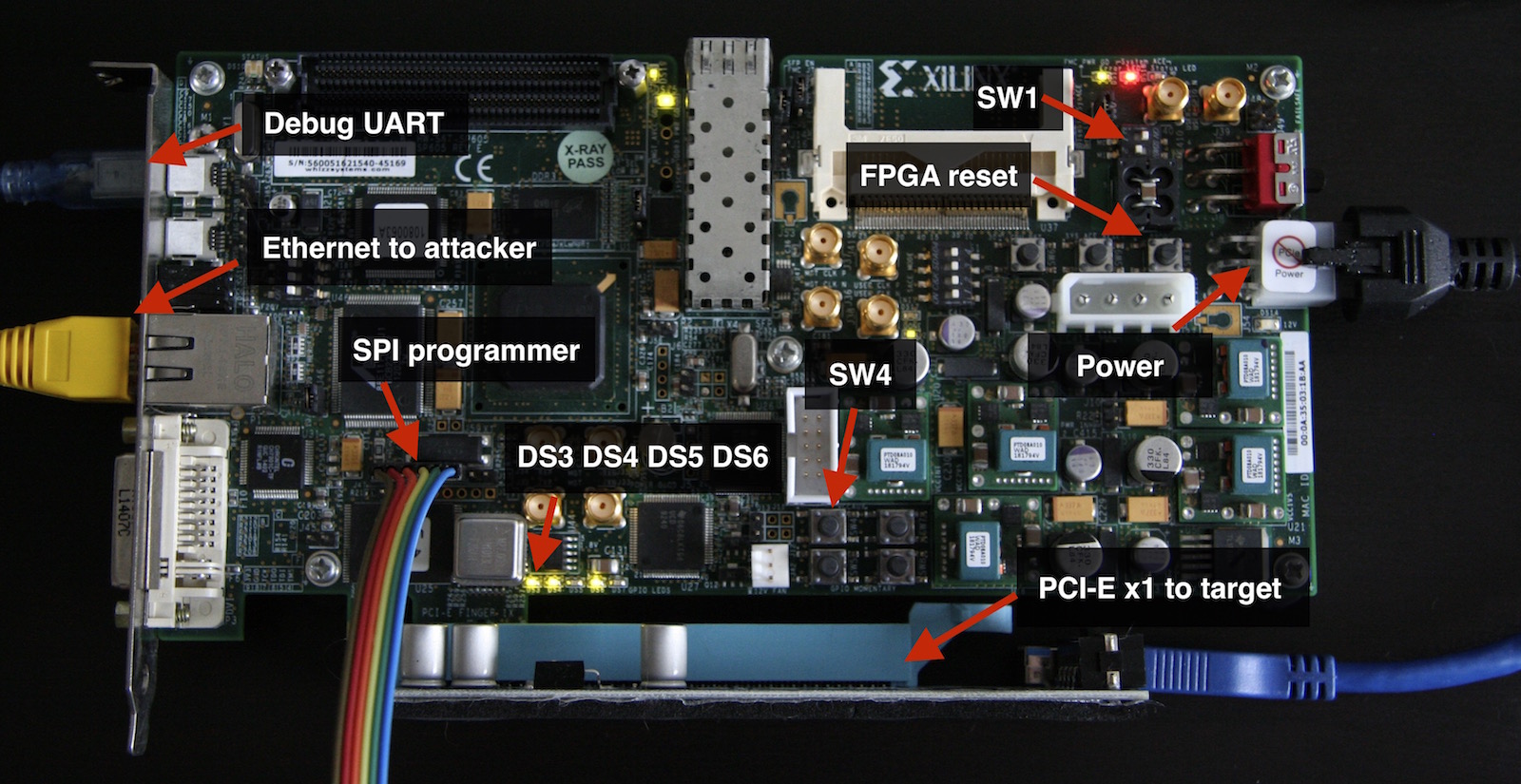
<img src=" width="800">
Xilinx UG526 document also known as SP605 Hardware User Guide is your best friend if you want to know more details about usage and configuration of this nice board.
1) To load bitstream from onboard SPI flash chip you need to configure SP605 by turning SW1 switches into the 1-ON, 2-OFF position.
2) Now you have to write FPGA bitstream into the SPI flash. Use s6_pcie_microblaze.mcs file if you want to do this over JTAG with the help of Xilinx iMPACT utility (see this tutorial), or s6_pcie_microblaze.bin if you want to use external SPI flash programmer connected to J17 header of SP605 (which is the fastest and more con way).
In case of flashrom compatible SPI flash programmer you can use flash_to_spi.py program as a flashrom wrapper:
3) Bitstream file that was written into the SPI flash in previous step includes custom bootloader for MicroBlaze core (see bootloader.c for more details). This bootloader allows to configure board options and write main program into the linear flash over the UART port of SP605.
To boot MicroBlaze into the update mode you have to disconnect SPI flash programmer and power the board holding SW4 pushbutton switch, release SW4 when DS6 LED indicating acti mode turns on.
4) To write main program (see main.c for more details) into the linear flash you need to connect your computer to the UART bridge USB port of SP605 and run bootloader_ctl.py program with --flash option:
5) To configure the 网络 settings you need to run bootloader_ctl.py program with --config option:
6) Now you can exit from the update mode and boot main MicroBlaze program from linear flash:
Main program prints its error messages into the onboard UART, you can use --console option of bootloader_ctl.py to monitor this messages in real time.
7) Connect SP605 to the PCI-E 老虎机 of the target computer and turn the computer on. When PCI-E link was successfully established you will see DS3 and DS4 LEDs on.
8) Run lspci command on target computer to ensure that its operating system is seeing your board as appropriate PCI-E device:
JTAG related notes: SP605 has onboard USB to JTAG interface compatible with iMPACT and others Xilinx tools. However, it's not very good so if you're planning to use onboard JTAG to program SPI flash like it was described in Xilinx tutorial you have to do the following things:
* Remove any hardware connected to the FMC 老虎机 of SP605 while working with JTAG.
* In Xilinx iMPACT settings configure JTAG interface to use 750 KHz speed (on more higher speed it works unstable).
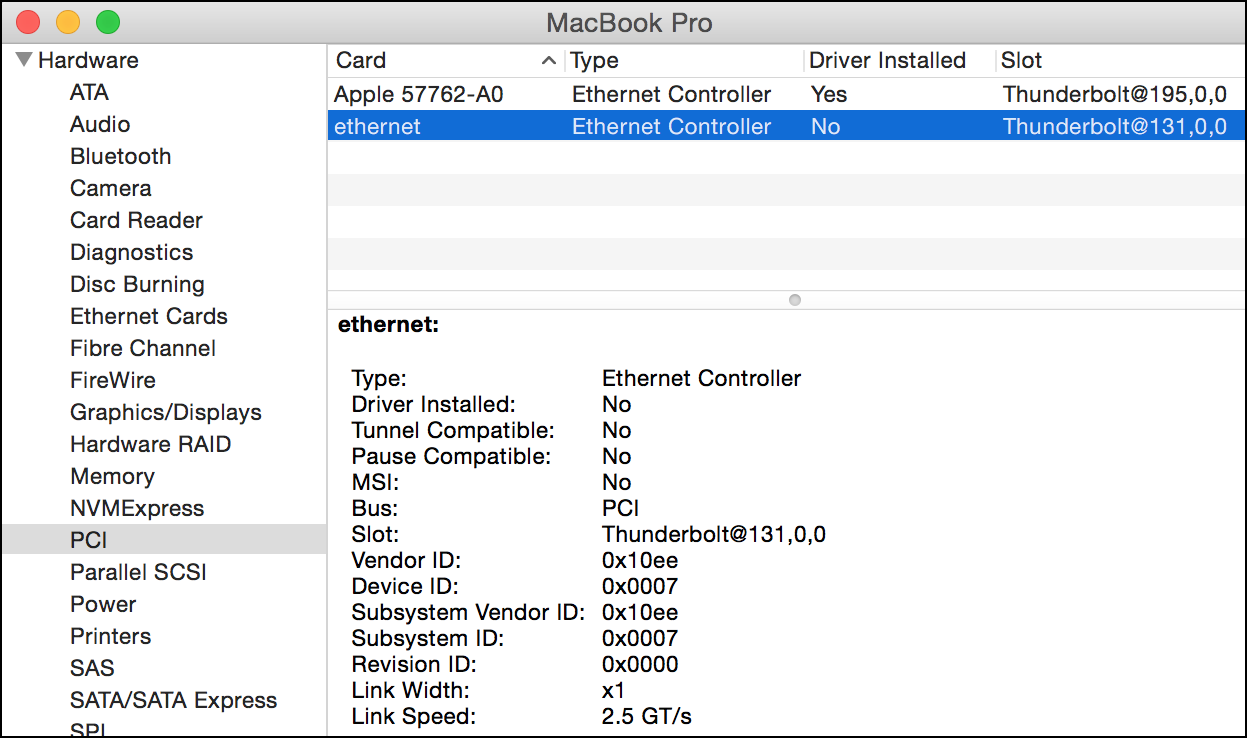
Xilinx SP605 board is also can be connected to the Thunderbolt 2/3 external port of the target computer using Thunderbolt to PCI-E expansion chassis. Please note, that SP605 is relatively large board so it might not fit into some of the chassis. For example, I'm using HighPoint RocketStor 6361A Thunderbolt 2 enclosure which works fine with my MacBook Pro.
Software configuration
Python tools to interact with the board and tiny implementation of PCI-E transaction layer are located in python folder. Because main MicroBlaze program uses TCP connection to transfer TLP packets no any drivers or 3rd party dependencies needed, you can use provided Python 代码 on any operating system.
To set up target board IP address and port edit PCIE_TO_TCP_ADDR in python/pcie_lib_config.py file.
Examples
Information about PCI-E device implemented by provided FPGA bitstream (just like it seeing by target computer):
Example of PCI-E device as it shown in Apple macOS hardware information when connected to the Thunderbolt 2 port of MacBook Pro:
<img src=" width="623">
On the attacker side you can use pcie_cfg.py program to view configuration space registers of PCI-E device:
Here's an example of dumping 0x80 bytes of target computer physical memory starting from zero address using pcie_mem.py program:
Example of saving physical memory into the file:
Provided Python software uses some en to o default of certain options:
* DEBUG_TLP − If set to 1 print TX and RX TLP packets dump into the standard output.
* TARGET_ADDR − <address>:<port> string to o IP address of the board specified in python/pcie_lib_config.py file.
Using Python API
Python library pcie_lib.py provides low level API to send and recei TLP packets along with abstractions for different TLP types and high le memory access API.
The following program demonstrates how to work with raw TLPs using pcie_lib.py:
Working with TLPs using more con high le:
Accessing physical memory with high level API:
Practical DMA attacks
One of the main goals of this project is pro flexible and con set of tools to perform so called pre-boot DMA attacks, in comparison with regular DMA attacks they are targeting pre-boot en of UEFI DXE phase of the platform initialization rather than operating system itself. Such attacks allows to run malicious 代码 at relatively early stages when IOMMU and other security features of the operating system are not initialized yet.
<img src=" width="610">
Pre-boot DMA attacks allows to bypass security features of the platform firmware like UEFI secure boot or Intel Boot Guard.
Python program uefi_backdoor_simple.py injects dummy UEFI DXE dri in payloads/DmaBackdoorSimple folder into the target system boot sequence using pre-boot DMA attack described above. To use this program you have to perform the following steps:
1) Power off the target computer.
2) Connect SP605 board to the PCI-E (or Mini PCI-E, or M.2) port of the target computer.
3) Turn the borad on and ensure that Microblaze firmware was successfully initialized by pinging an IP address that was specified during the board configuration with bootloader_ctl.py program.
4) Run the following command to start pre-boot DMA attack:
5) Power on the target computer, in case of successful attack after the couple of seconds you will see red debug messages screen of injected UEFI DXE driver:
<img src=" width="540">
An example of uefi_backdoor_simple.py console output after the successful attack:
This dummy UEFI DXE dri with uefi_backdoor_simple.py program can be used as skeleton project to implement attacks like injecting of malicious 代码 into the operating system bootloader, kernel or hypervisor.
There's also another Python program − uefi_backdoor_hv.py, it injects Hyper-V VM exit handler backdoor located in payloads/DmaBackdoorHv folder into the target system boot sequence exactly in the same way as previous dummy UEFI DXE driver. Here's an example of its usage:
UEFI DXE driver of Hyper- is also printing its debug messages on the screen. In addition, you can use --debug-output option of uefi_backdoor_hv.py to read this debug messages from the target system physical memory and print them into the stdout:
To get more information about Hyper- use cases and features check its README file with detailed information.
Python programs uefi_backdoor_boot.py and uefi_backdoor_boot_shell.py are used to inject Boot Backdoor into the target system boot sequence. Boot Backdoor allows to run arbitrary user mode or kernel mode 代码 under the Windows operating system and its payload called DMA Shell allows to execute console commands and transfer the files. To deploy Boot Backdoor with DMA Shell using pre-boot DMA attack you have to perform the same steps as described above but using uefi_backdoor_boot_shell.py program:
Now, when Boot Backdoor with its payload was sucessfully loaded, you can run uefi_backdoor_boot_shell.py with --attach option to communicate with currently running instance of DMA Shell:
Also, you can use --debug-output option to get debug messages of Boot Backdoor UEFI DXE driver and print them into the stdout:
To get more information about Boot Backdoor use cases and features check its README file with detailed information.
Python programs uefi_backdoor_simple.py, uefi_backdoor_hv.py, uefi_backdoor_boot.py and uefi_backdoor_boot_shell.py supports two different ways to pass execution to the injected UEFI DXE dri:
* EFI_SYSTEM_TABLE hijack − scan system memory down from physical address 0xf0000000 to 0 with 0x10000 bytes step in order to find EFI system table by its signature and patch LocateProtocol() function address. To o memory scan options you can use SCAN_FROM and SCAN_STEP en .
* PROTOCOL_ENTRY hijack − scan system memory up from physical address 0x76000000 to 0xa0000000 with 0x1000 bytes step to find EFI_CPU_IO2_PROTOCOL structure of CPU I/O 2 协议 and patch one of its functions. To o memory scan options you can use SCAN_FROM, SCAN_TO and SCAN_STEP en .
By default all four programs are using EFI system table hijack method, to use 协议 entry method instead you can pass --inj-prot command line option to the appropriate program. To reduce amount of time required to perform the attack you can specify pre found EFI_SYSTEM_TABLE structure address using --system-table option and PROTOCOL_ENTRY structure address using --prot-entry option. Also, all four Python programs has --test command line option, this option is used to do the memory scan and find required structures addresses without performing an actual hijack of the execution flow. So, during the first boot you can run desired program with --test option to find needed address and during the second boot you can run the same program with --system-table or --prot-entry option to specify that address.
During de of malicious 代码 for pre-boot DMA attacks it's important to have an information about execution en of UEFI DXE phase. To collect such information you can turn the target computer on, enter into the BIOS setup menu or boot options menu to pause loading of the operating system and run uefi.py program without arguments. This program will scan physical memory of the target computer and print information about existing UEFI DXE protocols and interfaces, loaded UEFI drivers, UEFI descriptor tables and ACPI tables. Here you can see an example of information obtained by uefi.py program while using AAEON UP Squared mini-PC as attack target.
Option ROM attacks
Provided bitstream can emulate PCI-E option ROM stored in onboard linear flash memory of SP605. Although modern platforms mitigates option ROM attacks, this feature still could be useful for security audit or prototyping purposes.
You can manage option ROM images using pcie_rom_ctl.py Python program.
Erasing option ROM contents:
Loading provided UEFI option ROM example into the board:
Also, there's an option to log option ROM memory access into the debug UART of SP605 board, to enable or disable this option use --log-on and --log-off parameters of ./pcie_rom_ctl.py program.
To correct operation of the option ROM support under the Linux you can do the following.
First, find bus-de address of SP605 PCI-E device:
Then, set enabled bit of the command register so target system will pass to the PCI-E device all of the memory access attempts to the option ROM physical memory rages:
Now you can dump contents of the pre loaded option ROM with the help of dd command and appropriate pseudo-file of sysfs:
In case when --log-on option of pcie_rom_ctl.py program was specified during the configuration you will see the following messages in the debug UART console of SP605 board while dumping the option ROM:
Troubleshooting
PCI Express is very complicated high speed bus so there's a lot of things that can go wrong. In case when DMA attack is not working on your setup you can check the following things to determine an exact problem:
* DS3 LED is on when physical PCI-E link is up and DS4 is on when root complex had assigned bus-de address to our PCI-E endpoint. If DS3 is off it likely means physical connectivity issue − check your risers, cables, etc. If DS3 is on but DS4 is off it means that you had to reboot your attack target or force PCI-E devices rescan on its side.
* DS5 LED is on during PCI-E bus reset, when it always on it means physical connectivity issue.
* If root complex sends Cpl TLP instead of CplD TLP in reply to memory read request it means that memory access was rejected because of invalid address or IOMMU enforced access checks. Also, typical x86 machine might not reply at all on memory read requests to certain MMIO regions of physical address space.
* If software is receiving inconsistent or invalid TLPs from the root complex in reply to the memory read requests you might try to set a smaller value of MEM_RD_TLP_LEN constant in pcie_lib.py to split reply data into more smaller chunks. Also it's useful to run the program with DEBUG_TLP=1 en and check raw TX/RX TLPs dump.
Building project from the source code
1) Install Xilinx ISE 13.4 which comes with your SP605 board and open s6_pcie_microblaze.xise project file.
2) Regenerate s6_pcie_v2_4 and fifo_generator_v8_4 cores which presents in project hierarchy.
3) Click on microblaze_i instance in project hierarchy and run "Export Hardware Design to SDK With Bitstream".
4) When build will be completed ISE opens Xilinx Software De Kit IDE, use sdk folder as it's workspace.
5) Create new standalone board support package in your Xilinx SDK project tree, choose lwIP and xilflash libraries in BSP configuration.
6) Import sdk/srec_bootloader_0 and sdk/main_0 projects into the project tree and run the build.
7) Run make bitstream && make srec from Xilinx ISE command prompt to generate needed output files.
De by
Dmytro Oleksiuk (aka Cr4sh)
<br/>
<br/>
项目信息
开发语言:C
Star 数:890
技术要点
该项目属于黑客技术方向的开源资源,代码结构清晰,适合安全研究人员学习参考。项目围绕PCI Express DIY hacking toolkit for Xilinx SP605. This repository is also home of Hyper- and Boot Backdoor, check readme for links and info展开,提供了可运行的实现,对理解相关安全机制、工具原理与攻防技术具有较高的研究价值。
从技术实现角度看,此类项目的核心在于对底层原理的深入理解与工程化落地。开发者在研究过程中可以结合官方文档与社区讨论,梳理项目的初始化流程、核心模块职责与数据流转,逐步掌握其中的技术细节与设计思路。
使用与学习建议
1. 下载源码压缩包,解压到本地环境。
2. 根据项目类型准备对应的运行环境与依赖。
3. 按照 README 中的步骤完成配置与部署。
4. 在隔离的测试环境中运行验证,避免影响生产系统。
免责声明
本资源来源于开源社区,仅供安全研究、技术学习与合法授权范围内的攻防演练使用,请勿用于任何非法或侵害他人权益的用途。使用本项目产生的一切后果由使用者自行承担。
| 资源标题 | s6_pcie_microblaze - PCI Express DIY hacking toolkit for Xilinx SP605. |
| 所属分类 | 黑客技术 |
| 发布作者 | admin |
| 发布时间 | 2026-10-05 22:15:50 |
| 下载权限 | 免费下载 |
| 附件数量 | 2 个下载链接 |
| 浏览次数 | 181 |
| 讨论数量 | 0 |
| 主题状态 | 正常讨论中 |