 黑客技术
点击放大
DllShimmer - Weaponize DLL hijacking easily. Backdoor any funct
项目说明
DllShimmer
<di="text-align:center;font-style: italic;">Weaponize DLL hijacking easily. Backdoor any function in any DLL without disrupting normal process operation.</div>
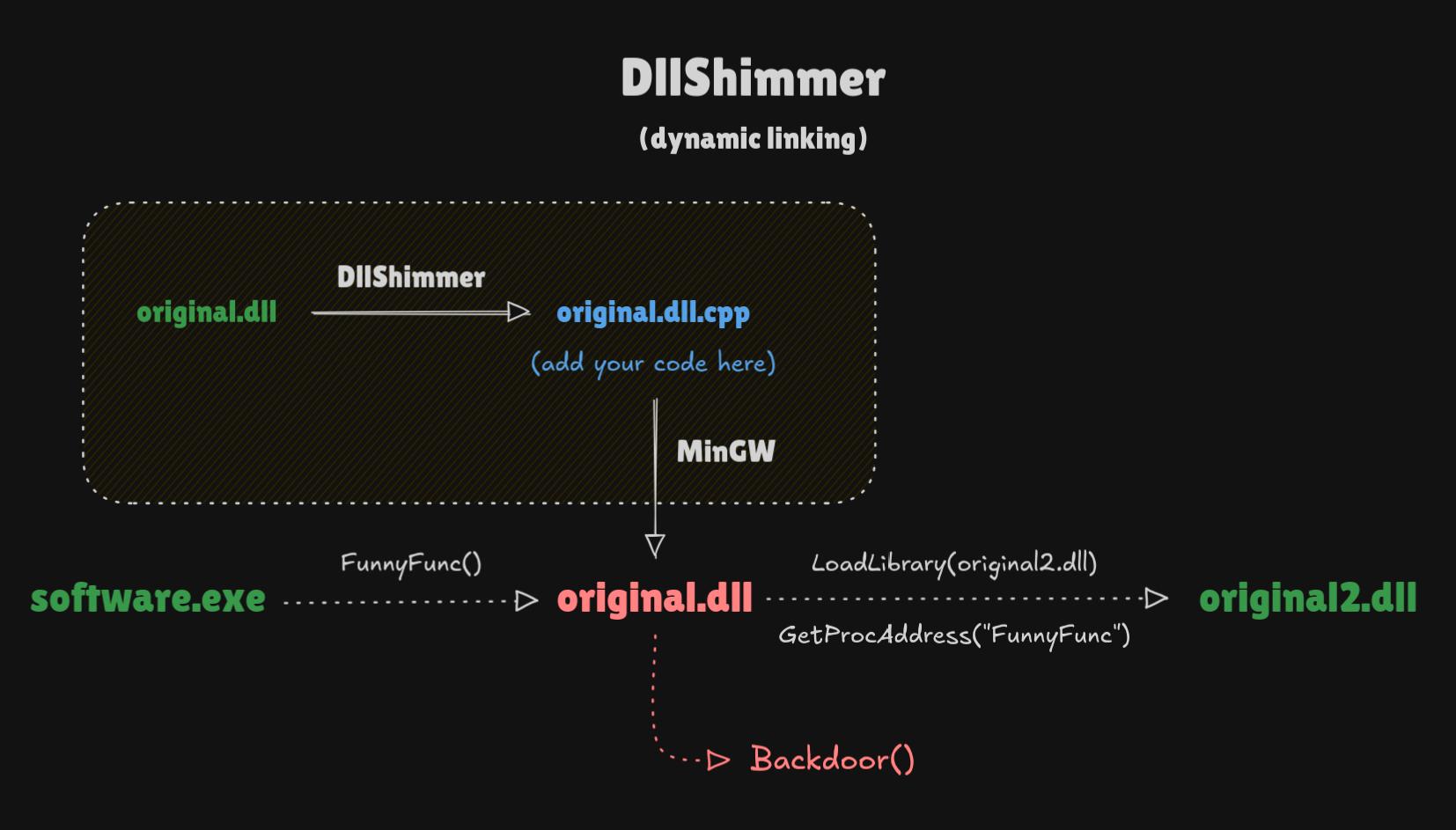
!DllShimmer flowchart
How it works
DllShimmer parses the original DLL and extracts information about exported functions (name, ordinal number, and forwarder info). Based on this information, DllShimmer creates a boilerplate C++ file (.cpp). The generated file allows you to add your own 代码 to each function exported from the original DLL without disrupting the normal operation of the program. No reverse engineering or instrumentation is required, because DllShimmer does not rely on function signatures (see more in “Limitations”).
The second file generated is a .def file, which ensures that all DLLs exported from the proxy after compilation will have the same names and ordinal numbers as in the original DLL.
After compilation, the EAT in the proxy DLL is an exact copy of the EAT in the original DLL. All names and ordinal numbers of exported functions match, and forwarded functions are forwarded as well. DllShimmer does not explicitly forward all functions (like most tools), creating a completely new and suspicious EAT structure.
Installation
Compile Go 源码 代码 or download the compiled binary.
Dependencies:
x86_64-w64-mingw32-g++x86_64-w64-mingw32-dlltoolUsage
Example:
Parameters:
-i / --input <path> [required]
The original DLL that you want to backdoor.
-o / --output <path> [required]
The path to the directory where DllShimmer will save all generated files.
-x / --original <path> [required]
In case of dynamic linking (default) provide the path where the proxy DLL will find the original DLL on the target system.
In the case of static linking (--static), specify only the name of the original DLL. It will be searched for according to the default loading order on Windows.
-m / --mutex [optional]
Enabling this option will add a mutex to the 源码 file, which prevents your backdoor from being executed more than once during a single program run. All original functions will continue to work normally.
--static [optional]
Enable static linking between the proxy DLL (IAT) and the original DLL (EAT). This generates an additional .lib file in the output directory, which acts as the original DLL for static compilation.
This technique has some serious limitations compared to dynamic linking:
However, static linking may be more stealthy and natural in some scenarios.
Default: DllShimmer always uses dynamic linking with the LoadLibraryA() and GetProcAddress() functions.
--debug-file <path> [optional]
Sa logs to a file. Logs are written to a file on an ongoing basis while the program is running. If selected, logs are not printed to STDOUT.
Default: DllShimmer always writes debug logs to STDOUT.
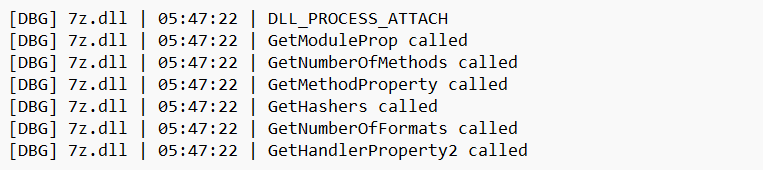
Example debug output:
!Example debug output
Limitations
Troubleshooting
Before you start troubleshooting:
1. Read "Limitations".
2. Make sure you don't use static linking (--static). It's easier to debug with dynamic linking (default).
3. Sa output to file (--debug-file).
_In the generated .cpp file, I don't see all the exported functions from the original DLL._
Functions defined in the original DLL as “forwarded” are not included in the .cpp file. However, they are in the .def file. They will also be exported after compilation, exactly as in the original DLL.
_Strange loader error (126) while loading original DLL_
Sometimes, your proxy DLL displays an error when loading the original DLL, and the error 代码 is 126, e you theoretically specified the correct relative path in the -x parameter. Why isn't it working?!?
DLLs are searched for in the Current Directory. In 98% of cases, this is simply the location of the main EXE file, but there are programs (mostly old legacy ones) that arbitrarily change the Current Directory using, for example, SetCurrentDirectoryW(). The main program is aware of this change, so it loads your proxy DLL correctly, but you are unaware of this and try to load the original DLL relatively, while the program searches for it in the changed Current Directory.
This rule applies to both static and dynamic loading of the original DLL. Unfortunately, with static linking, this problem is much harder to detect because we don't ha information. System loader just fails and it's over. This is why I always recommend using the default dynamic linking first.
In the case of dynamic linking, we have two options:
1. Adjust the path in the -x parameter to the new Current Directory situation.
2. Change the Current Directory dynamically to search for DLLs where we want.
In case of static linking, we really only have one option:
1. Move the original DLL to the Current Directory.
TODO
项目信息
开发语言:Go
Star 数:755
技术要点
该项目属于黑客技术方向的开源资源,代码结构清晰,适合安全研究人员学习参考。项目围绕Weaponize DLL hijacking easily. Backdoor any function in any DLL.展开,提供了可运行的实现,对理解相关安全机制、工具原理与攻防技术具有较高的研究价值。
从技术实现角度看,此类项目的核心在于对底层原理的深入理解与工程化落地。开发者在研究过程中可以结合官方文档与社区讨论,梳理项目的初始化流程、核心模块职责与数据流转,逐步掌握其中的技术细节与设计思路。
使用与学习建议
1. 下载源码压缩包,解压到本地环境。
2. 根据项目类型准备对应的运行环境与依赖。
3. 按照 README 中的步骤完成配置与部署。
4. 在隔离的测试环境中运行验证,避免影响生产系统。
免责声明
本资源来源于开源社区,仅供安全研究、技术学习与合法授权范围内的攻防演练使用,请勿用于任何非法或侵害他人权益的用途。使用本项目产生的一切后果由使用者自行承担。
| 资源标题 | DllShimmer - Weaponize DLL hijacking easily. Backdoor any funct |
| 所属分类 | 黑客技术 |
| 发布作者 | admin |
| 发布时间 | 2026-10-05 22:16:11 |
| 下载权限 | 免费下载 |
| 附件数量 | 2 个下载链接 |
| 浏览次数 | 344 |
| 讨论数量 | 0 |
| 主题状态 | 正常讨论中 |