 黑客技术
点击放大
MicroBackdoor - Small and convenient C2 tool for Windows targets
项目说明
Micro Backdoor for Windows
Micro Backdoor is C2 工具 for Windows targets with easy customizable 代码 base and small footprint. Micro Backdoor consists from 服务端, 客户端 and dropper. It wasn't designed as replacement for your fa post-exploitation tools but rather as really minimalistic thing with all of the basic features in less than 5000 lines of 代码, 客户端 DLL size is less than 20Kb without compression.
<img src=" width="450" alt="Эй, блядва, а пулл реквесты где?">
I'm using Micro Backdoor mostly for demonstration purposes as payload for my firmware rootkits and low le techniques. Its 代码 was written in couple of nights, so, it might contain bugs and : <a href=" it only for your own risk</a>.
General information
Web interface screenshots
Configuring the server
Using Python API
Deploying the server
Building Docker container
Configuring the client
General information
Micro Backdoor 客户端 supports 32-bit and 64-bit of Windows XP, Vista, 7, 8, 8.1, 10, 服务端 2003, 服务端 2003 R2, 服务端 2008, 服务端 2008 R2, 服务端 2012, 服务端 2012 R2, 服务端 2016 and 服务端 2019 of any editions, languages and service packs.
Key features of the Micro Backdoor:
* 客户端 dropper is written in Microsoft JScript which makes it extremely con for obfuscation: once A to detect the dropper you easily can modify its 代码 or apply existing JScript obfuscation tools.
* 客户端 can detect SOCKS 4, SOCKS 5 or HTTP proxy ser in the system settings and connect to the 服务端 over this proxy.
* In order to communicate with the ser Backdoor 客户端 is using end-to-end encrypted 协议 with RSA authentication and random session key.
* 客户端 dropper is not creating any executable files on the disk: its body is stored inside Windows registry which reduces backdoor footprint and makes it more stealth.
* Backdoor 服务端 is written in Python and can be used on any operating system. It provides clean and simple web interface which allows to interact with connected clients in con way. Redis 数据库 is used to store clients state.
* Backdoor ser track of all events for clients and 服务端 in the log files.
* For each connected 客户端 Micro Backdoor provides semi-interacti shell running in the web browser.
* Micro Backdoor has con file manager which allows to browse 客户端 file system, download and upload the files.
* Full Unicode and nati support by both 客户端 and 服务端.
* Backdoor 服务端 is also pro Python API and command line interface to perform any actions with connected clients which is useful for automation and scripting.
Web interface screenshots
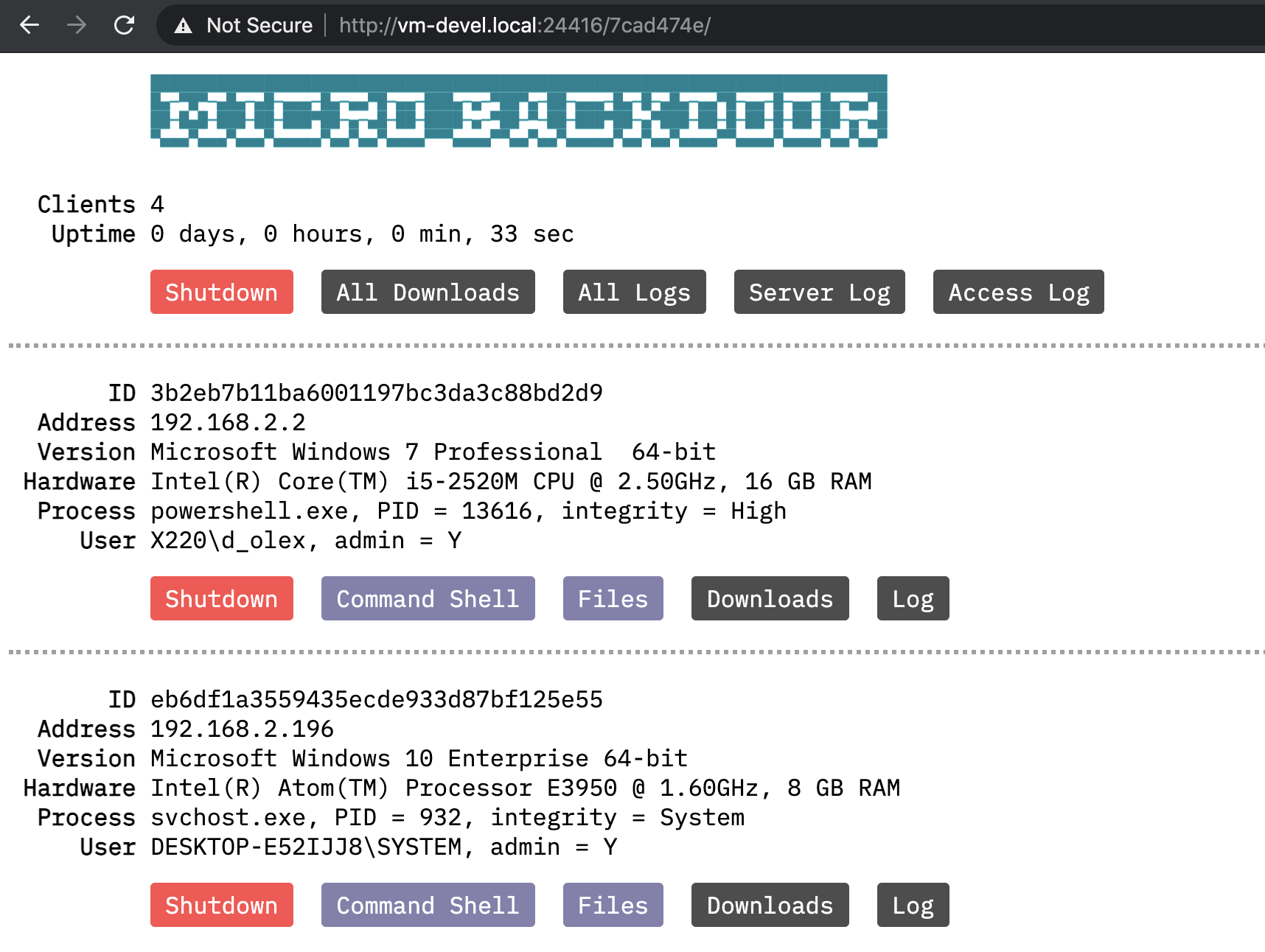
Main web interface page with connected clients list:
<img src=" width="858">
Command shell page:
<img src=" width="858">
File manager page:
<img src=" width="859">
Configuring the server
Micro Backdoor 服务端 代码 is located in ./server directory, you have to upload its contents to the remote machine where you planning to run the 服务端.
Directory contents:
* server.py − Ser file
* config.py − Ser file
* access.log − Access log of embedded web 服务端 used for admin interface
* server.log − 服务端 log file with messages related to connected clients
* server.crt − 服务端 RSA certificate used to encrypt 客户端 communication
* server.key − 服务端 RSA private key, see above
* downloads/ − Directory to store files downloaded from the clients
* logs/ − Directory with indi command line history files for each 客户端
* static/ − Directory with static files needed for admin interface
Python program server.py has a lot of command line options used to configure and manage the 服务端, interact with connected clients, etc. Here’s how to get to get the ser:
1) Install needed dependencies:
2) Install and run Redis database server:
3) Edit config.py file and change default of HTTP_USERS and HTTP_PATH to secure your ser.
4) Generate RSA key pair for new installation of the 服务端, it will create server.crt and server.key files:
5) Run the server as background process:
6) Shutdown the server:
Alternatively, you can run server.py with no command line options specified to start the 服务端 as interacti process (useful for debugging). After the 服务端 was started you can open admin interface in the web browser, its URL is composed from HTTP_ADDR, HTTP_PORT and HTTP_PATH options of config.py configuration file.
Also, there’s some options to interact with connected clients from the command line.
Retrieve and print list of the currently connected clients:
Execute some command on the connected 客户端:
Upload some file to the connected 客户端:
Download some file from the connected 客户端:
Update Micro Backdoor on the client:
Using Python API
As it was mentioned abo Backdoor 服务端 is also pro Python API to interact with connected clients which is quite useful for automation and scripting purposes. Here's some examples how to use this API.
Obtain and print connected clients list:
Execute console command on the client:
Work with the file system of the 客户端:
Execute WMI queries on the client:
Deploying the server
For easy deployment of Micro Backdoor ser's Fabric scenario located in fabfile.py Python script. To deploy the 服务端 to the remote Linux host you have to perform the following steps.
1) Edit .ssh_config file located in the project directory and add your ser there, for example:
2) Run ./server.py --keys on your local machine to generate RSA key pair for secure communication between Micro Backdoor 客户端 and 服务端.
3) Run fab deps:host=my-server command to connect to the remote host my-server over the SSH and install needed dependencies.
4) Run fab deploy:host=my-server command to copy needed files to the remote host my-server and run the server.
5) You also can run fab stop to stop running server, fab start to start it and fab uninstall to shutdown and remove its files form the remote host.
Building Docker container
You also can run Micro Backdoor ser Docker container with SSH and Redis servers included. To install docker on Ubuntu just run sudo apt-get install docker.io, for others distributives and operating systems please refer to official documentation.
Before building the container you need to run ./server.py --keys on your local machine to generate RSA key pair for secure communication between Micro Backdoor 客户端 and 服务端. Then you have to cd into the docker directory and run make to build docker image and start the container. To stop running container you can press Ctrl+C and use make start/make stop commands to run it in the background, make rm to remo and make rmi to remo. To ssh into the running container run make shell and enter the password specified in docker/makefile.conf file ("acab" without quotes by default).
NOTE: Before building docker container please ensure that exposed TCP ports specified in docker/makefile.conf are the same as CLIENT_PORT and HTTP_PORT port numbers specified in config.py of the server.
Configuring the client
Micro Backdoor 客户端 consists from the binary part used to implement backdoor functionality and JScript wrapper combined with the shellcode used to run and deliver the binary part in file-less way.
⚠️ JScript and PowerShell 代码 used in 客户端 dropper is easily detectable by most of AV/EDR products, you should consider to modify it or use other methods to deliver the binary part of the 客户端
First, you have to configure the binary using ./client_builder.py command line program, it operates with default configuration specified in ./ser.py file mentioned in previous part of the document.
Install Python pefile library:
Configure the client binary:
Also, you can specify client_amd64.dll file to use x86_64 of the client, or client_debug.dll/client_amd64_debug.dll to use debug build of the 客户端 that prints diagnostic messages into the standard Windows debug output. Before running client_builder.py you need to generate RSA key pair, see Configuring the ser of this document.
You can use configured 客户端 binary with your own delivery 工具: exploit, reflecti, etc. Or you can generate JScript 客户端 dropper:
Please note, that JScript/PowerShell reflecti generated by client_encoder.py is working only with 32-bit of the 客户端 binary on both 32-bit and 64-bit Windows targets. 64-bit 客户端 binaries are provided only for con in case if you need to use them with your own loaders and tools.
After the dropper.js was generated you can deploy it on your targets. In Windows command line you can run JScript files by running cscript.exe dropper.js. Or you can just double click JS file in Windows Explorer to run the dropper. Micro Backdoor 客户端 provides persistence within current user account used to run the dropper, it can work with any pri and medium integrity level.
De by
Dmytro Oleksiuk (aka Cr4sh)
<br/>
<br/>
项目信息
开发语言:C++
Star 数:622
技术要点
该项目属于黑客技术方向的开源资源,代码结构清晰,适合安全研究人员学习参考。项目围绕Small and con C2 工具 for Windows targets展开,提供了可运行的实现,对理解相关安全机制、工具原理与攻防技术具有较高的研究价值。
从技术实现角度看,此类项目的核心在于对底层原理的深入理解与工程化落地。开发者在研究过程中可以结合官方文档与社区讨论,梳理项目的初始化流程、核心模块职责与数据流转,逐步掌握其中的技术细节与设计思路。
使用与学习建议
1. 下载源码压缩包,解压到本地环境。
2. 根据项目类型准备对应的运行环境与依赖。
3. 按照 README 中的步骤完成配置与部署。
4. 在隔离的测试环境中运行验证,避免影响生产系统。
免责声明
本资源来源于开源社区,仅供安全研究、技术学习与合法授权范围内的攻防演练使用,请勿用于任何非法或侵害他人权益的用途。使用本项目产生的一切后果由使用者自行承担。
| 资源标题 | MicroBackdoor - Small and convenient C2 tool for Windows targets |
| 所属分类 | 黑客技术 |
| 发布作者 | admin |
| 发布时间 | 2026-10-05 22:17:31 |
| 下载权限 | 免费下载 |
| 附件数量 | 2 个下载链接 |
| 浏览次数 | 143 |
| 讨论数量 | 0 |
| 主题状态 | 正常讨论中 |