 黑客技术
点击放大
hackingtool - ALL IN ONE Hacking Tool For Hackers
项目说明
<di="center">
<img src="images/logo.svg" alt="HackingTool" width="600">
AI-guided, all-in-one toolkit for authorized security testing
215 curated tools across 21 categories — recon, OSINT, web, wireless, phishing,
forensics, post-exploitation and more — with an **AI layer that turns plain English
into the right 工具 and the exact command**.
Built for penetration testers · red teamers · blue-team/SOC and DFIR analysts ·
OSINT researchers · bug-bounty hunters · CTF players · security researchers and
students — all working legally, on systems they own or are authorised to test.
<a href=" target="_blank" rel="noopener noreferrer"><img src=" alt="Z4nzu/hackingtool | Trendshift" width="250" height="55"/></a> <a href=" target="_blank" rel="noopener noreferrer"><img src=" alt="Z4nzu/hackingtool | Trendshift daily" width="250" height="55"/></a> <a href=" target="_blank" rel="noopener noreferrer"><img src=" alt="Z4nzu/hackingtool | Trendshift weekly" width="250" height="55"/></a>
<br/><br/>
 ![Python]() ![Stars]() ![Forks]() ![Issues]() ![Last Commit]() 
<br/>
![]() ![]() ![]() ![]() ![]()
<br/>
<a href="#installation"><img src=" alt="Install Now"></a> <a href="docs/HOW-TO-USE.md"><img src=" alt="How to Use"></a> <a href="docs/TOOLS.md"><img src=" alt="工具 Catalog"></a> <a href="#support--sponsor"><img src=" alt="Sponsor"></a>
</div>
---
Contents
- From source with pipx (recommended)
- For de
- Docker
- Optional runtimes
- Command reference
- 🔎
/find — a 工具 for a need you don't have yet- 🎯
/goal — plan an objective, run it one step at a time- 🧠 Recommendations — say what you want in plain English
- 🏷 Tags and search
- ▶ Background panes (tmux)
- ⚙ Settings and the AI layer
- 📋 Headless engagements
---
Why hackingtool
and it maps your intent to the right tools, hands you the exact documented command,
plans an objective step by step, then summarizes findings and drafts an engagement
report. Bring your own key or run a local model — nothing auto-executes and nothing
is fabricated.
hunting down Git repos; a fixed tag taxonomy (63 tags in use) makes every 工具
disco.
/find searches your catalog first, then theGitHub API, and shows real maintained projects with the reason each was ranked.
curl | bash, downloads pinned +SHA-256 , list-form
subprocess, no forced sudo, andsigned releases with an SBOM.
forensics/IR — all on authorized targets only.
<di="center">
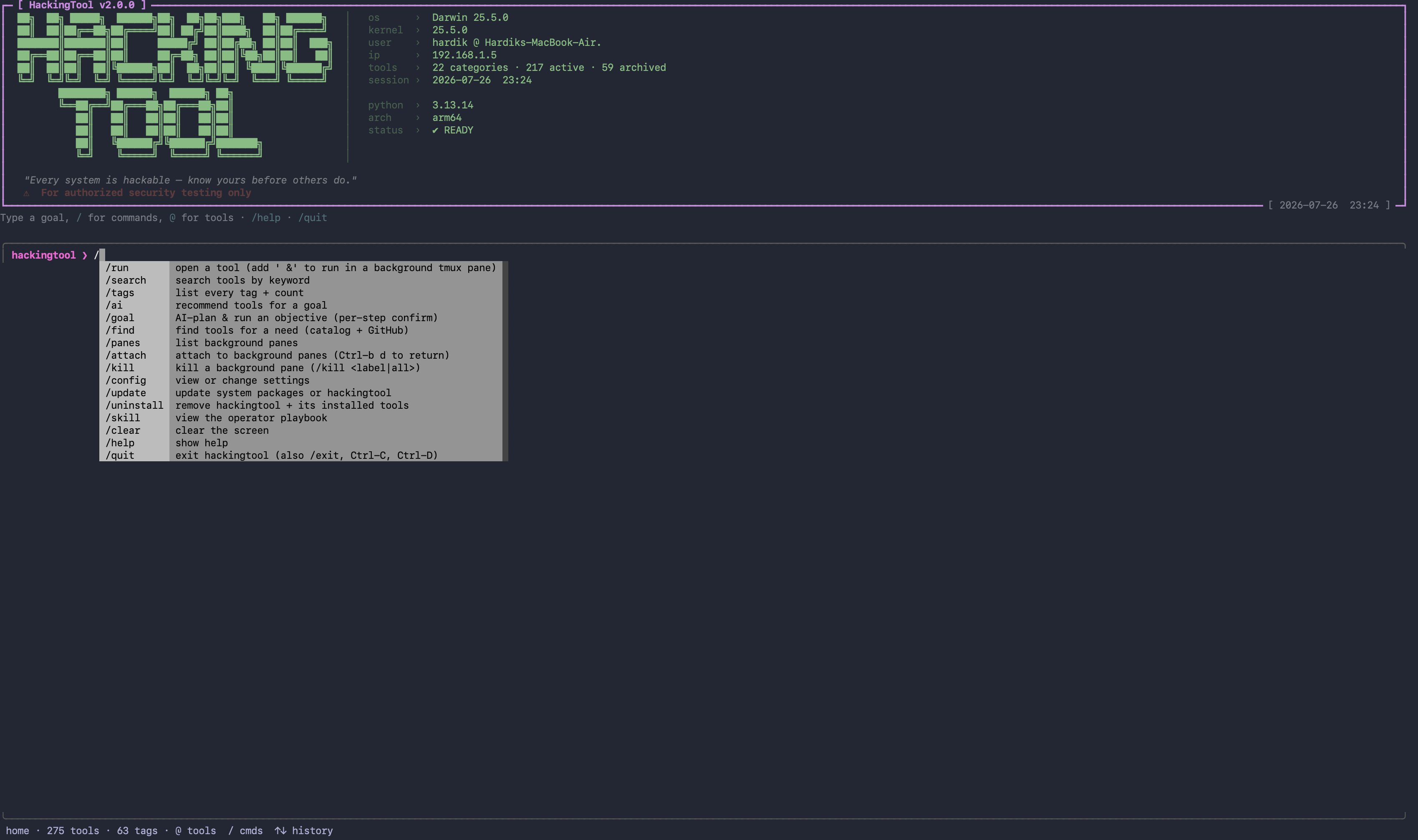
<img src="images/screenshots/1.png" alt="hackingtool console: banner with li readout and the / command palette" width="900">
<br/>
<sub>The console on launch — li readout, and <代码>/</代码> opens the command palette.</sub>
</div>
---
Tool Categories
215 tools across 21 categories — the full list, with links and tags, is in
docs/TOOLS.md.
<di="center">
| # | Category | Tools | | # | Category | Tools |
|:---:|---|:---:|---|:---:|---|:---:|
| 1 | 🛡 Anonymously Hiding Tools | 5 | | 12 | 🔁 Reverse engineering tools | 10 |
| 2 | 🔍 Information gathering tools | 26 | | 13 | ⚡ DDOS Attack Tools | 7 |
| 3 | 📚 Wordlist Generator | 8 | | 14 | 🖥 Remote Administrator Tools (RAT) | 4 |
| 4 | 📡 Wireless attack tools | 17 | | 15 | 🧪 XSS Attack Tools | 6 |
| 5 | 💉 SQL Injection Tools | 7 | | 16 | 🖼 Steganography Tools | 10 |
| 6 | 🎣 Phishing attack tools | 13 | | 17 | 🏢 Acti Tools | 10 |
| 7 | 🌐 Web Attack tools | 23 | | 18 | ☁ Cloud Security Tools | 7 |
| 8 | 🔧 Post exploitation tools | 15 | | 19 | 📱 Mobile Security Tools | 6 |
| 9 | 🕵 Forensic tools | 12 | | 20 | ✨ Other tools | 10 |
| 10 | 📦 Payload creation tools | 6 | | 21 | 🔑 Password / Hash Cracking | 7 |
| 11 | 🧰 Exploit framework | 6 | | | | |
</div>
<sub>59 further entries are archived (unmaintained or dead upstream) and hidden unless
you set show_archived true via /config. The in-app header counts 22 categories /
217 tools because it also counts the built-in Update / Uninstall menu.</sub>
---
Installation
Requires Python 3.10+ on Linux or macOS (Kali, Parrot, Debian/Ubuntu, Arch,
…). Windows is not supported — the app tells you so and exits. No curl | bash:
every path below is a standard, install.
From source with pipx (recommended)
pipx installs hackingtool into its own isolated en
and puts the hackingtool command on your PATH, so you can launch it from any
directory.
No pipx yet?
Open a new shell after pipx ensurepath so the PATH change takes effect.
To update later: git pull && pipx install . --force. To remove it:pipx uninstall hackingtool.
<details>
<summary>Alternative: <代码>uv 工具 install .</代码> (same result, uses u of pipx)</summary>
</details>
<details>
<summary>Alternati venv + pip (no PATH changes)</summary>
The command is only on your PATH while that venv is activated.
</details>
For de
uv creates the and installs e frompyproject.toml / uv.lock in one step:
No uv yet? pipx install uv (or see the
u docs).
Contributing? make setup wires the pre-push hook and make check runs the full
gate (lint + tests + catalog ). See CONTRIBUTING.md.
Docker
Pull and run the published image:
Or build it locally from a checkout:
<!-- Hidden until these distribution channels are li when the package
is published to PyPI and the .deb is attached to a release.
pipx / pip from PyPI
Debian / Ubuntu / Kali (.deb)
Grab the .deb from the latest release:
-->
Optional runtimes
Some indi tools need a language runtime to install/run; the core app doesn't.
| Dependency | | Needed for |
|---|---|---|
| Go | 1.21+ | nuclei, ffuf, amass, httpx, katana, dalfox, gobuster, subfinder |
| Ruby | any | haiti, e |
| tmux | any | background panes (/run … &, /panes, /attach) |
| Docker | any | Mythic, MobSF (optional) |
---
Quick Commands
Launch hackingtool and type. There are only three kinds of input:
| You type | It means | Example |
|---|---|---|
| /… | a command you run | /search subdomain |
| @… | a thing you name | , @tag:osint |
| anything else | plain English "what I want to do" | crack a wifi handshake |
<di="center">
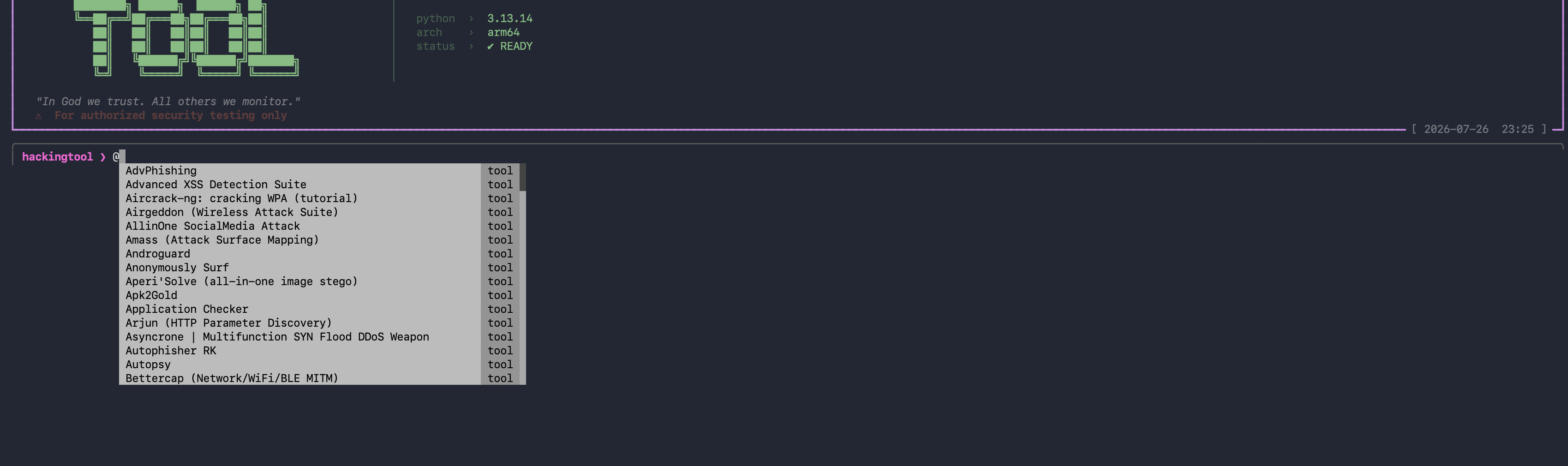
<img src="images/screenshots/4.png" alt="typing @ in the hackingtool console completes 工具 names" width="900">
<br/>
<sub><代码>@</代码> completes 工具 names — <代码>@tag:</代码> completes tags, <代码>/</代码> completes commands.</sub>
</div>
Command reference
| Command | Aliases | What it does |
|---|---|---|
| /run <tool> [args] [&] | /open | open a 工具's menu; with a trailing & it runs in a background tmux pane instead (that's where args are used) |
| /search <keyword> | | search tools by name, description or tag |
| /tags | | list every tag with its tool count |
| /ai <goal> | /recommend, /r | recommend tools for a goal |
| /goal <objective> | | AI-plan an objective and run it step by step, with per-step confirmation |
| /find <need> | /discover | find tools for a need — your catalog first, then GitHub (suggest-only) |
| /panes | /jobs | list background panes |
| /attach | | attach to the background session (Ctrl-b d to return) |
| /kill <label\|all> | | kill one background pane, or all of them |
| /config [key value] | | view/change settings; /config test checks the AI connection, /config github checks the GitHub token |
| /skill | | show the operator playbook |
| /update · /uninstall | /remove | update system packages or hackingtool · remo and its tools |
| /clear | /cls | clear the screen |
| /back | /b | leave the current tool and go back |
| /help | /?, /h | quick reference card |
| /quit | /q, /exit | exit (also q, Ctrl-C, Ctrl-D) |
| @<tool> | | open a tool (case-insensiti fallback) |
| @tag:<tag> | | list and pick from the tools carrying that tag |
Inside a category: 1–N pick a tool · 97 install e not yet installed ·98 archi · 99 back.
Inside a tool: 1 install · 2 run · c ask for the exact command for your goal ·98 project page · 99 back.
<di="center">
<img src="images/screenshots/5.png" alt="hackingtool /help quick reference card" width="900">
<br/>
<sub><代码>/help</代码> — the same card, in the app.</sub>
</div>
On a non-interacti (or without prompt_toolkit) hackingtool falls back to
the classic numbered menu, where / or s searches, t filters by tag, r or a
recommends, ? helps and q quits. Force it with hackingtool --classic.
> New here? docs/HOW-TO-USE.md walks through each of these
> start to finish with numbered steps.
---
Features
🔎 /find — a 工具 for a need you don't have yet
Searches the 215 curated tools first, then the GitHub search API, and ranks the
results explainably. Suggest-only — it ne, installs or runs anything —
and it makes zero model calls.
Press a to keep a result: it is saved to ~/.hackingtool/found.yaml as a
"Discovered tools" entry — title, tags, description, link, and **no install or run
command**, so a discovered entry can ne anything. It shows up in your menu
and in /search next launch.
Out-of-scope asks (jamming, DoS, mass-targeting, malware) are refused **before any
网络 call**, with an authorized alternati one exists. Defensive/DFIR
phrasing is ne.
Works anonymously at 10 GitHub searches/minute; a no-scope, no-permission token
raises that to 30 — see/config github.
🎯 /goal — plan an objective, run it one step at a time
hackingtool drafts a short plan of real commands (with the reason for each step and
an install hint for tools you don't have), asks you to confirm you are authorized
to test the target, then walks the steps: [y] run · [s] skip · [e] edit ·[q] abort. Every step runs list-form — ne a shell — and each goal gets a
timestamped workspace under ~/.hackingtool/goals/ holding plan.json, a
UTC-stamped run.log, and the raw output of each step.
The model is called once, for planning; 工具 output is never fed back to it. With
no model configured, /goal degrades to 工具 recommendations for the same objective.
🧠 Recommendations — say what you want in plain English
Bare text (or /ai) maps intent to tools. The model may only return tags from the
fixed taxonomy, and the catalog resolves tags → tools, so a tool can never be
in; with no model reachable a stdlib keyword matcher answers instead.
<di="center">
<img src="images/screenshots/3.png" alt="hackingtool /ai — pick a common task or describe your own" width="900">
<br/>
<sub><code>/ai</code> — pick one of the common tasks, or type the job in your own words.</sub>
</div>
🏷 Tags and search
/tags prints every tag in use with its live 工具 count; @tag:<name> opens the
tools carrying it; /search <keyword> matches names, descriptions and tags.
<di="center">
<img src="images/screenshots/2.png" alt="hackingtool /tags — every tag with its 工具 count" width="900">
<br/>
<sub><代码>/tags</代码> — 63 tags in use, with the number of tools behind each.</sub>
</div>
▶ Background panes (tmux)
Long scans shouldn't block your console. With tmux installed, /run <tool> … & opens
a labeled window in one detached hackingtool session:
/panes lists them, /attach watches one (Ctrl-b d to come back), /kill <label>
or /kill all stops them, and the status line under the prompt shows ▶ N running.
No tmux? It says so and opens the 工具 inline instead; disable it entirely with/config background_runner off.
⚙ Settings and the AI layer
/config opens a full-screen settings editor (↑↓ move, ←→ change, Enter edit,t test the connection, Esc close); /config <key> <value> sets one key from the
prompt. Settings live in ~/.hackingtool/config.json.
The AI layer is opt-in and bring-your-own-key: an OpenAI-compatible endpoint whenai_base_url + an API key are set, else a local Ollama, else
nothing — every feature degrades to a deterministic offline behaviour instead of
guessing. Your API key is written only to ~/.hackingtool/.env (mode 600), never toconfig.json, and ne back. /config test reports the real failure if a
probe fails.
📋 Headless engagements
The same catalog drives a non-interacti that normalizes 工具 output
into one findings.json:
Out-of-scope targets are flagged and logged before anything runs, and the AI passes
only e findings that exist.
---
Documentation
| Document | What's in it |
|---|---|
| How to use hackingtool | numbered walkthroughs: first run, /find, /goal, /config, background panes, headless mode |
| Tool catalog | every 工具, by category, with links and tags |
| Operator playbook | the charter and grounding rules the AI layer runs under (also /skill) |
| SECURITY.md | disclosure policy, release , threat model |
| CONTRIBUTING.md | catalog-first 工具 additions, the gate your PR must pass |
---
Contributing
New tools, fixes, and docs are all welcome — for authorized security testing only.
> The easy path: most tools are just one YAML entry in
> src/hackingtool/catalog/ — no Python needed. Tags come from a fixed taxonomy, so
> your 工具 is instantly disco and searchable.
| I want to… | Do this |
|---|---|
| 💡 Suggest a tool | Open a Tool Request issue |
| ➕ Add a tool | Add a catalog entry (or a class for custom install/run logic), then open a PR with the template |
| 🐛 Report a bug | Open a Bug report issue |
| 🔒 Report a | Pri — do not open a public issue; see SECURITY.md |
Before opening a PR, run make check (lint + tests + catalog ) and use
the title format [New Tool] Name — Category. The full guide — security rules and the
one-entry catalog walkthrough — is in CONTRIBUTING.md.
<sub>📄 Contributing · Security · Code of Conduct</sub>
---
<!-- Star History — enabled later.
GitHub now restricts anonymous star-history data, so a li can't render.
To enable: open (sign in with a
GitHub token — it's your repo), download the chart image, save it as
images/star-history.png, and uncomment the block below.
Star History
<di="center">
<a href=" src="images/star-history.png" alt="HackingTool Star History Chart" width="640"></a>
</div>
---
-->
Support & Sponsor
hackingtool is free and open-源码. If it saves you time on an engagement or helps
you learn, please consider sponsoring — funding goes to 工具 curation, the AI layer,
and keeping installs safe and current.
<a href=" src=" alt="Sponsor on GitHub"></a> <a href=" target="_blank"><img src=" alt="Buy Me A Coffee"></a>
⭐ Starring the repo is free and helps others discover the project.
Social
![Twitter]() ![GitHub]()
> For authorized security testing only.
> Thanks to all original authors of the tools included in hackingtool.
Your fa 工具 is not listed? Suggest it here
项目信息
开发语言:Python
Star 数:80101
技术要点
该项目属于黑客技术方向的开源资源,代码结构清晰,适合安全研究人员学习参考。项目围绕ALL IN ONE Hacking Tool For Hackers展开,提供了可运行的实现,对理解相关安全机制、工具原理与攻防技术具有较高的研究价值。
从技术实现角度看,此类项目的核心在于对底层原理的深入理解与工程化落地。开发者在研究过程中可以结合官方文档与社区讨论,梳理项目的初始化流程、核心模块职责与数据流转,逐步掌握其中的技术细节与设计思路。
使用与学习建议
1. 下载源码压缩包,解压到本地环境。
2. 根据项目类型准备对应的运行环境与依赖。
3. 按照 README 中的步骤完成配置与部署。
4. 在隔离的测试环境中运行验证,避免影响生产系统。
免责声明
本资源来源于开源社区,仅供安全研究、技术学习与合法授权范围内的攻防演练使用,请勿用于任何非法或侵害他人权益的用途。使用本项目产生的一切后果由使用者自行承担。
| 资源标题 | hackingtool - ALL IN ONE Hacking Tool For Hackers |
| 所属分类 | 黑客技术 |
| 发布作者 | admin |
| 发布时间 | 2026-10-05 22:28:06 |
| 下载权限 | 免费下载 |
| 附件数量 | 2 个下载链接 |
| 浏览次数 | 309 |
| 讨论数量 | 0 |
| 主题状态 | 正常讨论中 |