 黑客技术
点击放大
Ciphey - ⚡ Automatically decrypt encryptions without knowin
项目说明
<p align="center">
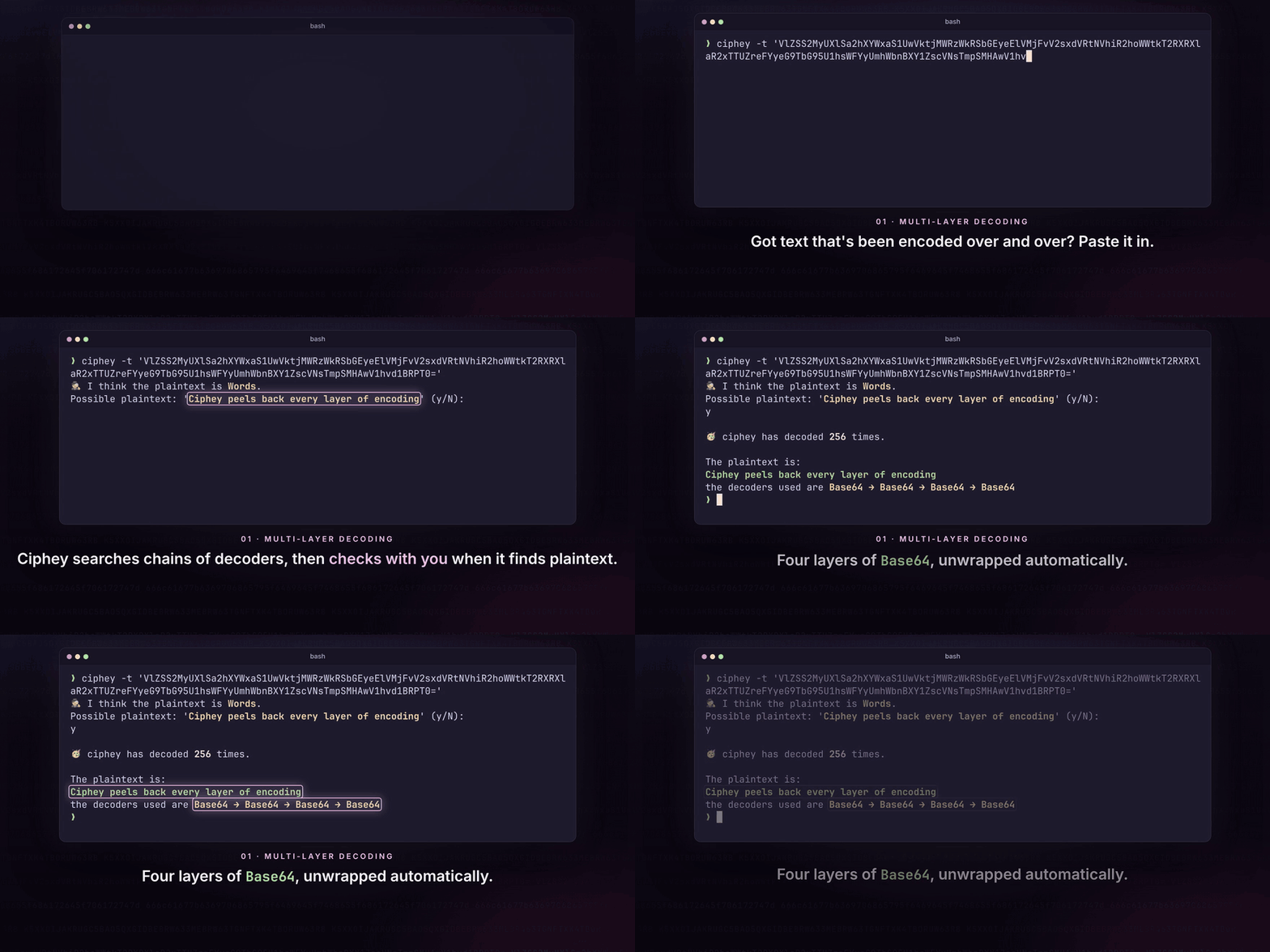
<a href=" src=" alt="Ciphey in a terminal: four layers of Base64 go in, Ciphey asks whether 'Ciphey peels back every layer of encoding' is the plaintext, then prints it with the path Base64 → Base64 → Base64 → Base64. Click to watch the one-minute tour."></a>
</p>
<h1 align="center">Ciphey</h1>
<p align="center">
<b>Paste in text that's been encoded or encrypted. Ciphey works out how and hands you the plaintext.</b><br>
No key, no cipher name, no hints. Base64, hex, Caesar/ROT13, Vigenère, Morse 代码 and 19 more, several layers deep.
</p>
<p align="center">
<a href=" alt="crates.io" src="
<a href=" alt="docs.rs" src="
<a href="LICENSE"><img alt="MIT license" src="
</p>
<p align="center">
<a href="#install">Install</a> ·
<a href="#quick-start">Quick start</a> ·
<a href="#features">Features</a> ·
<a href="#use-it-as-a-library">Library</a> ·
<a href="#mcp-ser">MCP</a> ·
<a href="#documentation">Docs</a> ·
<a href="
<br><sub>▶ <a href=" the one-minute tour</a> (MP4, 61 s)</sub>
</p>
Install
Prebuilt binaries for Linux (x86_64), macOS (Intel and Apple silicon) and Windows (x86_64) are on the releases page, each with a .sha256 checksum.
To build from 源码, you need a Rust toolchain:
Or skip installing: join the Discord 服务端, go to #bots and type $ciphey <your text> ($help lists the commands).
Quick start
The first time you run it, a short setup asks for a colour theme, how you want results shown and whether to use a wordlist, and saves your answers to ~/.ciphey/config.toml.
ciphey --help lists every option.
Features
⚡ Fast
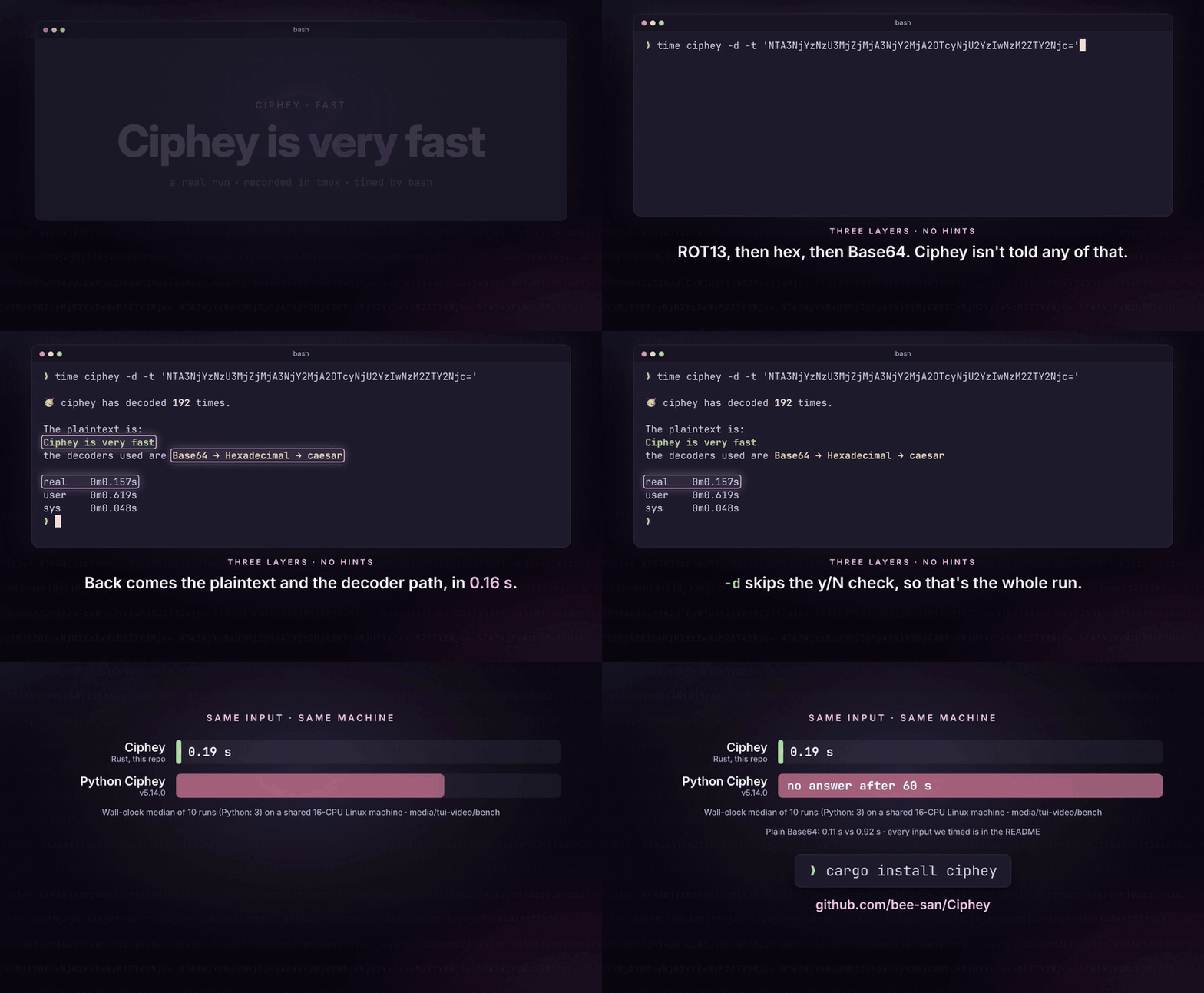
<a href=" src=" alt="A terminal runs time ciphey -d on a Base64 string. Ciphey prints 'Ciphey is very fast' and the path Base64 → Hexadecimal → caesar, and bash reports real 0m0.157s. A chart then compares Ciphey's 0.19 s (the median of 10 runs) with no answer after 60 s for Python Ciphey 5.14.0 on the same input."></a>
<sub>▶ <a href=" the clip</a> (16 s)</sub>
Three layers (ROT13, then hex, then Base64) come off in 0.16 s, measured by bash's time in a real recording. Here is the same comparison for more inputs, against Python Ciphey 5.14, the Ciphey replaces:
| Input | Ciphey | Python Ciphey 5.14 |
| --- | --- | --- |
| Base64 | 0.11 s | 0.92 s |
| Hex → Base64 | 0.14 s | 1.02 s |
| ROT13 → Hex → Base64 | 0.19 s | no answer within 60 s |
| URL → Base64 → Hex | 0.24 s | 1.15 s |
| Base64 ×4 | 0.41 s | 0.78 s |
| Hex → Base32 → Base64 → Hex | 0.54 s | 0.72 s, wrong answer |
| ROT13 → Hex → Base64 → Base32 | 1.15 s | no answer within 60 s |
<sub>Wall-clock median of 10 runs per input (Python Ciphey: 3) on a shared 16-CPU Linux machine, Ciphey at 47bd16d6 with the y/N prompt off and a fresh <代码>$HOME</代码> per run so its cache can't help. Every run was capped at 60 s. The script and raw numbers are in <a href=" on the <代码>media/readme-</代码> branch.</sub>
Where both get the right answer, Ciphey is 1.9 to 8.6 times faster. Where does the speed come from?
~/.ciphey/database.sqlite, so the same input a second time comes back in milliseconds.🧅 Layer after layer, no key needed
Ciphey doesn't need to be told what it's looking at. It searches chains of decoders (Base64 inside hex inside ROT13, four layers of Base64, and so on) and stops at the first candidate that looks like plaintext. By default it shows you that candidate and asks before accepting it (-d turns this off). The clip at the top of this page shows a four-layer decode.
There is also a timer: if Ciphey hasn't found anything after 5 seconds, it stops and says so (-c changes the limit).
It knows 24 decoders and crackers:
| Kind | Decoders |
| --- | --- |
| Base encodings | Base64 (standard and URL-safe), Base32, Base58 (Bitcoin, Flickr, Monero, Ripple), Base91, Base65536, Z85 |
| Other encodings | Hexadecimal, binary, URL (percent-encoding), Morse 代码, Braille, A1Z26, Citrix CTX1 |
| Ciphers | Caesar (including ROT13), ROT47, Atbash, Vigenère (it works out the key itself), rail fence, re text |
| Oddities | Brainfuck (it runs the program), Morse or binary written with other symbols |
More are on the way: #1030 tracks 109 decoders that aren't in yet.
🕵️ Knows what it found
<a href=" src=" alt="Three Ciphey runs. Base64 decodes to 'mount -o username=bee,password=hunter2', identified as a Mount Command With Clear Credentials. Base64 decodes to an otpauth:// link, identified as a Time-Based One-Time Password (TOTP) URI. Hex decodes to 192.168.0.1, identified as an Internet 协议 (IP) Address 4."></a>
<sub>▶ <a href=" the clip</a> (21 s)</sub>
Every candidate plaintext also goes through LemmeKnow, the Rust port of pyWhat, which recognises more than 120 formats. So Ciphey doesn't just decode the string, it tells you what it is: a password in a mount or sshpass command, a TOTP secret, a GitHub token or Stripe key, an IP or MAC address, an email address or URL, a card number, a crypto 钱包, an AWS ARN or a CTF flag.
🎯 Crib and regex mode
<a href=" src=" alt="A terminal runs ciphey -t on a Base64 string with -r 'picoCTF\{'. Ciphey reports 'Regex matched: picoCTF\{', asks about 'picoCTF{b4s3_64_1s_fun}', and prints it as the plaintext, decoded with Base64."></a>
<sub>▶ <a href=" the clip</a> (14.5 s)</sub>
If you know part of the answer (the flag format, a word that has to be in there, how it starts), give it to Ciphey as a regex with -r. The other checkers switch off and only text that matches is accepted. This finds plaintext the English detection would pass over: Base64-encoded picoCTF{b4s3_64_1s_fun} comes back as gibberish by default, but with -r 'picoCTF\{' it's the first match.
--wordlist words.txt works the same way for exact matches: a candidate that is a line in the file counts as plaintext.
🎨 Made for your terminal
The first-run setup lets you pick a colour theme (Capptucin, Darcula, GirlyPop, the default, or your own RGB ) and choose between being asked about each plaintext or getting a list of candidates at the end. You can see it in the tour from 0:32. E is saved to ~/.ciphey/config.toml, which you can edit later.
📚 Library first
The ciphey binary is a thin wrapper around the ciphey crate. The Discord bot uses it as well, and so can your 代码.
Use it as a library
perform_cracking runs the whole search, as the ciphey binary does:
This prints hello there general ().
One decoder
If you know what you're looking at, call that decoder. Each one is a function in ciphey::decoders: encodings come back decoded, ciphers are cracked, and the ones that take a key can decrypt with yours.
To choose the decoder at run time, decode_with takes its name or an alias, and list_decoders lists them all with their aliases, tags and the key they take:
Nothing is filtered out: you get what the decoder hands on to the search. The candidate Ciphey's plaintext checks accept comes first and carries a detection; if they accept none, you get the decodings unmarked, for you to judge (all 25 Caesar shifts, say, though crackers with many keys hand on only their best few).
Is it plaintext?
detect_plaintext runs the checks the search uses (a regex crib, a wordlist, LemmeKnow, common passwords and English) and says which one accepted the text and what it took it for:
cargo run --example decode tours all of this, and cargo run --example decode -- list lists the decoders.
perform_cracking returns Result<Option<DecoderResult>, CipheyError> on master (#915), and the single-decoder and detection functions are only on master so far. The last release on crates.io (0.12.0) still returns Option<DecoderResult>, so until the next release use the git : ciphey = { git = " }.Config is used for every later call, and the single decoders follow it too (a regex crib, a wordlist). They ne.MCP server (AI assistants)
<a href=" src=" alt="An AI assistant (Kiro CLI) is asked to decode a Base64 string from a CTF challenge. It calls ciphey's decode 工具 over MCP, which returns the plaintext flag{ciphey_speaks_mcp} and the decoders it used, Base64 → Hexadecimal → caesar with key 13. The assistant then answers with the flag. Click to watch the 30-second video."></a>
<sub>▶ <a href=" the video</a> (29.5 s). The chat replays a real Kiro CLI session with ciphey-mcp.</sub>
ciphey-mcp is a Model Context 协议 服务端, so AI assistants such as Claude Desktop and Kiro can decode text with Ciphey. It's behind the mcp feature, so the normal ciphey build doesn't include it:
The mcp feature isn't in a crates.io release yet (0.12.0 is the latest), so until the next one, install from git: cargo install --git ciphey --features mcp --bin ciphey-mcp.
It provides four tools:
decode decodes text when you don't know how it was encoded, and returns the plaintext and the path of decoders used, with keys such as the Caesar shift. Optional arguments: timeout_secs (1 to 30, default 10) and regex, a crib the plaintext must match, such as flag\{.decode_with runs one decoder you choose on text: give it the decoder's id, name or an alias (base64, rot13, xor_single_byte, ...). Without a key it decodes the text, or cracks the cipher by trying every key; with one it decrypts, for ciphers that take a key (13, LEMON, a=5, b=8, rails=3, offset=1). It returns every candidate decoding and whether each passes Ciphey's plaintext check. regex works as for decode.detect_plaintext checks whether text already is plaintext, without decoding it, and says which checker accepted it, what it took it for and, for LemmeKnow's formats, how sure it is. Optional arguments: checkers (any of lemmeknow, password and english, by default all three), sensitivity of the English checker (low, medium or high) and a regex crib.list_decoders lists the encodings and ciphers Ciphey supports, with the ids and aliases decode_with takes and the key format of each cipher that takes one.A decode result looks like this. status is decoded, not_found or timed_out.
decode_with with {"decoder": "rot13", "text": "Uryyb jbeyq"} gives the result below. status is plaintext_found, no_plaintext (none of the candidates passed the check, so judge them yourself) or no_candidates (the text isn't in that decoder's format). A result holds at most 100 candidates and 65,536 characters of their text; total_candidates says how many there were, and a candidate cut short has truncated set.
detect_plaintext with {"text": "192.168.0.1"} gives:
Every call except list_decoders runs in its own short-li. Input is limited to 65,536 characters (keys too) and regexes to 1,000. A decode searches for at most 30 seconds and may use 1 GiB of memory; a decode_with call may run for 30 seconds and a detect_plaintext call for 10, with 256 MiB each. At most two decodes and four other calls run at once. The ser't read or write ~/.ciphey, so there's no config file and no cache.
Claude Desktop
Open Settings → De → Edit Config, add the server to claude_desktop_config.json, then restart Claude Desktop. Use the full path printed by which ciphey-mcp (where ciphey-mcp on Windows, for example C:\\Users\\you\\.cargo\\bin\\ciphey-mcp.exe), because Claude Desktop may not see your shell's PATH.
Kiro
Or add the entry below to ~/.kiro/settings/mcp.json (all projects) or .kiro/settings/mcp.json (one project).
Other clients
Most MCP clients take the same mcpServers entry: a stdio ser by ciphey-mcp with no arguments.
Good to know
-r) or a wordlist helps a lot.~/.ciphey/database.sqlite to clear the cache.#coded-messages on Discord.Documentation
docs/ folder, including an o, the architecture, how the A* search works and how plaintext is identifiedContributing
Bug reports, ideas and pull requests are welcome in issues. A new decoder is a good first contribution: pick one from #1030, and copy the shape of an existing one in src/decoders/. You can also sponsor the project.
<a href=" src=" alt="A of the people who ha to Ciphey"></a>
Credits
media/tui-video on the media/readme- branch.AI use
We use AI for 2 things:
1. The TUI is entirely vibe coded.
2. I made AI spend hours researching every single CTF challenge out there. It created a list of 15,071 CTFs. It then went through every single CTF and looked for writeups. In those writeups it looked for anything related to encoding / decoding. It then created tests out of those. This enabled us to increase our testing co and make sure all CTF encoding / decoding challenges are solvable with this 工具.
License
MIT. See LICENSE.
项目信息
开发语言:Rust
Star 数:21652
技术要点
该项目属于黑客技术方向的开源资源,代码结构清晰,适合安全研究人员学习参考。项目围绕⚡ Automatically decrypt encryptions without knowing the key or cipher, decode encodings, and crack hashes ⚡展开,提供了可运行的实现,对理解相关安全机制、工具原理与攻防技术具有较高的研究价值。
从技术实现角度看,此类项目的核心在于对底层原理的深入理解与工程化落地。开发者在研究过程中可以结合官方文档与社区讨论,梳理项目的初始化流程、核心模块职责与数据流转,逐步掌握其中的技术细节与设计思路。
使用与学习建议
1. 下载源码压缩包,解压到本地环境。
2. 根据项目类型准备对应的运行环境与依赖。
3. 按照 README 中的步骤完成配置与部署。
4. 在隔离的测试环境中运行验证,避免影响生产系统。
免责声明
本资源来源于开源社区,仅供安全研究、技术学习与合法授权范围内的攻防演练使用,请勿用于任何非法或侵害他人权益的用途。使用本项目产生的一切后果由使用者自行承担。
| 资源标题 | Ciphey - ⚡ Automatically decrypt encryptions without knowin |
| 所属分类 | 黑客技术 |
| 发布作者 | admin |
| 发布时间 | 2026-10-05 22:28:32 |
| 下载权限 | 免费下载 |
| 附件数量 | 2 个下载链接 |
| 浏览次数 | 520 |
| 讨论数量 | 0 |
| 主题状态 | 正常讨论中 |