 安全软件
点击放大
restler-fuzzer - RESTler is the first stateful REST API fuzzing too
项目说明
RESTler
What is RESTler?
RESTler is the *first stateful REST API fuzzing 工具* for automatically
testing cloud services through their REST APIs and finding security and
reliability bugs in these services. For a gi service
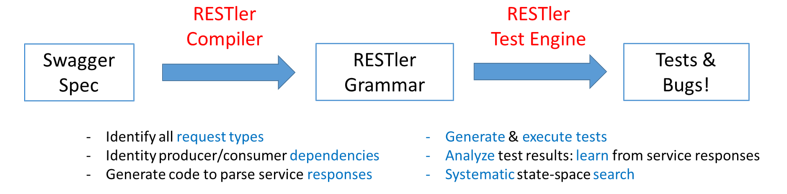
with an OpenAPI (formerly Swagger) specification, RESTler analyzes its entire specification,
and then generates and executes tests that exercise the service through its REST API.
RESTler intelligently infers producer-consumer dependencies among request types from the OpenAPI definition.
During testing, it checks for specific classes of bugs
and dynamically learns how the service behaves from prior service responses.
This intelligence allows RESTler to explore deeper service states
reachable only through specific request sequences and to find more bugs.
RESTler is described in these peer-re research papers:
1. RESTler: Stateful REST API Fuzzing (ICSE'2019)
2. Checking Security Properties of Cloud Service REST APIs (ICST'2020)
3. Differential Regression Testing for REST APIs (ISSTA'2020)
4. Intelligent REST API Data Fuzzing (FSE'2020)
If you use RESTler in your research, please cite the (default) ICSE'2019 paper (BibTeX).
RESTler includes multiple test generation strategies. In order to get a comprehensi view w.r.t. to (i) efficiency
(i.e., how quickly can RESTler find crashes) and (ii) effecti
(i.e., how many crashes can RESTler find in a give time frame),
we recommend comparing against all documented fuzzing_mode(s)
because each one provides a different trade-off between breadth and depth of state space exploration.
We also recommend running test mode before any fuzzing, as described below,
to discover and fix setup issues (e.g. adding required pre-requisite parameter to the dictionary) prior to fuzzing.
RESTler was created at Microsoft Research and is still under acti.
For an o and demo on how to get started, see Webinar - Fuzzing to Improve the Security and Reliability of Cloud Services.
!RESTler architecture
Build Status
![Build Status]()
Setting up RESTler
RESTler was designed to run on 64-bit machines with Windows or Linux. Experimental support for macOS is also enabled.
Build instructions
#### Docker
In the root of this repo, run
The resulting docker container will ha a in directory /RESTler/restler with main binary Restler.
You can then use this docker image as basis to add the application under test to execute fuzzing inside isolated docker containers.
#### Local
Prerequisites: Install Python 3.12.8 and
.NET 8.0, for your appropriate OS.
Create a directory where you'd like to place the RESTler binaries:
Switch to the repo root directory and run the following Python script:
Note: if you get nuget error NU1403 when building, a quick workaround is to clear your cache with this command
Using RESTler
RESTler runs in 4 main modes (in order):
1. Compile: from an OpenAPI JSON or YAML definition (and optionally examples), generate a RESTler grammar. See Compiling.
2. Test: execute quickly all of the endpoints+methods in a compiled RESTler grammar for debugging the test setup and compute what parts of the OpenAPI definition are covered. This mode is also called a *smoketest*.
See Testing. To use custom test 引擎 settings, see Test 引擎 Settings.
3. Fuzz-lean: execute once every endpoint+method in a compiled RESTler grammar with a default set of checkers to see if bugs can be found quickly. See Fuzzing.
4. Fuzz: bug hunting - explore a RESTler fuzzing grammar in smart breadth-first-search mode (deeper search mode) for finding more bugs.
Warning: This type of fuzzing is more aggressive and may create outages in the service under test if the service is poorly implemented (e.g., fuzzing might create resource leaks, perf degradation, backend corruptions, etc.).
See Fuzzing.
Quick Start
For a quick intro with simple examples, see this Tutorial.
To quickly try RESTler on your API, see Quick Start.
Bugs found by RESTler
There are currently two categories of bugs found by RESTler.
When a bug is found, RESTler reports bugs triaged in bug buckets, and provides a replay log that can be used to reproduce the bug (see Replay).
Ad Topics
For tips on using RESTler effectively, please see Best Practices and Improving API Co.
See also these Frequently Asked Questions.
If you're interested in using RESTler at scale as part of your CI/CD pipeline, check out
the REST API Fuzz Testing self-hosted service.
Questions
If you have a request/suggestion/question, please file an issue.
See Contributing.md for instructions.
Contributing
This project welcomes contributions and suggestions. Most contributions require you to
agree to a Contributor License Agreement (CLA) declaring that you have the right to,
and actually do, grant us the rights to use your contribution. For details, visit
When you submit a pull request, a CLA-bot will automatically determine whether you need
to provide a CLA and decorate the PR appropriately (e.g., label, comment). Simply follow the
instructions provided by the bot. You will only need to do this once across all repositories using our CLA.
This project has adopted the Microsoft Open 源码 代码 of Conduct.
For more information see the 代码 of Conduct FAQ
or contact with any additional questions or comments.
For more information, see Contributing.md.
Trademarks
This project may contain trademarks or logos for projects, products, or services. Authorized use of Microsoft trademarks or logos is subject to and must follow Microsoft's Trademark & Brand Guidelines. Use of Microsoft trademarks or logos in modified of this project must not cause confusion or imply Microsoft sponsorship. Any use of third-party trademarks or logos are subject to those third-party's policies.
Data collection
The software may collect information about you and your use of the software and send it to Microsoft. Microsoft may use this information to provide services and improve our products and services. You may turn off the telemetry as described in the repository. There are also some features in the software that may enable you and Microsoft to collect data from users of your applications. If you use these features, you must comply with applicable law, including pro appropriate notices to users of your applications together with a copy of Microsoft's privacy statement. Our privacy statement is located at You can learn more about data collection and use in the help documentation and our privacy statement. Your use of the software operates as your consent to these practices.
For more information, see Telemetry.md.
Reporting Security Issues
Security issues and bugs should be reported pri, , to the
Microsoft Security Response Center (MSRC) at
. You should receive a
response within 24 hours. If for some reason you do not, please follow up via
email to ensure we received your original message. Further information,
including the MSRC PGP
key, can be found in the Security TechCenter.
For additional details, see Security.md.
Privacy & Cookies
项目信息
开发语言:Python
Star 数:2953
技术要点
该项目属于安全软件方向的开源资源,代码结构清晰,适合安全研究人员学习参考。项目围绕RESTler is the first stateful REST API fuzzing 工具 for automatically testing cloud services through their REST APIs and finding security and reliability bugs in these services.展开,提供了可运行的实现,对理解相关安全机制、工具原理与攻防技术具有较高的研究价值。
从技术实现角度看,此类项目的核心在于对底层原理的深入理解与工程化落地。开发者在研究过程中可以结合官方文档与社区讨论,梳理项目的初始化流程、核心模块职责与数据流转,逐步掌握其中的技术细节与设计思路。
使用与学习建议
1. 下载源码压缩包,解压到本地环境。
2. 根据项目类型准备对应的运行环境与依赖。
3. 按照 README 中的步骤完成配置与部署。
4. 在隔离的测试环境中运行验证,避免影响生产系统。
免责声明
本资源来源于开源社区,仅供安全研究、技术学习与合法授权范围内的攻防演练使用,请勿用于任何非法或侵害他人权益的用途。使用本项目产生的一切后果由使用者自行承担。
| 资源标题 | restler-fuzzer - RESTler is the first stateful REST API fuzzing too |
| 所属分类 | 安全软件 |
| 发布作者 | admin |
| 发布时间 | 2026-10-05 22:29:09 |
| 下载权限 | 免费下载 |
| 附件数量 | 2 个下载链接 |
| 浏览次数 | 379 |
| 讨论数量 | 0 |
| 主题状态 | 正常讨论中 |