 安全软件
点击放大
megalinter - 🦙 MegaLinter analyzes 50 languages, 22 formats, 21
项目说明
<!-- markdownlint-disable MD013 MD033 MD041 -->
<!-- header-intro-start -->
<!-- header-intro-end -->
<!-- header-logo-start -->
<di="center">
<a href=" target="blank" title="Visit MegaLinter Web Site">
<img src=" alt="MegaLinter" min-height="200px">
</a>
</div>
<!-- header-logo-end -->
<!-- mega-linter-title-start -->
MegaLinter, by ![OX Security]()
<!-- mega-linter-title-end -->
<!-- mega-linter-badges-start -->
!GitHub release
![Docker Pulls]()
![Downloads/week]()
![Coding Agents]()
![GitHub stars]()
![MegaLinter]()
![codecov]()
<!-- gh-dependents-info-used-by-start -->
![Generated by github-dependents-info]()<!-- gh-dependents-info-used-by-end -->
![Secured with Trivy]()
![GitHub contributors]()
![GitHub Sponsors]()
![PRs Welcome]()
![Tweet]()
<!-- mega-linter-badges-end -->
<!-- welcome-phrase-start -->
MegaLinter is an open-source tool for CI/CD workflows that analyzes the consistency of your code, IaC, configuration, and scripts in your repository to ensure all your project sources are clean and formatted, no matter which IDE or toolbox is used by your de. Powered by OX Security.
Supports 67 languages, 23 formats, 22 tooling formats, and is ready to use out of the box as a GitHub Action or with any CI system. It is highly configurable and free for all uses.
MegaLinter has nati with popular CI/CD tools and is compliant with most Coding Agents.
<di="center">
<a href=" src=" alt="GitHub" height="40" style="height:40px;:middle;margin:4px"></a>
<a href=" src=" alt="GitLab" height="40" style="height:40px;:middle;margin:4px"></a>
<a href=" src=" alt="Azure" height="40" style="height:40px;:middle;margin:4px"></a>
<a href=" src=" alt="Bitbucket" height="40" style="height:40px;:middle;margin:4px"></a>
<a href=" src=" alt="Jenkins" height="40" style="height:40px;:middle;margin:4px"></a>
<a href=" src=" alt="Drone" height="40" style="height:40px;:middle;margin:4px"></a>
<a href=" src=" alt="Concourse" height="40" style="height:40px;:middle;margin:4px"></a>
<a href=" src=" alt="Docker" height="40" style="height:40px;:middle;margin:4px"></a>
<a href=" src=" alt="SARIF" height="40" style="height:40px;:middle;margin:4px"></a>
<a href=" src=" alt="Grafana" height="40" style="height:40px;:middle;margin:4px"></a>
<a href=" src=" alt="Datadog" height="40" style="height:40px;:middle;margin:4px"></a>
<a href=" src=" alt="New Relic" height="40" style="height:40px;:middle;margin:4px"></a>
<a href=" src=" alt="Elastic" height="40" style="height:40px;:middle;margin:4px"></a>
</div>
<di="center">
<a href=" src=" alt="Claude 代码" height="40" style="height:40px;:middle;margin:4px"></a>
<a href=" src=" alt="Cursor" height="40" style="height:40px;:middle;margin:4px"></a>
<a href=" src=" alt="GitHub Copilot CLI" height="40" style="height:40px;:middle;margin:4px"></a>
<a href=" src=" alt="Codex" height="40" style="height:40px;:middle;margin:4px"></a>
<a href=" src=" alt="Antigravity" height="40" style="height:40px;:middle;margin:4px"></a>
<a href=" src=" alt="OpenCode" height="40" style="height:40px;:middle;margin:4px"></a>
<a href=" src=" alt="Gemini CLI" height="40" style="height:40px;:middle;margin:4px"></a>
<a href=" src=" alt="Windsurf" height="40" style="height:40px;:middle;margin:4px"></a>
<a href=" src=" alt="Cline" height="40" style="height:40px;:middle;margin:4px"></a>
<a href=" src=" alt="Roo 代码" height="40" style="height:40px;:middle;margin:4px"></a>
<a href=" src=" alt="Kilo 代码" height="40" style="height:40px;:middle;margin:4px"></a>
<a href=" src=" alt="Amp" height="40" style="height:40px;:middle;margin:4px"></a>
<a href=" src=" alt="Goose" height="40" style="height:40px;:middle;margin:4px"></a>
<a href=" src=" alt="OpenHands" height="40" style="height:40px;:middle;margin:4px"></a>
<a href=" src=" alt="Qwen 代码" height="40" style="height:40px;:middle;margin:4px"></a>
</div>
<!-- welcome-phrase-end -->
!MegaLinter Presentation GIF
<!-- online-doc-start -->
Before you go further, see the online documentation website, which offers much easier na than this README
<!-- online-doc-end -->
<!-- table-of-contents-start -->
Table of Contents
- Languages
- Formats
- Tooling formats
- Other
- Coding agents (skills)
- Coding Agents (Plugins)
- Assisted installation
- Which to use ?
- GitHub Action
- GitLab CI
- Azure Pipelines
- Single Repository
- Central Repository
- Pull Request Comments
- Detailed Tutorial
- Bitbucket Pipelines
- Jenkins
- Concourse
- Pipeline step
- Use it as a reusable task
- Drone CI
- (Optional) Adjusting trigger rules
- Docker container
- Run MegaLinter locally
- .mega-linter.yml file
- Common
- Acti and deacti
- Filter linted files
- Apply fixes
- Apply fixes issues
- Notes
- Linter specific
- Pre-commands
- Post-commands
- En security
- Secured en
- Secured configuration examples
- Default secured
- Unhide for linters
- CLI lint mode
- Markdown
- reStructuredText
- External Plugins Catalog
- Use external plugins
- Example
- Create your own plugin
- Limitations
- English articles
- French articles
-
- Web Sites
- Linters
- Maintainers
- Contributors
- Open-source teams
- Super-Linter team
- Security
- Performance
- More languages and formats linted
- Automatically apply formatting and fixes
- Run locally
- Reports
- Capabilities
- Additional Reporters
- Enhanced configuration
- Enhanced documentation
- Plugin management
- Simplify architecture and e maintenance
- Impro \& stability
<!-- table-of-contents-end -->
Why MegaLinter
Projects need to contain clean 代码 in order to avoid technical debt, which makes ongoing maintenance harder and more time-consuming.
By using code formatters and code linters, you ensure that your codebase is easier to read and follows best practices, from kickoff through each step of the project lifecycle.
Not all de use linters in their IDEs, which makes 代码 reviews harder and longer to process.
By using MegaLinter, you'll enjoy the following benefits for your team:
Join a continuously growing community: MegaLinter Docker images are pulled hundreds of thousands of times every month.
![MegaLinter Docker pulls per month]()
<!-- quick-start-section-start -->
<!-- markdown-headers
---
title: Quick Start with MegaLinter
description: Setup MegaLinter in 5 minutes thanks to its assisted installation 工具
---
-->
Quick Start
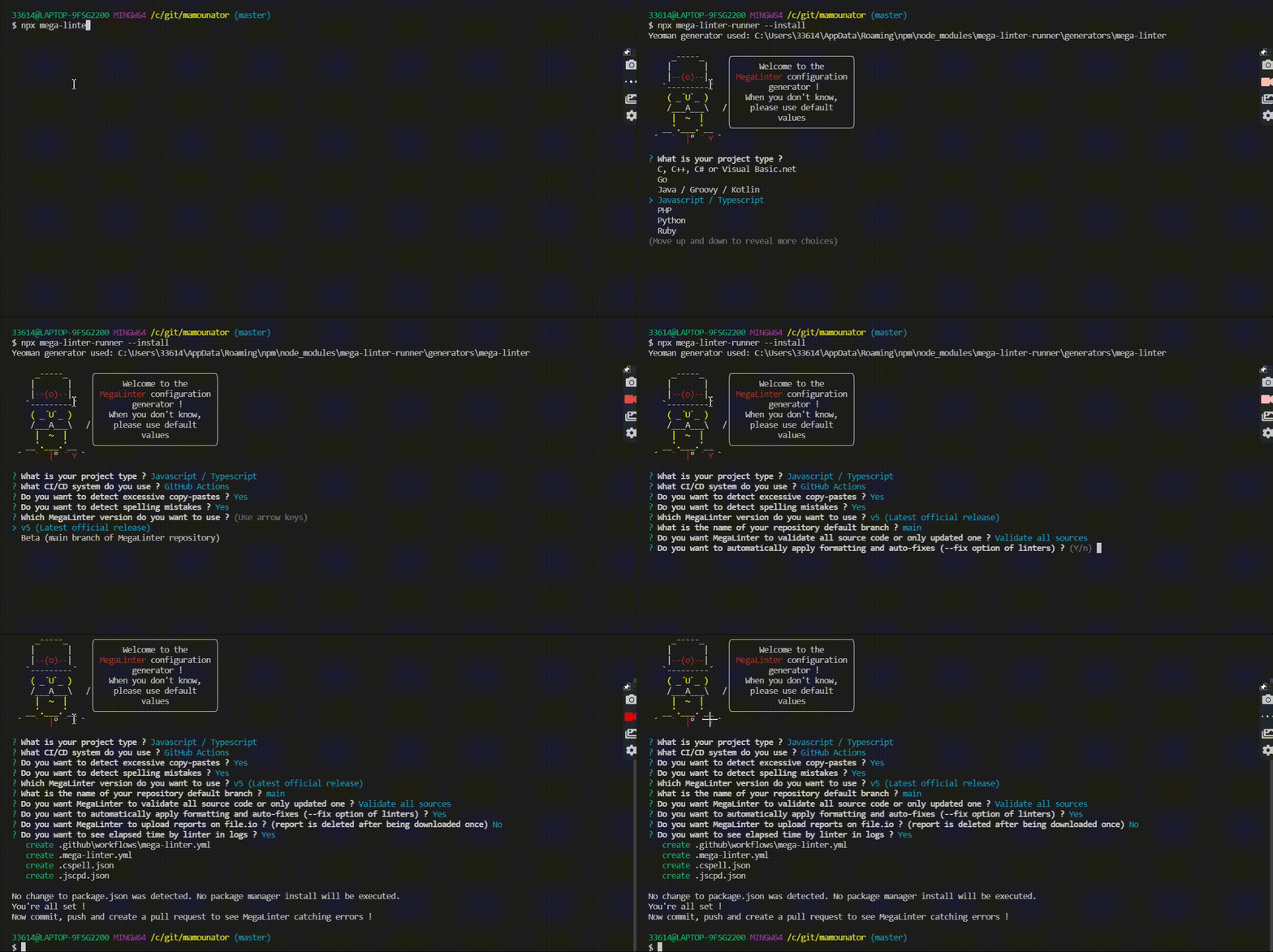
npx skills add oxsecurity/megalinter/skills, then ask your agent to _"setup megalinter"_.npx mega-linter-runner --install to generate configuration files (you need Node.js installed).!Runner Install
Notes:
<!-- # MAJOR-RELEASE-IMPACTED -->
super-linter/super-linter@v3 with oxsecurity/megalinter@v10 in your GitHub Action YAML file, like on this PR).<!-- quick-start-section-end -->
<!-- coding-agents-section-start -->
<!-- markdown-headers
---
title: Use MegaLinter with coding agents
description: Setup, run and fix MegaLinter errors from Claude 代码, Cursor, GitHub Copilot CLI, Codex, Gemini CLI, Antigravity, OpenCode and other coding agents, with token-efficient sub-agents orchestration
---
-->
Coding Agents
MegaLinter is designed to work hand in hand with your coding agent:
<img src=" alt="Claude 代码" height="40" style="height:40px">
<img src=" alt="Cursor" height="40" style="height:40px">
<img src=" alt="GitHub Copilot CLI" height="40" style="height:40px">
<img src=" alt="Codex" height="40" style="height:40px">
<img src=" alt="Antigravity" height="40" style="height:40px">
<img src=" alt="OpenCode" height="40" style="height:40px">
<img src=" alt="Gemini CLI" height="40" style="height:40px">
<img src=" alt="Windsurf" height="40" style="height:40px">
<img src=" alt="Cline" height="40" style="height:40px">
<img src=" alt="Roo 代码" height="40" style="height:40px">
<img src=" alt="Kilo 代码" height="40" style="height:40px">
<img src=" alt="Amp" height="40" style="height:40px">
<img src=" alt="Goose" height="40" style="height:40px">
<img src=" alt="OpenHands" height="40" style="height:40px">
<img src=" alt="Qwen 代码" height="40" style="height:40px">
Get started
Install the MegaLinter agent skills at the root of your repository:
With Claude Code (the skills are copied directly into .claude/skills/):
With another coding agent, replace claude-code with your agent's identifier (cursor, github-copilot, codex, antigravity, opencode... full list in the skills CLI documentation) — or let the CLI detect your installed agents and install the skills for all of them at once:
Then just talk to your agent:
What the skills do
| Skill | Role |
|:---------------------|:--------------------------------------------------------------------------------------------------------------------------------------------------------------------|
| megalinter | Entry point: detects the repository state and orchestrates the other skills in a check → fix → re-check loop (3 iterations max) |
| megalinter-setup | Installs or upgrades MegaLinter using npx mega-linter-runner --install (non-interactive), then refines .mega-linter.yml |
| megalinter-check | Collects errors: watches a MegaLinter CI job (GitHub Actions, GitLab CI, Azure Pipelines, Bitbucket Pipelines) or runs MegaLinter locally with docker/podman |
| megalinter-fix | Fixes errors guided by a per-linter fix guide (one for each of the 124 linters, loaded only when its linter has errors), asks you before disabling rules or pushing |
Sub-agents orchestration
On agents supporting sub-agents (Claude 代码, OpenCode, GitHub Copilot custom agents...), megalinter-setup installs three sub-agents that keep large CI logs and linter outputs out of your main agent's context, and run on low-cost models when possible:
The fix guides combine information generated from the linter descriptors (auto-fix support, rules documentation URLs, MegaLinter tuning ) with curated fix, inline-disable and ignore instructions grounded in each linter's official documentation.
Safety rules
See also the installation page for coding agents, or install e at once as an agent plugin.
<!-- coding-agents-section-end -->
<!-- supported-linters-section-start -->
<!-- markdown-headers
---
title: List of the 100+ supported linters embedded in MegaLinter
description: Full list of all linters for all languages and formats that are a in MegaLinter
---
-->
Supported Linters
All linters are integrated into the MegaLinter Docker image, which is frequently updated with their latest .
<!-- languages-section-start-->
<!-- linters-table-start -->
Languages
| <!-- --> | Language | Linter | Additional |
|:--------------------------------------------------------------------------------------------------------------------------------------------------------------------:|---------------------------------------------------------------------------------------------------------------------|--------------------------------------------------------------------------------------------------------------------------------------------------------------------------------------------------------------------------------------------------------------------------------------------|:---------------------------------------------------------------------------------------------------------------------------------------------------------------------------------------------------------------------------------------------------------------------------------------------------------------------------------------------------------------------------------------------------------:|
| <img src=" alt="" height="32px" class="megalinter-icon"></a> <!-- linter-icon --> | BASH | bash-exec<br/>_BASH_EXEC_ | |
| <img src=" alt="" height="32px" class="megalinter-icon"></a> <!-- linter-icon --> | BASH | shellcheck<br/>_BASH_SHELLCHECK_ | ![GitHub stars]() !sarif |
| <img src=" alt="" height="32px" class="megalinter-icon"></a> <!-- linter-icon --> | BASH | shfmt<br/>_BASH_SHFMT_ | ![GitHub stars]() !formatter |
| <img src=" alt="" height="32px" class="megalinter-icon"></a> <!-- linter-icon --> | C | cppcheck<br/>_C_CPPCHECK_ | !sarif |
| <img src=" alt="" height="32px" class="megalinter-icon"></a> <!-- linter-icon --> | C | cpplint<br/>_C_CPPLINT_ | ![GitHub stars]() |
| <img src=" alt="" height="32px" class="megalinter-icon"></a> <!-- linter-icon --> | C | clang-format<br/>_C_CLANG_FORMAT_ | ![GitHub stars]() !autofix |
| <img src=" alt="" height="32px" class="megalinter-icon"></a> <!-- linter-icon --> | CLOJURE | clj-kondo<br/>_CLOJURE_CLJ_KONDO_ | ![GitHub stars]() !sarif |
| <img src=" alt="" height="32px" class="megalinter-icon"></a> <!-- linter-icon --> | CLOJURE | cljstyle<br/>_CLOJURE_CLJSTYLE_ | ![GitHub stars]() !autofix |
| <img src=" alt="" height="32px" class="megalinter-icon"></a> <!-- linter-icon --> | COFFEE | <s>coffeelint<br/>_COFFEE_COFFEELINT_</s> | <span title="Disabled: CoffeeScript tooling is discontinued, and coffeelint can not honor EXCLUDED_DIRECTORIES (it has no exclusion option and only reads .coffeelintignore from its working directory). The linter will be removed in a future ">🚫</span> ![GitHub stars]() |
| <img src=" alt="" height="32px" class="megalinter-icon"></a> <!-- linter-icon --> | C++ (CPP) | cppcheck<br/>_CPP_CPPCHECK_ | !sarif |
| <img src=" alt="" height="32px" class="megalinter-icon"></a> <!-- linter-icon --> | C++ (CPP) | cpplint<br/>_CPP_CPPLINT_ | ![GitHub stars]() |
| <img src=" alt="" height="32px" class="megalinter-icon"></a> <!-- linter-icon --> | C++ (CPP) | clang-format<br/>_CPP_CLANG_FORMAT_ | ![GitHub stars]() !autofix |
| <img src=" alt="" height="32px" class="megalinter-icon"></a> <!-- linter-icon --> | C# (CSHARP) | dotnet-format<br/>_CSHARP_DOTNET_FORMAT_ | ![GitHub stars]() !formatter |
| <img src=" alt="" height="32px" class="megalinter-icon"></a> <!-- linter-icon --> | C# (CSHARP) | csharpier<br/>_CSHARP_CSHARPIER_ | ![GitHub stars]() !formatter |
| <img src=" alt="" height="32px" class="megalinter-icon"></a> <!-- linter-icon --> | C# (CSHARP) | roslynator<br/>_CSHARP_ROSLYNATOR_ | ![GitHub stars]() !formatter |
| <img src=" alt="" height="32px" class="megalinter-icon"></a> <!-- linter-icon --> | DART | dartanalyzer<br/>_DART_DARTANALYZER_ | ![GitHub stars]() |
| <img src=" alt="" height="32px" class="megalinter-icon"></a> <!-- linter-icon --> | GO | golangci-lint<br/>_GO_GOLANGCI_LINT_ | ![GitHub stars]() !autofix !sarif |
| <img src=" alt="" height="32px" class="megalinter-icon"></a> <!-- linter-icon --> | GO | revive<br/>_GO_REVIVE_ | ![GitHub stars]() !sarif |
| <img src=" alt="" height="32px" class="megalinter-icon"></a> <!-- linter-icon --> | GROOVY | npm-groo<br/>_GROO | ![GitHub stars]() !autofix !sarif |
| <img src=" alt="" height="32px" class="megalinter-icon"></a> <!-- linter-icon --> | JAVA | checkstyle<br/>_JA | ![GitHub stars]() !sarif |
| <img src=" alt="" height="32px" class="megalinter-icon"></a> <!-- linter-icon --> | JAVA | pmd<br/>_JA | ![GitHub stars]() !sarif |
| <img src=" alt="" height="32px" class="megalinter-icon"></a> <!-- linter-icon --> | JA | eslint<br/>_JA | ![GitHub stars]() !autofix !sarif |
| <img src=" alt="" height="32px" class="megalinter-icon"></a> <!-- linter-icon --> | JA | standard<br/>_JA | ![GitHub stars]() !autofix |
| <img src=" alt="" height="32px" class="megalinter-icon"></a> <!-- linter-icon --> | JA | prettier<br/>_JA | ![GitHub stars]() !formatter |
| <img src=" alt="" height="32px" class="megalinter-icon"></a> <!-- linter-icon --> | JA | biome<br/>_JA | ![GitHub stars]() !autofix !sarif |
| <img src=" alt="" height="32px" class="megalinter-icon"></a> <!-- linter-icon --> | JSX | eslint<br/>_JSX_ESLINT_ | ![GitHub stars]() !autofix !sarif |
| <img src=" alt="" height="32px" class="megalinter-icon"></a> <!-- linter-icon --> | JSX | biome<br/>_JSX_BIOME_ | ![GitHub stars]() !autofix !sarif |
| <img src=" alt="" height="32px" class="megalinter-icon"></a> <!-- linter-icon --> | KOTLIN | ktlint<br/>_KOTLIN_KTLINT_ | ![GitHub stars]() !autofix !sarif |
| <img src=" alt="" height="32px" class="megalinter-icon"></a> <!-- linter-icon --> | KOTLIN | detekt<br/>_KOTLIN_DETEKT_ | ![GitHub stars]() !sarif |
| <img src=" alt="" height="32px" class="megalinter-icon"></a> <!-- linter-icon --> | LUA | luacheck<br/>_LUA_LUACHECK_ | ![GitHub stars]() |
| <img src=" alt="" height="32px" class="megalinter-icon"></a> <!-- linter-icon --> | LUA | stylua<br/>_LUA_STYLUA_ | ![GitHub stars]() |
| <img src=" alt="" height="32px" class="megalinter-icon"></a> <!-- linter-icon --> | PERL | perlcritic<br/>_PERL_PERLCRITIC_ | ![GitHub stars]() |
| <img src=" alt="" height="32px" class="megalinter-icon"></a> <!-- linter-icon --> | PHP | phpcs<br/>_PHP_PHPCS_ | ![GitHub stars]() !sarif |
| <img src=" alt="" height="32px" class="megalinter-icon"></a> <!-- linter-icon --> | PHP | phpstan<br/>_PHP_PHPSTAN_ | ![GitHub stars]() !sarif |
| <img src=" alt="" height="32px" class="megalinter-icon"></a> <!-- linter-icon --> | PHP | psalm<br/>_PHP_PSALM_ | ![GitHub stars]() !sarif |
| <img src=" alt="" height="32px" class="megalinter-icon"></a> <!-- linter-icon --> | PHP | phplint<br/>_PHP_PHPLINT_ | ![GitHub stars]() !sarif |
| <img src=" alt="" height="32px" class="megalinter-icon"></a> <!-- linter-icon --> | PHP | php-cs-fixer<br/>_PHP_PHPCSFIXER_ | ![GitHub stars]() |
| <img src=" alt="" height="32px" class="megalinter-icon"></a> <!-- linter-icon --> | POWERSHELL | powershell<br/>_POWERSHELL_POWERSHELL_ | ![GitHub stars]() !autofix |
| <img src=" alt="" height="32px" class="megalinter-icon"></a> <!-- linter-icon --> | POWERSHELL | powershell_formatter<br/>_POWERSHELL_POWERSHELL_FORMATTER_ | ![GitHub stars]() !formatter |
| <img src=" alt="" height="32px" class="megalinter-icon"></a> <!-- linter-icon --> | PYTHON | pylint<br/>_PYTHON_PYLINT_ | ![GitHub stars]() |
| <img src=" alt="" height="32px" class="megalinter-icon"></a> <!-- linter-icon --> | PYTHON | black<br/>_PYTHON_BLACK_ | ![GitHub stars]() !formatter |
| <img src=" alt="" height="32px" class="megalinter-icon"></a> <!-- linter-icon --> | PYTHON | flake8<br/>_PYTHON_FLAKE8_ | ![GitHub stars]() |
| <img src=" alt="" height="32px" class="megalinter-icon"></a> <!-- linter-icon --> | PYTHON | isort<br/>_PYTHON_ISORT_ | ![GitHub stars]() !formatter |
| <img src=" alt="" height="32px" class="megalinter-icon"></a> <!-- linter-icon --> | PYTHON | bandit<br/>_PYTHON_BANDIT_ | ![GitHub stars]() !sarif |
| <img src=" alt="" height="32px" class="megalinter-icon"></a> <!-- linter-icon --> | PYTHON | mypy<br/>_PYTHON_MYPY_ | ![GitHub stars]() |
| <img src=" alt="" height="32px" class="megalinter-icon"></a> <!-- linter-icon --> | PYTHON | nbqa<br/>_PYTHON_NBQA_MYPY_ | ![GitHub stars]() |
| <img src=" alt="" height="32px" class="megalinter-icon"></a> <!-- linter-icon --> | PYTHON | pyright<br/>_PYTHON_PYRIGHT_ | ![GitHub stars]() |
| <img src=" alt="" height="32px" class="megalinter-icon"></a> <!-- linter-icon --> | PYTHON | ruff<br/>_PYTHON_RUFF_ | ![GitHub stars]() !autofix !sarif |
| <img src=" alt="" height="32px" class="megalinter-icon"></a> <!-- linter-icon --> | PYTHON | ruff-format<br/>_PYTHON_RUFF_FORMAT_ | ![GitHub stars]() !formatter |
| <img src=" alt="" height="32px" class="megalinter-icon"></a> <!-- linter-icon --> | R | lintr<br/>_R_LINTR_ | ![GitHub stars]() !sarif |
| <img src=" alt="" height="32px" class="megalinter-icon"></a> <!-- linter-icon --> | RAKU | raku<br/>_RAKU_RAKU_ | ![GitHub stars]() |
| <img src=" alt="" height="32px" class="megalinter-icon"></a> <!-- linter-icon --> | RUBY | rubocop<br/>_RUBY_RUBOCOP_ | ![GitHub stars]() !autofix |
| <img src=" alt="" height="32px" class="megalinter-icon"></a> <!-- linter-icon --> | RUST | clippy<br/>_RUST_CLIPPY_ | ![GitHub stars]() |
| <img src=" alt="" height="32px" class="megalinter-icon"></a> <!-- linter-icon --> | SALESFORCE | code-analyzer-apex<br/>_SALESFORCE_CODE_ANALYZER_APEX_ | ![GitHub stars]() !sarif |
| <img src=" alt="" height="32px" class="megalinter-icon"></a> <!-- linter-icon --> | SALESFORCE | code-analyzer-apexguru<br/>_SALESFORCE_CODE_ANALYZER_APEXGURU_ | ![GitHub stars]() !sarif |
| <img src=" alt="" height="32px" class="megalinter-icon"></a> <!-- linter-icon --> | SALESFORCE | code-analyzer-aura<br/>_SALESFORCE_CODE_ANALYZER_AURA_ | ![GitHub stars]() !sarif |
| <img src=" alt="" height="32px" class="megalinter-icon"></a> <!-- linter-icon --> | SALESFORCE | code-analyzer-lwc<br/>_SALESFORCE_CODE_ANALYZER_LWC_ | ![GitHub stars]() !sarif |
| <img src=" alt="" height="32px" class="megalinter-icon"></a> <!-- linter-icon --> | SALESFORCE | code-analyzer-flow<br/>_SALESFORCE_CODE_ANALYZER_FLOW_ | ![GitHub stars]() !sarif |
| <img src=" alt="" height="32px" class="megalinter-icon"></a> <!-- linter-icon --> | SCALA | scalafix<br/>_SCALA_SCALAFIX_ | ![GitHub stars]() |
| <img src=" alt="" height="32px" class="megalinter-icon"></a> <!-- linter-icon --> | SQL | sqlfluff<br/>_SQL_SQLFLUFF_ | ![GitHub stars]() !autofix !sarif |
| <img src=" alt="" height="32px" class="megalinter-icon"></a> <!-- linter-icon --> | SWIFT | swiftlint<br/>_SWIFT_SWIFTLINT_ | ![GitHub stars]() !autofix !sarif |
| <img src=" alt="" height="32px" class="megalinter-icon"></a> <!-- linter-icon --> | TSX | eslint<br/>_TSX_ESLINT_ | ![GitHub stars]() !autofix !sarif |
| <img src=" alt="" height="32px" class="megalinter-icon"></a> <!-- linter-icon --> | TSX | biome<br/>_TSX_BIOME_ | ![GitHub stars]() !autofix !sarif |
| <img src=" alt="" height="32px" class="megalinter-icon"></a> <!-- linter-icon --> | TYPESCRIPT | eslint<br/>_TYPESCRIPT_ES_ | ![GitHub stars]() !autofix !sarif |
| <img src=" alt="" height="32px" class="megalinter-icon"></a> <!-- linter-icon --> | TYPESCRIPT | ts-standard<br/>_TYPESCRIPT_STANDARD_ | ![GitHub stars]() !autofix |
| <img src=" alt="" height="32px" class="megalinter-icon"></a> <!-- linter-icon --> | TYPESCRIPT | prettier<br/>_TYPESCRIPT_PRETTIER_ | ![GitHub stars]() !formatter |
| <img src=" alt="" height="32px" class="megalinter-icon"></a> <!-- linter-icon --> | TYPESCRIPT | biome<br/>_TYPESCRIPT_BIOME_ | ![GitHub stars]() !autofix !sarif |
| <img src=" alt="" height="32px" class="megalinter-icon"></a> <!-- linter-icon --> | Basic .NET () | dotnet-format<br/>_ | ![GitHub stars]() !formatter |
Formats
| <!-- --> | Format | Linter | Additional |
|:-------------------------------------------------------------------------------------------------------------------------------------------------------------:|---------------------------------------------------------------------------------------|-----------------------------------------------------------------------------------------------------------------------------------------------------------------------------------------------------------------------------------|:-----------------------------------------------------------------------------------------------------------------------------------------------------------------------------------------------------------------------------:|
| <img src=" alt="" height="32px" class="megalinter-icon"></a> <!-- linter-icon --> | CSS | stylelint<br/>_CSS_STYLELINT_ | ![GitHub stars]() !autofix |
| <img src=" alt="" height="32px" class="megalinter-icon"></a> <!-- linter-icon --> | CSS | biome<br/>_CSS_BIOME_ | ![GitHub stars]() !autofix !sarif |
| <img src=" alt="" height="32px" class="megalinter-icon"></a> <!-- linter-icon --> | ENV | doten<br/>_EN | ![GitHub stars]() !autofix |
| <img src=" alt="" height="32px" class="megalinter-icon"></a> <!-- linter-icon --> | GRAPHQL | <s>graphql-schema-linter<br/>_GRAPHQL_GRAPHQL_SCHEMA_LINTER_</s> | <span title="Disabled: graphql-schema-linter is unmaintained (no release or commit since May 2022) and its peer dependency range pins graphql to ^15 || ^16, which blocks the whole GraphQL npm install from moving to graphql v17. Use GRAPHQL_BIOME to lint GraphQL files. The linter will be removed in a future ">🚫</span> ![GitHub stars]() |
| <img src=" alt="" height="32px" class="megalinter-icon"></a> <!-- linter-icon --> | GRAPHQL | biome<br/>_GRAPHQL_BIOME_ | ![GitHub stars]() !autofix !sarif |
| <img src=" alt="" height="32px" class="megalinter-icon"></a> <!-- linter-icon --> | HTML | djlint<br/>_HTML_DJLINT_ | ![GitHub stars]() |
| <img src=" alt="" height="32px" class="megalinter-icon"></a> <!-- linter-icon --> | HTML | htmlhint<br/>_HTML_HTMLHINT_ | ![GitHub stars]() !sarif |
| <img src=" alt="" height="32px" class="megalinter-icon"></a> <!-- linter-icon --> | JSON | jsonlint<br/>_JSON_JSONLINT_ | ![GitHub stars]() |
| <img src=" alt="" height="32px" class="megalinter-icon"></a> <!-- linter-icon --> | JSON | v8r<br/>_JSON_V8R_ | ![GitHub stars]() |
| <img src=" alt="" height="32px" class="megalinter-icon"></a> <!-- linter-icon --> | JSON | prettier<br/>_JSON_PRETTIER_ | ![GitHub stars]() !formatter |
| <img src=" alt="" height="32px" class="megalinter-icon"></a> <!-- linter-icon --> | JSON | npm-package-json-lint<br/>_JSON_NPM_PACKAGE_JSON_LINT_ | ![GitHub stars]() |
| <img src=" alt="" height="32px" class="megalinter-icon"></a> <!-- linter-icon --> | JSON | biome<br/>_JSON_BIOME_ | ![GitHub stars]() !autofix !sarif |
| <img src=" alt="" height="32px" class="megalinter-icon"></a> <!-- linter-icon --> | LATEX | chktex<br/>_LATEX_CHKTEX_ | |
| <img src=" alt="" height="32px" class="megalinter-icon"></a> <!-- linter-icon --> | MARKDOWN | markdownlint<br/>_MARKDOWN_MARKDOWNLINT_ | ![GitHub stars]() !formatter |
| <img src=" alt="" height="32px" class="megalinter-icon"></a> <!-- linter-icon --> | MARKDOWN | markdown-table-formatter<br/>_MARKDOWN_MARKDOWN_TABLE_FORMATTER_ | ![GitHub stars]() !formatter |
| <img src=" alt="" height="32px" class="megalinter-icon"></a> <!-- linter-icon --> | MARKDOWN | rumdl<br/>_MARKDOWN_RUMDL_ | ![GitHub stars]() !formatter !sarif |
| <img src=" alt="" height="32px" class="megalinter-icon"></a> <!-- linter-icon --> | PROTOBUF | protolint<br/>_PROTOBUF_PROTOLINT_ | ![GitHub stars]() !autofix !sarif |
| <img src=" alt="" height="32px" class="megalinter-icon"></a> <!-- linter-icon --> | RST | rst-lint<br/>_RST_RST_LINT_ | ![GitHub stars]() |
| <img src=" alt="" height="32px" class="megalinter-icon"></a> <!-- linter-icon --> | RST | rstcheck<br/>_RST_RSTCHECK_ | ![GitHub stars]() |
| <img src=" alt="" height="32px" class="megalinter-icon"></a> <!-- linter-icon --> | RST | rstfmt<br/>_RST_RSTFMT_ | !formatter |
| <img src=" alt="" height="32px" class="megalinter-icon"></a> <!-- linter-icon --> | XML | xmllint<br/>_XML_XMLLINT_ | !autofix |
| <img src=" alt="" height="32px" class="megalinter-icon"></a> <!-- linter-icon --> | YAML | prettier<br/>_YAML_PRETTIER_ | ![GitHub stars]() !formatter |
| <img src=" alt="" height="32px" class="megalinter-icon"></a> <!-- linter-icon --> | YAML | yamllint<br/>_YAML_YAMLLINT_ | ![GitHub stars]() |
| <img src=" alt="" height="32px" class="megalinter-icon"></a> <!-- linter-icon --> | YAML | v8r<br/>_YAML_V8R_ | ![GitHub stars]() |
Tooling formats
| <!-- --> | Tooling format | Linter | Additional |
|:------------------------------------------------------------------------------------------------------------------------------------------------------------------------:|-------------------------------------------------------------------------------------------------------------|------------------------------------------------------------------------------------------------------------------------------------------------------------------------------------------------------------------------------------------------------------------------------------------|:-------------------------------------------------------------------------------------------------------------------------------------------------------------------------------------------------------------------------------------------------------------------------:|
| <img src=" alt="" height="32px" class="megalinter-icon"></a> <!-- linter-icon --> | ACTION | actionlint<br/>_ACTION_ACTIONLINT_ | ![GitHub stars]() |
| <img src=" alt="" height="32px" class="megalinter-icon"></a> <!-- linter-icon --> | ACTION | zizmor<br/>_ACTION_ZIZMOR_ | ![GitHub stars]() !autofix !sarif |
| <img src=" alt="" height="32px" class="megalinter-icon"></a> <!-- linter-icon --> | ANSIBLE | ansible-lint<br/>_ANSIBLE_ANSIBLE_LINT_ | ![GitHub stars]() !sarif |
| <img src=" alt="" height="32px" class="megalinter-icon"></a> <!-- linter-icon --> | API | spectral<br/>_API_SPECTRAL_ | ![GitHub stars]() !sarif |
| <img src=" alt="" height="32px" class="megalinter-icon"></a> <!-- linter-icon --> | ARM | arm-ttk<br/>_ARM_ARM_TTK_ | ![GitHub stars]() |
| <img src=" alt="" height="32px" class="megalinter-icon"></a> <!-- linter-icon --> | BICEP | bicep_linter<br/>_BICEP_BICEP_LINTER_ | ![GitHub stars]() !sarif |
| <img src=" alt="" height="32px" class="megalinter-icon"></a> <!-- linter-icon --> | CLOUDFORMATION | cfn-lint<br/>_CLOUDFORMATION_CFN_LINT_ | ![GitHub stars]() !sarif |
| <img src=" alt="" height="32px" class="megalinter-icon"></a> <!-- linter-icon --> | DOCKERFILE | hadolint<br/>_DOCKERFILE_HADOLINT_ | ![GitHub stars]() !sarif |
| <img src=" alt="" height="32px" class="megalinter-icon"></a> <!-- linter-icon --> | EDITORCONFIG | editorconfig-checker<br/>_EDITORCONFIG_EDITORCONFIG_CHECKER_ | ![GitHub stars]() |
| <img src=" alt="" height="32px" class="megalinter-icon"></a> <!-- linter-icon --> | GHERKIN | gherkin-lint<br/>_GHERKIN_GHERKIN_LINT_ | ![GitHub stars]() |
| <img src=" alt="" height="32px" class="megalinter-icon"></a> <!-- linter-icon --> | KUBERNETES | kubeconform<br/>_KUBERNETES_KUBECONFORM_ | ![GitHub stars]() |
| <img src=" alt="" height="32px" class="megalinter-icon"></a> <!-- linter-icon --> | KUBERNETES | helm<br/>_KUBERNETES_HELM_ | ![GitHub stars]() |
| <img src=" alt="" height="32px" class="megalinter-icon"></a> <!-- linter-icon --> | KUBERNETES | kubescape<br/>_KUBERNETES_KUBESCAPE_ | ![GitHub stars]() !sarif |
| <img src=" alt="" height="32px" class="megalinter-icon"></a> <!-- linter-icon --> | ROBOTFRAMEWORK | robocop<br/>_ROBOTFRAMEWORK_ROBOCOP_ | ![GitHub stars]() !autofix !sarif |
| <img src=" alt="" height="32px" class="megalinter-icon"></a> <!-- linter-icon --> | SNAKEMAKE | snakemake<br/>_SNAKEMAKE_LINT_ | ![GitHub stars]() |
| <img src=" alt="" height="32px" class="megalinter-icon"></a> <!-- linter-icon --> | SNAKEMAKE | snakefmt<br/>_SNAKEMAKE_SNAKEFMT_ | ![GitHub stars]() !formatter |
| <img src=" alt="" height="32px" class="megalinter-icon"></a> <!-- linter-icon --> | TEKTON | tekton-lint<br/>_TEKTON_TEKTON_LINT_ | ![GitHub stars]() |
| <img src=" alt="" height="32px" class="megalinter-icon"></a> <!-- linter-icon --> | TERRAFORM | tflint<br/>_TERRAFORM_TFLINT_ | ![GitHub stars]() !sarif |
| <img src=" alt="" height="32px" class="megalinter-icon"></a> <!-- linter-icon --> | TERRAFORM | terragrunt<br/>_TERRAFORM_TERRAGRUNT_ | ![GitHub stars]() !autofix |
| <img src=" alt="" height="32px" class="megalinter-icon"></a> <!-- linter-icon --> | TERRAFORM | terraform-fmt<br/>_TERRAFORM_TERRAFORM_FMT_ | ![GitHub stars]() !formatter |
| <img src=" alt="" height="32px" class="megalinter-icon"></a> <!-- linter-icon --> | TERRAFORM | tofu-fmt<br/>_TERRAFORM_TOFU_FMT_ | ![GitHub stars]() !formatter |
| <img src=" alt="" height="32px" class="megalinter-icon"></a> <!-- linter-icon --> | TERRAFORM | tofu-<br/>_TERRAFORM_TOFU_ | ![GitHub stars]() |
Other
| <!-- --> | 代码 quality checker | Linter | Additional |
|:-------------------------------------------------------------------------------------------------------------------------------------------------------------------:|-----------------------------------------------------------------------------------------------------|------------------------------------------------------------------------------------------------------------------------------------------------------------------------------------------------------------------------------------------------|:--------------------------------------------------------------------------------------------------------------------------------------------------------------------------------------------------------:|
| <img src=" alt="" height="32px" class="megalinter-icon"></a> <!-- linter-icon --> | COPYPASTE | jscpd<br/>_COPYPASTE_JSCPD_ | ![GitHub stars]() !sarif |
| <img src=" alt="" height="32px" class="megalinter-icon"></a> <!-- linter-icon --> | REPOSITORY | checkov<br/>_REPOSITORY_CHECKOV_ | ![GitHub stars]() !sarif |
| <img src=" alt="" height="32px" class="megalinter-icon"></a> <!-- linter-icon --> | REPOSITORY | devskim<br/>_REPOSITORY_DE | ![GitHub stars]() !sarif |
| <img src=" alt="" height="32px" class="megalinter-icon"></a> <!-- linter-icon --> | REPOSITORY | dustilock<br/>_REPOSITORY_DUSTILOCK_ | ![GitHub stars]() !sarif |
| <img src=" alt="" height="32px" class="megalinter-icon"></a> <!-- linter-icon --> | REPOSITORY | git_diff<br/>_REPOSITORY_GIT_DIFF_ | ![GitHub stars]() |
| <img src=" alt="" height="32px" class="megalinter-icon"></a> <!-- linter-icon --> | REPOSITORY | betterleaks<br/>_REPOSITORY_BETTERLEAKS_ | ![GitHub stars]() !sarif |
| <img src=" alt="" height="32px" class="megalinter-icon"></a> <!-- linter-icon --> | REPOSITORY | grype<br/>_REPOSITORY_GRYPE_ | ![GitHub stars]() !sarif |
| <img src=" alt="" height="32px" class="megalinter-icon"></a> <!-- linter-icon --> | REPOSITORY | ls-lint<br/>_REPOSITORY_LS_LINT_ | ![GitHub stars]() |
| <img src=" alt="" height="32px" class="megalinter-icon"></a> <!-- linter-icon --> | REPOSITORY | os<br/>_REPOSITORY_OS | ![GitHub stars]() !sarif |
| <img src=" alt="" height="32px" class="megalinter-icon"></a> <!-- linter-icon --> | REPOSITORY | secretlint<br/>_REPOSITORY_SECRETLINT_ | ![GitHub stars]() !sarif |
| <img src=" alt="" height="32px" class="megalinter-icon"></a> <!-- linter-icon --> | REPOSITORY | semgrep<br/>_REPOSITORY_SEMGREP_ | ![GitHub stars]() !sarif |
| <img src=" alt="" height="32px" class="megalinter-icon"></a> <!-- linter-icon --> | REPOSITORY | syft<br/>_REPOSITORY_SYFT_ | ![GitHub stars]() !sarif |
| <img src=" alt="" height="32px" class="megalinter-icon"></a> <!-- linter-icon --> | REPOSITORY | trivy<br/>_REPOSITORY_TRIVY_ | ![GitHub stars]() !sarif |
| <img src=" alt="" height="32px" class="megalinter-icon"></a> <!-- linter-icon --> | REPOSITORY | tri<br/>_REPOSITORY_TRI | ![GitHub stars]() !sarif |
| <img src=" alt="" height="32px" class="megalinter-icon"></a> <!-- linter-icon --> | REPOSITORY | trufflehog<br/>_REPOSITORY_TRUFFLEHOG_ | ![GitHub stars]() |
| <img src=" alt="" height="32px" class="megalinter-icon"></a> <!-- linter-icon --> | REPOSITORY | kingfisher<br/>_REPOSITORY_KINGFISHER_ | ![GitHub stars]() !sarif |
| <img src=" alt="" height="32px" class="megalinter-icon"></a> <!-- linter-icon --> | SPELL | cspell<br/>_SPELL_CSPELL_ | ![GitHub stars]() |
| <img src=" alt="" height="32px" class="megalinter-icon"></a> <!-- linter-icon --> | SPELL | proselint<br/>_SPELL_PROSELINT_ | ![GitHub stars]() |
| <img src=" alt="" height="32px" class="megalinter-icon"></a> <!-- linter-icon --> | SPELL | vale<br/>_SPELL_VALE_ | ![GitHub stars]() |
| <img src=" alt="" height="32px" class="megalinter-icon"></a> <!-- linter-icon --> | SPELL | lychee<br/>_SPELL_LYCHEE_ | ![GitHub stars]() |
| <img src=" alt="" height="32px" class="megalinter-icon"></a> <!-- linter-icon --> | SPELL | codespell<br/>_SPELL_CODESPELL_ | ![GitHub stars]() !autofix |
<!-- linters-table-end -->
<!-- supported-linters-section-end -->
<!-- installation-section-start -->
<!-- markdown-headers
---
title: MegaLinter Installation Guide
description: How to install MegaLinter on Github Actions, Gitlab CI, Azure Pipelines, Jenkins, Concourse, Drone CI or to run locally
---
-->
Installation
<!-- install-agent-skills-section-start -->
<!-- markdown-headers
---
title: Install and use MegaLinter with coding agents
description: Setup and dri from Claude 代码, Cursor, GitHub Copilot CLI, Codex, OpenCode and other coding agents thanks to MegaLinter agent skills
---
-->
Coding agents (skills)
MegaLinter ships agent skills making it easy to drive from coding agents like Claude 代码, Cursor CLI, GitHub Copilot CLI, Codex, Antigravity or OpenCode:
With Claude Code (the skills are copied directly into .claude/skills/):
With another coding agent, replace claude-code with your agent's identifier (cursor, github-copilot, codex, antigravity, opencode... full list in the skills CLI documentation) — or let the CLI detect your installed agents and install the skills for all of them at once:
Then just ask your agent to _"setup megalinter"_ or _"run megalinter and fix the errors"_. The skills handle:
npx mega-linter-runner --install)On coding agents supporting sub-agents (Claude 代码, OpenCode, GitHub Copilot custom agents...), dedicated MegaLinter sub-agents (running on low-cost models) watch CI jobs and digest linter outputs to keep large logs out of your agent's context, and fix several linters in parallel.
<!-- install-agent-skills-section-end -->
<!-- agent-plugins-section-start -->
<!-- markdown-headers
---
title: Install MegaLinter agent plugins
description: Install the MegaLinter skills and sub-agents as a nati on Claude 代码, Cursor, GitHub Copilot, Codex, Gemini CLI and Antigravity
---
-->
Coding Agents (Plugins)
The MegaLinter agent skills are also published as an agent plugin, so a single command installs all four skills at once, and keeps them updated.
Claude Code
The three MegaLinter sub-agents are installed with the plugin, so there is nothing else to set up.
Cursor
Add as a plugin source from Customize → Plugins, then install MegaLinter. The sub-agents ship with the plugin.
GitHub Copilot
Codex
Then install MegaLinter from the /plugins browser.
Gemini CLI and Antigravity
Other coding agents
Every other agent (Windsurf, Cline, Roo 代码, Amp, OpenCode, Goose, OpenHands...) is covered by the skills installation with npx skills add oxsecurity/megalinter/skills.
Once installed, just ask your agent to _"setup megalinter"_ or _"run megalinter and fix the errors"_.
<!-- agent-plugins-section-end -->
<!-- install-assisted-section-start -->
<!-- markdown-headers
---
title: Install mega-linter with automated setup
description: Setup MegaLinter in 5 minutes thanks to its assisted installation 工具
---
-->
Assisted installation
Two assisted ways to setup MegaLinter on your repository:
npx skills add oxsecurity/megalinter/skills, then ask your agent to _"setup megalinter"_.npx mega-linter-runner --install at the root of your repository and answer questions, it will generate ready to use configuration files for MegaLinter :)!Runner Install
<!-- install-assisted-section-end -->
<!-- install- -->
<!-- markdown-headers
---
title: Selecting a MegaLinter to use
description: You can use latest release or beta of MegaLinter, know the differences !
---
-->
Which to use ?
<!-- # MAJOR-RELEASE-IMPACTED -->
> Docker registry change (since v9.5.0): MegaLinter Docker images are published only to GitHub Container Registry (ghcr.io). The Docker Hub registry (docker.io/oxsecurity/megalinter, formerly oxsecurity/megalinter:*) is frozen at v9.4.0 until we implement OIDC-based publishing to Docker Hub.
> Docker Hub does not have v10 images: if you pull oxsecurity/megalinter from Docker Hub you will stay on v9.4.0. To get v10, switch your image: / docker pull references to ghcr.io/oxsecurity/megalinter:v10 (same applies to :beta and all flavor tags like ghcr.io/oxsecurity/megalinter-python:v10).
> GitHub Action users (uses: oxsecurity/megalinter@v10) are not affected, as the action already pulls from ghcr.io.
The following instructions examples are using latest MegaLinter stable (v10 , always corresponding to the latest release)
ghcr.io/oxsecurity/megalinter:v10oxsecurity/megalinter@v10You can also use beta (corresponding to the content of main branch)
ghcr.io/oxsecurity/megalinter:betaoxsecurity/megalinter<!-- install- -->
<!-- install-github-section-start -->
<!-- markdown-headers
---
title: Install MegaLinter on GitHub Actions
description: Manual instructions to setup MegaLinter in a GitHub Action Workflow
---
-->
GitHub Action
1. Create a new file in your repository called .github/workflows/mega-linter.yml
2. Copy the example workflow from below into that new file, no extra configuration required
3. Commit that file to a new branch
4. Open up a pull request and observe the action working
5. Enjoy your more _stable_, and _cleaner_ code base
NOTES:
GITHUB_TOKEN: ${{ secrets.GITHUB_TOKEN }} in your workflow, then the MegaLinter will mark the status of each indi linter run in the Checks section of a pull request. Without this you will only see the o status of the full run. There is no need to set the GitHub Secret as it's automatically set by GitHub, it only needs to be passed to the action.GITHUB_TARGET_URL en exists.In your repository you should have a .github/workflows folder with GitHub Action similar to below:
.github/workflows/mega-linter.yml<details>
<summary>This file should have this 代码</summary>
</details>
<!-- install-github-section-end -->
<!-- install-gitlab-section-start -->
<!-- markdown-headers
---
title: Install MegaLinter on Gitlab CI
description: Manual instructions to setup MegaLinter as a Gitlab Pipeline job
---
-->
GitLab CI
Create or update .gitlab-ci.yml file at the root of your repository
Create a Gitlab access token and define it in a GITLAB_ACCESS_TOKEN_MEGALINTER in the project CI/CD masked . Make sure your token (e.g. if a project token) as the appropriate role for commenting a merge request (at least de).
!config-gitlab-access-token
!Screenshot
<!-- install-gitlab-section-end -->
<!-- install-azure-section-start -->
<!-- markdown-headers
---
title: Install MegaLinter on Azure Pipelines
description: Manual instructions to setup MegaLinter as an Azure Pipelines job
---
-->
Azure Pipelines
Use the following Azure Pipelines YAML template
You can configure a build branch policy against a single repository or across all repositories. If you configure across all repositories then your pipeline is stored in a central repository.
#### Single Repository
Add the following to an azure-pipelines.yaml file within your code repository:
#### Central Repository
Add the following to an azure-pipelines.yaml file within a separate repository, for example a 'MegaLinter' repository:
#### Pull Request Comments
To enable Pull Request comments, follow the configuration instructions.
Note: If your pipelines run on Azure DevOps but your 源码 代码 is hosted on GitHub, and you want status reports to appear on GitHub, you must provide additional repository information to the pipeline. See this example for guidance.
#### Detailed Tutorial
You can also follow this detailed tutorial by DonKoning.
#### Alternati DevOps Extension (Community)
> Note: This is a community-maintained extension and is not affiliated with or maintained by the MegaLinter team.
As an alternative to the manual Docker configuration above, the community-maintained megalinter-ado Azure DevOps extension provides a nati Pipelines task for running MegaLinter.
Install from the Studio Marketplace, then add the task to your pipeline:
See the extension repository for full configuration options.
<!-- install-azure-section-end -->
<!-- install-bitbucket-section-start -->
<!-- markdown-headers
---
title: Install MegaLinter on Bitbucket Pipelines
description: Manual instructions to setup MegaLinter as a Bitbucket Pipelines job
---
-->
Bitbucket Pipelines
1. Create a bitbucket-pipelines.yml file at the root of your repository.
2. Copy and paste the following template or add the step to your existing pipeline.
<!-- install-bitbucket-section-end -->
<!-- install-jenkins-section-start -->
<!-- markdown-headers
---
title: Install MegaLinter on Jenkins
description: Manual instructions to setup MegaLinter as a Jenkins job
---
-->
Jenkins
Add the following stage to your Jenkinsfile.
You may activate the File.io reporter or Email reporter to access detailed logs and fixed sources.
CloudBees has a helpful tutorial about how to use MegaLinter with Jenkins!
<di="text-align:center"><iframe width="560" height="315" src=" title="YouTube video player" frameborder="0" allow="accelerometer; autoplay; clipboard-write; encrypted-media; gyroscope; picture-in-picture" allowfullscreen></iframe></div>
PR Comment Reporting from Jenkins
When MegaLinter runs from a Jenkins Multibranch Pipeline, it can automatically post results as comments on pull requests / merge requests hosted on GitHub, GitLab, Azure DevOps, or Bitbucket.
MegaLinter auto-detects the git hosting platform by inspecting the GIT_URL en (provided by Jenkins Git plugin). It then maps Jenkins en (CHANGE_ID, GIT_COMMIT, BUILD_URL, etc.) to the native CI each comment reporter expects.
#### Requirements
CHANGE_ID is set by Jenkins)#### Platform Configuration
| Platform | Required Token | Notes |
|--------------|----------------------------------------------------------------|--------------------------------------------------------------------------------------------------------------------------------------------------------------------------------------------------------------------------------------------------------------------------------------------------------------|
| GitHub | GITHUB_TOKEN (recommended) — PAT only if strictly required | Prefer GITHUB_TOKEN. Personal Access Tokens (PAT) are not recommended due to recent supply-chain attacks on open-源码 projects; a leaked PAT can gi broad write access to your repository. Token needs repo scope (or issues:write + pull-requests:write for fine-grained tokens). |
| GitLab | GITLAB_ACCESS_TOKEN_MEGALINTER | Personal access token with api scope |
| Azure DevOps | SYSTEM_ACCESSTOKEN | Personal access token with Code (Read & Write) permission |
| Bitbucket | BITBUCKET_REPO_ACCESS_TOKEN | Repository access token with Pull-requests: Write scope |
#### Jenkinsfile Example with GitHub PR Comments
#### Self-hosted / On-premise Platforms
MegaLinter detects the platform by looking for keywords in the GIT_URL hostname (e.g., gitlab.mycompany.com is detected as GitLab, github.internal.corp.com as GitHub).
If your self-hosted instance uses a hostname without the platform name (e.g., git.mycompany.com), set the JENKINS_REPO_PLATFORM en to explicitly tell MegaLinter which platform to use:
#### Additional
For most setups, MegaLinter derives all needed automatically. In rare cases, you may need to set additional platform-specific :
CI_PROJECT_ID if the project path cannot be parsed from GIT_URLSYSTEM_ACCESSTOKEN as a Jenkins credential<!-- install-jenkins-section-end -->
<!-- install-concourse-section-start -->
<!-- markdown-headers
---
title: Install MegaLinter on Concourse
description: Manual instructions to setup MegaLinter as a Concourse job
---
-->
Concourse
#### Pipeline step
Use the following job step in your pipeline template.
Note: Make sure you have a job.plan.get step that retrieves the repo containing your repository, as shown in the example.
<!-- # MAJOR-RELEASE-IMPACTED -->
OR
#### Use it as a reusable task
Create a reusable Concourse task that can be used with multiple pipelines.
1. Create task file task-linting.yaml
<!-- # MAJOR-RELEASE-IMPACTED -->
2. Use that task-linting.yaml task in your pipeline.
Note:
1. Make sure task-linting.yaml is a in the repo input at the repository root.
2. Task output is not shown here.
<!-- install-concourse-section-end -->
<!-- install-drone-section-start -->
<!-- markdown-headers
---
title: Install MegaLinter on Drone CI
description: Manual instructions to setup MegaLinter as a Drone CI job
---
-->
Drone CI
Warning: Drone CI support is experimental and is undergoing significant modifications (see issue #2047).
1. Create a .drone.yml file on the root directory of your repository
2. Copy and paste the following template:
This uses the Drone CI Docker runner, so you need to install and configure it beforehand on your Drone CI 服务端.
#### (Optional) Adjusting trigger rules
The Drone CI workflow should trigger automatically for most scenarios (push, pull request, sync…). However, you can optionally change this behavior by modifying the trigger. For example:
The workflow abo only on push, and not in other situations. For more information about configuring Drone CI trigger rules, see the documentation.
<!-- install-drone-section-end -->
<!-- install-docker-section-start -->
<!-- markdown-headers
---
title: Run MegaLinter as a Docker image
description: Manual instructions to run MegaLinter as a docker image
---
-->
Docker container
You can also run MegaLinter with its Docker container. Execute this command:
docker run --rm -v /var/run/docker.sock:/var/run/docker.sock:rw -v $(pwd):/tmp/lint:rw ghcr.io/oxsecurity/megalinter:v10
No extra arguments are needed; however, MegaLinter will lint all files inside the /tmp/lint folder. You may need to configure your 工具 of choice to use /tmp/lint as its workspace.
This can be changed:
_Example:_
docker run --rm -v /var/run/docker.sock:/var/run/docker.sock:rw -v $(pwd):/example/folder:rw ghcr.io/oxsecurity/megalinter:v10
<!-- install-docker-section-end -->
<!-- install-locally-section-start -->
<!-- markdown-headers
---
title: Run MegaLinter locally on your computer
description: Manual instructions to run MegaLinter locally on your computer
---
-->
Run MegaLinter locally
![]()
![Downloads/week]()
![Downloads/total]()
Use mega-linter-runner to run MegaLinter locally with the same configuration defined in your .mega-linter.yml file.
See the mega-linter-runner installation instructions.
Example:
Note: You can also use this command line in your custom CI/CD pipelines.
<!-- install-locally-section-end -->
<!-- installation-section-end -->
<!-- configuration-section-start -->
<!-- markdown-headers
---
title: MegaLinter configuration Guide
description: List of all configuration that can be used to customize the use of MegaLinter (acti, filtering, auto-update, pre-post commands…)
---
-->
Configuration
<!-- config-file-section-start -->
<!-- markdown-headers
---
title: MegaLinter configuration file
description: Use config file with auto-completion to customize MegaLinter behaviour
---
-->
.mega-linter.yml file
MegaLinter configuration are defined in a .mega-linter.yml file at the root of the repository or with en .
You can see an example config file in this repo: .mega-linter.yml.
Configuration is assisted with autocompletion and in most commonly used IDEs, thanks to the JSON schema stored on schemastore.org.
You can also define as en .
.mega-linter.yml file, priority is given to the EN.!Assisted configuration
<!-- config-file-section-end -->
<!-- config- -->
<!-- markdown-headers
---
title: All Megalinter configuration common
description: List of common that you can use to customize MegaLinter behaviour
---
-->
Common
| ENV VAR | Default Value | Notes |
|---------------------------------------------------------------------------------------------------------------------------|-----------------------------------------------|------------------------------------------------------------------------------------------------------------------------------------------------------------------------------------------------------------------------------------------------------------------------------------------------------------------------------------------------|
| ADDITIONAL_EXCLUDED_DIRECTORIES | \[\] | List of additional excluded directory basenames. They're excluded at any nested level. |
| APPLY_FIXES | none | Activates formatting and autofix (more info) |
| CLEAR_REPORT_FOLDER | false | Flag to clear files from report folder (usually megalinter-reports) before starting the linting process |
| CONFIG_PROPERTIES_TO_APPEND | \[\] | List of configuration properties to append their (instead of replacing them) in case of using EXTENDS. |
| DEFAULT_BRANCH | HEAD | The name of the repository's default branch, useful if you use =false |
| DEFAULT_WORKSPACE | /tmp/lint | The location containing files to lint if you are running locally. |
| DISABLE_ERRORS | false | Flag to have the linter complete with exit 代码 0 even if errors were detected. |
| DISABLE | <!-- --> | List of disabled descriptors keys (more info) |
| DISABLE_LINTERS | <!-- --> | List of disabled linters keys (more info) |
| DISABLE_ERRORS_LINTERS | <!-- --> | List of enabled but not blocking linters keys. All linters not in this list will be not blocking (more info) |
| ENABLE_ERRORS_LINTERS | <!-- --> | List of enabled and blocking linters keys (more info) |
| ENABLE | <!-- --> | List of enabled descriptors keys (more info) |
| ENABLE_LINTERS | <!-- --> | List of enabled linters keys (more info) |
| EXCLUDED_DIRECTORIES | \[…many …\] | List of excluded directory basenames. They're excluded at any nested level. |
| EXTENDS | <!-- --> | Base mega-linter.yml config file(s) to extend local configuration from. Can be a single URL or a list of .mega-linter.yml config files URLs. Later files take precedence. |
| FAIL_IF_MISSING_LINTER_IN_FLAVOR | false | If set to true, MegaLinter fails if a linter is missing in the selected flavor |
| FAIL_IF_UPDATED_SOURCES | false | If set to true, MegaLinter fails if a linter or formatter has autofixed sources, even if there are no errors |
| FILTER_REGEX_EXCLUDE | none | Regular expression defining which files will be excluded from linting (more info) .ex: .*src/test.*) |
| FILTER_REGEX_INCLUDE | all | Regular expression defining which files will be processed by linters (more info) .ex: .*src/.*) |
| FLA | true | Provides suggestions about different MegaLinter flavors to use to impro performances |
| FORMATTERS_DISABLE_ERRORS | true | Formatter errors will be reported as errors (not warnings) if this is set to false. |
| GIT_AUTHORIZATION_BEARER | <!-- --> | If set, calls git with Authorization: Bearer+value |
| GITHUB_WORKSPACE | <!-- --> | Base directory for REPORT_OUTPUT_FOLDER, for user-defined linter rules location, for location of linted files if DEFAULT_WORKSPACE isn't set |
| IGNORE_GENERATED_FILES | false | If set to true, MegaLinter will skip files containing marker but without @not-generated marker (more info at ) |
| IGNORE_GITIGNORED_FILES | true | If set to true, MegaLinter will skip files ignored by Git using the .gitignore file. |
| JA | standard | Ja default style to check/apply. standard,prettier |
| LINTER_RULES_PATH | .github/linters | Directory for all linter configuration rules.<br/> Can be a local folder or a remote URL (e.g., ). |
| LINTER_TIMEOUT_SECONDS | 300 | Maximum duration in seconds of each linter run. When elapsed, the linter process and its child processes are killed and reported as an error (exit 代码 124), and the other linters keep running. O for a single linter with <LINTER_KEY>_TIMEOUT_SECONDS (ex: REPOSITORY_CHECKO). Set 0 to disable the timeout. |
| LOG_FILE | mega-linter.log | The file name for outputting logs. All output is sent to the log file regardless of LOG_LEVEL. Use none to not generate this file. |
| LOG_LEVEL | INFO | How much output the script will generate to the console. One of INFO, DEBUG, WARNING or ERROR. |
| MARKDOWN_DEFAULT_STYLE | markdownlint | Markdown default style to check/apply. markdownlint, rumdl |
| MEGALINTER_CONFIG | .mega-linter.yml | Name of MegaLinter configuration file. Can be defined remotely, in that case set this en with the remote URL of .mega-linter.yml config file |
| MEGALINTER_FILES_TO_LINT | \[\] | Comma-separated list of files to analyze. Using this will bypass other file listing methods |
| PARALLEL | true | Process linters in parallel to impro MegaLinter performance. If true, linters of same language or formats are grouped in the same parallel process to avoid lock issues if fixing the same files |
| PARALLEL_PROCESS_NUMBER | <!-- --> | All a cores are used by default. If there are too many, decrease the number of used cores to enhance performance (example: 4). |
| PLUGINS | \[\] | List of plugin urls to install and run during MegaLinter run |
| POST_COMMANDS | \[\] | Custom bash commands to run after linters |
| PRE_COMMANDS | \[\] | Custom bash commands to run before linters |
| PRINT_ALPACA | true | Enable printing alpaca image to console |
| PRINT_ALL_FILES | false | Display all files analyzed by the linter instead of only the number. |
| PYTHON_DEFAULT_STYLE | black | Python default style to check/apply. black,ruff |
| REPORT_OUTPUT_FOLDER | ${GITHUB_WORKSPACE}/megalinter-reports | Directory for generating report files. Set to none to skip generating reports. |
| SECURED_EN | \[\] | Additional list of secured en to hide when calling linters. |
| SECURED_EN | MegaLinter & CI platforms sensiti | List of secured en to hide when calling linters. Default list. This is not recommended to o this , use SECURED_EN |
| SHOW_ELAPSED_TIME | false | Displays elapsed time in reports |
| SHOW_SKIPPED_LINTERS | true | Displays all disabled linters MegaLinter could have run. |
| SKIP_CLI_LINT_MODES | \[\] | Comma-separated list of cli_lint_modes. To use if you want to skip linters with some CLI lint modes (ex: file,project). A : file,cli_lint_mode,project. |
| SKIP_LINTER_OUTPUT_SANITIZATION | false | By default, MegaLinter sanitizes the output of every external command using betterleaks public rules.<br/>If you are on a private and secured repo, you can impro by setting this to true, but it will mean that if a linter output contains a secret, it will be in log files |
| TYPESCRIPT_DEFAULT_STYLE | standard | Typescript default style to check/apply. standard,prettier |
| | true | Will parse the entire repository and find all files to across all types. NOTE: When set to false, only new or edited files will be parsed for . |
#### Linters timeout
By default, a linter still running after 5 minutes (LINTER_TIMEOUT_SECONDS: 300) is killed with all its child processes and reported as an error (exit 代码 124), while the other linters keep running. Raise the limit, o it per linter, or disable it with 0:
A timeout hit with very low CPU usage usually means an I/O stall (for example a workspace bind-mounted from Windows into a WSL2-backed container 引擎), not a repository that really needs more time.
<!-- config- -->
<!-- config-acti -->
<!-- markdown-headers
---
title: Configure acti and deacti of linters within MegaLinter
description: You can enable, disable, make not blocking, allow a minimum number of errors...
---
-->
Acti and deacti
MegaLinter has all linters enabled by default, but allows enabling or disabling specific ones.
ENABLE isn't set, all descriptors are activated by default. If set, all linters of listed descriptors are activated by default.ENABLE_LINTERS is set, only the listed linters are processed.DISABLE is set, the linters in the listed descriptors are skipped.DISABLE_LINTERS is set, the listed linters are skipped.ENABLE_LINTERS and DISABLE_LINTERS, ENABLE_LINTERS wins by default. Set ENABLE_DISABLE_LINTERS_PRIORITY: DISABLE to make DISABLE_LINTERS o ENABLE_LINTERS instead (useful to trim an inherited ENABLE_LINTERS list when using EXTENDS).DISABLE_ERRORS_LINTERS is set, the listed linters will run, but if errors are found, they will be considered non-blocking.ENABLE_ERRORS_LINTERS is set, only the linters in this list will be considered blocking.Examples:
ENABLE_LINTERS list via EXTENDS but skip one of the inherited linters locally<!-- config-acti -->
<!-- config-filtering-section-start -->
<!-- markdown-headers
---
title: Configure filtering of files analyzed by MegaLinter
description: Exclude files from linting
---
-->
Filter linted files
If you need to lint only a folder or exclude some files from linting, you can use the optional en parameters FILTER_REGEX_INCLUDE and FILTER_REGEX_EXCLUDE.
You can apply filters to a single linter by defining the <LINTER_KEY>_FILTER_REGEX_INCLUDE and <LINTER_KEY>_FILTER_REGEX_EXCLUDE.
Examples:
FILTER_REGEX_INCLUDE: (src/)FILTER_REGEX_EXCLUDE: (test/|examples/)FILTER_REGEX_EXCLUDE: (test/.*\.js)Warning: Not applicable with linters using CLI lint mode project (see details).
You can also use ADDITIONAL_EXCLUDED_DIRECTORIES to add more excluded directories
Example:
<!-- config-filtering-section-end -->
<!-- config-apply-fixes-section-start -->
<!-- markdown-headers
---
title: Configure auto-fixing of issues by MegaLinter
description: Use MegaLinter to auto apply corrections on your repository files
---
-->
Apply fixes
MegaLinter can apply fixes provided by linters. To use this capability, you need three en defined at the top level.
all to apply fixes of all linters, or a list of linter keys (ex: JA,MARKDOWN_MARKDOWNLINT)Only for the GitHub Actions workflow file, if you use it:
all, push, pull_request, none _(use none in case of use of Updated sources reporter)_commit to create a new commit and push it on the same branch, or pull_request to create a new PR targeting the branch.#### Apply fixes issues
You may see GitHub permission errors, or workflows not running on the new commit.
> Security warning — Personal Access Tokens (PAT) are NOT recommended.
> Open-源码 projects have been heavily targeted by supply-chain attacks in recent months, and a leaked or compromised PAT can gi broad write access to your repository — better safe than sorry!
> Before adding a PAT secret, ask yourself if you really need workflows to re-trigger automatically after MegaLinter pushes a fix commit. In most cases the simpler and safer workaround is enough:
>
> - Manually re-run the failed workflow from the GitHub Actions tab, or
> - Push another commit on the branch (even an empty one: git commit --allow-empty -m "trigger CI") so GitHub re-runs the workflows.
>
> Only set up a PAT if you fully understand the trade-off. If you do, use a fine-grained token scoped to a single repository with the minimum required permissions, and rotate it regularly.
To sol issues, apply one of the following solutions.
- Create a Fine-Grained Personal Access Token, scoped only to your repository and with Contents: Read/Write, then copy the PAT value
- Define en secret named PAT on your repository, and paste the PAT value
- Update your GitHub Actions workflow to add the en name
-- Method 2: Easier, but strongly discouraged — any contributor with write access can see your Personal Access Token, so use it only on private repositories.
#### Notes
APPLY_FIXES_EVENT and APPLY_FIXES_MODE cannot be defined in the .mega-linter.yml config file; they must be set as en .APPLY_FIXES, add the following line to your .gitignore file:<!-- config-apply-fixes-section-end -->
<!-- config-linters-section-start -->
<!-- markdown-headers
---
title: Linter scoped
description: Every linters has its own that can be customized
---
-->
Linter specific
See related to a single linter behavior in linters documentations
<!-- config-linters-section-end -->
<!-- config-precommands-section-start -->
<!-- markdown-headers
---
title: Configure custom commands to run before linters
description: Customize your MegaLinter run by installing linters extensions with npm, pip, or even raw bash before linters are run
---
-->
Pre-commands
MegaLinter can run custom commands before running linters (for example, installing a plugin required by one of the linters you use).
Example in .mega-linter.yml config file
> Note: to keep them lightweight, MegaLinter images do not embed a compilation toolchain. If a pre-command needs to compile native 代码 (e.g. a pip package distributed only as 源码), install the toolchain first within your pre-command: apk add --no-cache gcc make musl-dev.
| Property | Description | Default value |
|--------------------------|----------------------------------------------------------------------------------------------------------------------------------------------------------------------------------------------------------------------------------|---------------|
| command | Command line to run | Mandatory |
| cwd | Directory where to run the command (workspace or root) | root |
| run_before_linters | If set to true, runs the command before the execution of the linters themselves, required for npm/pip commands that cannot be run in parallel | false |
| run_after_linters | If set to true, runs the command after the execution of the linters themselves | false |
| secured_env | Apply filtering of secured en before calling the command (default true).<br/>Be careful if you disable it! | true |
| continue_if_failed | If set to false, stop the MegaLinter process in case of command failure | true |
| venv | If set, runs the command in the related Python venv | <!-- --> |
| output_ | EN to read from output after running the commands, and store in MegaLinter's EN so they can be reused in subsequent commands | [] |
| replacement_en | EN to copy into other EN, for the scope of this command only. Each item contains and . are read from MegaLinter configuration, so secured en are sent to the command | [] |
| tag | Tag defining at which command entry point the command will be run (a tags: before_plugins) | <!-- --> |
<!-- config-precommands-section-end -->
<!-- config-postcommands-section-start -->
<!-- markdown-headers
---
title: Configure custom commands to run after linters
description: Customize your MegaLinter run by running commands after linters are run
---
-->
Post-commands
MegaLinter can run custom commands after running linters (for example, running additional tests).
Example in .mega-linter.yml config file
<!-- config-postcommands-section-end -->
<!-- config-on-start -->
<!-- markdown-headers
---
title: Configure en security with MegaLinter
description: Hide from linter executables the en that can contain secrets
---
-->
En security
#### Secured en
MegaLinter runs in a Docker image and calls the linters via the command line to gather their results.
If you run it from your CI/CD pipelines, the Docker image may have access to your en , which can contain secrets defined in CI/CD .
As it can be complicated to fully trust the authors of all open-源码 linters, MegaLinter remo from the en used to call linters.
Thanks to this feature, you only need to trust MegaLinter and its internal Python dependencies; there is no need to trust all the linters that are used.
You can add secured to the default list using the configuration property SECURED_EN in .mega-linter.yml or as an en (priority is given to EN over the .mega-linter.yml property).
can be:
MY_SECRET_VAR)(MY.*VAR))En are secured for each command line called (linters, plugins, SARIF formatter, etc.) except for PRE_COMMANDS, and only if you define secured_en in the command.
#### Secured configuration examples
.mega-linter.yml:.mega-linter.yml:#### Default secured
If you o SECURED_EN, it replaces the default list, so it's better to only define SECURED_EN to add items to the default list.
SECURED_EN contains exact names and (regular expressions) matching patterns for commonly used sensiti :
This compact list is intentionally pattern-based: such as GITHUB_TOKEN, CI_JOB_TOKEN, NPM_TOKEN, GIT_AUTHORIZATION_BEARER, AWS_SECRET_ACCESS_KEY, AZURE_CLIENT_SECRET, OPENAI_API_KEY, DOCKER_PASSWORD, SMTP_PASSWORD, AZURE_PAT, and PAT_GITHUB_COM are hidden through these broader matchers.
#### Security boundaries and threat model
When a linter or plugin command is executed, MegaLinter builds a child-process en where matched sensiti are replaced with HIDDEN_BY_MEGALINTER.
This means:
This does not mean full sandboxing. A malicious dependency can still attempt to collect secrets from other channels, such as:
SECURED_EN)(linter-key)_UNSECURED_ENTo maximize protection:
SECURED_EN unchanged when possibleSECURED_ENExample (compromised dependency scenario):
axios) is compromised and executes malicious 代码, it can read the en passed to that linter process.HIDDEN_BY_MEGALINTER.GITHUB_TOKEN, NPM_TOKEN, OPENAI_API_KEY, or AWS_SECRET_ACCESS_KEY from the process en returns HIDDEN_BY_MEGALINTER, not the original secret value.#### Unhide for linters
You can configure exceptions for a specific linter by defining (linter-key)_UNSECURED_EN.
names in this list won't be hidden from the linter commands.
<!-- config-on-end -->
<!-- config-cli-lint-mode-section-start -->
<!-- markdown-headers
---
title: O the way linters are called by MegaLinter
description: Cli lint mode can be list_of_files, project or files
---
-->
CLI lint mode
Each linter is preconfigured to use a default lint mode, which is in the MegaLinter documentation (example). The possible are:
list_of_files: The linter is called only once, and passed a list of all the files to be processedproject: The linter is called only once, from the root folder of the repository, and it scans for the files to process, as no file names are provided to itfile: The linter is called once per file, which hurts performanceYou can o the CLI_LINT_MODE by using a configuration for each linter (see the linters documentation).
file lint mode cannot be o to use the list_of_files lint mode.project lint mode cannot be o to use either the list_of_files or file lint modes.Allowing file or list_of_files to be o to project is mostly for workarounds. For example, some linters have a problem finding their config file when the current folder isn't the repository root.
Special considerations:
project lint mode ignore like FILTER_REGEX_INCLUDE and FILTER_REGEX_EXCLUDE, as they are not passed a list of files to lint. For those linters, you must check their documentation to see if a linter can be configured to ignore specific files. For example, the Secretlint linter ignores files listed in ~/.secretlintignore by default, or it can be configured to instead ignore files listed in ~/.gitignore by setting REPOSITORY_SECRETLINT_ARGUMENTS to --secretlintignore .gitignore.<!-- config-cli-lint-mode-section-end -->
<!-- configuration-section-end -->
<!-- reporters-section-start -->
<!-- markdown-headers
---
title: MegaLinter Reporters Guide
description: "List of all a reporters: Text, SARIF, TAP, GitHub, Gitlab, Azure, IDE, File.io, Email, JSON…"
---
-->
Reporters
MegaLinter can generate reports that you can activate or deactivate and customize.
| Reporter | Description | Default |
|------------------------------------------------------------------------------------------------------------------------------------|---------------------------------------------------------------------------------------------------------------|------------------------------|
| Text files | Generates One log file by linter + suggestions for fixes that can not be automated | Active |
| SARIF (beta) | Generates an aggregated SARIF output file | Inactive |
| GitHub Pull Request comments | MegaLinter posts a comment on the PR with a summary of lint results, and links to detailed logs | Active if GitHub Action |
| Gitlab Merge Request comments | Mega-Linter posts a comment on the MR with a summary of lint results, and links to detailed logs | Active if in Gitlab CI |
| Azure Pipelines Pull Request comments | Mega-Linter posts a comment on the PR with a summary of lint results, and links to detailed logs | Active if in Azure Pipelines |
| Bitbucket Pull Request comments | Mega-Linter posts a comment on the PR with a summary of lint results, and links to detailed logs | Active if in Bitbucket CI |
| API (Grafana) | Sends logs and metrics to Grafana endpoint (Loki / Prometheus) | Inactive |
| Updated sources | Zip containing all formatted and autofixed sources so you can extract them in your repository | Active |
| IDE Configuration | Apply MegaLinter configuration in your local IDE with linter config files and IDE extensions | Active |
| GitHub Status | One GitHub status by linter on the PR, with links to detailed logs | Active if GitHub Action |
| File.io | Send reports on file.io so you can access them with a simple hyperlink provided at the end of console log | Inactive |
| JSON | Generates a JSON output report file | Inactive |
| Email | Receive all reports on your e-mail, if you can not use artifacts | Active |
| TAP files | One file by linter following Test Anything Protocol format | Active |
| Console | Execution logs in console with summary table and links to other reports at the end | Active |
| Markdown Summary | Generates a Markdown summary report file | Inactive |
<!-- reporters-section-end -->
<!-- fla -->
<!-- markdown-headers
---
title: MegaLinter Flavors for better performances
description: Use one of the numerous MegaLinter flavors to run MegaLinter e with only the linters you need
---
-->
Flavors
To improve run performance, we provide flavored MegaLinter images containing only the linters related to a project type.
_The following table doesn't display docker pulls from MegaLinter v4 & v5 images._
<!-- fla -->
| <!-- --> | Flavor | Description | Embedded linters | Info |
|:--------------------------------------------------------------------------------------------------------------------------------------------------------:|:--------------------------------------------------------------------------------------------------|:-----------------------------------------------------------------------|:----------------:|-------------------------------------------------------------------------------------------------------------------------------------------------------------------------------------------------------:|
| <img src=" alt="" height="32px" class="megalinter-icon"></a> | all | Default MegaLinter Flavor | 133 | !Docker Image Size (tag) !Docker Pulls |
| <img src=" alt="" height="32px" class="megalinter-icon"></a> | c_cpp | Optimized for pure C/C++ projects | 59 | !Docker Image Size (tag) !Docker Pulls |
| <img src=" alt="" height="32px" class="megalinter-icon"></a> | ci_light | Optimized for CI items (Dockerfile, Jenkinsfile, JSON/YAML schemas,XML | 23 | !Docker Image Size (tag) !Docker Pulls |
| <img src=" alt="" height="32px" class="megalinter-icon"></a> | cupcake | MegaLinter for the most commonly used languages | 99 | !Docker Image Size (tag) !Docker Pulls |
| <img src=" alt="" height="32px" class="megalinter-icon"></a> | documentation | MegaLinter for documentation projects | 52 | !Docker Image Size (tag) !Docker Pulls |
| <img src=" alt="" height="32px" class="megalinter-icon"></a> | dotnet | Optimized for C, C++, C# or projects | 66 | !Docker Image Size (tag) !Docker Pulls |
| <img src=" alt="" height="32px" class="megalinter-icon"></a> | dotnetweb | Optimized for C, C++, C# or projects with JS/TS | 81 | !Docker Image Size (tag) !Docker Pulls |
| <img src=" alt="" height="32px" class="megalinter-icon"></a> | formatters | Contains only formatters | 20 | !Docker Image Size (tag) !Docker Pulls |
| <img src=" alt="" height="32px" class="megalinter-icon"></a> | go | Optimized for GO based projects | 54 | !Docker Image Size (tag) !Docker Pulls |
| <img src=" alt="" height="32px" class="megalinter-icon"></a> | java | Optimized for JA projects | 57 | !Docker Image Size (tag) !Docker Pulls |
| <img src=" alt="" height="32px" class="megalinter-icon"></a> | ja | Optimized for JA or TYPESCRIPT based projects | 68 | !Docker Image Size (tag) !Docker Pulls |
| <img src=" alt="" height="32px" class="megalinter-icon"></a> | php | Optimized for PHP based projects | 57 | !Docker Image Size (tag) !Docker Pulls |
| <img src=" alt="" height="32px" class="megalinter-icon"></a> | python | Optimized for PYTHON based projects | 69 | !Docker Image Size (tag) !Docker Pulls |
| <img src=" alt="" height="32px" class="megalinter-icon"></a> | ruby | Optimized for RUBY based projects | 53 | !Docker Image Size (tag) !Docker Pulls |
| <img src=" alt="" height="32px" class="megalinter-icon"></a> | rust | Optimized for RUST based projects | 53 | !Docker Image Size (tag) !Docker Pulls |
| <img src=" alt="" height="32px" class="megalinter-icon"></a> | salesforce | Optimized for Salesforce based projects | 58 | !Docker Image Size (tag) !Docker Pulls |
| <img src=" alt="" height="32px" class="megalinter-icon"></a> | security | Optimized for security | 24 | !Docker Image Size (tag) !Docker Pulls |
| <img src=" alt="" height="32px" class="megalinter-icon"></a> | swift | Optimized for SWIFT based projects | 53 | !Docker Image Size (tag) !Docker Pulls |
| <img src=" alt="" height="32px" class="megalinter-icon"></a> | terraform | Optimized for TERRAFORM based projects | 57 | !Docker Image Size (tag) !Docker Pulls |
<!-- fla -->
If you need a new flavor, post an issue :wink:
You can also generate your own custom flavors to include exactly the linters you need in your MegaLinter Docker image.
<!-- fla -->
<!-- badge-section-start -->
<!-- markdown-headers
---
title: MegaLinter Badges
description: Show that your repositories are cleaned and secured with MegaLinter with a badge
---
-->
Badge
You can show the MegaLinter status with a badge in your repository README.
![MegaLinter]()
If your main branch is named master, replace main with master in the URLs.
Markdown
reStructuredText
_Note:_ IF you did not use MegaLinter as GitHub Action name, please read GitHub Actions Badges documentation{target=_blank}
<!-- badge-section-end -->
<!-- plugins-section-start -->
<!-- markdown-headers
---
title: MegaLinter linter plugins
description: Build and use your own linter plugins for MegaLinter, like jupyfmt, nitpick, mustache and linkcheck
---
-->
Plugins
For performance and security reasons, we cannot embed every linter in MegaLinter.
But our core architecture allows building and publishing MegaLinter plugins!
External Plugins Catalog
<!-- plugins-table-start -->
| Name | Description | Author | Raw URL |
|:-----------------------------------------------------------------------------------------------------------|:----------------------------------------------------------------------------------------------------------------------------------------------------------------------------------------|:----------------------------------------------------:|:--------------------------------------------------------------------------------------------------------------------------------------------------------------|
| jupyfmt | The uncompromising Jupyter notebook formatter | Kim Philipp Jablonski | Descriptor |
| linkcheck | Plugin to check and markdown links exist and working | Shiran Rubin | Descriptor |
| nitpick | Command-line 工具 and flake8 plugin to enforce the same settings across multiple language-independent projects | W. Augusto Andreoli | Descriptor |
| mustache | Plugin to Logstash pipeline definition files using mustache | Yann Jouanique | Descriptor |
| salt-lint | Checks Salt State files (SLS) for best practices and behavior that could potentially be improved. | Joachim Grimm | Descriptor |
| docker-compose-linter | Plugin to lint docker-compose files | Wesley Dean | Descriptor |
| repolinter | Plugin to run TODO Group's repolinter to look for repository best practices | Wesley Dean | Descriptor |
| j2lint | Plugin to lint Jinja2 files | Wesley Dean | Descriptor |
| fmlint | Plugin to lint YAML frontmatter in Markdown documents | Wesley Dean | Descriptor |
| lintlang | Deterministic offline linter for AI agent instructions, 工具 definitions and prompt files (AI_LINTLANG) | Rolando Bosch | Descriptor |
<!-- plugins-table-end -->
> Note: Using an external plugin means you trust its author.
Submit a Pull Request if you want your plugin to appear here :)
Use external plugins
Add plugin URLs in the PLUGINS property of .mega-linter.yml. URLs must either begin with " or take the form of "file://\<path\>", where \<path\> points to a valid plugin descriptor file.
> Note: Both \<path\> and the default mount directory (/tmp/lint/\<path\>) will be checked for a valid descriptor.
#### Example
Create your own plugin
You can implement your own descriptors and load them as plugins during MegaLinter runtime.
#### Limitations
install attributes managed are dockerfile instructions starting by RUNCommunity Tools
Beyond plugins, the community has built additional tools that integrate with MegaLinter. These are independently maintained and not affiliated with the MegaLinter team.
<!-- markdownlint-disable MD060 -->
| Name | Description | Author |
|:--------------------------------------------------------------------------------------------|:-----------------------------------------------------------------------------------------------------------------------------------------------------------------------------------------------------------------------------------------------------------------------------------------------------------------------------------------------------------|:-------------------------------------------------------------------------------:|
| megalinter-mcp-server | An MCP 服务端 for running MegaLinter via mega-linter-runner. Provides 15 MCP tools for execution, discovery, and analysis. Works with GitHub Copilot Chat in VS 代码 and other MCP-compatible clients. A on npm. | DownAtTheBottomOfTheMoleHole |
| megalinter-ado | Azure DevOps extension pro a nati task for running MegaLinter. Supports fla, auto-fix PRs, and PR comments. A on the Studio Marketplace. | DownAtTheBottomOfTheMoleHole |
<!-- markdownlint-enable MD060 -->
<!-- plugins-section-end -->
<!-- articles-section-start -->
<!-- markdown-headers
---
title: MegaLinter Articles Reference
description: List of all known articles, blog posts and that talk about MegaLinter usage
---
-->
They talk about MegaLinter
<!-- /* cspell:disable */ -->
English articles
| Article | Author |
|:----------------------------------------------------------------------------------------------------------------------------------------------------------------------------------------------------------------------------------------------------------|:----------------------------------------------------------------------------------------------------------------------------------------------------------------------------------------------------|
| Looking for the best CI/CD Pipeline Linting 工具? Try MegaLinter!{target=_blank} | Seasoned De{target=_blank} |
| Integrating MegaLinter to Automate Linting Across Multiple Codebases. A Technical Description{target=_blank} | Thorsten Foltz{target=_blank} |
| MegaLinter Performance Tuning for Maximum Efficiency{target=_blank} | Wes Dean{target=_blank} |
| 10 MegaLinter Tips and Tricks Unlock its Full Potential{target=_blank} | Wes Dean{target=_blank} |
| 30 Seconds to Setup MegaLinter: Your Go-To 工具 for Automated 代码 Quality{target=_blank} | Peng Cao |
| Introducing MegaLinter: Streamlining 代码 Quality Checks Across Multiple Languages{target=_blank} | Cloud Tuned{target=_blank} |
| Infrastructure as 代码 GitHub Codespace Template{target=_blank} | Luke Murray{target=_blank} |
| 5 ways MegaLinter upped our De 游戏{target=_blank} | Wes Dean{target=_blank} |
| Achieve 代码 Consistency: MegaLinter Integration in Azure DevOps{target=_blank} | Don Koning{target=_blank} on Microsoft Tech Community{target=_blank} |
| MegaLinter in Azure DevOps{target=_blank} | James Cook{target=_blank} |
| Maximize your 代码 consistency with Megalinter{target=_blank} | Tor Ivar Asbølmo{target=_blank} on codewithme.cloud{target=_blank} |
| 8 Tools to Scan Node.js Applications for Security {target=_blank} | Chandan Kumar{target=_blank} on GeekFlare.com{target=_blank} |
| Use the Workflows JSON schema in your IDE{target=_blank} | Google Cloud{target=_blank} |
| Level up your Unity Packages with CI/CD{target=_blank} | RunningMattress{target=_blank} |
| GitHub Actions: sharing your secrets with third-party actions{target=_blank} | Constantin Bosse{target=_blank} and Stephen Hosom{target=_blank} |
| Talk about the Kotlin plugins Kover, Ktlint and Detekt. Made for the AmsterdamJUG meetup.{target=_blank} | Simone de Gijt{target=_blank} |
| Linting - What is all the fluff about?{target=_blank} | Neil Shepard{target=_blank}, Uni Of Sheffield |
| How to apply security at the 源码 using GitOps{target=_blank} | Edu Minguez{target=_blank} |
| How to linter basic things like trailing whitespaces and newlines{target=_blank} | Nicolai Antiferov{target=_blank} |
| Node.js Coding Standard Tools with MegaLinter on Gitlab CI{target=_blank} | Albion Bame{target=_blank} |
| Linting a Jekyll blog with MegaLinter{target=_blank} | Alec Johnson{target=_blank} |
| MegaLinter sells his soul and joins OX Security{target=_blank} | Nicolas {target=_blank} |
| Limit your technical debt and secure your 代码 base using MegaLinter{target=_blank} | Nicolas {target=_blank} |
French articles
| Article | Author |
|:----------------------------------------------------------------------------------------------------------------------------------------------------------------------------------------------------------------------------------------------------------|:-------------------------------------------------------------------------------------------------------------------------|
| MegaLinter{target=_blank} | Stéphane Robert, 3DS OutScale{target=_blank} |
| MegaLinter: un linter pour les gou tous{target=_blank} | Guillaume Arnaud, WeScale{target=_blank} |
| MegaLinter, votre meilleur ami pour un 代码 de qualité{target=_blank} | Thomas Sanson{target=_blank} |
Japanese articles
| Article | Author |
|:---------------------------------------------------------------------------------------------------|:-------------------------------------------------------------------------------------------------------------------|
| Try using MegaLinter{target=_blank} | Takashi Minayaga{target=_blank} |
<di="text-align:center"><iframe width="560" height="315" src=" title="YouTube video player" frameborder="0" allow="accelerometer; autoplay; clipboard-write; encrypted-media; gyroscope; picture-in-picture" allowfullscreen></iframe></div>
<di="text-align:center"><iframe width="560" height="315" src=" title="YouTube video player" frameborder="0" allow="accelerometer; autoplay; clipboard-write; encrypted-media; gyroscope; picture-in-picture" allowfullscreen></iframe></div>
<di="text-align:center"><iframe width="560" height="315" src=" title="YouTube video player" frameborder="0" allow="accelerometer; autoplay; clipboard-write; encrypted-media; gyroscope; picture-in-picture" allowfullscreen></iframe></div>
<di="text-align:center"><iframe width="560" height="315" src=" title="YouTube video player" frameborder="0" allow="accelerometer; autoplay; clipboard-write; encrypted-media; gyroscope; picture-in-picture" allowfullscreen></iframe></div>
<di="text-align:center"><iframe width="560" height="315" src=" title="YouTube video player" frameborder="0" allow="accelerometer; autoplay; clipboard-write; encrypted-media; gyroscope; picture-in-picture" allowfullscreen></iframe></div>
<di="text-align:center"><iframe width="560" height="315" src=" title="YouTube video player" frameborder="0" allow="accelerometer; autoplay; clipboard-write; encrypted-media; gyroscope; picture-in-picture" allowfullscreen></iframe></div>
<di="text-align:center"><iframe width="560" height="315" src=" title="YouTube video player" frameborder="0" allow="accelerometer; autoplay; clipboard-write; encrypted-media; gyroscope; picture-in-picture" allowfullscreen></iframe></div>
<di="text-align:center"><iframe width="560" height="315" src=" title="YouTube video player" frameborder="0" allow="accelerometer; autoplay; clipboard-write; encrypted-media; gyroscope; picture-in-picture; web-share" allowfullscreen></iframe></div>
Web Sites
<!-- - iac-analyzers.dev/{target=_blank} -->
Linters
<!-- referring-linters-start -->
<!-- referring-linters-end -->
<!-- /* cspell:enable */ -->
<!-- articles-section-end -->
<!-- frequently-asked-questions-section-start -->
<!-- markdown-headers
---
title: Frequently Asked Questions about MegaLinter
description: List of recurrent questions about MegaLinter
---
-->
Frequently Asked Questions
> My repo CI already has linters and they're working perfectly, so why do I need MegaLinter?
You can continue using your installed linters and deactivate them in .mega-linter.yml. For example, in a Ja project using ESLint, configure MegaLinter with DISABLE: JA. That way, you will benefit from both your installed linters and other MegaLinter linters checking JSON, YAML, Markdown, Dockerfile, Bash, spelling mistakes, dead URLs…
> OK but… how does it work?
MegaLinter is based on Docker images containing either all linters, or a selection of linters if you use a MegaLinter flavor for a project with a specific language or format.
The core architecture does the following:
- List all project files:
- except files in ignored folders (
node_modules, etc…)- except files not matching
FILTER_REGEX_INCLUDE (if defined by user)- except files matching
FILTER_REGEX_EXCLUDE (if defined by user)- Collect files for each activated linter, matching their own filtering criteria:
- file extensions
- file names
- file content
-
<descriptor_or_linter_key>_FILTER_REGEX_INCLUDE (if defined by user)-
<descriptor_or_linter_key>_FILTER_REGEX_EXCLUDE (if defined by user)- Parallelly, for each linter with matching files:
- Call the linter on matching files (or the whole project for some linters like copy-paste detector)
- Call activated linter-le (GitHub Status Reporter…)
- Call activated global le (GitHub Pull Request Comment Reporter, File.io Reporter, Email Reporter…)
- Manage return code:
- 0 if no error (or only non blocking errors if user defined
DISABLE_ERRORS or <descriptor_or_linter_key>_DISABLE_ERRORS)- 1 if errors
> I run MegaLinter on an ARM machine (Apple Silicon, ARM CI runner) and linters crash randomly
MegaLinter Docker images are published for linux/amd64 only, and mega-linter-runner explicitly requests that platform, so on an ARM host the whole container runs through emulation (QEMU or Rosetta).
Emulation is a known 源码 of random crashes that are not MegaLinter bugs: linters exit with Segmentation fault, Killed, or qemu: uncaught target signal 11, often on a different linter at each run.
If you hit this:
PARALLEL_PROCESS_NUMBER: 1 in .mega-linter.yml, which makes some emulation issues disappearlinux/arm64 if you need a nati image<!-- frequently-asked-questions-section-end -->
<!-- how-to-contribute-section-start -->
<!-- markdown-headers
---
title: MegaLinter Contributing Guide
description: Help MegaLinter by starring the repo, post issues and Pull Requests, or e the author
---
-->
How to contribute
Contributions to MegaLinter are very welcome: the more we are, the stronger MegaLinter becomes!
Please follow Contributing Guide
To help, you can also:
<!-- how-to-contribute-section-end -->
<!-- special-thanks-section-start -->
<!-- markdown-headers
---
title: Special Thanks from MegaLinter
description: List of all contributors, websites and linters that help MegaLinter to grow and be better e
---
-->
Special thanks
Maintainers
MegaLinter wouldn't be what it is without its great team of maintainers!
Contributors
<a href="
<img src=" />
</a>
Among them, special thanks to the contributors whose merged pull requests had a significant and lasting impact on MegaLinter sources (list built from the analysis of all merged pull requests since the beginning of the project — apologies to anyone we may ha!):
| Contributor | Merged PRs | Main contributions |
|:------------------------------------------------------------|:----------------------------------------------------------------------------------------------------------------------------:|:--------------------------------------------------------------------------------------------------------------------------------------------------------------------------------------------------------------------------------------------------------------------------------------------------------------------------------------------------------------------|
| Laurent Laville | 48 | O of the PHP linters (PHPStan, Psalm, PHP_CodeSniffer), list_of_files lint mode performances, and many core and documentation fixes |
| Tom | 20 | Fixes and enhancements on many linters (TFLint, xmllint XSD support, PowerShell, CSharpier…) and configuration schemas |
| Wes Dean | 13 | Vale linter, SARIF reporter fixes, and curation of the plugins catalog |
| Stefan Kuhn | 12 | Running MegaLinter as non-root in containers, runtime and CI hardening |
| Luke Lloyd | 11 | Azure comments reporter and updated sources reporter fixes, Azure pipelines documentation |
| Ross Smith II | 9 | Workflow templates and documentation impro |
| Tom Pansino | 8 | New linters: terraform fmt, Checkov and bandit |
| Lars Reimann | 7 | ruff linter, Docker images deployment to GitHub Container Registry |
| Dariusz Porowski | 6 | lychee linter, secrets scanning impro, SARIF fixes |
| Sergey Kolomenkin | 6 | Early core features: EXCLUDED_DIRECTORIES, file name regex matching, Docker image optimizations |
| Tom Klingenberg | 6 | Build and documentation fixes |
| Patrick Jungermann | 6 | OpenAPI/AsyncAPI linting with Spectral, trivy fixes |
| Yann Jouanique | 5 | kubeconform linter, ktlint impro |
| Dalton | 5 | C/C++ flavor, clang-format linter |
| Omeed Musavi | 5 | Prettier as JSON formatter, Bicep linter |
| Ashok | 5 | Reporters UX and documentation fixes |
| Parker Brown | 5 | GitHub Actions workflows modernization |
| Inbar | 4 | 服务端 mode and SSH usage impro |
| Thomas Sanson | 4 | Helm linter, Gitpod workspace and Makefile automation |
| Andrew | 4 | DevSkim default configuration, repository config cleanups |
| Josef Andersson | 4 | SARIF report impro, ts-standard linter |
| Saad Yousfi | 4 | nbqa + mypy linter to type-check Jupyter notebooks |
| Alejandro Suero | 3 | Lua linters: StyLua and Selene |
| Barry Pollard | 3 | SQLFluff configuration support |
| Saishiva K | 2 | Markdown summary and Bitbucket comment reporters |
| Tre | 2 | Linter acti precedence (ENABLE_DISABLE_LINTERS_PRIORITY), excluded directories fixes |
| Jan Opravil | 2 | ESLint 9 and 10 upgrades across descriptors |
| Practicalli Johnny | 2 | cljstyle linter |
| ideaship | 2 | codespell linter |
| Zine Moualhi | 1 | Kubescape linter |
| Rogerio Peixoto | 1 | KICS linter |
| Abdeslam | 1 | Salesforce 代码 Analyzer v5 upgrade |
| Mustafa Kılıç | 1 | detekt linter |
| Sebastien Colladon | 1 | ls-lint linter |
| Lance Craig | 1 | zizmor linter |
| Aaron Sterren | 1 | IDEA plugins auto-install |
| jackheuberger | 1 | Local plugins support |
Open-source teams
MegaLinter ob would not exist without its linters and libraries: many thanks to all the dedicated open-源码 teams maintaining these awesome linters!
Super-Linter team
MegaLinter has been built on the ashes of a rejected Pull Request{target=_blank} on GitHub Super-Linter{target=_blank}.
Even if I disagree with their decision to remain in Bash, the core team has always been nice and supportive during the time I was a Super-Linter contributor{target=_blank} :)
<!-- special-thanks-section-end -->
<!-- license-section-start -->
License
<!-- license-section-end -->
<!-- mega-linter-start -->
<!-- markdown-headers
---
title: Compare MegaLinter and SuperLinter
description: Detailed differences between MegaLinter and SuperLinter (performances, reporters, architecture…)
---
-->
MegaLinter
The hard fork of Super-Linter to Python isn't just a language switch: Python's flexibility and libraries enabled many additional features described below.
Security
MegaLinter hides many en when calling the linters.
That way you need to trust only MegaLinter core 代码 with your secrets, not the 100+ embedded linters !
Performance
More languages and formats linted
Automatically apply formatting and fixes
MegaLinter can automatically apply fixes performed by linters and push them to the same branch, or create a Pull Request that you can .
This is pretty handy, especially for linter errors related to formatting (in that case, you don't have any manual update to perform)
Run locally
MegaLinter can be run locally thanks to mega-linter-runner.
Reports
#### Capabilities
- General log
- One report file by linter
#### Additional Reporters
!Screenshot
!Screenshot
!Screenshot
!Screenshot
!Screenshot
!Screenshot
Enhanced configuration
!Runner Install
!Assisted configuration
JACLUDE (src)JA "--debug --en"JA- ENABLE = list of languages and formats to apply lint on codebase (default: all)
- ENABLE_LINTERS = list of linters to apply lint on codebase (default: all)
- DISABLE = list of languages and formats to skip (default: none)
- DISABLE_LINTERS = list of linters to skip (default: none)
- are still taken in account (but should not be used in association with ENABLE and DISABLE )
Enhanced documentation
!HTML doc home
- All that can be used with this linter
- List of file extensions, names and filters applied by the linter
- Link to MegaLinter default linter configuration
- Link to linter website
- Link to official page explaining how to customize the linter rules
- Link to official page explaining how to disable rules from 源码 comments
- Examples of linter command line calls behind the hood
- Help command text
- Installation commands
!HTML doc linter
!HTML doc IDE
- Separate languages, formats, and tooling formats in the linters table
- Add logos for each descriptor
Plugin management
For less commonly used linters, MegaLinter offers a plugin architecture so anyone can publish plugins.
Simplify architecture and e maintenance
- Easier ongoing maintenance
- Fewer conflicts to manage between PRs
- A few special cases require a Python linter class)
- Generate linters tables (ordered by type: language, format, and tooling format) and include them in the README. (see result)
- Generate one markdown file per linter, containing all configuration , information, and examples (see examples)
- Dockerfile commands (FROM, ARG, ENV, COPY, RUN)
- APK packages (Linux)
- NPM packages (Node.js)
- PIP packages (Python)
- GEM packages (Ruby)
- Phi (PHP)
Impro & stability
- multi-status on PR inside each PR (posted from step "Run against all 代码 base")
- Run test classes and 代码 co with pytest during GitHub Action
- descriptor YML files with json schema during build
- Automated job to upgrade linters to their latest stable
<!-- mega-linter-end -->
项目信息
开发语言:Dockerfile
Star 数:2609
技术要点
该项目属于安全软件方向的开源资源,代码结构清晰,适合安全研究人员学习参考。项目围绕🦙 MegaLinter analyzes 50 languages, 22 formats, 21 tooling formats, excessive copy-pastes, spelling mistakes and security issues in your repository sources with a GitHub Action, other CI tools or locally.展开,提供了可运行的实现,对理解相关安全机制、工具原理与攻防技术具有较高的研究价值。
从技术实现角度看,此类项目的核心在于对底层原理的深入理解与工程化落地。开发者在研究过程中可以结合官方文档与社区讨论,梳理项目的初始化流程、核心模块职责与数据流转,逐步掌握其中的技术细节与设计思路。
使用与学习建议
1. 下载源码压缩包,解压到本地环境。
2. 根据项目类型准备对应的运行环境与依赖。
3. 按照 README 中的步骤完成配置与部署。
4. 在隔离的测试环境中运行验证,避免影响生产系统。
免责声明
本资源来源于开源社区,仅供安全研究、技术学习与合法授权范围内的攻防演练使用,请勿用于任何非法或侵害他人权益的用途。使用本项目产生的一切后果由使用者自行承担。
| 资源标题 | megalinter - 🦙 MegaLinter analyzes 50 languages, 22 formats, 21 |
| 所属分类 | 安全软件 |
| 发布作者 | admin |
| 发布时间 | 2026-10-05 22:29:28 |
| 下载权限 | 免费下载 |
| 附件数量 | 2 个下载链接 |
| 浏览次数 | 250 |
| 讨论数量 | 0 |
| 主题状态 | 正常讨论中 |