 黑客技术
点击放大
pyWhat - 🐸 Identify anything. pyWhat easily lets you iden
项目说明
<p align='center'>
<img src='images/logo.png'>
<p align="center">➡️ <a href=" ⬅️<br>
<i>The easiest way to identify anything</i><br>
<代码>pip3 install pywhat && pywhat --help</代码>
</p>
<p align="center">
<a href=" alt="Discord" src=" <a href=" alt="PyPI - Downloads" src=" <a href=" alt="Twitter Follow" src=" <a href=" alt="PyPI - Python " src=" <a href=" alt="PyPI" src="
</p>
<hr>
🤔 What is this?

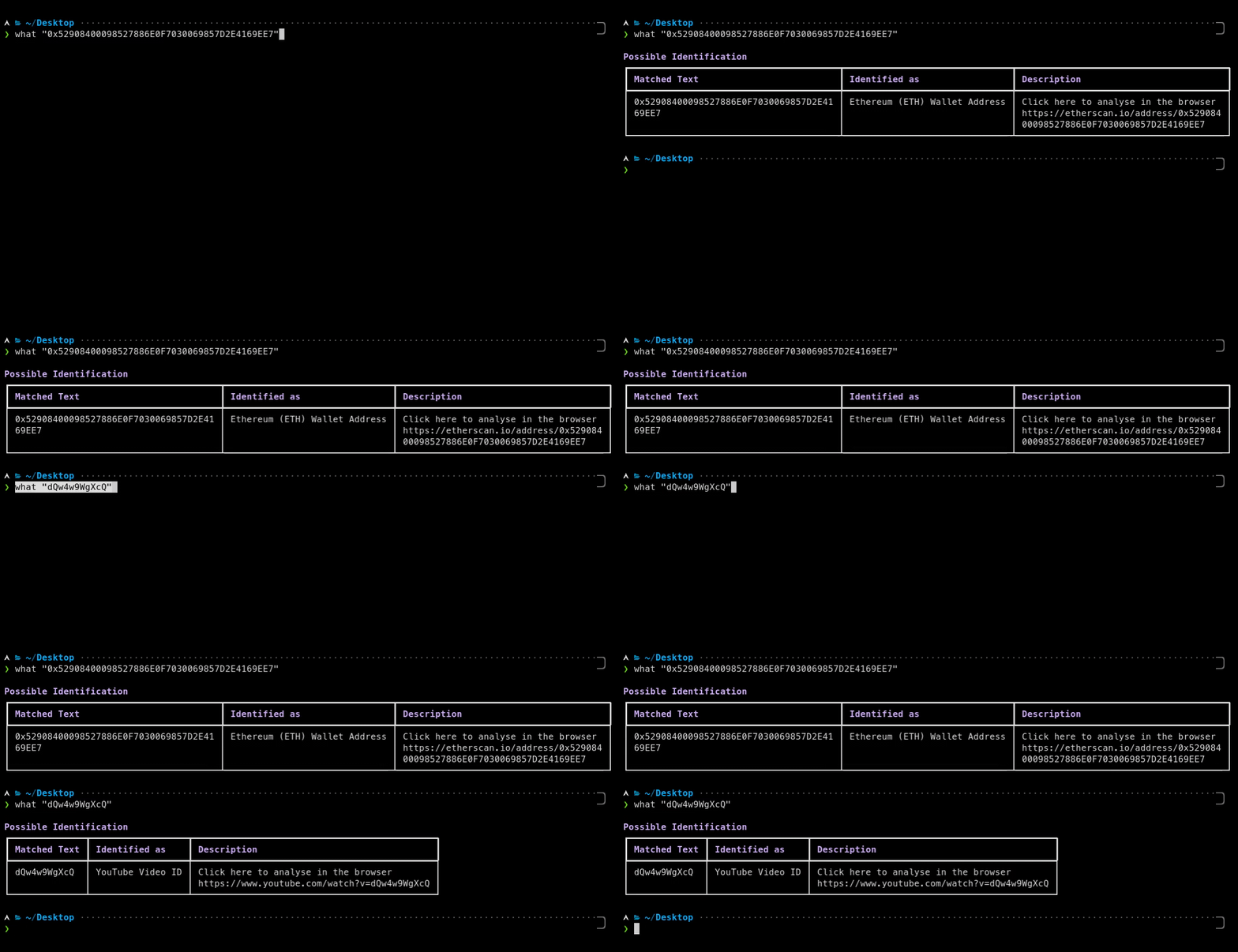
Imagine this: You come across some mysterious text 🧙♂️ 0x527886E0F7030069857D2E4169EE7 or dQw4w9WgXcQ and you wonder what it is. What do you do?
Well, with what all you have to do is ask what "0x527886E0F7030069857D2E4169EE7" and what will tell you!
what's job is to identify _what_ something is. Whether it be a file or text! Or even the hex of a file! What about text _within_ files? We have that too! what is recursive, it will identify e in text and more!
Installation
🔨 Using pip
or
🔨 On Mac?
Or for our MacPorts fans:
⚙ Use Cases
🦠 Wannacry

You come across a new piece of malware called WantToCry. You think back to Wannacry and remember it was stopped because a researcher found a kill-switch in the 代码.
When a domain, hardcoded into Wannacry, was registered the virus would stop.
You use What to identify all the domains in the malware, and use a domain registrar API to register all the domains.
🦈 Faster Analysis of Pcap files

Say you have a .pcap file from a network attack. What can identify this and quickly find you:
With what, you can identify the important things in the pcap in seconds, not minutes.
🐞 Bug Bounties
You can use PyWhat to scan for things that'll make you money via bug bounties like:
* API Keys
* Webhooks
* Credentials
* and more
Run PyWhat with:
To do this.
Here are some examples 👇
🐙 GitHub Repository API Key Leaks
1. Download all GitHub repositories of an organisation
2. Search for anything that you can submit as a bounty, like API keys
🕷 Scan all web pages for bounties
PS: We support more filters than just bug bounties! Run pywhat --tags
🌌 Other Features
Anytime you have a file and you want to find structured data in it that's useful, What is for you.
Or if you come across some piece of text and you don't know what it is, What will tell you.
📁 File & Directory Handling
File Opening You can pass in a file path by what 'this/is/a/file/path'. What is smart enough to figure out it's a file!
What about a whole directory? What can handle that too! It will recursively search for files and output e you need!
Multiple inputs You can pass several files, directories or texts at once, like what file1 file2 this/is/a/directory 'some text' or find . -name '*.log' -exec what {} +. What shows the file of every match, the matches in text are under text, and --json returns e in one JSON object.
Unicode Files and text piped into What can be UTF-8, or UTF-16 or UTF-32 with a byte order mark, like the "Unicode" text files that Windows saves. What also searches the UTF-16 strings in binary files (like strings -el), which is how Windows programs store most of their text. Characters that your terminal cannot show are printed as escape sequences such as \u20bf instead of crashing.
🔍 Filtering your output
Sometimes, you only care about seeing things which are related to AWS. Or bug bounties, or cryptocurrencies!
You can filter output by using what --rarity 0.2:0.8 --include Identifiers,URL . Use what --help to get more information.
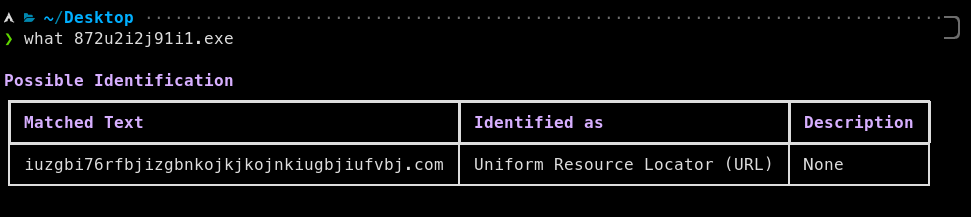
By default, what only shows matches with a rarity of 0.1 or more, as matches with a lower rarity are often false positives. For example, a YouTube video ID on its own, like dQw4w9WgXcQ, could be any 11 random characters, so what dQw4w9WgXcQ finds nothing, but what --rarity 0: dQw4w9WgXcQ shows it. YouTube links, like or youtube.com/watch?&t=42s, are shown by default.
To see all filters, run pywhat --tags! You can also combine them, for example to see all cryptocurrency wallets minus Ripple you can do:
The names of the regexes work like tags, and many regexes ha alternati too, such as BTC Wallet for Bitcoin (₿) Wallet Address or ARN for Amazon Resource Name (ARN). To only see Bitcoin and Ethereum wallets:
Run pywhat --names to see the name of every regex with its alternati.
👽 Sorting, Exporting, and more!
Sorting You can sort the output by using what -k rarity --reverse TEXT. Use what --help to get more information.
Top matches Found too much? what --top 10 TEXT only shows the 10 most likely matches, most likely first, and what --top 5% TEXT the most likely 5% of them. For a directory or several inputs, these are the most likely matches of all of them. The most likely matches have the highest rarity, but fragments of a longer word or match, which boundaryless mode finds, are less likely: what --top 1 0x527886E0F7030069857D2E4169EE7 shows the Ethereum address, not the card and social security numbers in it. what -k likely TEXT shows all matches in this order. In the API, pywhat.ranking.top_matches(identified, 10) keeps the 10 most likely matches of what Identifier.identify() returns, and the "Fragment" key of a match says whether it is a fragment.
Exporting You can export to json using what --json and results can be sent directly to a file using what --json > file.json. The JSON is printed on one line, so it can be piped to other programs too, like what --json TEXT | jq.
Progress and streaming When a search takes a while, like on a big file or directory, progress bars show how far What is: how many of the regexes it has searched the file for, with the one it is searching for now, and for a directory or several inputs how many of the files it has searched. They are only shown on a terminal (on stderr if the output is redirected to a file) and go away once the search is complete, --no-progress turns them off. With --stream, What prints every match as soon as it finds it, instead of once the search is complete: what --stream big.log, or what --stream --json big.log > matches.jsonl for a JSON object per match, one per line. As it does not wait for all the matches, --stream cannot sort them (--key) or only show the most likely ones (--top), and its JSON has no "Fragment" key.
Boundaryless mode What has a special mode to match identifiable information within strings. By default, it is enabled in CLI but disabled in API. Use what --help or refer to API Documentation for more information.
Processing Once a regex has found something, What can process it further, beyond what a regex can do. For example, the date of a Unix timestamp is added to its description: what --rarity 0: --include "UNIX Timestamp" 1637093119 shows Date: No 16, 2021 8:05:19 PM UTC. Bitcoin 钱包 addresses have a checksum, so a match whose checksum is wrong, like 3F3F3F3F3F3F3F3F3F3F3F3F3F3F3F3F3F, is filtered out. Use what --disable-processing to turn this off.
keys what -- asks the services whether the keys it finds are valid, and adds the answer to their description. For now it Google API keys: what -- AIzaSyA00000000000000000000000000000000 shows : invalid, Google rejected the key (API_KEY_INVALID). A key that is valid but cannot use the API it was tested with (e.g. SER) is reported as valid. is off by default because it sends the keys to the services (o, once per key), so only use it for keys you are allowed to test. The Exploit of a key also contains the curl command to it yourself.
Maps Coordinates link to Google Maps. Use what --map osm to link them to OpenStreetMap instead: what --map osm '52.6169586, -1.9779857' shows Link: .
💬 Interactive mode
Analysing something big? Load it into memory once with --interactive, then search through what What found as often as you like, without scanning it again:
tags shows the tags of the current matches and how many matches have each of them, include TAG and exclude TAG narrow the search down. top 10 only shows the 10 most likely matches of a search (--top 10 does this from the start) and more the next 10. A search combines location:, include:, exclude:, rarity: and text to look for, and every part of it has to match. Where readline is a, Tab completes commands, search keys, tags, rarities and paths. Type help in interactive mode to see all commands.
🍕 API
PyWhat has an API! Click here to read about it.
You can also process the matches with your own 代码, for example to filter out false positives. A processor gets every match of the regexes named in names and returns it, possibly changed (its description, rarity, ...), or None to filter it out. It is an object, so it can keep state between matches:
Identifier(processors=[]) or identify(text, processors=[]) turns processing off.
To keys with the API, like --, add the to the processors: Identifier(processors=[*default_processors(), *()]), with from pywhat.processors.
To link coordinates to OpenStreetMap, like --map osm, add OpenStreetMapProcessor() from pywhat.processors to the processors. The link of a match is then its "Link", and pywhat.printer.get_link(match) gives the link of any match.
To get the matches while a search goes on, iter_identify() is a generator which yields what identify() finds as soon as it is found, as (kind, location, value): kind is "File Signatures" or "Regexes", location is the file (or "text") and value is the file signature or the match. identify(), identify_inputs() and iter_identify() also call progress, if it is given, with a Progress before every regex they search for and once a file has been searched:
👾 Contributing
what not only thrives on contributors, but can't exist without them! If you want to add a new regex to check for things, you can read our documentation here
If a regex is known by other names, such as an abbre, list them in its optional "Alternati" in regex.json rather than adding them as tags. Tags are for groups of regexes, like Bug Bounty.
Not sure which rarity to give your regex? python scripts/rarity_score.py 'REGEX' estimates it from the regex itself: the more specific characters a match has to contain, like the ghp_ of a GitHub token, the rarer it is. python scripts/rarity_score.py --database compares the rarities in regex.json with their estimates, and --help explains how the estimate works.
Every regex needs examples in regex.json, which are run as tests. See CONTRIBUTING.md for how to add fake API keys as examples.
We ask contributors to join the Discord for quicker discussions, but it's not needed:
<a href=" alt="Discord" src="
🙏 Thanks
We would like to thank Dora for their work on a bug bounty specific regex 数据库 which we have used.
We would also like to thank tomnomnom for the patterns in gf, which some of our regexes are based on.
Some of our regexes, like cron schedules, browser user agents, ISO 8601 timestamps, UK postcodes and regex101 permalinks, are based on the community library of regex101.
项目信息
开发语言:Python
Star 数:7321
技术要点
该项目属于黑客技术方向的开源资源,代码结构清晰,适合安全研究人员学习参考。项目围绕🐸 Identify anything. pyWhat easily lets you identify emails, IP addresses, and more. Feed it a .pcap file or some text and it'll tell you what it is! 🧙♀️展开,提供了可运行的实现,对理解相关安全机制、工具原理与攻防技术具有较高的研究价值。
从技术实现角度看,此类项目的核心在于对底层原理的深入理解与工程化落地。开发者在研究过程中可以结合官方文档与社区讨论,梳理项目的初始化流程、核心模块职责与数据流转,逐步掌握其中的技术细节与设计思路。
使用与学习建议
1. 下载源码压缩包,解压到本地环境。
2. 根据项目类型准备对应的运行环境与依赖。
3. 按照 README 中的步骤完成配置与部署。
4. 在隔离的测试环境中运行验证,避免影响生产系统。
免责声明
本资源来源于开源社区,仅供安全研究、技术学习与合法授权范围内的攻防演练使用,请勿用于任何非法或侵害他人权益的用途。使用本项目产生的一切后果由使用者自行承担。
| 资源标题 | pyWhat - 🐸 Identify anything. pyWhat easily lets you iden |
| 所属分类 | 黑客技术 |
| 发布作者 | admin |
| 发布时间 | 2026-10-05 22:29:44 |
| 下载权限 | 免费下载 |
| 附件数量 | 2 个下载链接 |
| 浏览次数 | 527 |
| 讨论数量 | 0 |
| 主题状态 | 正常讨论中 |