 安全软件
点击放大
cloudsplaining - Cloudsplaining is an AWS IAM Security Assessment t
项目说明
Cloudsplaining
--------------
Cloudsplaining is an AWS IAM Security Assessment 工具 that identifies of least pri and generates a risk-prioritized HTML report.
![Tests]()
![Documentation Status]()
![Join the chat at ]()
![Twitter]()
![PyPI]()

![Downloads]()
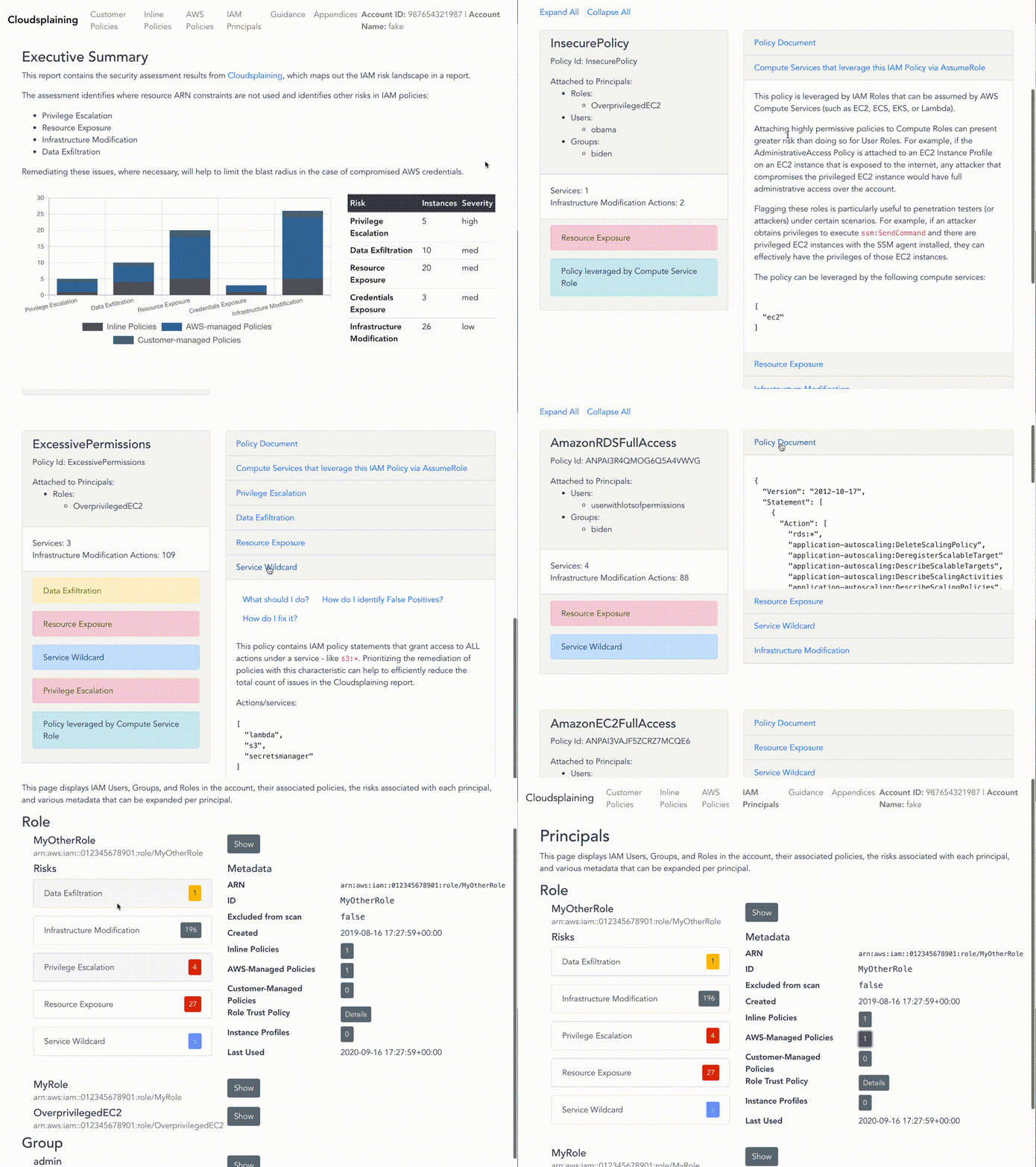
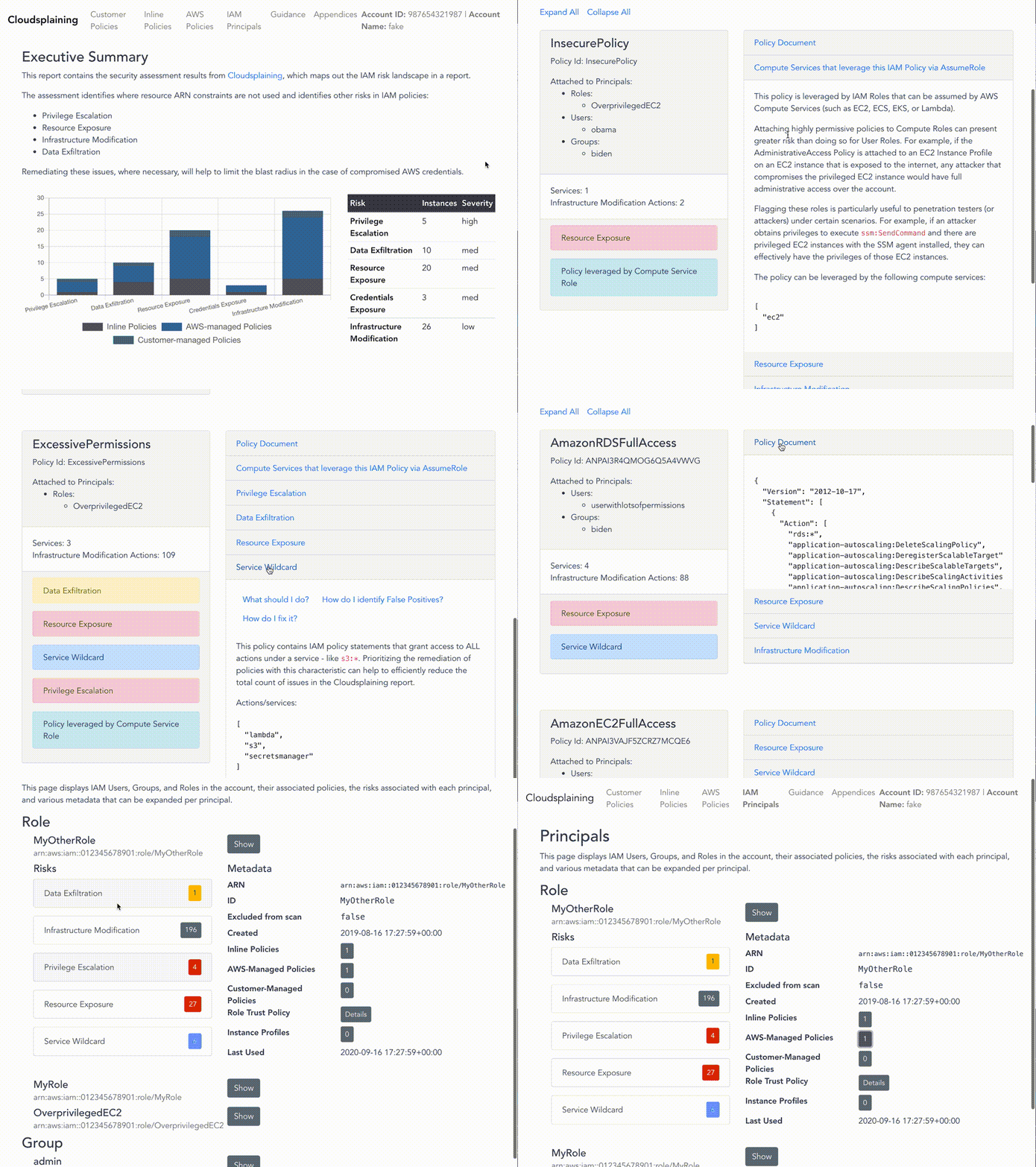
* Example report
> ![]()
Documentation
For full documentation, please visit the project on ReadTheDocs.
* Installation
* Cheatsheet
* Example report
O
Cloudsplaining identifies of least pri in AWS IAM policies and generates a pretty HTML report. It can scan all the policies in your AWS account, across multiple AWS accounts, or it can scan a single policy file.
It helps to identify IAM actions that do not le resource constraints. It also helps prioritize the remediation process by flagging IAM policies that present the following risks to the AWS account in question without restriction:
* Data Exfiltration (s3:GetObject, ssm:GetParameter, secretsmanager:GetSecretValue)
* Infrastructure Modification
* Resource Exposure (the ability to modify resource-based policies)
* Pri Escalation (based on Pathfinding.cloud)
* Credentials Exposure
Cloudsplaining also identifies IAM Roles that can be assumed by AWS Compute Services (such as EC2, ECS, EKS, or Lambda), as they can present greater risk than user-defined roles - especially if the AWS Compute service is on an instance that is directly or indirectly exposed to the internet. Flagging these roles is particularly useful to penetration testers (or attackers) under certain scenarios. For example, if an attacker obtains pri to execute ssm:SendCommand and there are pri EC2 instances with the SSM agent installed, they can effectively have the pri of those EC2 instances. Remote 代码 Execution via AWS Systems Manager Agent was already a known escalation/exploitation path, but Cloudsplaining can make the process of identifying theses cases easier. See the sample report for some examples.
You can also specify a custom exclusions file to filter out results that are False Positives for reasons. For example, User Policies are permissive by design, whereas System roles are generally more restrictive. You might also ha that are specific to your organization's multi-account strategy or AWS application architecture.
Moti
Policy Sentry re to us that it is possible to finally write IAM policies according to least pri in a scalable manner. Before Policy Sentry was released, it was too easy to find IAM policy documents that lacked resource constraints. Consider the policy below, which allows the IAM principal (a role or user) to run s3:PutObject on any S3 bucket in the AWS account:
This is bad. Ideally, access should be restricted according to resource ARNs, like so:
Policy Sentry makes it really easy to do this. Once Infrastructure as 代码 de or AWS Administrators gain familiarity with the 工具 (which is quite easy to use), we' that adoption starts very quickly. However, if you've been using AWS, there is probably a very large backlog of IAM policies that could use an uplift. If you ha of AWS accounts with dozens of policies in each, how can we lock down those AWS accounts by programmatically identifying the policies that should be fixed?
That's why we wrote Cloudsplaining.
Cloudsplaining identifies of least pri in AWS IAM policies and generates a pretty HTML report. It can scan all the policies in your AWS account, across multiple AWS accounts, or it can scan a single policy file.
Installation
#### Homebrew
#### Pip3
* Now you should be able to execute cloudsplaining from command line by running cloudsplaining --help.
#### Shell completion
To enable Bash completion, put this in your .bashrc:
To enable ZSH completion, put this in your .zshrc:
Scanning a single IAM policy
You can also scan a single policy file to identify risks instead of an entire account.
The output will include a finding description and a list of the IAM actions that do not le resource constraints.
The output will resemble the following:
Scanning an entire AWS Account
#### Downloading Account Authorization Details
We can scan an entire AWS account and generate reports. To do this, we le the AWS IAM get-account-authorization-details API call, which downloads a large JSON file (around 100KB per account) that contains all of the IAM details for the account. This includes data on users, groups, roles, customer-managed policies, and AWS-managed policies.
* You must have AWS credentials configured that can be used by the CLI.
* You must have the pri to run iam:GetAccountAuthorizationDetails. The arn:aws:iam::aws:policy/SecurityAudit policy includes this, as do many others that allow Read access to the IAM Service.
* To download the account authorization details, ensure you are authenticated to AWS, then run cloudsplaining's download command:
* If you prefer to use your ~/.aws/credentials file instead of en , you can specify the profile name:
It will download a JSON file in your current directory that contains your account authorization detail information.
#### Create Exclusions file
Cloudsplaining 工具 does not attempt to understand the context behind e in your AWS account. It's possible to understand the context behind some of these things programmatically - whether the policy is applied to an instance profile, whether the policy is attached, whether inline IAM policies are in use, and whether or not AWS Managed Policies are in use. Only you know the context behind the design of your AWS infrastructure and the IAM strategy.
As such, it's important to eliminate False Positives that are context-dependent. You can do this with an exclusions file. We' a command that will generate an exclusions file for you so you don't have to remember the required format.
You can create an exclusions template via the following command:
This will generate a file in your current directory titled exclusions.yml.
Now when you run the scan command, you can use the exclusions file like this:
For more information on the structure of the exclusions file, see Filtering False Positives
#### Scanning the Authorization Details file
Now that we' the account authorization file, we can scan *all* of the AWS IAM policies with cloudsplaining.
Run the following command:
It will create an HTML report like this:
> 
It will also create a raw JSON data file:
* default-iam-results.json: This contains the raw JSON output of the report. You can use this data file for operating on the scan results for purposes. For example, you could write a Python script that parses this data and opens up automated JIRA issues or Salesforce Work Items. An example entry is shown below. The full example can be at examples/files/iam-results-example.json
See the examples/files folder for sample output.
#### Filtering False Positives
Resource constraints are best practice - especially for system roles/instance profiles - but sometimes, these are by design. For example, consider a situation where a custom IAM policy is used on an instance profile for an EC2 instance that pro Terraform. *In this case, broad permissions are design requirements* - so we don't want to include these in the results.
You can create an exclusions template via the following command:
This will generate a file in your current directory titled exclusions.yml.
The default exclusions file looks like this:
* Make any additions or modifications that you want.
* Under policies, list the path of policy names that you want to exclude.
* If you want to exclude a role titled MyRole, list MyRole or MyR* in the roles list.
* You can follow the same approach for users and groups list.
Now when you run the scan command, you can use the exclusions file like this:
Scanning Multiple AWS Accounts
If your IAM user or IAM role has sts:AssumeRole permissions to a common IAM role across multiple AWS accounts, you can use the scan-multi-account command.
This diagram depicts how the process works:
!Diagram for scanning multiple AWS accounts with Cloudsplaining
> Note: If you are new to setting up cross-account access, check out the official AWS Tutorial on Delegating access across AWS accounts using IAM roles. That can help you set up the architecture above.
* First, you'll need to create the multi-account config file. Run the following command:
* This will generate a file called multi-account-config.yml with the following contents:
> Note: Observe how the format of the file abo account_name: accountID. Edit the file contents to match your desired account name and account ID. Include as many account IDs as you like.
For the next step, let's say that:
* We have a role in the target accounts that is called CommonSecurityRole.
* The credentials for your IAM user are under the AWS Credentials profile called scanning-user.
* That user has sts:AssumeRole permissions to assume the CommonSecurityRole in all your target accounts specified in the YAML file we created pre.
* You want to save the output to an S3 bucket called my-results-bucket
Using the data above, you can run the following command:
> Note that if you run the abo the --profile flag, it will execute in the standard AWS Credentials order of precedence (i.e., En , credentials profiles, ECS container credentials, then finally EC2 Instance Profile credentials).
Custom Guidance and Appendices
Cloudsplaining supports customizing the Guidance and Appendices sections of the HTML report to include organization-specific security recommendations and documentation.
How It Works
Place HTML files in your project root directory:
custom-guidance.html - Custom security guidance contentcustom-appendices.html - Custom appendices contentBehavior
Example Usage
Generate report with custom content
cloudsplaining scan --input-file account-data.json --output reports/
Cheatsheet
FAQ
Will it scan all policies by default?
No, it will only scan policies that are attached to IAM principals.
Will the download command download all policy ?
Not by default. If you want to do this, specify the --include-non-default-policy- flag. Note that the scan 工具 does not currently operate on non-default .
I followed the installation instructions but can't execute the program line at all. What do I do?
This is likely an issue with your PATH. Your PATH en is not considering the binary packages installed by pip3. On a Mac, you can likely fix this by entering the command below, depending on the you ha. YMMV.
I followed the installation instructions, but I am receiving a ModuleNotFoundError that says No module named policy_sentry.analysis.expand. What should I do?
Try upgrading to the latest of Cloudsplaining. This error was fixed in 0.0.10.
References
* Policy Sentry by Kinnaird McQuade at Salesforce
* Parliament by Scott Piper at Summit Route and Duo Labs.
* AWS Pri Escalation Methods by Spencer Gietzen at Rhino Security Labs
* Understanding Access Le within Policy Summaries
* Le next-generation blockchain-based AI across multiple service meshes to transparently automate multi-cloud IAM wizardry :mage_man:
项目信息
开发语言:JavaScript
Star 数:2250
技术要点
该项目属于安全软件方向的开源资源,代码结构清晰,适合安全研究人员学习参考。项目围绕Cloudsplaining is an AWS IAM Security Assessment 工具 that identifies violations of least privilege and generates a risk-prioritized report.展开,提供了可运行的实现,对理解相关安全机制、工具原理与攻防技术具有较高的研究价值。
从技术实现角度看,此类项目的核心在于对底层原理的深入理解与工程化落地。开发者在研究过程中可以结合官方文档与社区讨论,梳理项目的初始化流程、核心模块职责与数据流转,逐步掌握其中的技术细节与设计思路。
使用与学习建议
1. 下载源码压缩包,解压到本地环境。
2. 根据项目类型准备对应的运行环境与依赖。
3. 按照 README 中的步骤完成配置与部署。
4. 在隔离的测试环境中运行验证,避免影响生产系统。
免责声明
本资源来源于开源社区,仅供安全研究、技术学习与合法授权范围内的攻防演练使用,请勿用于任何非法或侵害他人权益的用途。使用本项目产生的一切后果由使用者自行承担。
| 资源标题 | cloudsplaining - Cloudsplaining is an AWS IAM Security Assessment t |
| 所属分类 | 安全软件 |
| 发布作者 | admin |
| 发布时间 | 2026-10-05 22:29:51 |
| 下载权限 | 免费下载 |
| 附件数量 | 2 个下载链接 |
| 浏览次数 | 384 |
| 讨论数量 | 0 |
| 主题状态 | 正常讨论中 |