 安全软件
点击放大
wireguard-manager - ✔️ WireGuard-Manager is an innovative tool designe
项目说明
WireGuard-Manager: Secure Your Network 💻 🖥!
🔰 Introduction
Welcome to WireGuard-Manager, your solution for setting up WireGuard, a cutting-edge . WireGuard is known for its speed, security, and ease of use, making it an ideal choice for both personal and professional . This 工具 is designed to simplify the installation and management of WireGuard, ensuring a secure and efficient networking experience.
Quality and Reliability
Project Information and Status
![Latest Release]()
![Monthly App Release]()
Build Statuses
![ShellCheck WireGuard Manager]()
![Blocked Hosts Update Status]()
![Named Cache Update Status]()
![Software Build Status]()
Contribution and Issues
![Open Issues]()
![Active Pull Requests]()
Licensing
![License: MIT]()
✊ Show Your Support
If you' this project useful, please consider giving it a star and forking it. Your support is greatly appreciated!
🤷 What is VPN?
A Private 网络 (VPN) allows users to send and receive data through shared or public networks as if their computing devices were directly connected to the private 网络. Thus, applications running on an end-system (PC, smartphone, etc.) over a VPN may benefit from indi 网络 features, protection, and management. Encryption is a standard aspect of a but not an intrinsic one.
📶 What is WireGuard?
WireGuard is a straightforward yet fast and modern VPN that utilizes state-of-the-art cryptography. It aims to be faster, simpler, leaner, and more useful than IPsec while a the massi. It intends to be considerably more performant than OpenVPN. WireGuard is designed as a general-purpose VPN for running on embedded interfaces and super computers alike, fit for many circumstances. Initially released for the Linux kernel, it is now cross-platform (Windows, macOS, BSD, iOS, Android) and widely deployable. It is currently under a massi, but it already might be regarded as the most secure, most comfortable to use, and the simplest in the industry.
Why WireGuard-Manager?
⛳ Goals
🌲 Prerequisite
sudo pri is necessary.🚦 Getting Started
1. Installation: Simple and quick installation process.
2. Configuration: Easy-to-follow configuration steps.
3. Management: User-friendly interface for managing your VPN.
Installation Guide
🐧 Installation
To ensure the successful installation of the WireGuard Manager script on Linux systems, it's crucial to have curl and bash installed. Here's an expanded installation guide that includes instructions for installing curl and bash on different Linux distributions:
Installing curl & bash & resolvconf on Linux Systems
#### Debian/Ubuntu-based Systems (e.g., Ubuntu, Debian, Linux Mint):
#### Red Hat-based Systems (e.g., CentOS, RHEL, Fedora):
or
#### Arch-based Systems (e.g., Arch Linux, Manjaro):
#### Alpine Linux:
#### Other Distributions:
For other Linux distributions, you can use the package manager specific to that distribution to install curl & bash & resolvconf. The package names may vary slightly.
Installing WireGuard Manager Script
Now that you have curl and bash installed, you can proceed with installing the WireGuard Manager script using the provided instructions:
1. First, use curl to download the script and save it in /usr/local/bin/:
2. Next, make the script user executable:
3. Finally, execute the script:
Connecting to WireGuard Interface
In your /etc/wireguard/clients directory, you will find .conf files. These are the peer configuration files. Download them from your WireGuard Interface and connect using your fa WireGuard Peer.
🔑 Usage
🥰 Features
💡 Configuration Options
PRI: This defines the private IPv4 subnet used within the VPN. The default is 10.0.0.0/8, a standard private IP range.PRI: This sets the private IPv6 subnet. The default fd00:00:00::0/8 is a typical private IPv6 range.SER: This is used to detect the public IPv4 address of the 服务端, crucial for establishing connections from outside the local 网络.SER: This is the IPv6 counterpart to the previous setting, used for detecting the 服务端's public IPv6 address.SER: This determines the local public 网络 interface using the ip command, essential for ser on the public 网络.SER: This specifies the default public port (51820) for the WireGuard interface, the port through which will pass.NAT_CHOICE_SETTINGS: This configures the use of the 's keep-ali, which helps keep the connection active.MTU_CHOICE_SETTINGS: This sets the Maximum Transmission Unit (MTU) for WireGuard peers, impacting the size of packets transmitted over the 网络.SER: This is a general setting for defining ser configurations.CLIENT_ALLOWED_IP_SETTINGS: This defines the IP range allowed for clients connecting to the VPN, restricting which devices can connect.AUTOMATIC_UPDATES_SETTINGS: This likely relates to whether the system will automatically update software or configurations.AUTOMATIC_BACKUP_SETTINGS: This pertains to the automatic backup of system configurations or data.DNS_PRO: This in setting up a DNS provider for the 网络. If you're not using Unbound, you'll need to specify another DNS service.CONTENT_BLOCKER_SETTINGS: This might relate to settings for blocking certain types of content through the 网络.CLIENT_NAME: This is the name assigned to a WireGuard peer (客户端) in the VPN.AUTOMATIC_CONFIG_REMOVER: This is possibly a setting to automatically remo configurations after they are no longer needed or after a set period.👉👈 Compatibility with Linux Distributions
| Operating System | i386 Support | amd64 Support | armhf Support | arm64 Support |
| ------------------- | ------------ | ------------- | ------------- | ------------- |
| Ubuntu 14 and below | No | No | No | No |
| Ubuntu 16 and above | Yes | Yes | Yes | Yes |
| Debian 7 and below | No | No | No | No |
| Debian 8 and above | Yes | Yes | Yes | Yes |
| CentOS 6 and below | No | No | No | No |
| CentOS 7 and above | Yes | Yes | Yes | Yes |
| Fedora 29 and below | No | No | No | No |
| Fedora 30 and above | Yes | Yes | Yes | Yes |
| RedHat 6 and below | No | No | No | No |
| RedHat 7 and above | Yes | Yes | Yes | Yes |
| Kali 1.0 and below | No | No | No | No |
| Kali 1.1 and above | Yes | Yes | Yes | Yes |
| Arch Linux | Yes | Yes | Yes | Yes |
| Raspbian | Yes | Yes | Yes | Yes |
| PopOS | Yes | Yes | Yes | Yes |
| Manjaro | Yes | Yes | Yes | Yes |
| Mint | Yes | Yes | Yes | Yes |
| AlmaLinux | Yes | Yes | Yes | Yes |
| Alpine | Yes | Yes | Yes | Yes |
| FreeBSD | Yes | Yes | Yes | Yes |
| KDE Neon | Yes | Yes | Yes | Yes |
| Rocky Linux | Yes | Yes | Yes | Yes |
| Oracle Linux | Yes | Yes | Yes | Yes |
☁️ Compatibility with Cloud Pro
| Cloud | Supported |
| --------------- | --------- |
| AWS | Yes |
| Google Cloud | Yes |
| Linode | Yes |
| Digital Ocean | Yes |
| Vultr | Yes |
| Microsoft Azure | Yes |
| OpenStack | Yes |
| Rackspace | Yes |
| Scaleway | Yes |
| EuroVPS | Yes |
| Hetzner Cloud | No |
| Strato | No |
🛡️ Compatibility with
| | Supported |
| -------------- | --------- |
| KVM | Yes |
| None | Yes |
| Qemu | Yes |
| LXC | Yes |
| Microsoft | Yes |
| | Yes |
| OpenVZ | No |
| Docker | No |
| WSL | No |
💻 Compatibility with Linux Kernel
| Kernel | Compatibility |
| -------------------------- | ------------- |
| Linux Kernel 3.0 and below | No |
| Linux Kernel 3.1 and above | Yes |
🙋 Frequently Asked Questions
Which hosting pro do you recommend?
Which WireGuard clients do you recommend?
Additional Information
Where can I access comprehensi documentation?
How can I install WireGuard without interacti for a headless installation?
./wireguard-manager.sh --installAre there any alternatives to self-hosting a VPN?
Why is all the 代码 centralized in one place?
Which port and 协议 does WireGuard require?
51820 using the UDP protocol.Do I need to forward any ports for Unbound?
port 53).What does the content blocker restrict?
What information is collected and how is it used?
Setting Up Your Own
To set up your own , you will need the following items:
Raspberry Pi 5 Setup Components
Estimated Cost for Building Your Own VPN
WireGuard Resources
Comparison
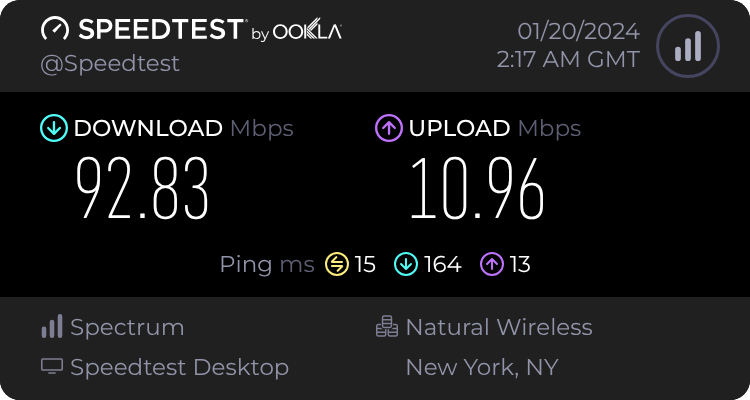
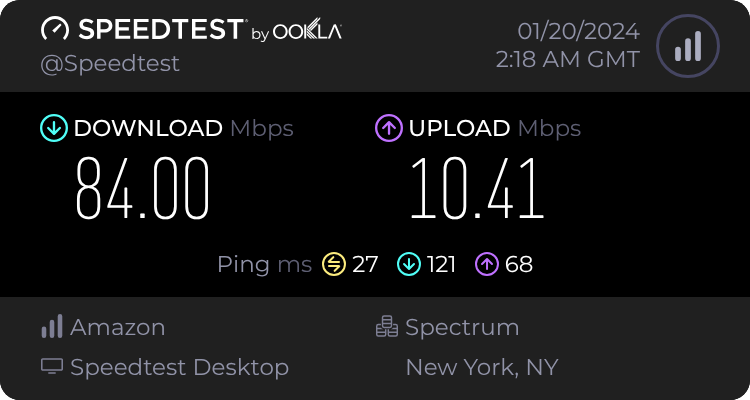
This section compares the internet speed differences between using no VPN, WireGuard, and OpenVPN.
No VPN (Normal Connection)
!No Test
WireGuard Speed Test
!Wireguard Speed Test
Open Test
!Open Test
🙅 Content-Blocking vs. No Content-Blocking
📐 Architecture
!Wireguard Manager Architecture
🤝 Code De
Develop 代码 Without Cloning the Repository
You can directly work on the 代码 without the need to clone the repository. This is facilitated by Studio 代码's online platform. By clicking the link below, you can preview and edit the 代码 in your browser, le the intuiti of Studio 代码. This method streamlines the de process, particularly for those who want to make quick modifications or do not wish to set up the entire repository on their local machine.
![Open in Studio Code]()
🐛 Code Debugging
Detailed Debugging Process After Cloning the Repository
For a comprehensi process, you might want to clone the repository to your local system. This method allows you to thoroughly test and debug the 代码 in your en. Follow these steps to clone the repository and start the debugging process:
1. Clone the Repository: Use the Git command to clone the repository to your preferred directory, such as /root/ in this example. This step copies all the 代码 from the online repository to your local machine.
2. Start Debugging: After cloning, na to the script's directory and initiate the debugging process. The script will be executed in debug mode, pro detailed output of each step. This output is redirected to a log file for easier examination. The log file, located in the same directory, stores all the debugging information, making it easy to trace any issues or understand the script's behavior.
Following these steps, you can either quickly modify the 代码 online without cloning or perform a more comprehensi process by cloning the repository to your local machine. Each method offers different benefits depending on your needs and the extent of your work with the WireGuard Manager script.
Detailed Debugging Guide for WireGuard Manager
1. Setting Up the En
- Ensure that all necessary software, including Git, Bash, and any dependencies required by WireGuard Manager, are installed on your system.
- While Studio 代码 is used in this example, you can use any IDE that supports Git and Bash.
2. Cloning the Repository
- Use Git to clone the WireGuard Manager repository to a local directory: git clone /path/to/local-directory
- Avoid using root directories for de. Choose a user directory for better safety and permission management.
3. Understanding the Codebase
- Review the 代码 to understand its structure, con, and documentation.
- Check for a README file or wiki pages in the repository that might provide insights into the codebase.
4. Setting Up Debugging Tools
- Configure the debugging tools in your IDE. Set breakpoints, watch , and use step-through debugging features.
- Ensure that logging is correctly set up in the script to capture sufficient details for debugging.
5. Running the Script in Debug Mode
- Run the script with bash -x to get detailed trace outputs: bash -x /path/to/local-directory/wireguard-manager/wireguard-manager.sh >> /path/to/local-directory/wireguard-manager.log
- Regularly check the log file for errors or unexpected behavior.
6. Testing in Different En
- Test the script in isolated en like Docker containers or VMs to understand its behavior in different settings.
- If possible, test on different operating systems to ensure compatibility.
7. Collaborating and Seeking Feedback
- Commit changes to a new branch and use pull requests for reviews.
- Request 代码 reviews from peers to get different perspectives on potential issues.
8. Documenting Your Findings
- If you disco behavior or fixes, update the project documentation.
- Use the repository's issue tracker to report bugs or suggest enhancements.
9. Automating Testing
- Create automated tests for critical functionalities to catch bugs early.
- Use CI tools to automate testing with every commit or pull request.
10. Staying Updated with the Repository
- Regularly update your local repository with changes from the main project to stay in sync and avoid conflicts.
By following these steps and adapting them to their own de en and workflow, de can more effectively debug and contribute to the WireGuard Manager project. This comprehensi caters to skill levels and preferences, thereby facilitating a more inclusive and efficient de process.
💋 Acknowledgements
This project is made possible thanks to the Open 源码 Community.
📱 Community and Contributions
Join our community on ![Discord]() and ![Slack]() to contribute to the project, share ideas, and get help.
🤝 Sponsors
This project is sponsored by
![Digital Ocean]() ![Google Cloud]() ![AWS]() ![Linode]()
Backup
📝 License
WireGuard-Manager is licensed under the Apache License 2.0. For more details, please refer to our License File.
项目信息
开发语言:Shell
Star 数:1857
技术要点
该项目属于安全软件方向的开源资源,代码结构清晰,适合安全研究人员学习参考。项目围绕✔️ WireGuard-Manager is an innovative 工具 designed to streamline the deployment and management of WireGuard VPNs. Emphasizing user-friendliness and security, it simplifies the complexities of VPN configuration, offering a robust yet accessible solution for both personal and professional use.展开,提供了可运行的实现,对理解相关安全机制、工具原理与攻防技术具有较高的研究价值。
从技术实现角度看,此类项目的核心在于对底层原理的深入理解与工程化落地。开发者在研究过程中可以结合官方文档与社区讨论,梳理项目的初始化流程、核心模块职责与数据流转,逐步掌握其中的技术细节与设计思路。
使用与学习建议
1. 下载源码压缩包,解压到本地环境。
2. 根据项目类型准备对应的运行环境与依赖。
3. 按照 README 中的步骤完成配置与部署。
4. 在隔离的测试环境中运行验证,避免影响生产系统。
免责声明
本资源来源于开源社区,仅供安全研究、技术学习与合法授权范围内的攻防演练使用,请勿用于任何非法或侵害他人权益的用途。使用本项目产生的一切后果由使用者自行承担。
| 资源标题 | wireguard-manager - ✔️ WireGuard-Manager is an innovative tool designe |
| 所属分类 | 安全软件 |
| 发布作者 | admin |
| 发布时间 | 2026-10-05 22:30:22 |
| 下载权限 | 免费下载 |
| 附件数量 | 2 个下载链接 |
| 浏览次数 | 211 |
| 讨论数量 | 0 |
| 主题状态 | 正常讨论中 |