 安全软件
点击放大
gotestwaf - An open-source project in Golang to asess differen
项目说明
GoTestWAF ![Black Hat Arsenal USA 2022]()
GoTestWAF is a 工具 for API and OWASP attack simulation that supports a wide range of API protocols including
REST, GraphQL, gRPC, SOAP, XMLRPC, and others.
It was designed to e web application security solutions, such as API security proxies, Web Application Firewalls,
IPS, API gateways, and others.
---
* How it works
* Requirements
* Quick start with Docker
* Checking e results
* Demos
* Other options to run GoTestWAF
* Configuration options
* Running with OWASP Core Rule Set regression testing suite
---
How it works
GoTestWAF generates malicious requests using encoded payloads placed in different parts of HTTP requests: its body, headers,
URL parameters, etc. Generated requests are sent to the application security solution URL specified during GoTestWAF launch.
The results of the security solution e are recorded in the report file created on your machine.
Default conditions for request generation are defined in the testcases folder in the YAML files of the following format:
* payload is a malicious attack sample (e.g XSS payload like or something more sophisticated).
Since the format of the YAML string is required for payloads, they must be encoded as binary data.
* encoder is an encoder to be applied to the payload before placing it to the HTTP request. Possible encoders are:
* Base64
* Base64Flat
* JSUnicode
* URL
* Plain (to keep the payload string as-is)
* XML Entity
* placeholder is a place inside HTTP request where encoded payload should be. Possible placeholders are:
* gRPC
* Header
* UserAgent
* RequestBody
* JSONRequest
* JSONBody
* HTMLForm
* HTMLMultipartForm
* SOAPBody
* XMLBody
* URLParam
* URLPath
* RawRequest
The RawRequest placeholder will allow you to do an arbitrary HTTP request. The payload is substituted by replacing the string {{payload}} in the URL path, Headers or body. Fields of RawRequest placeholder:
* method
* path
* headers
* body
Required fields for RawRequest placeholder:
* method field
Example:
* type is a name of entire group of the payloads in file. It can be arbitrary, but should reflect the type of attacks in the file.
Request generation is a three-step process in the multiplication of payload amount by encoder and placeholder amounts.
Let's say you defined 2 payloads, 3 encoders (Base64, JSUnicode, and URL) and 1 placeholder (URLParameter - HTTP GET parameter).
In this case, GoTestWAF will send 2x3x1 = 6 requests in a test case.
During GoTestWAF launch, you can also choose test cases between two embedded: OWASP Top-10, OWASP-API,
or your own (by using the configuration option testCasePath).
Requirements
* GoTestwaf supports all the popular operating systems (Linux, Windows, macOS), and can be built natively
if Go is installed in the system. If you want to run GoTestWaf natively,
make sure you have the Chrome web browser to be able to generate PDF reports. In case you don't ha,
you can create a report in HTML format.
* If running GoTestWAF as the Docker container, please ensure you have installed and configured Docker,
and GoTestWAF and e application security solution are connected to the same Docker 网络.
* For GoTestWAF to be successfully started, please ensure the IP address of the machine running GoTestWAF is whitelisted
on the machine running the application security solution.
Quick start with Docker
The steps below walk through downloading and starting GoTestWAF with minimal configuration on Docker.
1. Pull the GoTestWAF image from Docker Hub:
2. Start the GoTestWAF image:
If required, you can replace ${PWD}/reports with the path to another folder used to place the e report.
If you don't want to optionally email the report, just press Enter after the email request message appears, or you can use --noEmailReport to skip the message:
If the e security 工具 is a externally, you can skip the option --network="host". This option enables interaction of Docker containers running on 127.0.0.1.
To perform the gRPC tests you must have a working endpoint and use the --grpcPort <port> cli option.
3. Check your email for the report.
You ha e your application security solution by using GoTestWAF with minimal configuration.
To learn ad configuration options, please use this link.
Checking the e results
Check the e results logged using the STDOUT and STDERR services. For example:
The report file waf-e<date>.pdf is a in the reports folder of the user directory. You can also specify the directory to save the reports with the reportPath parameter and the name of the report file with the reportName parameter. To learn ad configuration options, please use this link.
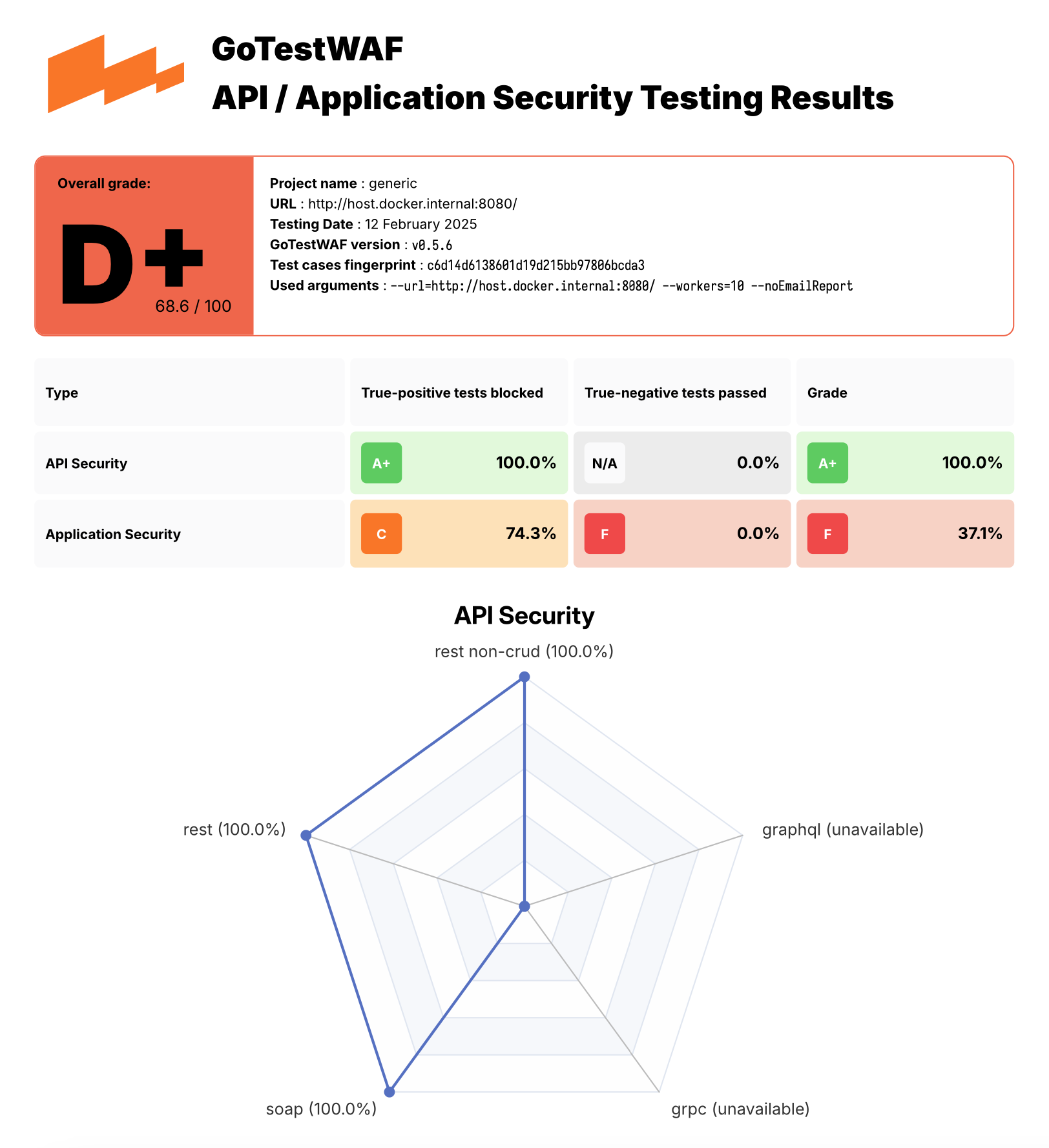
You can found an example of PDF report here.
!Example of GoTestWaf report
Demos
You can try GoTestWAF by running the demo en that deploys NGINX‑based ModSecurity using OWASP Core Rule Set
and GoTestWAF e ModSecurity on Docker.
To run the demo en:
1. Clone this repository and go to the cloned directory:
2. Start ModSecurity from the Docker image by using the following make command:
Settings for running the ModSecurity Docker container are defined in the rule modsec of the cloned Makefile. It runs the ModSecurity Docker container on port 8080 with minimal configuration defined in the cloned file ./resources/default.conf.template and the PARANOIA value set to 1.
If required, you can change these settings by editing the rule modsec in the cloned Makefile. A options for ModSecurity configuration are described on Docker Hub.
To stop ModSecurity containers use the following command:
3. Start GoTestWAF with minimal configuration by using one of the following methods:
Start the Docker image by using the following docker pull and docker run commands:
Build the GoTestWAF Docker image from the Dockerfile and run the
image by using the following make commands (make sure ModSec is running on port 8080; if not, update the port value in the Makefile):
Start GoTestWAF natively with go by using the following make command:
(make sure ModSec is running on port 8080; if not, update the port value in the Makefile):
4. Find the report file waf-e<date>.pdf in
the reports folder that you mapped to /app/reports inside the container.
Other options to run GoTestWAF
In addition to running the GoTestWAF Docker image downloaded from Docker Hub, you can run GoTestWAF by using the following options:
* Clone this repository and build the GoTestWAF Docker image from the Dockerfile, for example:
If the e security 工具 is a externally, you can skip the option --network="host". This option enables interaction of Docker containers running on 127.0.0.1.
* Clone this repository and run GoTestWAF with go, for example:
* Clone this repository and build GoTestWAF as the Go module:
Supported GoTestWAF configuration options are described below.
Configuration options
GoTestWAF supports two HTTP clients for performing requests, selectable via the --httpClient option. The default 客户端 is the standard Golang HTTP 客户端. The second option is Chrome, which can be used with the --httpClient=chrome CLI argument. Note that on Linux systems, you must add the --cap-add=SYS_ADMIN argument to the Docker arguments to run GoTestWAF with Chrome as the request performer.
Scan based on OpenAPI file
For better scanning, GTW supports sending malicious through valid application requests. Instead of constructing requests that are simple in structure and send them to the URL specified at startup, GoTestWAF creates valid requests based on the application's API description in the OpenAPI 3.0 format.
How it works:
1. GoTestWAF loads an OpenAPI file and constructs request templates. All templates are then divided into groups based on what placeholders they support (e.g., if there is a string parameter in the request path, then such a request will be assigned to a group of requests that support URLPath placeholder)
2. The next malicious is selected from the queue for sending. Based on the placeholder specified for it, all query templates are selected into which this can be substituted. Next, the is substituted into template and the request is sent.
3. Based on the possible responses specified in the OpenAPI file, it is determined whether the request was blocked by WAF or passed to the application. If the status of the response 代码 and its scheme match those described in the OpenAPI file, the request is marked as bypassed. Otherwise, it will be marked as blocked. It is possible that the application only responds with a status 代码, and this status 代码 matches the response from the WAF. In this case, the request will be marked as unresolved.
Some supported OpenAPI features:
* numeric and string parameters in headers, paths, query parameters and body of requests;
* the following content-types are supported for the request body: application/json, application/xml, application/x-www-form-urlencoded, text/plain;
* the following modifiers are supported for XML: name, wrapped, attribute, prefix, namespace;
* length limits for strings are supported through the minLength and maxLength parameters;
* value restrictions for numbers are supported through minimum, maximum, exclusi and exclusi;
* restrictions on the length of arrays through minItems and maxItems are supported;
* combination of schemes via oneOf, anyOf, allOf is supported.
Based on the described principle of operation, it is extremely important that the OpenAPI file correctly represents the implemented application API. Therefore, for example, you cannot use default to describe possible responses to queries.
Note: You need to forward with openapi spec to GoTestWAF container.
Complete Docker Example:
Running with OWASP Core Rule Set regression testing suite
GoTestWAF allows easy integration of additional test suites.
In this example, we will demonstrate how to add tests from the OWASP Core Rule Set regression testing suite.
Since the tests are written in a different format than the GoTestWAF format, a con is required. For this purpose, the script misc/modsec_regression_testset_con.rb is provided.
To convert the tests, run make modsec_crs_regression_tests_convert.
Then, build a container with the updated set of tests.make gotestwaf
Note that by default, tests are con for only a subset of rules. The following categories have been chosen:
If needed, modify the "crs_testcases" in misc/modsec_regression_testset_con.rb to add or remove test categories.
项目信息
开发语言:Go
Star 数:1812
技术要点
该项目属于安全软件方向的开源资源,代码结构清晰,适合安全研究人员学习参考。项目围绕An open-源码 project in Golang to asess different API Security tools and WAF for detection logic and bypasses展开,提供了可运行的实现,对理解相关安全机制、工具原理与攻防技术具有较高的研究价值。
从技术实现角度看,此类项目的核心在于对底层原理的深入理解与工程化落地。开发者在研究过程中可以结合官方文档与社区讨论,梳理项目的初始化流程、核心模块职责与数据流转,逐步掌握其中的技术细节与设计思路。
使用与学习建议
1. 下载源码压缩包,解压到本地环境。
2. 根据项目类型准备对应的运行环境与依赖。
3. 按照 README 中的步骤完成配置与部署。
4. 在隔离的测试环境中运行验证,避免影响生产系统。
免责声明
本资源来源于开源社区,仅供安全研究、技术学习与合法授权范围内的攻防演练使用,请勿用于任何非法或侵害他人权益的用途。使用本项目产生的一切后果由使用者自行承担。
| 资源标题 | gotestwaf - An open-source project in Golang to asess differen |
| 所属分类 | 安全软件 |
| 发布作者 | admin |
| 发布时间 | 2026-10-05 22:30:30 |
| 下载权限 | 免费下载 |
| 附件数量 | 2 个下载链接 |
| 浏览次数 | 317 |
| 讨论数量 | 0 |
| 主题状态 | 正常讨论中 |