 安全软件
点击放大
murphysec - An open source tool focused on software supply cha
项目说明
中文 | EN
MurphySec CLI is used for detecting dependencies from the command-line, and also can be integrated into your CI/CD pipeline.
<p>
<a href="
<img src="
</a>
<a href="
<img src="
</a>
<img src="
<a href="
<img alt="GitHub" src="
</a>
<img alt="GitHub last commit" src="
<img alt="GitHub Repo stars" src="
</p>
Features
1. Analyze dependencies being used by your project, including direct and indirect dependencies
2. Detect known in project dependencies
Screenshots
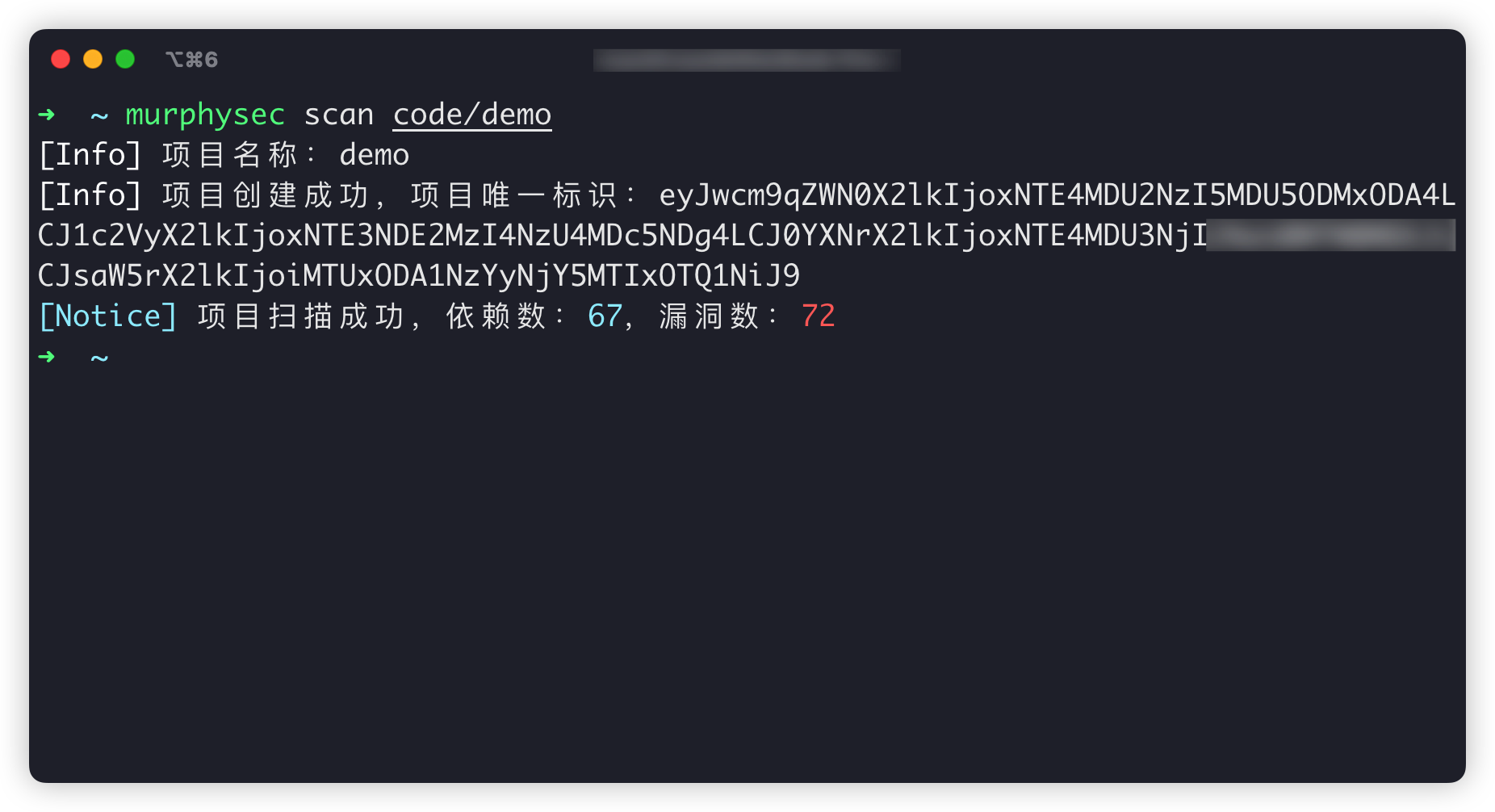
<img alt="cli output" src="./assets/cli.png" width="80%">
<img alt="scan result" src="./assets/scan-result.png" width="80%">
<img alt="scan result" src="./assets/scan-detail-result.png" width="80%">
Table of Contents
1. Supported languages
2. How it works
3. Working Scenarios
4. Getting Started
5. Command Introduction
6. Communication
7. License
Supported languages
Currently supports Ja, Golang. Other de languages will be gradually supported in the future.
Want to learn more about language support? check out our documentation
How it works
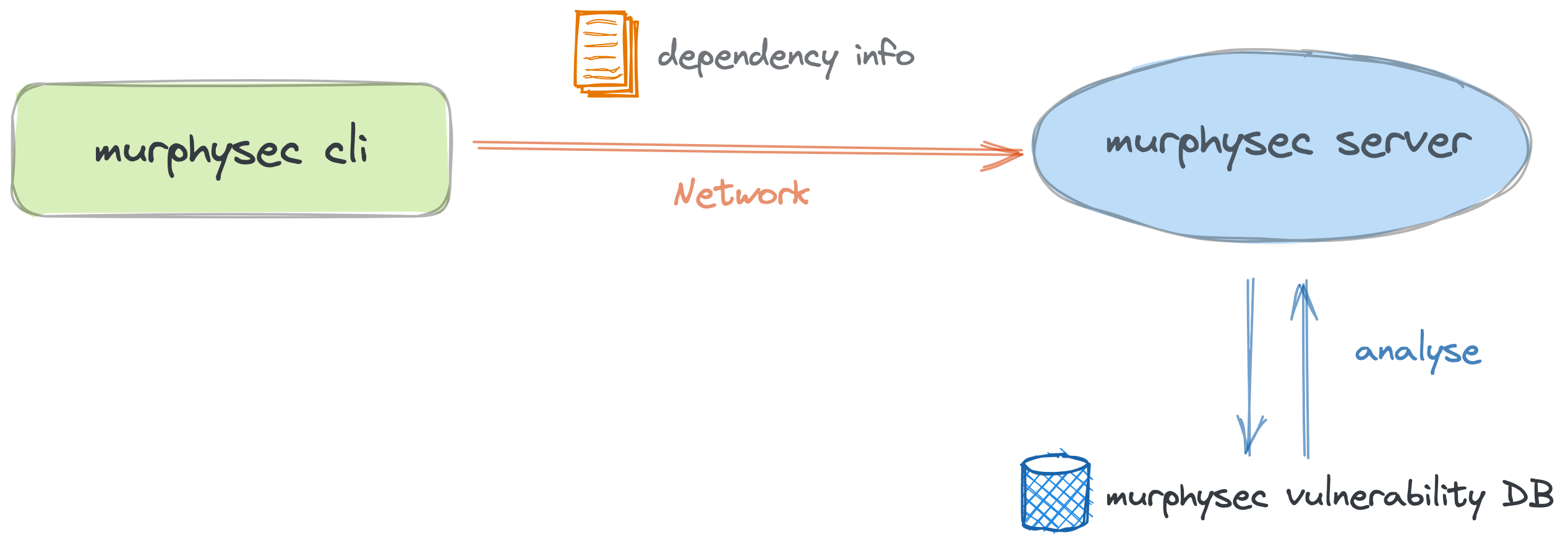
1. MurphySec CLI obtains the dependency information of your project mainly by building the project or parsing the package manifest files.
1. The dependency information of the project will be uploaded to the 服务端, and the dependencies with security issues in the project will be identified through the knowledge base maintained by MurphySec.
!cli-flowchart
> Note: MurphySec CLI will only send the dependencies and basic information of your project to 服务端 for identifying the dependencies with security issues, and will not upload any 代码 snippets.
Working Scenarios
1. To detect security issues in your 代码 locally
2. To detect security issues in CI/CD pipeline
Learn how to integrate MurphySec CLI in Jenkins
Getting Started
1. Install MurphySec CLI
Visit the GitHub Releases page to download the latest of MurphySec CLI, or install it by running:
#### Linux
#### OSX
#### WINDOWS
2. Get access token
> MurphySec CLI requires an access token from your MurphySec account for authentication to work properly. What is an access token?
Go to MurphySec platform - Access Token, click the copy button after the Token, then the access token is copied to the clipboard.
3. Authentication
There are two authentication methods a:
Interacti and Parameter authentication#### Interacti
Execute murphysec auth login command and paste the access token.
> If you need to change the access token, you can repeat this command to o the old one.
#### Parameter Authentication
Specify the access token for authentication by adding the --token parameter
4. Detection
To perform detection using the
murphysec scan command, you can execute the following command.A parameters
--token: Specify the access token--log-level: Specify the log level to be printed on the command line output stream, no log will be printed by default, optional parameters are silent, error, warn, info, debug--json: Specify the output of the result as json format, not showing the result details by default5. View results
MurphySec CLI does not show the result details by default, you can view the results in MurphySec platform.
Command Introduction
murphysec auth
Mainly used for the management of certification
murphysec scan
Mainly used to run detections
Communication
Contact our official WeChat account, and we'll add you into the group for communication.
<img src="./assets/wechat.png" width="200px">
License
Apache 2.0
项目信息
开发语言:Go
Star 数:1753
技术要点
该项目属于安全软件方向的开源资源,代码结构清晰,适合安全研究人员学习参考。项目围绕An open 源码 工具 focused on software supply chain security. 墨菲安全专注于软件供应链安全,具备专业的软件成分分析(SCA)、漏洞检测、专业漏洞库。展开,提供了可运行的实现,对理解相关安全机制、工具原理与攻防技术具有较高的研究价值。
从技术实现角度看,此类项目的核心在于对底层原理的深入理解与工程化落地。开发者在研究过程中可以结合官方文档与社区讨论,梳理项目的初始化流程、核心模块职责与数据流转,逐步掌握其中的技术细节与设计思路。
使用与学习建议
1. 下载源码压缩包,解压到本地环境。
2. 根据项目类型准备对应的运行环境与依赖。
3. 按照 README 中的步骤完成配置与部署。
4. 在隔离的测试环境中运行验证,避免影响生产系统。
免责声明
本资源来源于开源社区,仅供安全研究、技术学习与合法授权范围内的攻防演练使用,请勿用于任何非法或侵害他人权益的用途。使用本项目产生的一切后果由使用者自行承担。
| 资源标题 | murphysec - An open source tool focused on software supply cha |
| 所属分类 | 安全软件 |
| 发布作者 | admin |
| 发布时间 | 2026-10-05 22:30:38 |
| 下载权限 | 免费下载 |
| 附件数量 | 2 个下载链接 |
| 浏览次数 | 245 |
| 讨论数量 | 0 |
| 主题状态 | 正常讨论中 |