 安全软件
点击放大
monkey365 - Monkey365 is an open-source security assessment to
项目说明
<p align="center">
<img src=" width="240" alt="Monkey365 logo"/>
</p>
<p align="center">
<a href=" alt="GitHub Release" src="
<a href=" src=" alt="PowerShell Gallery "></a>
<a href=" src=" alt="Pester tests"></a>
<a href=" src=" alt="PSScriptAnalyzer"></a>
<a href=" src="
</p>
<p align="center">
<a href=" alt="Issues" src="
<a href="LICENSE"><img src=" alt="Apache 2.0 license"></a>
</p>
<p align="center">
<a href=" src=" alt="GitHub downloads"></a>
<a href=" src=" alt="PowerShell Gallery downloads"></a>
</p>
<p align="center">
<a href=" src=" alt="Stars"></a>
<a href=" src=" alt="Follow "></a>
</p>
Monkey365
Monkey365 is a PowerShell-based security assessment framework for Microsoft 365, Microsoft Entra ID, and Azure. It collects configuration data, e it against security rules, and produces reports with the e and remediation guidance needed to review each finding.
The module is self-contained: its runtime dependencies are bundled, so it does not require the Azure CLI, Az PowerShell, ExchangeOnlineManagement, or the Microsoft Graph PowerShell SDK.
It helps security professionals, consultants, administrators, and incident responders identify misconfigurations, review cloud security posture, and e en against industry security best practices and compliance standards.
Monkey365 simplifies Microsoft cloud security assessments without requiring users to learn complex APIs, install multiple Microsoft modules, or na multiple administration portals.
Features
- Microsoft 365
- Azure
- Microsoft Entra ID
- Exchange Online
- SharePoint Online
- Microsoft Teams
- Microsoft Purview
- Microsoft Fabric
- Interacti
- Service principals
- Certificate-based authentication
- Direct access token authentication
Quick start
Install Monkey365 from the PowerShell Gallery:
Run a Microsoft 365 assessment and include Microsoft Entra ID:
Monkey365 prompts you to sign in when the selected authentication flow requires it. The services a to the scan depend on the permissions granted to the signed-in identity.
Before scanning a production en, review the
installation guide,
required permissions,
and authentication options.
How it works
Monkey365 separates an assessment into three stages:
1. Collect configuration data from the selected cloud services.
2. E the collected data with the selected rulesets.
3. Report findings, supporting e, and remediation guidance.
Security rules are declarative and configured in JSON files. They are e separately from collectors, so you can add organization-specific checks without changing the scan engine. Review the rules or see Custom checks and rulesets for the configuration model.
Reports and automation
Use -ExportTo to select one or more output formats:
| Format | Best suited for |
| --- | --- |
| HTML | Interacti of findings and e |
| JSON | Pipelines, APIs, and structured post-processing |
| CSV | Spreadsheet analysis and data exchange |
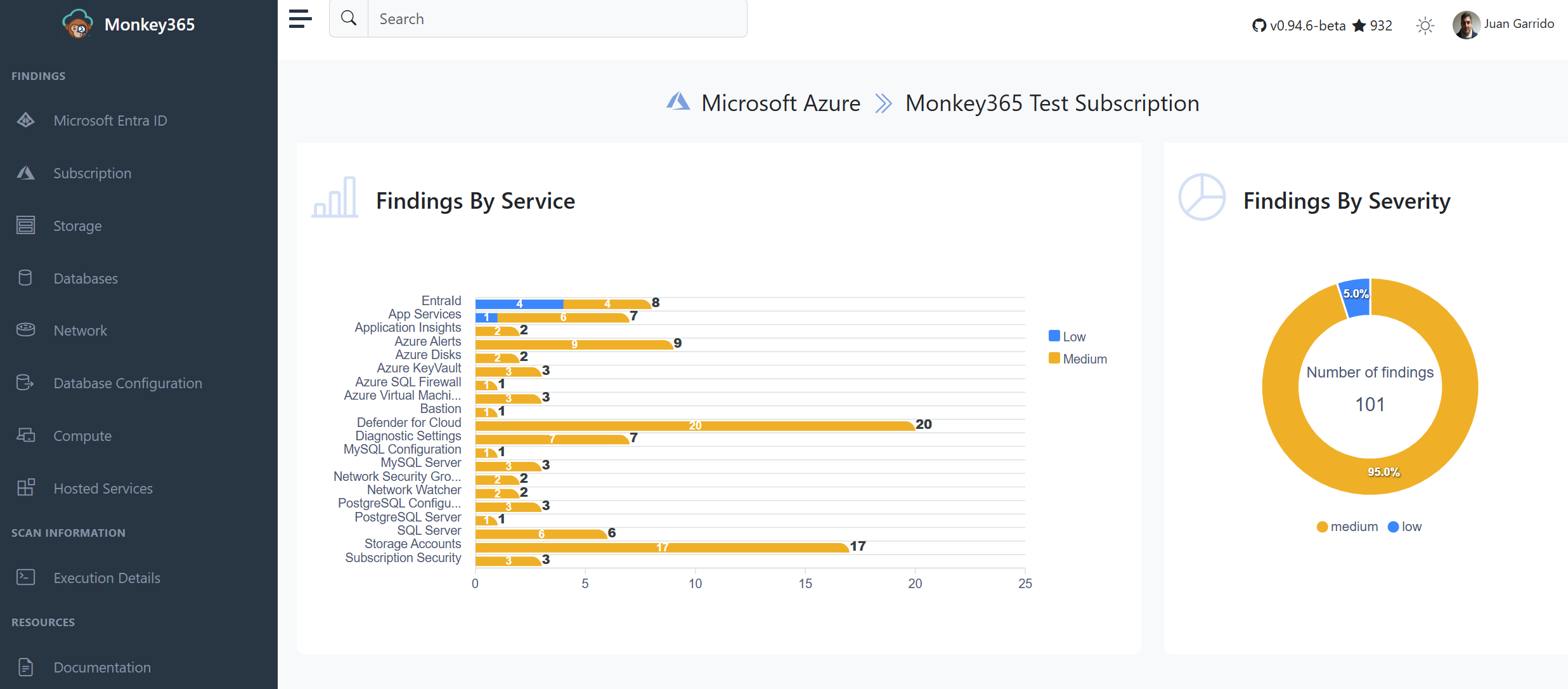
<p align="center">
<img src="docs/docs/assets/images/htmlreport.png" alt="Example Monkey365 HTML report">
</p>
The documentation includes details for exporting results, rate limits and retries, and logging.
Rulesets
Built-In rulesets currently include:
* CIS Microsoft Azure Foundations Benchmark v6.0.0
* CIS Microsoft Azure Database Services Benchmark v2.0.0
* CIS Microsoft Azure Compute Services Benchmark v2.0.0
* CIS Microsoft 365 Foundations Benchmark v7.0.0
* Monkey365 ruleset for Microsoft Entra ID
A benchmark mapping identifies the control associated with a finding; it does not by itself establish certification or compliance. Review each result in the context of the assessed en and its licensing, business, and risk requirements.
Authentication and permissions
Monkey365 supports both delegated and application authentication. Support by workload—for example, some Microsoft 365 services require a certificate rather than a client secret for app-only access. Use the authentication support matrix before choosing an unattended authentication flow.
Monkey365 is designed to read configuration data and does not remediate or modify cloud resources. Use least-pri roles and API permissions, treat output as sensitive data, and remo identifiers and secrets before sharing logs or reports.
Documentation
| Topic | Link |
| --- | --- |
| Install Monkey365 | Installation guide |
| Run a scan | Basic usage |
| Configure a scan | General options |
| Choose an authentication flow | Authentication o |
| Grant access | Required permissions |
| Run in a container | Docker guide |
| Write custom checks | Security checks |
For command syntax and examples, use PowerShell's built-in help:
Detailed installation guides, ad usage examples, configuration references, and additional documentation are a at:
---
Contributing and support
Contributions to code, tests, documentation, collectors, and security checks are
welcome. Read CONTRIBUTING.md before opening a pull request
and follow the Code of Conduct.
Do not post credentials, tokens, tenant data, or unredacted assessment reports
in a public issue or discussion.
---
> [!TIP]
> Give us a Star! If you find Monkey365 useful, please consider starring the repository on GitHub. It helps impro and supports ongoing de.
---
Star History
<a href="
<picture>
<source media="(prefers-color-scheme: dark)" srcset=" />
<source media="(prefers-color-scheme: light)" srcset=" />
<img alt="Star History Chart" src=" />
</picture>
</a>
项目信息
开发语言:PowerShell
Star 数:1354
技术要点
该项目属于安全软件方向的开源资源,代码结构清晰,适合安全研究人员学习参考。项目围绕Monkey365 is an open-source security assessment tool for Microsoft 365, Azure, and Microsoft Entra ID. It helps security professionals identify misconfigurations, review cloud security posture, and evaluate environments against industry security best practices and compliance standards.展开,提供了可运行的实现,对理解相关安全机制、工具原理与攻防技术具有较高的研究价值。
从技术实现角度看,此类项目的核心在于对底层原理的深入理解与工程化落地。开发者在研究过程中可以结合官方文档与社区讨论,梳理项目的初始化流程、核心模块职责与数据流转,逐步掌握其中的技术细节与设计思路。
使用与学习建议
1. 下载源码压缩包,解压到本地环境。
2. 根据项目类型准备对应的运行环境与依赖。
3. 按照 README 中的步骤完成配置与部署。
4. 在隔离的测试环境中运行验证,避免影响生产系统。
免责声明
本资源来源于开源社区,仅供安全研究、技术学习与合法授权范围内的攻防演练使用,请勿用于任何非法或侵害他人权益的用途。使用本项目产生的一切后果由使用者自行承担。
| 资源标题 | monkey365 - Monkey365 is an open-source security assessment to |
| 所属分类 | 安全软件 |
| 发布作者 | admin |
| 发布时间 | 2026-10-05 22:31:32 |
| 下载权限 | 免费下载 |
| 附件数量 | 2 个下载链接 |
| 浏览次数 | 221 |
| 讨论数量 | 0 |
| 主题状态 | 正常讨论中 |