 安全软件
点击放大
nmap-vulners - Nmap NSE scripts that turn a service scan into CVE
项目说明
<di="center">
nmap-
**Turn an nmap service scan into a ranked list of CVEs, exploits and what is
being attacked in the wild.**
One NSE script that takes the software nmap already identified, asks the
database what is known about it, and prints the
answer inside the scan report - worst first, by what is actually exploitable.
![tests]()

![nmap]()
![data]()
![stars]()
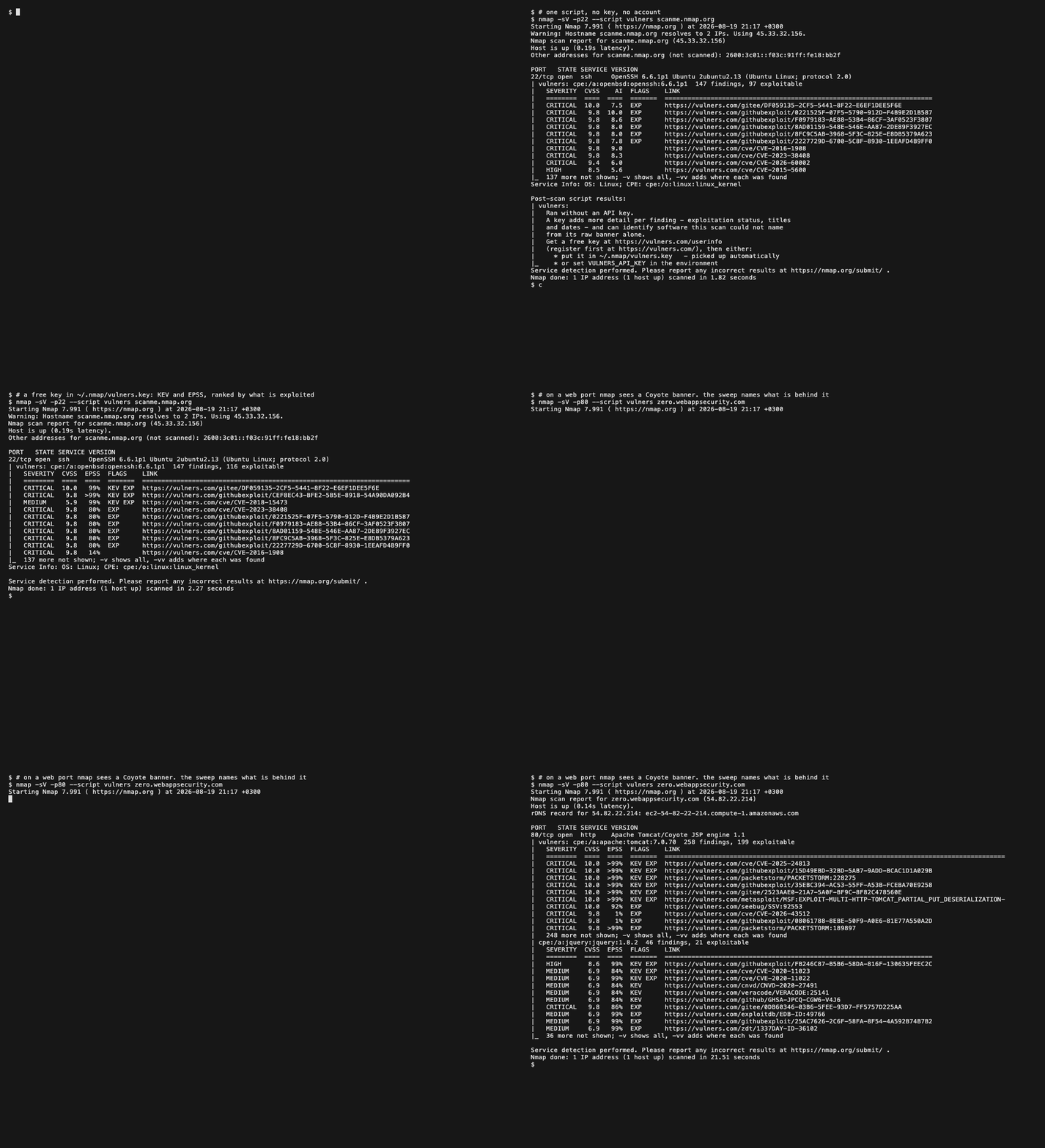
<img src="docs/demo.gif" alt="Three scans: an SSH port with no API key, the same port with one, and a web port where the sweep names the Tomcat behind a Coyote banner" width="900">
<sub>Real scans of hosts published for scanning. No key, then a key, then a web
port: nmap's <code>-sV</code> reports a Coyote banner and the sweep names the
Tomcat and the jQuery behind it.</sub>
</div>
---
Contents
| | |
|---|---|
| Start here | What it does · Install · Your first scan |
| Understand the answer | Reading the output · With a key and without · Ranking |
| Understand the machine | How it works · The web sweep · Where the fingerprints come from · Scanning politely |
| Reference | Options · Where to keep the API key · Machine-readable output |
| When something is off | Troubleshooting · FAQ |
What it does
nmap already tells you what software is listening on a port. This tells you
what is wrong with it.
You run one command. For every open port, the script takes the software nmap
identified, asks .com what is known about it, and prints the answer
under that port - ordered so the things people are actually being attacked with
come first, rather than merely the things with the highest score.
It works with no account and no API key. A free key makes each answer richer,
and With a key and without shows exactly how, with
the same scan run both ways.
Install
macOS, Linux, Kali, WSL - one line, no arguments:
Windows - PowerShell as Administrator:
The installer asks nmap where it keeps its data, copies the script there,
rebuilds the script database, and then checks that --script really
resolves to what it just installed - nmap ships a .nse of its own, and
this replaces it. It also offers to store an API key, if you have one.
<details>
<summary><b>Without root, and other options</b></summary>
PowerShell takes the same options: -User, -Prefix, -Ref, -Uninstall.
</details>
<details>
<summary><b>From a checkout</b></summary>
The installer uses the files next to it, so this installs exactly what you
cloned. Running the script straight out of the checkout works too:
> Use an absolute path when running from a checkout. nmap resolves a
> relative --script ./.nse against its own script.db first, and
> quietly runs the copy that shipped with nmap instead of yours.
</details>
<details>
<summary><b>By hand</b></summary>
One file: copy .nse into <nmap data dir>/scripts/ and runsudo nmap --script-updatedb. There is nothing else to place - the script
downloads its fingerprint data at scan time and writes nothing to disk - and so
nothing to forget, which used to produce a script that ran, found nothing, and
said nothing about why.
If you are upgrading from 1.x, delete .nse andhttp-.nse from that directory as well. A leftoverhttp-.nse still carries the default category and keeps sweeping
targets under a plain -sC. The installer does this for you.
The nmap data directory is usually /usr/share/nmap (Debian, Ubuntu, Kali),/usr/local/share/nmap (built from source), /opt/homebrew/share/nmap
(Homebrew) or C:\Program Files (x86)\Nmap (Windows). To be certain, ask nmap:
The directory holding nse_main.lua is the one this nmap uses.
</details>
Your first scan
That is the whole interface. Two parts of it matter:
* -sV is not optional. It is the flag that makes nmap work out which
software is behind each port. Without it nmap reports "port 80 is open" and
nothing more - there is no software to ask about, and this script has nothing
to do. This is the single most common reason for an empty result.
* --script runs the script. It is deliberately not in nmap's
default set, so a plain -sC will not run it: sending the identity of your
target's software to a third party should be something you asked for.
You get your usual nmap report, with a block added under each port that has
something known against it.
Reading the output
The first line of the block is nmap's own; e indented under it is this
script. Here is the shape, with three of its rows:
The header line names one piece of software and counts what was found
against it:
| Part | Means |
|---|---|
| cpe:/a:apache:http_server:2.4.7 | The software identity - kind, , product, . E indented below belongs to this one piece of software. A single port can produce several of these blocks: a web server, the PHP behind it, a jQuery on the page |
| 272 findings | How many records .com holds for that exact |
| 56 exploitable | How many of them either are published exploit code, or have some. This number goes up with an API key - see With a key and without |
The columns:
| Column | Means |
|---|---|
| SE | CRITICAL / HIGH / MEDIUM / LOW, derived from the C |
| CVSS | The se score, 0.0 to 10.0. How bad it is if exploited - not how likely that is |
| AI or EPSS | This column changes depending on your key. Both are estimates of likelihood, not se. With a key and without explains which you get and why |
| FLAGS | KEV - confirmed exploited in the wild by CISA. EXP - working exploit code is published. Empty means neither is known |
| LINK | The .com page for this finding. Always a full URL, ne |
Only the top ten per software are printed, and the block closes by saying
how many it held back:
The other 262 are not lost. They are always in the machine-readable -oX
output, whatever your . To see them on screen:
With a key and without
This is the question people ask most, so it is answered four times over: in
short, then as the same scan printed both ways, then as a table, and finally
in detail for the one capability a key adds outright.
The short answer
Do I find fewer without a key?
For every piece of software nmap managed to identify, no - you get the same
list. Measured across four products: for a gi identity, the free
lookup returns exactly the same CVEs as the paid one. The exception is a port
nmap could not identify, which a keyless scan cannot report on at all; that
is smart audit, further down.
Then what actually changes?
How well the findings are sorted, and how much you know about each one.
Without a key you get the *what*; with a key you also get the *how likely* and
the *is it happening right now*.
Does it cost money?
No. A key is free, and the detail a key unlocks costs nothing. There is exactly
one paid operation - smart
audit, which
gets findings out of ports that have no software identity at all. It never runs
for a port that has one, and .max_items=0 switches it off.
Can a key find me *more* , or just describe them better?
Both, but by different mechanisms. For software nmap identified, the answer is
the same either way - a key describes it better. For a port nmap could not
identify, smart audit can turn a blank into a full set of findings. Your
keyless scan says at the end how many such ports it saw.
Do I have to configure a mode?
No, and there is no mode flag. The script looks for a key in the usual places,
and uses whatever the key it finds is good for. Give it a key and it does more;
take the key away and it quietly does less. Nothing to switch.
The same scan, both ways
Same host, same software, same 272 findings. Without a key:
With a free key:
Both are real answers from .com, captured against a local server
presenting that banner, and both are abridged to five rows. Three things
changed, and each one is worth understanding:
1. 56 exploitable became 78 exploitable.
An exploit record lists the it exploits. That list only comes
back with a key. Without it the script can see that an exploit exists, but
cannot connect it to the CVE it attacks - so only the exploit records
themselves get counted and flagged. With a key, the 22 C exploits
target are marked too. The did not change; the script's ability
to join them up did.
2. The AI column became EPSS.
Both answer "how likely is this to be used against me", and the script prints
whichever one the answer carried:
* AI is ' own model score, 0 to 10. It comes back on the free
lookup.
* EPSS is the Exploit Prediction Scoring System,
an industry-standard published probability that a will be
exploited in the next 30 days. >99% is not a rounding of 100 - EPSS never
reaches either end, and a value that would round away is shown as a bound
instead of a misleading 0.0%.
The column follows the data rather than the licence: a signal that did not
arri its column instead of showing blank cells, because a blank EPSS
reads as "this one is quiet", and an absent field cannot support that claim.
3. KEV flags appeared.
CISA's Known Exploited catalogue
is a list of confirmed to be under attack in the real world.
Not predicted - observed. It is the strongest signal on the page, and it only
arrives with a key.
And so the top row is different, which is the whole point. Without a key
the list opens with a 10.0 that may never have been used against anyone. With a
key it opens with a 9.1 that CISA has recorded as actively exploited and that
EPSS puts above 99%. The second list is the one that tells you what to fix
first.
The same thing as a table
| | Without a key | With a free key |
|---|---|---|
| Which are found | all of them | the same ones |
| Se (CVSS, and the SE label) | yes | yes |
| Link to each finding | yes | yes |
| Exploit code exists (EXP) | for exploit records only | also for the C exploits attack |
| Confirmed exploited in the wild (KEV) | - | yes |
| Probability of exploitation | ' AI score | EPSS, the published standard |
| Titles, publication dates, upstream ad links | - | yes |
| Ranking quality | good | better - the "confirmed exploited" bands can actually fill |
| Findings for a port nmap could not identify | none - there is nothing to ask about | smart audit names it and reports on it. The only paid part, and the only way the count goes up |
| Price | free, no account | free, register here |
Smart audit
E above is free. There is one more capability that is not, and it is
the only part of a keyed scan that can raise the number of findings rather than
merely describe them better.
The problem it solves. Every lookup so far needs an identity - a CPE likecpe:/a:apache:http_server:2.4.7. Some ports ne one. nmap probes an
appliance, gets a banner it has no rule for, and reports the port as open with
no product and no . There is nothing to ask about, so a keyless scan
prints nothing for that port. Not "clean" - nothing.
What smart audit does. With a key, the script can hand raw text to
and ask it to work out what the software is. The answer comes back as an
identification, often including a real CPE, together with the bulletins for it.
Those bulletins then go through the same enrichment as every other finding, so
they arrive with the same columns and the same ranking.
When it fires. Two cases, both narrow:
| Case | What is sent |
|---|---|
| The port produced no identity at all | nmap's own product text if it has one, otherwise the raw service banner, cleaned of nmap's metadata |
| A CPE was looked up and the service positively could not resolve it | that CPE, as text |
The second case is easy to miss and worth understanding. echoes back
which product it matched a lookup to. When what it matched is not what was
asked, the CPE is a name nothing recognises - often one nmap assembled from a
banner - and the empty answer means "unknown identity", not "no known
". Re-asking it as text is what turns that silence into
findings.
When it ne, which is the case that keeps the bill at zero:
* never for a port whose CPE resolved, even if the answer was empty. A
correctly identified, fully patched service produces no findings, and *clean
is an answer*. Gating on "nothing was found" instead would ha a
credit for every well-maintained host - the better the network, the higher
the bill.
* ne a key. There is no keyless path to it.
Why it raises the finding count. For a port with an identity, a credit buys
nothing: measured across four products, the free lookup returns the same CVEs
as the paid one for the same CPE. For a port *without* one, it is the
difference between a report and a blank. Asking about "Apache httpd" as free
text returns nothing useful, while cpe:/a:apache:http_server:2.4.7 returned
342 findings - and smart audit is what gets from the first to the second.
The keyless scan tells you when it would ha. The notice at the end
of a scan with no key counts the ports that showed a banner and produced no
usable identity:
Those three are exactly the ports smart audit would ha on. If that
count is zero on your network, a key buys you better sorting and richer
findings, but no additional ones.
What it costs, and the four things that bound it:
* one credit per distinct string, not per port and not per host;
* answers are cached for the whole scan, so a /24 of identical appliances
pays once rather than 254 times;
* capped by .max_items, default 32, for the entire scan. The
very first billed call is additionally capped at fi, because the
wallet balance is not known until one call has answered;
* --script-args .max_items=0 switches it off entirely, and every
other keyed feature keeps working.
Reaching the ceiling stops the spending and nothing else - the key stays in
use for the enrichment that is free.
How it works
What it finds, it gives back to nmap. Every identity the sweep discovers is
written onto the port itself, not just into this script's own block. So a
Tomcat that only the sweep could see appears in nmap's <service>
element in -oX output, where your other tooling reads it. It does not
masquerade as one of nmap's own findings: the port keeps the detection method
and confidence nmap gave it, so nothing downstream is told a probe
matched when none did.
Two extra abilities are worth naming, because they are what finds software that
a pattern alone cannot:
* It reads nmap's own service banner. When -sV could not settle what a
service is, nmap still records the raw text it saw. Matching that costs no
extra request, and it is exactly the case where a port would otherwise report
nothing at all.
* It asks a product that will not say. A CMS that names itself and hides
its is common, and no amount of pattern matching extracts a number
that is not on the page. When the product is recognised and the is
not, one request goes to the place that answers - /CHANGELOG.txt for
Drupal, /administrator/manifests/files/joomla.xml for Joomla. A host
running none of the six probed products is sent nothing extra.
<details>
<summary><b>What goes over the network, exactly</b></summary>
Three kinds of request reach .com, and they ha rules:
| What | Key | Cost | When |
|---|---|---|---|
| Look up a software identity | never sent, even if you have one | free | once per identity per scan |
| Fetch the detail of findings | required | free | once per 100 findings |
| Identify software from text (smart audit) | required | 1 credit per distinct string | only for a port with no identity at all, or a CPE the service could not resolve |
The lookup deliberately travels without your key even when you have one. It is
served from a CDN cache shared by every user of this script, and attaching a
key would take you off that cache for an answer that is not improved by it.
A request carries a software name and a . It carries nothing about the
host it came from.
</details>
Ranking
Facts outrank predictions. Findings are ordered:
1. CISA KEV - recorded as exploited in the wild
2. SSVC active - a coordinator's judgement that exploitation is happening
3. an exploit exists - the code is published, for this or for a CVE it names
4. high EPSS - a model expects exploitation
5. e else
C ties inside a band, not across them: an exploited 7.5 is a worse
problem than an unexploited 9.8, and this is the order that says so.
Bands 3 and 5 work without a key. Bands 1, 2 and 4 need the data a key brings,
and a band whose data did not arrive is skipped rather than filled with
guesses - which is the mechanical reason a keyed report is better sorted.
The web sweep
On an HTTP port the script requests every path its catalogue publishes - 939
paths - and matches all 721 rules against every answer. The paths come from
WhatWeb, nuclei and FingerprintHub: places where a product is known to be
recognisable, rather than guesses.
Even a path belonging to software you are not running is worth the request,
because the answer still carries Server, X-Powered-By, a cookie and a
title, and those are where the rules find the stack in front of it.
How fast that goes is your -T, not a setting of ours. The list never
shrinks; the rate does:
| | batches | wait between them | measured, one web port |
|---|---|---|---|
| -T0 paranoid | 188 x 5 | 2 s | 11 m 22 s |
| -T1 sneaky | 94 x 10 | 1 s | 1 m 56 s |
| -T2 polite | 38 x 25 | 0.5 s | 26.2 s |
| -T3 normal (default) | 10 x 100 | 0.1 s | 7.6 s |
| -T4 aggressive | 4 x 250 | none | 6.7 s |
| -T5 insane | 1 | none | 6.6 s |
All six measured in one run against the same local server. -sV alone against
it is 6.1 s, so at the default rate the sweep costs about a second and a half.
The two slow rows are -T0 and -T1 doing their job: 188 and 94 batches, with
a deliberate wait between each.
The requests are pipelined o connections with at most four open at
once, which is nselib's pipeline_go - the same machinery nmap's ownhttp-enum uses, honouring the server's Keep-Alive: max= and--script-args http.max-pipeline=N.
--script-args .paths=none turns the sweep off entirely.
Where the fingerprints come from
The script does not carry them. It downloads them once per scan, before the
first host is touched:
That is four requests per scan - one per file, not per host and not per port -
for 40 KB compressed out of 250 KB of JSON, in nmap's pre-scan phase. Measured
against the published branch. An installed script therefore picks up new
fingerprints without being reinstalled.
It writes nothing to your filesystem. The data is held for the duration of
the scan and dropped, which is how every script nmap ships behaves: of the 611
of them, 26 open a file for writing and every one writes only where a script
argument told it to. None keeps a cache, and neither does this.
If it cannot be downloaded, the scan still runs. This data feeds the web
fingerprinting and nothing else, so a machine with no route to GitHub loses
that and keeps e else: the software nmap itself identified is still
looked up. The report says which capability was missing, rather than leaving
you to read an empty result as a clean network.
| argument | what it does |
|---|---|
| .catalog_url=<url> | fetch from a mirror instead - for an airgapped network. A host name or an IPv6 address in brackets, ]/catalog/ |
| .catalog=none | do not fetch at all; look up only what nmap named |
Scanning politely
Two different parties deser here, and they need different things.
To .com, a scan of a whole network asks far less than it looks:
* one request per software identity, not per port and not per host, with
every answer cached for the rest of the scan - a hundred identical servers
cost one lookup
* a lookup another port already has in flight is waited for, not repeated
* discovery goes to a CDN-cached endpoint, deliberately *without* your key
even when you have one, so it lands on the cache the whole user base shares
rather than on the origin
* a rate limit or an outage stops that leg of the scan rather than being
retried once per host, and a key that stops working drops to the free path
instead of silencing the scan
* credits are spent only where the free path could not answer at all
To the target, the sweep is the only thing that makes real noise:
* it goes over a handful of pipelined connections rather than one per path,
and asks for compressed pages
* its rate is entirely yours - see the -T table in The web
sweep - and .paths=none removes it
* it stops matching a response once it has spent its byte budget, so an
enormous page cannot turn into an enormous amount of work
* nothing else in the script touches the target: e after the sweep is
a con with .com about text nmap already collected
Options
All are passed with --script-args. A bare name works too, so--script-args mincvss=7 is enough.
The ones you are likely to want:
| Argument | Default | Meaning |
|---|---|---|
| .mincvss | 0 | Hide findings scored below this. Unscored bulletins and anything with a known exploit are shown whatever the threshold |
| .width | 80 | Terminal width the table is laid out for |
| .paths | all 939 | Paths for the web sweep. none switches the sweep off; a Lua list, or one string naming a file with one path per line, replaces it. A file you name that cannot be read stops the sweep and says so, rather than quietly falling back to the published list |
| .max_items | 32 | Ceiling on paid identifications for the whole scan. 0 disables spending entirely |
Telling it about your key - see Where to keep the API
key for which of these to prefer:
| Argument | Default | Meaning |
|---|---|---|
| .api_key_file | - | Absolute path to a file whose first line is the token |
| .api_key | - | The token itself. Leaky: nmap copies its own command line into -oX |
Rarely needed:
| Argument | Default | Meaning |
|---|---|---|
| .catalog_url | GitHub | Fetch the fingerprint data from a mirror instead |
| .catalog | fetch it | none to run with no web fingerprinting and no request for it |
| .api_host | .com | Host name of the API |
| .api_port | 443 | Port on api_host |
The 1.x argument names still work for one release: .* for
the key, host, port and minc, and http-.paths for
the sweep. Using one prints a deprecation notice naming its replacement.
Worked examples
Where to keep the API key
There are four places the script will find a key. They differ in how safe they
are, and - separately - in which one wins when you have more than one. Those
two orders are opposites, so they are worth reading together:
| Where | How safe | Wins over |
|---|---|---|
| ~/.nmap/.key, one line, mode 600 | safest - never on a command line, never in a report. The installer offers to write it for you | nothing; it is the last resort |
| in the en | safe, but inherited by whatever else you launch from that shell | the key file |
| --script-args .api_key_file=/absolute/path | safe; only the *path* is on the command line | the en |
| --script-args .api_key=<token> | leaky - see below | e |
Read the table downwards for what to choose, and upwards for what wins. The
most explicit setting takes precedence, which is what you want when you are
o a stored key for one scan - and it is exactly why the most explicit
one is also the most exposed.
Why the last row is leaky: nmap copies its own command line into every
report, so a token passed that way ends up in the args attribute of -oX
output and in your shell history. It is fine for a throwaway test and wrong for
anything recorded.
The script itself ne the token anywhere, including its debug output -
there are regression tests that say so, in the offline suite and against the
li.
A key file you name explicitly and that cannot be read stops the run rather
than quietly falling back - an operator who names a file means that file - and
the report says which file it was. A mistyped path cannot look like a clean
scan.
Machine-readable output
E printed is also structured, so -oX can be parsed without touching
the human text. The script id, the two table levels and the fi
element keys are unchanged from 1.x, which is what DefectDojo, Faraday,
nmap2csv and raven read:
mode says which way the scan ran - free or keyed - so a report can be
read without guessing which fields to expect.
New in 2.0: schema, mode, se, exploit_known, kev, epss,epss_percentile, exploitation, ai_score, title, published, href,source_href and found_on. Every one is present-or-absent, ne.
Nothing is nested more deeply than before, because a third table level is
in to every importer examined.
href is always the .com page for the finding, in both modes. The
endpoint's own href is the upstream address - nvd.nist.gov for a CVE,
github.com for a scraped exploit - and that travels separately, assource_href, so neither field's meaning depends on which mode produced it.
The structured output always carries every finding that passed mincvss, even
the ones the ladder hides from the text - so no automation loses
findings by not passing -v.
The rendered text is a break from 1.x. The *EXPLOIT* and *HAS EXPLOIT*
tokens and the tab-delimited layout are gone, replaced by the aligned table
above. The per-row .com link stayed: it is the last column, and it is
the one cell the layout will not shorten, because half a URL is not a URL.
Text-scraping consumers need updating; -oX consumers do not.
Troubleshooting
It printed nothing for a host I know is . Work down this list -
the first two account for most cases:
1. Did you pass -sV? Without it nmap names no software, and there is
nothing to look up. nmap --script <target> alone will almost
always print nothing.
2. Did nmap print a ? Look at the column of nmap's own
output. nginx with no number cannot be looked up - there is no to
ask about. -s tries harder and sometimes gets one. If nmap
named nothing at all, and the end-of-scan notice counts the port among the
services that "showed a banner that produced no usable identity", then a key
is the answer: see smart
audit.
3. Is the software simply clean? A fully patched service produces no
findings, and that looks identical to a failure. Check against a host you
know is old.
4. Look at what it had to work with. The script asks about exactly the
software identities attached to the port, so those are what to check.
-oX lists them, including the ones the sweep added:
No <cpe> line means nothing was identified, and nothing identified means
nothing to look up. Add -vv to see which URL each swept identity came
from.
5. Then ask what went wrong. -d prints what the script refused or could
not do - an identity it judged unreal, a ceiling it hit, an API error, a
catalogue file that would not parse:
The report says the fingerprint catalogue could not be downloaded. Then the
web fingerprinting did not run and e else did - the software nmap
itself named was still looked up. It is said out loud for that reason: a
capability that did not run reads exactly like a capability that found nothing.
The two causes ha wording. "Could not be downloaded" is your network
or GitHub; "answered, but one of its dictionaries could not be read" is the
mirror you pointed .catalog_url at.
The scan is slow. On a web port, almost all of it is the 939-path sweep,
and its rate is your -T - see The web sweep. Either raise
the timing (-T4) or turn the sweep off with--script-args .paths=none. Note that against internet hosts the sweep
costs about a minute per web port at the default -T3, where on a local
network it costs seconds; the difference is entirely round-trip time.
-sC stopped finding web software after I upgraded from 1.x. Because is not in nmap's default category, and neither is the fingerprint
sweep that used to live in http-.nse. Run --script
explicitly.
The table is cut off / wrapped badly. It is laid out for an 80-column
terminal by default. --script-args .width=140 matches a wider one. The
link column is allowed to o on purpose - half a URL is useless.
My key does not seem to be used. Run with -d: the script reports which
source the key came from and how long it is, never the key itself. If that
names a source you did not expect, something more explicit is o you -
see the precedence column in Where to keep the API
key. One trap is worth knowing on top of that:
nmap resolves ~/.nmap through your real account rather than $HOME, so undersudo it looks in root's home. The installer handles that when it writes the
key for you.
The notice at the end says "Ran without a usable API key". A key was found
but stopped working, and the sentence names what happened. The scan did not
stop: it carried on with the free lookup, which is why you still got findings.
Check the key at .com/userinfo. A scan
with no key at all says "Ran without an API key" instead, with no reason
attached - the two are worth telling apart.
FAQ
Does it exploit anything? No. It reads banners and pages and asks a
database - it sends no payload and tries no credential. It is categoriseddiscovery, intrusive, vuln, external rather than safe, for one reason: the
path sweep requests 939 paths of a web port, and nmap's definition of safe
excludes scripts that use large amounts of bandwidth. nmap's own http-enum
requests 2 204 and is discovery, intrusive, vuln for the same reason - this
script adds external on top, because its lookups leave your network. Your-T sets how fast those requests go out and never how many, and--script-args .paths=none turns the sweep off altogether.
Does it work without an API key? Yes - see With a key and
without. For any software nmap identified, the free
lookup returns the same as the paid one; a key adds detail and
sorts them better. The one thing a keyless scan cannot do is report on a port
whose software nmap could not identify, which is what smart
audit is
for. Your keyless scan says at the end how many such ports it met, so you can
tell whether that matters on your network.
What is a CPE? The identity string nmap and this script use for a piece of
software: cpe:/a:apache:http_server:2.4.7 is application / apache /
product http_server / 2.4.7. It is what makes a lookup exact rather
than a text search.
Why does one finding show cvss2.0 and another cvss3.1? The label names
the scale the score is on. returns whichever the source published; a v2
score of 9.3 is not a v3 score of 9.3.
Why is a low-scoring entry shown when I set mincvss? Because it has a
known exploit, or because the source ne it. Both are deliberate: a
threshold should not hide working exploit code, and an unscored bulletin is not
a low-scoring one.
Why is an exploit listed separately from the CVE it exploits? They are
different documents, and both are worth seeing. At the same score the
leads and its exploit follows; the EXP flag on the CVE is what
tells you they are one problem.
Does it send anything about my hosts to ? A request carries a
software name and a . It carries nothing about the host it came from,
nothing about your network, and no scan results.
De
The tests, the hygiene gate and CONTRIBUTING.md are in the git repository
only; the release archi the script and its data. Eight gates, all
offline except where noted, and CI runs exactly these:
273 unit cases run inside nmap against the real NSE libraries; 64 end-to-end
cases drive the real nmap binary against a local web server and a stand-in
API that enforces what the real one enforces; the hygiene gate keeps
secrets, scan output and editor clutter out of the tree and refuses a global
read that NSE would turn into a lost result; and the last four hold the data
and the tools that publish it - the catalogue's shape, the XML contract every
importer reads, the pattern translator, and the gate that decides a rebuild is
safe to publish. The last one holds the whole repository to
Nmap's own Code Standards, whichHACKING names as the authority for a script that wants to live in nmap's
tree: no tabs, no trailing whitespace, lines under 80 columns, no semicolons,
private NSEdoc opening with --;, PEP 8 for the Python.python3 tests/e2e/run_e2e.py --live adds checks against the real service.
See CONTRIBUTING.md.
License
The script is licensed the same as Nmap itself - see LICENSE for the
Nmap Public Source License, and
nmap.org/npsl for what it means.
data comes from and is subject to
their terms.
Related
* .com - the database behind this script
* /api - the Python client
* /burp- - the same data inside Burp Suite
* nmap.org/book/nse.html - how NSE scripts work
---
<di="center">
Maintained by the Team <info@.com>
#nmap #nse # #cve #cvss #cpe ##security-tools #pentest #infosec #network-scanner #exploit-database#lua # #security-automation
</div>
项目信息
开发语言:Lua
Star 数:3496
技术要点
该项目属于安全软件方向的开源资源,代码结构清晰,适合安全研究人员学习参考。项目围绕Nmap NSE scripts that turn a service scan into CVEs, CVSS scores and known exploits — fingerprints software from HTTP responses and checks every detected CPE against the Vulners database.展开,提供了可运行的实现,对理解相关安全机制、工具原理与攻防技术具有较高的研究价值。
从技术实现角度看,此类项目的核心在于对底层原理的深入理解与工程化落地。开发者在研究过程中可以结合官方文档与社区讨论,梳理项目的初始化流程、核心模块职责与数据流转,逐步掌握其中的技术细节与设计思路。
使用与学习建议
1. 下载源码压缩包,解压到本地环境。
2. 根据项目类型准备对应的运行环境与依赖。
3. 按照 README 中的步骤完成配置与部署。
4. 在隔离的测试环境中运行验证,避免影响生产系统。
免责声明
本资源来源于开源社区,仅供安全研究、技术学习与合法授权范围内的攻防演练使用,请勿用于任何非法或侵害他人权益的用途。使用本项目产生的一切后果由使用者自行承担。
| 资源标题 | nmap-vulners - Nmap NSE scripts that turn a service scan into CVE |
| 所属分类 | 安全软件 |
| 发布作者 | admin |
| 发布时间 | 2026-10-05 22:32:36 |
| 下载权限 | 免费下载 |
| 附件数量 | 2 个下载链接 |
| 浏览次数 | 384 |
| 讨论数量 | 0 |
| 主题状态 | 正常讨论中 |