 安全软件
点击放大
SSH-Snake - SSH-Snake is a self-propagating, self-replicating,
项目说明
SSH-Snake: Automated SSH-Based Network Tra
🐍 SSH-Snake is a powerful tool designed to perform automatic network tra using SSH private keys discovered on systems, with the objective of creating a comprehensive map of a network and its dependencies, identifying to what extent a network can be compromised using SSH and SSH private keys starting from a particular system.
SSH-Snake can automatically reveal the relationship between systems which are connected via SSH, which would normally take a tremendous amount of time and effort to perform manually.
In other words, SSH-Snake performs the following tasks automatically and recursively:
1. On the current system, find any SSH private keys,
2. On the current system, find any hosts or destinations (user) that the private keys may be accepted,
3. Attempt to SSH into all of the destinations using all of the private keys discovered,
4. If a destination is successfully connected to, repeats steps #1 - #4 on the connected-to system.
It's completely self-replicating and self-propagating -- and completely fileless. In many ways, SSH-Snake is actually a worm: It replicates itself and spreads itself from one system to another as far as it can.
Instead of manually jumping between systems with SSH keys like it's a Super Mario game, let SSH-Snake do the work for you.
Although this tool is intended for hacking purposes, sysadmins can also use it to better understand their infrastructure and network. If you want to disable the printing of private keys discovered, comment out this line of code.
An in-depth look at how this script actually works, technical details, interesting disco, design decisions, benchmarking, and lessons learnt, check out this blog post. This software was written by Joshua Rogers.
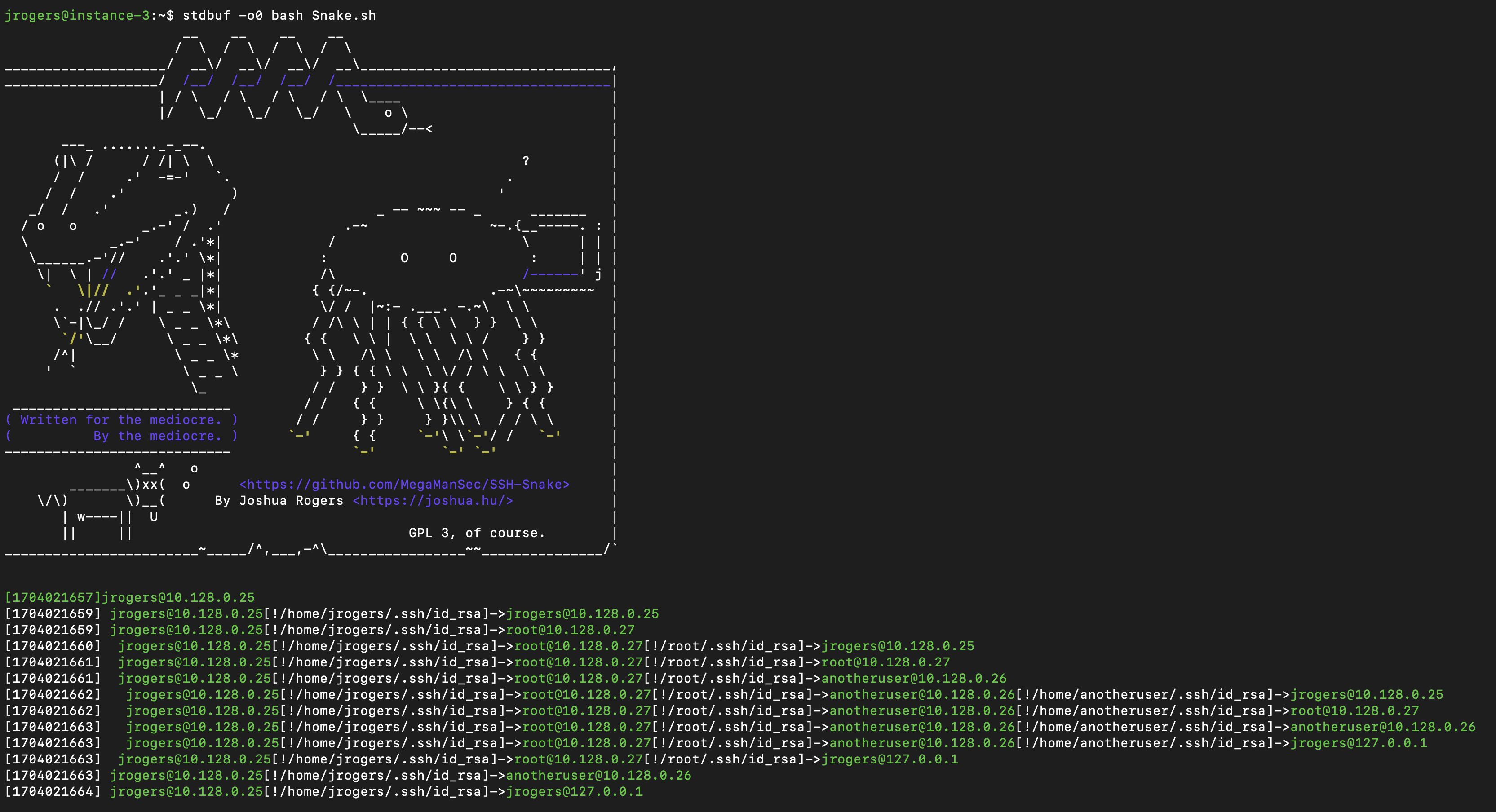
Screenshots
|A reduced screenshot from the output of SSH-Snake in a very small network.|
|:-:|
---
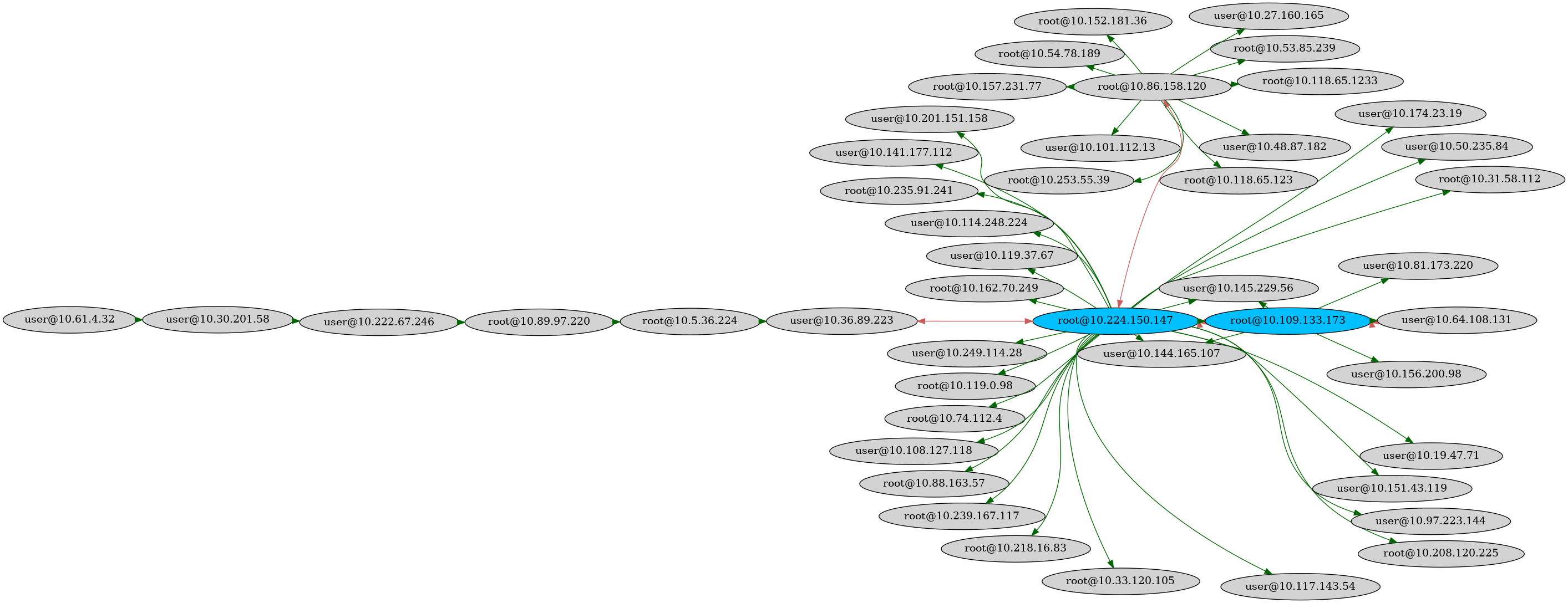
|!A graph the relation between systems using SSHThe blue nodes indicate the _destination_ can connect to itself (user<-->user). The red edges indicate that the connection is bi-directional (user1<-->user2).|
|:-:|
---
|!A graph the relation between systems using SSHThe green nodes indicate a _host_ (without a username) that can connect to itself (host1<-->host1). The green edges indicate that the connection is bi-directional (host1<-->host2). The gray host in the top right corner is the host that the script was initially executed on.|
|:-:|
---
|!A graph the relation between systems using SSHThe blue nodes indicate the _destination_ can connect to itself (user<-->user). The red edges indicate that the connection is bi-directional (user1<-->user2).|
|:-:|
Using and Running SSH-Snake
SSH-Snake can either be downloaded or piped into bash:
or
About SSH-Snake
SSH-Snake seamlessly emulates what a human ad would do to discover SSH private keys and destinations where they can be used to connect to. Written entirely in Bash, it operates with a minimal set of dependencies commonly a on major Linux (and MacOS) systems: bash, ssh, coreutils, awk, uniq, sort, grep, tr, find, and cat. getent OR dscacheutil is required. sed is required for only the very first system. Likewise, sudo, hostname, ip, timeout, arp, ifconfig, ipconfig, and xargs may also be used, but they are not required (and the script gracefully handles cases where they are not present). If a system is discovered without any of the required packages, it gracefully fails, alerting the user that the scan could not continue on that particular system (and backtracks, continuing from the previous system.)
SSH-Snake is completely fileless: after the user runs the script, it is passed to destinations' bash and bash arguments (via SSH). No material e of the script exists on any of the systems scanned: the only e of the script running is in the process tree, and the substantial amount of invalid SSH attempts which will ine occur.
SSH-Snake takes a depth-first approach to discovery: once it connects to one system, it tries to connect further from that system before backtracking.
The name SSH-Snake comes from the fact that the output of the script looks like a snake slithering up and down the network. Howe the game Snake, SSH-Snake will not die when it bites its own tail (connects to a systems it has already scanned or is currently scanning): it will simply print how it connected there as normal, but return and not re-scan the destination (in order to avoid infinite recursion).
SSH-Snake has been tested on flavors of Linux, and MacOS (with Homebrew Bash installed). If you encounter a Linux-based OS it isn't compatible with, please submit a report.
Features
.bash_history entries,Settings
SSH-Snake comes with some general settings that can be configured. These settings are documented in SETTINGS.md#general-settings.
SSH-Snake also comes with a configurable/plug-and-play strategies (functions) which can be used to discover SSH private keys on a system and disco and destinations to attempt to connect to. Sane defaults have been provided, however if you want to perform a scan as thoroughly as possible, then enabling more discovery techniques can help. If a scan is taking a long time, disabling some discovery techniques can help. With the exception of one strategy (find_ssh_keys), each of the strategies can be toggled off/on. These are documented in SETTINGS.md#configurable-disco.
Understanding Output
The raw output of SSH-Snake contains a mix of infomation about discovered private keys, destinations, and error messages.
A detailed explanation on the full output of SSH-Snake can be found in OUTPUT.md.
An example of an output can be found in example-output.log.
System Relationships
The output of SSH-Snake can be used to create graphs/ of the network that the script tra.
A detailed explanation on how to create and interpret images/ from the output of SSH-Snake can be found in GRAPHICS.md.
Other Tools
In addition to the ability to create of the network that SSH-Snake tra, three other tools are provided. Namely:
1. forward-lookup-host.py: Given a source host or destination, determine all of the systems that can be accessed either directly or indirectly (i.e. through a tertiary system).
2. re.py: Given a destination host or destination, determine all of the systems that can either directly or indirectly access it.
3. shortest-path-create-chain.py: Given host or destination A and B, determine the shortest path connecting the two.
The third tool also generates a command that can be used to connect from destination A to destination B. For example:
Snake.sh .nocomments.sh
Since the script is quite large, loading the script into a here-document (which it does automatically because the script it actually a Quine)) causes bash to write to a temporary file (as it is greater than 65535-bytes).
To cut down on the size such that it remains 100% fileless, Snake.nocomments.sh has a with all comments, unnecessary white-spaces, and blank lines removed. This cuts the file's size down such that the temporary file is not created by bash.
Bugs / Issues
If you encounter any bugs or issues related to the script, please report them as a GitHub issue. Please include your configuration setings.
I am particually interested in any interesting [line] outputs associated with errors that haven't been caught by the script.
Limitations
项目信息
开发语言:Shell
Star 数:2341
技术要点
该项目属于安全软件方向的开源资源,代码结构清晰,适合安全研究人员学习参考。项目围绕SSH-Snake is a self-propagating, self-replicating, file-less script that automates the post-exploitation task of SSH private key and host discovery.展开,提供了可运行的实现,对理解相关安全机制、工具原理与攻防技术具有较高的研究价值。
从技术实现角度看,此类项目的核心在于对底层原理的深入理解与工程化落地。开发者在研究过程中可以结合官方文档与社区讨论,梳理项目的初始化流程、核心模块职责与数据流转,逐步掌握其中的技术细节与设计思路。
使用与学习建议
1. 下载源码压缩包,解压到本地环境。
2. 根据项目类型准备对应的运行环境与依赖。
3. 按照 README 中的步骤完成配置与部署。
4. 在隔离的测试环境中运行验证,避免影响生产系统。
免责声明
本资源来源于开源社区,仅供安全研究、技术学习与合法授权范围内的攻防演练使用,请勿用于任何非法或侵害他人权益的用途。使用本项目产生的一切后果由使用者自行承担。
| 资源标题 | SSH-Snake - SSH-Snake is a self-propagating, self-replicating, |
| 所属分类 | 安全软件 |
| 发布作者 | admin |
| 发布时间 | 2026-10-05 22:32:52 |
| 下载权限 | 免费下载 |
| 附件数量 | 2 个下载链接 |
| 浏览次数 | 195 |
| 讨论数量 | 0 |
| 主题状态 | 正常讨论中 |