 安全软件
点击放大
0 - Full-stack AI security OS for your browser, termin
项目说明
<p align="center">
<a href="
<img src="assets/readme-cover.png" alt="0security landscape with Zero and the security research mission" width="100%">
</a>
</p>
<p align="center">
<picture>
<source media="(prefers-color-scheme: dark)" srcset="assets/0-aperture-white.svg">
<img src="assets/0-aperture-ink.svg" alt="0security" width="280">
</picture>
</p>
<p align="center">
<strong>Open-source security workflows in your browser, terminal, or coding agent.</strong><br/>
<sub>Backed by Y Combinator · The Swiss Applied AI & Cybersecurity Research Lab</sub><br/>
<a href=" ·
<a href=" ·
<a href="
</p>
<p align="center">
<a href="LICENSE"><img src=" alt="License: MIT OR Apache-2.0"></a>
<a href=" release</a>
<a href="#status-and-safety"><img src=" alt="Status: research preview"></a>
</p>
<p align="center">
<img src="assets/zero-manifesto-mo.webp" alt="Zero manifesto mo" width="100%">
</p>
Get started
Install on Apple Silicon macOS or x64/ARM64 Linux:
Command Center (browser): 0 web · Terminal: 0
Configure a model provider before running AI workflows.
Workflows
Browser, CLI, and MCP share one workflow runner with retained results.
Findings are prioritized by business impact: affected customers and data, fraud,
critical services, and disruption. Each priority includes a rationale; missing
context stays Not assessed. C a as technical se.
| Work | Built-in templates |
| --- | --- |
| Assess | Repositories, dependencies, APIs, web configuration, scoped penetration tests, package behavior, smart contracts, native code |
| | Findings with replay e |
| Fix | Candidates with regression tests |
| Research | Security research, deep source in |
Start from 12 templates, customize steps, and run manually or with browser triggers and schedules.
Template: starting point · Workflow: reusable steps · Run: one execution.
Learning retains local run activity, source-grounded notes and e
impro history. Sa keep immutable re and support restore.
Use 0 learning status or open Learning in the browser.
Learning documentation.
Workflow guide: inputs, limits, and results.
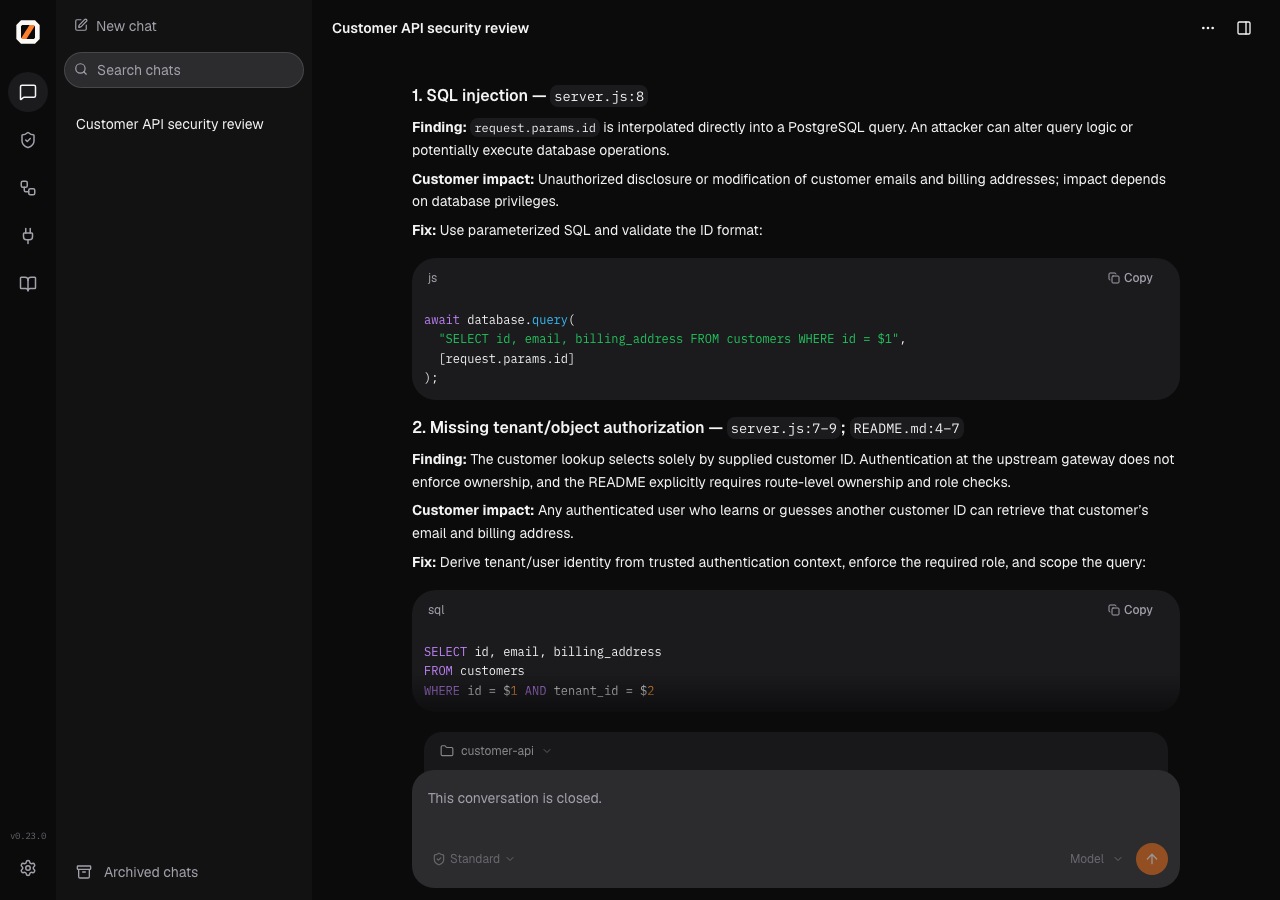
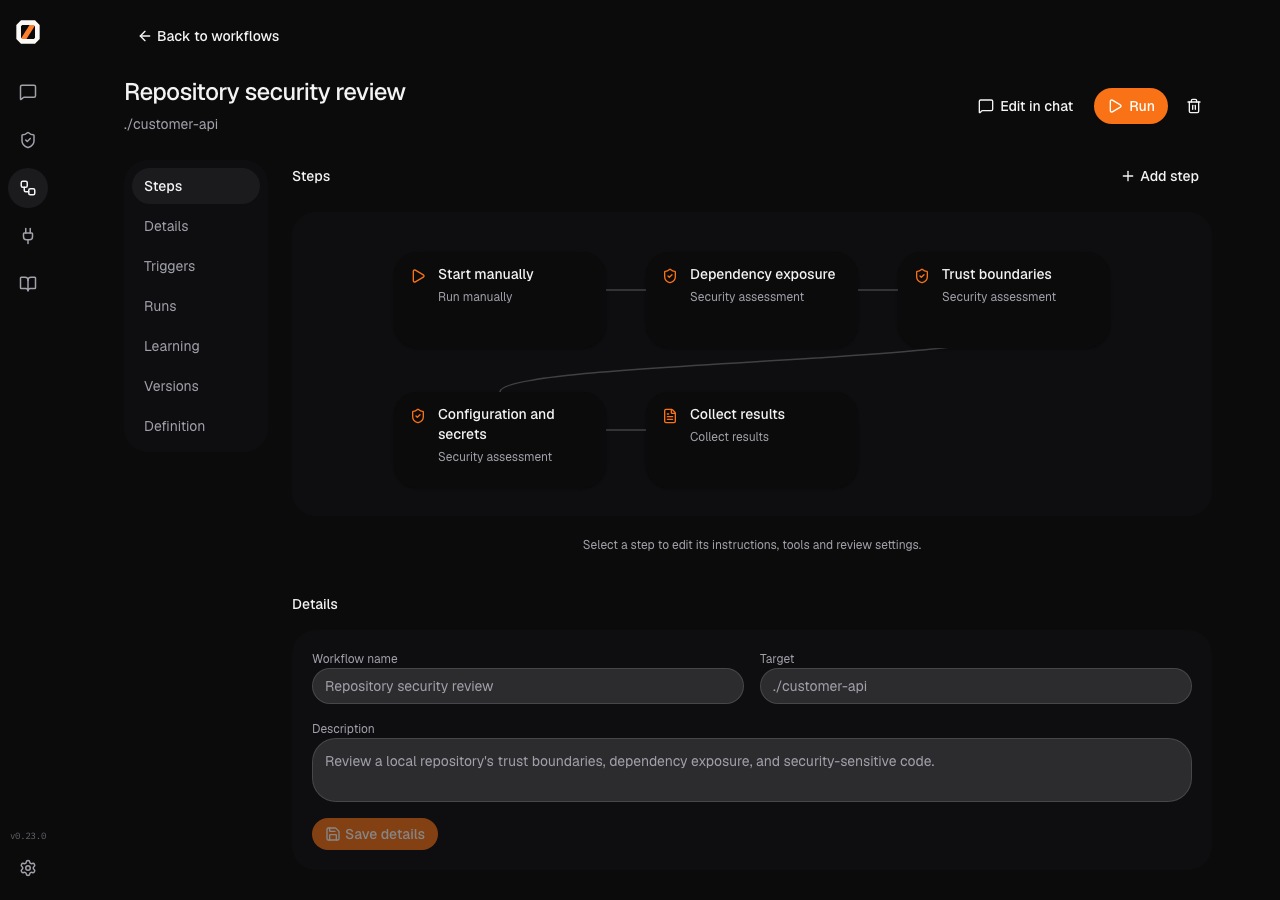
See Zero at work
A source review of the included demo API, with code locations and suggested fixes.
!Demo API source review in Zero
Start a workflow from a template and edit its steps.
!Workflow editor in Zero
Use 0 from another agent
Use the CLI commands above, or MCP to disco, create workflows, and manage runs:
Local MCP requires an explicitly selected host-local execution profile.
For a registered remote engine, use 0 mcp-ser --backend production.
0's model provider is separate from the connecting agent's session.
Browser chat's Connect an external agent copies a setup prompt.
CLI and MCP workflow clients automatically attach to a running local web engine
for the same workspace and control database. To attach explicitly to the sessions
and runs already open in an engine:
Set ENGINE_TOKEN to the engine's configured bearer credential. Attached clients
share the browser's session and run lifecycle; disconnecting leaves the engine
running. Omit --session to create a session under the engine's admission grants.
See MCP setup and indi tools or
local and remote engines.
Plugins
Connect GitHub, Elastic, Semgrep, Snyk, Linear, Jira, Cloudflare, Slack, and Teams
through plugins and MCP.
More guides: installation ·
GitHub Actions ·
plugin de ·
troubleshooting.
De
Install dependencies, run npm run dev, and open the printed browser address.
See CONTRIBUTING.md.
Status and safety
Research preview. Assess authorized systems and review findings and fixes.
The terminal defaults to YOLO; use 0 console --mode standard for confirmations.
The optional scope plugin enforces target boundaries.
Report through SECURITY.md.
Licensed under MIT OR Apache-2.0.
Public disclosures and upstream fixes.
Thanks to OpenTUI, Bun,
React, Models.dev,
LiteLLM, and our contributors.
项目信息
开发语言:TypeScript
Star 数:496
技术要点
该项目属于安全软件方向的开源资源,代码结构清晰,适合安全研究人员学习参考。项目围绕Full-stack AI security OS for your browser, terminal, and agents. Find, verify, and fix vulnerabilities. Prioritized by business impact instead of just CVSS scores.展开,提供了可运行的实现,对理解相关安全机制、工具原理与攻防技术具有较高的研究价值。
从技术实现角度看,此类项目的核心在于对底层原理的深入理解与工程化落地。开发者在研究过程中可以结合官方文档与社区讨论,梳理项目的初始化流程、核心模块职责与数据流转,逐步掌握其中的技术细节与设计思路。
使用与学习建议
1. 下载源码压缩包,解压到本地环境。
2. 根据项目类型准备对应的运行环境与依赖。
3. 按照 README 中的步骤完成配置与部署。
4. 在隔离的测试环境中运行验证,避免影响生产系统。
免责声明
本资源来源于开源社区,仅供安全研究、技术学习与合法授权范围内的攻防演练使用,请勿用于任何非法或侵害他人权益的用途。使用本项目产生的一切后果由使用者自行承担。
| 资源标题 | 0 - Full-stack AI security OS for your browser, termin |
| 所属分类 | 安全软件 |
| 发布作者 | admin |
| 发布时间 | 2026-10-05 22:36:13 |
| 下载权限 | 免费下载 |
| 附件数量 | 2 个下载链接 |
| 浏览次数 | 101 |
| 讨论数量 | 0 |
| 主题状态 | 正常讨论中 |