 安全软件
点击放大
SILENTCHAIN - AI-powered vulnerability scanner extension for Bur
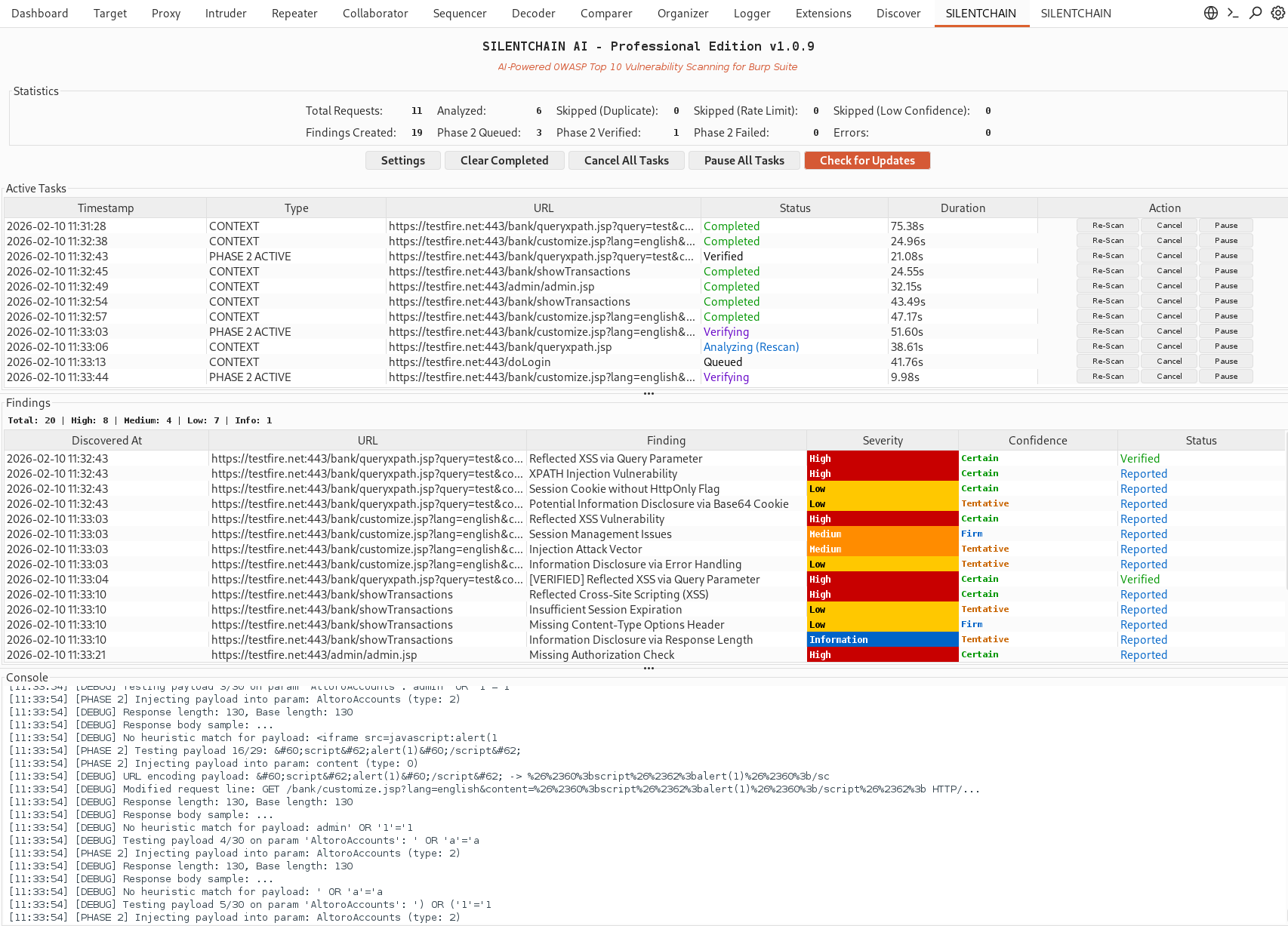
项目说明
!SILENTCHAIN-AI-Intro.gif
SILENTCHAIN AI™ - Community Edition
<di="center">
!SILENTCHAIN Logo
![Burp Suite]()
![Java]()
🔗 ⛓️ 🔒
AI-Powered Passi Analysis for Burp Suite
*Intelligent • Silent • Adaptive • Comprehensive*
🚀 Getting Started • 📖 Documentation • 🔧 Configuration • 📊 Benchmarks • ⬆️ Upgrade to Pro
![Watch the Professional Demo]()
</div>
---
!SILENTCHAINAI-professional-burp-findings1.PNG
!SILENTCHAINAI-burp-findings1.PNG
---
> Note: This is the Community Edition. Commercial and Professional Editions with ad features are a separately.
🌟 O
SILENTCHAIN AI™ - Community Edition is a Burp Suite extension that brings the power of artificial intelligence to web application security testing. Using ad AI models, SILENTCHAIN performs intelligent passi of HTTP traffic to identify OWASP Top 10 , security misconfigurations, and potential attack .
Why SILENTCHAIN?
Traditional security scanners rely on predefined signatures and patterns. SILENTCHAIN AI™ goes beyond with:
---
✨ Features
Core Capabilities
#### 🔍 Passive AI Analysis
#### 🎨 Professional UI
#### 🤖 Multi-AI Support
#### 📋 Smart Reporting
#### 🛡️ Data Privacy (DataSanitizer)
[REDACTED] before any AI request, whatever the sanitizer setting: cookie , Authorization and API-key/token header , and parameters / JSON fields named like credentials (password, token, api_key, session...) in the URL, URL-bearing headers (Referer, Location), the parameter sample and the request and response bodies (form, JSON including nested , multipart, XML, HTML form inputs) (names, Set-Cookie attributes and the Authorization scheme are kept)[REDACTED_*] placeholders before sending to the AI provider, then restored in the response- API keys - OpenAI (
sk-), GitHub (ghp_), AWS (AKIA), GitLab (glpat-), Slack (xoxb-)- Authorization headers - Bearer tokens, Basic auth
- Credentials - password/secret/token fields,
user:pass URIs- Session cookies - session IDs, CSRF tokens, JWTs, auth tokens
- Email addresses
- IP addresses & hostnames - target infrastructure details
Detection
SILENTCHAIN AI™ detects a wide range of security issues including:
| Category | |
|----------|----------------|
| Injection | SQL Injection, NoSQL Injection, Command Injection, LDAP Injection, XPath Injection |
| Cross-Site Scripting | Reflected XSS, Stored XSS, DOM-based XSS |
| Authentication | Broken Authentication, Session Management Issues, Credential Exposure |
| Access Control | IDOR, Broken Authorization, Pri Escalation |
| Cryptography | Weak Encryption, Insecure SSL/TLS, Sensitive Data Exposure |
| Configuration | Security Misconfigurations, Default Credentials, Debug Enabled |
| XXE | XML External Entity Attacks |
| Deserialization | Insecure Deserialization |
| Components | Dependencies, Outdated Libraries |
---
🚀 Quick Start
Prerequisites
- Burp AI (default; zero-config; uses Burp AI credits)
- Ollama (free, local, pri)
- OpenAI API key
- Claude (Anthropic) API key
- Gemini (Google) API key
- Azure OpenAI / Foundry
Installation
1. Download the extension
- Grab the latest silentchain-community-edition.jar from GitHub Releases (this link always serves the newest build). Specific (silentchain-community-edition-X.Y.Z.jar) are on the Releases page.
- Or build it from source: ./gradlew shadowJar produces build/libs/silentchain-community-edition-<>.jar (the Gradle wrapper is included; the JDK 21 toolchain is auto-pro if missing).
2. Load it in Burp Suite
- Go to Extensions → Installed → Add
- Set Extension type: Java
- Select the downloaded .jar and click Next
- In Extensions → Installed, enable Use AI for SILENTCHAIN (required for every provider)
3. Configure your AI provider
- Click Settings on the SILENTCHAIN Community tab, or search Burp's Settings window for SILENTCHAIN
- Pick a provider - Burp AI works with no configuration. For an external provider, set the API URL / key / model and click Test Connection. Changes apply immediately (there is no Sa).
4. Start scanning
- Set your target scope in Burp (Target → Scope)
- Turn on passi with Start Scanning on the SILENTCHAIN Community tab (it is OFF by default), then browse the target through Burp's proxy (Burp's default li audit of Proxy traffic feeds in-scope items to SILENTCHAIN) - or right-click any request → Analyze Request (SILENTCHAIN) for on-demand analysis
- Findings appear in the SILENTCHAIN Community tab and as native Burp issues (Dashboard / Target → Site map issues)
Requirements
---
🔧 Configuration
AI Provider Setup
SILENTCHAIN's settings live in Burp's Settings window: click Settings on the
SILENTCHAIN Community tab, or search Burp's Settings for SILENTCHAIN. Changes apply
immediately (there is no Save or Cancel). Each provider keeps its own API URL, API key and
model, so switching provider ne another provider's key. Settings from earlier
are migrated automatically.
Every provider, including Ollama, only runs when Use AI is enabled for SILENTCHAIN in
Extensions → Installed.
#### Option 1: Burp AI (Default - zero configuration)
Requires Burp Suite Professional. No API URL or key needed - prompts are sent through
Burp to PortSwigger's Burp AI service under PortSwigger's AI data-handling policy and consume
Burp AI credits from your account.
Burp AI#### Option 2: Ollama (Recommended for local / private use)
Free, local, no API keys required
1. Install Ollama:
2. Pull a model:
3. Configure SILENTCHAIN:
- Provider: Ollama
- API URL: (the default; SILENTCHAIN calls /api/chat on the host you configure)
- API Key: *(not used)*
- Model: deepseek-r1:latest
#### Option 3: OpenAI
1. Get API key from platform.openai.com
2. Configure SILENTCHAIN:
- Provider: OpenAI
- API URL:
- API Key: sk-... (sent as a Bearer token)
- Model: gpt-4 or gpt-3.5-turbo
#### Option 4: Claude (Anthropic)
1. Get API key from console.anthropic.com
2. Configure SILENTCHAIN:
- Provider: Claude
- API URL:
- API Key: Your Anthropic API key (sent in the x-api-key header)
- Model: claude-3-5-sonnet-20241022
#### Option 5: Google Gemini
1. Get API key from makersuite.google.com
2. Configure SILENTCHAIN:
- Provider: Gemini
- API URL:
- API Key: Your Google API key (sent in the x-goog-api-key header, never in the URL)
- Model: gemini-1.5-pro
#### Option 6: Azure OpenAI / Foundry
1. Create a model deployment in your Azure OpenAI / Foundry resource
2. Configure SILENTCHAIN:
- Provider: Azure Foundry
- API URL:
- API Key: Your Azure key (sent in the api-key header)
- Model: your deployment name
- Azure API : e.g. 2024-06-01 (the default)
Settings Reference
| Setting | Description | Default |
|---------|-------------|---------|
| AI Provider | AI service to use | Burp AI |
| Passi | Automatically analyze in-scope items that Burp's li tasks and scans pass to SILENTCHAIN's passive scan check | Off (opt-in) |
| API URL | Provider endpoint (external pro; stored per provider) | *(provider default)* |
| API Key | Authentication key (external pro; stored per provider) | *(empty)* |
| Model | AI model name (external pro; stored per provider) | *(provider default)* |
| Max Tokens | Response length limit | 2048 |
| Third-party AI timeout (s) | Response timeout for third-party pro and for the right-click response fetch (Burp AI uses Burp's own limits) | 120 |
| Sanitizer | Redact secrets/PII and neutralize prompt injection before sending (credential headers are always redacted) | On |
| Per-host Requests/Minute | Passi per host per minute | 10 |
| URL Dedup Window (min) | Skip a method + URL already analyzed passively within this window | 60 |
| Logging | Enable detailed logs | On |
---
📖 Documentation
How It Works
1. Burp Scanner passi: Burp's li tasks and scans (for example Burp's default li audit of Proxy traffic) hand each audited request/response to SILENTCHAIN's passive scan check. When no other analysis is queued, the check waits up to 60 seconds and returns the findings to Burp Scanner; otherwise the findings are added to Burp's issues when the analysis completes. The passi ne requests to the target. Burp scans and crawls also feed in-scope items, so AI usage can rise during scans.
2. Scope Filtering: Passi only covers in-scope targets (configure in Burp's Target Scope), and only runs while SILENTCHAIN's passi is ON and its tasks are not paused
3. Throttling: Per-URL de-duplication, a per-host rate limit (default 10/min) and a passi cap (16) bound how much traffic reaches the AI
4. AI Analysis: Sends a capped, redacted summary of the request/response to the selected provider, only when Use AI is enabled for SILENTCHAIN in Burp
5. Detection: AI identifies security issues based on OWASP Top 10 patterns
6. Finding Generation: Creates Burp issues with se, confidence, and remediation; findings below 50% AI confidence are dropped
Finding Confidence Levels
| Level | AI Confidence | Meaning |
|-------|---------------|---------|
| Certain | 90-100% | High confidence, pattern |
| Firm | 75-89% | Strong indicators, likely |
| Tentative | 50-74% | Potential issue, requires manual |
UI Components
#### 📊 Statistics Panel
#### 📋 Acti
#### 🔍 Findings Panel
- 🔴 High - Critical
- 🟠 Medium - Important security issues
- 🟡 Low - Minor
- 🔵 Information - Security notes
#### 🖥️ Console
---
🎯 Usage Examples
Basic Workflow
1. Set Target Scope
2. Browse Application
- Click Start Scanning on the SILENTCHAIN Community tab (passi is OFF by default)
- Configure browser proxy to Burp (127.0.0.1:8080)
- Na through the target application
- SILENTCHAIN analyzes in-scope traffic in the background, through Burp's li audit of Proxy traffic (Burp's default). If Burp pauses its tasks (for example when a project is reopened), SILENTCHAIN's passi pauses too.
3. Review Findings
- Check SILENTCHAIN → Findings panel
- Or Burp's Dashboard / Target → Site map issues (integrated with Burp)
Context Menu Analysis
Right-click any request in:
Select: Analyze Request (SILENTCHAIN)
This forces analysis even if the URL was pre scanned. If the item has no response,
SILENTCHAIN sends the request once to capture one. The first analysis asks for data-handling
consent.
Repeater traffic is analyzed automatically only if a li task covers Repeater;
otherwise use the context menu.
Manual
1. Open the finding in Burp's issue view (Dashboard or Target → Site map)
2. Review the detailed description and e
3. Check affected parameters
4. Follow the CWE/OWASP references for more information
5. Manually test using Burp Repeater/Intruder
---
🆚 Community
| Feature | Community (Free) | Professional |
|---------|------------------|--------------|
| AI-Powered Passi | ✅ | ✅ |
| OWASP Top 10 Detection | ✅ | ✅ |
| Multi-AI Support | ✅ | ✅ |
| Professional UI | ✅ | ✅ |
| CWE/OWASP Mapping | ✅ | ✅ |
| Deduplication | ✅ | ✅ |
| Phase 2 Acti | ❌ | ✅ |
| Ad Payload Libraries | ❌ | ✅ |
| WAF Detection & E | ❌ | ✅ |
| Out-of-Band (OOB) Testing | ❌ | ✅ |
| Burp Intruder Integration | ❌ | ✅ |
| Automatic Fuzzing | ❌ | ✅ |
| Priority Support | ❌ | ✅ |
⬆️ Upgrade to Professional
SILENTCHAIN Professional adds acti capabilities:
![Watch the Professional Demo]()
See it in action - watch the full SILENTCHAIN Professional demo to see AI-powered acti, WAF e, and automated fuzzing at work.
Contact us for commercial licensing and professional editions:
---
🛠️ Troubleshooting
Common Issues
#### "AI connection test failed"
Solution:
ollama list)#### "No findings detected"
Solution:
Target → Scope)Waiting for Burp Scanner (needs a li task) until Burp first calls the passiAnalyze Request (SILENTCHAIN))#### "Extension fails to load"
Solution:
.jar.jar if the file may be corrupted#### High Memory Usage
Solution:
llama3 instead of deepseek-r1)Debug Mode
Enable logging (on by default):
1. SILENTCHAIN's settings (Burp Settings window) → Ad
2. Check Logging
3. Review Console for detailed output
---
🤝 Contributing
This project does not accept outside contributions. See CONTRIBUTING.md for details.
Reporting Bugs
1. Check existing issues
2. Create a new issue with:
- Burp Suite
- SILENTCHAIN
- AI provider/model
- Steps to reproduce
- Error messages (from Console)
Feature Requests
Open an issue with tag enhancement:
---
📄 License
SILENTCHAIN AI™ CE is source- but proprietary software. By using this software, you agree to the terms in the LICENSE file.
PortSwigger BApp Store
PortSwigger Ltd. is granted explicit permission to redistribute, host, and bundle this software within Burp Suite and the BApp Store free of charge to users. All other redistribution is prohibited without written permission.
---
⚖️ Responsible Use
Do not use this software for unauthorized access or acti outside systems you own or ha permission to test.
Data Handling and Third-Party AI Disclosure
> See PRIVACY.md for the full privacy notice, including the per-provider data-residency table and your responsibilities when scanning sensiti.
SILENTCHAIN analyzes HTTP requests and responses intercepted by Burp Suite. Depending on the AI provider you select, this data may be transmitted to PortSwigger's Burp AI service or to third-party cloud services. Nothing is sent to any provider unless Use AI is enabled for SILENTCHAIN in Burp.
#### Which pro see your data
| Provider | Data Destination | Data Transmitted |
|----------|-----------------|------------------|
| Ollama | The Ollama host you configure (default ) | Nothing leaves your machine when Ollama runs locally |
| OpenAI | OpenAI, L.L.C. servers (api.openai.com) | HTTP request/response content from in-scope targets |
| Claude | Anthropic, PBC servers (api.anthropic.com) | HTTP request/response content from in-scope targets |
| Gemini | Google LLC servers (generati.googleapis.com) | HTTP request/response content from in-scope targets |
| Azure OpenAI | Your Azure OpenAI / Foundry resource | HTTP request/response content from in-scope targets |
| Burp AI | PortSwigger's Burp AI service, via Burp, under PortSwigger's AI data-handling policy (uses Burp AI credits) | HTTP request/response content from in-scope targets |
For each analyzed request, SILENTCHAIN sends a capped summary to the selected provider: the URL, method, status and MIME type, a sample of up to 5 parameters, the first 10 request and response headers, and the request and response bodies (truncated). Both passive and right-click analysis only send in-scope targets. Credentials are always replaced with [REDACTED] before any AI request, whatever the sanitizer setting: cookie (in the Cookie / Set-Cookie headers and in the parameter sample), Authorization-style and API-key/token header , and parameters, JSON fields and multipart fields named like credentials (password, token, api_key, session...) in the URL, URL-bearing headers (Referer, Location), the parameter sample and the request and response bodies (form, JSON including nested , multipart, XML, HTML form inputs). Cookie and parameter names, Set-Cookie attributes and the Authorization scheme are kept, and an empty value stays empty so a missing token is still . The built-in DataSanitizer (enabled by default, applied to every provider) also redacts API keys, credentials, session tokens, and other sensiti before transmission, but it cannot guarantee removal of all sensitive data from request/response bodies.
#### Regulated data restriction
Do not submit regulated data to cloud AI pro. This includes:
If your target application processes any of the above data categories, you must use a local AI provider (Ollama) or ensure you ha data processing agreements with the cloud provider and legal authorization to transmit such data.
#### No telemetry
SILENTCHAIN itself does not collect, store, or transmit any usage data, telemetry, or analytics. All data flows are directly between your Burp Suite instance and your selected AI provider.
#### Best practices
1. Use Ollama on your own machine for sensitive or regulated en (100% local, private)
2. Enable DataSanitizer (on by default) when using cloud pro
3. Review your AI provider's data retention and privacy policies before use
4. Never test production systems without authorization
5. Sanitize findings and logs before sharing externally
---
💬 Support & Community
Get Help
Stay Updated
---
🙏 Acknowledgments
Built by:
Built with:
Inspired by the security community's dedication to making the web safer.
---
™️ Trademark Notice
"SILENTCHAIN AI™", "SILENTCHAIN™", and the SILENTCHAIN AI logo are trademarks of SN1PERSECURITY LLC. Unauthorized use is prohibited.
Legal Notices
See NOTICE for third-party trademark attributions.
---
<di="center">
🔗 ⛓️ 🔒
SILENTCHAIN AI™ - *Intelligent Security Testing for the Modern Web*
Website • Documentation • Professional Edition • Professional Demo
Copyright © 2026 SN1PERSECURITY LLC. All rights reserved.
</div>
项目信息
开发语言:Java
Star 数:463
技术要点
该项目属于安全软件方向的开源资源,代码结构清晰,适合安全研究人员学习参考。项目围绕AI-powered vulnerability scanner extension for Burp Suite with multi-provider support (Ollama, OpenAI, Claude, Gemini)展开,提供了可运行的实现,对理解相关安全机制、工具原理与攻防技术具有较高的研究价值。
从技术实现角度看,此类项目的核心在于对底层原理的深入理解与工程化落地。开发者在研究过程中可以结合官方文档与社区讨论,梳理项目的初始化流程、核心模块职责与数据流转,逐步掌握其中的技术细节与设计思路。
使用与学习建议
1. 下载源码压缩包,解压到本地环境。
2. 根据项目类型准备对应的运行环境与依赖。
3. 按照 README 中的步骤完成配置与部署。
4. 在隔离的测试环境中运行验证,避免影响生产系统。
免责声明
本资源来源于开源社区,仅供安全研究、技术学习与合法授权范围内的攻防演练使用,请勿用于任何非法或侵害他人权益的用途。使用本项目产生的一切后果由使用者自行承担。
| 资源标题 | SILENTCHAIN - AI-powered vulnerability scanner extension for Bur |
| 所属分类 | 安全软件 |
| 发布作者 | admin |
| 发布时间 | 2026-10-05 22:36:36 |
| 下载权限 | 免费下载 |
| 附件数量 | 2 个下载链接 |
| 浏览次数 | 89 |
| 讨论数量 | 0 |
| 主题状态 | 正常讨论中 |