 安全软件
点击放大
celerystalk - An asynchronous enumeration & vulnerability scanne
项目说明
celerystalk
celerystalk helps you automate your network scanning/enumeration process with asynchronous jobs (aka *tasks*) while retaining full control of which tools you want to run.
![]()
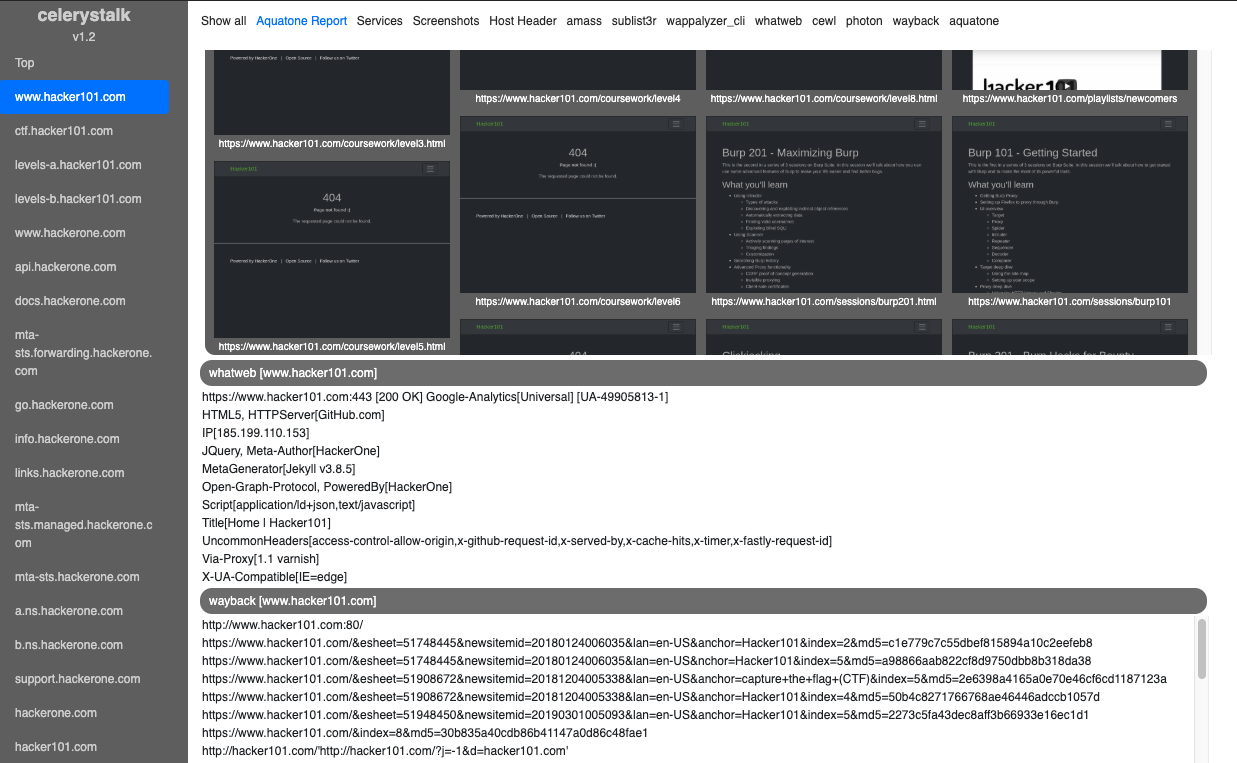
Interactive Demo: Bug Bounty Mode (HackerOne)
Interactive Demo: Assessment / PenTest Mode (Retired HackTheBox.eu machines)
What celerystalk can automate for you
Phase | Command | Examples of tools used
--- | --- | ----
DNS Recon/Enumeration | ./celerystalk subdomains -d domain1,domain2 | Amass, sublist3r
Define Scope, Import nmap/nessus | ./celerystalk import [scan_data,scope_files,etc.] | celerystalk
Port Scanning | ./celerystalk nmap | nmap
Directory and File Enumeration, Identification | ./celerystalk scan | Gobuster, Nikto, Photon, sqlmap, wpscan, hydra, medusa, wappalyzer, whatweb, etc.
Screenshots | ./celerystalk sceenshots | Aquatone
Analysis | ./celerystalk report | celerystalk
---
celerystalk is:
* Configurable - Some common tools are in the default config, but you can add any tool you want
* Service Aware - Uses Nmap/Nessus service names rather than port numbers to decide which tools to run
* Scalable - Designed for scanning multiple hosts, but works well for scanning one host at a time
* - Supports subdomain recon and scanning
* Job Control - Supports canceling, pausing, and resuming of tasks, inspired by Burp scanner
* Screenshots - Screenshots (aquatone) every in-scope URL that was identified by any tool (you can limit # of screenshots if you'd like)
---
Install/Setup
* Supported Operating Systems: Kali
* Supported Python : 2.x
You must install and run celerystalk as root
Use docker container from Dockerhub
Docker Build
Using celerystalk - The basics
[URL Mode] - How to scan a a URL (or multiple URLs in a file)
#### Launch all enabled tools against a URL or many URLs in a file without having to import scope, nmap, etc.
[CTF/HackTheBox/Easy mode] - How to scan one or more hosts
#### Import nmap xml
#### Or, import list of hosts that are in scope and ha run nmap for you
#### Check imported services, launch scans, take screenshots, generate report
Ad Usage: Bug Bounty Mode Assessment Mode
You define the mode at workspace instantiation. The default workspace is VAPT mode, but you have two options for manually
created workspaces.
* If you are starting with in scope IP addresses/ranges/CIDRs, use Assessment and PenTest (VAPT) mode.
* If you are starting with in scope domains, use Bug Bounty (BB) mode.
[Bug Bounty Mode]
* In BB mode, all subdomains found with celerystalk or manually imported are marked in scope.
#### Find subdomains, define out of scope hosts, scan e else
Note: You can run the subdomains command first and then define scope, or you can define scope and import subdomains.
[ Assessment Mode]
* In VAPT mode, IP addresses/ranges/CIDRs define scope.
* Subdomains that match an in-scope IP are also added to scope.
#### Import nmap scan, optionally define IPs or hostnames that are out of scope
Note: You can run the subdomains command first and then define scope, or you can define scope and import subdomains.
#### Import list of hosts that are in scope and ha run nmap and parse results
Note: You can run the subdomains command first and then define scope, or you can define scope and import subdomains.
Using celerystalk - Some more detail
Config.ini - Your configuration home.
1. Configure celerystalk options like number of concurrent tasks
1. Create custom configuration replacement
1. Configure Nmap/Nessus to celerystalk service mapping
1. Configure which tools you'd like celerystalk to execute
For more detail, check out the Configuration page in the Wiki
Subcommands
#### workspace
You need to create a workspace before you can do anything else.
| Option | Description |
| --- | --- |
| no options | Prints current workspace |
| create | Creates new workspace |
| -w | Define new workspace name |
| -o | Define output directory assigned to workspace |
| -m | Mode [vapt \ bb] |
#### import
This command allows you to import port and host data into celerystalk, and allows you to define what is in scope and what is out of scope.
| Option | Description |
| --- | --- |
| -f scan.xml | <b>Nmap/Nessus xml</b><br><ul><li>Adds all IP addresses from this file to hosts table and marks them all in scope to be scanned.</li><li>Adds all ports and service types to services table.</li></ul> |
| -S scope.txt | <b>Scope file</b><br><ul><li>Show file differences that haven't been staged </li></ul>|
| -D subdomains.txt | <b>(sub)Domains file</b><br><ul><li>celerystalk determines whether each subdomain is in scope by resolving the IP and looking for IP in the DB. If there is a match, the domain is marked as in scope and will be scanned.</li></ul>|
#### subdomains
This command executes uses all of the subdomain search tools in your config file. If you prefer, you can do this outside of celerystalk and import the subdomains with the import command
| Option | Description |
| --- | --- |
| -d domain1,domain2,etc| <b>Run Amass, Sublist3r, etc. and store domains in DB</b><ul><li>After running your subdomain recon tools celerystalk determines whether each subdomain is in scope by resolving the IP and looking for IP in the DB. If there is a match, the domain is marked as in scope and will be scanned.</li></ul>|
#### nmap
This command will run nmap for you, using the options you specified in the config.ini file. You can alternatively import port scan data from an nmap xml file or from a .nessus file
| Option | Description |
| --- | --- |
| no options | Read nmap command from config and scan all services for in-scope hosts
| -c [filename] | Specify a celerystalk configuration file [Default: ./config.ini]
#### scan
This command will submit tasks to celery, which asynchronously executes them and logs output to your output directory.
| Option | Description |
| --- | --- |
| no options | <b>Scan all in scope hosts</b><ul><li>Reads DB and scans every in scope IP and subdomain.</li><li>Launches all enabled tools for IPs, but only http/http specific tools against </li></ul> |
| --noIP | Don't scan hosts by IP (only scan )
| -t ip,vhost,cidr | <b>Scan specific target(s) from DB or scan file</b><ul><li>Scan a subset of the in scope IPs and/or subdomains</li></ul> |
| -s | <b>Simulation</b><br> Sends all of the tasks to celery, but all commands are executed with a # before them rendering them inert</li></ul> |
| -c [filename] | Specify a celerystalk configuration file [Default: ./config.ini] |
| -u [URL] | Scan a specific URL, even if it is not in the DB yet |
#### rescan
This command will rescan an already scanned host.
| Option | Description |
| --- | --- |
| no option| For each in scope host in the DB, celerystalk will ask if if you want to rescan it|
| -t ip,vhost,cidr | Scan a subset of the in scope IPs and/or subdomains. |
| -s | Sends all of the tasks to celery, but all commands are executed with a # before them rendering them inert.
| -c [filename] | Specify a celerystalk configuration file [Default: ./config.ini] |
#### query
Asynchronously check the status of the tasks queue as frequently as you like. The watch mode actually executes the linux watch command so you don't fill up your entire terminal buffer.
| Option | Description |
| --- | --- |
| no options | Shows all tasks in the current workspace |
| watch | Sends command to the unix watch command which will let you get an updated status every 2 seconds|
| brief | Limit of 5 results per status (pending/running/completed/cancelled/paused) |
| summary | Shows only a banner with numbers and not the tasks themselves |
#### cancel/pause/resume
Cancel/Pause/Resume any task(s) that are currently running or in the queue.
| Option | Description |
| --- | --- |
| cancel | <ul><li>Canceling a running task will send a kill -TERM</li><li>Canceling a queued task* will make celery ignore it (uses celery's revoke).</li><li>Canceling all tasks* will kill running tasks and revoke all queued tasks.</li></ul>
| pause | <ul><li>Pausing a single task uses kill -STOP to suspend the process.</li><li>Pausing all tasks* attempts to *kill -STOP* all running tasks, but it is a little wonky and you mind need to run it a few times. It is possible a job completed before it was able to be paused, which means you will have a worker that is still accepting new jobs.</li></ul>
| resume | <ul><li>Resuming tasks* sends a kill -CONT which allows the process to start up again where it left off.</li></ul>|
#### screenshots
| Options | Description |
| --- | --- |
| no options | Take screenshots for all known paths |
#### report
Run a report which combines all of the tool output into an html file and a txt file. Run this as often as you like. Each time you run the report it o the previous report.
| Options | Description |
| --- | --- |
| no options | Create report for all in-scope hosts that have been scanned |
#### db
List or export the workspaces, hosts, services, or paths stored in the celerystalk database
| Option | Description |
| --- | --- |
| workspaces | Show all known workspaces and the output directory associated with each workspace |
| workspace | Same as workspaces |
| services | Show all known open ports and service types by IP |
| ports | Same as ports. |
| hosts | Show all hosts (IP addresses and subdomains/) and whether they are in scope and whether they have been submitted for scanning |
| | Same as hosts command, but excludes that are IP addresses. |
| paths | Show all paths that have been identified by vhost |
| paths_only | Show a newline separated list of paths in the db. Useful for piping into another tool |
| export | Export the services, hosts, and paths tables
| export_paths_only | Export just a newline separated list of paths in the db to a file.
#### admin
Administrati
| Options | Description |
| --- | --- |
| start | Start Celery & Redis processes |
| stop | Stop Celery & Redis processes |
| restart | Restart Celery & Redis processes |
| reset | Destroy DB, Flush Redis, start over |
| backup | Backup DB and all workspace data directories |
| restore | Restore DB and all workspace data directories |
| -f [filename] | Restore file name |
Usage
Credit
This project was inspired by many great tools:
1. by
1. by
1. by
1.
1. by
Thanks to and for their lab networks
Also, thanks to:
1. for pointing me towards celery, helping me sol problems that were over my head, and for the extensive beta testing
1. for inspiring me to dust off an old project and turn it into celerystalk
1. My friends at TU and IthacaSec for testing this out and submitting bugs and features
项目信息
开发语言:Python
Star 数:400
技术要点
该项目属于安全软件方向的开源资源,代码结构清晰,适合安全研究人员学习参考。项目围绕An asynchronous enumeration & vulnerability scanner. Run all the tools on all the hosts.展开,提供了可运行的实现,对理解相关安全机制、工具原理与攻防技术具有较高的研究价值。
从技术实现角度看,此类项目的核心在于对底层原理的深入理解与工程化落地。开发者在研究过程中可以结合官方文档与社区讨论,梳理项目的初始化流程、核心模块职责与数据流转,逐步掌握其中的技术细节与设计思路。
使用与学习建议
1. 下载源码压缩包,解压到本地环境。
2. 根据项目类型准备对应的运行环境与依赖。
3. 按照 README 中的步骤完成配置与部署。
4. 在隔离的测试环境中运行验证,避免影响生产系统。
免责声明
本资源来源于开源社区,仅供安全研究、技术学习与合法授权范围内的攻防演练使用,请勿用于任何非法或侵害他人权益的用途。使用本项目产生的一切后果由使用者自行承担。
| 资源标题 | celerystalk - An asynchronous enumeration & vulnerability scanne |
| 所属分类 | 安全软件 |
| 发布作者 | admin |
| 发布时间 | 2026-10-05 22:37:06 |
| 下载权限 | 免费下载 |
| 附件数量 | 2 个下载链接 |
| 浏览次数 | 295 |
| 讨论数量 | 0 |
| 主题状态 | 正常讨论中 |