剑庭安
首页
黑客安全首页全部安全栏目 黑客技术黑客技术、渗透测试、漏洞利用工具与教程 安全软件安全工具、扫描器、检测与审计软件 病毒分析恶意软件分析、样本、逆向与沙箱 CTF思路CTF 题目、writeup、解题思路与工具 防护思路防御技术、加固、检测响应与蓝队 红蓝攻防红队攻击模拟、蓝队对抗、攻防演练 漏洞知识库漏洞、CVE、PoC、EXP 与安全研究
逆向|反编译
PHP源码PHP 网站源码、程序、系统 APP源码安卓/iOS APP 源码 ASP源码ASP 网站源码与程序 NET源码.NET 网站源码与系统 小程序源码微信/支付宝小程序源码 Dedecms风格模板Dedecms 织梦风格模板 Empirecms风格模板EmpireCMS 帝国风格模板 Discuz商业模板/插件Discuz 商业模板与插件 WordPress主题/插件WordPress 主题与插件 其它源码、模板其它各类源码与模板 游戏源码游戏源码与引擎项目 加密货币源码加密货币、区块链、钱包、USDT/比特币相关源码与工具 手游源码手机游戏源码、服务端、客户端与引擎项目 传奇源码热血传奇、传奇世界、复古传奇等客户端/服务端/引擎源码 页游源码网页游戏、H5 游戏、浏览器游戏源码 端游源码电脑单机游戏、PC 网游客户端/服务端源码
最新万能免驱动支持所有型号打印机下载程序 日历天气老黄历 · 每天同步真实日期与天气
站长工具站长工具 自助开通会员浏览该分类 其他资源qtziy SEO工具SEO工具 站群源码站群源码 泛程序泛程序 蜘蛛模板蜘蛛模板 蜘蛛池蜘蛛池 外链工具外链工具
搜索 自助开通会员🔓 破甲 API
登录 注册
首页 分类列表 安全软件 BurpAPISecuritySuite - Burp …
BurpAPISecuritySuite - Burp Suite extension for API security testing with 安全软件 点击放大
作者:admin 发布:2026-10-05

BurpAPISecuritySuite - Burp Suite extension for API security testing with

项目说明<!-- donation:eth:start --><di="center">Support DeIf this project helps your work, support ongoing maintenance and new featu…
资源可下载 免费下载 0 条讨论
会员资源
开通会员后即可下载全部资源。
登录后开通会员
会员方案
302浏览量
0讨论
2下载链接
可下载资源状态
内容可验证
更新 2026-10-05
人工审核发布
评论区答疑

BurpAPISecuritySuite - Burp Suite extension for API security testing with

BurpAPISecuritySuite - Burp Suite extension for API security testing with

项目说明

<!-- donation:eth:start -->
<di="center">

Support De

If this project helps your work, support ongoing maintenance and new features.

ETH Donation Wallet
0x11282eE5726B3370c8B480e321b3B2aA13686582

<a href="
<img src="publiceth.svg" alt="Ethereum donation QR code" width="220" />
</a>

_Scan the QR code or copy the wallet address above._

</div>
<!-- donation:eth:end -->

BurpAPISecuritySuite

<p align="center">
<img src="public/banner.png" alt="BurpAPISecuritySuite Banner" width="250" height="200">
</p>

<p align="center">
<img src="public/API%20security%20suite.gif" alt="Demo" width="800">
</p>

!Python
!Burp Suite
!License
!
!Attack Types
!Payloads
!Platform
!API Testing
!Security

Professional-grade Burp Suite extension for comprehensive API reconnaissance, intelligent fuzzing, and AI-powered security testing.

Why One Extension with Multiple Tabs?

BurpAPISecuritySuite consolidates functionality that would typically require 10+ separate extensions into a single, optimized extension. This architectural decision provides significant performance benefits:

Memory Efficiency: Running multiple Burp extensions simultaneously creates substantial memory pressure. Each extension maintains its own state, UI components, and event listeners. A single extension with multiple tabs shares resources efficiently and reduces o memory footprint.

Reduced API O: Burp's extension API processes callbacks from every loaded extension. With 10+ extensions, each HTTP request triggers callbacks across all extensions, creating multiplicati. One extension means one callback chain, dramatically reducing CPU cycles and improving responsi.

Shared Context: Integrated tabs share captured traffic data, eliminating redundant processing. The Recon tab captures once, and all other tabs (Fuzzer, Auth Replay, Passi, etc.) operate on the same dataset without re-parsing requests.

Faster Startup: Loading one extension is significantly faster than loading 10+ extensions. Burp initializes UI components, registers callbacks, and allocates resources once instead of repeatedly.

Better Stability: Fewer extensions mean fewer potential conflicts, mismatches, and compatibility issues. A single codebase is easier to test, debug, and maintain.

This design philosophy prioritizes performance and user experience while deli comprehensive API security testing capabilities that would otherwise require a complex multi-extension setup.

Table of Contents

  • BurpAPISecuritySuite

  • - Why One Extension with Multiple Tabs?
    - Table of Contents
    - Screenshots
    - Main Interface
    - Scope Tab
    - Fuzzer Tab
    - Parameter Analysis
    - Diff View
    - ApiHunter Tab
    - Nuclei Tab
    - Katana Tab
    - HTTPX Tab
    - FFUF Tab
    - Wayback Tab
    - Export Options
    - Turbo Intruder Export
    - Info
    - Purpose
    - Key Features
    - 🎯 Reconnaissance
    - ⚡ Ad Fuzzing
    - 🔍 Discovery Tools
    - 🚀 Export \& Integration
    - Comparison with Similar Tools
    - Why Choose BurpAPISecuritySuite?
    - Installation
    - Requirements
    - Usage
    - Basic Workflow
    - Tab O
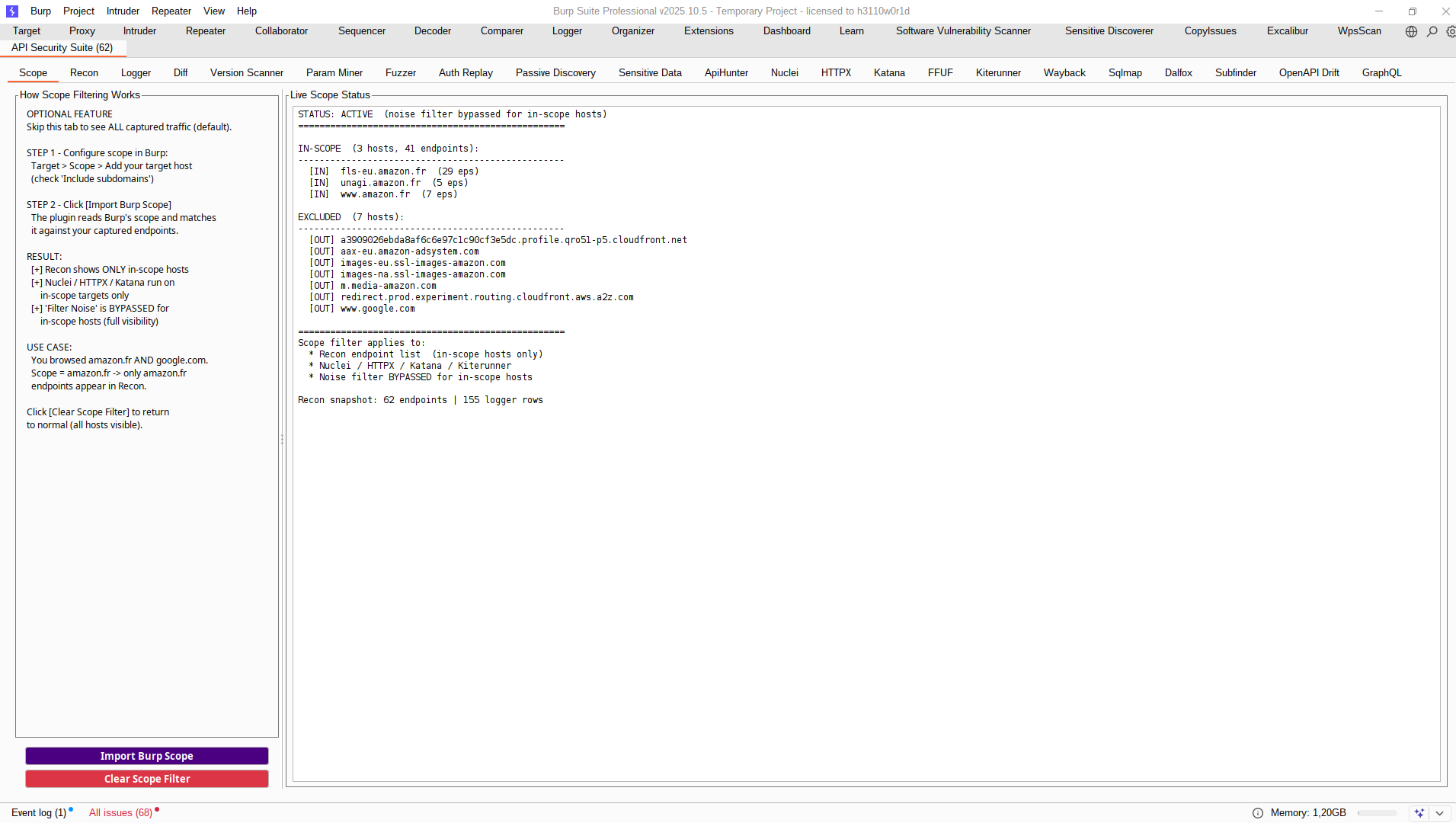
    - 1. Scope Tab
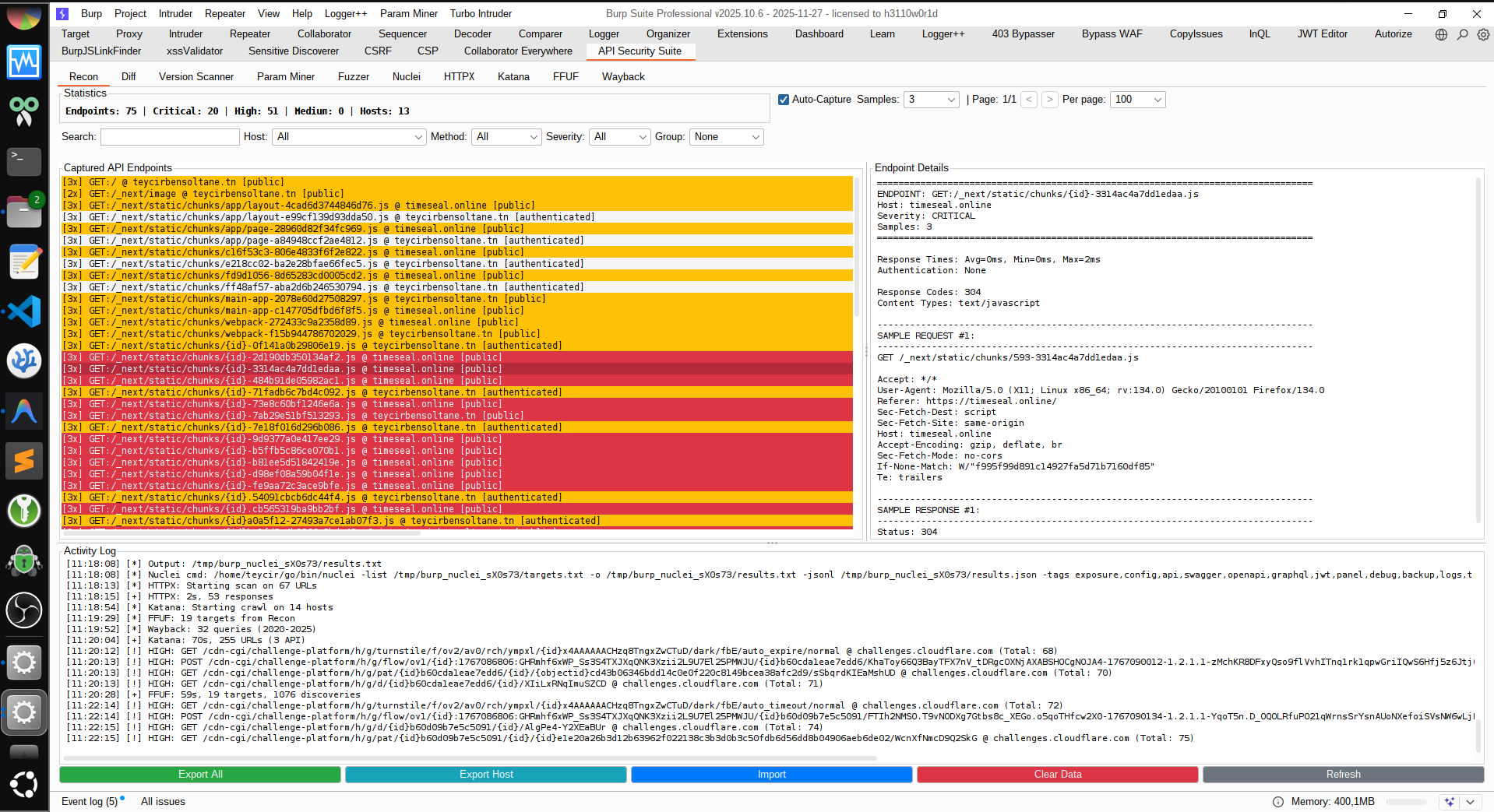
    - 2. Recon Tab
    - Logger Tab
    - 3. Diff Tab
    - 4. Scanner Tab
    - 5. Param Miner Tab
    - 6. Fuzzer Tab
    - 7. Auth Replay Tab
    - 8. Passi Tab
    - Sensitive Data Tab
    - 9. ApiHunter Tab
    - 10. Nuclei Tab
    - 11. HTTPX Tab
    - 12. Katana Tab
    - 13. FFUF Tab
    - 14. Kiterunner Tab
    - 15. Wayback Tab
    - 16. SQLMap Tab
    - 17. Dalfox Tab
    - 18. API Assets Tab
    - 19. OpenAPI Drift Tab
    - 20. GraphQL Tab
    - Ad Fuzzing Capabilities
    - Attack Types Detected
    - Exported Data Structure
    - Data \& Export
    - What Gets Captured
    - Per Endpoint
    - Analysis
    - Integration
    - LLM Prompt Integration
    - Companion Repo Workflow (APIPentesting)
    - Workflow Examples
    - 1. AI-Powered Payload Generation
    - 2. Turbo Intruder Race Condition
    - 3. Burp Intruder with Auto-Positions
    - Output Locations
    - Best Practices
    - Reconnaissance Phase
    - Fuzzing Phase
    - AI Integration
    - Automation
    - Technical Information
    - Technical Details
    - Limitations
    - Use Cases
    - Documentation
    - FAQ
    - General Questions
    - Performance \& Limits
    - Fuzzing \& Attacks
    - External Tools
    - Security Notes
    - Export \& Integration
    - Troubleshooting
    - Ad Usage
    - Technical Highlights
    - 💼 Professional Services
    - Featured Projects
    - Services Offered
    - Contributing
    - Author
    - License
    - Changelog

    Screenshots

    Main Interface


    !Main Start Page

    Scope Tab


    !Scope Configuration

    Fuzzer Tab


    !Fuzzer Interface

    Parameter Analysis


    !Parameter Detection

    Diff View


    !Diff Analysis

    ApiHunter Tab


    !ApiHunter Integration

    Integrated gap-fill + deep-search runner calibrated to complement Nuclei/HTTPX/Katana co.

    Note: ApiHunter is an MIT-licensed open-source tool and an important complement to BurpAPISecuritySuite. It provides ad API reconnaissance capabilities that fill gaps left by other scanners. See for installation and usage.

    Nuclei Tab


    !Nuclei Integration

    Katana Tab


    !Katana Integration

    HTTPX Tab


    !HTTPX Integration

    FFUF Tab


    !FFUF Integration

    Wayback Tab


    !Wayback Integration

    Export Options


    !Export Options

    Turbo Intruder Export


    !Turbo Intruder Export

    Info


    !

    Purpose

    BurpAPISecuritySuite is a complete API security testing toolkit that:

  • Captures & analyzes API traffic with smart normalization

  • Generates intelligent fuzzing campaigns with 100+ attack

  • Exports to multiple formats for AI, Turbo Intruder, and Nuclei

  • Auto-configures Burp Intruder with attack positions

  • Detects across OWASP API Top 10
  • Key Features

    🎯 Reconnaissance


  • Auto-Capture: Monitors all HTTP/Proxy traffic automatically

  • Smart Normalization: Groups similar endpoints (/users/123 → /users/{id})

  • Comprehensi: Parameters, headers, auth methods, request/response bodies

  • Pattern Detection: REST, GraphQL, SOAP, JSON/XML APIs

  • Security Analysis: IDOR/BOLA, unauth endpoints, PII exposure, weak encryption

  • JWT Detection: Automatic JWT extraction and security analysis

  • Diff Comparison: Compare two API exports to detect changes

  • Import/Export: Save and restore captured API data

  • Scope Filtering (Optional): Import Burp's target scope to filter endpoints and tool runs to in-scope hosts only
  • ⚡ Ad Fuzzing


  • 15 Attack Types: BOLA, IDOR, SQLi, XSS, NoSQLi, SSTI, JWT, GraphQL, Race Conditions, Business Logic, WAF Bypass, and more

  • Smart Detection: Context-aware identification

  • 108+ Attack : Comprehensi library with bypass techniques

  • Se Ratings: Critical/High/Medium/Low risk classification

  • WAF E: Header injection, encoding bypass, method o, path manipulation
  • 🔍 Discovery Tools


  • ApiHunter Deep Search: Filtered/deduped endpoint scans with WAF-e gap-fill calibration for auth/workflow/API-logic issues (MIT-licensed open-source tool: )

  • Scanner: Test API (v1, v2, de, legacy)

  • Param Miner: Disco parameters (admin, debug, internal, callback)

  • SQLMap : Confirm SQL injection candidates with e sqlmap checks

  • Dalfox : Confirm reflected XSS candidates with Dalfox proof output

  • API Asset Discovery: Expand first-party scope with subfinder + dnsx + httpx

  • OpenAPI Drift: Compare obser spec for undocumented/missing endpoints

  • Counterfactual Differentials: Scoreless, non-destructi breaks for representation/auth/identifier drift

  • Sequence In: Non-destructi checks with confidence/e ledger export

  • Token Lineage Analysis: Passi/session lifecycle drift detection for logout/revoke/refresh rotation gaps

  • Cross-Interface Parity & Drift: Detects REST/GraphQL/internal auth parity gaps, cache/auth drift, time-window flips, content-type policy drift, and replay-after-delete leakage

  • Wayback Machine: Disco endpoints and forgotten APIs

  • Katana Crawler: Deep web crawling with automatic endpoint discovery

  • HTTPX Probe: Fast HTTP probing with technology detection

  • FFUF Fuzzer: Directory and file fuzzing with wordlist support
  • 🚀 Export & Integration


  • Burp Intruder: Auto-configured attack positions (§markers§)

  • AI Context: Structured data for ChatGPT/Claude payload generation

  • Turbo Intruder: Ready-to-use Python scripts for race conditions & high-speed attacks

  • Nuclei: Target export and integrated scanning with WAF e

  • Payload Library: JSON export of all attack payloads

  • cURL Export: Copy attacks as cURL commands for manual testing
  • Comparison with Similar Tools

    | Feature | BurpAPISecuritySuite | Burp Scanner Pro | OWASP ZAP | Postman |
    |---------|---------------------|------------------|-----------|----------|
    | Price | Free | $449/year | Free | Free/Paid |
    | API-Specific Focus | ✅ Yes | ⚠️ Partial | ⚠️ Partial | ✅ Yes |
    | Auto-Capture & Normalization | ✅ Yes | ❌ No | ⚠️ Basic | ❌ No |
    | BOLA/IDOR Detection | ✅ Automated | ⚠️ Manual | ⚠️ Manual | ❌ No |
    | Attack Types | 15 types | 100+ (generic) | 50+ (generic) | Limited |
    | API Payloads | 108+ API-focused | Generic web | Generic web | Basic |
    | JWT Analysis | ✅ Automatic | ⚠️ Extension needed | ⚠️ Extension needed | ⚠️ Manual |
    | GraphQL Testing | ✅ Built-in | ❌ No | ⚠️ Limited | ⚠️ Manual |
    | Race Condition Testing | ✅ Turbo Intruder | ✅ Turbo Intruder | ❌ No | ❌ No |
    | AI Integration | ✅ Export AI Bundle + LLM payloads | ❌ No | ❌ No | ❌ No |
    | Scanner | ✅ Built-in | ❌ No | ❌ No | ❌ No |
    | Parameter Mining | ✅ Built-in | ⚠️ Extension needed | ❌ No | ❌ No |
    | Wayback Discovery | ✅ Built-in | ❌ No | ❌ No | ❌ No |
    | External Tool Integration | ✅ ApiHunter, Nuclei, SQLMap, Dalfox, HTTPX, Katana, FFUF, Subfinder, DNSX | ❌ No | ⚠️ Limited | ⚠️ Limited |
    | WAF Bypass Techniques | ✅ 20+ methods | ⚠️ Some | ⚠️ Some | ❌ No |
    | Export Formats | JSON, Intruder, Turbo, Nuclei, cURL | XML, HTML | XML, HTML, JSON | JSON, cURL |
    | Burp Community Support | ✅ Yes | ❌ Pro only | N/A | N/A |
    | Learning Curve | Low | Medium | Medium | Low |
    | Best For | API pentesting, bug bounty | Full web app testing | DAST automation | API de |

    Why Choose BurpAPISecuritySuite?

  • API-First Design: Built specifically for modern API security testing (REST, GraphQL, SOAP)

  • Free & Open Source: All features a without licensing costs

  • Intelligent Automation: Auto-detects BOLA/IDOR across all authenticated endpoints

  • AI-Powered: Export all-tab AI bundles (plus sequence e ledger) for ChatGPT/Claude triage

  • Differential-First Logic Co: Includes scoreless counterfactual drift checks that many signature scanners miss

  • Token Lifecycle Drift Co: Adds passi analysis for logout/refresh/session-rotation gaps many scanners ignore

  • Comprehensi: 15 attack types with 108+ API-specific payloads

  • External Tool Integration: Seamlessly integrates with ApiHunter, Nuclei, SQLMap, Dalfox, HTTPX, Katana, FFUF, Subfinder, and DNSX

  • Works with Burp Community: No need for expensive Burp Pro license

  • Acti: Regular updates with new attack and features
  • Installation

    1. Burp → Extender → Extensions → Add → Python
    2. Select: BurpAPISecuritySuite.py
    3. Extension loads and starts capturing automatically

    Requirements

  • Burp Suite (Professional or Community Edition)

  • Jython Standalone JAR ()
  • Usage

    Basic Workflow

    1. Capture: Browse/scan target API with auto-capture enabled
    2. Review: Check the Recon tab to inspect captured endpoints and findings
    3. Deep Logic (Optional): In Passi, click Run Differential for scoreless counterfactual checks, or Run In for the full deep-logic stack
    4. Refresh Cache (Optional): In Recon, click Refresh In to refresh Differential + Sequence + Golden + State Matrix + Token Lineage + Parity Drift results before export
    5. Export: In Recon, click Export AI Bundle to generate all-tab AI context
    6. Generate: Feed exported JSON to an LLM (ChatGPT, Claude, etc.) for triage/payload planning

    Tab O

    #### 1. Scope Tab

  • OPTIONAL Configuration: Does not impact normal workflow

  • Import Burp Scope: One-click import of Burp's target scope (Include/Exclude rules)

  • Clear Scope Filter: Return to unfiltered view anytime

  • Li Display: Shows included/excluded hosts when scope is active

  • Global Filtering: When acti:

  • - Recon endpoint list (shows only in-scope hosts)
    - All external tool runs (Nuclei, HTTPX, Katana, FFUF, Kiterunner, ApiHunter, etc.)
  • Scope Indicator: Recon stats show "Scope: X hosts" when active

  • Default Behavior: All endpoints by default (skip this tab if you want unfiltered view)
  • #### 2. Recon Tab

  • Auto-Capture Toggle: Enable/disable automatic traffic capture

  • Sample Limit: Configure samples per endpoint (1, 3, 5, 10)

  • Pagination: Na large endpoint lists (50, 100, 200, 500 per page)

  • Search & Filters: Filter by host, method, se, search term

  • Filter Noise: Starts selected on launch to suppress tracker/static/CDN noise and keep downstream tool tabs focused on higher-signal API traffic

  • Grouping: Group endpoints by Host, Method, Auth, Encryption

  • Export All: Export complete API analysis to JSON

  • Export Host: Export specific host endpoints

  • Export AI Bundle: Export all-tab AI-ready context + LLM request payloads

  • Import: Load Suite exports, Excalibur HAR/session sidecars, or excalibur-burp-bridge/v1 bundles (Excalibur is a proprietary tool: )

  • Postman: Export scoped endpoints to Postman Collection v2.1

  • Insomnia: Export scoped endpoints to Insomnia import JSON

  • Tool Health: One-click diagnostics for ApiHunter/Nuclei/HTTPX/Katana/FFUF/Wayback/SQLMap/Dalfox/Subfinder/DNSX binary compatibility

  • Button Help: Quick guide for Recon buttons and expected outputs

  • Refresh In: Refresh Differential + Sequence + Golden + State Matrix + Token Lineage + Parity Drift analysis from captured endpoints before AI export

  • In Status Line: Shows Differential, Sequence, Golden, State Matrix, Token Lineage, and Parity Drift cache counts with source/update time

  • Clear Data: Reset captured Recon endpoints and Logger events together
  • #### Logger Tab

  • Timeline View: High-signal request timeline (tool, method, host/path, status, len, type, tags).

  • Two-Line Toolbar: Controls are split across two rows to avoid hidden/clipped actions.

  • Noise Filter: Shared noise suppression aligned with Recon filtering heuristics.

  • Auto Prune: Trims oldest Logger rows when Max Memory is exceeded (default 20,000 rows).

  • Logging Off: Single capture toggle for Logger ingestion (on/off model).

  • Clear Data: Shared clear action that resets both Logger events and Recon captured data.

  • ReqM / RespM: Useful marker counts by default, and regex hit counts when regex is active.

  • Grep + Rules: Grep ..., Tag Rules..., and sa workflow (Sa + sa).

  • Header Sorting: Click a header to sort, Shift+click to add a second sort key.

  • Right-Click Ops: Show Endpoint Detail, Send Selected To Repeater, Copy Selected Rows, and bulk selection.
  • #### 3. Diff Tab

  • Load Export 1/2: Load two API exports for comparison

  • Compare: Identify added, removed, and unchanged endpoints

  • Copy: Copy diff results to clipboard
  • #### 4. Scanner Tab

  • Input: Comma-separated strings to test

  • Presets: Standard, Decimal, En, Legacy, All

  • Scan : Test all API endpoints with

  • Export Results: Sa to file
  • #### 5. Param Miner Tab

  • Param Input: Comma-separated parameter names to test

  • Presets: Admin, Debug, Access, Callback, All

  • Mine Params: Disco parameters in API endpoints

  • Export Results: Sa mining results
  • #### 6. Fuzzer Tab

  • Attack Type Dropdown: All, BOLA, IDOR, Auth Bypass, SQLi, XSS, SSRF, XXE, WAF Bypass

  • Generate: Create fuzzing campaign with intelligent attack detection

  • Send to Intruder: Export to Burp Intruder with pre-configured positions

  • Export Payloads: Save all payloads to JSON

  • Turbo Intruder: Generate Python scripts for high-speed attacks

  • Copy as cURL: Export attack as cURL command
  • #### 7. Auth Replay Tab

  • Scope: Replay Selected Endpoint, Filtered View, or All Endpoints

  • Max: Limit endpoints per run for faster triage

  • Guest/User/Admin Headers: Set profile headers in Name: value format

  • Distinct Context Guard: If two role headers are identical, replay collapses duplicates and asks for at least two distinct contexts

  • Extract: Open searchable popup to pick captured auth/session headers

  • Base URLs (Exclusive): Optional comma/newline list of first-party base URLs/hosts to replay exclusively (includes deri like subdomains on the same base domain)

  • URL Copy UX: Select one or more replay rows, then use Copy URL(s) (or right-click Copy Selected URL(s)) to copy full URLs

  • Se Ranking: Click Result header to rank by se, or use Sort Se for quick CRITICAL -> HIGH -> MEDIUM -> OK

  • Run Replay: Replay requests per profile and compare response behavior

  • Stop: Cancel acti safely

  • Findings Output: Se e for likely BOLA/authz drift
  • #### 8. Passi Tab

  • Passive Only: Analyzes captured/replayed proxy traffic without acti

  • Mode Selector: Run All or per-category checks (API3, API4, API5, API6, API9, API10)

  • Scope Selector: Analyze All Endpoints, Filtered View, or current host scope

  • Run Differential: Run scoreless counterfactual checks for representation/auth/identifier precedence drift (passi)

  • Run Token Lineage: Run passi/session family checks for logout/revoke/refresh in drift

  • Run Parity Drift: Run cross-interface parity checks plus cache/auth, time-window, content-type, and replay-after-delete drift heuristics

  • Run In: Run full non-destructi (Differential + Sequence + Golden + State + Token Lineage + Parity Drift) for deep workflow/token/state analysis

  • Run All Ad: One-click execution of all ad deep-logic engines

  • Abuse Chains: Build shortest graph-to-replay exploit chains (auth -> object access -> state change)

  • Proof Mode: Generate minimal reproducible packet sets with expected vs safe signals

  • Spec Guardrails: Deri auth/param/transition rules from obser and flag

  • Role Delta: Compare role-le (guest/user/admin-like) and rank suspicious parity for BOLA/BFLA triage

  • Run / Stop / Clear: Execute discovery, cancel safely, and reset output quickly

  • Export / Copy: Sa or copy report text

  • Export Ledger: Sa + Sequence + Golden + State Matrix + Token Lineage artifacts as JSON files

  • Ad Exports: Also writes abuse_chain_*, proof_mode_packet_sets, spec_guardrails_*, and role_delta_* JSON artifacts

  • Output: Se/categorical summary plus top findings for triage
  • #### Sensitive Data Tab

  • Goal: Regex-first extraction of API-sensiti from captured proxy traffic and imported HAR/replay data already loaded into Recon.

  • Scope: Scan Selected Endpoint, Filtered View, or All Endpoints.

  • Source Mode: Restrict to Proxy/Li, Imported HAR/Replay, or scan both together.

  • Pattern Packs: All API Sensitive, Secrets & Tokens, PII & Financial, Credentials & Session, Infra/Internal Exposure.

  • Max Findings: Hard cap to keep output actionable during large captures.

  • Run Scan: Produces grouped findings with se/category, endpoint, source, section, match snippet, and local context.

  • Export: Writes both machine-readable JSON and analyst-friendly TXT report output.

  • Append Report / To AI: Reuses the same workflow as other analysis tabs for session reporting and AI triage.
  • #### 9. ApiHunter Tab

  • ApiHunter Path: Configure apihunter binary path (default auto-detection searches runtime PATH, then shell probes (bash -lc and bash -ic) via command -v, and copies the discovered absolute path; no static fallback candidates)

  • Note: ApiHunter is a proprietary tool a at

  • Runtime PATH Resolve: On Run ApiHunter, the suite re-resolves apihunter from PATH (process + shell probe) and auto-updates the field to the resol binary when a

  • Calibration: Quick (Desktop Preset), Balanced (Desktop Preset) (default), Deep (Desktop Preset)

  • Auth Mode: Unauth Only, Auth Only, Auth + Unauth (default). In dual-pass mode, deduplicated base URLs are split into auth-associated and unauth-associated target lists; each pass runs on its own list. Auth association uses both request auth headers and non-header auth signals (auth_detected, token/cookie/session markers in request metadata).

  • Auth Mode: Unauth Only, Auth Only, Auth + Unauth (default). In dual-pass mode, deduplicated base URLs are split into auth-associated and unauth-associated target lists; each pass runs on its own list. Auth association uses both request auth headers and non-header auth signals (auth_detected, token/cookie/session markers in request metadata).

  • Top Findings Min: Operator-configurable Critical / High / Medium threshold for summary triage noise control

  • Use Custom Targets: Checkbox to force ApiHunter input from the Custom Targets... popup instead of Recon-filtered scope

  • Custom Targets Popup: Multiline editor (max 20 entries, one per line) with strict sanitization and canonical base URL normalization (scheme://host[:port]/), including de-duplication and in rejection

  • Enforcement: When Use Custom Targets is enabled, runs fail fast if popup content is empty, exceeds limit, or contains invalid URL lines

  • Always Filtered Source: Consumes current Recon filtered view and emits de-duplicated host-base targets (scheme://host[:port]/) for ApiHunter

  • Run ApiHunter: Executes ApiHunter using ApiHunter-nati behavior (Burp acts as a thin launcher + result renderer)

  • Default Command Model: Burp does not apply extra runtime heuristics (no Burp-side watchdog caps or endpoint-expansion o); default flags mirror ApiHunter Desktop presets

  • Desktop Preset Parity:

  • - Quick: --no-discovery, --max-endpoints 40, --concurrency 4, --timeout-secs 12, --retries 1, --delay-ms 0, and disables hea (mass-assignment, oauth-oidc, rate-limit, c, websocket)
    - Balanced: --no-discovery, --max-endpoints 80, --concurrency 5, --timeout-secs 15, --retries 1, --delay-ms 50
    - Deep: --acti --response-diff-deep --no-discovery, --max-endpoints 0, --concurrency 6, --timeout-secs 20, --retries 2, --delay-ms 100, --waf-e, --per-host-clients, --adapti
  • Enable Custom: Opt in to full command o with placeholders ({apihunter_path}, {targets_file}, {results_file})

  • Custom + Auth Note: In custom mode, Auth + Unauth dual-pass is blocked; use Auth Only or Unauth Only, or disable custom mode for automatic dual-pass execution.

  • Preset : Preset dropdown is always and seeded with Desktop-equi templates

  • Stop / PKill Tools: Cancel active runs safely or emergency-stop external scanner processes

  • Export Targets: Sa/deduped host-base target list for offline ApiHunter usage

  • Output: Parsed NDJSON findings summary with se/scanner/runtime breakdown plus surfaced launcher/parse/runtime errors

  • Top Findings Signal Mode: Shows findings returned by ApiHunter command output (sorted by se with e/remediation context)

  • Top Findings Display Filtering: Selected minimum se is applied to Burp Top Findings rendering (Critical / High / Medium), while scanner output statistics remain complete.
  • #### 10. Nuclei Tab

  • Nuclei Path: Configure path to nuclei binary

  • Auth Mode: Unauth Only, Auth Only, Auth + Unauth (default). In dual-pass mode, deduplicated base URLs are split into auth-associated and unauth-associated target lists; each pass runs on its own list. Auth association uses both request auth headers and non-header auth signals (auth_detected, token/cookie/session markers in request metadata). Auth-context deri captures best a Authorization header, top auth-like headers (X-API-Key, Api-Key, ApiKey, X-Auth-Token, X-Access-Token), and deri pairs from request Cookie headers.

  • Profile: Fast, Balanced, Deep API-discovery scan presets

  • Run Nuclei: Execute Nuclei scanner with WAF e

  • GraphQL Templates: 29+ GraphQL-specific templates for detection and exploitation

  • Target Bases...: Open multiline popup to define explicit base URLs/hosts

  • Only Base+Deri: Restrict scans to popup scope and same base-domain deri

  • Enable Custom: Opt in to o default command with your own template

  • Custom + Auth Note: In custom mode, Auth + Unauth dual-pass is blocked; use Auth Only or Unauth Only, or disable custom mode for automatic dual-pass execution.

  • Preset Cmd + ? Help: Auto-fill common commands and show usage guidance

  • Stop: Cancel acti safely

  • PKill Tools: Emergency kill for nuclei/httpx/katana/ffuf/kiterunner/waybackurls/gau/sqlmap/dalfox/subfinder/dnsx

  • Cross-Platform Kill: Uses taskkill on Windows and pkill (with killall fallback) on Linux/macOS

  • Export Targets: Sa list for external scanning

  • Features: Header-based spoofing, rate limiting, clear error reporting
  • #### 11. HTTPX Tab

  • HTTPX Path: Configure path to httpx binary

  • Probe Endpoints: Fast HTTP probing with technology detection

  • Enable Custom: Opt in to o default command with your own template

  • Preset Cmd + ? Help: Auto-fill common probe profiles and usage

  • Stop: Cancel acti safely

  • PKill Tools: Emergency kill for scanner processes

  • Export URLs: Save URLs for external tools
  • #### 12. Katana Tab

  • Katana Path: Configure path to katana binary

  • Crawl Endpoints: Deep web crawling for endpoint discovery

  • Target Bases...: Open multiline popup to define explicit base URLs/hosts

  • Only Base+Deri: Restrict crawls to popup scope and same base-domain deri

  • Enable Custom: Opt in to o default command with your own template

  • Preset Cmd + ? Help: Auto-fill crawl depth profiles and usage

  • Stop: Cancel acti safely

  • PKill Tools: Emergency kill for scanner processes

  • Export Discovered: Sa endpoints

  • Send to Recon: Import discovered endpoints to Recon tab
  • #### 13. FFUF Tab

  • FFUF Path: Configure path to ffuf binary

  • Wordlist: Select wordlist for fuzzing

  • Target Bases...: Open multiline popup to define explicit base URLs/hosts

  • Only Base+Deri: Restrict fuzzing to popup scope and same base-domain deri

  • Fuzz Directories: Directory and file fuzzing

  • Auto Scope: Prioritizes first-party hosts and filters noisy third-party/CDN targets

  • PKill Tools: Emergency kill for scanner processes

  • Export Results: Sa results

  • Send to Intruder: Export results to Burp Intruder
  • #### 14. Kiterunner Tab

  • Kiterunner Path: Configure path to local kr binary

  • Wordlist/Alias: Use a local .kite file or an Assetnote alias such as apiroutes-260227:20000

  • Profile: Fast, Balanced, Deep route-scan tuning, with Balanced selected by default for wider first-pass co; Fast keeps a tighter 10-minute cap for quicker triage and Deep spends a 15-minute ceiling on fewer hosts with fuller scans

  • Use Custom Targets: Checkbox to force Kiterunner input from the Custom Targets... popup instead of Recon-filtered scope

  • Custom Targets Popup: Multiline editor (max 20 entries, one per line) with strict sanitization and canonical base URL normalization (scheme://host[:port]/)

  • Target Bases...: Open multiline popup to define explicit base URLs/hosts

  • Only Base+Deri: Restrict scans to popup scope and same base-domain deri

  • Run Kiterunner: Scoped API route discovery against either popup-defined base URLs or the current Recon filtered view

  • Startup Summary: Prints selected mode, target source, and the target URL list before the scan begins

  • Always Filtered Source: When custom targets are off, Kiterunner consumes the current Recon filtered view, so the Recon Filter Noise control starting selected on launch compresses its default target set

  • Runtime Boundaries: Kiterunner scans ranked host/base targets instead of every Recon URL and enforces profile-specific host, route-budget, and elapsed-time caps so runs do not sprawl indefinitely

  • WAF-E Defaults: Lower concurrency, request delay, forwarded-IP spoof headers, and redirect quarantine controls

  • PKill Tools: Emergency kill for scanner processes

  • Export Results: Sa results

  • Send to Intruder: Export discovered method/path hits to Burp Intruder
  • #### 15. Wayback Tab

  • Date Range: Configure from/to years for historical search

  • Limit: Set maximum results to retrieve

  • Discover: Query Wayback Machine for historical endpoints

  • Target Bases...: Open multiline popup to define explicit base URLs/hosts

  • Only Base+Deri: Restrict discovery to popup scope and same base-domain deri

  • Auto Scope: Limits default queries to first-party hosts/paths from Recon

  • Noise Exclusion: Drops common ad-tech/tracker hosts in default Wayback mode

  • Enable Custom: Opt in to o built-in queries with waybackurls/gau commands

  • Preset Cmd + ? Help: Auto-fill passi presets and usage

  • Stop: Cancel acti safely

  • PKill Tools: Emergency kill for scanner processes

  • Send to Recon: Import discovered endpoints to Recon tab

  • Export Results: Sa endpoints
  • #### 16. SQLMap Tab

  • SQLMap Path: Configure path to local sqlmap

  • Profile: Fast, Balanced, Deep command tuning presets

  • Run : Replay SQLi-priority targets and collect e confirmations

  • Max Targets / Timeout: Control breadth and per-target duration

  • Stop / PKill Tools: Cancel or emergency-stop tool processes

  • Send to Recon: Import SQLi endpoints back into Recon for follow-up

  • Export Results: Sa output to file
  • #### 17. Dalfox Tab

  • Dalfox Path: Configure path to local dalfox

  • Profile: Fast, Balanced, Deep command tuning presets

  • Run : Replay XSS-priority targets and capture Dalfox confirmation output

  • Max Targets / Timeout: Tune scan duration and co

  • Stop / PKill Tools: Cancel acti or emergency-stop tool processes

  • Send to Recon: Import XSS candidates to Recon

  • Export Results: Sa findings to file
  • #### 18. API Assets Tab

  • Domains Input: Optional manual domains list (comma/newline); auto-derives from Recon when empty

  • Profile: Fast, Balanced, Deep stage tuning for subfinder/dnsx/httpx

  • Pipeline: Runs subfinder → dnsx → httpx for alive API asset discovery

  • Run Discovery: Find additional first-party API hosts/URLs beyond captured paths

  • Stop / PKill Tools: Cancel staged discovery or emergency-stop tool processes

  • Send to Recon: Import discovered assets into Recon

  • Export Results: Sa URLs
  • #### 19. OpenAPI Drift Tab

  • Spec Source: Load OpenAPI/Swagger file from local path or URL

  • Generate OpenAPI: One-click OpenAPI 3.0.3 generation from captured Recon traffic

  • Run Drift: Compare obser vs spec and report endpoint/parameter drift

  • Findings: Undocumented obser, missing obser, parameter mismatches

  • Stop / PKill Tools: Cancel acti analysis safely

  • Send to Recon: Import spec-missing candidates into Recon for probing

  • Export Results: Sa output report
  • #### 20. GraphQL Tab

  • Targets Input: Optional manual GraphQL targets (auto-detects from Recon if empty)

  • Show Targets: Preview candidate GraphQL endpoints before execution

  • Run Analysis: Run GraphQL-focused multi-tool analysis workflow

  • Stop / PKill Tools: Cancel acti or emergency-stop tools

  • Send to Recon: Import GraphQL findings/candidates into Recon

  • Export Results: Sa analysis output
  • Ad Fuzzing Capabilities

    Attack Types Detected

    1. BOLA (Broken Object Le)
    - Tests ALL authenticated endpoints
    - Horizontal/ pri escalation
    - Token manipulation, batch requests

    2. IDOR (Insecure Direct Object Reference)
    - ID enumeration (numeric, UUID, ObjectID)
    - Wildcard injection, encoding bypass
    - Parameter pollution

    3. SQL Injection
    - Boolean-based, union-based, time-based blind
    - Error-based, stacked queries
    - 38+ payloads

    4. XSS (Cross-Site Scripting)
    - Reflected parameter exploitation
    - Context breaking, polyglot payloads
    - Event handlers, template injection

    5. NoSQL Injection
    - MongoDB operators ($gt, $ne, $regex)
    - Array notation, where clause injection

    6. JWT Exploitation
    - Algorithm confusion (alg:none)
    - kid injection, claim manipulation

    7. GraphQL Abuse
    - Introspection queries (schema extraction)
    - Batching attacks (array-based and alias-based)
    - Depth attacks (nested query DoS)
    - Directi (, abuse)
    - Field suggestion (typo-based schema discovery)
    - Circular fragments (recursive DoS)
    - Mutation injection

    8. SSTI (Ser Template Injection)
    - Jinja2, Freemarker,
    - RCE payloads

    9. Race Conditions
    - TOCTOU exploitation
    - Parallel request techniques

    10. Business Logic
    - Price/quantity manipulation
    - Workflow bypass

    11. WAF Bypass
    - Header injection (X-Forwarded-For, X-Original-URL)
    - Encoding bypass (URL, Unicode, Hex, HTML entities)
    - HTTP method o (X-HTTP-Method-O)
    - Path manipulation (dot encoding, null bytes, semicolons)
    - Content-Type manipulation
    - Protocol smuggling (CL.TE, TE.CL)

    12. Path Tra
    - Directory tra payloads
    - Encoded path manipulation
    - Null byte injection

    13. SSRF (Ser Request Forgery)
    - Internal IP targeting
    - Cloud metadata access
    - DNS rebinding

    14. XXE (XML External Entity)
    - File disclosure
    - SSRF via XXE
    - Denial of Service

    15. Deserialization
    - Ja
    - PHP object injection
    - Python pickle exploitation

    Exported Data Structure

    Data & Export

    What Gets Captured

    Per Endpoint


  • HTTP method and normalized path

  • Host, protocol, port

  • Query string and all parameter types (URL, body, cookie, JSON)

  • Request/response headers

  • Request/response bodies (truncated to 20KB)

  • Response status codes

  • Content types

  • Authentication methods detected

  • API patterns (REST, GraphQL, SOAP, etc.)
  • Analysis


  • API structure o (types, methods, auth, base paths)

  • Security obser (unauth endpoints, sensitive data)

  • Endpoint grouping and deduplication

  • Sample requests for each endpoint
  • Integration

    LLM Prompt Integration

    The export includes AI-ready prompts and context that prioritize:

    1. Sensiti exploit paths (cross-account/tenant exposure)
    2. Unauthorized state changes (workflow/lifecycle abuse)
    3. Non-obvious logic flaws o generic findings
    4. Reproducible e deltas and missing-data requests

    Primary AI artifacts:

  • ai_bundle.json

  • ai_all_tabs_context.json

  • ai_openai_request.json

  • ai_anthropic_request.json

  • ai_ollama_request.json
  • Companion Repo Workflow (APIPentesting)

    BurpAPISecuritySuite and APIPentesting are designed to be used together:

    1. Capture + analyze traffic in BurpAPISecuritySuite.
    2. In Recon, click Export AI Bundle.
    3. In APIPentesting, run:
    - ./scripts/scan-nuclei-prioritize.sh /path/to/ai_bundle.json <scan-name>
    4. Review Reports/<scan-name>-<timestamp>/priority.json and results.jsonl.
    5. Use scripts/AI_TRIAGE_PROMPT.md (from APIPentesting) with your AI UI for sensiti triage.

    Ownership split:

  • BurpAPISecuritySuite: in-Burp capture, enrichment, deep-logic analysis, AI/export packaging.

  • APIPentesting: external scanning orchestration, ranking, and AI-assisted exploit triage.
  • Workflow Examples

    1. AI-Powered Payload Generation

    2. Turbo Intruder Race Condition

    3. Burp Intruder with Auto-Positions

    Output Locations

    Best Practices

    Reconnaissance Phase


  • Capture Authenticated Traffic: Login first to capture protected endpoints

  • Exercise All Features: Click through entire application for complete co

  • Use Multiple Roles: Capture traffic as admin, user, guest for BOLA detection

  • Review Statistics: Check Critical/High/Medium counts in stats panel
  • Fuzzing Phase


  • Start with "All": Generate comprehensi campaign first

  • Focus on High-Risk: Filter by se for critical endpoints

  • Detections: Review generated attacks before sending to Intruder

  • Batch Testing: Use Turbo Intruder for race conditions and high-speed enumeration
  • AI Integration


  • Export Context Early: Generate AI context after initial capture

  • Run + Refresh In Before Export: Add fresh deep-logic e (Differential + Sequence + Golden + State Matrix + Token Lineage + Parity Drift) before sending data to AI

  • Iterate Payloads: Use AI-generated payloads, test, refine prompt

  • Combine Techniques: Merge AI payloads with built-in payload library
  • Automation


  • Nuclei Integration: Run Nuclei for quick

  • Export Targets: Use target lists with ffuf, wfuzz, or custom scripts

  • CI/CD Integration: Automate exports for regression testing
  • Technical Information

    Technical Details

  • Normalization: Replaces numeric IDs, UUIDs, ObjectIDs with placeholders

  • Deduplication: Tracks unique endpoints by method + normalized path

  • Truncation: Bodies limited to 20KB, samples limited to 3 per endpoint

  • Auth Detection: Identifies Bearer, Basic, API Key, Session Cookie

  • Pattern Matching: Regex-based detection for REST, GraphQL, SOAP
  • Limitations

  • Does not capture WebSocket traffic

  • Binary responses not fully analyzed

  • Large responses truncated (20KB limit)

  • Requires Jython (Python 2.7 syntax)
  • Use Cases

  • API Penetration Testing: Comprehensi with 108+ attack

  • Bug Bounty Hunting: Automated BOLA/IDOR detection and exploitation

  • Security Research: Ad attack techniques (race conditions, JWT, GraphQL)

  • Red Team Operations: Turbo Intruder scripts for high-speed attacks

  • AI-Assisted Testing: Generate custom payloads with ChatGPT/Claude

  • CI/CD Security: Export targets for automated regression testing

  • Training & Education: Learn API through real-world examples
  • Documentation

  • Complete Documentation Index

  • Architecture O

  • GraphQL Fuzzing

  • Logger++ Tags Reference
  • FAQ

    General Questions

    Q: Does this work with Burp Suite Community Edition?

    A: Yes! All core features work with both Community and Professional editions. However, some ad Burp features like Scanner integration require Pro.

    Q: Why is the extension not capturing traffic?

    A: Check that:

  • Auto-Capture toggle is enabled in the Recon tab

  • You're browsing through Burp's proxy

  • The target is sending HTTP/HTTPS traffic (WebSockets not supported)

  • Check the Activity Log for any error messages
  • Q: How do I install Jython?

    A: Download Jython Standalone JAR from then in Burp: Extender → Options → Python En → Select File → Choose the jython-standalone-*.jar file.

    Performance & Limits

    Q: How many endpoints can it handle?

    A: The extension efficiently handles 500+ endpoints with automatic rotation when the limit (800) is reached. Older endpoints are automatically removed.

    Q: Why are responses truncated to 20KB?

    A: To prevent memory issues with large responses while preserving useful analysis context. The current default body capture cap is 20KB.

    Q: Can I increase the sample limit per endpoint?

    A: Yes, use the "Samples" dropdown in the Recon tab (1, 3, 5, or 10 samples per endpoint).

    Fuzzing & Attacks

    Q: Why am I not seeing any BOLA/Auth Bypass attacks?

    A: These attacks require authenticated endpoints. Make sure to:

  • Login to the application first

  • Capture traffic while authenticated

  • Look for endpoints with Bearer tokens, API keys, or session cookies
  • Q: How do I use the generated attacks?

    A: Three ways:
    1. Burp Intruder: Click "Send to Intruder" for automated testing
    2. Turbo Intruder: Export scripts for high-speed attacks
    3. Manual: Use "Copy as cURL" for command-line testing

    Q: What's the difference between "All" and specific attack types?

    A: "All" generates comprehensi across all types. Specific types (e.g., "SQLi") focus only on that class for targeted testing.

    Q: How do I test GraphQL endpoints effectively?

    A: Three-pronged approach:
    1. Fuzzer Tab: Select "GraphQL" attack type for 40+ GraphQL-specific payloads (introspection, batching, directi, field suggestion)
    2. Nuclei Tab: Run with -tags graphql for 29+ templates co misconfigurations and detection
    3. Manual Testing: Use "Copy as cURL" to test introspection, batching, and depth attacks manually

    The Fuzzer detects GraphQL endpoints automatically and generates attacks for:

  • Schema extraction

  • DoS (array/alias) and depth attacks

  • Field suggestion for schema discovery when introspection is disabled

  • Directi (, abuse)

  • Circular fragment DoS

  • Unauthorized mutations
  • External Tools

    Q: Do I need to install ApiHunter/Nuclei/HTTPX/Katana/FFUF/Kiterunner?

    A: Only if you want to use those specific tabs. The core extension works without them. Install from:

  • ApiHunter: (proprietary tool - requires separate installation or local build at ~/Repos/ApiHunter, then build target/release/apihunter)

  • Nuclei:

  • HTTPX:

  • Katana:

  • FFUF:

  • Kiterunner:
  • Q: Where should I install these tools?

    A: Default paths:

  • ~/Repos/ApiHunter/target/release/apihunter

  • ~/go/bin/nuclei

  • ~/go/bin/httpx

  • ~/go/bin/katana

  • ~/go/bin/ffuf

  • ~/.local/bin/kr

  • On Windows, common defaults are under C:\\Users\\<you>\\go\\bin\\*.exe
  • Or configure custom paths in each tab.
    Tabs now auto-detect both Unix-style and Windows *.exe Go-bin locations when present.

    Q: How do custom command o work?

    A:

  • Leave Enable Custom unchecked to use safe built-in defaults.

  • Check Enable Custom to run exactly what you type in the command box.

  • Use Preset Cmd... to auto-fill common commands quickly (still opt-in until Enable Custom is checked).

  • Click ? to see placeholders and examples for each tab.

  • Custom commands run with cmd /c on Windows and bash/sh -lc on Linux/macOS.

  • Built-in HTTPX and Katana defaults use nati flags (-l / -list) for cross-platform execution.
  • Security Notes

  • Custom command mode is intentionally strict and opt-in (Enable Custom must be checked).

  • Rendered custom commands are for forbidden shell fragments (for example command chaining/redirection/subshell syntax).

  • Executables are restricted by per-tool allow-lists in custom mode (for example nuclei, httpx, katana, waybackurls/gau, apihunter, subfinder).

  • Placeholder context are sanitized before template rendering, and quoted are a ({targets_file_q}, {urls_file_q}, etc.) for safer path interpolation.

  • If your workflow needs complex shell logic outside this policy, run that command manually outside the extension.
  • Q: Why does HTTPX show invalid option errors?

    A:

  • Make sure you are using ProjectDiscovery httpx, not the Python httpx CLI tool.

  • Recommended path: ~/go/bin/httpx.

  • The extension now local tool signatures and shows a fix hint when mismatched.
  • Q: How do I fill Guest/User/Admin headers for Auth Replay quickly?

    A:

  • In Auth Replay, click Extract next to Guest/User/Admin.

  • A searchable popup opens with captured header candidates.

  • Filter by endpoint text, header name, or token fragment.

  • Select one item and click OK; the field is filled in Name: value format.
  • Export & Integration

    Q: Where are exported files saved?

    A: All exports go to ~/burp_APIRecon/ with timestamped subdirectories. Check the Activity Log for exact paths.

    Q: How do I use the AI Context export?

    A:
    1. (Optional) Run Passi → Run In
    2. (Optional) In the Recon tab, click Refresh In
    3. In the Recon tab, click Export AI Bundle
    4. Use APIPentesting to scan from that export:
    - ./scripts/scan-nuclei-prioritize.sh /path/to/ai_bundle.json burp-ai-scan
    5. Feed Reports/.../priority.json + results.jsonl to your AI UI using APIPentesting scripts/AI_TRIAGE_PROMPT.md
    6. Use ai_sequence_e.json, ai_golden_ticket_ledger.json, and ai_state_transition_ledger.json to prioritize what to first

    Q: Can I import pre exported data?

    A: Yes. Import accepts:

  • api_analysis.json (BurpAPISecuritySuite export)

  • Excalibur .har exports (Excalibur is a proprietary tool: )

  • Excalibur -replay-studio.json / -cookies.json / -insights.json sidecars (auto-discovered from the same session prefix)

  • excalibur_bridge_bundle.json (schema: excalibur-burp-bridge/v1)
  • If Excalibur artifacts are detected, the tool auto-runs Refresh In after import so Differential + Sequence + Golden + State + Token Lineage + Parity Drift caches are immediately ready.

    Q: Can I send captured requests to Postman or Insomnia?

    A: Yes. In the Recon tab, use:

  • Postman to export postman_collection.json (Collection v2.1)

  • Insomnia to export insomnia_collection.json (Insomnia import format)

  • Both support scope selection: All Endpoints, Filtered View, or Current Host.
  • Troubleshooting

    Q: Extension loaded but not showing in tabs?

    A: Check Burp's Extender → Extensions tab for errors. Common issues:

  • Jython not configured correctly

  • Python 2.7 syntax errors (extension uses Jython/Python 2.7)

  • Insufficient memory (increase Burp's heap size)
  • Q: "No endpoints captured" message?

    A: Ensure:

  • You're actively browsing through Burp proxy

  • Auto-Capture is enabled

  • Target is making HTTP requests (not just loading static files)

  • Check if endpoints are being filtered (images/fonts are auto-filtered)
  • Q: Nuclei/HTTPX scan hangs or times out?

    A:

  • Check tool is installed and path is correct

  • network connectivity to targets

  • Large scans may still take several minutes (default max timeout: 15 minutes)

  • Use Target Bases... with Only Base+Deri to force strict single-target scope

  • Use the Stop button in the same tab to cancel running external tools

  • Check Activity Log for detailed error messages
  • Q: Why are some endpoints marked as "Critical" or "High"?

    A: Se is based on:

  • Critical: Debug/admin endpoints, unauthenticated IDOR/BOLA

  • High: Authenticated IDOR/BOLA, sensitive data exposure, weak encryption

  • Medium: Error responses, reflected parameters

  • Info: Standard endpoints
  • Ad Usage

    Q: How do I test for race conditions?

    A:
    1. Generate fuzzing attacks (Fuzzer tab)
    2. Click "Turbo Intruder" button
    3. Load the exported race_condition.py script in Burp's Turbo Intruder
    4. Configure for 50+ parallel requests

    Q: Can I customize attack payloads?

    A: Yes! Export payloads to JSON, modify them, then:

  • Use in Burp Intruder manually

  • Feed to AI for enhancement

  • Create custom scripts with the payload library
  • Q: How do I compare two API ?

    A:
    1. Export API data from 1 ("Export All")
    2. Clear data and capture 2
    3. Export 2
    4. Use Diff tab → Load both exports → Compare

    Q: What's the best workflow for bug bounty hunting?

    A:
    1. Capture authenticated traffic (all user roles)
    2. Review Critical/High se endpoints first
    3. Generate "All" attacks in Fuzzer
    4. Focus on BOLA/IDOR endpoints
    5. Use Scanner to find legacy APIs
    6. Run Param Miner on high-value endpoints
    7. Export to Nuclei for automated

    Technical Highlights

  • Clean Jython Architecture: Modular design with testable core logic

  • Modular Extraction: Hea extracted to helper modules (hea.py, ai_prep_layer.py, beha.py)

  • Smart Detection: Context-aware identification

  • Performance Optimized: Handles 500+ endpoints efficiently

  • Cross-Platform: Works on Windows, macOS, Linux

  • Extensible: Easy to add new attack types and payloads

  • Professional UI: Color-coded se, tabbed interface, real-time stats

  • Replay Co: Includes golden replay corpus tests for sequence in detection + confidence ledger output
  • 💼 Professional Services

    Need custom security tools or API testing solutions? I build production-ready applications and security tools.

    Featured Projects

  • ApiHunter - Automated API reconnaissance and security testing tool with intelligent endpoint discovery

  • TimeSeal (GitHub) - Cryptographic time-locked vault and dead man's switch with zero-trust encryption

  • Ghost Chat - Secure P2P chat with WebRTC, no ser, self-destruct timers

  • BurpCopyIssues - Burp Suite extension for browsing, copying, and exporting scan findings

  • BurpWpsScan - WordPress security scanner for Burp Suite with WPScan API integration

  • Excalibur - API attack-surface discovery and session workflow tooling for practical pentest operations (proprietary tool)

  • APIPentesting - Burp-first external scanning and exploit-triage companion workflow for API bug bounty hunting

  • Custom Security Tools - Burp extensions, API testing frameworks, automation scripts
  • Services Offered

  • 🔒 Security Tool De - Custom Burp extensions, penetration testing tools, automation frameworks

  • 🚀 Web Application De - Full-stack de with modern technologies

  • 🔧 API Security Consulting - Architecture review, assessment, remediation guidance

  • 🤖 AI Integration - LLM-powered security tools, automated payload generation, intelligent fuzzing
  • Get in Touch: teycirbensoltane.tn | A for freelance projects and consulting

    Contributing

    Author

    De by Teycir Ben Soltane

    License

    MIT License - Free to use for authorized security testing and research purposes.

    Changelog

    See CHANGELOG.md for full release history.

    项目信息

    开发语言:Python

    Star 数:341

    技术要点

    该项目属于安全软件方向的开源资源,代码结构清晰,适合安全研究人员学习参考。项目围绕Burp Suite extension for API security testing with 15 attack types, 108+ payloads, intelligent fuzzing, BOLA/IDOR detection, AI integration, and automated reconnaissance. Supports REST/GraphQL/SOAP APIs with Nuclei, Turbo Intruder, and external tool integration. OWASP API Top 10 coverage.展开,提供了可运行的实现,对理解相关安全机制、工具原理与攻防技术具有较高的研究价值。

    从技术实现角度看,此类项目的核心在于对底层原理的深入理解与工程化落地。开发者在研究过程中可以结合官方文档与社区讨论,梳理项目的初始化流程、核心模块职责与数据流转,逐步掌握其中的技术细节与设计思路。

    使用与学习建议

    1. 下载源码压缩包,解压到本地环境。

    2. 根据项目类型准备对应的运行环境与依赖。

    3. 按照 README 中的步骤完成配置与部署。

    4. 在隔离的测试环境中运行验证,避免影响生产系统。

    免责声明

    本资源来源于开源社区,仅供安全研究、技术学习与合法授权范围内的攻防演练使用,请勿用于任何非法或侵害他人权益的用途。使用本项目产生的一切后果由使用者自行承担。

    资源标题BurpAPISecuritySuite - Burp Suite extension for API security testing with
    所属分类安全软件
    发布作者admin
    发布时间2026-10-05 22:37:50
    下载权限 免费下载
    附件数量2 个下载链接
    浏览次数302
    讨论数量0
    主题状态正常讨论中

    本资源免费,登录后即可在本页「下载链接」区域获取全部附件。

    请在评论区留言说明具体链接,或联系作者补档。楼主更新后本页会同步最新的下载地址。

    请先阅读正文中的授权说明;未注明的默认仅限站内学习交流,禁止直接搬运到其他站点二次售卖。
    还没有讨论,快来抢沙发~
    登录 后才能参与讨论
    下载链接
    会员才能下载
    登录后开通会员
    同分类推荐
    暂无同类资源
    免费登录即可下载
    查看会员
    放大预览

    © 2026 剑庭安 - 网站开发定制 SEO 优化蜘蛛池代做 在线看手相算命. 保留所有权利。

    Powered by 酷像SEOv3.0

    网站地图 Sitemap.xml
    首页 全部分类 黑客安全 逆向|反编译 精品源码 站长工具自助开通会员其他资源SEO工具站群源码泛程序蜘蛛模板蜘蛛池外链工具创意乐园 搜索 会员服务 登录 注册