 安全软件
点击放大
keyleak-detector - Runtime leak detector for modern web apps — finds
项目说明
KeyLeak Detector
![PyPI]()
![GitHub]()


![Python]()
Runtime leak detector for modern web apps. Finds exposed API keys, BaaS misconfigurations (Supabase RLS, Firebase Security Rules), and catches secrets in Ja bundles -- with a Chrome extension for real-time detection.
What Makes This Different
Static scanners find hardcoded secrets in source code. KeyLeak finds the ones that only appear at runtime -- and then proves they're exploitable.
Install
PyPI (recommended)
Or with uv (faster):
GitHub Action (CI/CD)
Add to any repo to scan preview deployments automatically:
Works with , Netlify, Render, Railway — anywhere a preview URL is generated. See full GitHub Action docs for all options, SARIF upload, and local-only scanning.
Chrome Extension
Browse any site. The extension icon shows a badge count for findings. Click to see details, TEST keys live, and view remediation. RUN FULL SCAN now opens Docker Desktop if necessary, starts the local scanner, and stops the helper-started container after about five idle minutes.
From Source
Usage
Private scans through a proxy
Route a scan's outbound traffic through a proxy with the global --proxy flag
(off by default). It covers every outbound path of a scan — crt.sh subdomain
lookups, the Playwright crawl, and BaaS probes:
Notes:
--proxy is a global flag, so it must come before the subcommand(like
--offline).socks5:// proxies need PySocks (pip install requests[socks]); the warpand
tor aliases are SOCKS5.through it — including secrets a scan discovers. Prefer a trusted local proxy
such as Cloudflare WARP or Tor o free public proxies, which are an
acti risk.
--proxy warp coexists with --offline. Anon-loopback proxy is rejected under
--offline. The local KeyLeak web bridgeis ne.
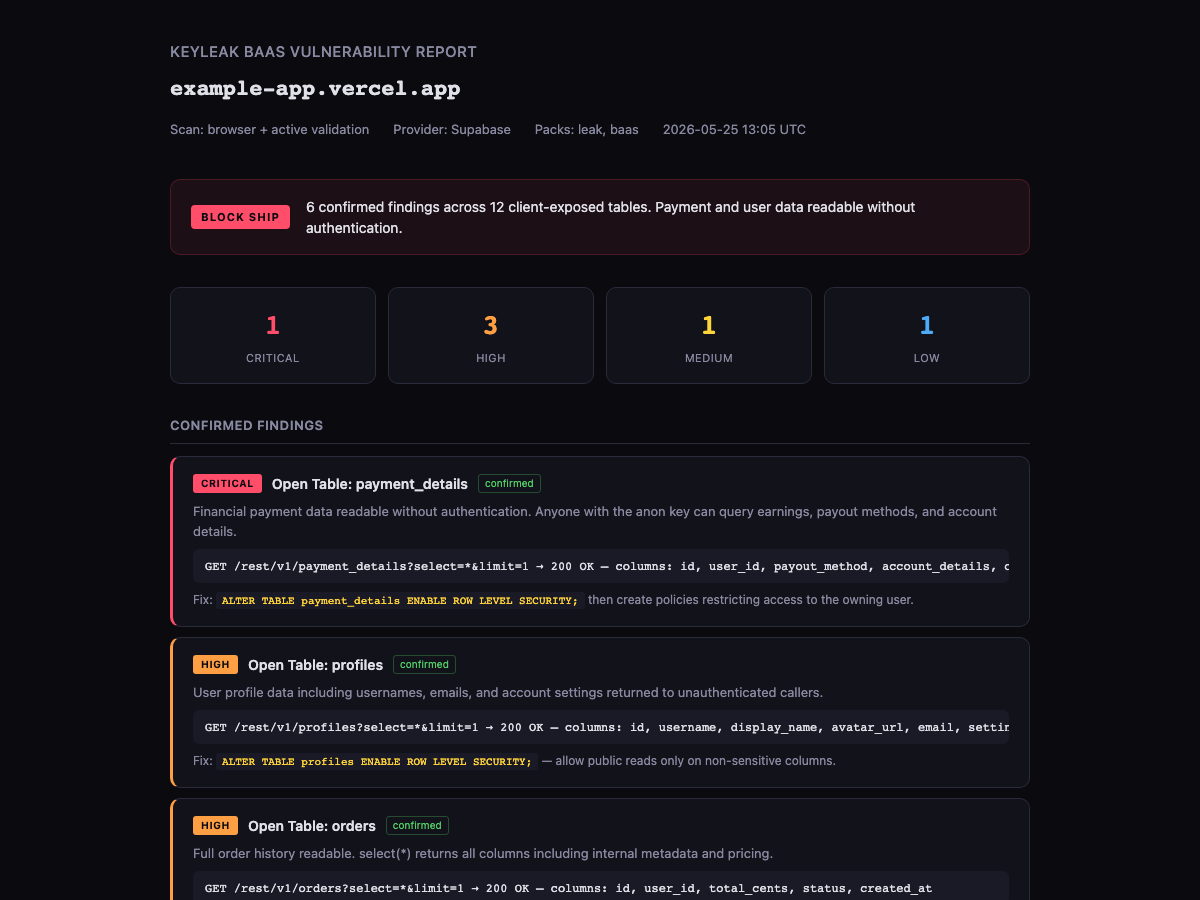
HTML Report
The --html flag generates a self-contained dark-theme report:
!KeyLeak BaaS Report
What It Detects
| Category | What | How |
|---|---|---|
| BaaS misconfig | Open Supabase tables, missing RLS, public storage buckets, callable RPCs | Acti -- probes the REST API with only the anon key |
| BaaS pro | Supabase, Firebase, Appwrite, PocketBase, Convex | Config extraction plus pro read-only |
| API keys | OpenAI, Anthropic, Gemini, Stripe, GitHub, AWS, and 20+ more | Regex detection + live TEST |
| JWT analysis | ser exposure, admin flags, broad scopes, long expiry | Decode + claims analysis (no needed) |
| Client-side auth | isAdmin === true checks in browser JS | Pattern detection in bundles |
| Write access | Tables accepting INSERT/UPDATE without auth | Prefer: tx=rollback probing (ne data) |
| Auth config | Missing email confirmation, exposed auth settings | Supabase auth endpoint probing |
| Supply chain | Malicious npm lifecycle hooks (download-and-exec, base64/PowerShell/Bun stagers), Git-ref/tarball deps — incl. inside node_modules | Structured manifest scan (Shai-Hulud / Miasma class) |
| Attack chains | Indi findings correlated into real attack paths (e.g. anon key + RLS-less table = unauth exfil) | Correlation engine over the merged findings |
| CI/CD hardening | Unpinned GitHub Actions / reusable workflows / docker:// tags, permissions: write-all, secrets echoed in run: | Workflow-file detectors |
| Local files | .env, MCP configs, CI workflows, Docker files, source maps | keyleak local scanner |
Chrome Extension Features
v0.6.1 -- What's New
A patch release for finding identity, report reliability, and dependency
hardening. Full notes in CHANGELOG.md.
and can use configured HMAC material for reproducible, non-secret IDs.
match after the newer fingerprint/report identity shape.
longer disappear into misleadingly clean reports.
and optional
mitmproxy import failures are preser while proxy modefalls back to the disabled path when una.
v0.6.0 -- What's New
A security-and-usefulness release. Full notes in CHANGELOG.md.
does: a published anon key + a table readable without RLS is reported as one
unauthenticated-exfiltration path, in the JSON/Markdown/HTML report.
keyleak bundles and --bundle <id> run named groups ofchecks (secrets, baas, authz, recon, deep, …) instead of "e or nothing".
preinstall/postinstall/prepare scripts and git-ref deps inside node_modules (theShai-Hulud / Miasma / Bitwarden-CLI supply-chain class) that the regex pack skips.
write-all, secret echo.URLs could reach internal/cloud-metadata hosts); redirect-re egress
guard; PII scrubbing now spans every scan surface; confidence-aware ship .
pull_request-triggered, SHA-pinned workflow running the test suites +launch-gate.
SSRF-guarded remote fetch (see CHANGELOG.md).
v0.5.0 -- What's New
keyleak site-scan + web UI button) with crt.sh + DNS subdomain enumeration, multi-le, and per-finding page pro--html)baas pack detectorsFalse Positives
The Chrome extension suppresses findings from 200+ first-party domains (Google, AWS, Azure, GitHub, Stripe, etc.), 87 CDN scripts, cloud storage signed URLs, and infrastructure headers. Despite this, you may encounter false positives on sites we haven't seen yet.
If you find a false positi report it. Open an issue with:
We actively review reported FPs and add suppression rules. The more sites you browse with the extension, the better the suppression gets.
The Delta Four Result
Every serious scan should lead to four things:
SAFE TO SHIP, REVIEW, or BLOCK SHIP.Proof: redacted e, source, detector, and confidence.Fix: exact remediation and rotation guidance.Re-test: the command or profile to run after fixing.Example CLI result:
What It Checks
| Area | Status | Notes |
|---|---:|---|
| Runtime JS/API response secrets | Strong | Browser + proxy capture scans scripts, headers, URLs, and responses. |
| AI/LLM provider keys | Strong | OpenAI, Anthropic, Gemini, OpenRouter, Groq, Hugging Face, and more. |
| Cloud/SaaS/PAT/webhooks | Strong | AWS, GitHub, Stripe, Slack, SendGrid, PyPI, database URLs, private keys. |
| Auth-only leaks | Partial | Authenticated bearer/cookie scan support exists; two-user comparison is a with explicit second-user credentials. |
| SQLi/XSS/auth bypass leads | Opt-in | appsec pack labels these as leads until exploit exists. |
| IDOR/BOLA hints | Improved | Flags direct object references and can with two explicit user contexts. |
| Attack surface | Partial | Security headers, TLS, exposed files, admin paths, subdomain enumeration. |
| Local config leaks | New | keyleak local scans .env, MCP, CI, Docker, source maps, and logs. |
| Correctness/housekeeping | Opt-in | correctness and housekeeping packs catch N+1, regressions, off-by-one/date/config leads, missing tests, dead code, and stale docs. |
| Source maps/debug bundles | New | Local scanner detects source map content and provider keys. |
| GraphQL/LLM/agent hints | Early | Local detectors catch GraphQL introspection and prompt-injection-style text. |
KeyLeak is not a full DAST, not exploit automation, and not a replacement for GitLeaks, TruffleHog, GitHub secret scanning, or GitGuardian. It is the runtime/browser/local-config layer that complements them.
How To Use It Now
Use the surface that matches your workflow.
1. Run The Web UI With Docker
This is the fastest way to try the browser scanner without installing Python dependencies locally.
Open .
Use the page input for a basic runtime scan. Use the authenticated scan modal only with throwaway test credentials.
2. Run The Web UI Locally
Use this path when you want to develop the Flask app, scanner, templates, CSS, or Ja.
Open .
If you do not use Poetry, create a en and install the package locally:
3. Scan Local Files And Configs
Use keyleak local before pushing or shipping. It scans local files without starting the web app.
By default, local mode includes env,mcp,ci,docker,sourcemaps,logs.
Limit the scan to specific file families:
Detector packs control the kind of failure patterns to look for. CLI/web default to leak; the extension default uses leak,appsec,access-control.
Exit codes are designed for automation: 0 means the selected threshold passed, 1 means the command failed, and 2 means findings met --fail-on.
4. Scan A Running Web App From The CLI
Use keyleak scan when you have a preview URL, staging URL, or local app URL.
The CLI talks to the local KeyLeak web scanner API, so start the web app first:
You can also point the CLI at the Docker web scanner:
5. Run Authenticated Scans
Use authenticated mode only against systems you own or ha to test.
Use a cookie instead of a bearer token:
Use both when the app requires both:
For access-control checks, provide a second throwaway user explicitly. KeyLeak will compare object-looking URLs as user A and user B and mark same-access e as :
6. Generate Reports For CI Or Review
Use JSON for baselines, SARIF for code scanning systems, and Markdown for human review.
Fail on high or critical findings:
Suppress known findings with a previous JSON report or allowlist:
The default launch profile is launch-gate, which blocks on high and critical findings while keeping lower-se hardening notes for review:
The repository includes a GitHub Actions launch gate at .github/workflows/keyleak-launch-gate.yml that runs the local scanner and uploads a JSON report artifact.
7. Use With Claude Code / Codex
The repo ships an agent skill at .claude/skills/keyleak-/SKILL.md. In any Claude Code session inside this repo, prompts like:
trigger the skill. The agent then chooses between keyleak local and keyleak scan, picks the right --launch-profile and --fail-on threshold, interprets the JSON, and reports back with BLOCK SHIP / REVIEW / SAFE TO SHIP plus the top blocking findings and a re-test command. The skill respects the local-first trust model: it only scans systems you own, ne findings, and ne raw secret back.
Safe Demo
The repo includes an intentionally local fixture:
This gi and Hacker News readers a safe way to see a BLOCK SHIP result without scanning random systems.
Web Scanner
Basic scan:
1. Loads the target in headless Chromium through mitmproxy.
2. Captures URLs, headers, responses, inline scripts, and DOM config data.
3. Applies custom and GitLeaks-deri patterns.
4. Runs attack-surface checks for exposed files, security headers, admin paths, TLS, and subdomains.
5. Returns a , summary, findings, proof, fix guidance, and re-test command.
Authenticated scan:
1. Adds a throwaway bearer token and/or cookie to the browser context.
2. Scans authenticated pages and traffic.
3. Applies best-effort access-control heuristics for direct object references.
Use throwaway credentials only.
Chrome Extension
The extension/ folder contains an experimental local Chrome extension that passively monitors pages as you browse.
It scans:
Load It In Chrome
The extension is not published to the Chrome Web Store yet. Load it from this repo:
1. Clone or pull the latest main branch.
2. Open chrome://extensions in Chrome.
3. Enable De mode.
4. Click Load unpacked.
5. Select the extension/ folder, not the repository root.
6. From the repository root, run poetry run keyleak install-extension-host once.
7. Return to chrome://extensions and click Reload on KeyLeak Detector.
8. Pin KeyLeak Detector from the Chrome toolbar extensions menu.
9. Browse an app you own or ha to test.
10. Click the KeyLeak toolbar icon to see findings for the current tab.
The exact folder to select is:
The one-time setup discovers the unpacked extension ID in Chrome and installs an exact-origin nati manifest for this checkout. If Chrome uses a profile the installer cannot discover, copy the extension ID from chrome://extensions and run:
Use The Popup
The popup shows:
SAFE TO SHIP, REVIEW, or BLOCK SHIPCRIT, HIGH, MED, and LOWREDACTED SAMPLE ROW on confirmed open BaaS tables plus an explicit REVEAL RAW SAMPLE control for up to two actual rows; raw rows stay in tab-scoped memory and ne extension storage or copied reportsRUN FULL SCAN action that starts the Docker Compose scanner automatically when loopback is una, calls it at CLEAR button to reset findings for the current tabUse The De Panel
Open Chrome De on a page, then select the Secrets panel. It shows a wider launch-gate table and enables De network body capture while the panel is open, which impro for parser-loaded bundles and source maps.
Learn And Reference Tabs
Both the popup and the De panel include a Findings tab and a Reference tab:
LEARN on any finding to inline-expand a panel explaining what the detector is, why it matters, the canonical attack scenario, the fix, and external references (OWASP, CWE, docs).Reference to browse every detector grouped by pack (leak, appsec, access-control, correctness, housekeeping). The search box filters by detector ID, description, remediation, or category. Use this as a glossary even when there are no findings.Detector educational content is sourced from keyleak/detectors.py (description, remediation, references, optional attack_scenario) and regenerated into extension/lib/detector-info.js by scripts/generate_extension_patterns.py. To add or improve an explanation, edit the detector and re-run the script.
Extension Permissions
The extension requests webRequest, storage, activeTab, tabs, and <all_urls> because it obser, headers, page content, and fetch/XHR responses locally. It requests nati only to send fixed lifecycle actions, a random startup challenge, and its local proof to the installed KeyLeak helper; page URLs, site credentials, findings, and captured browser content are ne in those nati. The proof authenticates the loopback scanner before the extension sends a scan target.
Use it for de, staging, bug bounty scopes, or owned systems. Disable it when browsing unrelated sensiti. See docs/SECURITY_MODEL.md before using it on sensiti sessions.
Reports
CLI output formats:
Each normalized finding includes:
idtypeseconfidencedetector_idcategorysourceeredacted_valuerisk_reasonremediationreferencesReports also include packs and pack_summary, so web, CLI, CI, and extension exports can group findings by heatmap category.
Baselines and allowlists are intentionally simple. A baseline can be a previous KeyLeak JSON report; those finding IDs/signatures are suppressed so CI fails only on new findings. An allowlist can be JSON (ids, detector_ids, types, source_contains) or a line file using entries like id:finding_..., detector:local:openai_api_key, type:source_map_reference, or source:fixtures/.
Security Model
Read docs/SECURITY_MODEL.md for details and limits.
Contributing
Useful PRs are very welcome. The best contribution lanes are:
Start with CONTRIBUTING.md and docs/DETECTOR_AUTHORING.md. For an end-to-end runbook on running a scan (setup, choosing a command, and triaging output), see docs/AGENT_SCAN_HOWTO.md.
Roadmap
Responsible Use
Only scan systems you own or ha permission to test. Unauthorized scanning may be illegal. Handle findings securely, rotate exposed credentials immediately, and report through responsible disclosure.
Acknowledgments
License
MIT. See LICENSE.
项目信息
开发语言:Python
Star 数:268
技术要点
该项目属于安全软件方向的开源资源,代码结构清晰,适合安全研究人员学习参考。项目围绕Runtime leak detector for modern web apps — finds exposed API keys, validates BaaS misconfigurations (Supabase/Firebase RLS), and catches secrets in JS bundles. Chrome extension + CLI.展开,提供了可运行的实现,对理解相关安全机制、工具原理与攻防技术具有较高的研究价值。
从技术实现角度看,此类项目的核心在于对底层原理的深入理解与工程化落地。开发者在研究过程中可以结合官方文档与社区讨论,梳理项目的初始化流程、核心模块职责与数据流转,逐步掌握其中的技术细节与设计思路。
使用与学习建议
1. 下载源码压缩包,解压到本地环境。
2. 根据项目类型准备对应的运行环境与依赖。
3. 按照 README 中的步骤完成配置与部署。
4. 在隔离的测试环境中运行验证,避免影响生产系统。
免责声明
本资源来源于开源社区,仅供安全研究、技术学习与合法授权范围内的攻防演练使用,请勿用于任何非法或侵害他人权益的用途。使用本项目产生的一切后果由使用者自行承担。
| 资源标题 | keyleak-detector - Runtime leak detector for modern web apps — finds |
| 所属分类 | 安全软件 |
| 发布作者 | admin |
| 发布时间 | 2026-10-05 22:38:37 |
| 下载权限 | 免费下载 |
| 附件数量 | 2 个下载链接 |
| 浏览次数 | 252 |
| 讨论数量 | 0 |
| 主题状态 | 正常讨论中 |