 安全软件
点击放大
chromium_for_spider - dynamic crawler for web vulnerability scanner
项目说明
中文版本(Chinese )
Core functions
By modifying the chromium source code, two functions that are more concerned about in two dynamic crawlers are mainly implemented:
1. The current page is prohibited from being redirected, and the URL to be redirected is collected for future use. This is achieved by modifying a relatively low-le, and there is no need to hook in scenarios.
2. Hook all non-default events bound by the current page and reserve the scene for subsequent triggers. This way the crawler does not need to traverse all DOM nodes.
There are also some small features:
1. Disable browsers from downloading files.
2. Ignore the "X-Frame-Options" header, which allows arbitrary pages to be iframed.
3. Prohibit alert, print, confirm, prompt popups.
4. Forbid the page to open a new window by itself; record the URL of the new window to be opened.
5. Hidden the na.webdri.
Download
Compiled binary:
Example
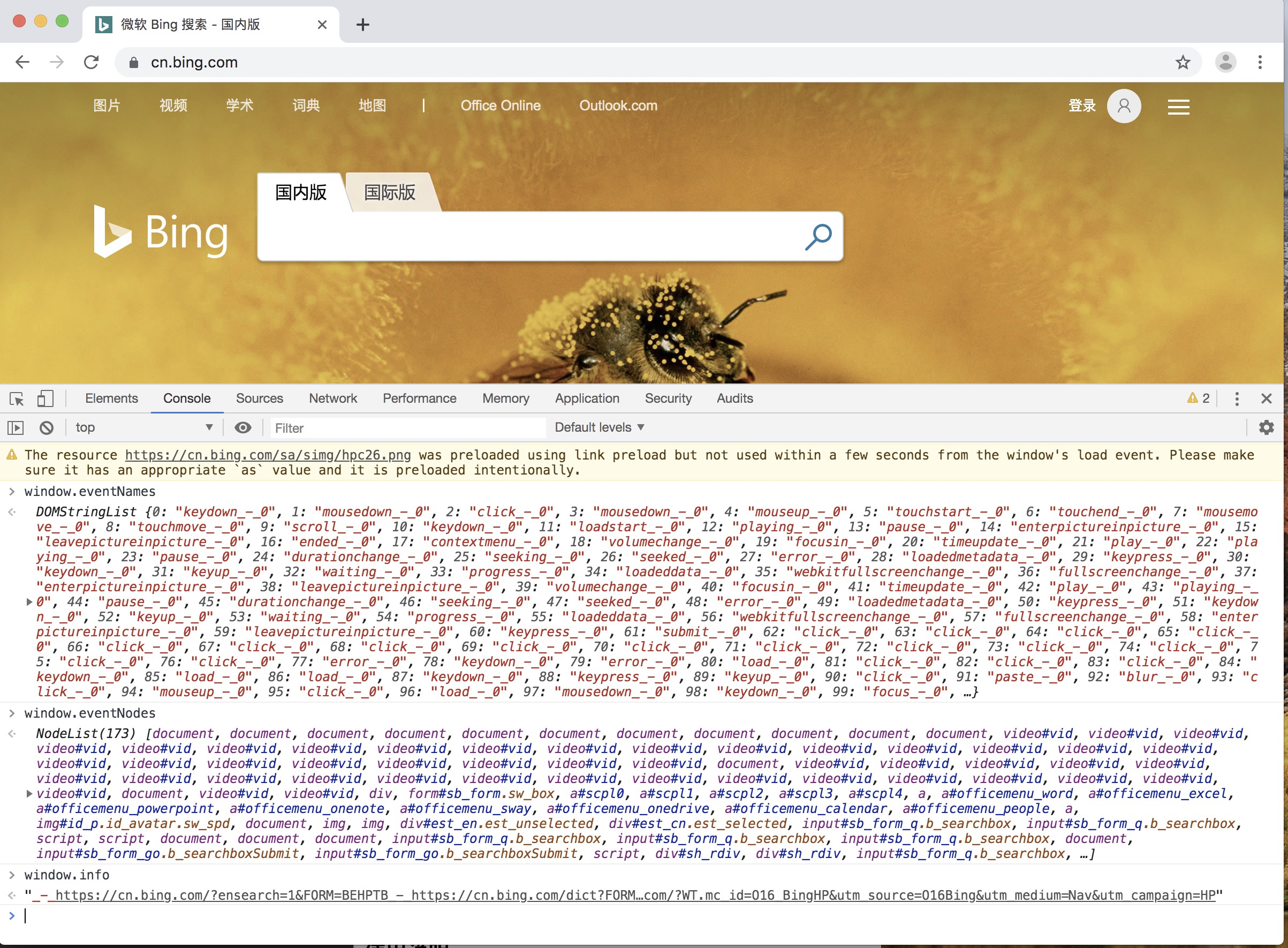
After opening the page, because the page jump is hooked, no matter how you click (or execute any JS), the page should not jump successfully. "URL to be redirected" will be recorded in window.info.
!e
Instructions for use
After implementing the core function by modifying the chromium source code, three properties have been added to the browser's window object: window.info, window.e, and window.e.
Among them, window.info records the jump URL triggered in the page, etc., and uses _-_ to separate.
window.e and window.e are used together, e is the event name, such as click, onmouseover, etc. e is the DOM node bound to the event, which can be obtained through JS. See ch_test/fireevent.html for usage examples.
Compile
The current (20190517) of chromium used is dbc6c805b7430f401875d50b8566d9f743ca402b, and the test can be easily compiled successfully. It is possible that some of the dependencies of chromium will be in over time. If it fails, please open an issue reminder to update the chromium .
Today, the compilation of chromium is very simple. According to the official steps, choose the correct de (such as dbc6c805b7430f401875d50b8566d9f743ca402b currently used), which can completely achieve no warning throughout the process.
See the official documentation: .
1. Install the official steps first, download the source code and prepare the en.
2. git checkout dbc6c805b7430f401875d50b8566d9f743ca402b to switch to the specified .
3. gclient sync, this step may report an error. If the error is a module of chromium, delete the module and continue executing this command.
4. git apply path/to/dbc6c805b7430f401875d50b8566d9f743ca402b.diff apply this patch.
2. gn args out/Release adds parameters in args.gn (optional, does not affect usability).
3. gn gen out/Release produces compiled files.
4. autoninja -C out/Release chrome starts to compile.
The executable file on Mac is src/out/Release/Chromium.app/Contents/MacOS/Chromium, and the executable file on Ubuntu is src/out/Release/chrome.
项目信息
开发语言:HTML
Star 数:250
技术要点
该项目属于安全软件方向的开源资源,代码结构清晰,适合安全研究人员学习参考。项目围绕dynamic crawler for web vulnerability scanner展开,提供了可运行的实现,对理解相关安全机制、工具原理与攻防技术具有较高的研究价值。
从技术实现角度看,此类项目的核心在于对底层原理的深入理解与工程化落地。开发者在研究过程中可以结合官方文档与社区讨论,梳理项目的初始化流程、核心模块职责与数据流转,逐步掌握其中的技术细节与设计思路。
使用与学习建议
1. 下载源码压缩包,解压到本地环境。
2. 根据项目类型准备对应的运行环境与依赖。
3. 按照 README 中的步骤完成配置与部署。
4. 在隔离的测试环境中运行验证,避免影响生产系统。
免责声明
本资源来源于开源社区,仅供安全研究、技术学习与合法授权范围内的攻防演练使用,请勿用于任何非法或侵害他人权益的用途。使用本项目产生的一切后果由使用者自行承担。
| 资源标题 | chromium_for_spider - dynamic crawler for web vulnerability scanner |
| 所属分类 | 安全软件 |
| 发布作者 | admin |
| 发布时间 | 2026-10-05 22:39:01 |
| 下载权限 | 免费下载 |
| 附件数量 | 2 个下载链接 |
| 浏览次数 | 490 |
| 讨论数量 | 0 |
| 主题状态 | 正常讨论中 |