 安全软件
点击放大
Log4j-RCE-Scanner - Remote command execution vulnerability scanner for
项目说明
<h1 align="center">
<img src=" alt="Log4j-RCE-Scanner" width="50%"></a>
<br>
</h1>
<p align="center">
<a href=" src="
<a href=" src="
<a href=" src="
<a href=" src="
<a href=" src="
<a href=" src="
<a href=" alt="GitHub last commit" src="
</p>
<p align="center">
<a href=" •
<a href=" •
<a href=" •
<a href=" •
<a href="
</p>
---
RCE scanner for Log4j
Using this tool, you can scan for remote command execution C on Apache Log4j at multiple addresses.
> Affected < 2.15.0
Features
Requirements
1. httpx
2. curl
> If you want to scan with a domain name, you must additionally install subfinder, assetfinder and amass.
Installation
1.
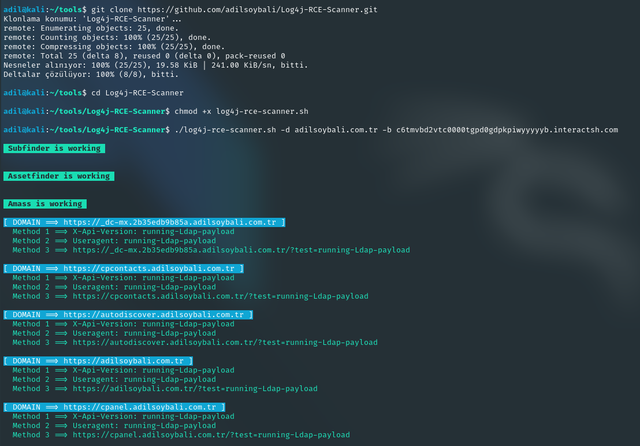
git clone 2.
cd Log4j-RCE-Scanner3.
chmod +x log4j-rce-scanner.sh<a href=" src="
Usage
./log4j-rce-scanner.sh -h
This will display help for the tool. Here are all the switches it supports.
-h, --help - Display help
-l, --url-list - List of domain/subdomain/ip to be used for scanning.
-d, --domain - The domain name to which all subdomains and itself will be checked.
-b, --burpcollabid - Burp collabrator client id address or interactsh domain address.
Example uses:
./log4j-rce-scanner.sh -l httpxsubdomains.txt -b yrt45r4sjyoj19617jem5briio3cs.burpcollaborator.net
./log4j-rce-scanner.sh -d adilsoybali.com -b yrt45r4sjyoj19617jem5briio3cs.burpcollaborator.net
Click here to go to Burp collaborator documentation page.
Click here to go to Interactsh.
> If the domain is , dns callbacks with the domain name is sent to the burp collaborator or interactsh address you provided.
Contributing
Contributions are what make the open source community such an amazing place to learn, inspire, and create. Any contributions you make are greatly appreciated.
If you have a suggestion that would make this better, please fork the repo and create a pull request. You can also simply open an issue with the tag "enhancement". Don't forget to give the project a star! Thanks again!
1. Fork the Project
2. Create your Feature Branch (git checkout -b feature/AmazingFeature)
3. Commit your Changes (git commit -m 'Add some AmazingFeature')
4. Push to the Branch (git push origin feature/AmazingFeature)
5. Open a Pull Request
Contact
<p>
<a href="mailto:" target="_blank"><img align="center" src=" alt="Email" /></a>
<a href=" target="_blank"><img align="center" src=" alt="Linkedin" /></a>
<a href=" target="_blank"><img align="center" src=" alt="Discord" /></a>
<a href=" target="_blank"><img align="center" src=" alt="Twitter" /></a>
<a href=" target="_blank"><img align="center" src=" alt="Personal Web Site" /></a>
</p>
Acknowledgments
Stargazers over time
![Stargazers over time]()
项目信息
开发语言:Shell
Star 数:250
技术要点
该项目属于安全软件方向的开源资源,代码结构清晰,适合安全研究人员学习参考。项目围绕Remote command execution vulnerability scanner for Log4j.展开,提供了可运行的实现,对理解相关安全机制、工具原理与攻防技术具有较高的研究价值。
从技术实现角度看,此类项目的核心在于对底层原理的深入理解与工程化落地。开发者在研究过程中可以结合官方文档与社区讨论,梳理项目的初始化流程、核心模块职责与数据流转,逐步掌握其中的技术细节与设计思路。
使用与学习建议
1. 下载源码压缩包,解压到本地环境。
2. 根据项目类型准备对应的运行环境与依赖。
3. 按照 README 中的步骤完成配置与部署。
4. 在隔离的测试环境中运行验证,避免影响生产系统。
免责声明
本资源来源于开源社区,仅供安全研究、技术学习与合法授权范围内的攻防演练使用,请勿用于任何非法或侵害他人权益的用途。使用本项目产生的一切后果由使用者自行承担。
| 资源标题 | Log4j-RCE-Scanner - Remote command execution vulnerability scanner for |
| 所属分类 | 安全软件 |
| 发布作者 | admin |
| 发布时间 | 2026-10-05 22:39:04 |
| 下载权限 | 免费下载 |
| 附件数量 | 2 个下载链接 |
| 浏览次数 | 438 |
| 讨论数量 | 0 |
| 主题状态 | 正常讨论中 |