 安全软件
点击放大
harbor-scanner-trivy - Use Trivy as a plug-in vulnerability scanner in th
项目说明
[![GitHub Release][release-img]][release]
[![GitHub Build Actions][build-action-img]][actions]
[![Go Report Card][report-card-img]][report-card]
[![License][license-img]][license]
![Docker Pulls / Aqua][docker-pulls-aqua]
![Docker Pulls / Harbor][docker-pulls-harbor]
IMPORTANT: This repository is no longer maintained. Future de in this project will happen in the repository:
Harbor Scanner Adapter for Trivy
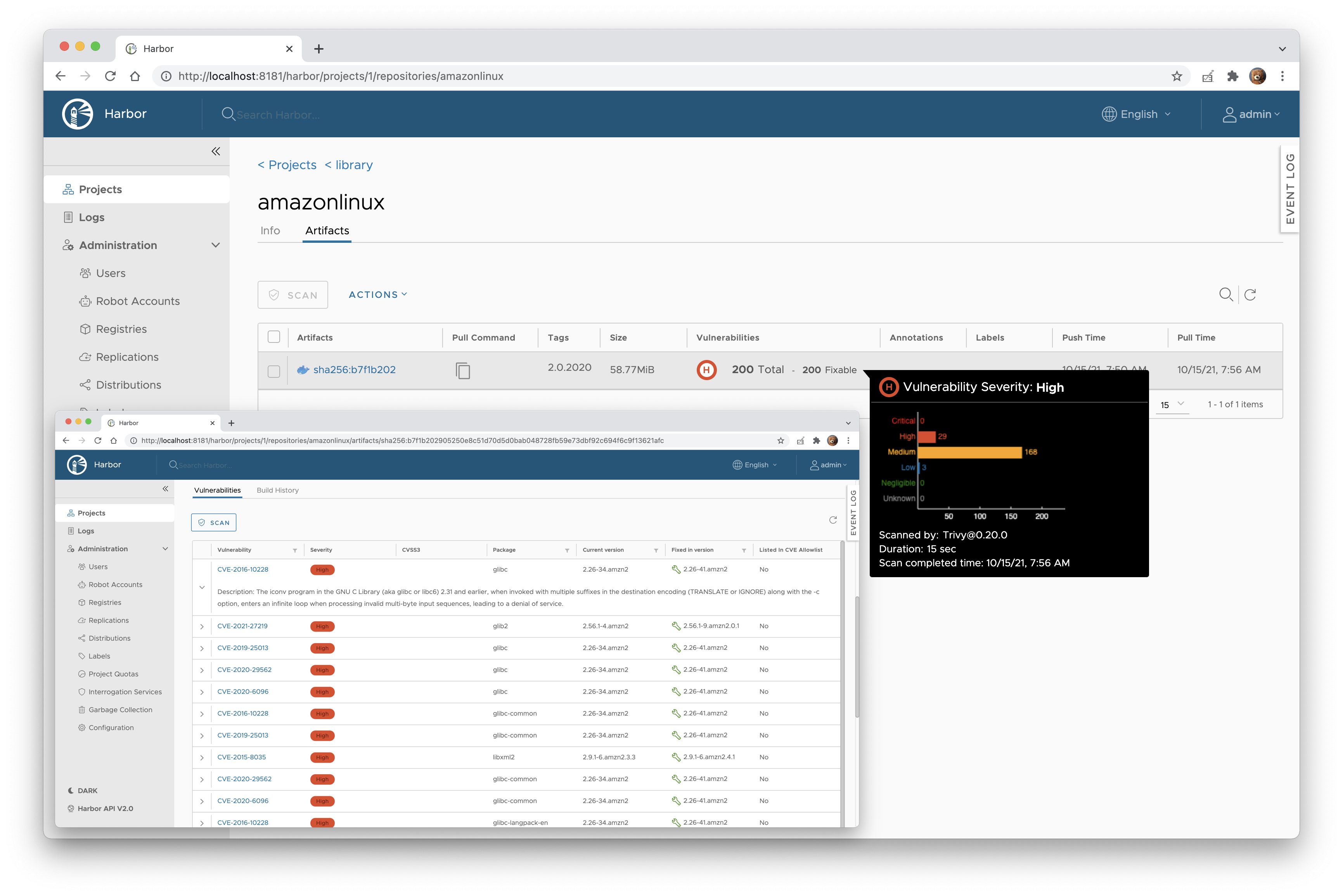
The Harbor [Scanner Adapter][harbor-pluggable-scanners] for [Trivy] is a service that translates the [Harbor] scanning
API into Tri and allows Harbor to use Trivy for pro reports on images stored in Harbor
registry as part of its scan feature.
Harbor Scanner Adapter for Trivy is the default static scanner in Harbor >= 2.2.
!
For compliance with core components Harbor builds the adapter service binaries into Docker images based on Photos OS
(goharbor/tri), whereas in this repository we build Docker images based on Alpine
(aquasec/harbor-scanner-trivy). There is no difference in functionality though.
TOC
- Harbor >= 2.0 on Kubernetes
- Harbor 1.10 on Kubernetes
Matrix
The following matrix indicates the of Trivy and Tri installed in each Harbor
release.
| Harbor | Tri | Trivy |
|------------------|---------------|-----------------|
| - | v0.31.4 | [trivy v0.54.1] |
| - | v0.31.3 | [trivy v0.52.2] |
| - | v0.31.2 | [trivy v0.51.2] |
| - | v0.31.1 | [trivy v0.50.4] |
| - | v0.31.0 | [trivy v0.50.1] |
| - | v0.30.23 | [trivy v0.50.1] |
| - | v0.30.22 | [trivy v0.49.1] |
| - | v0.30.21 | [trivy v0.48.3] |
| - | v0.30.20 | [trivy v0.48.1] |
| - | v0.30.19 | [trivy v0.47.0] |
| - | v0.30.18 | [trivy v0.46.1] |
| - | v0.30.17 | [trivy v0.46.0] |
| - | v0.30.16 | [trivy v0.45.0] |
| - | v0.30.15 | [trivy v0.44.0] |
| - | v0.30.14 | [trivy v0.43.0] |
| - | v0.30.13 | [trivy v0.43.0] |
| - | v0.30.12 | [trivy v0.42.0] |
| - | v0.30.11 | [trivy v0.40.0] |
| - | v0.30.10 | [trivy v0.39.0] |
| - | v0.30.9 | [trivy v0.38.2] |
| - | v0.30.8 | [trivy v0.38.2] |
| - | v0.30.7 | [trivy v0.37.2] |
| - | v0.30.6 | [trivy v0.35.0] |
| - | v0.30.5 | [trivy v0.35.0] |
| - | v0.30.4 | [trivy v0.35.0] |
| - | v0.30.3 | [trivy v0.35.0] |
| - | v0.30.2 | [trivy v0.32.1] |
| - | v0.30.0 | [trivy v0.29.2] |
| - | v0.29.0 | [trivy v0.28.1] |
| [harbor v2.5.1] | v0.28.0 | [trivy v0.26.0] |
| - | v0.27.0 | [trivy v0.25.0] |
| [harbor v2.5.0] | v0.26.0 | [trivy v0.24.2] |
| - | v0.25.0 | [trivy v0.22.0] |
| [harbor v2.4.1] | v0.24.0 | [trivy v0.20.1] |
| [harbor v2.4.0] | v0.24.0 | [trivy v0.20.1] |
| - | v0.23.0 | [trivy v0.20.0] |
| - | v0.22.0 | [trivy v0.19.2] |
| - | v0.21.0 | [trivy v0.19.2] |
| - | v0.20.0 | [trivy v0.18.3] |
| [harbor v2.3.3] | v0.19.0 | [trivy v0.17.2] |
| [harbor v2.3.0] | v0.19.0 | [trivy v0.17.2] |
| [harbor v2.2.3] | v0.18.0 | [trivy v0.16.0] |
| [harbor v2.2.0] | v0.18.0 | [trivy v0.16.0] |
| [harbor v2.1.6] | v0.14.1 | [trivy v0.9.2] |
| [harbor v2.1.0] | v0.14.1 | [trivy v0.9.2] |
[harbor v2.5.1]:
[harbor v2.5.0]:
[harbor v2.4.1]:
[harbor v2.4.0]:
[harbor v2.3.3]:
[harbor v2.3.0]:
[harbor v2.2.3]:
[harbor v2.2.0]:
[harbor v2.1.6]:
[harbor v2.1.0]:
[trivy v0.48.1]:
[trivy v0.47.0]:
[trivy v0.46.1]:
[trivy v0.46.0]:
[trivy v0.45.0]:
[trivy v0.44.0]:
[trivy v0.43.0]:
[trivy v0.42.0]:
[trivy v0.40.0]:
[trivy v0.39.0]:
[trivy v0.38.2]:
[trivy v0.37.2]:
[trivy v0.35.0]:
[trivy v0.32.1]:
[trivy v0.29.2]:
[trivy v0.28.1]:
[trivy v0.26.0]:
[trivy v0.25.0]:
[trivy v0.24.2]:
[trivy v0.22.0]:
[trivy v0.20.1]:
[trivy v0.20.0]:
[trivy v0.19.2]:
[trivy v0.18.3]:
[trivy v0.17.2]:
[trivy v0.16.0]:
[trivy v0.9.2]:
Deployment
Harbor >= 2.0 on Kubernetes
In Harbor >= 2.0 Trivy can be configured as the default scanner, therefore you can install it with the
official [Harbor Helm chart], where HARBOR_CHART_ >= 1.4:
The adapter service is automatically registered under the Interrogation Service in the Harbor interface and
designated as the default scanner.
Harbor 1.10 on Kubernetes
1. Install the harbor-scanner-trivy chart:
2. Configure the scanner adapter in the Harbor interface.
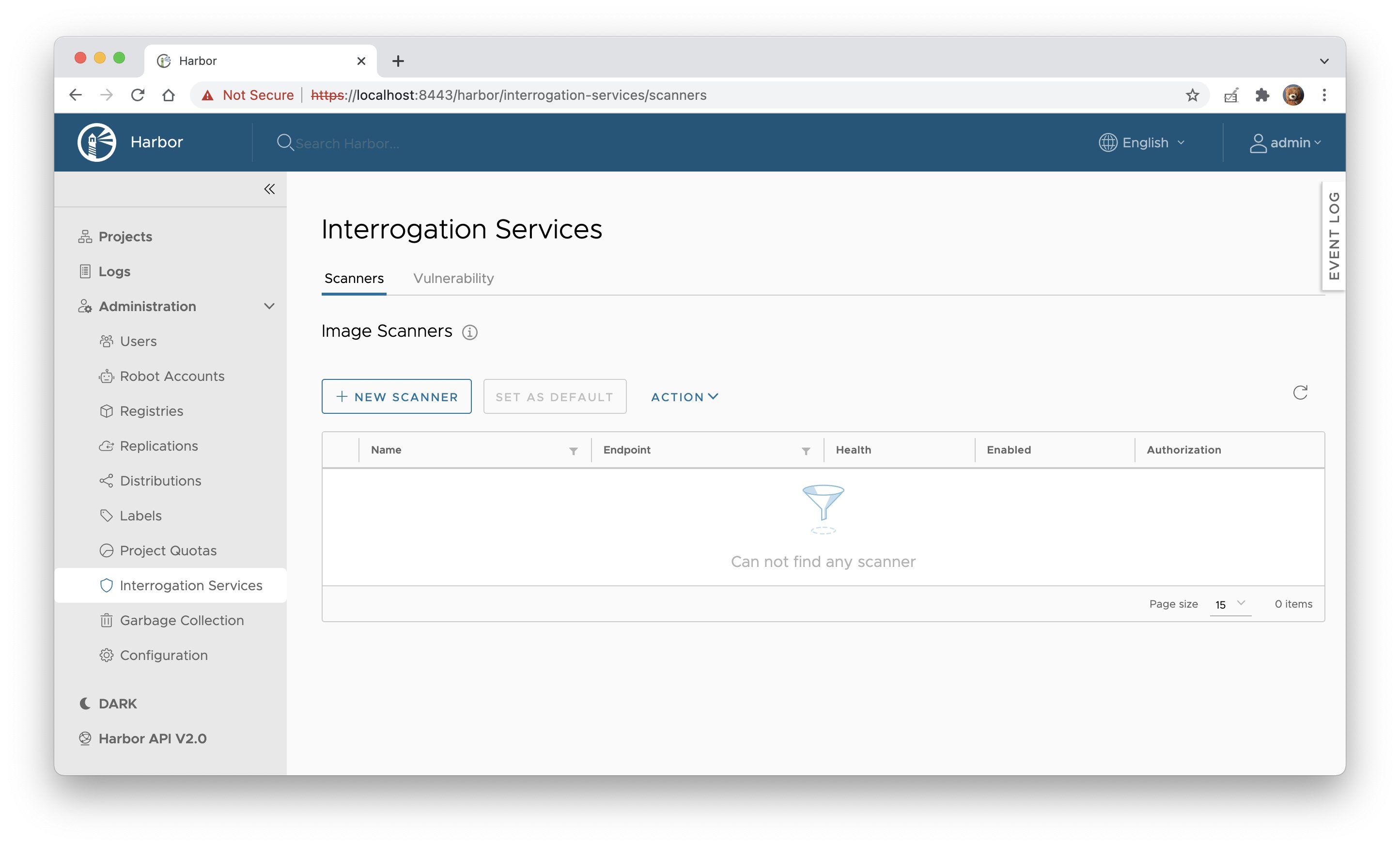
1. Na to Interrogation Services and click + NEW SCANNER.
!Interrogation Services
2. Enter < as the Endpoint URL and click TEST CONNECTION.
!Add scanner
3. If e is fine click ADD to save the configuration.
3. Select the Trivy scanner and set it as default by clicking SET AS DEFAULT.
!Set Trivy as default scanner
Make sure the Default label is displayed next to the Trivy scanner's name.
Configuration
Configuration of the adapter is done at startup.
| Name | Default | Description |
|-----------------------------------------|------------------------------------|------------------------------------------------------------------------------------------------------------------------------------------------------------------------------------------------------------------------------------------------------------------------------------|
| SCANNER_LOG_LEVEL | info | The log level of trace, debug, info, warn, warning, error, fatal or panic. The standard logger logs entries with that level or anything above it. |
| SCANNER_API_SER | :8080 | Binding address for the API server |
| SCANNER_API_SER | N/A | The absolute path to the x509 certificate file |
| SCANNER_API_SER | N/A | The absolute path to the x509 private key file |
| SCANNER_API_SER | N/A | A list of absolute paths to x509 root certificate authorities that the api use if required to a client certificate |
| SCANNER_API_SER | 15s | The maximum duration for reading the entire request, including the body |
| SCANNER_API_SER | 15s | The maximum duration before timing out writes of the response |
| SCANNER_API_SER | 60s | The maximum amount of time to wait for the next request when keep-alives are enabled |
| SCANNER_API_SER | true | Whether to enable metrics |
| SCANNER_TRI | /home/scanner/.cache/trivy | Tri directory |
| SCANNER_TRI | /home/scanner/.cache/reports | Tri directory |
| SCANNER_TRI | false | The flag to enable or disable Tri mode |
| SCANNER_TRI | os,library | Comma-separated list of types. Possible are os and library. |
| SCANNER_TRI | vuln,config,secret | comma-separated list of what security issues to detect. Possible are vuln, config and secret. Defaults to vuln. |
| SCANNER_TRI | UNKNOWN,LOW,MEDIUM,HIGH,CRITICAL | Comma-separated list of se to be displayed |
| SCANNER_TRI | false | The flag to display only fixed |
| SCANNER_TRI | ` | The path for the Tri policy OPA Rego file |SCANNER_TRI
| | false | The flag to disable [Trivy DB] downloads. |SCANNER_TRI
| | false | The flag to disable [Trivy JAVA DB] downloads. |SCANNER_TRI
| | false | The flag to disable external API requests to identify dependencies. |SCANNER_TRI
| | N/A | The GitHub access token to download [Trivy DB] (see [GitHub rate limiting][gh-rate-limit]) |SCANNER_TRI
| | false | The flag to skip registry certificate |SCANNER_TRI
| | 5m0s | The duration to wait for scan completion |SCANNER_STORE_REDIS_NAMESPACE
| | harbor.scanner.tri | The namespace for keys in the Redis store |SCANNER_STORE_REDIS_SCAN_JOB_TTL
| | 1h | The time to live for persisting scan jobs and associated scan reports |SCANNER_JOB_QUEUE_REDIS_NAMESPACE
| | harbor.scanner.tri | The namespace for keys in the scan jobs queue backed by Redis |SCANNER_JOB_QUEUE_WORKER_CONCURRENCY
| | 1 | The number of workers to spin-up for the scan jobs queue |SCANNER_REDIS_URL
| | redis://harbor-harbor-redis:6379 | The Redis server URI. The URI supports schemas to connect to a standalone Redis server, i.e. redis://:password:port/db-number and Redis Sentinel deployment, i.e. redis+sentinel://:password:port1,sentinel_host2:port2/monitor-name/db-number. |SCANNER_REDIS_POOL_MAX_ACTIVE
| | 5 | The max number of connections allocated by the Redis connection pool |SCANNER_REDIS_POOL_MAX_IDLE
| | 5 | The max number of idle connections in the Redis connection pool |SCANNER_REDIS_POOL_IDLE_TIMEOUT
| | 5m | The duration after which idle connections to the Redis server are closed. If the value is zero, then idle connections are not closed. |SCANNER_REDIS_POOL_CONNECTION_TIMEOUT
| | 1s | The timeout for connecting to the Redis server |SCANNER_REDIS_POOL_READ_TIMEOUT
| | 1s | The timeout for reading a single Redis command reply |SCANNER_REDIS_POOL_WRITE_TIMEOUT
| | 1s | The timeout for writing a single Redis command. |HTTP_PROXY
| | N/A | The URL of the HTTP proxy server |HTTPS_PROXY
| | N/A | The URL of the HTTPS proxy server |NO_PROXY
| | N/A | The URLs that the proxy settings do not apply to |
Documentation
Troubleshooting
Error: database error: --skip-db-update cannot be specified on the first run
If you set the value of the SCANNER_TRI to true, make sure that you download the [Trivy DB]/home/scanner/.cache/trivy/db/trivy.db
and mount it in the path.
Error: failed to list releases: Get < dial tcp: lookup api.github.com on 127.0.0.11:53: read udp 127.0.0.1:39070->127.0.0.11:53: i/o timeout
Most likely it's a Docker DNS server or network firewall configuration issue. Tri internet connection to
periodically download database from GitHub to show up-to-date risks.
Try adding a DNS server to docker-compose.yml created by Harbor installer.
Alternatively, configure Docker daemon to use the same DNS server as host operating system. See [DNS services][docker-dns]
section in the Docker container networking documentation for more details.
Error: failed to list releases: GET < 403 API rate limit exceeded
Trivy DB downloads from GitHub are subject to [rate limiting][gh-rate-limit]. Make sure that the Trivy DB is mounted
and cached in the /home/scanner/.cache/trivy/db/trivy.db path. If, for any reason, it's not enough you can set theSCANNER_TRI` en (authenticated requests get a higher rate limit).
value of the
Contributing
Please read CONTRIBUTING.md for details on our code of conduct, and the process for submitting pull
requests.
---
Harbor Scanner Adapter for Trivy is an Aqua Security open source project.
Learn about our open source work and portfolio here.
[release-img]:
[release]:
[build-action-img]:
[actions]:
[report-card-img]:
[report-card]:
[docker-pulls-aqua]:
[docker-pulls-harbor]:
[license-img]:
[license]:
[Harbor]:
[Harbor Helm chart]:
[Trivy]:
[Trivy DB]:
[harbor-pluggable-scanners]:
[gh-rate-limit]:
[docker-dns]:
项目信息
开发语言:Go
Star 数:226
技术要点
该项目属于安全软件方向的开源资源,代码结构清晰,适合安全研究人员学习参考。项目围绕Use Trivy as a plug-in vulnerability scanner in the Harbor registry展开,提供了可运行的实现,对理解相关安全机制、工具原理与攻防技术具有较高的研究价值。
从技术实现角度看,此类项目的核心在于对底层原理的深入理解与工程化落地。开发者在研究过程中可以结合官方文档与社区讨论,梳理项目的初始化流程、核心模块职责与数据流转,逐步掌握其中的技术细节与设计思路。
使用与学习建议
1. 下载源码压缩包,解压到本地环境。
2. 根据项目类型准备对应的运行环境与依赖。
3. 按照 README 中的步骤完成配置与部署。
4. 在隔离的测试环境中运行验证,避免影响生产系统。
免责声明
本资源来源于开源社区,仅供安全研究、技术学习与合法授权范围内的攻防演练使用,请勿用于任何非法或侵害他人权益的用途。使用本项目产生的一切后果由使用者自行承担。
| 资源标题 | harbor-scanner-trivy - Use Trivy as a plug-in vulnerability scanner in th |
| 所属分类 | 安全软件 |
| 发布作者 | admin |
| 发布时间 | 2026-10-05 22:39:40 |
| 下载权限 | 免费下载 |
| 附件数量 | 2 个下载链接 |
| 浏览次数 | 205 |
| 讨论数量 | 0 |
| 主题状态 | 正常讨论中 |