 安全软件
点击放大
BugTraceAI-CLI - Autonomous AI-powered security scanner — multi-age
项目说明
BugTraceAI-CLI
![Website]() ![]()   ![DeepWiki]()
Autonomous security scans with an interacti workspace, REST API and MCP.
BugTraceAI combines LLM-guided analysis with specialist tools and browser
. Follow the scan, inspect e and configure pro from the
terminal, or connect the engine to BugTraceAI-WEB and your own AI assistant.
Use it only against applications you are authorized to test.
Terminal workspace
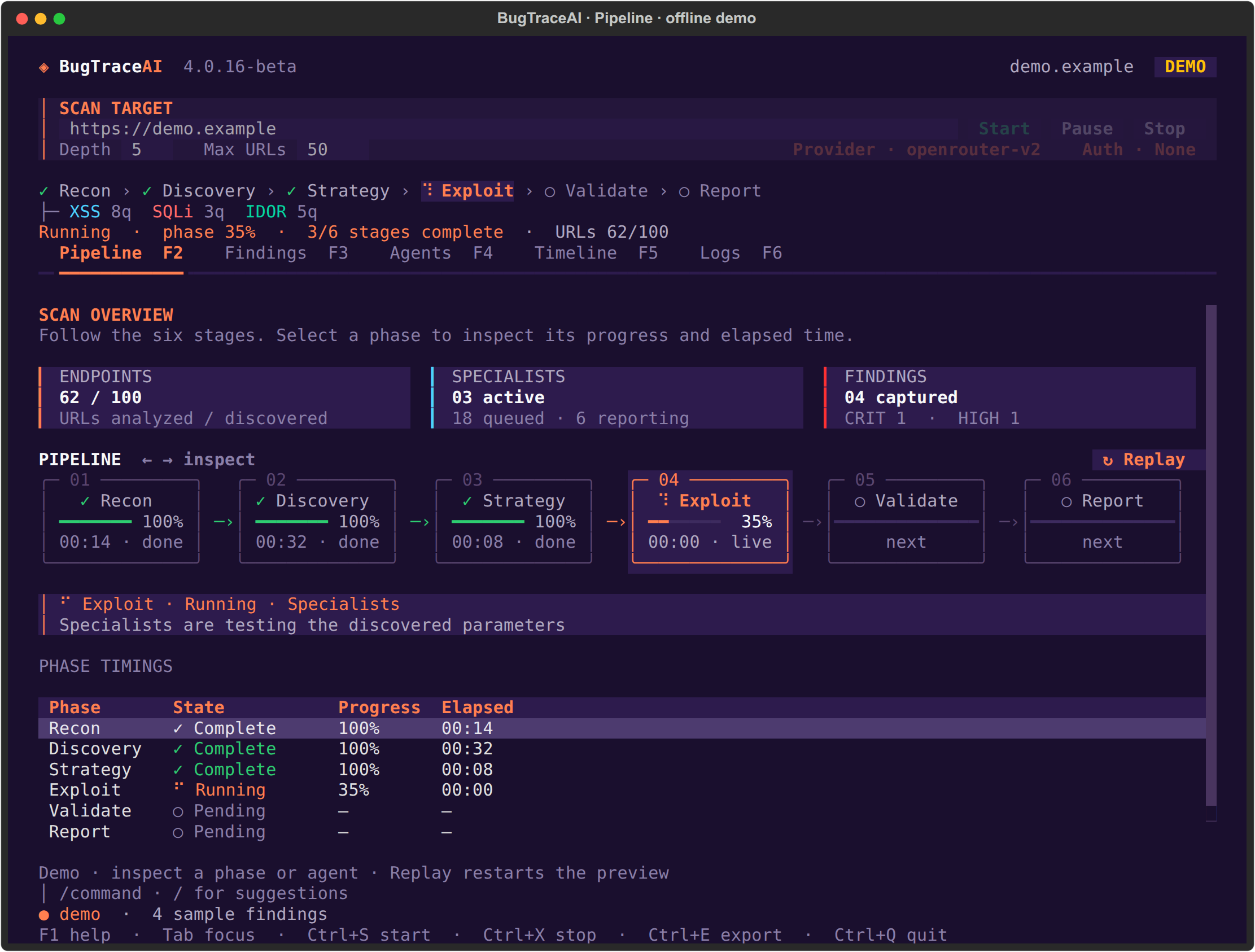
!BugTraceAI 4.0.16-beta terminal pipeline, showing all six stages with offline sample data
The TUI follows Recon → Discovery → Strategy → Exploit → → Report.
Set the target URL, Depth and Max URLs at the top. The phase strip, counters,
timings and scan controls stay while you switch views.
<table>
<tr>
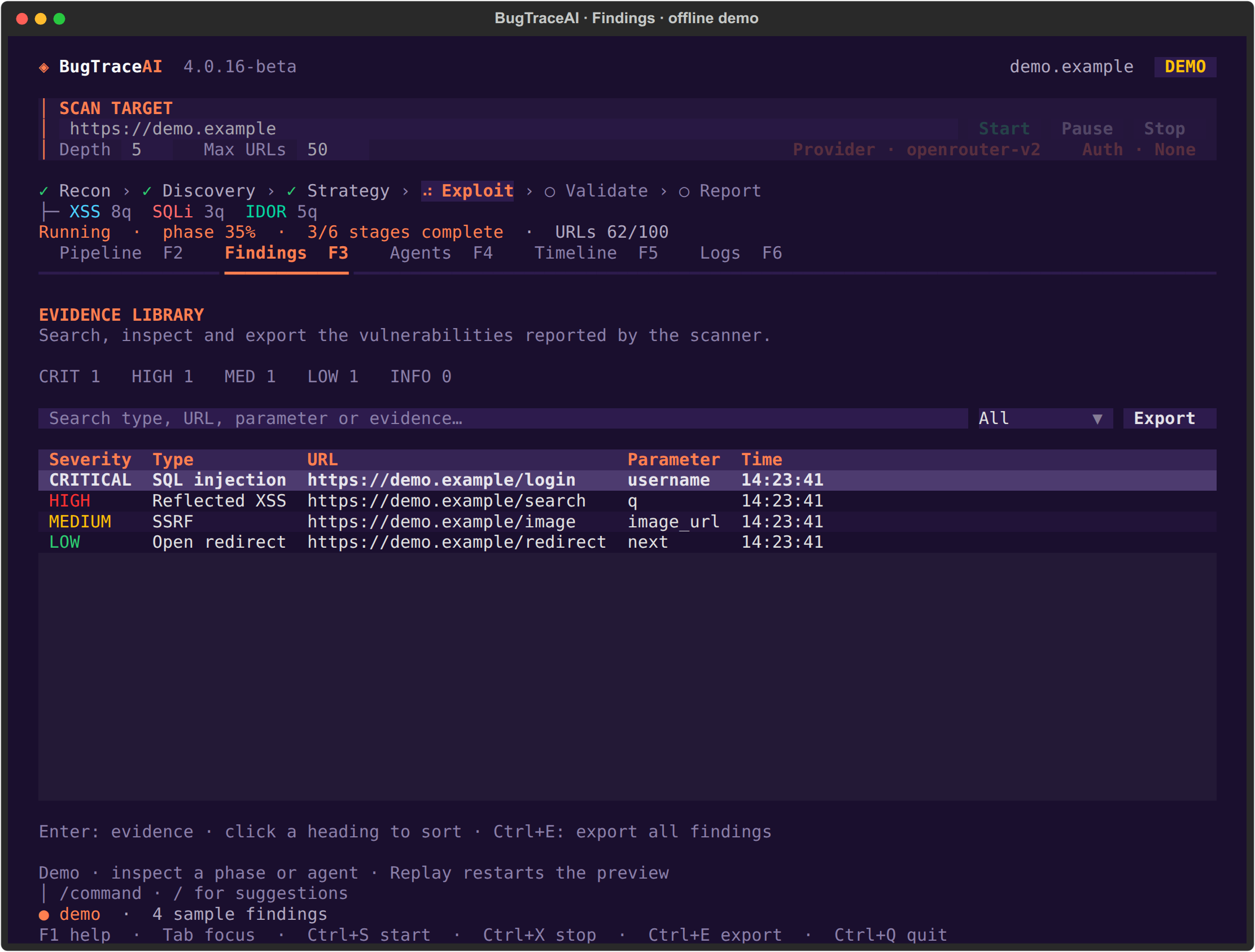
<td width="50%"><strong>Findings</strong><br/>Search, sort and inspect e.<br/><img src="docs/screenshots/tui-findings.png" alt="BugTraceAI Findings tab with searchable offline sample findings"/></td>
<td width="50%"><strong>Agents</strong><br/>Follow specialist states and queues.<br/><img src="docs/screenshots/tui-agents.png" alt="BugTraceAI Agents tab with specialist cards, queues and processed counts"/></td>
</tr>
<tr>
<td width="50%"><strong>Provider · F7</strong><br/>Select the LLM provider and configure its API key.<br/><img src="docs/screenshots/tui-provider.png" alt="BugTraceAI provider setup with an empty masked API-key field"/></td>
<td width="50%"><strong>Target Auth · F8</strong><br/>Use a Bearer token or a login YAML with optional TOTP.<br/><img src="docs/screenshots/tui-auth.png" alt="BugTraceAI target authentication dialog with WEB-compatible login YAML"/></td>
</tr>
</table>
Pipeline, Findings and Agents captures use the built-in offline demo in
4.0.16-beta. Sample findings illustrate the interface. Provider and Auth captures
show the actual setup dialogs without credentials.
Install · Terminal controls ·
Install with your AI coding agent ·
API and MCP · Configuration and reports
Scan engine
The shared engine discovers endpoints, analyzes candidate findings, routes work
to specialists and collects e through the /reporting stages.
Specialist co includes SQL injection, XSS, SSRF, IDOR, LFI, RCE, template
injection, XXE, JWT and redirect checks. Tool and browser e accompanies
the reported findings.
Provider presets include OpenRouter, Anthropic and Z.ai. The WEB connects to the
same CLI engine for web scans, report access and Model Lab through its API.
Install
On Linux or macOS, clone the public repository and run its installer:
First choose how to use BugTraceAI: TUI for a terminal workspace,
API + MCP for WEB/agent integrations, or both. The WEB app is installed
separately. Then choose how those interfaces run: local Python in a .venv
on your machine, or Docker containers. A Docker TUI still appears in your
terminal. The wizard explains each option and summarizes your chosen setup.
The installer selects the interface dependencies and offers an optional
user-global btai command for TUI/both. It also offers to open the TUI when
installation finishes. Accept to open immediately; the current terminal does
not need a refreshed PATH. Use --launch no for an unattended install.
| Profile | Command |
| --- | --- |
| Local TUI + global command | ./install.sh --interface tui --runtime local --global yes |
| Docker API + MCP | ./install.sh --interface api --runtime docker --global no |
| Docker API + TUI + global command | ./install.sh --interface both --runtime docker --global yes |
| Update or repair the sa | ./install.sh --reuse |
Local installation needs Python 3.10+. The installer prepares missing Linux
pip/ven and Docker/Compose for the Docker profile. On macOS, Docker
setup uses an existing Docker Desktop or Homebrew/Colima. Some specialist tools
also use Docker during local scans. TUI adds
Textual; API adds FastAPI, U, WebSockets and MCP. Existing en
retain pre installed packages when you change profiles.
Choices are saved in .bugtrace-install.env without API keys. See
INSTALLATION.md for prerequisites and runtime-specific setup.
Open the real TUI
Configure Provider/F7, enter your target, choose crawl limits and press
Start. Opening the workspace does not start a scan. A real scan requires a
provider key. In Provider, uncheck Save this key in local .env to keep a new
key only for the current session.
Use Auth/F8 for the target website's credentials: a masked Bearer token or
a WEB-compatible login YAML, with optional TOTP/2FA. These target credentials
stay in the TUI session. Auth can be edited before a scan or after it finishes.
The current YAML format and example are in
Target authentication.
To open a full interactive scan directly, or explicitly preview sample data:
Docker TUI
The global btai helper honors the selected local/Docker profile. Keep the
registered checkout at its installation path; rerun registration after moving
it. API-only installations do not offer the global TUI command.
Terminal controls
| View | Key | Purpose |
| --- | --- | --- |
| Pipeline | F2 | Scan stages, progress, counters and elapsed times |
| Findings | F3 | Search, sort, inspect and export e |
| Agents | F4 | Specialist states, queues, counts and runtime details |
| Timeline | F5 | Scan milestones and alerts |
| Logs | F6 | Search engine output and filter by agent |
| Provider | F7 | LLM provider and masked API-key setup |
| Auth | F8 | Target Bearer token or login YAML |
F1 opens help; Tab mo; Ctrl+S starts; Ctrl+X stops;
Ctrl+E exports captured findings; Ctrl+Q quits. Pause takes effect at the
next pipeline checkpoint. The top form accepts the target URL; the lower bar
accepts commands such as /help, /provider, /auth, /pause, /resume,/stop, /findings and /export.
Install with your AI coding agent
Copy this prompt into an agent with terminal access, such as Claude Code,
Cursor or Codex. The default installs the real TUI and a global btai command
on Linux/macOS. To deploy a ser, change the first line to specify
API + MCP or both, and local or Docker.
See INSTALLATION.md for profiles, Provider/F7, Auth/F8 and
troubleshooting. Installation does not require running a scan.
API and MCP
Install the api or both profile to use the engine without opening the TUI.
For local installations:
The API exposes /health and /docs. For Docker API/both profiles, the
installer starts the API/MCP Compose services and records the selected ports
in .env; use docker compose up -d to start them again. Connect an SSE client
to using the actual configured MCP port.
BugTraceAI-WEB uses the CLI API for scans, progress and reports. MCP clients can
control scans through the engine's tools. Configure provider credentials locally
before scanning. See API and MCP for details.
Configuration and reports
bugtraceaicli.conf contains the engine settings; provider credentials can be
configured in local .env. The TUI offers Provider/F7 and Auth/F8 for scan setup.
See custom provider configuration for additional
provider options. Read the selected provider preset rather than relying on
historical model names from older releases.
Reports are written beneath the configured report directory. Scan deli
include final_report.md, .json, engagement_data.json
and report.html, with e and specialist artifacts as a.
Ctrl+E or /export exports the findings captured by the TUI as JSON.
Explicit command-line scans remain a for scripts:
Documentation and releases
The public CLI is a beta. Use scans only on explicitly authorized targets.
License
Apache-2.0 for BugTraceAI-owned material in this public distribution.
See LICENSE, NOTICE and license history.
bugtraceai.com ·
项目信息
开发语言:Python
Star 数:184
技术要点
该项目属于安全软件方向的开源资源,代码结构清晰,适合安全研究人员学习参考。项目围绕Autonomous AI-powered security scanner — multi-agent vulnerability detection, exploitation, and validation engine展开,提供了可运行的实现,对理解相关安全机制、工具原理与攻防技术具有较高的研究价值。
从技术实现角度看,此类项目的核心在于对底层原理的深入理解与工程化落地。开发者在研究过程中可以结合官方文档与社区讨论,梳理项目的初始化流程、核心模块职责与数据流转,逐步掌握其中的技术细节与设计思路。
使用与学习建议
1. 下载源码压缩包,解压到本地环境。
2. 根据项目类型准备对应的运行环境与依赖。
3. 按照 README 中的步骤完成配置与部署。
4. 在隔离的测试环境中运行验证,避免影响生产系统。
免责声明
本资源来源于开源社区,仅供安全研究、技术学习与合法授权范围内的攻防演练使用,请勿用于任何非法或侵害他人权益的用途。使用本项目产生的一切后果由使用者自行承担。
| 资源标题 | BugTraceAI-CLI - Autonomous AI-powered security scanner — multi-age |
| 所属分类 | 安全软件 |
| 发布作者 | admin |
| 发布时间 | 2026-10-05 22:40:32 |
| 下载权限 | 免费下载 |
| 附件数量 | 2 个下载链接 |
| 浏览次数 | 526 |
| 讨论数量 | 0 |
| 主题状态 | 正常讨论中 |