 安全软件
点击放大
pwned-deps - Is your lockfile pwned? 5-second scan of npm/PyPI/
项目说明
pwned-deps
> **Drop your lockfile in. Get a red/green answer in 5 seconds — and
> never a green one for a package that wasn't actually checked.**
>
> A multi-ecosystem scanner for compromised package —
> account hijacks, typosquats, dependency-confusion, retroactively
> trojanised releases — across npm, PyPI, Maven, Cargo, Go, RubyGems, Packagist.
![CI]()
![PyPI ]()
![PyPI downloads]()
![Python ]()


Why this and not just npm audit / os? Three things
they don't do:
| | pwned-deps |
|---|---|
| Campaigns before OSV has them | A curated, Sigstore-signed feed of named incidents (e → xz → Shai-Hulud → Mini Shai-Hulud) with tarball SHA-256s, IDE-persistence IoCs and remediation steps. A maintainer hijack can be described as a *time window* and confirmed against the registry's publish timestamp for your pinned . |
| A cooling-off gate | --min-age N blocks published fewer than N days ago — the only defence that works in the hours *before* any ad exists. Works on any lockfile, in any CI. |
| Honest exit codes | Offline cache miss? OSV down? You get UNCHECKED + exit 4, not "All clean". A scanner that can't tell "checked, nothing found" from "didn't look" is worse than none. |
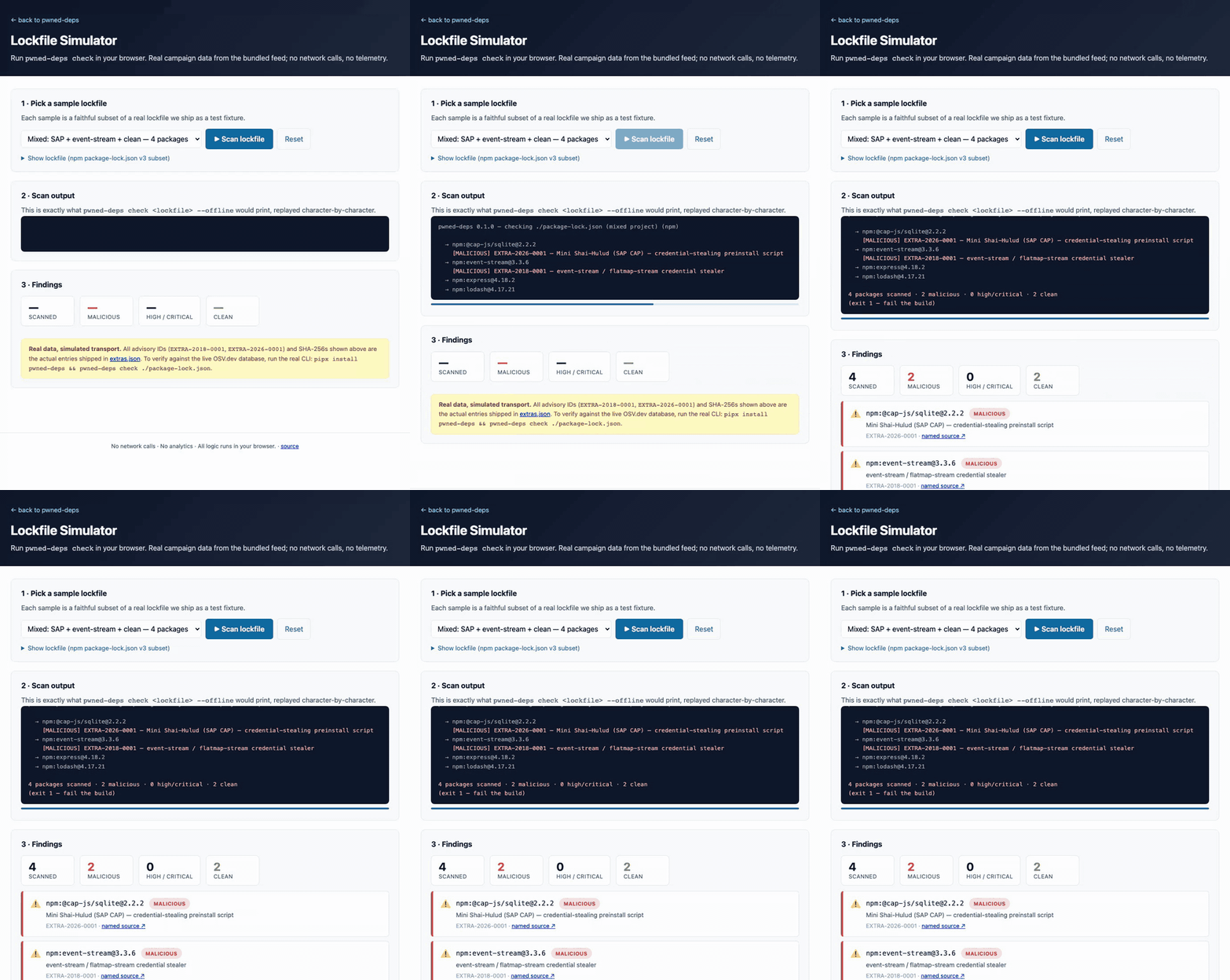
Try it without installing: the in-browser lockfile simulator
replays pwned-deps check against real campaign data.
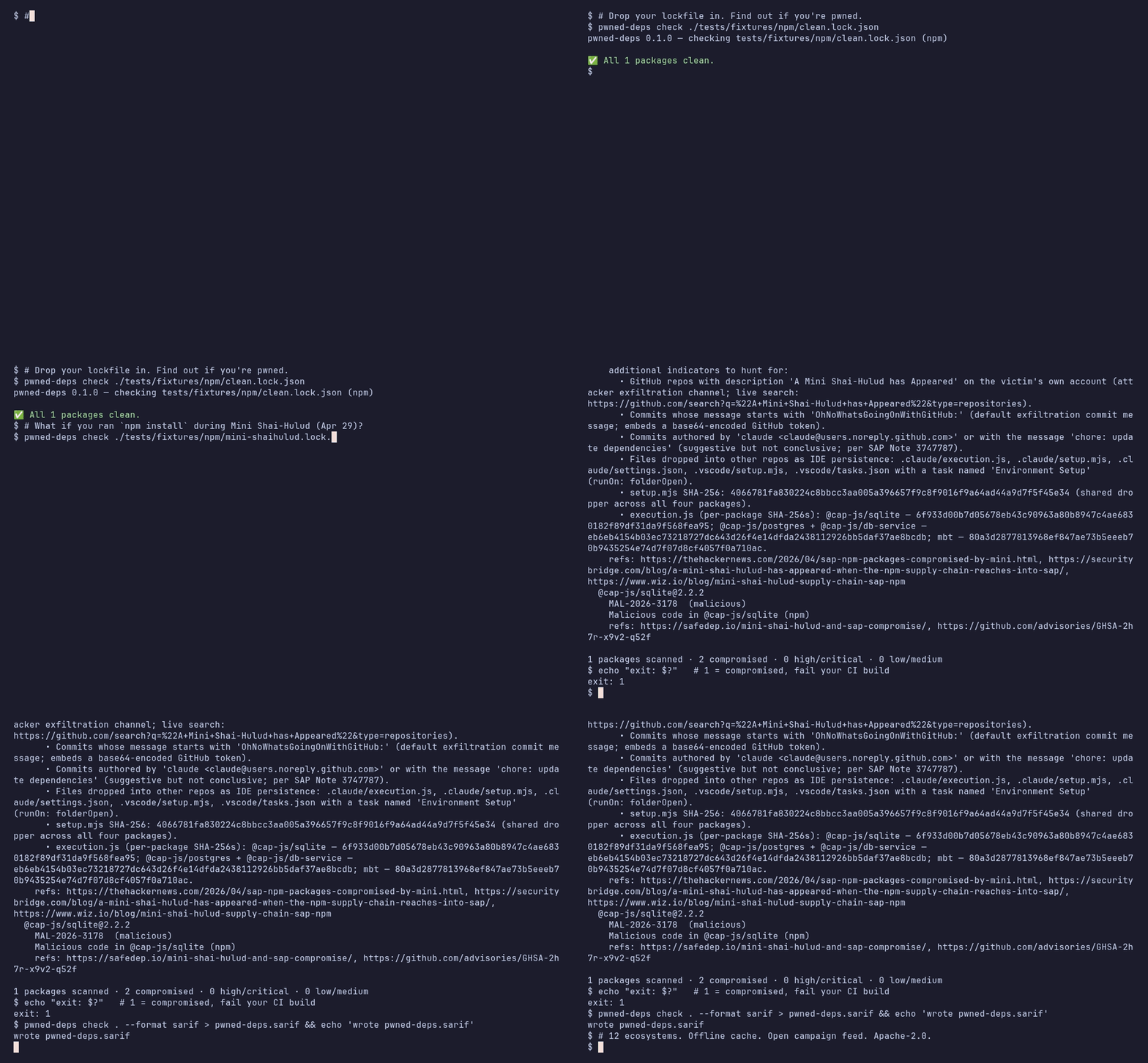
!pwned-deps demo: scanning an npm lockfile and flagging a Mini Shai-Hulud compromised package
Table of contents
- Campaigns the bundled feed already covers
- A worked example: Mini Shai-Hulud (April 29, 2026)
- Benchmark
- GitHub Actions (one line)
- Plain workflow step (no action wrapper)
- Sticky PR comment (the bot workflow)
- Static HTML dashboard (org-wide )
- pre-commit
- GitLab CI
- a release with SLSA pro
- Where each tool is the right answer
pwned-deps is a Python CLI that takes one or more de lockfiles
(package-lock.json, pnpm-lock.yaml, yarn.lock, composer.lock, requirements.txt,Pipfile.lock, poetry.lock, uv.lock, Cargo.lock, go.sum,pom.xml, Gemfile.lock) and tells you, in seconds, whether you've
installed a package that's publicly flagged as compromised —
supply-chain malware, abandoned-and-hijacked packages, retroactively
published malicious .
At a glance
| | |
|-----------------------|-----------------------------------------------------------------|
| What | A 5-second red/green answer to "is anything in my lockfile pwned?" |
| Who it's for | Application devs, SREs, AppSec / DFIR responders during an acti |
| Inputs | Lockfiles (npm, PyPI, Maven, Cargo, Go, RubyGems, Packagist) and CycloneDX / SPDX SBOMs — ne, ne |
| Data sources | OSV.dev public API + curated extras.json campaign feed (signed, sigstore + Rekor) + registry publish timestamps (npm, PyPI) to resol windows and enforce --min-age |
| Outputs | Coloured terminal report, JSON, SARIF (GitHub Code Scanning) |
| Four commands | pwned-deps check <lockfile> (one-shot scan) · pwned-deps audit-repo <dir> (forensic file-IoC scan) · pwned-deps watch <lockfile> --baseline <file> (daily baseline + delta alert) · pwned-deps report <scans> -o <html> (org-wide HTML dashboard) |
| Failure mode | Exit 1 on confirmed compromise — wire that to your CI gate. Exit 4 when a scan is *incomplete* (a pinned package could not be looked up) — ne as clean |
| Network footprint | api.osv.dev always; registry.npmjs.org / pypi.org only when a SUSPECT hit needs a publish timestamp or --min-age is set. No telemetry. Offline mode supported (uncached packages are reported as UNCHECKED, not clean). |
| Trust model | Apache-2.0, SLSA L3 build pro (hard release gate, with slsa- before publish), OIDC-only PyPI publishing, SHA-pinned Actions, locked container CI |
Architecture
The CLI is intentionally a thin matcher around two data sources. There
is no service, no backend, no telemetry — your lockfile bytes never
leave the machine running the command.
How a scan works (happy path):
Module map (one file, one job):
| Path | Responsibility |
|-------------------------------------|------------------------------------------------------|
| src/pwned_deps/cli.py | Click command surface; check, watch, audit-repo, report |
| src/pwned_deps/parsers/*.py | One parser per ecosystem; pure text → tuples |
| src/pwned_deps/ad/os.py | OSV.dev HTTP client (httpx, batched); tracks unchecked packages |
| src/pwned_deps/ad/registry.py | npm / PyPI publish-timestamp client (no-TTL cache) |
| src/pwned_deps/ad/cache.py | SQLite cache, TTL, offline mode |
| src/pwned_deps/ad/matcher.py| Se + ID dedup; OSV ⨯ extras.json merge |
| src/pwned_deps/ad/.py | Minimal range matcher for extras.json specs (OS ser) |
| src/pwned_deps/ad/extras.py | Curated-feed loader; per-package ecosystem o |
| src/pwned_deps/audit/repo.py | audit-repo — SHA-256 walk, file-IoC matching |
| src/pwned_deps/extras_data/extras.json | The campaign feed; sigstore-signed on main and at every release |
| src/pwned_deps/report/{text,json_out,sarif}.py | Three renderers, identical schema input |
Why this exists
Supply-chain compromises don't take a year off. Roughly every other
month somebody's npm/PyPI account gets hijacked, a maintainer hands
publish rights to a stranger, or a typosquat gets coin-mined into
production. The first 30 minutes of every incident is the same panic:
> **"Did *we* install one of those bad ? Where? When? Is it
> still in our caches and container images?"**
The data to answer that already exists — across OSV, GHSA,
blogs, news writeups, and the affected package's GitHub issues — but
nobody has time to assemble it under fire. pwned-deps does that
assembly upfront: a curated, signed feed of named campaigns plus the
OS, behind a single command that reads a lockfile and
returns red/green in seconds.
Campaigns the bundled feed already covers
These are the named, well-documented incidents the tool flags out of
the box on a fresh pipx install — no network required after the
first cache fill, and the curated entries carry IoCs and remediation
steps that OSV's MAL-* records typically don't:
| ID | Year | Ecosystem | Campaign |
|-------------------|------|-----------|---------------------------------------------------------------|
| EXTRA-2018-0001 | 2018 | npm | e / flatmap-stream (Copay wallet target) |
| EXTRA-2018-0002 | 2018 | npm | eslint-scope token-stealer worm |
| EXTRA-2021-0001 | 2021 | npm | ua-parser-js account hijack (coin miner + Windows stealer) |
| EXTRA-2021-0002 | 2021 | npm | coa account hijack (DanaBot family) |
| EXTRA-2021-0003 | 2021 | npm | rc account hijack (DanaBot family) |
| EXTRA-2022-0001 | 2022 | PyPI | ctx PyPI account takeover (env-) |
| EXTRA-2022-0002 | 2022 | npm | node-ipc protestware / peacenotwar (C) |
| EXTRA-2022-0003 | 2022 | PyPI | PyTorch nightly torchtriton dependency-confusion |
| EXTRA-2023-0001 | 2023 | npm | /connect-kit Web3 wallet drainer (~$610k drained) |
| EXTRA-2024-0001 | 2024 | Linux | xz-utils / liblzma backdoor (C, CVSS 10.0) |
| EXTRA-2024-0002 | 2024 | npm | /lottie-player crypto drainer |
| EXTRA-2025-0001 | 2025 | GH Actions| tj-actions/changed-files retroacti (C) |
| EXTRA-2025-0002 | 2025 | npm | Shai-Hulud original — 180+ pkg self-replicating worm |
| EXTRA-2026-0001 | 2026 | npm | Mini Shai-Hulud — SAP CAP packages |
| EXTRA-2026-0002 | 2026 | npm/PyPI | Mini Shai-Hulud follow-on (intercom-client + lightning) |
This is the curated feed only — every ad in OSV's public
database is also queried automatically. Each entry above is sourced
from at least one named research blog (full citations live inextras.json); adding a new campaign is a fi PR.
A worked example: Mini Shai-Hulud (April 29, 2026)
Used here because the IoC data is unusually rich (Wiz published every
malicious tarball SHA-256 plus the IDE-persistence files), making it
the cleanest demo of the audit-repo subcommand. **Four SAP-ecosystem
npm packages** (@cap-js/sqlite@2.2.2, @cap-js/postgres@2.2.2,@cap-js/db-service@2.10.1, mbt@1.2.48) were briefly poisoned with
a credential-stealing preinstall script. Anyone whose CI rannpm install during the ~2-4 h window pulled a payload that
exfiltrated GitHub/npm/AWS/Azure/GCP/K8s creds. Confirming whether
your pipeline ran during that window manually requires log-diving;pwned-deps is the 5-second answer.
Sources, all named research blogs:
The Hacker News,
SecurityBridge,
Wiz.
Install
Python 3.10+ on macOS, Linux, or Windows.
See it in action
Try it now — the interacti simulator
runs a faithful in-browser replay of pwned-deps check against four
sample lockfiles (Mini Shai-Hulud, e historic, mixed,
clean). Real campaign data, no network calls.
![lockfile simulator demo: pwned-deps check replays in-browser against a mixed npm lockfile and flags two malicious packages]()
Below are the same outputs captured against bundled fixtures:
> Real terminal output — captured with tools/capture_demos.py against
> the bundled fixtures, not mocked. Reproduce locally with
> pwned-deps check tests/fixtures/npm/mini-shaihulud.lock.json.
| Scenario | Screenshot |
|---|---|
| check on a clean lockfile | !clean scan |
| check on the historic e/flatmap-stream campaign (2018) | !e scan |
| check on Mini Shai-Hulud (SAP CAP, April 2026) — full IoC payload | !shai-hulud scan |
| watch — Day 0 baseline, quiet day, alert day | !watch demo |
| PR comment rendered by GitHub on a pull request | !pr comment markdown |
Benchmark
Match-time on a 2024 MacBook Pro (M-series), offline mode:
!benchmark
Matcher work is sub-millisecond per lockfile against the bundled
extras feed; first OS adds the network round-trip and is
cached on disk for 24h. See docs/assets/benchmark.md
for the raw numbers.
Quick usage
Exit codes:
| Code | Meaning |
|------|----------------------------------------|
| 0 | Clean — every pinned package was checked, nothing found |
| 1 | At least one MAL-* / EXTRA-* hit (compromised package) |
| 2 | Needs attention: HIGH/CRITICAL C maintainer hit, or --min-age policy (no malicious hits) |
| 3 | Parse error |
| 4 | Incomplete — some pinned packages could not be looked up (offline cache miss, OS). Not clean. |
Findings win o: a compromised hit is exit 1 even
if other packages went unchecked. Unpinned entries (requests>=2)
are counted separately and reported in a note: line — they do not
change the exit code because the input, not the scan, is incomplete.
Watch mode (the recurring-value workflow)
check answers *"is anything bad in my lockfile right now?"*. **Watch
mode** answers the question that matters every other day:
> *"Did anything I already ha become flagged o?"*
The first run records a baseline (the (ecosystem, name, )
tuples currently in your lockfile). Every run after that compares
fresh ad data against the baseline and exits 1 only when a
package that was *already* in your baseline is now publicly flagged.
Brand-new findings on packages you don't depend on don't fire.
The baseline file is plain JSON, contains no machine-identifying data
(only (ecosystem, name, ) triples), and is safe to commit
to your repo so every contributor + CI runner shares one source of
truth. Pair with a nightly GitHub Actions cron — three lines of YAML
and you have a same-day signal for every campaign that lands.
Supported ecosystems
| Ecosystem | Lockfiles |
|-----------|-----------------------------------------------------------|
| npm | package-lock.json (v1/v2/v3), npm-shrinkwrap.json, pnpm-lock.yaml, yarn.lock (v1 + Berry) |
| PyPI | requirements*.txt / requirements*.lock, Pipfile.lock, poetry.lock, uv.lock |
| crates.io | Cargo.lock |
| Go | go.sum |
| Maven | pom.xml (<dependencies> + <dependencyManagement>) |
| RubyGems | Gemfile.lock |
| Packagist | composer.lock |
| SBOM | CycloneDX / SPDX JSON — bom.json, *.cdx.json, *.spdx.json (any ecosystem above, read from the purl) |
Loose pins in requirements.txt (>=, ~=, <, ==1.2.*) and Maven
property- (${spring.}) are parsed but marked — we cannot match an ad without an exact
. They are excluded from the "pinned packages clean" count and
reported in a note: N unpinned entries … not checked line so zero
co is ne for a clean bill of health.
Real-world scenarios this is built for
These are the questions de and security teams actually ask in
the first hour of a published supply-chain incident — and they recur
every few months across every ecosystem (see the campaign table
above). The Mini Shai-Hulud (Apr 29, 2026) example below is used
because Wiz published unusually rich IoC data for it; the same
workflow applies to any campaign in the feed.
"Did *we* run npm install during the 2-hour window?"
Pipe every lockfile in the org through pwned-deps check. Exit 1
is the receipt that something matched. The bundled campaign feed
(extras.json) covers the four SAP CAP packages the day of the
incident — you don't have to wait for OSV.de.
"Where in our artifact stores are the bad tarballs?"
For campaigns where a primary source publishes the malicious.tgz SHA-256 (Wiz did for Mini Shai-Hulud), the CLI now prints
the hash next to every flagged :
Feed that into find . -name '*.tgz' -exec sha256sum {} + against
your npm cache, container image layers, and artifact registries
for forensic confirmation — SecurityBridge's recommended approach
rather than relying on strings alone.
"What else should we hunt for beyond the lockfile?"
Most real campaigns lea traces: rogue GitHub repos
on the 's own account, IDE-config persistence files
(.claude/execution.js, ./setup.mjs), known C2 domains.
Each campaign in extras.json carries an iocs list and the CLI
surfaces it next to every finding:
No more cross-referencing three blogs to assemble the
remediation list.
**"Did the second-stage payload actually land on a de
laptop or build runner?"**
After the lockfile match, run the forensic file scanner:
It walks the tree (skipping node_modules, .git, .venv, etc.),
hashes every file under 50 MiB, and matches against the bundled
file IoCs — SAP CAP .claude/execution.js, ./setup.mjs,
the shared setup.mjs dropper, and the IDE-persistencesettings.json / tasks.json configurations. Exit codes:
| Exit | Meaning |
|-----:|---------------------------------------------------------------|
| 0 | Clean |
| 1 | At least one file's SHA-256 matches a known payload (CONFIRMED) |
| 2 | A file sits at a known-persistence path but the bytes differ (SUSPECT — or modified) |
**"What about the follow-on packages? They were on a different
ecosystem."**extras.json supports per-package ecosystem o so a single
campaign can span npm, PyPI, crates.io, etc. EXTRA-2026-0002
covers intercom-client@7.0.5 (npm) and lightning@2.6.2/2.6.3
(PyPI) under one campaign — the same operator, the same shared
C2, distinct package registries.
**"What about the first 30 minutes of an account-hijack incident,
when we know the maintainer is compromised but don't yet have the
exact bad ?"**
Each campaign can declare a compromised_maintainers block:
Any package whose name appears in that list is reported as a
SUSPECT finding (HIGH se → exit 2), distinct from the
CONFIRMED MALICIOUS hits (CRITICAL → exit 1). Since 0.2.0 the
matcher then asks the registry *when* your pinned was
published (registry.npmjs.org time[], pypi.org upload time):
| Publish time | Result |
|------------------------------------|------------------------------------------|
| inside [compromised_after, compromised_until] | CONFIRMED — EXTRA-*, CRITICAL, exit 1 |
| outside the window | cleared — no finding |
| una (offline, 404, yanked) | stays SUSPECT — exit 2 |
That is the strategic shift in the feed: a campaign entry no longer
has to enumerate every bad (OSV MAL-* will do that
e). A maintainer handle plus a time window, published in
the first hour of an incident, is enough for pwned-deps to give
every user a *confirmed* yes/no against their own lockfile. Once
exact are known, add them to packages and they take
precedence.
"Can we just not install anything that is brand new?"--min-age DAYS enforces a cooling-off period: every pinned npm/PyPI
published fewer than DAYS days ago is reported under
TOO NEW (rule id MIN-AGE, HIGH, exit 2). Most hijacked releases
are pulled within days, so a 3–7 day quarantine blocks the window
before any ad exists. A whose publish time cannot be
fetched is reported as UNCHECKED (exit 4) rather than assumed old.
Ecosystems without a timestamp source (Cargo, Go, Maven, RubyGems)
are skipped by the policy. The GitHub Action exposes it asmin-age:.
"How do we trust the campaign feed itself?"
Every change to extras.json on main is signed with sigstore
keyless OIDC and logged to the public Rekor transparency log, and
every tagged release re-signs the exact feed it ships and attachesextras-vX.Y.Z.json + .sha256 + the sigstore bundle as Release
assets. See SECURITY.md §" the campaign
feed" for the recipe. Force-pushes and silent removals
can't escape the append-only log.
CI integration
GitHub Actions (one line)
The action installs the pwned-deps release that matches the action
tag (never an unpinned "latest"), scans every recognised lockfile
under path, and uploads SARIF to Code Scanning. Step fails the
build on exit 1 (compromised package) by default; exits 2/3/4
are surfaced as workflow annotations. Use fail-on: incomplete if
"could not " must also block. Inputs are passed to the shell via
en (no script injection) and every action it uses
is SHA-pinned. See action.yml for all inputs.
Plain workflow step (no action wrapper)
Exit 1 fails the build. Exit 2 is HIGH/CRITICAL CVEs or SUSPECT
hits (no malicious hits) and exit 4 is an incomplete scan — you
decide whether those fail or warn.
Sticky PR comment (the bot workflow)
For pull requests, you usually want a ** signal next to the
diff — not just a red check. Dropexamples/workflows/pr-comment.yml
into .github/workflows/ and every PR that touches a lockfile gets a
single sticky comment that gets *edited in place* on subsequent
pushes (no comment spam):
Mechanism: the workflow runs pwned-deps check . --format json,
pipes the JSON through tools/pr_comment.py
(stdlib-only, no extra deps), and uses gh pr comment --edit-last
to find and update the prior comment by a magic marker. Comment-only
mode (don't fail the build) is a one-line tweak documented in the
example.
Static HTML dashboard (org-wide )
For platform/security teams that need an aggregate view across
many repos, pwned-deps report consumes one or more JSON scan files
(typically CI artifacts) and emits a single self-contained HTML
dashboard:
!dashboard preview
> Click to interact: the same dashboard rendered for a 5-repo "ACME Corp" demo
> is hosted live at <
> (also committed at docs/assets/demo-dashboard.html)
> — try the filter chips and see the per-campaign rollup.
The HTML file is self-contained — inline CSS, no external assets,
no telemetry, no Ja dependencies (one tiny filter
chip handler, no framework). Drop into S3, GitHub Pages, or open
locally. Zero infrastructure to host the org dashboard.
What you get: top-level KPIs (scans, packages, MALICIOUS hits,
HIGH/CRITICAL CVEs), a per-source scans table, a campaign rollup
(same ad hitting >1 repo = high-priority cross-org incident),
and a filterable findings table. Every campaign-supplied string is
HTML-escaped at render time, and only http(s):// reference URLs
become clickable.
pre-commit
The hook only fires when a recognised lockfile changes — unrelated
commits skip the network entirely.
GitLab CI
Output formats
* text (default) — colourful terminal output via rich,
MAL-*/EXTRA-* findings prominently flagged.
* json — machine-readable. Stable schema (schema_
1.1; top-level: tool, summary incl. checked/unchecked/
unpinned, lockfiles[], each lockfile carries findings[] and
unchecked[]).
* sarif — SARIF v2.1.0 for GitHub Code Scanning upload.
against the OASIS schema; partialFingerprints.primaryLocationLineHash
is set so the same finding dedups across runs; unchecked packages
appear as in[].toolExecutionNotifications.
Threat model
pwned-deps is itself a piece of supply-chain software. Highlights of
the safety contract:
* No execution of ad or package content. We never run
npm install, pip install -r, cargo build, go get, mvn,
gem install, or any other package-manager command on inputs.
Lockfile parsing is text/JSON/TOML/XML/YAML only.
* No eval / exec / subprocess / pickle.load of user input.
A make target enforces this with a Python regex
scanner; the negati plants eval("1+1") and proves the
scanner catches it.
* Network allow-list. The CLI talks to api.osv.dev, plus
registry.npmjs.org / pypi.org only when a SUSPECT hit needs a
publish timestamp or --min-age is set (and an opt-in
--feed-file PATH you explicitly hand to it). GET/POST of package
coordinates only; no telemetry, no analytics, no crash reporting.
* Container-only dev with non-root appuser UID 1000, network
denied during tests, source mounted read-only, base image pinned
to a SHA-256 digest.
* Pinned deps. Runtime dependencies are pinned by exact
*and* SHA-256 hash in requirements.lock (--generate-hashes).
Every third-party GitHub Action is pinned to a full commit SHA and
kept current by Dependabot.
* OIDC publishing only. The release.yml workflow publishes to
PyPI through the Trusted Publishers OIDC flow — no long-lived
tokens in repository secrets. Pro generation is a hard
gate and is with slsa- before anything is
uploaded.
* No service mode. We ne lockfiles via a hosted
backend we control. The future drag-drop web UI (V1.1) will be
fully client-side; lockfile contents ne the browser.
* Eat your own dog food. Every CI run executes
pwned-deps check ./pyproject.toml ./requirements.lock. If a
malicious of one of our own deps appears — or the scan
cannot complete — the release is blocked.
If pwned-deps itself were compromised, the irony would kill the
project. We treat account hygiene as tier-1: hardware-key 2FA on
GitHub, OIDC trusted publishing on PyPI, no shared maintainer
credentials.
a release with SLSA pro
Every published wheel and sdist ships with SLSA Level 3 build
pro generated by slsa-github-generator.
before installing if you're paranoid (or in a regulated
en):
A passing slsa- run cryptographically proves the wheel
was built by release.yml on this
repository, by the tagged commit, with no human-in-the-middle. The
same check runs inside release.yml itself before the PyPI upload;
if it fails, nothing is published.
Comparison
Honest, hyperlink-checkable. Every claim should be from the
linked tool's public docs. Submit a PR if any cell is wrong — we'd
rather correct than mislead.
| Tool | Multi-ecosystem | Offline cache | Publisher signature check | MAL-* surfacing | Open campaign feed | Min-age policy | License |
|--------------------------------------------------------------|-----------------|---------------|---------------------------|-----------------|--------------------------|----------------|----------------------------------|
| npm audit | npm only | no | yes (--audit-signatures, npm 9+) | partial | no | no | open (Artistic-2.0) |
| pip-audit | PyPI only | partial | no | partial | no | no | Apache-2.0 |
| os | yes (the bar) | yes | no | partial | no | no | Apache-2.0 |
| socket | yes | n/a (cloud) | yes | yes | yes (free + paid tiers) | yes (cloud) | MIT (CLI), proprietary (cloud) |
| pwned-deps | yes | yes | no (planned V1.x) | first-class¹ | yes (Sigstore-signed) | yes (--min-age, npm + PyPI) | Apache-2.0 |
¹ MAL-\* and our EXTRA-* campaign IDs are always surfaced regardless
of CVSS. Ships with 15 historic + recent campaigns built in
(e 2018 → xz 2024 → tj-actions 2025 → Mini Shai-Hulud 2026).
Where each tool is the right answer
os is thebar. Google-resourced, no project bias, container + filesystem
scanning. If you only run one tool, run that one.
socket has the deepest behaanalysis (it parses package source for risky API use). The free CLI
is enough for many teams; deeper insights are paid.
pip-audit is thePyPA-blessed Python-only choice; integrates cleanly with
pip
freeze workflows.npm auditis already on every Node de's machine. Run it with
--audit-signatures (npm 9+) for publisher-key .pwned-deps adds: a friendlier red/green CLI UX, MAL-\* as a
first-class concept, the audit-repo forensic file scanner, and an
open Sigstore-signed campaign feed for incidents OSV hasn't yet
ingested. We don't pretend to replace any of the above; we're the
tool you reach for at 2 a.m. when a fresh incident hits and you need
a yes/no answer about your pipeline before the CVE is published.
FAQ
Q. What happens if api.osv.dev is down?
The CLI uses ~/.cache/pwned-deps/os (24 h TTL by default).
Anything in the cache is still checked. Anything that is *not* in the
cache — or that fails to fetch — is listed under UNCHECKED, the
summary reads INCOMPLETE, and the exit code is 4. No network
a is ne as "all clean". Run --offline to
skip the network deliberately; the same rules apply.
Q. How do I add a new campaign before OS it?
Send a PR adding an entry to src/pwned_deps/extras_data/extras.json.
Each campaign needs an ID, a name, a summary, ≥1 named-blog citation,
the affected ecosystem + (name, ) tuples, an exposure window,
and a remediation list. Fi review target.
**Q. Why does pyproject.toml print "skipping … not a recognised
lockfile shape"?**pwned-deps audits *lockfiles* (resolved, exact ). Apyproject.toml is a manifest with declared ranges — there's nothing
deterministic to match against an ad. Pass it alongside your
real lockfile and it will be skipped with a warning rather than
crashing the run.
**Q. Will you accept attached .tgz/.whl files in issues to "look
at the malware"?**
No. The contributing rules explicitly
forbid attaching compromised package tarballs. PoC patterns are
shared in text only.
Q. Can I scan Docker images / SBOMs?
Not in V1. SBOM generation is syft's job; reachability analysis is
out of scope. We consume lockfiles, full stop.
Contributing
Issues that include attack PoCs must share patterns in text only —
ne malicious package tarballs to issues.
Adding a new campaign is intentionally a 5-minute PR:
1. Add an entry to src/pwned_deps/extras_data/extras.json. Cite at
least one named research blog (SecurityBridge, Wiz, Sophos, GHSA,
etc.). Do NOT fabricate numbers; if a source doesn't pin
a , use a TODO(precise-) marker and document the
sources you checked.
2. Add a fixture lockfile pinning one of the affected under
tests/fixtures/<ecosystem>/.
3. Run make && make test (the de does the
rest).
4. Open the PR.
Maintenance
Issues are triaged within 7 days, not 24 hours. The project is
deliberately solo-OSS-friendly — we'd rather acknowledge slowly than
burn out a single maintainer.
License
Apache License 2.0 — see LICENSE.
Maintainer
mkbhardwas12
Issues: <
项目信息
开发语言:Python
Star 数:164
技术要点
该项目属于安全软件方向的开源资源,代码结构清晰,适合安全研究人员学习参考。项目围绕Is your lockfile pwned? 5-second scan of npm/PyPI/Maven/Cargo/Go/RubyGems lockfiles for compromised packages — OSV + curated campaign feed, --min-age cooling-off gate, exit 4 when a scan is incomplete. SLSA L3, Sigstore-signed feed.展开,提供了可运行的实现,对理解相关安全机制、工具原理与攻防技术具有较高的研究价值。
从技术实现角度看,此类项目的核心在于对底层原理的深入理解与工程化落地。开发者在研究过程中可以结合官方文档与社区讨论,梳理项目的初始化流程、核心模块职责与数据流转,逐步掌握其中的技术细节与设计思路。
使用与学习建议
1. 下载源码压缩包,解压到本地环境。
2. 根据项目类型准备对应的运行环境与依赖。
3. 按照 README 中的步骤完成配置与部署。
4. 在隔离的测试环境中运行验证,避免影响生产系统。
免责声明
本资源来源于开源社区,仅供安全研究、技术学习与合法授权范围内的攻防演练使用,请勿用于任何非法或侵害他人权益的用途。使用本项目产生的一切后果由使用者自行承担。
| 资源标题 | pwned-deps - Is your lockfile pwned? 5-second scan of npm/PyPI/ |
| 所属分类 | 安全软件 |
| 发布作者 | admin |
| 发布时间 | 2026-10-05 22:40:58 |
| 下载权限 | 免费下载 |
| 附件数量 | 2 个下载链接 |
| 浏览次数 | 165 |
| 讨论数量 | 0 |
| 主题状态 | 正常讨论中 |