 安全软件
点击放大
wacat - wacat - Challenge Your Web App with Cat Chaos and
项目说明
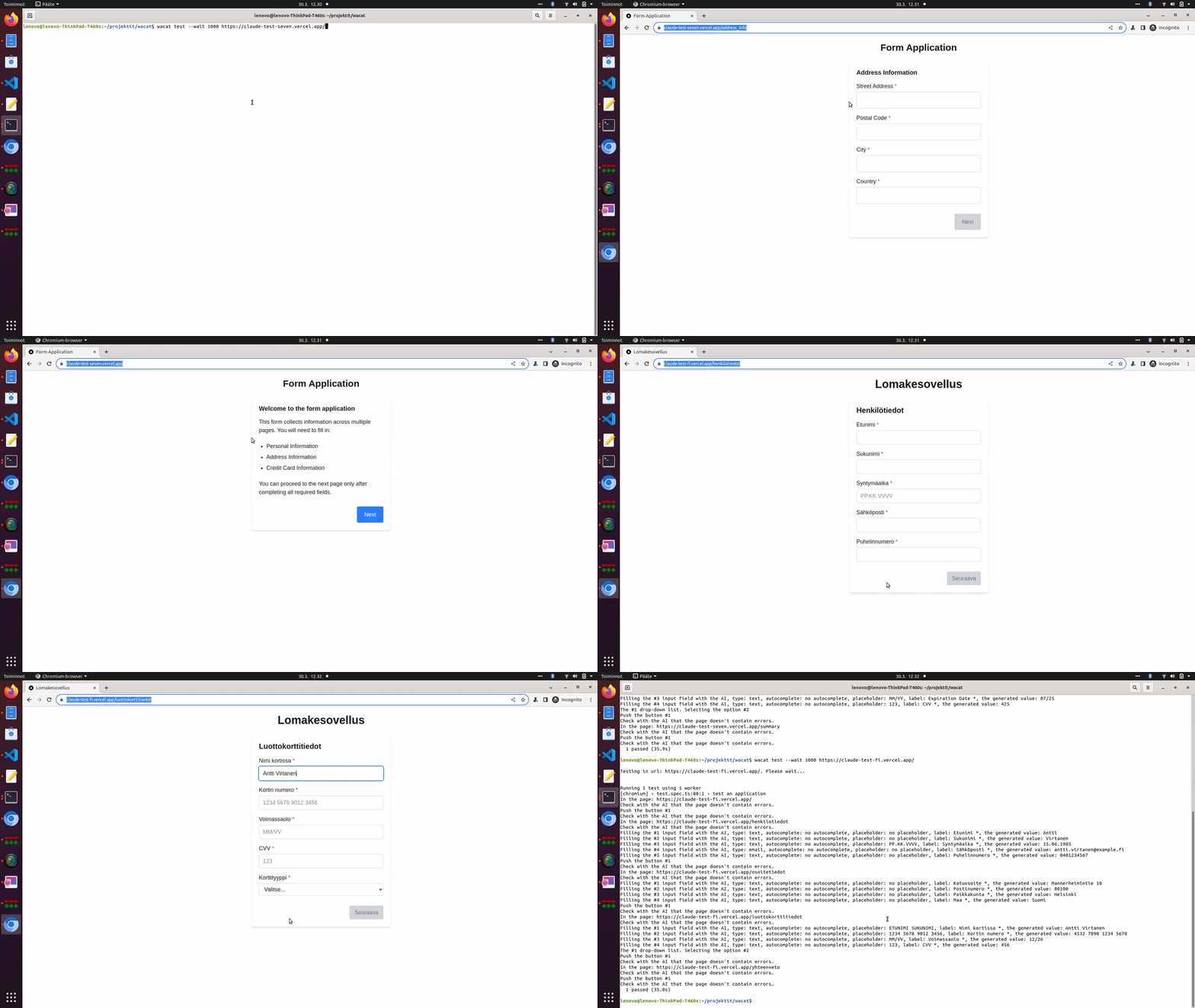
!Imagine, you leave your computer for a while and go to pick up a cup of coffee. Meanwhile, your cat walks over your keyboard and causes some chaos.
!wacat video demonstrating AI capabilities
wacat - Challenge Your Web App with Cat Chaos and AI-Dri!
Imagine, you leave your computer for a while and go to pick up a cup of coffee. Meanwhile, your cat walks over your keyboard and causes some chaos.
wacat (walking cat) application
Additionally, wacat:
- This is an optional feature and requires an OpenAI API key
- Optional feature requiring an OpenAI API key
- Supports generating invalid or broken input content
- These error messages are specified in a parameter file
- Use this if AI is not enabled
- Authentication configurations are provided in a JSON file
Technical details
wacat uses the Playwright tool internally. It is tested to work on Windows, Linux, and Mac.
Reporting bugs and requesting features
If you encounter a bug or need a specific feature, please create a new issue.
Current
The current of wacat is 1.5.4. Please refer to the end of this page for the change history.
Warnings
Please ensure you only test your own web application or ha permission to test someone else’s application. Testing the of an application without authorization could be illegal.
The application is designed to stay within the host you are testing. However, as this is a hobby project, unexpected behavior is possible. It's important to monitor wacat's actions and use Ctrl + C to stop the process if it na to an unintended page.
Additionally, if your application requires authentication and your wacat authentication configuration is incorrect or incompatible, it could lead to issues such as account lockouts. wacat could also potentially disrupt your application's database or other components. For these reasons, it is strongly recommended to use wacat only in a testing en.
Installation
Install Node.js
Install Node.js from here. wacat has been tested and to work with Node.js 20 on Linux, Mac, and Windows.
Clone wacat and install it
Clone the wacat repository, na to the wacat folder, and run the following command:
Note: You may be prompted for your password when running the abo, as the Playwright tool is installed globally.
Optional: Add OpenAI API Key
If you want to use AI for error detection (see details below), add your OpenAI API key and model to a .env file:
Important: Pro an OpenAI API key will result in charges from OpenAI for API usage. While wacat has been thoroughly tested, please be aware that programming errors could lead to a higher-than-expected number of calls to the OpenAI API.
Additionally, please note that if your website contains sensiti, the contents of your pages will be sent to the OpenAI API, and you must ensure that this aligns with your intended use. For example, it is possible that the content you send may be used as training data.
You can also add the following optional en to the .env file:
This value sets the maximum number of characters sent to the OpenAI API for error detection. The default is 3000 if not specified. See additional details below.
You can optionally use the following en :
When set to true, the OpenAI API will generate for all input fields on each page. By default, this value is set to false. Please note that enabling this option can result in significant API usage. Therefore, it is recommended to have at least a Tier 1 usage plan, as it allows for a higher number of requests per minute compared to the Free tier. Using the Free tier plan is possible, but it may be very slow if there are numerous OpenAI API calls.
Updating wacat
To update wacat to the latest , run:
Running
Basic usage
Run the following command in the wacat folder:
For example, the command:
tests a simple application at the URL The application includes the following pages:


First, the wacat application opens the Chromium browser and na to the root URL provided in the command:

The root page does not contain any input fields, dropdown menus, or similar elements. wacat simply collects links to the two subpages and them. On each subpage, wacat performs the following actions:
1. Presses the button
2. Fills the form fields, selects options from dropdown menus, etc.
3. Presses the button again
Here is the command for you to copy, paste, and run. You can follow the same process to run all other examples. Feel free to experiment with the provided test applications.
Note: The default wait time for each page is 5000 milliseconds. To adjust this wait time, use the --wait flag (see details later).
Optional: Detect errors on the page with AI
Here is an example application that contains an error message, "An unexpected error occurred! Please try again after some time.", on one of its subpages:

If you provide an OpenAI API key (see above), wacat can use AI to detect error messages like this on the page.
For example, run the command:
The command output might look like this:
When wacat uses AI, it logs the message:
for every page.
If the AI detects an error, wacat logs a message like this (see the error message above):
To log AI errors without halting the test, use the --bypass-ai-errors flag. For example:
#### Handling OpenAI API rate limits
The OpenAI API has rate limits based on your organization's subscription. For example, if you see an error like this:
use the --wait parameter (as explained below) to slow down wacat's requests. You may also need to adjust the test timeout using the --timeout parameter (as explained below).
For daily request limits, such as:
wait for the limit to reset, and then rerun wacat.
#### Managing OpenAI token usage
If your queries exceed the API's tokens-per-minute limit, you can use the MAX_PAGE_CONTENT_CHARS .en (see above) to control the number of characters wacat sends per page to the API for analysis.
The base prompt contains approximately 1600 characters. For example, if you set MAX_PAGE_CONTENT_CHARS to 400, the total prompt size will be around 2000 characters, or roughly 500 tokens (1 token is approximately 4 characters in English). The response will always consist of a single token, so primarily manage the prompt size.
For more details, refer to
Optional: AI-generated input field content
The AI can generate content for HTML input fields based on the , , or attributes of the input element. It can also use the field's label content to assist in generating the input. This feature can be enabled by setting the en (refer to the details above).
Here’s an example of an application page:

If you run the following command:
The output might look like this:
In the lines:
you can see that the AI automatically generated the content for the input fields based on their type and label.
Optional: AI-generated invalid or broken input
wacat can generate input that are broken in ways and to degrees for testing purposes. The level of brokenness can range from
inputs with only minor errors to deliberately highly broken inputs that may contain multiple inconsistencies or severe issues.
If the en is set to true (refer to the details above), AI is used to generate input texts.
Example of a simple application page:

The following commands are identical in syntax, regardless of whether AI is used. For example, if AI is enabled and the following command is executed:
The output might look like this:
In this example, the broken input are clearly indicated in the output with the text . Examples include:
#### Using the flag
If you want only a portion of the input to be broken, you can use the flag. This flag allows you to specify a percentage (0-100) of inputs to be intentionally broken or invalid. For instance, setting this flag to 34 means approximately 34% of inputs will be invalid.
For example:
This command might produce the following output:
In this case, only the value is broken, while the other inputs and remains valid. This demonstrates how the flag controls the proportion of invalid inputs.
By fine-tuning this parameter, you can simulate real-world scenarios where some user inputs may be erroneous or malformed.
Detect HTTP errors
wacat can detect HTTP errors occurring between the browser and the server. For example, in the application shown below, clicking the button triggers an HTTP 500 error:


You can test this scenario with the following command:
The command output might look like this:
In this example, wacat detects the HTTP 500 error, logs it with "1 failed," and stops execution. The specific error message is:
#### Continuing execution despite HTTP errors
To prevent wacat from stopping execution on HTTP errors, use the --bypass-http-errors flag. For example:
In this case, wacat logs the HTTP 500 error but continues the test execution without stopping.
Detect user-defined error strings (if AI is not enabled)
Here is an example application where one subpage contains the error text:

In this example, we configure wacat to detect the error text "An unexpected error occurred! Please try again after some time." We also want wacat to detect the error text "abc". This configuration is added to a JSON file as follows:
The run command to use this JSON configuration file (via the --conf flag) is as follows:
#### For Windows:
#### For Linux and Mac:
The command output is:
In this scenario, wacat detects the error text "An unexpected error occurred! Please try again after some time." on one subpage. It reports the error with the message "1 failed" and halts execution.
Detect errors in the browser's console
Here is an example application that logs an error in the browser's console:

When the following command is run:
the execution stops when an error is detected in the browser's console:
In this example, wacat logs the message:
and stops execution.
#### Bypassing browser console error checks
If you want wacat to bypass this check and continue execution despite browser console errors, use the --bypass-browser-console-errors flag. For example:
In this case, wacat logs the error message but does not stop execution, continuing the test instead.
Configure random form inputs
By default, wacat generates random form inputs with lengths ranging between 1 and 60 characters, using a default character set. You can customize these settings as follows:
Here is an example command and its output:
In this example, wacat generates random strings using the character set . The generated strings ha between 1 and 3 characters.
Read input field texts from a file
It is also possible to configure wacat to read input field texts from a file. For example, consider the file example-files/input-texts.txt with the following contents:
wacat uses each line from the file as input for the fields in the target application, unless an error occurs or the page changes.
The command to run this with a local file on Windows is:
On Linux and Mac, the command is:
To use a remote file, the command is:
All these commands produce the following output:
As shown in the output, the from the file input-texts.txt (xaxa and ybyb) are used as inputs.
You can test using different input text files, such as those a at
#### Important
When using a large input text file, set an appropriately high value for the --timeout parameter to ensure smooth execution. wacat has been successfully tested with a file containing 5000 lines against a simple test application.
Test links only
To test only the links in an application, use the --only-links flag. With this option, wacat loads the pages and detects errors but does not fill input fields or interact with other elements.
Here is an example command and its output:
Perform authentication
Here is an example of an application with simple authentication:


wacat can perform authentication for this application using the following JSON configuration file:
In this JSON file:
#### Example run commands
##### For Windows
##### For Linux and Mac:
#### Command output
##### Authentication Confirmation
In the output, the line:
indicates that wacat successfully completed the authentication process.
Perform more complicated authentication
Here is an example of an application with a more complex authentication process:


wacat can perform authentication for this application using the following JSON configuration file:
#### Explanation of the JSON
This JSON file is more complex than the one in the previous example:
#### Example Run Commands
##### For Windows
##### For Linux and Mac
#### Command output
Configure pages to exclude from
wacat is designed to remain within the host you are testing. Additionally, you can configure specific page URLs that should not be during the test.
For example, consider the following output from a previous test:
If you want to prevent wacat from the logout page, you can use the "not" attribute in the JSON configuration. This attribute lists the URLs that wacat should avoid.
Here is an example JSON configuration:
#### Example Run Commands
##### For Windows:
##### For Linux and Mac:
#### Command Output
#### Confirmation
In the output, you can see that the following line is no longer present:
This confirms that wacat successfully excluded the specified page from the test.
Configure buttons to avoid pushing
The JSON attribute is used to specify the URLs that wacat should avoid (see above). Similarly, you can configure buttons that wacat should not push by using the following configuration:
In this example, wacat is configured to avoid pushing buttons labeled "Logout" or "Go to GitHub." Below is an example demonstrating the use of the JSON attribute.
Adding headers for authentication and other purposes
If the current wacat authentication methods are not sufficient, you can manually pass authentication cookies or other headers to wacat for testing. Below is an example. Note that authentication headers vary between applications, so using this feature might require detailed in. Additionally, headers can be used for purposes beyond authentication.
We’ll use this simple application as an example: The app has a login page and a main page. If a user attempts to access the main page directly, they are redirected to the login page. The credentials are:


#### Extracting Authentication Cookies
To extract authentication cookies:
1. Log in to the application and na to the main page.
2. Open the de console (press Ctrl + Shift + I on most major browsers).
3. Go to the Network tab and refresh the page.
4. Right-click on the page’s network call and select Copy > Copy as cURL.

If you paste the copied cURL command into a file, it will look similar to this:
Copy the value of the cookie header and add it to the wacat configuration file.
#### Example configuration file
Below is an example configuration file that includes the cookie header. It also configures wacat to avoid pressing the "Logout" button during the test.
#### Running the test
Here are the commands to run the test:
##### On Windows:
##### On Linux and Mac:
#### Example output
In this example, wacat bypasses the login page by using the cookie from the configuration file, directly accessing the main page.
Run in headless mode
To run wacat in headless mode (without displaying the browser), use the --headless flag.
An example command is:
Run in a CI pipeline
wacat can be integrated into a CI pipeline using the --headless flag. For an example configuration, see
Configure wait time
By default, wacat waits 5000 milliseconds for each page to download. You can configure the wait time in milliseconds using the --wait flag.
Here is an example command with a 2000-millisecond wait time:
Note: wacat uses the Playwright tool internally. While Playwright tests can typically wait for specific text on a page, wacat does not know what text to wait for, so it relies on a configurable wait time instead.
Configure total test timeout
By default, the total timeout for the test command is 120 seconds. You can configure the timeout in seconds using the --timeout flag. The minimum timeout value is 1 second.
Here is an example command with a 50-second timeout:
Note: Playwright internally uses milliseconds for timeouts. If the timeout occurs in this example, the output will resemble:
Help Command
To view all a flags, run the following command:
Note: The URL can be placed before or after the flags.
De wacat
Technology Stack
The technology stack for wacat is straightforward:
De Instructions
#### For Linux and Mac:
Make your changes, then run:
The run-tests.sh script runs all test cases to that wacat works correctly. Alternatively, push your changes to the repository and let GitHub Actions execute the tests.
#### For Windows:
Make your changes, then run:
There is currently no automated test script like run-tests.sh for Windows. Instead, run:
Review the output to ensure e is working correctly.
Contributions
Contributions are warmly welcomed! Check the issues page for tasks. If you encounter a bug or need a specific feature, please create a new issue.
Guidelines for contributions:
If adding a new feature, ensure a test case is included. Check the run-tests.sh file for integration test examples.
Consider adding unit tests to improve code reliability.
Change history of main releases
1.5.0 (January 28, 2025)
1.4.0 (January 5, 2025)
autocomplete and placeholder attributes of input elements.
1.3.0 (December 3, 2024)
1.2.0 (No 3, 2024)
1.1.0 (April 16, 2024)
1.0.0 (March 23, 2024)
项目信息
开发语言:TypeScript
Star 数:113
技术要点
该项目属于安全软件方向的开源资源,代码结构清晰,适合安全研究人员学习参考。项目围绕wacat - Challenge Your Web App with Cat Chaos and AI-Driven Testing!展开,提供了可运行的实现,对理解相关安全机制、工具原理与攻防技术具有较高的研究价值。
从技术实现角度看,此类项目的核心在于对底层原理的深入理解与工程化落地。开发者在研究过程中可以结合官方文档与社区讨论,梳理项目的初始化流程、核心模块职责与数据流转,逐步掌握其中的技术细节与设计思路。
使用与学习建议
1. 下载源码压缩包,解压到本地环境。
2. 根据项目类型准备对应的运行环境与依赖。
3. 按照 README 中的步骤完成配置与部署。
4. 在隔离的测试环境中运行验证,避免影响生产系统。
免责声明
本资源来源于开源社区,仅供安全研究、技术学习与合法授权范围内的攻防演练使用,请勿用于任何非法或侵害他人权益的用途。使用本项目产生的一切后果由使用者自行承担。
| 资源标题 | wacat - wacat - Challenge Your Web App with Cat Chaos and |
| 所属分类 | 安全软件 |
| 发布作者 | admin |
| 发布时间 | 2026-10-05 22:42:29 |
| 下载权限 | 免费下载 |
| 附件数量 | 2 个下载链接 |
| 浏览次数 | 449 |
| 讨论数量 | 0 |
| 主题状态 | 正常讨论中 |