 安全软件
点击放大
Mephisto - A comprehensive WordPress vulnerability scanner an
项目说明
InMyMine7 - WordPress Auto Exploit
<di="center">
!
!Python
!License
!Status
WordPress Scanner & Exploitation Framework
Features • Installation • Usage • CVEs • Support
</div>
---
A comprehensi scanner and exploitation framework for authorized penetration testing. This tool automatically detects and exploits multiple WordPress security (CVEs) to help security professionals identify and patch weaknesses.
📋 Table of Contents
⚠️ LEGAL DISCLAIMER
WARNING: This tool is for authorized penetration testing only.
This toolkit should only be used on systems you own or ha written permission to test. Unauthorized access to computer systems is illegal and the Computer Fraud and Abuse Act (CFAA) and similar laws worldwide. The author assumes no liability for misuse or damage caused by this tool. Users are responsible for ensuring they ha authorization before running any exploits.
---
✨ Features
✅ Multi-C - Exploits 22+ WordPress across different
✅ Mass Scanning - Scan multiple targets simultaneously using thread pooling
✅ Single Target Mode - Focus on indi WordPress installations
✅ Automatic Detection - Identifies WordPress plugins and themes
✅ Shell Upload - Uploads web shells for post-exploitation access
✅ Credential Management - Creates admin accounts and captures passwords
✅ Result Logging - Sa, credentials, and exploit results
✅ Anti-Detection - Randomized headers, user agents, and request patterns
✅ Proxy Support - Route requests through proxies for anonymity
✅ Configuration Management - Persistent settings via JSON config
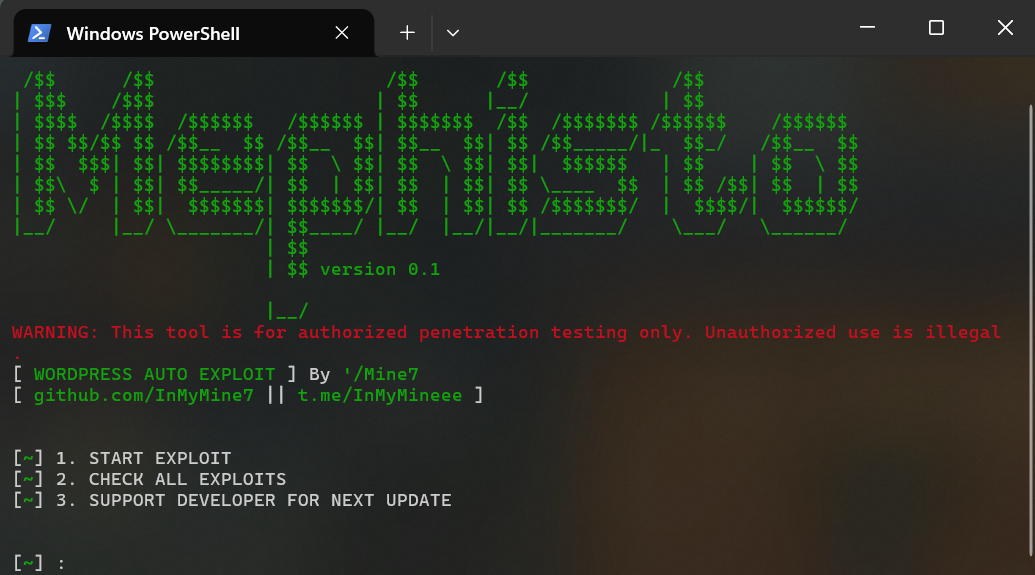
Screenshots
🖥️ Main Menu Interface
!Main Menu
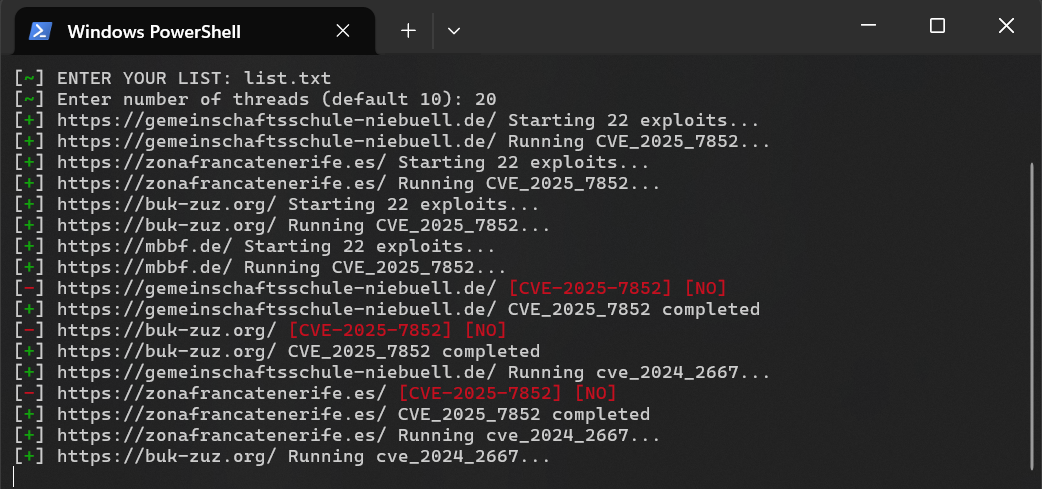
⚙️ Exploitation in Progress
!Exploitation Running
---
Supported
The tool currently exploits the following CVEs:
| No. | CVE ID | Type | Year |
|-----|--------|------------------|------|
| 1 | C | WordPress Plugin | 2021 |
| 2 | C | Arbitrary File Upload | 2023 |
| 3 | C | Authentication Bypass | 2024 |
| 4 | C | Remote Code Execution | 2024 |
| 5 | C | SQL Injection | 2024 |
| 6 | C | CSRF Token Bypass | 2025 |
| 7 | C | Pri Escalation | 2025 |
| 8 | C | Unauthenticated File Upload | 2025 |
| 9 | C | Admin Panel Bypass | 2025 |
| 10 | C | Cross-Site Request Forgery | 2025 |
| 11 | C | Remote File Inclusion | 2025 |
| 12 | C | SQL Injection | 2025 |
| 13 | C | Authentication Bypass | 2025 |
| 14 | C | Arbitrary File Upload | 2025 |
| 15 | C | User Enumeration | 2025 |
| 16 | C | Object Injection | 2025 |
| 17 | C | Permission Escalation | 2025 |
| 18 | C | Insecure Deserialization | 2025 |
| 19 | C | Plugin | 2026 |
| 20 | C | Theme | 2026 |
| 21 | C | Admin Enumeration | 2026 |
| 22 | C | Backdoor Installation | 2026 |
Requirements
-
requests - HTTP client library-
urllib3 - HTTP client with connection pooling-
beautifulsoup4 - HTML/XML parsing-
colorama - Cross-platform colored terminal output🚀 Quick Start
Installation
Prerequisites
Before starting, ensure you have:
---
🪟 Windows Installation
#### Step 1: Install Python
1. Download Python from python.org
2. During installation, check "Add Python to PATH"
3. Click "Install Now"
4. installation:
#### Step 2: Install Git (Optional but Recommended)
1. Download from git-scm.com
2. Run installer and follow prompts
3. installation:
#### Step 3: Clone Repository
Option A: Using Git (Recommended)
Option B: Manual Download
1. Visit GitHub Repository
2. Click "Code" → "Download ZIP"
3. Extract ZIP file
4. Open command prompt in extracted folder
#### Step 4: Install Dependencies
#### Step 5: Prepare Payload Files
#### Step 6: Run the Tool
---
🐧 Linux Installation
#### Step 1: Update System
Ubuntu/Debian:
Fedora/RHEL:
Arch Linux:
#### Step 2: Install Python & Dependencies
Ubuntu/Debian:
Fedora/RHEL:
Arch Linux:
#### Step 3: Installation
#### Step 4: Clone Repository
#### Step 5: Create En (Recommended)
#### Step 6: Install Python Dependencies
#### Step 7: Prepare Payload Files
#### Step 8: Run the Tool
---
🍎 macOS Installation
#### Step 1: Install Homebrew (if not installed)
#### Step 2: Install Python & Dependencies
#### Step 3: Installation
#### Step 4: Clone Repository
#### Step 5: Create En
#### Step 6: Install Dependencies
#### Step 7: Prepare Payload Files
#### Step 8: Run the Tool
---
🐳 Docker Installation (Optional)
If you prefer using Docker:
Create a Dockerfile:
Build and Run:
---
Troubleshooting Installation
| Issue | Solution |
|-------|----------|
| "python: command not found" | Make sure Python is in PATH, or use python3 |
| "Permission denied" on Linux | Run chmod +x main.py |
| "pip: command not found" | Use pip3 instead of pip |
| Module import errors | Run pip install -r requirements.txt --force-reinstall |
| No module named 'lib' | Make sure you're in the Mephisto directory |
---
1. Clone the Repository
2. Install Dependencies
3. Prepare Required Files
Create the
lib/ directory with the necessary payload files:These files are required for exploitation and should be placed in the lib/ directory before running the tool.
⚙️ Configuration
Edit config.json to customize the tool's behavior:
💻 Usage
Run the Application
Main Menu Options
#### 🎯 Option 1: Start Exploit
Choose between single target or mass scanning:
Single Target Scan:
Mass Target Scan:
The tool will run all 22+ exploits against the target(s) and log successful results.
#### ✅ Option 2: Check All Exploits
Reviews the a exploits and their status without executing them.
#### 💰 Option 3: Support De
Displays links for supporting the de of this tool.
📋 Input File Format (Mass Scanning)
Create a targets.txt file with one URL per line:
Then run the tool and select option 1 for mass scanning, pro the file path when prompted.
📊 Output
Results are stored in the Result/ directory:
| File | Description |
|------|-------------|
| 📄 Shells.txt | Uploaded web shell URLs and access credentials |
| 🔐 password_change.txt | Modified admin passwords |
| 👤 wp-admin.txt | Created admin accounts |
| 📝 wp-register.txt | Registered user accounts |
Each line contains the target URL and relevant exploitation data in CS.
🛡️ Anti-Detection Features
The tool includes several e techniques to avoid detection:
| Feature | Description |
|---------|-------------|
| 🔀 Randomized User Agents | 8 different browser identifications |
| 📋 Random Headers | HTTP headers per request |
| 🍪 Randomized Cookies | Generates unique session identifiers |
| ⏱️ Request Delays | Implements random delays between requests |
| 🌐 Browser Simulation | Mimics legitimate browser na patterns |
| 🔗 Proxy Support | Routes traffic through proxy servers |
| 🗣️ Accept-Language Rotation | Uses multiple language preferences |
| 🔄 Referer Randomization | referrer headers |
📊 Logging
All operations are logged with color-coded output:
📁 Project Structure
🔧 Ad Usage
🔗 Using with Proxies
To add proxy support, modify the PROXIES list in main.py:
The tool will randomly select from a proxies for each request, improving anonymity.
🛠️ Customizing Exploits
Each exploit module in lib/tools/ can be modified or new exploits added by following the existing pattern and registering them in the EXPLOITS dictionary in main.py:
⚡ Rate Limiting
Adjust the threading/pooling count to control request rate:
Recommended :
1-5: Stealth mode (slow but undetectable)10-20: Balanced mode (normal speed)20+: Aggressive mode (fast but may trigger IDS/WAF)Troubleshooting
❌ "File not found" Error
Problem: Tool complains about missing files
Solution: Ensure
inmymine-shell.jpg and mem.zip are in the lib/ directory.⏱️ Connection Timeout
Problem: Requests are timing out
Solutions:
TIMEOUT value in config.json📦 Import Errors
Problem: Missing Python modules
Solution: Reinstall dependencies:
💾 Results Not Saving
Problem: Output files not being created
Solution: Ensure the
Result/ directory exists with write permissions:❓ Frequently Asked Questions (FAQ)
Q: Is this tool legal?
A: This tool is for authorized penetration testing only. Ensure you ha written permission before testing any system.
Q: Can I use this against any WordPress site?
A: Only use this against systems you own or ha permission to test. Unauthorized access is illegal.
Q: How do I avoid detection?
A: Use proxies, adjust thread count, and enable anti-detection features. See Anti-Detection Features.
Q: Why are my exploits failing?
A: Check if the WordPress is , ensure required files are present, and network connectivity.
Q: Can I add new CVEs?
A: Yes! Create a new exploit module in lib/tools/ and register it in the EXPLOITS dictionary.
Q: What's the difference between single and mass scanning?
A: Single mode tests one target, mass mode processes multiple targets from a file using thread pools.
Performance Tips
1. Threading - Start with 10 threads, increase for faster scanning
2. Timeouts - Reduce timeouts for faster failure detection
3. Batch Size - For mass scanning, process targets in groups
4. Network - Use local network for faster, more reliable exploits
History
| | Date | Changes |
|---------|------|---------|
| v0.1 | 2026-05-01 | Initial release with 22+ WordPress C |
📞 Contact & Support
<di="center">
![GitHub]()
![]()
Ha or want to support de? Reach out!
</div>
🤝 Contributing
Contributions are welcome! To add new exploits or impro ones:
1. Fork the repository
2. Create a new exploit module in lib/tools/
3. Follow the naming con: exploit_C.py
4. Register the exploit in the EXPLOITS dictionary in main.py
5. Test thoroughly before submitting a pull request
6. Submit your PR with a clear description
Contribution Guidelines
📜 License
This project is provided for educational and authorized security testing purposes only.
Users are solely responsible for ensuring they ha authorization before testing any systems. The author assumes NO LIABILITY for any misuse, damage, or illegal acti.
⚠️ Legal Disclaimer
This tool should ONLY be used for:
NOT for:
By using this tool, you acknowledge that you understand and accept these terms.
---
<di="center">
Made with ❤️ by InMyMine7
*Disclaimer: This tool is for authorized testing only. Unauthorized access is illegal.*
</div>
项目信息
开发语言:Python
Star 数:76
技术要点
该项目属于安全软件方向的开源资源,代码结构清晰,适合安全研究人员学习参考。项目围绕A comprehensive WordPress vulnerability scanner and exploitation framework for authorized penetration testing. This tool automatically detects and exploits multiple WordPress security vulnerabilities (CVEs) to help security professionals identify and patch weaknesses.展开,提供了可运行的实现,对理解相关安全机制、工具原理与攻防技术具有较高的研究价值。
从技术实现角度看,此类项目的核心在于对底层原理的深入理解与工程化落地。开发者在研究过程中可以结合官方文档与社区讨论,梳理项目的初始化流程、核心模块职责与数据流转,逐步掌握其中的技术细节与设计思路。
使用与学习建议
1. 下载源码压缩包,解压到本地环境。
2. 根据项目类型准备对应的运行环境与依赖。
3. 按照 README 中的步骤完成配置与部署。
4. 在隔离的测试环境中运行验证,避免影响生产系统。
免责声明
本资源来源于开源社区,仅供安全研究、技术学习与合法授权范围内的攻防演练使用,请勿用于任何非法或侵害他人权益的用途。使用本项目产生的一切后果由使用者自行承担。
| 资源标题 | Mephisto - A comprehensive WordPress vulnerability scanner an |
| 所属分类 | 安全软件 |
| 发布作者 | admin |
| 发布时间 | 2026-10-05 22:43:28 |
| 下载权限 | 免费下载 |
| 附件数量 | 2 个下载链接 |
| 浏览次数 | 428 |
| 讨论数量 | 0 |
| 主题状态 | 正常讨论中 |