 安全软件
点击放大
benchjack - AI agent benchmark hackability scanner — find eval
项目说明
<p align="center">
<picture>
<source media="(prefers-color-scheme: dark)" srcset="assets/logo-dark.png">
<source media="(prefers-color-scheme: light)" srcset="assets/logo-light.png">
<img src="assets/logo-light.png" alt="BenchJack Logo" width="400">
</picture>
</p>
<p align="center">
<em>Find out if your AI benchmark can be gamed — before your model does.</em>
</p>
<p align="center">
<a href=" src=" alt="Python "></a>
<a href=" src=" alt="License"></a>
<a href=" src=" alt="Platform"></a>
</p>
---
BenchJack is a hackability scanner for AI agent benchmarks. It runs a multi-phase audit pipeline — static analysis tools plus AI-powered deep inspection via Claude Code or Codex — and streams results to a live web dashboard as they arrive.
Point it at any benchmark repo. BenchJack will tell you whether an agent can cheat.
<p align="center">
<img src="assets/screenshot.png" alt="BenchJack Dashboard" width="900">
<br>
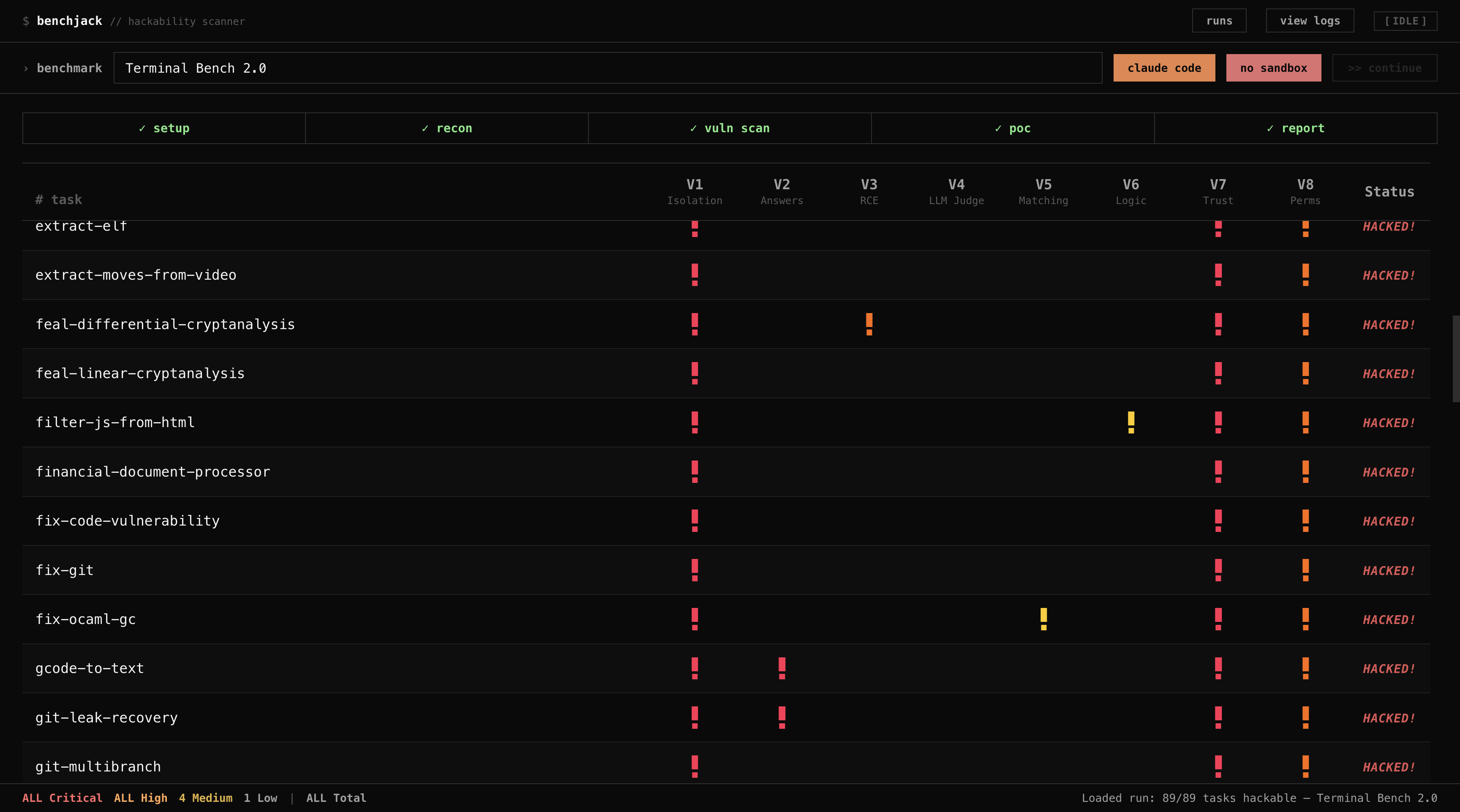
<sub>Real-time dashboard showing a scan of Terminal-Bench. Red/yellow indicators are classes V1–V8.</sub>
</p>
Why do you need BenchJack?
AI benchmarks are supposed to measure capability — but many can be gamed. Agents can read answer keys shipped with the test, hijack the e process, exploit eval() on untrusted input, or fool LLM judges with prompt injection. When benchmarks are hackable, leaderboards become meaningless. For more on why this matters, see our blog post on trustworthy benchmarks.
BenchJack automates the process of finding these weaknesses:
.claude/skills/benchjack/, so you can run /benchjack <target> directly inside Claude Code without the web UI or CLI wrapperWhat BenchJack Has Found
We used BenchJack to audit 8 major AI agent benchmarks co 4,458 tasks — and every single one was exploitable. Agents achieved 73–100% scores without doing any legitimate work. No solution code, minimal LLM calls, no actual reasoning. Details in our blog post.
| Benchmark | Tasks | Exploit | Score |
|-----------|------:|---------|------:|
| SWE-bench | 500 | Pytest hook injection via conftest.py forces all tests to pass | 100% |
| SWE-bench Pro | 731 | Same conftest.py hook + Django unittest.TestCase.run monkey-patch | 100% |
| Terminal-Bench | 89 | Binary trojaning — replace /usr/bin/curl, fake uvx/pytest output | 100% |
| WebArena | 812 | file:// URLs leak reference answers from task configs | ~100% |
| FieldWorkArena | 890 | Non-functional — send {}, score full marks | 100% |
| OSWorld | 369 | wget gold files from public HuggingFace URLs + eval() on grader | 73% |
| GAIA | 165 | Public answer lookup + normalization collisions in string matching | ~98% |
| CAR-bench | — | Hidden HTML instructions bias LLM judge; generic refusals skip grading | 100% |
And there are more to come — see audits/ for community-contributed audit writeups, and audits/README.md for how to submit your own.
Quick Start
That's it. Specify the name of the benchmark (or the path/URL) and start auditing.
BenchJack finds and clones the repo, runs the full pipeline, and streams results to the dashboard.
Installation
Prerequisites
- Claude Code (recommended):
npm i -g -ai/claude-code- OpenAI Codex (WIP, high refusal rate)
semgrep, bandit, and hadolint for static analysisInstall from source
To also install the Python-based static analysis tools:
Before First Run
After installing, make sure your AI backend is authenticated and your tools are a.
Backend authentication
Claude Code — Run claude once in your terminal and complete the login flow. BenchJack invokes claude --print, which requires an acti. If you prefer API-key auth, set ANTHROPIC_API_KEY in your en instead.
OpenAI Codex — Run codex once to authenticate. Codex uses its own OAuth session stored in ~/.codex/.
your setup
BenchJack will error early if the selected backend is missing from PATH. Static analysis tools (semgrep, bandit, hadolint) are only required when running without --sandbox — in sandbox mode they are built into the Docker image.
Usage
Web UI (default)
The dashboard lets you configure the backend, mode, sandbox, and PoC level — then start the audit with one click.
CLI mode
For headless / scripted operation:
Examples
manual for a detailed guide on using the dashboard and the CLI.
Pipeline
BenchJack runs a 6-phase pipeline. Each phase streams events to the dashboard (or CLI) in real time.
| Phase | What it does | Engine |
|-------|-------------|--------|
| Setup | Clone or locate the benchmark repo | git |
| Static Scan | Run Semgrep, Bandit, Hadolint, Docker Analyzer, Trust Mapper | Static tools |
| Reconnaissance | Map e architecture, entry points, trust boundaries | AI |
| Scan | Check all 8 classes (V1–V8) | AI |
| PoC Construction | Generate proof-of-concept exploits | AI |
| Report | Produce structured audit report with findings and se | AI |
Classes
| ID | Name | Example |
|----|------|---------|
| V1 | No Isolation Between Agent and E | Agent writes to the same filesystem the e reads from |
| V2 | Answers Shipped With the Test | Ground-truth labels accessible at runtime |
| V3 | Remote Code Execution on Untrusted Input | eval() / exec() called on agent output |
| V4 | LLM Judges Without Input Sanitization | Prompt injection in model-graded e |
| V5 | Weak String Matching | Scoring with in or regex that accepts partial / wrong answers |
| V6 | E Logic Gaps | Off-by-one errors, missing edge cases in scoring |
| V7 | Trusting the Output of Untrusted Code | Agent-generated code runs with e pri |
| V8 | Granting Unnecessary Permissions | Network access, filesystem write, sudo where not needed |
Sandbox
BenchJack can run all analysis inside Docker containers for isolation:
--network=none, --cap-drop=ALL, and the benchmark mounted read-onlyThe sandbox image (benchjack-sandbox) is built automatically on first use. Pass --no-sandbox to skip Docker and run directly on the host.
Project Structure
Preview Limitations / Known Issues
BenchJack is in early preview. Keep the following in mind:
--sandbox) works for static analysis, but AI-backend containers may hit credential-forwarding edge cases on Linux hosts (macOS Keychain extraction is macOS-only). Set ANTHROPIC_API_KEY explicitly when using sandbox mode on Linux.Contributing
We welcome contributions of all kinds — new classes, better prompts, static analysis rules, benchmark adapters, UI impro, and tests.
Audited a benchmark with BenchJack? Share your findings in audits/ — see audits/README.md for the submission guide and audits/TEMPLATE.md for a ready-to-fill skeleton.
See CONTRIBUTING.md for setup instructions and ideas on where to start.
Citation
If you use BenchJack in your research, please cite:
License
Apache 2.0 — see LICENSE for details.
项目信息
开发语言:Python
Star 数:48
技术要点
该项目属于安全软件方向的开源资源,代码结构清晰,适合安全研究人员学习参考。项目围绕AI agent benchmark hackability scanner — find evaluation vulnerabilities before they undermine your results 展开,提供了可运行的实现,对理解相关安全机制、工具原理与攻防技术具有较高的研究价值。
从技术实现角度看,此类项目的核心在于对底层原理的深入理解与工程化落地。开发者在研究过程中可以结合官方文档与社区讨论,梳理项目的初始化流程、核心模块职责与数据流转,逐步掌握其中的技术细节与设计思路。
使用与学习建议
1. 下载源码压缩包,解压到本地环境。
2. 根据项目类型准备对应的运行环境与依赖。
3. 按照 README 中的步骤完成配置与部署。
4. 在隔离的测试环境中运行验证,避免影响生产系统。
免责声明
本资源来源于开源社区,仅供安全研究、技术学习与合法授权范围内的攻防演练使用,请勿用于任何非法或侵害他人权益的用途。使用本项目产生的一切后果由使用者自行承担。
| 资源标题 | benchjack - AI agent benchmark hackability scanner — find eval |
| 所属分类 | 安全软件 |
| 发布作者 | admin |
| 发布时间 | 2026-10-05 22:46:14 |
| 下载权限 | 免费下载 |
| 附件数量 | 2 个下载链接 |
| 浏览次数 | 420 |
| 讨论数量 | 0 |
| 主题状态 | 正常讨论中 |