 安全软件
点击放大
Marvin-dynamic-Analyzer - Dynamic android vulnerability scanner using OpenNe
项目说明
Mar Analyzer #
Dynamic android scanner using OpenNebula and Android-x86 emulators.
: 0.01
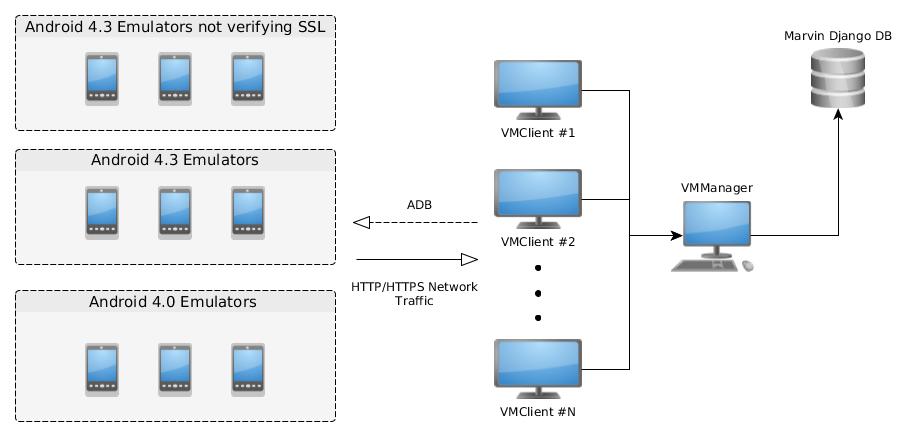
General architecture ##
!architecture.jpg
analyzed dynamically are:
* JA
* PHONEGAP_JS_INJECTION
* PHONEGAP_C
* SSL_CUSTOM_TRUSTMANAGER
* SSL_CUSTOM_HOSTNAME
* SSL_ALLOWALL_HOSTNAME
* SSL_INSECURE_SOCKET_FACTORY
* SSL_WEB
* WEB
Also it checks for new that might be found while searching for others:
* ZIP_PATH_TRA
* INSECURE_TRANSMISSION
* INSECURE_STORAGE
is in charge of searching new to be analyzed in Marvin's Django database.
receive the app and type of to analyze and emulator to use from . It uses ADB to connect to the emulator and start the analysis. It also configures the emulator to act as its gateway to intercept HTTP/HTTPS requests.
uses a custom fuzzer Mar de for interacting with the application to try triggering the .
The emulators are running Android 4.3 x86 because of Cydia Substrate support. The project is using Android-x86 images.
There are 3 types of emulator:
* Emulators with no SSL
* Emulators with normal SSL (They are used to check if an application does proper SSL )
* Emulators running ICS 4.0 (Used for exploiting Ja Interface )
Configurations ##
configurations are in settings.py:
IMPORTANT: Under the django_support directory, also configure the settings.py file with the corresponding SECRET_KEY, database password and BungieSearch URL from Mar configuration.
configurations are also in the settings.py file:
Running ##
Start the server with:
And with:
Running a single analysis ##
Mar analyzer obtains the next app to analyze from the pool of un on Marvin's database. If you want to run an analysis on a single app you can change the DEBUG_MODE to True in settings.py of the client. Then you can run an analysis with:
In the case of PHONEGAP_C, you must also include the parameter "activity" with a reference to the initial application activity. If you only want to run checks against not found statically such as ZIP path tra, insecure storage and insecure transmission use "dummy" as the ID.
IMPORTANT: The filename of the APK must be the same as the package name.
Deployment ##
and can use any Linux machine hosted in OpenNebula. Authors used ttylinux - kvm from OpenNebula Marketstore as template.
dependencies ###
Run to install dependencies:
dependencies ###
Run to install dependencies:
Creating an emulator ###
Download from the Android-x86 site the ISO for 4.3 or 4.0 release. Install it in a disk with your fa tool. Authors used .
Convert the installed image to KVM qemu's format in order to support OpenNebula's snapshot feature. You can use the following command:
Upload the image to OpenNebula and create a new template for the emulator.
Example of template:
IMPORTANT: Set QCOW2 as the image mapping driver for snapshot support.
IMPORTANT: When creating a ICS Android device, set the network interface driver to pcnet.
Create a the previous template and boot the device.
IMPORTANT: Start the kernel in debug mode the first time and edit the file /mnt/grub/menu.lst. Add "quiet nomodeset vga=788" before the option video=-16 to kernel arguments.
So far there is no contextualization support for Android in OpenNebula so the network interfaces have to be configured manually. First to run commands as root run in Terminal application the following commands:
The following commands should work to set the network if run using the Terminal application as root.
Once the network configuration is set,exit the Terminal in root mode and use adb to allow remote debugging with:
Manually configure:
* Disable all sound in emulator (Settings->Sound)
* Un appplications with Settings->Security->Uncheck Apps
Then run android_setup_client.sh in a host with the following parameters:
Choose {SSL/NOSSL} to emulator deploy type 1 or 2.
This script:
* Roots the emulator
* Adds network static configuration
* Installs SuperUser and CydiaSubstrate, links Substrate and allows it to run as root.
* If it's NOSSL type, install Android-SSL-TrustKiller to skip SSL
* Install the Mar fuzzer.
* Disables lockscreen and suspension
Lastly, create a snapshot of the with any name you refer.
Requirements ###
* Deployed Mar
* Python 2.7.x (DO NOT USE Python 3.X)
Credits ###
* Joaquín Rinaudo ()
* Juan Heguiabehere ()
Who do I talk to? ###
* Send an email to stic at fundacionsadosky.org.ar
项目信息
开发语言:Python
Star 数:42
技术要点
该项目属于安全软件方向的开源资源,代码结构清晰,适合安全研究人员学习参考。项目围绕Dynamic android vulnerability scanner using OpenNebula and Android-x86 emulators.展开,提供了可运行的实现,对理解相关安全机制、工具原理与攻防技术具有较高的研究价值。
从技术实现角度看,此类项目的核心在于对底层原理的深入理解与工程化落地。开发者在研究过程中可以结合官方文档与社区讨论,梳理项目的初始化流程、核心模块职责与数据流转,逐步掌握其中的技术细节与设计思路。
使用与学习建议
1. 下载源码压缩包,解压到本地环境。
2. 根据项目类型准备对应的运行环境与依赖。
3. 按照 README 中的步骤完成配置与部署。
4. 在隔离的测试环境中运行验证,避免影响生产系统。
免责声明
本资源来源于开源社区,仅供安全研究、技术学习与合法授权范围内的攻防演练使用,请勿用于任何非法或侵害他人权益的用途。使用本项目产生的一切后果由使用者自行承担。
| 资源标题 | Marvin-dynamic-Analyzer - Dynamic android vulnerability scanner using OpenNe |
| 所属分类 | 安全软件 |
| 发布作者 | admin |
| 发布时间 | 2026-10-05 22:47:06 |
| 下载权限 | 免费下载 |
| 附件数量 | 2 个下载链接 |
| 浏览次数 | 109 |
| 讨论数量 | 0 |
| 主题状态 | 正常讨论中 |