 安全软件
点击放大
harbor-scanner-adapter - Harbor Scanner Adapter for Anchore Engine and Ente
项目说明
[![CI][ci-img]][ci]
[![Go Reportcard][report-card-img]][report-card]
Harbor Scanner Adapter for Anchore Engine/Enterprise
O
The Harbor Scanner Adapter for Anchore is a service that translates the Harbor scanning API into the Anchore API
and allows Harbor to utilize Anchore Enterprise for pro reports on images stored in Harbor as
part of its scan feature.
This Adapter is only required if you want Harbor to use Anchore for its 'Scan' feature. If your objective is to use Anchore in a CI/CD
workflow or to provide its own analysis reports against images stored in Harbor, that can be achie this Adapter.
>:construction: Note:
>
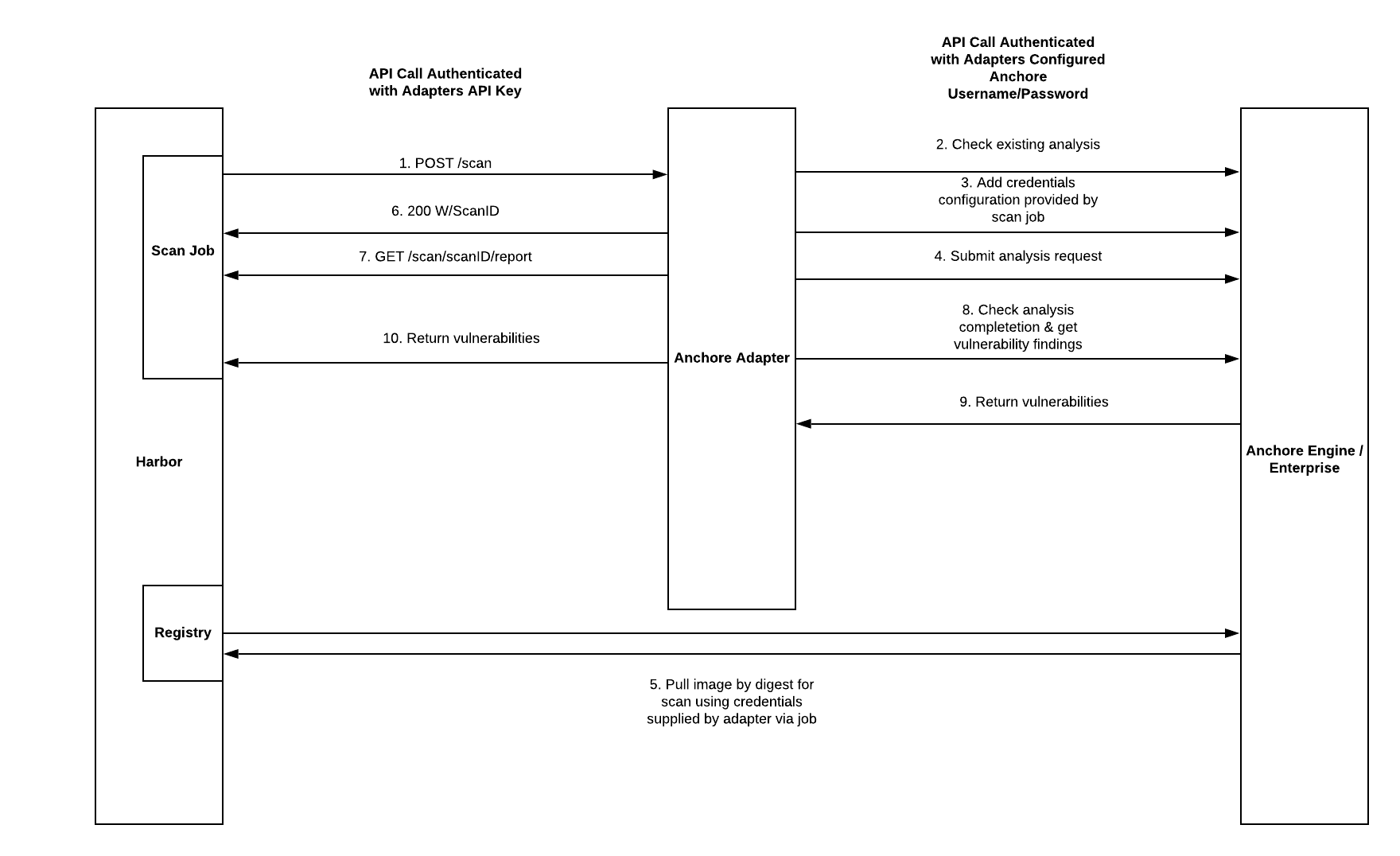
> This sequence diagram is no longer quite accurate. The calls are correct, but in recent updates they are done asynchronously and are stored by a result store that is not yet added to this diagram
!Interaction O
Authentication
#### Harbor-to-Adapter
API requests between Harbor and the adapter should be protected by TLS/HTTPS at the channel level, but can also use a shared secret for authentication.
See the configuration section below on setting an API key for the Adapter. Then, when adding the adapter to Harbor via the UI, use the 'Bearer' auth type
and set the value to the value set in the adapter configuration. This will cause harbor to send they token as a Bearer token to the adapter, which will
the HTTP Authorization header against the expected value.
#### Adapter-To-Anchore
API calls between the Adapter and Anchore should also be protected by TLS/HTTPS and also require a username/password for HTTP Basic authentication to Anchore. For this, it
is highly recommended to create a specific harbor user in Anchore and use those credentials in the auth secret presented to the Adapter as described below in the configuration section.
Note that these are not credentials use to pull images from Harbor, only to authenticate API calls between the adapter service and the Anchore API service.
#### Anchore-To-Harbor
API requests from Anchore services to Harbor to fetch the image data for analysis are protected by short-li generated by Harbor and passed to the Adapter service on each
new scan request. The Adapter service automatically configures Anchore to use the supplied credentials for the data fetch operations as part of requesting an image analysis to Anchore.
The adapter ne requests to Harbor and ne any image content, only Anchore services access any Harbor image data.
Building the Adapter service
Run make to run test and get the binary in dist/<platform>/anchore-adapter
To build into a container:
Configuration
Configuration of the adapter is done at startup or via a configuration file. If both are used,
en take precedent o from the file.
En
Adapter configuration . These cannot be set in the client config file, only .
| En | Description | Default Value |
|----------|-------------|---------------|
| SCANNER_ADAPTER_LISTEN_ADDR | The address for the adapter to listen on for HTTP traffice | ":8080" |
| SCANNER_ADAPTER_LOG_LEVEL | Log | "info" |
| SCANNER_ADAPTER_LOG_FORMAT | Format of the log, either text or json | "text" |
| SCANNER_ADAPTER_APIKEY | Secret that must be presented by client (harbor) to authenticate calls to the adapter itself | null |
| SCANNER_ADAPTER_FULL_ | Add full descriptions, but will make scans slower | true |
| SCANNER_ADAPTER_TLS_KEY_FILE | Path to the private key for the API to listen with HTTPS | null |
| SCANNER_ADAPTER_TLS_CERT_FILE | Path to the public cert file for the API to listen with HTTPS | null |
| SCANNER_ADAPTER_FILTER_ | If set, any marked as ignored or will-not-fix by (e.g. Debian's No-DSA flag will not be returned in the scan result. This can help reduce noise in scans if you accept the distro 's fix assessment. | False |
| SCANNER_ADAPTER_REGISTRY_ | If set, the adapter will ask Anchore to the credentials passed to it by Harbor for the image fetch. If false, then the is skipped and credentials are used without being checked first. | True |
| SCANNER_ADAPTER_REGISTRY_TLS_ | If set to False, the adapter will set a flag in Anchore to ensure Anchore skips of the TLS certificate when it contacts Harbor to pull the image. This is primarily for use when your Harbor install uses self-signed certificates | True |
| SCANNER_ADAPTER_DESCRIPTION_CACHE_ENABLED | Boolean to enable a cache to impro of the scan by caching descriptions | True |
| SCANNER_ADAPTER_DESCRIPTION_CACHE_COUNT | Number of cache entries to keep in memory in the adapter. This is the number of description strings to cache | 10000 |
| SCANNER_ADAPTER_DESCRIPTION_CACHE_TTL | The timeout value for entries in the description cache. Descriptions can be updated, so larger gi performance but may ha descriptions. | 86400 (24 hours) |
| SCANNER_ADAPTER_REPORT_CACHE_ENABLED | Boolean to enable caching of the raw reports from Anchore within the Adapter. This reduces the call to Anchore for different report types requested by Harbor or scans that are close-together and result in the same report from Anchore between Anchore's vuln db updates | True |
| SCANNER_ADAPTER_REPORT_CACHE_COUNT | The number of raw Anchore image reports to cache in memory to avoid repeated calls to Anchore for the same result. | 100 |
| SCANNER_ADAPTER_REPORT_CACHE_TTL | The ttl, in seconds, for raw Anchore reports in the adapter, which are re-used for the Harbor format and raw format responses. A good value here is at least 10 seconds. | 180 |
| SCANNER_ADAPTER_DB_UPDATE_CACHE_ENABLED | Boolean to enable caching of the Anchore db updated timestamp to reduce call between the adapter and Anchore. Harbor tends to check the update timestamp often so this reduces calls to Anchore. | True |
| SCANNER_ADAPTER_DB_UPDATE_CACHE_TTL | The number of seconds to keep the last db update timestamp before checking the Anchore service again. The service check to Anchore is a bit resource intensive so this value helps reduce load on Anchore from the Adapter | 60 |
| SCANNER_ADAPTER_ENABLE_RAW_MIME_TYPE | Enable/Disable the RAW MIME type from the adapter | True |
| ANCHORE_ENDPOINT | The url to reach the Anchore API (e.g ) | null |
| ANCHORE_USERNAME | The username the Adapter will use to authenticate API calls against Anchore itself. This must be a username within Anchore, not a Harbor user. | null |
| ANCHORE_PASSWORD | The password the Adapter will use to authenticate API calls against Anchore itself. This is not a Harbor credential. | null |
| ANCHORE_CLIENT_TIMEOUT_SECONDS | Timeout (in seconds) for API calls to Anchore from the Adapter | 60 |
| ANCHORE_AUTHFILE_PATH | A path to a json file with any of the properties "username", "password", "endpoint", "timeoutseconds", and "tls" to enable passing Anchore credentials to the Adapter without en (e.g. for secrets in k8s mounted as a file) | null |
Configuration file format
The configuration file must be json formatted and may contain all or some of the below fields. The config file is loaded first, and any also present in the en will o the file .
Deployment
Requirements
This adapter requires both a Harbor deployment and an Anchore Enterprise deployment to operate. The adapter can be deployed before the Anchore installation,
but the endpoint url and credentials must be known to pass to the adapter.
Install Harbor:
Install Anchore Enterprise:
Installation docs
Create Credentials
It is highly recommended to create a new account in the Anchore deployment and a new user with credentials dedicated to the Harbor adapter.
When using Enterprise 5+, you can also utilize api keys. Learn how to generate them here -
Create a harbor account and user in Anchore for the adapter to use for authenticating calls to Anchore.
_This is not required, but recommended as it will limit the scope of the adapter's credentials within Anchore to a
non-admin account and keep all Harbor image data in one account for easy management. This step can be skipped for demo en where the Anchore deployment is not shared, but is strongly encouraged for all production use and all cases where
Harbor will be integrated with an existing Anchore deployment._
For example with anchorectl, you could create a new account in Anchore, _harbor_ with a single user _harbor_ and password for this example (use a much stronger password in your install)
Now you need to store the credentials in a secret for use by the adapter.
If you created a custom user:
You can use the default admin user/pass for a fresh test/de of Anchore (DO NOT DO THIS FOR PRODUCTION!):
Please ensure the secret is stored in the same namespace as the deployed Harbor adapter.
Install Adapter
Take a copy of the yaml manifest and edit to your specific deployment requirements. If you created a secret for the username and password then these will be used.
Install the adapter:
Please note: You can install multiple adapters and configure each of these to work differently. This would allow you to map each adapter/scanner instance to the desired project in Harbor.
Configure Adapter
Configure the scanner in Harbor:
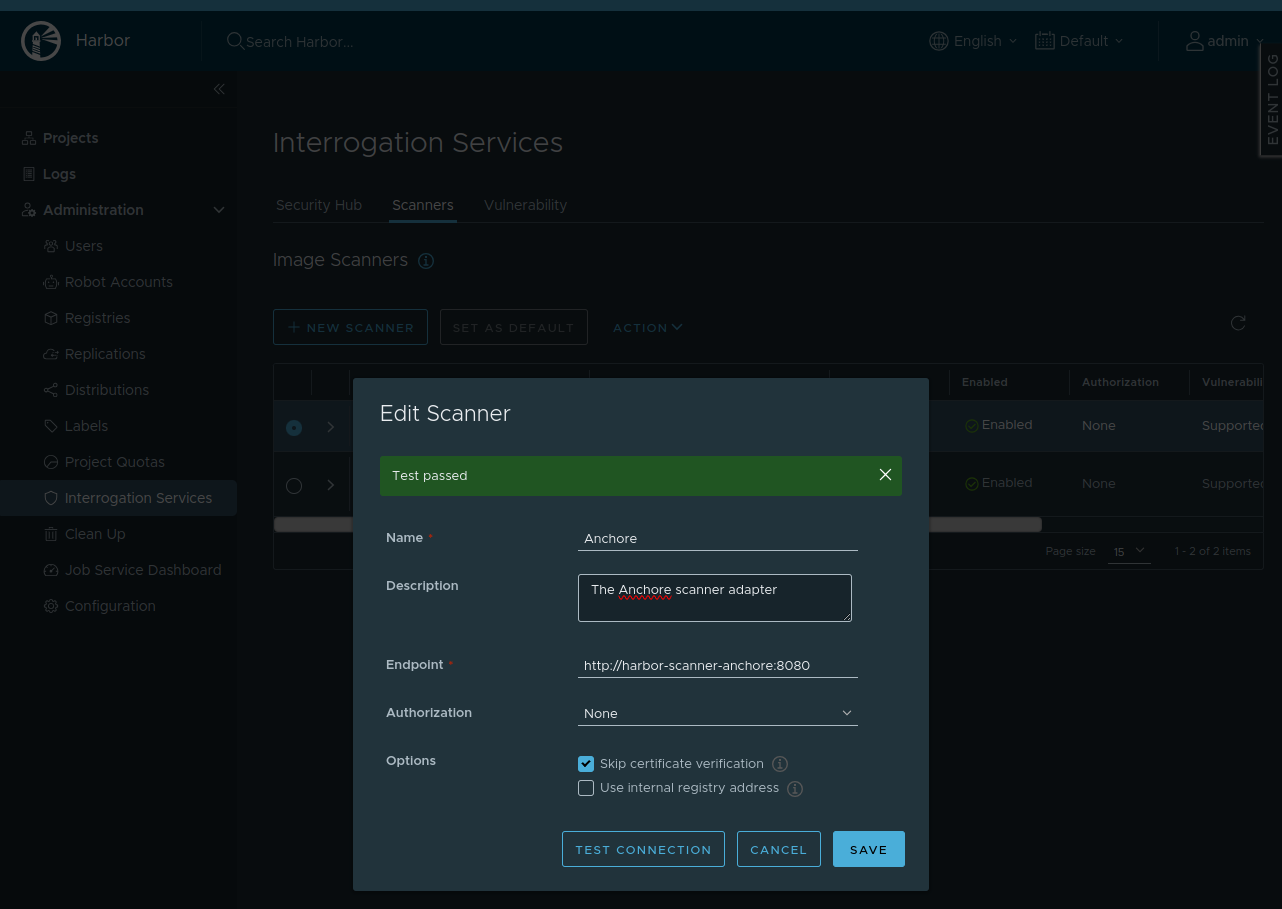
In the Harbor UI login as an admin and na to Administration->Interrogation Ser>Scanners and click "+ New Scanner".
In older of Harbor, this can be found under Configuration->Scanners.
!Add Scanner UI
In 'Endpoint', use the adapter hostname of your instance. The default is the following:
Lea empty since in this example we did not set an API key in the adapter deployment en.
Click "Test Connection" and should work.
You can now click "Add" to add the scanner
Now for each project in Harbor, we must add and set the Anchore Scanner.
In the Harbor UI, na to the project->scanner and click "Select Scanner". You might want to make Anchore the default scanner for a project.
!Add Scanner to Project UI
Test Scanning
Na to a project and repository, then select an image and push the scan button at the top of the page.
Also under the Administration->Interrogation Services page you can perform bulk scans.
Finally, under a Project goto the 'Configuration' page where you can 'scan images on push' and 'prevent images from running'.
The last option will require you to enable 'Use internal registry address' so that Anchore can access the image in Harbor to scan it.
De
If you ha installed it can be used against a local k8s install for
de skaffold dev will build the adapter with ko and deploy using the
manifest file at k8s/harbor-adapter-anchore-skaffold.yaml. Any changes will
then be li to local k8s for testing.
Special Thanks
Special thanks to the following for their help with the prototype adapter implementation that inspired this work:
* cafeliker
* MaGaoJU
[ci]:
[ci-img]:
[report-card]:
[report-card-img]:
项目信息
开发语言:Go
Star 数:40
技术要点
该项目属于安全软件方向的开源资源,代码结构清晰,适合安全研究人员学习参考。项目围绕Harbor Scanner Adapter for Anchore Engine and Enterprise展开,提供了可运行的实现,对理解相关安全机制、工具原理与攻防技术具有较高的研究价值。
从技术实现角度看,此类项目的核心在于对底层原理的深入理解与工程化落地。开发者在研究过程中可以结合官方文档与社区讨论,梳理项目的初始化流程、核心模块职责与数据流转,逐步掌握其中的技术细节与设计思路。
使用与学习建议
1. 下载源码压缩包,解压到本地环境。
2. 根据项目类型准备对应的运行环境与依赖。
3. 按照 README 中的步骤完成配置与部署。
4. 在隔离的测试环境中运行验证,避免影响生产系统。
免责声明
本资源来源于开源社区,仅供安全研究、技术学习与合法授权范围内的攻防演练使用,请勿用于任何非法或侵害他人权益的用途。使用本项目产生的一切后果由使用者自行承担。
| 资源标题 | harbor-scanner-adapter - Harbor Scanner Adapter for Anchore Engine and Ente |
| 所属分类 | 安全软件 |
| 发布作者 | admin |
| 发布时间 | 2026-10-05 22:47:42 |
| 下载权限 | 免费下载 |
| 附件数量 | 2 个下载链接 |
| 浏览次数 | 329 |
| 讨论数量 | 0 |
| 主题状态 | 正常讨论中 |