 安全软件
点击放大
Fathometer - Self-hosted CVE triage for your root servers: Triv
项目说明
<h1 align="center">Fathometer — C</h1>
<p align="center">
Self-hosted C for the <strong>root servers you run yourself</strong>.<br>
Agents run Trivy on each host, Fathometer judges every finding in context with an
LLM, and surfaces only the ones that actually need you.<br>
Think uptime-kuma, but for CVEs on running servers.
</p>
<p align="center">
<a href=" src=" alt="CI status" /></a>
<a href=" src=" alt="Latest release" /></a>
<img src=" alt="Python 3.14" />
<a href=" src=" alt="Linted with Ruff" /></a>
<img src=" alt="Type-checked with mypy --strict" />
<a href="LICENSE"><img src=" alt="Apache 2.0 license" /></a>
</p>
<p align="center">
<a href="#is-this-for-you">Is this for you?</a> •
<a href="#features">Features</a> •
<a href="#what-the-ai-does">What the AI does</a> •
<a href="#how-it-scores">How it scores</a> •
<a href="#built-to-last">Engineering</a> •
<a href="#install-fathometer">Install</a> •
<a href="ARCHITECTURE.md">Full spec</a>
</p>
<p align="center">
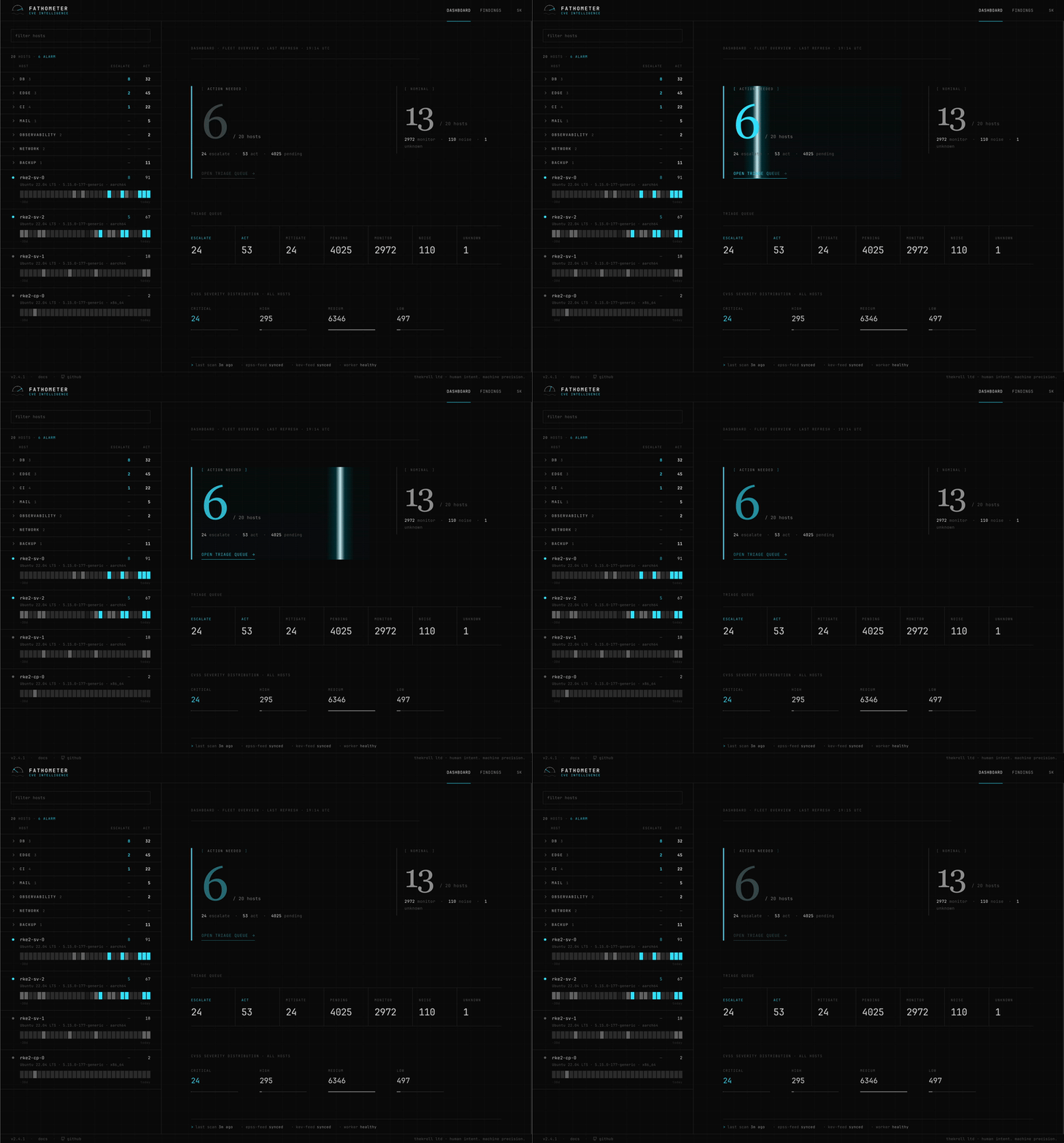
<strong>Three pages, that's it.</strong> A fleet dashboard, a per-host triage
workspace, and a cross-host findings explorer — no sprawling menus, no
dashboards-of-dashboards.
</p>
<p align="center">
<img src="docs/images/dashboard.gif" width="820" alt="Fathometer dashboard — fleet o with triage queue and C distribution" />
</p>
<p align="center">
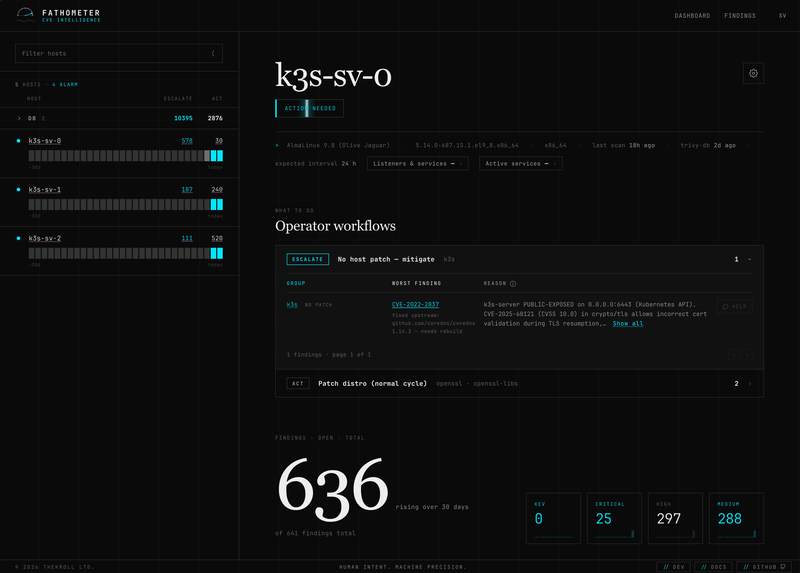
<a href="docs/images/ser.png"><img src="docs/images/ser.png" width="200" alt="Ser — per-host triage with each finding's AI and the reasoning behind it" /></a>
<a href="docs/images/findings.png"><img src="docs/images/findings.png" width="200" alt="Findings — cross-host CVE and package explorer" /></a>
<a href="docs/images/ai-upstream-check.png"><img src="docs/images/ai-upstream-check.png" width="200" alt="Agentic upstream check — ad patch-a panel" /></a>
<a href="docs/images/ai-chat.png"><img src="docs/images/ai-chat.png" width="200" alt="Per-group CVE chat — explaining the attack " /></a>
</p>
<p align="center"><sub>Ser · Findings · Upstream check · CVE chat — click to enlarge</sub></p>
Is this for you?
Built for you if you:
that host*, not in the abstract;
data leaving your infrastructure, air-gap-friendly.
Look elsewhere if you:
Grype directly or a platform built for that;
dashboards.
At a glance
| | |
|---|---|
| Stack | Python 3.14 · Flask · PostgreSQL 17 · HTMX + Alpine.js · plain CSS |
| Scanner | Tri scan, lightweight agent push model |
| LLM | any OpenAI-compatible endpoint — bring your own key |
| Deploy | docker-compose (Kubernetes possible; omnibus image on the roadmap) |
| Model | single-user · self-hosted · runs air-gapped |
| License | Apache-2.0 |
Features
*Noise* stay out of the way. No alarm firehose, no hundreds of "critical" CVEs
to wade through by hand.
*actually apply* (
dnf/apt upgrade will pull it) from one that only existsupstream inside a statically-linked binary (Go, Rust, Java) and needs a
rebuild. It resolves each binary to its owning package and checks your host's
repos, so it ne you to "apply the update" for a patch your package
manager doesn't have.
results; Fathometer ne credentials to your servers and works
air-gapped.
history, not a metrics dashboard.
command (daily systemd timer, cron fallback).
infrastructure. Built for the operator who runs the boxes — no email / Discord
/ webhook noise by design.
What the AI does
Fathometer puts an LLM to work on exactly three jobs. Each one brings *your*
OpenAI-compatible endpoint and key, each one stays in its lane, and none of them
e o you — the AI advises, you decide.
1 · The context re
Every finding is read by the re, which asks the questions a human triager
would: is this reachable on this host, does the deployment actually run the
code path, can an attacker meet the preconditions — and how
bad is the damage if they do? CVSS, EPSS and KEV feed in as *weights*, never as
the . The result is one of four tiers — **Escalate · Act · Watch ·
Noise** — and every downgrade states *which* condition is missing, so you can
check the call. Each is cached, so you only ever pay the LLM for *new*
findings. How the scoring works in detail →
2 · The agentic upstream check <sub>(opt-in)</sub>
For statically-linked binaries (Go, Rust, Java) and hand-rolled installs
(Ansible, GitHub releases), your host's package manager simply can't tell you
whether a fix exists yet. Press one button and an agent goes and looks for you:
it searches the project's latest releases, reads the build manifest (e.g. thego.mod toolchain) and answers in one line whether a fixed build exists — and
which . The manual changelog-and-go.mod digging, done for you. It is
ad only (it ne a risk band on its own), runs **only when you
ask (never in the scan path), and is off by default**. Bring your own search
backend — self-hosted SearXNG, Tavily, Firecrawl, … — and air-gapped
deployments just leave the container out.
3 · The CVE chat
Sometimes you just want to talk it through. The Help button on any package
group opens a chat scoped to that exact host and group: ask it to explain the
attack , the realistic blast radius, what to patch first, or whether
deferring is safe. It answers from a focused snapshot — the group's most
important findings plus an aggregate of the rest, not a raw dump — so replies
stay fast and grounded in *your* host, not generic C.
What it costs
Surprisingly little. Each finding is judged once and the is cached, so
you only pay the LLM for *new* findings, not for every scan. With an
open-weights model like gpt-oss-120b or deepseek- on a
commodity inference provider, assessing thousands of findings lands in the
single-digit cent range, and a typical day of *new* findings costs **about a
cent**. You bring your own OpenAI-compatible endpoint and key, so you stay in
control of the provider and the spend.
Moti
There are plenty of tools for container images, Kubernetes clusters and CI
pipelines. Keeping the handful of plain root servers you own quietly under
control — so you can sleep — is the gap Fathometer fills.
A single root ser spits out hundreds of CVEs, almost none exploitable
in *your* setup. Wading through that by hand burns hours and trains you to ignore
the alarms. Fathometer exists to cut that list down to the few findings that
actually matter on your hosts.
It's a pragmatic e tool, not infallible, and does not replace
enterprise management — but it beats blindly applying every distro
patch or burning hours on unexploitable findings.
How it scores
Fathometer rates every finding on two axes and places it in one of four tiers.
Axis 1 — is it exploitable on this host? All three must hold:
Miss even one and the C is irrelevant — it isn't exploitable here.
CVSS, EPSS and KEV feed in as *weights*, never as the .
Axis 2 — what's the damage? From code execution / takeover, through data
theft and tampering, down to a mere service crash (DoS).
That yields four tiers:
reachable. Patch in the normal cycle.
high score.
Every downgrade states which condition is missing, so you can check the call.
Pure DoS ne — worst case is a restart.
Built to last
Fathometer is built like infrastructure you'd trust with your own servers — not
a weekend prototype:
floor enforced in CI. The full lint → type-check → test gate runs on every push
and pull request (the CI badge above).
mypy --strict across the application, Pydantic v2 andSQLAlchemy 2.x throughout. Lint and formatting are enforced with Ruff.
docs/decisions/ capture every non-trivial choice and whyit was made — nothing important is left to guesswork.
CHANGELOG.md, and a single, complete spec inARCHITECTURE.md.(
nh3) and ne with |safe; LLM API keys are encrypted at rest(Fernet), secrets hashed with Argon2, endpoints rate-limited, and the opt-in
outbound research path is SSRF-guarded. The full threat model lives in
ARCHITECTURE.md.Install Fathometer
Fathometer keeps the moving parts small. There are three ways to run it.
<details open>
<summary><strong>1. docker-compose</strong> — recommended today</summary>
<br>
The supported path right now. Brings up the app, a PostgreSQL 17 database, and
the LLM worker. Put a reverse proxy (Caddy, nginx or Traefik) in front for TLS —
the app speaks plain HTTP on port 8000 and is not meant to face the internet
directly.
Re config, TLS, the /api/scans IP allowlist and Postgres backups are
covered in ARCHITECTURE.md §9.
</details>
<details>
<summary><strong>2. Kubernetes</strong> — for the brave</summary>
<br>
Run the app and Postgres as you would any Flask + DB workload and let your
ingress controller terminate TLS. Unlikely to be most people's choice, but
nothing in Fathometer stands in the way.
</details>
<details>
<summary><strong>3. Omnibus single container</strong> — <em>roadmap</em></summary>
<br>
A single self-contained image (app + database in one container, uptime-kuma
style, à la GitLab Omnibus) for the simplest possible setup. **Not a
yet** — planned, not shipped. Use docker-compose until then.
</details>
Configure the LLM provider — required first
Fathometer ships without a model. The context re is the engine of the
whole tool, so once the app is up, your first step is to point it at an LLM:
open Settings → LLM provider, set the OpenAI-compatible base URL, paste your
API key (encrypted at rest), and pick a model. **Until a provider is configured,
the re can't run and no findings get judged** — the app comes up but stays
idle.
Any endpoint that speaks the OpenAI protocol works (DeepInfra, your own
vLLM/Ollama, …); see What the AI does for model and cost
guidance.
Add a server
Once Fathometer is reachable o, register each root server with a single
command run as root. It installs Trivy and the agent, registers the host with
your master key (asked interactively), Tri its official
release, and sets up a daily scan timer (systemd, cron fallback).
Re-running the same command updates an existing host and skips the master-key
prompt. For unattended pro (Ansible, cloud-init), passFM_UNATTENDED=1 plus FM_MASTER_KEY / FM_SER as
en .
Supported: Debian/Ubuntu, RHEL family (AlmaLinux, Rocky, Fedora, Amazon, Oracle),
SUSE — on x86_64 and aarch64. Alpine/OpenRC and container hosts are
deliberately unsupported.
Tuning the host scan
The agent scans the live root filesystem (tri /) so statically built
host binaries (k3s, tailscale, in-house Go/Ja) are captured. On a host
running a container runtime it excludes all container-runtime content by
default — both the unpacked image layers/snapshots *and* the li
filesystems. This covers Docker, podman/CRI-O, and every containerd-based
Kubernetes distribution (k3s, RKE2, k0s, MicroK8s, standalone containerd),
regardless of where the runtime's data-root lives. Container-image scanning is out
of scope for Fathometer, so **C your containers/pods are not reported
here** — use a dedicated image scanner for those. Host OS packages and host
binaries (including the etcd/containerd compiled into the k3s host binary)
li the runtime and are still scanned in full.
Two en tune this (set them in the agent's systemd unit /
en):
| | Default | Purpose |
|---|---|---|
| FM_SCAN_SKIP_DIRS | _(empty)_ | Comma-separated absolute paths appended to the built-in skip list. Use it for a Docker data-root or podman graphroot relocated via daemon.json / storage.conf to a non-default path — those are not auto-discovered. |
| FM_SCAN_TIMEOUT | 5m | Explicit --timeout for the rootfs scan. |
> If a scan still exceeds 5 minutes after the built-in skips, the fix is almost
> always to exclude more (add the offending tree to FM_SCAN_SKIP_DIRS), not
> to raise FM_SCAN_TIMEOUT. A blown-up tree is usually accidental image-layer
> scanning leaking back in. Raise the timeout only for a host that genuinely has a
> large *in-scope* tree.
Remove a server
To uninstall the agent from a host, run the uninstaller it dropped at install
time (works air-gapped, no backend needed):
Or, symmetric to the installer, over the network:
It removes /opt/fathometer, /etc/fathometer (config + API key), the systemd
timer/service (or cron entry), and the Tri. Pass --keep-cache to keep
the Trivy DB, or -y / FM_UNATTENDED=1 to skip the confirmation prompt. This
is local-only — the host stays listed in the dashboard until you delete it
there.
Documentation & contributing
ARCHITECTURE.md — the spec: deployment detail, reand TLS, security model, data model, scoring internals.
CHANGELOG.md — what changed in each release.docs/decisions/ — architecture decision records (ADRs).CONTRIBUTING.md — how to propose changes (a CLA applies).License
Fathometer is licensed under the Apache License, 2.0. SeeLICENSE for the full text and NOTICE for attribution.
Third-party dependency licenses — including the LGPL-3.0 notice for psycopg —
are listed in THIRD-PARTY-NOTICES.md.
Copyright 2026 THEKROLL LTD.
---
<p align="center">
<sub><a href=" LTD</a> · human intent. machine precision.</sub>
</p>
项目信息
开发语言:Python
Star 数:36
技术要点
该项目属于安全软件方向的开源资源,代码结构清晰,适合安全研究人员学习参考。项目围绕Self-hosted CVE triage for your root servers: Trivy scans, LLM-judged exploitability, only the findings that matter.展开,提供了可运行的实现,对理解相关安全机制、工具原理与攻防技术具有较高的研究价值。
从技术实现角度看,此类项目的核心在于对底层原理的深入理解与工程化落地。开发者在研究过程中可以结合官方文档与社区讨论,梳理项目的初始化流程、核心模块职责与数据流转,逐步掌握其中的技术细节与设计思路。
使用与学习建议
1. 下载源码压缩包,解压到本地环境。
2. 根据项目类型准备对应的运行环境与依赖。
3. 按照 README 中的步骤完成配置与部署。
4. 在隔离的测试环境中运行验证,避免影响生产系统。
免责声明
本资源来源于开源社区,仅供安全研究、技术学习与合法授权范围内的攻防演练使用,请勿用于任何非法或侵害他人权益的用途。使用本项目产生的一切后果由使用者自行承担。
| 资源标题 | Fathometer - Self-hosted CVE triage for your root servers: Triv |
| 所属分类 | 安全软件 |
| 发布作者 | admin |
| 发布时间 | 2026-10-05 22:48:50 |
| 下载权限 | 免费下载 |
| 附件数量 | 2 个下载链接 |
| 浏览次数 | 81 |
| 讨论数量 | 0 |
| 主题状态 | 正常讨论中 |