 安全软件
点击放大
Web_Vulnerability_Scanner-AI - PoliteWebScanner is a learning-grade web vulnerabi
项目说明
Learning Grade AI Web Scanner
<di="right">
![CI]()
![Python]()
![Tests]()
![License]()
![Last commit]()
![Issues]()
</div>
A portfolio-ready, learning-grade web scanner and lightweight AI-assisted report . This project demonstrates a polite, non-destructi to crawling and finding common web security issues (security headers, insecure cookie flags, reflected XSS heuristics, and basic error-based SQL injection indicators). It ships with a small Flask-based AI proxy intended to power the in-report AI assistance (optional).
> ⚠️ Important — Authorization & Ethics
>
> This tool is meant only for authorized security testing, education, and labs. Always obtain explicit written permission before scanning any domain you do not own or are not authorized to test. The scanner requires a --confirm flag to run as an extra safety step.
---
<details>
<summary>Pictures</summary>
<br>
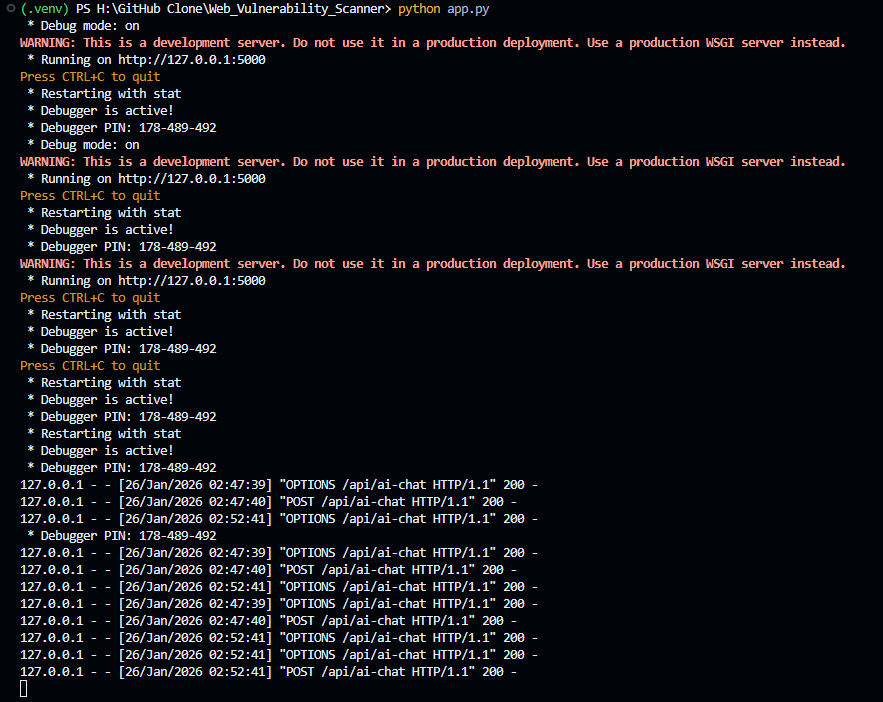
After running python app.py
<br>
!python app.py
<br>
---
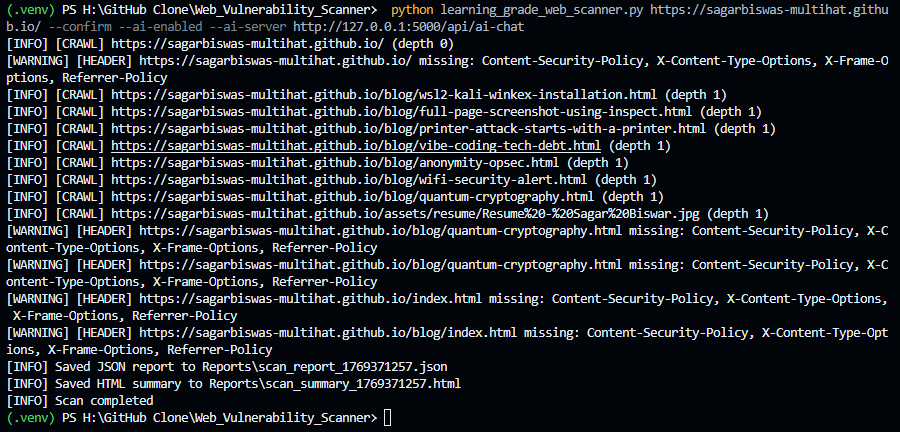
After running mainScaner.py
<br>
!python mainScaner.py httpssagarbiswas-multihat.github.io --confirm --ai-enabled --ai-ser.0.0.15000apiai-chat
<br>
---
After running cd Reports, python -m http.server 8080
<br>
!python -m http.server 8080
<br>
---
JSON Report Example
<br>
!JSON Report Example
<br>
---
HTML Report Example
<br>
!HTML Report Example
<br>
---
AI Help Center
1).
!AI Help Center
2).
!AI Help Center
<br>
---
withOut Anonymize before send
<br>
!withOut Anonymize before send
<br>
---
with Anonymize before send
<br>
!with Anonymize before send
<br>
</details>
---
Table of contents
---
Key features
<details>
<summary>Quick explanation — Queue-based crawler, Polite crawler & No recursi spawning (beginner-friendly)</summary>
#### 1. Queue-based crawler
A queue-based crawler uses a single shared work queue to manage all URLs that need to be .
How it works (conceptually):
1. Start with the base URL → put it into the queue
2. Worker threads repeatedly:
- Take one URL from the queue
- Fetch the page
- Extract links
- Add new, allowed URLs back into the same queue
3. Repeat until the queue is empty or the depth limit is reached
What this means:
> Key point:
> All crawling tasks go through one controlled pipeline (the queue).
#### 2. Polite crawler
A polite crawler is designed not to stress or harm servers.
In this scanner, politeness includes:
--delay)robots.txtInstead of hammering a site, the scanner behaves more like a careful human using a browser.
#### 3. No recursi spawning (critical design choice)
This explains what the crawler deliberately does NOT do.
✘ Bad design (recursi spawning):
<di=center>
| |
| ------------------------------ |
| Thread A URL A |
| └── spawns Thread B for link B |
| └── spawns Thread C for link C |
| └── spawns Thread D for link D |
</div>
A thread is a lightweight unit of execution that allows a program to do work in parallel (In parallel means multiple tasks are executed at the same time, instead of one after another.).
Problems with this approach:
This pattern is called recursi spawning — every discovered link creates new threads.
✓ What this scanner does instead?
[ Queue ]
↓
Worker Thread Pool (fixed size)
↓
Fetch → Extract → Enqueue (back to Queue)
A fixed pool equal to the --threads setting (default: 10). Threads are created once at startup and reused — no new thread per discovered link.
--threads)> Core idea:
> No recursi spawning = threads do not create threads
#### Why this design is considered best practice?
<di=center>
| Aspect | Queue-based crawler | Recursi |
| ---------------------- | ---------------------- | ------------------ |
| Thread control | ✅ Fixed & predictable | ❌ Unbounded |
| Rate limiting | ✅ Enforceable | ❌ Difficult |
| Ser | ✅ Polite | ❌ Aggressive |
| Memory safety | ✅ Stable | ❌ Risky |
| Debugging | ✅ Easier | ❌ Chaotic |
| Legal / ethical safety | ✅ Much safer | ❌ Risky |
</div>
This is why professional tools and search engine crawlers use queue-based designs.
Result: safer scans, predictable behavior, ethical crawling, and easier extensibility.
---
</details>
--delay) to avoid hammering a serverrobots.txt awareness (the scanner checks and respects rules where a).<details>
<summary>robots.txt</summary>
robots.txt
robots.txt: A website rule file that tells scanners which URLs they should avoid.
<di=center>
<!-- | robots.txt status → Scanner behavior |
| -------------------------------------------------------------------- |
| robots.txt exists → Scanner follows the rules (Disallow / Allow) |
| robots.txt is missing → Scanner treats the whole site as accessible |
| robots.txt is empty → Same as missing; no restrictions are applied | -->
| robots.txt status → Scanner behavior |
| :------------------------------------------------------------------: |
| robots.txt exists → Scanner follows the rules (Disallow / Allow) |
| robots.txt is missing → Scanner treats the whole site as accessible |
| robots.txt is empty → Same as missing; no restrictions are applied |
<!-- :---: = centered
---: = right-aligned
:--- = left-aligned -->
</div>
📍 there is no robots.txt in the repository. The scanner only fetches/respects robots.txt from target sites at runtime;
---
</details>
<details>
<summary>Quick explanation — ThreadPool & scalable crawling and analysis (beginner-friendly)</summary>
ThreadPool-style workers
ThreadPool-style workers means the scanner creates a fixed number of worker threads once and reuses them to process many URLs, instead of creating new threads again and again.
#### What is a ThreadPool?
A ThreadPool is simply a group of pre-created worker threads that wait for work.
How it works in this scanner:
--threads)A fixed pool equal to the --threads setting (default: 10). Threads are created once at startup and reused — no new thread per discovered link.
- Takes one URL from the queue
- Fetches the page (GET only)
- Runs all analyses (headers, cookies, XSS, SQL error checks)
- Reports findings
- Goes back to the pool to process the next URL
No new threads are created during scanning
#### Why this is called _scalable_?
Scalability here does not mean infinite threads.
It means:
--threadsExamples:
--threads 4 → slower, very gentle on the server--threads 8 → balanced and recommended--threads 16 → faster, still controlled and polite#### Why this matters for crawling _and_ analysis
Each worker does both jobs:
- Checking security headers
- Inspecting cookies
- Detecting reflected XSS markers
- Scanning responses for SQL error patterns
So the same worker repeats this cycle:
fetch → analyze → report → repeat
This keeps scanning controlled, consistent, and safe.
#### Bad vs good design (quick contrast)
✘ Without ThreadPool (bad design):
✓ With ThreadPool (this scanner):
#### Simple mental model
> ThreadPool = a fixed team of workers sharing a task list
They don’t hire new workers every time work appears —
they just keep working until the task list is empty.
Result: safer scans, polite crawling, and predictable performance.
---
</details>
requests.Session)<details>
<summary>Quick explanation — Session reuse & connection pooling (beginner-friendly)</summary>
Session reuse and connection pooling
Session reuse and connection pooling mean the scanner keeps a small, persistent HTTP client state and reuses network connections, instead of opening a brand-new connection for every request.
In simple terms:
> The scanner behaves like a browser that stays open, not like one that restarts for every page.
1. What is a Session (in simple terms)?
A session is a persistent context that remembers information across multiple HTTP requests.
Using requests.Session() allows the scanner to reuse:
Set-Cookie)> Without a session, every request starts from scratch and forgets previous responses.
Beginner analogy:
A session is like keeping one browser tab open, instead of opening a brand-new browser for every page you visit.
2. What is connection pooling?
Connection pooling means:
✘ Without pooling:
Connect → Request → Close
Connect → Request → Close
Connect → Request → Close
✓ With pooling (used by this scanner):
Connect once → Request → Request → Request → Close later
This behavior is handled automatically by requests.Session().
3. Why this matters for a crawler / scanner?
✘ Without session & pooling (bad practice):
✓ With session reuse & pooling (this scanner):
4. Why this is important for security analysis?
Session reuse improves accuracy, not just performance:
Secure, HttpOnly, SameSite) persist across requestsProfessional tools such as:
all rely on session reuse and connection pooling for correctness and performance.
Ultra-short :
_A session keeps HTTP state; connection pooling reuses network connections._
---
</details>
- Missing security headers (Content-Security-Policy, X-Content-Type-Options, X-Frame-Options, Referrer-Policy, Strict-Transport-Security)
- Insecure
Set-Cookie flags (Secure, HttpOnly, SameSite)- Dangerous HTTP methods reported in
Allow header (PUT, DELETE, TRACE, CONNECT)- Reflected XSS detection using contextual reflection checks
- Error-based SQL detection by searching for common database error messages
--depth 1-2)--confirm to run---
What this scanner does (and doesn't)
Does:
robots.txt entries where aDoes not:
---
Requirements
Python dependencies (install via pip):
requirements.txt should include at minimum:
(Optionally add python-dotenv or similar if you want en configuration.)
---
Files
mainScaner.py — main scanner implementation and CLIapp.py — minimal Flask AI proxy that forwards context to a Groq clientReports/ — default output directory for JSON and HTML resultsInstallation
1. Clone the repository:
2. Create and activate a en (recommended):
3. Install dependencies:
Instructions (AI-enabled local setup)
> This workflow uses three terminals: one for the AI backend, one to ser over HTTP, and one to run the scanner.
>
> DM me for a free API key (used by the example Groq-based AI backend).
1. Terminal 1 — Start the AI backend (Flask)
The included app.py is a minimal Flask endpoint that demonstrates how the embedded report can call an AI service. It expects an en GROQ_API_KEY for the Groq client used in the example. The scanner embeds the AI server URL into the generated HTML when --ai-enabled --ai-server are passed.
Set the API key and run the server:
The AI server will listen on:
---
2. Terminal 2 — Serve the HTML reports
Expose the Reports/ directory via a local HTTP server (required for browser JS features):
This makes reports a at:
---
3. Terminal 3 — Run the scanner with AI enabled
After the scan completes, note the generated HTML file name:
---
🌐 Open in Edge / Chrome
Open the report in your browser:
You can now:
---
Usage & Command-line arguments
The scanner exposes a small CLI. All arguments are documented below.
Notes on arguments:
base_url must include the URL scheme (http:// or https://). The scanner will only crawl the _same host_ as the base URL.--threads controls parallelism. Higher speed up scans but may increase load on the target.--delay is important: it enforces a minimum delay per host between requests. Use higher when scanning production systems.--depth limits how deep the crawler will follow links and can also be a range to control _analysis depth_.More explanation on --depth
#### Depth is measured in link-hops from the base URL:
0 — scan the base URL only (seeded at depth 0)
1 — include the base URL and any pages linked directly from it
2 — include pages linked from the base page and pages linked from those pages
3 — include pages linked from the previous level (i.e., pages whose shortest link-distance from the base is 3)
1-2 — crawl links as needed, but only run analysis on pages whose depth is between 1 and 2 (inclusive)
N — include any page whose shortest link-distance from the base URL is <= N
> Important clarification (for 1-2):
> The crawler may still visit shallower pages (e.g., depth 0) to disco, but security checks are only performed on pages at depth 1 and 2.
Implementation note: the scanner enqueues the base URL at depth 0 and enqueues discovered links with depth + 1.
URLs with depth > max_depth are skipped. When a range is used (e.g., --depth 1-2), crawling still reaches deeper pages to disco, but analysis only runs when depth >= min_depth and depth <= max_depth.
#### Example crawl levels (illustrative):
> Note:
> Most real-world live at: depth 0–2. eg, Landing pages, Forms, Dashboards, API endpoints, Blog posts, Admin panels (if exposed).
> Very deep pages are often: Pagination, Archives, Comment pages, User-generated content, Repetiti.
> Scanning them adds noise, not value.
---
</details>
--header and --cookie let you pass authentication context for authorized, authenticated scans (no login automation).--confirm is intentionally required to remind you of legal/ethical constraints. The script will refuse to run without it.---
Examples
Scan a single site with default settings (safe defaults):
Scan with more threads and a longer delay (polite):
Scan shallowly (only the base URL):
Scan a depth range (only analyze pages at depth 1–2, but still crawl to reach them):
Run with a depth range (only analyze pages at or deeper than min_depth):
Provide custom headers or cookies (helpful for authenticated pages; no login automation is included):
Generate the AI test UI HTML (no scanning):
Enable the AI UI in the generated report (you must also provide --ai-server pointing to your AI proxy endpoint):
Scan with custom headers and cookies for authenticated testing (no login automation):
Specify a custom output folder:
---
Output files & report format
After a successful run, the scanner writes two primary files to the output directory:
scan_report_<timestamp>.json — The raw findings array in JSON format. Each item contains:-
url — The URL where the issue was observed-
issue — A short title for the issue (e.g., "Missing Security Headers")-
details — A small JSON object with more context (e.g., which headers were missing)scan_summary_<timestamp>.html — A compact, shareable HTML summary table suitable for quick review.These files are intended as starting points for manual . See the project code to extend or reformat outputs (CS, or integration with bug trackers).
---
Internals & design decisions
crawl_worker and read from a single Queue.last_access timestamps are tracked for each host to apply --delay politely.robots.txt where a. If it cannot fetch robots.txt, it proceeds but logs the condition.requests.Session is used to speed up scanning and correctly handle cookies/headers.Limitations to be aware of:
---
Extending the scanner
Examples of useful extensions:
analyze_page method and add helper functions similar to check_reflected_xss or check_sqli_errors.If you'd like, I can add any of the above as follow-up work.
---
Safety & legal notes (please read)
--delay to reduce the load on target servers and avoid interference with production.base_url and uses multiple worker threads to fetch pages politely (respecting robots.txt and per-host crawl delays).max_depth.min_depth are analyzed for headers, cookies, HTTP methods, reflected XSS e, and error messages pointing to potential SQL injection.--threads or adjust --delay, but be careful to remain polite to the target site.---
Limitations:
Contributing
Contributions are welcome. If you add features, please:
---
Contact / Acknowledgements
This README was generated to accompany a learning-grade scanner implementation. If you want more help integrating an LLM-based remediation assistant safely (production-ready proxy patterns, rate-limiting, or example Nginx configurations), ask for a focused guide and I will provide one.
---
项目信息
开发语言:Python
Star 数:33
技术要点
该项目属于安全软件方向的开源资源,代码结构清晰,适合安全研究人员学习参考。项目围绕PoliteWebScanner is a learning-grade web vulnerability scanner plus AI-assisted report viewer. It crawls safely (queue-based, robots-aware, rate-limited), detects common issues (security headers, cookie flags, reflected XSS heuristics, SQL error patterns), and exports human-friendly JSON/HTML reports with optional AI help for triage and remediation展开,提供了可运行的实现,对理解相关安全机制、工具原理与攻防技术具有较高的研究价值。
从技术实现角度看,此类项目的核心在于对底层原理的深入理解与工程化落地。开发者在研究过程中可以结合官方文档与社区讨论,梳理项目的初始化流程、核心模块职责与数据流转,逐步掌握其中的技术细节与设计思路。
使用与学习建议
1. 下载源码压缩包,解压到本地环境。
2. 根据项目类型准备对应的运行环境与依赖。
3. 按照 README 中的步骤完成配置与部署。
4. 在隔离的测试环境中运行验证,避免影响生产系统。
免责声明
本资源来源于开源社区,仅供安全研究、技术学习与合法授权范围内的攻防演练使用,请勿用于任何非法或侵害他人权益的用途。使用本项目产生的一切后果由使用者自行承担。
| 资源标题 | Web_Vulnerability_Scanner-AI - PoliteWebScanner is a learning-grade web vulnerabi |
| 所属分类 | 安全软件 |
| 发布作者 | admin |
| 发布时间 | 2026-10-05 22:49:28 |
| 下载权限 | 免费下载 |
| 附件数量 | 2 个下载链接 |
| 浏览次数 | 292 |
| 讨论数量 | 0 |
| 主题状态 | 正常讨论中 |