 安全软件
点击放大
cpguard - Open-source CPG-based interprocedural taint analy
项目说明
<p align="center">
<img src="assets/icon.png" width="128" alt="CPGuard"/>
</p>
<h1 align="center">CPGuard</h1>
<p align="center">
<b>Air-gapped security assessment, from source code to the finished report</b><br/>
<sub>CPG-based taint analysis · LLM triage · audit deli generated for you — a desktop tool that ne home</sub>
</p>
<p align="center">
<b>English</b> · <a href="README.ko.md">한국어</a>
</p>
<p align="center">
<img src=" alt="Python 3.11+">
<img src=" alt="Windows / macOS / Linux">
<img src=" alt="Apache-2.0">
<img src=" alt="Django 5.2">
<img src=" alt="11 languages">
<img src=" alt="78 taint rules">
<img src=" alt="tests passing">
<img src=" alt="OWASP Benchmark">
<img src=" alt="LLM">
</p>
<p align="center">
<img src="docs/img/architecture.svg" width="820" alt="CPGuard analysis pipeline"/>
</p>
> CPGuard = CPG (Code Property Graph) + Guard — it guards your code with a property graph, not a pattern list. That graph is why the logo is three connected nodes.
Pattern-matching scanners drown you in false positives. CPGuard goes deeper —
tree-sitter parsing → language-neutral IR → CPG (AST · CFG · def-use · call) → interprocedural taint with function summaries → LLM triage —
then hands the result to a three-pane review screen where a human confirms the .
<p align="center">
<img src="docs/img/workbench.png" width="900" alt="CPGuard review screen — Source→Sink taint flow over the code with the inspector"/>
<br/>
<sub> review — the <b>Source→Sink</b> taint path highlighted over the real code, with rule, CWE, flow steps and in the inspector.</sub>
</p>
---
✨ Features
Two detection axes
SQL injection (CWE-89) · command injection (78) · code injection (94) · XSS (79) · path tra (22) · file inclusion (98) · SSRF (918) · open redirect (601) · insecure deserialization (502) · buffer o (120) · format string (134) · LDAP (90) / XPath (643) injection · WebView XSS · Intent redirection (926) · library injection (114).
review screen
Ctrl+P) · context menu · gutter markers.sanitize, then clear them in one action.Running an assessment
Scale: one analyst, hundreds of projects
/projects/) — every project's latest scan in one searchable, sortable, filterable table.Assess against the standard your client asks for
Deli you can actually hand over
LLM triage
Deli
UX & delivery
---
🖥 Screens
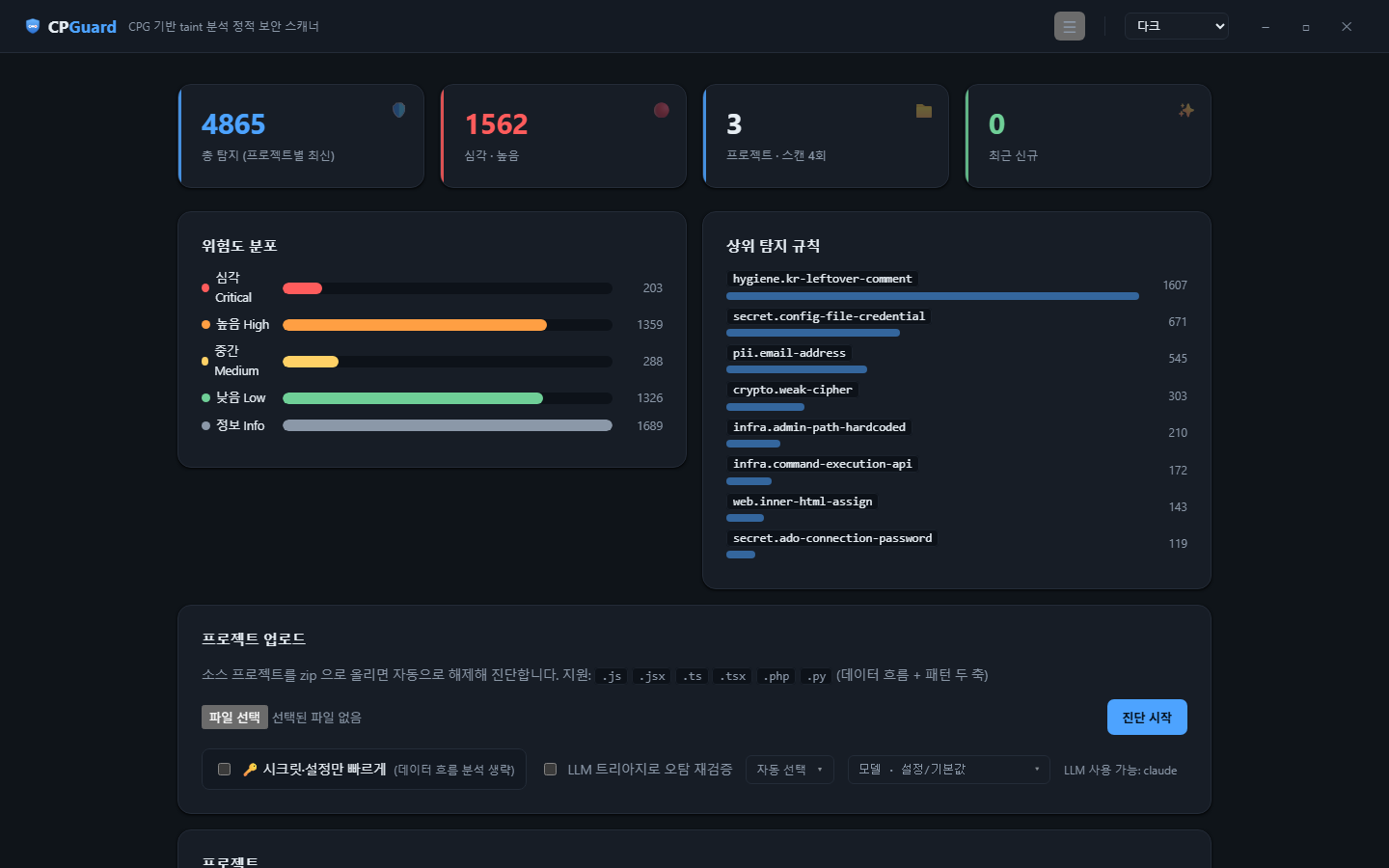
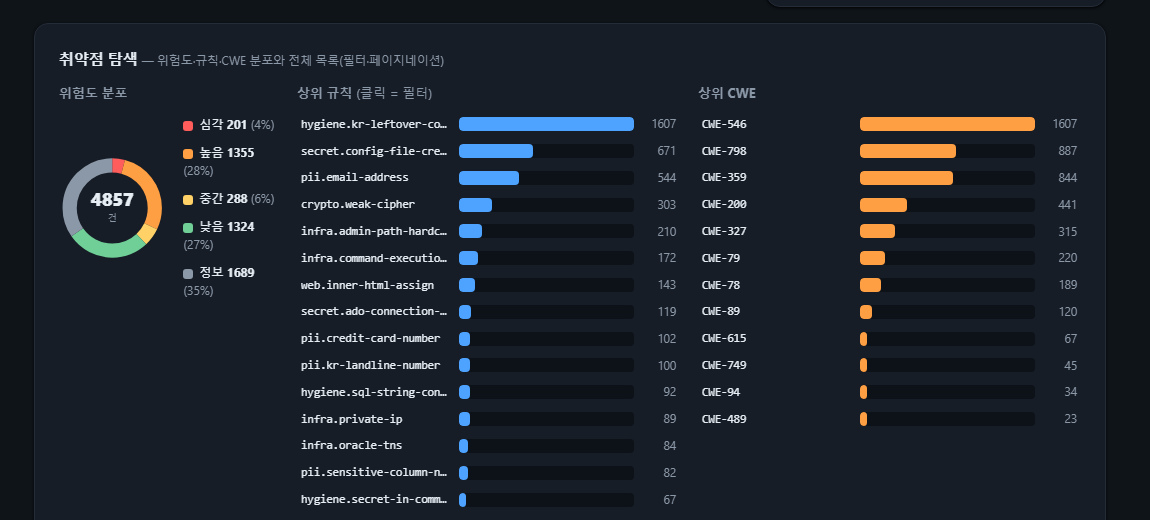
| Dashboard | explorer (charts · filters · pagination) |
|:---:|:---:|
| !Dashboard | !Explorer |
| Status tiles · se distribution · top rules | Se donut · top rule/CWE bars · large-result explorer |
<p align="center">
<img src="docs/img/reports.png" width="780" alt="Reports and exports"/>
<br/>
<sub>Reports & exports — per-scan assessment report and remediation guide (PDF), SARIF, CS sheet (xlsx).</sub>
</p>
> The review screen (code + Source→Sink flow + inspector) is the hero image above.
---
📦 Install
Installer — Windows (recommended, no Python needed)
Download the latest CPGuard-Setup-*.exe from Releases and run it.
It installs per-user (no admin rights) and installs the WebView2 runtime if missing.
To build the installer yourself:
It also runs portable — copy the dist/CPGuard folder and run CPGuard.exe.
From source — Windows · macOS · Linux
The engine, the web UI and every report format are pure Python and run on all three platforms.
Only the packaged installer and the nati window (WebView2) are Windows-specific.
Korean text in PDF reports needs a Korean font: Windows and macOS have one out of the box, on
Linux install fonts-nanum, or point CPGUARD_PDF_FONT at any TrueType font you prefer.
🚀 Usage
In the dashboard: upload zip(s) → progress screen (step checklist + runtime log) → review and mark →
add an LLM key in ⚙️ Settings to enable AI analysis and triage.
🔁 CI/CD (GitHub Actions)
Scan on every push and PR, upload SARIF to GitHub Code Scanning so new findings appear inline on the code and the PR. A se gate can fail the build.
The CLI gates too: cpguard scan . --sarif out.sarif --fail-on high (exit code 1 at or above that se).
This repository's .github/workflows/cpguard.yml is a working example.
---
🤖 MCP server — AI agents drive it (SAST → dynamic )
An AI coding agent (Claude Code, Cursor) can dri over MCP: scan, pull the
source-to-sink e, explain a rule, and dynamically a finding —
answering the question a static scanner never can, "is this actually exploitable?"
CPGuard does not fire HTTP. Because it knows the sink, it emits a probe plus an
oracle — what to send and, more importantly, what to observe that proves the sink
fired. The agent fires it with its own tools and hands back what it saw; CPGuard
matches that against the oracle and returns a . It is oracle-match, not IAST —
no instrumentation, so it reports "the predicted signal appeared", not "I observed the
real execution path". NOT_REPRODUCED is kept distinct from FALSE_POSITIVE.
Nine tools: scan_file · scan_start / scan_status (async whole-repo audit) ·finding.list · finding.e · explain · probe.get · .submit · (did your fix actually close the flow?). The core opens no socket; only the
agent's own web tools touch the network.
Design, boundaries, and the full tool contract: docs/mcp-ser.md.
Runnable demo: examples/mcp_demo.py.
🧱 Architecture
Stack: Python 3.11+ · tree-sitter (11 languages) · Django (SSR) · reportlab (PDF) · openpyxl (xlsx) · SARIF 2.1.0 · LLM SDKs (anthropic / openai / google-genai) · pytest.
📊 Accuracy
Measured against labelled ground truth in eight languages — fi totalling 138,785 cases, of which 76,866 are scored (the rest are categories excluded below). Score = recall − false-positive rate (the official OWASP metric; random guessing = 0.000).
| Corpus | Language | Scored | Recall | Precision | Score |
|---|---|---:|---:|---:|---:|
| OWASP Benchmark v1.2 | Java | 1,572 | 95.8% | 88.7% | 0.826 |
| C# Test Suite | C# | 33,024 | 84.3% | 91.1% | 0.728 |
| OWASP Benchmark for Python | Python | 346 | 82.1% | 83.3% | 0.717 |
| BenchProctor (httplib / standalone) | C++ | 800 | ~79% | 100% | 0.79 |
| BenchProctor (gin / net_http) | Go | 2,000 | ~80% | ~85% | 0.66 |
| BenchProctor (standalone) | C | 500 | 52.0% | 100% | 0.520 |
| BenchProctor (express / koa) | Ja | 2,200 | ~66% | ~78% | 0.47 |
| BenchProctor (express_ts / nestjs) | TypeScript | 2,200 | ~62% | ~79% | 0.45 |
| BenchProctor (rails / sinatra) | Ruby | 2,400 | ~56% | ~81% | 0.43 |
| PHP test suite | PHP | 31,824 | 47.0% | 66.4% | 0.369 |
Read it plainly: Java, C++, Python, C# and Go are at working-tool quality; C, JS/TS and Ruby are usable; PHP is not there yet. Where the score is low it is usually recall, not noise (PHP recall is 47.0%).
read out of a database or a file count as user input by default — that is where second-order injection and stored XSS come from. Pass --trust-stored-data to turn it off. The default was chosen by measurement, not taste: across 15 suites, treating stored data as a source cost nothing anywhere and bought Go 50 extra true positives for 9 extra false ones.
Do not take the 100% precision on C/C++ at face value. Those corpora are small (400-500 cases each) and their safe are generated from exactly two guard idioms (check(x) ? x : default, and "replace with a default when the check fails"). Teaching the engine to read those two took the false positives to zero in one step — that measures how completely the generator's rules were matched, not how real C code is. The 52-80% recall is the more honest signal. Kotlin and Swift have no public labelled corpus at all, so they are covered by idiom tests instead (see below).
Config-only categories (weakrand, crypto, hash, securecookie, trustbound) are not data-flow problems and are excluded rather than counted as free wins. Categories that *are* data-flow problems but that CPGuard has no rule for (NoSQL injection, SSTI, prototype pollution, XXE …) are reported separately from those, so co is not quietly inflated.
The benchmarks drove real engine work. Ja at 0.137 and PHP at 0.001; every point since came from a defect the numbers exposed — taint dying inside try blocks, for-each losing the collection's taint, no path sensitivity at all, container mutations not propagating, comparison results carrying taint, constructor-to-field-to-method flows missing in every language, by-reference output parameters (fgets(buf, …), Decode(&v)) in to a return- model, closures running against an empty en so anything they captured looked clean, and — most recently — applied to a *projection* of the tainted value (if !allowed[url.Parse(x).Hostname()] { reject }) leaving the original tainted, which was 59% of all Go false positives. Each fix is a general analysis technique, not a tweak aimed at the test cases. The full before/after ledger is in bench/README.md.
Where labelled data does not exist (Kotlin, Swift, and any framework a corpus does not cover), CPGuard ships idiom tests instead: 130 minimal reproductions of shapes that are common in real code, run as part of the test suite. They catch a different class of defect than the benchmarks do — TypeScript parameters were carrying their type annotation into the parameter name, which silently removed *every typed function* from interprocedural analysis, and no benchmark score moved when it was fixed.
A second measurement on a real application (DVWA, PHP) is also published. Full methodology, per-category tables and limitations: bench/README.md.
📈 Large codebases
Strategies for extreme scale (20–30 GB of source, 50k+ findings) — sink pre-filtering, incremental and summary caches, the finding DB table, aggregation with scrolling, triage clustering — are in docs/large-scale.md.
🗺️ Roadmap
pip install "cpguard[mcp]", cpguard-mcp)💛 Support
CPGuard is de in the open by one person. If it is useful to you, you can support
its continued de on Fairy @cp-guard.
📄 License
Apache License 2.0. Free to use, modify and redistribute, commercially included, provided the notice and license are preserved. Includes an express patent grant.
Bundled third-party font: NanumGothic (c) NHN Corporation, under the SIL Open Font License 1.1. It ships with the package so Korean reports render on servers without Korean fonts installed.
项目信息
开发语言:Python
Star 数:24
技术要点
该项目属于安全软件方向的开源资源,代码结构清晰,适合安全研究人员学习参考。项目围绕Open-source CPG-based interprocedural taint analysis + LLM triage, with a Ghidra-style audit workbench. Runs fully offline.展开,提供了可运行的实现,对理解相关安全机制、工具原理与攻防技术具有较高的研究价值。
从技术实现角度看,此类项目的核心在于对底层原理的深入理解与工程化落地。开发者在研究过程中可以结合官方文档与社区讨论,梳理项目的初始化流程、核心模块职责与数据流转,逐步掌握其中的技术细节与设计思路。
使用与学习建议
1. 下载源码压缩包,解压到本地环境。
2. 根据项目类型准备对应的运行环境与依赖。
3. 按照 README 中的步骤完成配置与部署。
4. 在隔离的测试环境中运行验证,避免影响生产系统。
免责声明
本资源来源于开源社区,仅供安全研究、技术学习与合法授权范围内的攻防演练使用,请勿用于任何非法或侵害他人权益的用途。使用本项目产生的一切后果由使用者自行承担。
| 资源标题 | cpguard - Open-source CPG-based interprocedural taint analy |
| 所属分类 | 安全软件 |
| 发布作者 | admin |
| 发布时间 | 2026-10-05 22:52:59 |
| 下载权限 | 免费下载 |
| 附件数量 | 2 个下载链接 |
| 浏览次数 | 367 |
| 讨论数量 | 0 |
| 主题状态 | 正常讨论中 |