 安全软件
点击放大
quodeq - AI-powered code quality and security scanner. Open
项目说明
<p align="center">
<picture>
<source media="(prefers-color-scheme: dark)" srcset="res/quodeq-logo-dark.svg" />
<img src="res/quodeq-logo.svg" alt="Quodeq" width="340" />
</picture>
</p>
<h2 align="center">AI-powered code quality and security scanner</h2>
<p align="center">
<a href=" src=" alt="Tests" /></a>
<a href=" src=" alt="MIT License" /></a>
<a href=" src=" alt="PyPI" /></a>
</p>
<p align="center">
<a href=" the demo</a> · <a href=" · <a href=" · <a href=" · <a href="
</p>
---
AI models can now find and design flaws that human review misses, but most tools that put this to work are locked behind enterprise contracts. Quodeq is the open alternative.
Open source. MIT license. Runs locally. No telemetry. No account. No servers.
Scans any codebase with AI across six quality dimensions from ISO 25010:
Security, Reliability, Maintainability, Performance, Flexibility, and Usability.
Every finding maps to a CWE identifier. You get grades, with line numbers, and a fix plan. Cloud pro (Claude, Gemini, Codex, GitHub Copilot) for speed. Local models via Ollama for privacy.
---
What It Finds
Each finding includes a reason, the offending code, and a fix plan. Results are stored as JSON on your machine.
---
Getting Started
1. Prerequisites
> On macOS you can skip this step by installing through Homebrew (see step 2). The
> formula pulls in its own Python.
| OS | Command |
|---|---|
| macOS | brew install python pipx |
| Windows | winget install Python.Python.3.13 then python -m pip install --user pipx && python -m pipx ensurepath |
| Debian / Ubuntu | sudo apt install -y python3.12 python3-pip pipx |
| Fedora / RHEL | sudo dnf install -y python3.12 python3-pip pipx |
| Arch | sudo pacman -S python python-pipx |
> Debian/Ubuntu heads-up: If you use the nati window (not --browser), you'll need sudo apt install -y python3-gi gir1.2-webkit2-4.1 too. Otherwise quodeq will auto-fall-back to opening the dashboard in your default browser.
> Windows note: The test suite runs on windows-latest as a blocking CI gate, so a Windows regression blocks the PR. The desktop window (WebView2) is smoke-tested manually per release. If anything misbehaves, please open an issue.
Minimum : Python 3.12+. (The dashboard UI ships pre-built inside the wheel, so end users no longer need Node.js or npm. Contributors who want to iterate on the UI source need Node 20+ and npm 10+, see CONTRIBUTING.md.)
2. Install quodeq
Homebrew (macOS, and the shortest path):
pipx / pip (every platform):
Prefer a desktop app to the CLI? See Desktop apps below.
3. Pick an AI provider
Quodeq needs an LLM to do the e. You have two options:
Local, free, private — Ollama with Gemma 4:
Cloud, faster — one of the agentic CLIs (at least one):
npm install -g -ai/claude-codenpm install -g /codexnpm install -g /gemini-clinpm install -g /copilot). Requires a dedicated Quodeq login.llama.cpp is also supported. See AI Pro for the
full list and how to choose.
4. Launch the dashboard
The dashboard opens at . Use Settings → AI Provider to select the one you installed in step 3, then E to point at a project and start your first scan.
If the nati doesn't show up (common on Linux without GTK), run quodeq --browser instead.
Desktop apps (beta)
Every release attaches two prebuilt apps to Releases. They bundle their own Python, so none of the prerequisites abo.
| Download | Platform | What it is |
|---|---|---|
| Quodeq-<>-macOS.dmg | macOS | The dashboard in a nati, with an optional menu bar icon (Settings, "Show menu bar icon") that starts, stops, and monitors it |
| Quodeq-<>-Windows.zip | Windows | The dashboard in a nati (WebView2) |
macOS. Open the .dmg and drag the app to Applications. The apps are unsigned, so
the first launch needs one of:
Or right-click the app, select Open, then click Open in the dialog.
Windows. Unzip anywhere and run Quodeq.exe. SmartScreen will warn about an
unrecognized publisher on first launch: choose More info then Run anyway.
---
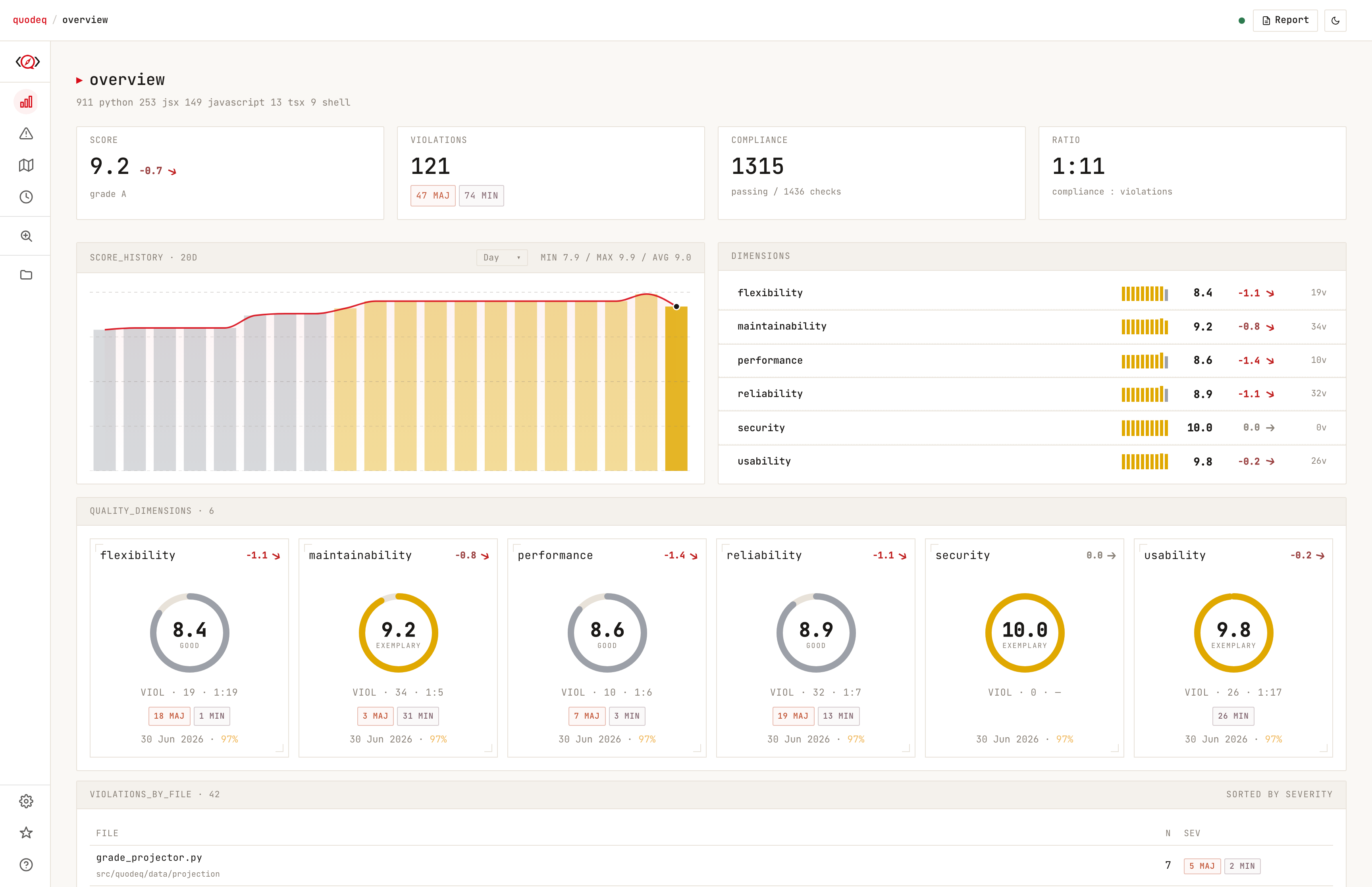
Dashboard
<p align="center">
<picture>
<source media="(prefers-color-scheme: dark)" srcset="res/dashboard-dark.png" />
<img src="res/dashboard.png" alt="Quodeq Dashboard" width="900" />
</picture>
</p>
<br>
Click any dimension, file, or principle to explore the details. Dismiss false positi from the UI.
Running quodeq is equi to quodeq dashboard. Both open the same UI.
CLI
Excluding paths (.quodeqignore)
To keep fixture, , or generated code out of an e, add a.quodeqignore file at the scan root. Each line is a glob pattern matched
against paths relative to that root; a pattern that names a directory excludes
e under it. Blank lines and # comments are skipped, and * crosses
directory separators.
Exclusions apply e files are collected — full scans, --scope runs,
monorepo subproject discovery, and --diff-from change detection — on top of
the built-in skips (node_modules, dist, dot-directories, ...).
SARIF / GitHub code scanning
Quodeq can emit findings as SARIF 2.1.0
for GitHub code scanning (the Security tab), GitLab SAST, or any SARIF
consumer. Generate it during a scan, or export it from a past run:
Code snippets are omitted by default (so source ne your machine on
upload); pass --with-snippets to include them. Use --min-se to drop
low-se findings.
Upload to GitHub code scanning:
---
AI Pro
Choose what fits your workflow. Configure in Settings from the dashboard.
| Provider | Type | Getting started |
|---|---|---|
| Ollama | Local | Free, private, code ne your machine |
| llama.cpp | Local | Run any GGUF directly. Supports speculati (MTP) via a draft model |
| Claude Code | Cloud | Best balance of speed, quality, and cost |
| Codex CLI | Cloud | OpenAI models |
| Gemini CLI | Cloud | Google models |
| GitHub Copilot CLI | Cloud | Models a through your Copilot account, including company-managed accounts |
> For local analysis we recommend Gemma 4 (gemma4:26b). Reducing the context window to 32k still gives good results and allows running multiple subagents in parallel.
Using GitHub Copilot
Copilot supports e and the embedded assistant. Install a current GitHub
Copilot CLI, then sign in once using Quodeq's dedicated profile:
On PowerShell:
Use your company account if it provides your Copilot entitlement. For Enterprise
Cloud with data residency, add --host YOUR-ENTERPRISE.ghe.com to the login command.
Your organization must permit Copilot CLI, the selected model, and Quodeq's MCP
servers: findings for e and quodeq-assistant for the assistant.
Subscription limits, usage charges and company policies still apply.
Select GitHub Copilot in the e or assistant settings. Quodeq loads
the models a to your signed-in account into a dropdown. Choose Auto
or a specific model. Tier o use the same list; leave them on **Use main
model** to reuse the selected model.
The login instructions disappear when model discovery succeeds. If it fails,
Quodeq shows the setup instructions, an error, and Retry connection. Model
discovery queries the CLI's model API without sending a prompt or running tools.
Successful login and model discovery do not MCP access. If Copilot reports
that the required MCP server is blocked by policy, Quodeq stops the e
without spawning replacement agents. Ask your organization administrator to
allow the ser retrying.
The e displays E blocked by Copilot policy. The reason is
saved with the run and remains after refresh, e the logs.
If files were already completed, their results are kept with a partial-run warning.
Quodeq uses ~/.quodeq/copilot, not your normal ~/.copilot profile. It does not
copy credentials or inherit unrelated API keys, GitHub tokens, Copilot permission
or BYOK en o. Keep this profile for login and Quodeq sessions only. Custom MCP
servers and installed plugins in it are rejected. Quodeq disables hooks,
custom instructions and built-in MCP servers, and runs from a scratch directory.
E expose file-reading tools plus Quodeq's findings MCP server; assistant
turns expose only Quodeq's assistant MCP tools, with the existing write-grant rules.
The assistant's web toggle is una for Copilot.
If authentication expires, repeat the dedicated-profile login command. Errors
from model access, company policy and quota restrictions are surfaced rather than
silently switching pro. Quodeq's e time limits still apply; its
Claude-specific dollar-budget and maximum-turn flags are not passed to Copilot.
Using llama.cpp
llama.cpp is one process per model, fixed at launch. Start llama-server yourself, then point Quodeq at it from Settings → AI Provider → llama.cpp.
Quodeq probes and looks for the log file at ~/.quodeq/logs/llama-server.log (or platform-standard locations like ~/Library/Logs/llama-server.log on macOS). O with LLAMACPP_LOG_FILE. To use a different port or host, set LLAMACPP_BASE_URL. To switch models, stop llama-server and relaunch with a different -m.
---
How It Works
1. Detect languages, frameworks, and project structure
2. Analyze with AI agents that read the code using read-only tools
3. Collect findings as structured JSONL via tool calls
4. Score against ISO 25010 principles with CWE classifications
5. Report per-dimension grades, , compliance, and fix plans
Results are stored in ~/.quodeq/e/ and persist across sessions. Works with any language. The AI analysis engine reads and understands code regardless of the tech stack.
Quodeq scores each principle on a 0 to 10 scale using four independent constraints. Full details in the scoring formula documentation.
Standards
By default, Quodeq e the six ISO 25010 dimensions. It also ships with Clean Architecture, Domain-Dri and Accessibility (WCAG 2.2) standards, off until you enable them. You can create your own from the dashboard, or ask any AI to generate one as a .json file and import it.
Numeric thresholds on the built-in standards (max function lines, max parameters, ...) can be tuned per project from the dashboard. O live in .quodeq/standards-o.json at the repo root, so the whole team scans with the same numbers.
Threat model
By default Quodeq scores a project as if it were a hosted multi-tenant service. For a
local-first tool that produces noise: a file path built from a value the operator already
controls gets reported as an attack surface, and the real findings get buried under it.
A project can say what it actually is, in .quodeq/project-profile.json at the repo root:
multiTenant answers whether more than one user's data li the same code.networkExposure is one of loopback, lan, or public, and answers whether an
untrusted party can open a socket to the process.
Findings the declared model rules out are capped at minor rather than dropped, and
carry a marker naming the rule that moved them, so nothing becomes in. A finding
whose e names a real remote source is ne, whatever the profile says.
The file is optional. Without it Quodeq infers what it can from your manifests and
otherwise assumes the most pessimistic model, which is how it beha.
---
Privacy
There is no Quodeq account, no Quodeq server, and no telemetry. Your source code is read
locally and e results are written to ~/.quodeq/e/ as plain JSON. If
you run a local provider, nothing about your code leaves the machine at all. If you pick a
cloud provider, your code goes to that provider using your own API key or CLI account.
Quodeq makes exactly one network call of its own: a daily unauthenticated check
(PyPI for pip/pipx/uv installs, GitHub Releases for the desktop apps). It shows a
dismissible notice with the right upgrade step and ne itself. Turn it off withQUODEQ_NO_UPDATE_NOTIFIER=1, or under Settings → Updates.
---
De
Run from a fresh checkout:
Same OS prerequisites as the pipx install (Python 3.12+), plus Node 20+ and npm 10+ because a source checkout builds the dashboard UI from the working copy. You also need a configured LLM provider (Ollama or Claude Code / Codex CLI / Gemini CLI / GitHub Copilot CLI) before you can actually scan anything.
If the dashboard window doesn't appear on Linux, run uv run quodeq --browser (the nati needs python3-gi + gir1.2-webkit2-4.1, which aren't pulled in by the pip wheel).
---
Contributing
Issues and pull requests are welcome. CONTRIBUTING.md covers the
de setup, the test suite, and how changes get re. E taking part is
expected to follow the Code of Conduct.
If Quodeq is useful to you, starring the repo genuinely helps other people find it.
Changelog
See CHANGELOG.md for release history, or the
release announcements
for the readable .
License
MIT. See LICENSE.
项目信息
开发语言:Python
Star 数:23
技术要点
该项目属于安全软件方向的开源资源,代码结构清晰,适合安全研究人员学习参考。项目围绕AI-powered code quality and security scanner. Open source, MIT, runs locally. <🧭>展开,提供了可运行的实现,对理解相关安全机制、工具原理与攻防技术具有较高的研究价值。
从技术实现角度看,此类项目的核心在于对底层原理的深入理解与工程化落地。开发者在研究过程中可以结合官方文档与社区讨论,梳理项目的初始化流程、核心模块职责与数据流转,逐步掌握其中的技术细节与设计思路。
使用与学习建议
1. 下载源码压缩包,解压到本地环境。
2. 根据项目类型准备对应的运行环境与依赖。
3. 按照 README 中的步骤完成配置与部署。
4. 在隔离的测试环境中运行验证,避免影响生产系统。
免责声明
本资源来源于开源社区,仅供安全研究、技术学习与合法授权范围内的攻防演练使用,请勿用于任何非法或侵害他人权益的用途。使用本项目产生的一切后果由使用者自行承担。
| 资源标题 | quodeq - AI-powered code quality and security scanner. Open |
| 所属分类 | 安全软件 |
| 发布作者 | admin |
| 发布时间 | 2026-10-05 22:53:21 |
| 下载权限 | 免费下载 |
| 附件数量 | 2 个下载链接 |
| 浏览次数 | 260 |
| 讨论数量 | 0 |
| 主题状态 | 正常讨论中 |