 安全软件
点击放大
ideviewer-oss - Security scanner for developer workstations — dete
项目说明
IDE
A cross-platform security tool that scans de workstations for supply chain threats — risky IDE extensions, dependencies, plaintext secrets, insecure AI tool configurations, and MCP ser. Built as a single Go binary with an optional self-hosted portal for team-wide .
Documentation | Releases | Portal Container
Why IDE?
De workstations are one of the most pri and least monitored attack surfaces. IDE extensions run with full process permissions, npm packages execute lifecycle hooks silently, AI coding assistants connect to external services, and secrets sit in plaintext across config files. EDR and SCA tools don't see any of this. IDE does.
Key Features
| Feature | Description |
|---------|-------------|
| IDE Extension Analysis | Scans 7+ IDEs, analyzes extension permissions against a 4-tier risk model (Critical/High/Medium/Low) |
| AI Tool Detection | Discovers Claude Code, Cursor, Kiro, OpenClaw — their skills, MCP servers, cloud integrations, and granted permissions |
| AI Risk Scoring | Flags insecure configurations: wildcard bash access, plaintext API keys, autonomous execution, unencrypted transports |
| Extension Dependency Scanning | In packages bundled inside VS Code node_modules and JetBrains plugin JARs — in to standard SCA |
| Secrets Detection | Finds plaintext credentials in .env files and git history. Ne actual — only type and location |
| C | All packages (project + extension-bundled) checked against OSV.dev for known |
| Real-Time Monitoring | Filesystem watchers detect extension changes within 30 seconds |
| Tamper Detection | SHA-256 checksums on daemon binary, config, and service files with instant alerting |
| Git Hook Bypass Detection | Detects --no- usage and reports to portal |
| SARIF Output | Integrates with GitHub Code Scanning, CodeQL, and CI/CD pipelines |
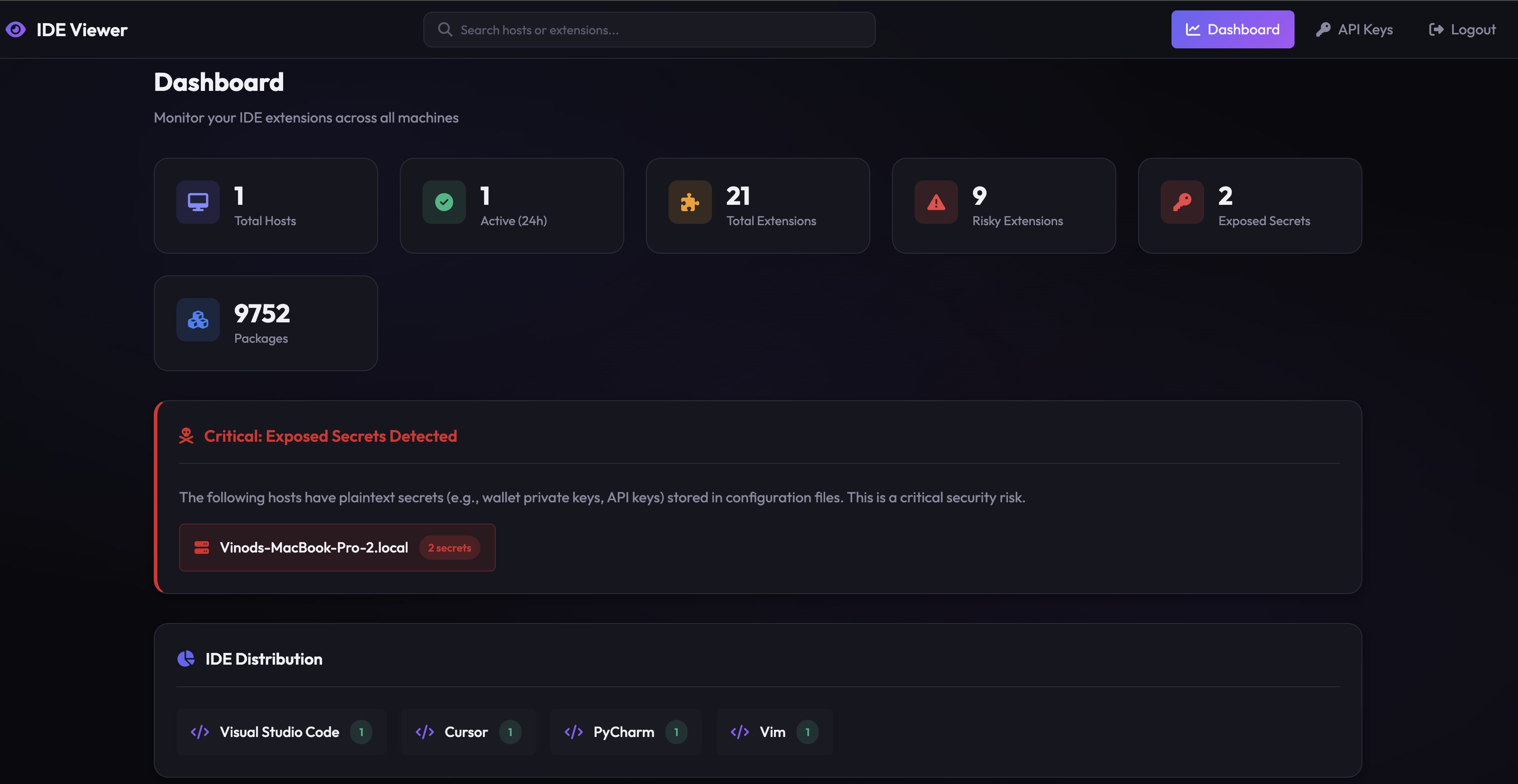
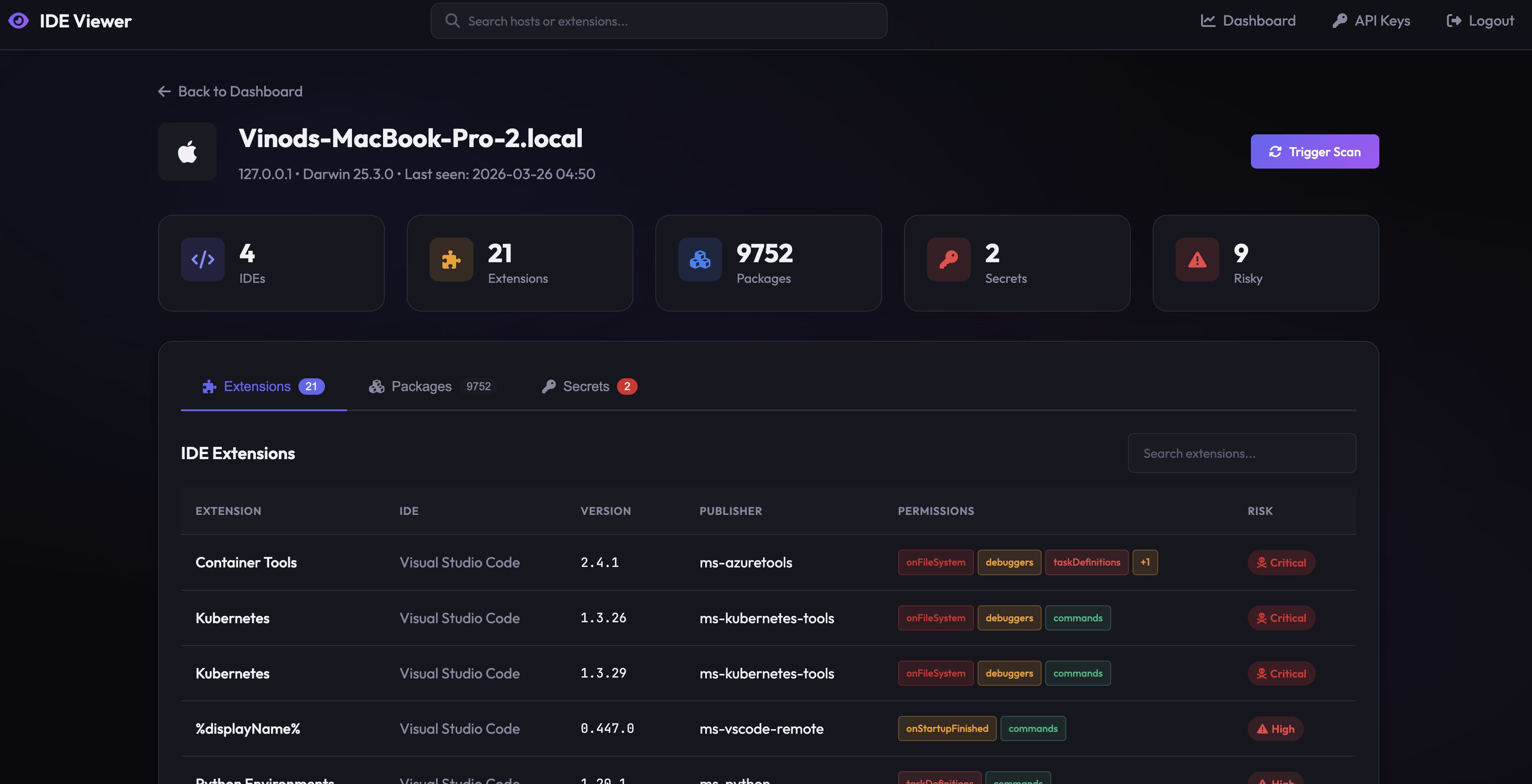
Screenshots
| Dashboard | Host Detail |
|-----------|------------|
| !Dashboard | !Host Status |
| Extension Analysis | Secrets Detection |
|-------------------|-------------------|
| !Extensions | !Secrets |
Quick Start
Option A: Download a Pre-built Binary
Download from the Releases page:
| Platform | File |
|----------|------|
| macOS (Apple Silicon) | IDE*-arm64.pkg |
| Windows (64-bit) | IDE*.exe |
| Linux (amd64) | ide*_amd64.deb |
| Linux (arm64) | ide*_arm64.deb |
Option B: Build from Source
Standalone Scanning (No Portal)
Portal Setup
The portal is a self-hosted web dashboard for monitoring multiple de machines. It's optional — the CLI works standalone.
One-Command Start
Default login (via ./start.sh or ./start.sh --docker): admin / ide — you'll be prompted to change it on first login. When running the portal container directly without setting IDE, a strong initial password is generated and printed to the startup logs instead.
> Portal URL / port: both ./start.sh and ./start.sh --docker serve on . O with PORTAL_PORT. Both run on PostgreSQL.
Connect a Daemon
First log in to the portal and create a customer key (Keys → Create), then:
The daemon starts automatically after registration and runs continuously in the background.
Portal Container
What Gets Detected
Supported IDEs
| IDE | Extensions Path |
|-----|----------------|
| VS Code | ~/./extensions |
| Cursor | ~/.cursor/extensions |
| | ~/./extensions |
| Kiro | ~/.kiro/extensions |
| JetBrains (IntelliJ, PyCharm, WebStorm, GoLand, CLion, Rider, PhpStorm, RubyMine, DataGrip) | ~/.config/JetBrains/*/plugins |
| Sublime Text | ~/Library/Application Support/Sublime Text/Packages |
| Vim / Neovim | ~/.vim, ~/.config/nvim |
| Xcode | /Applications/Xcode.app |
Supported Package Managers
| Language | Manager | Detection |
|----------|---------|-----------|
| Python | pip, pipen | Global + project-level |
| Node.js | npm | Global + project + extension-bundled |
| Go | go | ~/go/bin + go.mod |
| Rust | cargo | Global + Cargo.lock |
| Ruby | gem | Global + Gemfile.lock |
| PHP | composer | composer.lock |
| Java | maven | JetBrains plugin JARs |
| macOS | Homebrew | Formula + casks |
AI Tools & MCP Detection
| Tool | What's Detected |
|------|----------------|
| Claude Code | Enabled skills/plugins, cloud MCP servers (Gmail, Calendar, etc.), per-project permissions (Bash, Read, Write, MCP tools), API keys (redacted) |
| Cursor | MCP ser from mcp.json and VS Code settings, remote MCP servers, env vars, auto-appro |
| Kiro | MCP ser from ~/.kiro/settings/mcp.json, remote MCP servers, env vars, auto-appro |
| OpenClaw | LLM pro, Slack/port |
Each component is classified by type (skill, mcp-server, cloud-mcp, integration, permission) and assigned a risk score:
| Risk | Examples |
|------|---------|
| Critical | Wildcard bash access (Bash(*)), plaintext API keys |
| High | Autonomous execution enabled, external integrations, insecure HTTP transport, auto-approved MCP tools |
| Medium | Cloud MCP with data access, shell command permissions |
| Low | Skills with network access |
Extension Risk Model
| Level | Criteria | Examples |
|-------|----------|----------|
| Critical | Full system compromise potential | Wildcard acti (*), filesystem + shell |
| High | Elevated permissions | Authentication, terminal access, URI handlers |
| Medium | Potentially concerning | Startup execution, debugger access |
| Low | Standard permissions | Commands, keybindings, themes |
Portal Features
tamper_alert.created, extension.high_risk_detected, hook_bypass.detected, policy.) to any HTTP endpoint with HMAC-signed payloads and automatic retryPolicy rows, critical tamper alerts (for block), and policy. webhooksis_unpublished state for every extension on every host; daily re-poll detects when an extension is removed from the marketplace, emits extension.unpublished_detected webhook, and surfaces a banner on affected hosts/metrics endpoint with counters for webhook deli, policy , RQ job outcomes, and extension enrichmentsDeployment
AWS (ECS Fargate + RDS)
Creates: VPC, ALB (HTTPS optional), ECS Fargate (autoscaling 1-4), RDS PostgreSQL, Secrets Manager, CloudWatch, ECR. See deploy/README.md.
MDM (JAMF / Mosyle / Kandji)
For managed fleets, deploy the PPPC profile first (grants Full Disk Access silently), then the .pkg:
See deploy/mdm/README.md for step-by-step JAMF instructions.
Linux (systemd)
Privacy by Design
Uninstalling
Contributing
We welcome contributions! See CONTRIBUTING.md for guidelines.
License
Apache License 2.0 — Copyright 2024-2026 Securient
See LICENSE for the full text.
项目信息
开发语言:Python
Star 数:21
技术要点
该项目属于安全软件方向的开源资源,代码结构清晰,适合安全研究人员学习参考。项目围绕Security scanner for developer workstations — detects IDE extension risks, AI tool permissions, plaintext secrets, and vulnerable dependencies across VS Code, Cursor, JetBrains, and more.展开,提供了可运行的实现,对理解相关安全机制、工具原理与攻防技术具有较高的研究价值。
从技术实现角度看,此类项目的核心在于对底层原理的深入理解与工程化落地。开发者在研究过程中可以结合官方文档与社区讨论,梳理项目的初始化流程、核心模块职责与数据流转,逐步掌握其中的技术细节与设计思路。
使用与学习建议
1. 下载源码压缩包,解压到本地环境。
2. 根据项目类型准备对应的运行环境与依赖。
3. 按照 README 中的步骤完成配置与部署。
4. 在隔离的测试环境中运行验证,避免影响生产系统。
免责声明
本资源来源于开源社区,仅供安全研究、技术学习与合法授权范围内的攻防演练使用,请勿用于任何非法或侵害他人权益的用途。使用本项目产生的一切后果由使用者自行承担。
| 资源标题 | ideviewer-oss - Security scanner for developer workstations — dete |
| 所属分类 | 安全软件 |
| 发布作者 | admin |
| 发布时间 | 2026-10-05 22:53:59 |
| 下载权限 | 免费下载 |
| 附件数量 | 2 个下载链接 |
| 浏览次数 | 249 |
| 讨论数量 | 0 |
| 主题状态 | 正常讨论中 |