 安全软件
点击放大
wphunter - WordPress vulnerability scanner with public exploi
项目说明
wphunter
A Python CLI tool to scan WordPress plugins, themes, and core for known C, look up public exploits/POCs, and detect judol (gambling spam) injection — with AI-powered analysis . Works both offline (from exported lists) and remotely (from a URL). Supports Anthropic API key (pay-per-token) or Claude Pro/Max subscription Code SDK.
![Python 3.10+]()
![CI]()
![License: MIT]()
<p align="center">
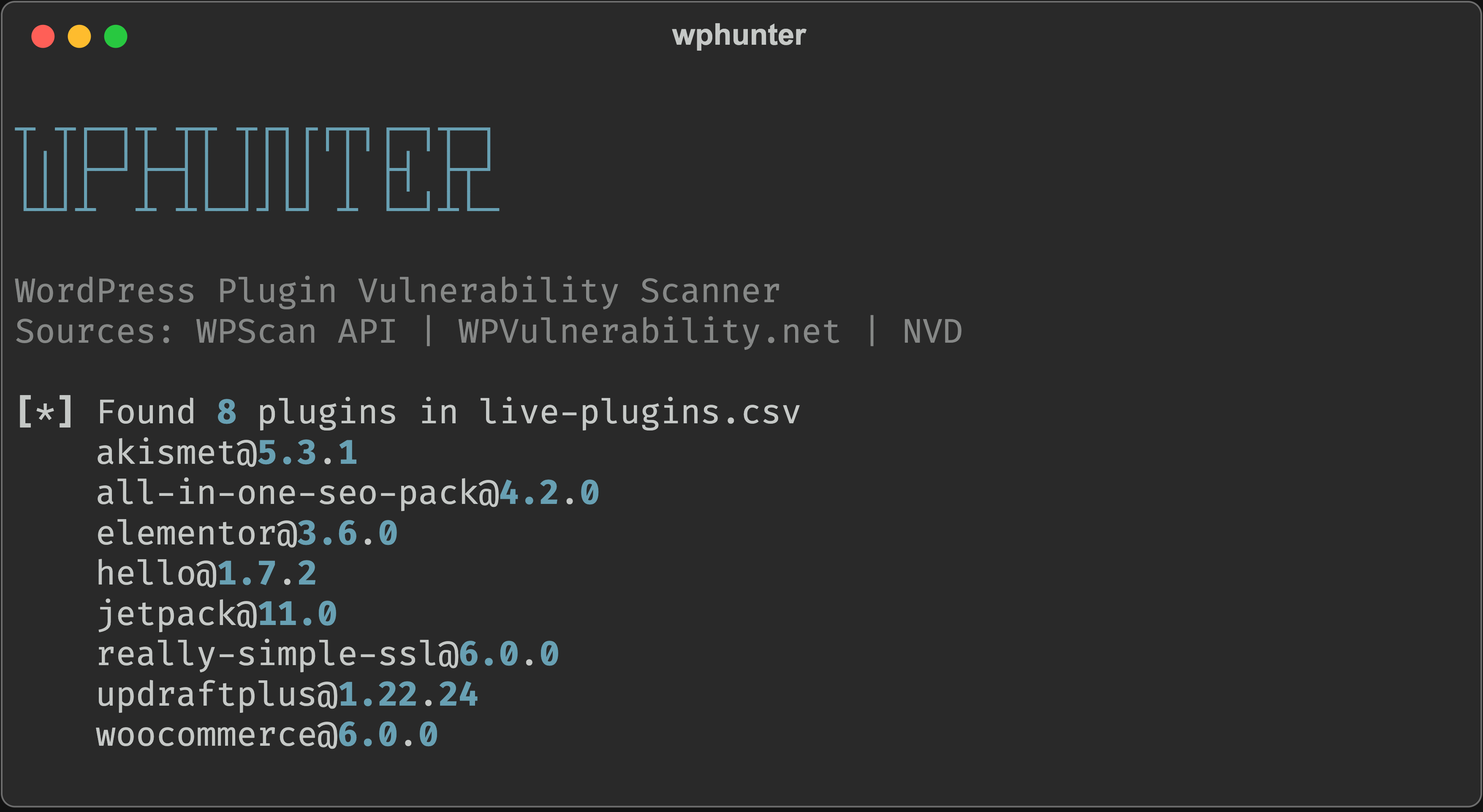
<img src="docs/banner.png" alt="wphunter banner" width="600">
</p>
Why This Tool?
I wanted to audit the plugins on my WordPress site — quickly check which ones had known CVEs. But every existing tool either needed a live URL or didn't support WordPress at all:
| Tool | Offline scan? | POC lookup? | Judol detection? | AI analysis? | Free? |
|------|:------------:|:-----------:|:----------------:|:------------:|:-----:|
| WPScan CLI | No (needs URL) | No | No | No | Freemium |
| Wordfence CLI | No (needs filesystem) | No | No | No | Freemium |
| Sucuri SiteCheck | No (needs URL) | No | Partial | No | Free |
| Trivy | No | No | No | No | Free |
| os | No | No | No | No | Free |
| wphunter | Yes | Yes (6 sources) | Yes (200+ brands) | Yes (Claude AI) | Yes |
wphunter fills this gap. Export your plugin/theme list and core , transfer to your machine, scan offline. No WAF triggers, no firewall issues, no authentication needed. Plus: AI-powered analysis that no other WordPress scanner offers.
Features
Scanning
Judol (Gambling Spam) Detection
AI-Powered Analysis (Claude)
POC / Exploit Lookup
~/.wphunter/cache/General
wp-cli CS, or tab-separated--threads for fast scanning of large lists--min-se flag for CI/CD pipelinesQuick Start
Installation
Basic Scan (no API key needed)
That's it. This uses WP.net which is completely free.
With POC Lookup
Remote Scan (from URL)
Get Your Plugin/Theme List & Core
On your WordPress server:
Transfer the CS to your machine (scp, rsync, copy-paste). Then scan.
Usage
Offline Scanning (from exported lists)
Remote Scanning (from URL)
Authentication (for AI analysis)
CLI Options
| Flag | Default | Description |
|------|---------|-------------|
| -i, --input | — | Plugin/theme list file path |
| -t, --type | plugin | Component type: plugin or theme |
| --wp- | — | WordPress core to scan (e.g. 6.4.3) |
| --url | — | WordPress site URL for remote scanning |
| -s, --source | wp | source: wpscan, wp, or both |
| -f, --format | table | Output format: table, json, or csv |
| -o, --output | *(stdout)* | Write results to file |
| --no-enrich | false | Skip NVD C |
| --no-banner | false | Skip ASCII banner |
| --threads | 1 | Number of concurrent API requests |
| --min-se | — | Minimum se: critical, high, medium, or low |
| --aggressive | false | Aggressi enumeration (remote scan) |
| --delay | 100 | Delay between requests in ms (remote scan) |
| --detect-judol | false | Enable judol (gambling spam) detection |
| --poc | false | Look up public exploits/POCs for discovered CVEs |
| --ai | false | Enable AI-powered analysis (requires auth) |
| --ai-model | claude-sonnet-4-20250514 | Claude model for AI analysis |
| --yes | false | Skip confirmation prompts |
At least one of --input, --wp-, or --url is required.
Subcommands
| Command | Description |
|---------|-------------|
| connect | Set up Anthropic API authentication |
| auth-status | Show current authentication status |
| disconnect | Remo credentials |
Input Formats
The tool auto-detects the format from your file. The same formats work for both plugins and themes.
Simple CSV (manual):
wp-cli CS (wp plugin list --format=csv or wp theme list --format=csv):
Tab-separated (wp plugin list or wp theme list):
Lines starting with # are treated as comments and ignored.
Sources
| Source | Vulns Found* | API Key? | Rate Limit | Databases |
|--------|:-----------:|:--------:|:----------:|-----------|
| WP.net | 108 | No | None | CVE + WPScan + Wordfence + Patchstack + EUVD + JVN |
| WPScan API | 74 | Required | 25 req/day/key | WPScan curated database |
| Both (deduplicated) | 120 | WPScan only | Combined | All of the above |
*\*Tested with the same 8 plugins (elementor, woocommerce, jetpack, etc.)*
Recommendation: use --source both for maximum co. The tool deduplicates automatically.
WPScan API Setup
1. Register a free account at wpscan.com
2. Get your API token (25 requests/day on free tier)
3. Set the en :
Key rotation: register multiple accounts and provide comma-separated keys:
The tool rotates between keys using round-robin and automatically skips exhausted ones.
N (Optional)
Some entries are missing C. The tool can fetch them from NIST NVD:
Get a free NVD API key at nvd.nist.gov.
Skip enrichment entirely with --no-enrich.
Output
Table (default)
<p align="center">
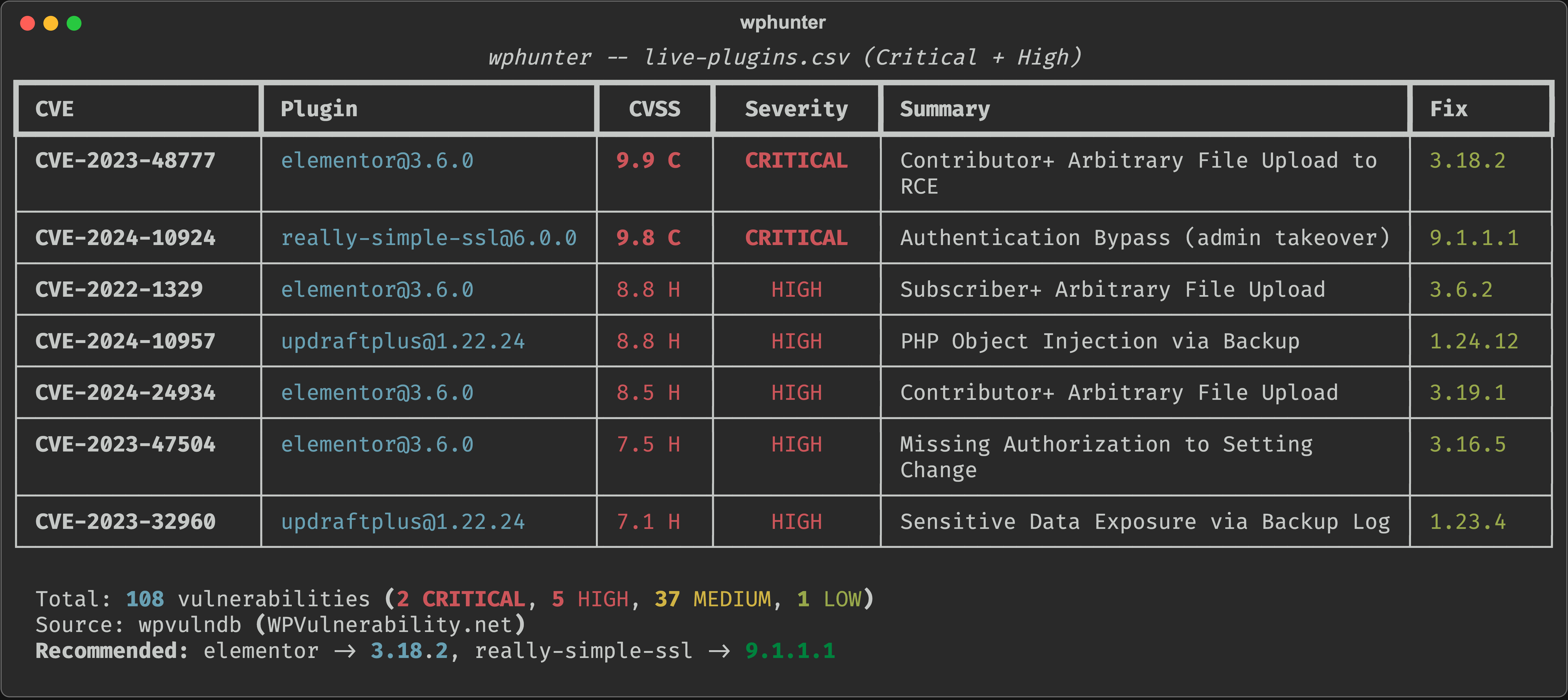
<img src="docs/output.png" alt="wphunter table output" width="700">
</p>
Color-coded se levels with C, fix , and a summary panel.
<details>
<summary>Full scan output (text)</summary>
</details>
JSON
<details>
<summary>Example JSON output</summary>
</details>
CSV
Opens in any spreadsheet application. References are semicolon-separated within cells.
POC Lookup Output
When using --poc, an additional table shows exploit/POC a for each CVE:
POC Status Classification (priority order):
| Status | Icon | Source | Meaning |
|--------|------|--------|---------|
| Exploited in Wild | 🔴 | CISA KE exploited, patch ASAP |
| Public Exploit | 🟠 | Exploit-DB | Ready-to-use exploit code exists |
| Public POC | 🟡 | nomi-sec PoC-in-GitHub | POC repository on GitHub |
| Nuclei Template | 🟡 | nuclei-templates | Detection template exists |
| Exploit Refs | 🔵 | NVD API | References tagged "Exploit" |
| No Known POC | ⚪ | (none matched) | No public exploit found |
EPSS (Exploit Prediction Scoring System) indicates the probability a CVE will be exploited in the next 30 days. Scores above 0.5 (50%) are highlighted in red.
<details>
<summary>JSON output with POC data</summary>
When using --poc --format json, a poc key is added:
</details>
Exit Codes
| Code | Meaning |
|:----:|---------|
| 0 | Clean — no or infections found |
| 1 | found |
| 2 | Judol (gambling spam) infection detected |
Use this in CI/CD pipelines to fail builds when plugins are detected. Combine with --min-se high to only fail on critical and high se .
Se Levels
Based on CVSS v3 scores:
| Level | C | Indicator |
|-------|:----------:|:---------:|
| Critical | 9.0 - 10.0 | 9.8 C |
| High | 7.0 - 8.9 | 8.8 H |
| Medium | 4.0 - 6.9 | 5.3 M |
| Low | 0.1 - 3.9 | 2.1 L |
| Unknown | No score | ? ? |
How It Works
Mode 1: Offline (from exported lists)
Mode 2: Remote (from URL)
Full Site Audit Example
Project Structure
Docker Test En
Want to test with a real WordPress? Spin one up with Docker:
POC / Exploit Lookup
After scanning, the --poc flag checks whether public exploit code or proof-of-concept exists for each discovered CVE. This helps prioritize patching — a CVE with a ready-to-use exploit is far more dangerous than one with no known POC.
How It Works
The tool queries 6 free public sources (no API keys required):
| Source | What It Provides | Cache |
|--------|-----------------|-------|
| Shodan CVEDB | EPSS score (exploit probability) + KEV flag | Li |
| CISA KEV | Actively exploited in the wild confirmation | Local, 24h TTL (~2MB) |
| Exploit-DB | Ready-to-use exploit code entries | Local, 7d TTL (~12MB) |
| nomi-sec PoC-in-GitHub | GitHub POC repositories with star counts | Li |
| Nuclei Templates | Detection template existence | Live HEAD check |
| NVD API | References tagged "Exploit" | Li |
On first run, CISA KEV and Exploit-DB are downloaded and cached in ~/.wphunter/cache/. Subsequent runs reuse the cache until TTL expires.
Rate Limiting
For a scan with ~20 CVEs, total POC lookup time is approximately 30–40 seconds.
Usage
Judol Detection
> What is Judol? "Judol" (judi online) is a massi campaign targeting WordPress sites, especially in Indonesia and Southeast Asia. Attackers compromise WordPress sites and inject hidden gambling spam content to manipulate search engine rankings. The site owner often doesn't notice because the gambling content is in to human — it only appears to search engine crawlers (Googlebot).
What This Tool Detects
wphunter's --detect-judol flag checks whether a WordPress site has already been infected with gambling spam injection. It does NOT prevent attacks — it detects existing infections so you can clean them up.
The detection works across all pages sitemap crawling, not just the homepage.
Detection Layers
| Layer | What it checks | How |
|-------|---------------|-----|
| 1. SERP Check | Are gambling pages indexed on Google? | Queries Google CSE API or generates manual search URLs |
| 2. Cloaking | Does the site ser content to Googlebot? | Compares responses with human User-Agent |
| 3. Content Analysis | Is there hidden gambling content in pages? | Scans for keywords, hidden CSS elements, suspicious links |
| 4. Sitemap Crawl | Are indi pages infected? | Fetches sitemap.xml/wp-sitemap.xml, crawls pages, analyzes each |
| 5. Spam Directories | Did attackers create gambling directories? | HEAD requests to common spam paths (/slot/, /togel/, /casino/, etc.) |
| 6. AI Analysis | Deeper contextual analysis (optional) | Sends findings to Claude API for expert-le |
Usage
Attack (How Sites Get Infected)
wphunter also helps identify how the attacker likely got in by scanning for known CVEs in your plugins, themes, and WordPress core. Common attack for judol injection:
| Attack | Example | wphunter detects? |
|---------------|---------|:-----------------:|
| plugins | Elementor RCE (C, CVSS 9.9) | Yes — --url or -i plugins.csv |
| themes | Theme file upload | Yes — --type theme |
| Outdated WordPress core | Core XSS/CSRF/auth bypass | Yes — --wp- or auto-detected via --url |
| Authentication bypass | Really Simple SSL (C, CVSS 9.8) | Yes — C |
| Weak credentials | Brute-forced admin password | No — use Wordfence/WPScan |
| Compromised hosting | Shared hosting neighbor attack | No — ser check needed |
| Supply chain | Nulled/pirated plugins/themes | No — requires filesystem access |
| File upload abuse | Malicious files in wp-content/uploads/ | No — requires filesystem access |
| Database injection | Modified wp_options, wp_posts | No — requires database access |
> Important: wphunter detects the infection and identifies possible attack through C, but it cannot determine the exact entry point with certainty. A full forensic in requires ser.
Remediation Guide (If Infected)
If wphunter reports your site as INFECTED, follow these steps:
1. Immediate Actions
2. Remove the Infection
wp-content/mu-plugins/ — attackers commonly drop auto-loading PHP files herewp-content/uploads/ — look for .php files (there should be none in uploads)functions.php, header.php, footer.php, index.php.htaccess in the root and wp-content/ — look for suspicious rewrite ruleswp_options table for suspicious entries:wp_posts and wp_postmeta for injected gambling content:3. Close the Attack
wp plugin update --allwp theme update --allwp core updatewp core download --force4. Secure Credentials
wp-config.php5. Harden the Site
define('DISALLOW_FILE_EDIT', true); to wp-config.php755, files 644, wp-config.php 440php_flag engine off to wp-content/uploads/.htaccess6. Request Re-indexing
AI Analysis Setup
To use --ai, you need either an Anthropic API key or a Claude Code OAuth token:
Two authentication paths:
| Auth Method | How It Works | Model |
|---|---|---|
| API Key (sk-ant-api03-*) | Direct Anthropic API calls | Claude Sonnet 4 (any model via --ai-model) |
| OAuth Token (sk-ant-oat01-*) | Agent SDK → Claude Code CLI | Claude Sonnet 4 (uses subscription quota) |
Get an API key at console.anthropic.com, or use your Claude Pro/Max subscription . Both paths are included in requirements.txt.
Docker Test En (Judol Simulation)
The docker-test/ directory includes a test malware file (judol-infection.php) that simulates a real judol attack for testing purposes. See docker-test/test-commands.sh for the full test procedure.
Limitations
wordpress-seo not yoast-seo for plugins).--aggressive) for broader co.Requirements
requests >= 2.28.0rich >= 13.0.0beautifulsoup4 >= 4.12 (for HTML parsing)lxml >= 5.0 (for fast HTML parsing)claude-agent-sdk >= 0.1.0 (for AI analysis Code subscription)Related
License
MIT License — see LICENSE for details.
Disclaimer
This tool is for authorized security testing and auditing only. By using this tool, you agree that:
--url) sends HTTP requests to the target site. While non-destructive, it may be logged by the target's WAF or security plugins.--aggressive) sends approximately 100+ HTTP requests to the target. Use responsibly and respect rate limits.docker-test/judol-infection.php) are provided for testing purposes only. They simulate real attack patterns and must never be deployed on production sites.项目信息
开发语言:Python
Star 数:16
技术要点
该项目属于安全软件方向的开源资源,代码结构清晰,适合安全研究人员学习参考。项目围绕WordPress vulnerability scanner with public exploit/POC lookup, gambling spam (judol) detection, and AI-powered analysis. Scan plugins, themes & core for known CVEs — offline or remote.展开,提供了可运行的实现,对理解相关安全机制、工具原理与攻防技术具有较高的研究价值。
从技术实现角度看,此类项目的核心在于对底层原理的深入理解与工程化落地。开发者在研究过程中可以结合官方文档与社区讨论,梳理项目的初始化流程、核心模块职责与数据流转,逐步掌握其中的技术细节与设计思路。
使用与学习建议
1. 下载源码压缩包,解压到本地环境。
2. 根据项目类型准备对应的运行环境与依赖。
3. 按照 README 中的步骤完成配置与部署。
4. 在隔离的测试环境中运行验证,避免影响生产系统。
免责声明
本资源来源于开源社区,仅供安全研究、技术学习与合法授权范围内的攻防演练使用,请勿用于任何非法或侵害他人权益的用途。使用本项目产生的一切后果由使用者自行承担。
| 资源标题 | wphunter - WordPress vulnerability scanner with public exploi |
| 所属分类 | 安全软件 |
| 发布作者 | admin |
| 发布时间 | 2026-10-05 22:56:47 |
| 下载权限 | 免费下载 |
| 附件数量 | 2 个下载链接 |
| 浏览次数 | 244 |
| 讨论数量 | 0 |
| 主题状态 | 正常讨论中 |