 安全软件
点击放大
web-vulnerability-scanner - Non-destructive web vulnerability scanner in Pytho
项目说明
web-
A lightweight, defensive web scanner written in Python for
authorized security testing (pentesting your own or explicitly appro).
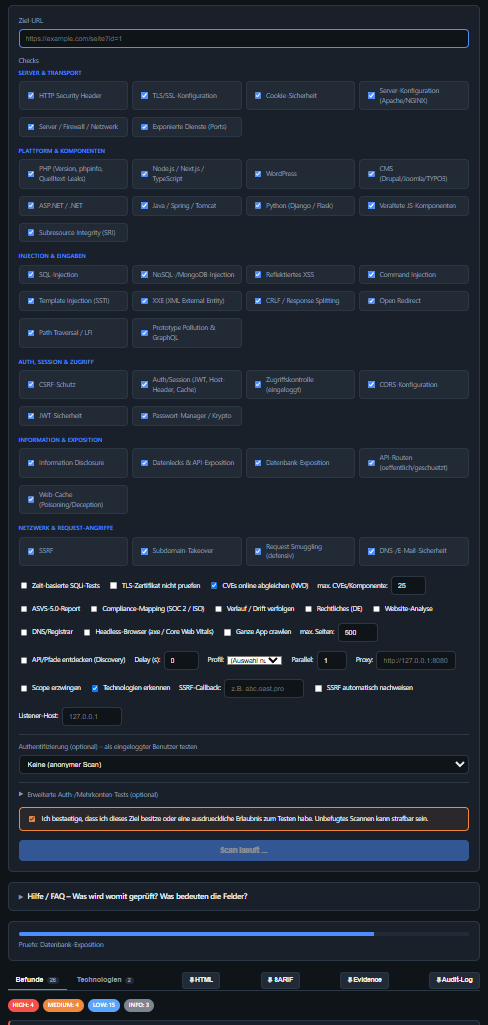
!Web interface of the scanner: target URL, grouped check selection, scan options and li
⚠️ Legal notice
Use this tool exclusively against systems that you own or for which you have
explicit, written permission. Unauthorized scanning of third-party systems can
be a criminal offense in many countries (e.g. in Germany under § 202a/c StGB).
The tool asks for an authorization confirmation before every scan.
The scanner is non-destructive: it does not modify any data and uses no
destructi (no DROP/DELETE, no stacked queries, no DoS).
Installation
> Optional packages: dnspython (for the dns check), cryptography (for
> certificate key length/signature in the tls check) and pymongo (for the
> MongoDB unauth check in the database check) are included in requirements.txt.
> If they are missing, the affected sub-checks are silently skipped (for the
> database check only port detection remains).
Usage
The scanner can be used two ways. The web interface is the easiest entry point:
See Web interface for details. E the web UI offers is
also a on the command line via scan.py:
| Option | Effect |
|----------------|---------|
| --checks | Selection from the check names (see "What is checked?": headers,tls,…,node,wordpress,network,api,tra,jwt,pwmgr,pollution,dotnet,ja,cms) or all |
| --timeout | Request timeout in seconds (default 10) |
| --delay | Pause between requests (considerate scan) |
| --insecure | Do not the TLS certificate |
| --time-based | Enable time-based SQLi/command injection detection |
| --crawl | Crawl same-origin and run the injection checks on all discovered pages |
| --max-pages N | Crawl: max. number of pages (default 500) |
| --max-depth N | Crawl: max. link depth (default 8) |
| --discover | API/path discovery (OpenAPI, JS endpoints, robots/sitemap, backups, OIDC) → test discovered endpoints |
| --ssrf-callback HOST | Your own (external) OOB callback host for the SSRF check |
| --ssrf-auto | Pro SSRF automatically via the built-in local listener |
| --ssrf-listen-host HOST | OOB listener address: 127.0.0.1 (default), auto (egress IP) or IP/tunnel host |
| --faq | Explains what each option checks and which inputs are expected (then exits) |
| --asvs | Additionally produce an ASVS 5.0 report (automated checks) |
| --legal | Legal compliance report (DE): imprint, GDPR, cookies, SEO, accessibility (heuristic) |
| --browser | With --legal: rendered WCAG audit browser (Playwright+axe-core) |
| -- | Actively & non-destructively confirm findings |
| --no-c | Disable the online C (NVD) – use only the bundled list |
| --c | Ignore the local C and reload fresh from the NVD |
| --c N | Max. online CVEs per component (default 25, by se) |
| --ratelimit-burst N | Requests for the rate-limit probe of the network check (5–40, default 20; not a load test) |
| --profile P | Scan profile quick (fast essentials), full (all), safe (without more aggressi); o --checks |
| --concurrency N | Parallel workers for the per-URL checks during crawl/discovery (default 1) |
| --proxy URL | Route all requests through an HTTP/S proxy (e.g. Burp/ZAP: ) |
| --scope / --allow-host H | Only request the target host (+ subdomains, + allowed hosts); e else is blocked & logged |
| --audit-log FILE | Log every sent request (time/method/URL/status) as JSONL |
| --sarif FILE | Sa as SARIF 2.1.0 (CI / GitHub Code Scanning) |
| --track | Record the scan in the local history and show the drift (new/fixed/unchanged) vs. the previous run |
| --controls | Compliance mapping: map findings onto SOC 2 and ISO 27001 controls (only the externally portion) |
| --remediation | Load the stored remediation status per finding and show the open backlog |
| --set-status FP=STATUS | Set the remediation status of a finding (OPEN/IN_PROGRESS/RESOLVED/RISK_ACCEPTED/FALSE_POSITIVE); can be gi times. Additionally --status-owner/--status-note/--status-due |
| --e FILE | Save an audit-ready e bundle (findings + + controls + remediation + drift) as JSON |
| --history-dir DIR | Different base folder for history/remediation (default: %LOCALAPPDATA%/web-) |
| --no-tech | Disable technology detection (tech stack o) (on by default) |
| --analyze | Additional website analysis: performance, SEO, HTML markup conformance, DNS/email, a & trackers/privacy |
| --mxtools | DNS/registrar checks (records, SPF/DMARC/DKIM/MTA-STS/BIMI/TLS-RPT, RDAP, DNSBL, SMTP) |
| --json FILE | Additionally sa as JSON |
| --yes | Skip the authorization prompt |
| -- | Print the and exit (the same is stamped into JSON/HTML/SARIF/e) |
Multi-page checking (crawler)
By default only the entered URL is checked (plus the curated path lists of
indi checks and the forms on exactly that page). So the scanner does *not*
crawl the application on its own.
With --crawl (CLI) or the "Crawl entire app" checkbox in the web UI, the
scanner discovers all linked pages of the same origin and runs the parameter-/
page-related injection checks (**SQLi, XSS, NoSQLi, command injection, open
redirect**) on every discovered page and every form.
reset, remove …) are always skipped – so a logged-in crawl does not trigger
anything.
--auth-method (finds pages behind thelogin), otherwise anonymous.
--max-pages/--max-depth, and dedup by (path + parameter names) – ?id=1 and ?id=2count as one page. Duplicate findings are merged.
start URL; the crawl specifically extends the injection co.
(status, depth, title, form/parameter characteristics, "finding" marker on hits;
including the API endpoints found ), on the CLI as a compact list
and in the HTML/JSON export as its own section.
--crawl --asvs):the page-specific categories (, session management, authentication) are
e across all discovered pages and aggregated app-wide per requirement
(worst status wins, affected pages are listed); host-wide categories
(architecture, access control, cryptography) remain single.
API/path discovery (for SPAs)
For single-page apps the link crawler finds hardly anything – the attack surface
is in the API. With --discover (CLI) or the "Discover API/paths" checkbox
the scanner discovers additional endpoints in a read-only way and feeds them into
the injection checks:
parameters filled with placeholders).
.bak/~/.old …)./.well-known/openid-configuration (e.g. endpoints over HTTP → finding).Ad auth/multi-account tests
Beyond the defaults, login and authorization weaknesses can be checked actively
(but non-destructively):
| Test | What & limits |
|------|----------------|
| Session fixation (--auth-tests) | Logs in once and checks whether the session ID rotates. Separate login credentials (--login-url/--username/--password …) or form auth. |
| Brute-force protection (--auth-tests) | ≤15 failed logins with a fake user → does rate limit/lockout/delay kick in? Does not lock a real account. |
| Tenant isolation / pri escalation (--second-cookie) | Can account B read object-related data (id parameter) belonging to A or admin areas? Read-only, findings "suspected" (confirm role/tenant manually). |
| Password policy (--password-policy-url / --password-policy-auto) | Opt-in, state-changing: checks whether trivial passwords are accepted. --password-policy-auto searches for the endpoint read-only and tests only the best candidate. |
> The login test is independent of the main auth method: provide your own
> --login-url/--username/--password (+ field names/--success-indicator), and
> exactly this login form is checked for fixation/brute force — even if the main
> scan runs e.g. via --auth-method cookie. In the web UI separate fields appear
> for this once "Login security tests" is enabled.
> Not automatable (code review): the ser password hashing method
> (bcrypt/Argon2 …) cannot be observed from the outside. What is checked is
> transport (login over TLS) and JWT secret strength.
Authenticated scans (as a logged-in user)
So that tests also run behind the login, the scanner can authenticate. Supported:form (form login with automatic CSRF/hidden-field pickup), basic, bearer,cookie, header. The session established this way carries cookies/headers into
all checks.
CLI – form login:
If no --password is passed, the tool prompts for it hidden or usesSCAN_PASSWORD. Alternatively, store login credentials in a file:
Other methods:
Web UI: In the *Authentication* section choose the method and fill in the
fields. After the start a banner shows whether the login succeeded.
> Tip – Broken Access Control while logged in: With a session set, the
> access check becomes especially . Example with a session cookie:
>
> It checks (read-only) admin/pri paths *with and without* a session,
> 403/401 bypasses and IDOR. Note: the tool does not know the role of the
> session – findings of the type "reachable with session" mean "check whether this
> role is allowed to". Rotate test session tokens after the scan.
> Security: credentials are only used at runtime and are not stored (unless you
> deliberately create an auth.json – then it belongs in .gitignore). The UI
> password field is not echoed back. For the form login a success_indicator is
> recommended so that a failed login is reliably detected.
Web interface
Instead of the command line you can also use a local web UI:
The ser only on 127.0.0.1:5000 and automatically opens the browser.
The interface offers target input, check selection, options, a mandatory
authorization checkbox as well as li with result cards by se.
Options: --port, --host, --no-browser.
!Web interface during a running scan: checks grouped by topic, options, authorization confirmation and the result tabs
An expandable "Help / FAQ" panel (with a li) explains every check
(*what* & *how*) and every input field (*what is expected*, *what it means*)
directly in the interface. The same content is a on the CLI viapython scan.py --faq.
A DE/EN language switch in the header toggles the entire interface,
including scan findings, the AS/analysis reports and the FAQ, between
German and English; the choice is remembered per browser.
> Note: reachable only locally by default. Only bind the server to another address
> (--host) if you knowingly accept the access risks.
Technology detection (tech stack)
On every scan (unless disabled via --no-tech) the technology stack in use is
determined – Wappalyzer-style from response headers, Set-Cookie, HTML signatures
and script sources, with no extra effort. Detected are, among others:
TypeScript via
tsconfig.json/source maps – heuristic)Output with confidence (certain › probable › possible) in the CLI section
"Detected technologies", in the web UI "Technologies" tab and in the HTML/JSON
export.
What is checked?
1. HTTP security headers – CSP, HSTS, X-Frame-Options, X-Content-Type-Options,
Referrer-Policy, Permissions-Policy; re headers (Server, X-Powered-By).
2. TLS/SSL – HTTPS present, certificate valid/expiry, negotiated protocol,
support for outdated protocols (TLS 1.0/1.1).
3. Cookie security – Secure, HttpOnly, SameSite flags.
4. Information disclosure – exposed .git, .env, web.config,
phpinfo.php, backups, robots.txt hints, acti listing.
With catch-all/SPA detection against false positives.
5. Ser (Apache/NGINX) – fingerprint and known
CVEs (bundled base + automatic online lookup against the
NIST NVD, see below), dangerous HTTP methods (OPTIONS), HTTP TRACE/XST,
status endpoints (mod_status, mod_info, stub_status), default pages.
6. SQL injection – error-based (DB error signatures), boolean-based
(TRUE/FALSE comparison) and optionally time-based; GET parameters and forms
found on the page are tested.
7. Reflected XSS (xss) – benign marker in GET parameters/forms; reports
*unencoded* reflection (HTML tag and attribute context).
7b. CSRF protection (csrf) – state-changing POST forms without an anti-CSRF
token whose cookies also offer no SameSite (read-only; per page during a crawl).
8. CORS configuration (cors) – reflected/too-open Access-Control-Allow-Origin
(especially with Allow-Credentials), wildcard *, origin null.
9. Open redirect (redirect) – un redirect parameters
(url/next/redirect …) to foreign domains (Location/Meta/JS).
10. Auth/session (authsec) – JWT weaknesses (alg:none, missing exp,
weak HMAC secret), missing Cache-Control: no-store on sensiti,
Host header injection (reset poisoning), user enumeration.
11. Outdated JS components (components) – library
(jQuery, Bootstrap, AngularJS, Vue, Lodash …) → N (Retire.js style).
12. Data leaks & API exposure (leaks) – secrets in source (AWS/Google/Slack/
Stripe/GitHub keys, private keys), stack traces/ errors, open Swagger/OpenAPI,
enabled GraphQL introspection.
13. DNS/email security (dns) – SPF, DMARC, CAA, DNSSEC.
14. Command injection (cmdi) – OS command injection *detection*: in-band via
echo with an arithmetic proof (no false positive from mere reflection) and
optionally time-based (sleep/timeout, with --time-based). Only benign commands.
15. SSRF (ssrf) – Ser Request Forgery: in-band cloud metadata detection
(169.254.169.254) as well as optionally out-of-band via a self-provided
callback (--ssrf-callback). No listener is run.
16. Subdomain takeover (takeover) – CNAME chain + provider fingerprints
(GitHub Pages, S3, Heroku, Azure, Fastly, Shopify …).
17. Access control / Broken Access Control (access, OWASP A01) – uses the
logged-in session (read-only): pri/admin paths *with and without* a session
(reachable anonymously → HIGH; only with a session → check the role), 403/401 bypass
(path/header tricks) and IDOR heuristic (change ID parameters read-only).
18. NoSQL/MongoDB injection (nosqli) – operator injection in GET parameters/
forms (param[$ne]/[$gt]/[$regex]): error-based (Mongo/Mongoose signatures),
boolean-differential and login auth bypass (password[$ne]=).
19. Database exposure (database) – curated DB ports on the target host
(MongoDB/Redis/Elasticsearch/CouchDB → unauth *metadata* check; MySQL/PostgreSQL/
MSSQL → port reachable; Oracle → TNS port + best-effort /status probe),
exposed DB admin interfaces (phpMyAdmin/Adminer/Mongo-Express/Fauxton …) and
connection-string leaks (with credentials).
20. Template injection (ssti) – {{61*61}}/${…}/<%=…%> in params/forms;
if the computed result appears → SSTI (RCE class). A03.
21. CRLF / HTTP response splitting (crlf) – does a line break in params inject
a test header into the response? A03.
22. XXE (xxe) – external XML entities at XML endpoints: in-band (error) +
blind via OOB listener (--ssrf-auto). A05/A03.
23. Subresource Integrity (sri) – CDN/third-party scripts without integrity. A08.
24. Web cache (cache) – defensive: cache-poisoning susceptibility (unkeyed
header reflected + cacheable) and cache deception – always with a cache buster,
nothing is poisoned. A05.
25. Exposed services (services) – risky ports on the target host
(Telnet/SSH/SMTP/RDP/VNC/Docker API/etcd/Kibana …) + banners; unauth Docker API = CRITICAL.
26. Request smuggling (smuggle) – defensive: does the ser ambiguous
CL+TE/duplicate-CL requests (RFC )? Consistent body → no desync/collateral. A05.
27. Node.js / Next.js / TypeScript (node) – stack fingerprint (Express
X-Powered-By, Next.js), exposed Node/TS files (package.json, lockfiles,
tsconfig.json, next.config.js, .npmrc with token = CRITICAL, .env*,
Dockerfile, …), OS audit (CVEs/GHSA for npm packages from
package.json/lockfile – "remote npm audit", only name+ are sent),
published source maps (*.js.map), de in prod
(react-dom.de.js …) and Next.js specifics (__NEXT_DATA__ secret scan,
/_next/image metadata SSRF probe). A06/A05.
28. WordPress (wordpress) – non-destructive: fingerprint & core
(generator meta/readme.html/RSS) incl. NVD C; plugin/theme enumeration
(from the assets referenced in the HTML, via readme.txt/style.css);
exposed files (wp-config.php backups, wp-content/debug.log, install.php,
readme.html/license.txt, SQL dumps) + directory listing; XML-RPC (is
xmlrpc.php active? pingback.ping/system.multicall = SSRF/brute-force
amplification – only detection via system.listMethods, no abuse);
REST/?author=N user enumeration; login hardening & username oracle (a
single failed attempt, no brute force). A05/A06/A07.
> Note on wordpress: plugin CVEs are not matched automatically (the
> NVD CPEs for WP plugins are unreliable); please check the detected plugin/theme
> against the WPScan DB. If the target
> is not WordPress, the check reports only an INFO and skips the rest.
29. Server / firewall / network (network) – non-destructive: WAF/CDN/re
proxy detection (headers/cookies + one harmless trigger payload; "no WAF" as a
finding) and raw IP/default VHost access; firewall posture (connect scan of
curated management/app/monitoring ports → open/closed/filtered as a firewall
indicator); HTTP methods (OPTIONS/Allow, TRACE=cross-site tracing,
PUT/DELETE/WebDAV only "ad"); Host header/X-Forwarded-Host injection;
ser pages (/ser, /nginx_status); rate-limiting detection
(a bundled, capped request series via --ratelimit-burst, not a load test). A05/A07.
> Note on network: dangerous methods (PUT/DELETE/WebDAV) are **only reported
> from the Allow header, not executed**. A port timeout means "filtered"
> (firewall indicator), not provably "firewall". Behind a CDN/proxy, port/origin
> tests apply mainly to the real origin server. The rate-limit probe is deliberately
> limited to a small series (default 20, max. 40) – it complements services/tls/headers.
30. API routes (api) – non-destructive: classifies discovered + con
routes by auth posture (public 2xx / protected 401-403 / missing 404); searches
for sensiti endpoints (/api, Spring Boot /actuator/* incl. env/heapdump,
/metrics, /graphql, /swagger-ui, /debug …); checks methods/verb access
(OPTIONS/Allow, GET 401 but HEAD 200); scans public responses for
secrets/PII/stack traces, open API docs & GraphQL introspection and
unfiltered list endpoints. A01/A05/A07.
> Note on api: routes are first probed with a **fresh, unauthenticated
> session** (= public view); a logged-in session serves only for comparison. Only
> GET/HEAD/OPTIONS – state-changing methods (POST/PUT/DELETE) are reported
> exclusively from the Allow header, ne. Route sources:
> default list + OpenAPI/Swagger + JS mining (via discover).
31. Path tra / LFI (tra) – non-destructive: injects ../ payloads
in several (....//, URL/double encoding, null byte, Windows \) into
URL parameters, GET form fields and common file parameters; confirms a hit **only
file signatures** (root:x:0:0, [boot loader], [fonts]) →
practically no false positives. A01/A03.
32. JWT security (jwt) – offline analysis: collects JWTs from cookies/Set-Cookie/
body and checks alg=none, weak HMAC secret (cracked offline against a word list),
missing/too-long exp, sensiti, kid/jku key-injection surface. No
forged tokens are sent. A02/A07.
33. Password manager / crypto (pwmgr) – gray-box, heuristic: hints of
client-side encryption (WebCrypto/Argon2/PBKDF2/libsodium/sjcl), KDF iteration
count, hardcoded secrets in the client JS and whether the **vault API returns
plaintext instead of ciphertext**. Does not replace a crypto/code review. A02/A04.
34. Prototype pollution & GraphQL (pollution) – non-destructive: client-side PP
sinks (static in the JS), ser PP (GET-based __proto__ probe, no mutations),
GraphQL field suggestion (schema leak) and missing alias/batch limiting
(DoS amplification, only a few aliases – not a load test). A03/A05.
> Note on pwmgr: for a password manager the actual zero-knowledge/crypto
> guarantee (master password ne the browser, AES-GCM, I, KDF)
> is fully only via a code/design review – this check only delivers
> observable proxy indicators.
35. ASP.NET / .NET (dotnet) – non-destructive: fingerprint (IIS, X-AspNet(Mvc)-),
__ hint, diagnostic handlers (trace.axd=request log,
elmah.axd=error log, glimpse.axd) and detailed .NET error pages (customErrors off). A05.
36. Java / Spring / Tomcat (java) – non-destructive: fingerprint (Tomcat/Jetty/
Spring Boot X-Application-Context), Tomcat Manager/Host Manager (open = CRITICAL,
401 = present, no credential test), Spring Whitelabel error, JSF , Java
stack traces and Log4Shell/expression injection in-band (${ja} lookups). A05/A06.
37. Python: Django / Flask (python) – non-destructive: fingerprint (WSGIServer/
gunicorn/Werkzeug, Django cookies), Django DEBUG=True (debug page leaks URLconf/
settings/SECRET_KEY), /admin/ login and the Werkzeug debugger (Flask debug=True → console/RCE). A05.
38. CMS: Drupal / Joomla / TYPO3 (cms) – non-destructive: fingerprint + core
(generator/CHANGELOG/XML) incl. NVD C, default/admin paths (/user/login,
/administrator/, /typo3/) and exposed config/backup files. A06.
> Note on java: Log4Shell is probed in-band (harmless ${ja} lookups,
> reflection of an e Java/OS value). A reliable OOB JNDI confirmation
> (LDAP/DNS) is not possible with the built-in HTTP listener – use an external OAST for that.
Additionally extended: security headers now also check the CSP quality
(unsafe-inline/unsafe-eval/wildcards/missing directives), isolation headers
(COOP/CORP) and mixed content; TLS additionally checks weak ciphers,
forward secrecy, TLS 1.3 as well as certificate key length/signature.
> Note on cmdi/ssrf (detection, no exploitation): command injection
> is *detected* exclusively with harmless commands (echo, sleep/timeout) –
> no file access, no shells, no exfiltration. SSRF is detected in-band via
> cloud metadata, out-of-band via an external OAST domain (--ssrf-callback)
> or via a built-in, passive local listener (--ssrf-auto) that only logs
> incoming tokens. Both, like the entire scanner, are to be used only against
> authorized targets.
>
> Internet targets / NAT: for a target to be able to call back, the listener
> must be reachable for the target. Options: --ssrf-listen-host auto (egress/network
> IP – covers LAN targets and genuinely public scanner hosts) · a specific
> public IP with an open port · or a self-started tunnel (e.g.
> ngrok http <port> with a fixed --ssrf-listen-port and the tunnel host as
> --ssrf-listen-host). Behind NAT a relay/tunnel or an external OAST domain
> is una – that is routing physics, not a tool limitation. For non-loopback
> hosts the listener opens the port only for the duration of the scan (a warning is printed).
> Note on database/nosqli (detect, do not exfiltrate): for exposed
> databases the scanner reads at most metadata as proof (database/index names,
> ser) – never documents, keys or vault contents. No DB credentials
> are guessed and no writing commands are sent. Only a small, curated port list on
> the one target host is checked (no port-scan range); behind a CDN/proxy the
> check is most meaningful against the real origin. NoSQL injection uses only reading
> operators (no $where with code, no writing operators).
Automatic C (NVD)
During the ser (server) the scanner detects the components in use from
the Server and X-Powered-By headers – Apache, nginx, PHP and OpenSSL –
and automatically matches each detected against the **NIST National
Database** (NVD, nvd.nist.gov) – a free,
official C. The bundled offline list (Apache/nginx) is kept as a base and
supplemented with the current NVD hits (dedup by CVE ID, se derived from the
C).
How it works & what to watch for:
is in the
Server or X-Powered-By header). Note: for PHP/OpenSSL the NVD hit list tends to be "noisier" (broad CPE ranges) – so double-check
HIGH/CRITICAL findings manually in particular.
reported. This can be adjusted via
--c N (CLI) or the *"max. C"*field in the web UI. The cache stores the full list, so a changed limit takes
effect immediately without
--c.(e.g.
apache 2.4.49 as a CPE) – never the target URL, cookies or other scandata.
%LOCALAPPDATA%\web-\cve\, default TTL 24 h) to spare the NVD ratelimits.
--c bypasses the cache.automatically uses the (possibly older) cache or the bundled list – a scan never
fails because of the C.
(~5 requests / 30 s), sufficient for indi scans. For frequent scans, store
a free NVD API key via an en :
> findings are a hint: distributions often patch flaws via
> backports without increasing the displayed number. Please manually.
ASVS 5.0 report (automated checks)
With --asvs (CLI) or the ASVS 5.0 report checkbox in the web UI, the scanner
additionally produces a report structured by category along the **OWASP Application
Security Standard 5.0. In the web UI a separate "AS" tab**
appears next to the classic findings.
The report is structured into the six requested categories (with ASVS 5.0 chapter reference):
| Category | ASVS 5.0 chapter | Automatically checked |
|-----------|------------------|------------------------|
| Architecture and threat analysis | V15 | security.txt, defense-in-depth headers (rest: manual) |
| Authentication | V6 | Login/credentials only over TLS, no Basic auth without TLS |
| Session management | V7 | Session cookies with Secure/HttpOnly/SameSite |
| Access control | V8 | exposed sensiti, directory listing |
| and encoding | V1/V2/V3 | SQL injection, reflected XSS, nosniff, CSP |
| Cryptography | V11/V12 | HTTPS/TLS, certificate, outdated protocols, HSTS |
Status per requirement:
> Important – co: ASVS is a comprehensi standard. An
> unauthenticated black-box scan automatically covers only a part of it.
> Requirements about the threat model/architecture, MFA, password policies or
> fine-grained role/permission assignment are not counted as passed, but
> honestly reported as NA (manual review needed). So the report does not replace
> a full AS, but it speeds up the automatable part. The XSS check
> uses a benign marker (non-destructive).
Acti (non-destructive)
With -- (CLI) or the "" button on each finding in the web UI, a
suspicion can be actively turned into solid proof – without harm: only reading
or tightly capped requests, no writing/deleting, no flooding, no code execution.
Safely (button/test a):
| Finding | Safe active test |
|--------|------------------------|
| Apache path tra (C/42013) | One encoded PoC request, checks for a root: line from /etc/passwd (read-only) |
| SQL injection | Reading boolean/error reproduction (no data extraction) |
| HTTP TRACE / XST | TRACE with a marker, checks for reflection |
| Exposed .env/.git, directory listing | Repeated fetch + content excerpt as proof |
Protection-mechanism probe instead of a "watered-down DoS": for the DoS class
(e.g. HTTP/2 Rapid Reset, C) no flooder is built – not even a
throttled one, since a limit is just a constant. Instead a hard-capped probe
(max. 40 normal requests over ~3 s, stopping at the first protection signal)
measures whether the other side intervenes: 429/503, Retry-After,
a connection reset or a WAF/CDN response. Additionally it is checked via ALPN
whether the ser HTTP/2 at all. That answers "does a protection kick in?"
without being an attack tool.
> Deliberate limits: no functional DoS/flood attacks and no
> memory-corruption/RCE exploits are implemented. Such CVEs (e.g. buffer
> o) remain a /patch-based hint and therefore show no ""
> button. Acti – like the scan – is to be used only against
> authorized targets; the web UI requires the authorization checkbox for it.
Legal compliance report (DE)
With --legal (CLI) or the "Legal (DE)" checkbox in the web UI, the scanner
produces a report structured by category (its own tab) focused on German law –
purely reading:
Google Analytics/Tag Manager, Facebook Pixel, reCAPTCHA; consent tool detected? Non-essential
cookies before consent?
robots.txt, sitemap.xml.
success criterion by success criterion – among others 1.1.1 (alt), 1.3.1 (labels/tables), 1.3.5
(autocomplete), 1.4.3 (inline contrast), 1.4.4 (zoom not blocked), 2.1.1 (tabindex),
2.4.1 (skip/landmarks), 2.4.2 (title), 2.4.4 (link text), 2.4.6 (headings), 3.1.1 (lang),
3.3.8 (CAPTCHA, new in 2.2), 4.1.2 (name/role/value, ARIA references) as well as
screen-reader/ARIA rules (aria-hidden on focusable elements, required ARIA states,
landmark uniqueness, abstract roles). Contrast is computed from **inline styles,
<style>blocks and linked CSS files** (rules that set foreground + background together).
Pixel-accurate contrast over the rendered cascade (parent backgrounds, images), focus ,
target size and reflow need a render engine → reported as
NA (manual, e.g. axe in the browser).> ⚠️ Not legal advice. These are heuristic indicators; the findings must be
> re legally/professionally. The automatic accessibility check covers only a
> part of WCAG (contrasts, focus order, screen-reader flow require manual review).
Website analysis (performance/SEO/markup/DNS/hygiene)
Via --analyze (CLI) or the "Website analysis" checkbox (web UI) – beyond pure
security – a separate report (tab "Analysis") is added, grouped by:
Alt-S page weight, render-blocking scripts, image optimization.
canonical, indexability,Open Graph/Twitter Cards, structured data (JSON-LD),
hreflang, alt-text co,/lang/charset,
robots.txt/sitemap.xml.quirks mode, unclosed and stray tags, invalid nesting (block elements inside
<p>),obsolete elements/attributes (
<font>, <center>, bgcolor …), duplicate idattributes, position of the charset declaration and unescaped
& in text.(needs
dnspython).behavior,
security.txt/manifest/robots/sitemap, tracker/third-party in,cookies on first visit.
Rated as PASS/WARN/FAIL/INFO, heuristic (without a headless browser), included in
the HTML and JSON export.
> On the markup check: it runs entirely locally – neither the target URL nor the
> markup is sent to an external (same stance as the C, which sends only
> product and ). It is therefore not a full replacement for
> .w3.org, and it deliberately ne worse
> than WARN: markup are code quality, not a defect – the vast majority of
> sites do not cleanly, and browsers and screen readers cope. WCAG 2.2 removed
> success criterion 4.1.1 "Parsing" for exactly that reason, which is why this lives in
> the analysis report and not in the legal/accessibility report. CSS is not checked:
> a real CSS is its own project, and a heuristic finds nothing that matters.
Real Core Web (optional, rendered): in addition to --analyze,--browser (CLI) or the "Headless browser" checkbox enables a performance audit
in Chromium (Playwright) and measures LCP, CLS, FCP, TTFB, Load as well as
transfer size/requests – as its own category "Performance (browser)". The same--browser switch delivers the rendered WCAG audit (axe-core) with --legal. Requirespip install playwright && playwright install chromium; if missing, only an
INFO hint appears (no error).
DNS/registrar
Via --mxtools (CLI) or the "DNS/registrar" checkbox (web UI), a separate
tab "DNS/registrar" is added with:
p= policy), DKIM (commonselectors tried:
default, google, selector1/2, k1, s1, dkim, mail …),MTA-STS (DNS TXT *and* HTTPS policy under
mta-sts.<domain>), BIMI, TLS-RPT.origin.asn.cymru.com).official RDAP (
A IP and the first MX IP.
> Deliberately not implemented: ICMP trace (raw sockets/root pri) – comes as
> an honest INFO. dnspython is a prerequisite (in requirements.txt).
Continuous monitoring & compliance (drift, SOC 2/ISO 27001, remediation)
Beyond the single scan, a target's security posture can be tracked over time
and e in a compliance-oriented way – inspired by platforms like Vanta,
but consistently from the black-box perspective (only the externally/technically
observable portion; nothing is "claimed" as passed that only an internal review can
prove).
The basis is a stable fingerprint per finding (from check + normalized title +
target path/parameter *names*). This lets the same finding be recognized across
scans – even if parameter or numbers in the title change.
1. Scan history & drift (--track)
Records the scan locally and compares it with the previous run: NEW (regression),
FIXED, UNCHANGED. This turns point-in-time scans into continuous
monitoring (ideal in combination with the schedule/loop feature or a cron job).
Snapshots li %LOCALAPPDATA%\web-\history\ (metadata only:
fingerprint, check, title, se, target path – no response contents), limited
to the last 60 runs per target.
2. Compliance mapping SOC 2 / ISO 27001 (--controls)
Maps the findings onto the externally controls of SOC 2 (Common Criteria,
e.g. CC6.1/CC6.6/CC6.7/CC7.1/CC8.1) and ISO/IEC 27001:2022 Annex A (e.g. A.5.14,
A.8.8, A.8.9, A.8.24, A.8.28, A.8.20) and derives a status per control:PASS (checked, clean) · FAIL (HIGH/CRITICAL) · WARN (MEDIUM/LOW) · NA (not
assessed – no associated check ran). Two monitoring controls (CC7.2/A.8.16)
reflect whether a scan history/drift tracking is active.
> As with the AS: a black-box scan covers only the technical part of the
> controls. Organizational controls (policies, personnel, physical access) are
> not part of the mapping and are not counted as satisfied.
3. Audit-ready e bundle (--e FILE)
Bundles findings (with fingerprint), the actively produced proofs
(--), the control mapping, the remediation status and the drift into one
traceable JSON proof. Unlike a mere configuration claim, it contains – where present
– the non-destructively produced proof.
4. Remediation tracking (--remediation, --set-status)
Manages a lifecycle per finding (OPEN → IN_PROGRESS → RESOLVED /RISK_ACCEPTED / FALSE_POSITIVE) incl. owner, due date and note –
linked to the finding via the fingerprint and stable across scans.
Fixed/accepted findings drop out of the open backlog; the RISK_ACCEPTED/FALSE_POSITIVE note is preserved. The status is also carried in the JSON/HTML report and
in the e bundle.
Web UI: the checkboxes "Compliance mapping (SOC 2 / ISO)" and **"Track history /
drift" enable the "Compliance"** tab (control matrix + drift banner); the
export button "E" downloads the e bundle. In the UI each finding gets
a status selector (Open/In progress/Resolved/Risk accepted/False positive) that
saves the remediation status directly – without the CLI.
Guidance, remediation suggestions & self-tests
For each finding the scanner provides – beyond the short recommendation – a
help layer (scanner/guidance.py): a concrete
remediation hint (if the check does not bring its own recommendation) and links to
authoritati – OWASP Cheat Sheet Series, CWE, MDN – matching the
finding category. These appear in the console ("Help:"), in the HTML report and in the web UI
("Help & references") as well as structured in the e bundle.
For the not automatically checkable points (status NA in the ASVS and compliance
report) there is a self-test guide ("Check yourself: …"), e.g.:
~10 failed logins with a test account → partially automatable with
--password-policy-auto / --auth-tests.--second-cookieor
--auth-method … --checks access.threat-model.md, SBOM (CycloneDX/SPDX) andsecurity-review steps.
Where the scanner can partially automate a point itself, the hint names the
appropriate option – turning "not checkable" into a concrete next step.
#### Location & reproduction ("where exactly?")
So that de can see directly where they need to act, each finding
additionally provides a location and – where useful – a copyable **curl command for
reproduction** (scanner/locate.py):
affected parameter/form field/header and the injected payload – the
curl commandreproduces exactly the triggering request.
proof (parameter/field/header name, linked resource URL for SRI/mixed content/leaks).
> Honest limit: as a black-box scanner the tool only sees HTTP responses, not the
> ser code – it cannot name the file/line in the backend. Instead it provides
> the exact *reproduction request*; with it you find the responsible route/handler in
> your own code immediately. For client-side artifacts (JS/HTML) the resource URL
> (and, if applicable, the excerpt) is given.
This is shown in the console ("Location:" / "Reproduction:"), in the HTML report, in the
web UI (with a Copy button for the curl command) and in JSON/the e bundle
(fields location + reproduction).
The reference links are safeguarded in two stages: an offline structural check
(format/allowed hosts/unique URLs) runs in the normal test suite; an
online reachability check (tests/test_guidance_links.py, marker netlinks)
fetches every URL for real. The latter is network-dependent and therefore skipped by
default – it runs only with RUN_NETLINKS=1 pytest -m netlinks or weekly in its own
CI workflow (.github/workflows/linkcheck.yml), so that
regular CI stays network-free and PRs do not fail because of external outages.
Tests & CI
A pytest suite (tests/) ensures consistency (CLI checks, labels/FAQ/
groups), the session layer (scope/audit/proxy), report/SARIF export, the crawler and
one positive test per check – via a local fixture server, **without external
network access**.
The GitHub Action (.github/workflows/ci.yml) runs lint (flake8 --select=F),
compile and the suite on Python 3.11–3.13 on every push/PR.
Notes on false positives
Boolean- and time-based SQLi detection are heuristic and, on highly dynamic pages,
prone to false positives (therefore marked "suspected"/MEDIUM). Always
HIGH/CRITICAL findings manually.
Architecture
New checks can easily be added as another module with a check(...) function
that returns a list of Finding objects.
& releases
The project follows Semantic ; released are
tagged as vX.Y.Z and listed under
Releases, with the
changes per in CHANGELOG.md.
scanner/__init__.py holds the single source of truth for the . It is whatpython scan.py -- prints, what the web UI shows in the header, and what is
stamped into every export – JSON (tool.), HTML (report header), SARIF
(tool.dri, relevant for GitHub Code Scanning) and the e bundle.
So an audit finding can always be traced back to the exact release that produced it.
Installation from a release: download the source archive of the desired tag (orgit clone + git checkout v1.0.0), then proceed as under
Installation. The scanner is run from the source tree; there is no
PyPI package.
License
Licensed under the Apache License 2.0. Copyright 2026 Tobias Wagner.
The software is provided "AS IS" without warranty. Use is at your own risk – see
the legal notice at the top of this file: only against systems for which you have
permission.
项目信息
开发语言:Python
Star 数:14
技术要点
该项目属于安全软件方向的开源资源,代码结构清晰,适合安全研究人员学习参考。项目围绕Non-destructive web vulnerability scanner in Python for authorized security testing. Crawls, scans, and reports findings with remediation guidance and reproduction steps.展开,提供了可运行的实现,对理解相关安全机制、工具原理与攻防技术具有较高的研究价值。
从技术实现角度看,此类项目的核心在于对底层原理的深入理解与工程化落地。开发者在研究过程中可以结合官方文档与社区讨论,梳理项目的初始化流程、核心模块职责与数据流转,逐步掌握其中的技术细节与设计思路。
使用与学习建议
1. 下载源码压缩包,解压到本地环境。
2. 根据项目类型准备对应的运行环境与依赖。
3. 按照 README 中的步骤完成配置与部署。
4. 在隔离的测试环境中运行验证,避免影响生产系统。
免责声明
本资源来源于开源社区,仅供安全研究、技术学习与合法授权范围内的攻防演练使用,请勿用于任何非法或侵害他人权益的用途。使用本项目产生的一切后果由使用者自行承担。
| 资源标题 | web-vulnerability-scanner - Non-destructive web vulnerability scanner in Pytho |
| 所属分类 | 安全软件 |
| 发布作者 | admin |
| 发布时间 | 2026-10-05 22:57:48 |
| 下载权限 | 免费下载 |
| 附件数量 | 2 个下载链接 |
| 浏览次数 | 263 |
| 讨论数量 | 0 |
| 主题状态 | 正常讨论中 |