 安全软件
点击放大
pointvy - Pointvy is a simple web frontend for Trivy vulnera
项目说明
![OpenSSF Scorecard]() ![Semgrep Badge]()
Pointvy
Why Pointvy?
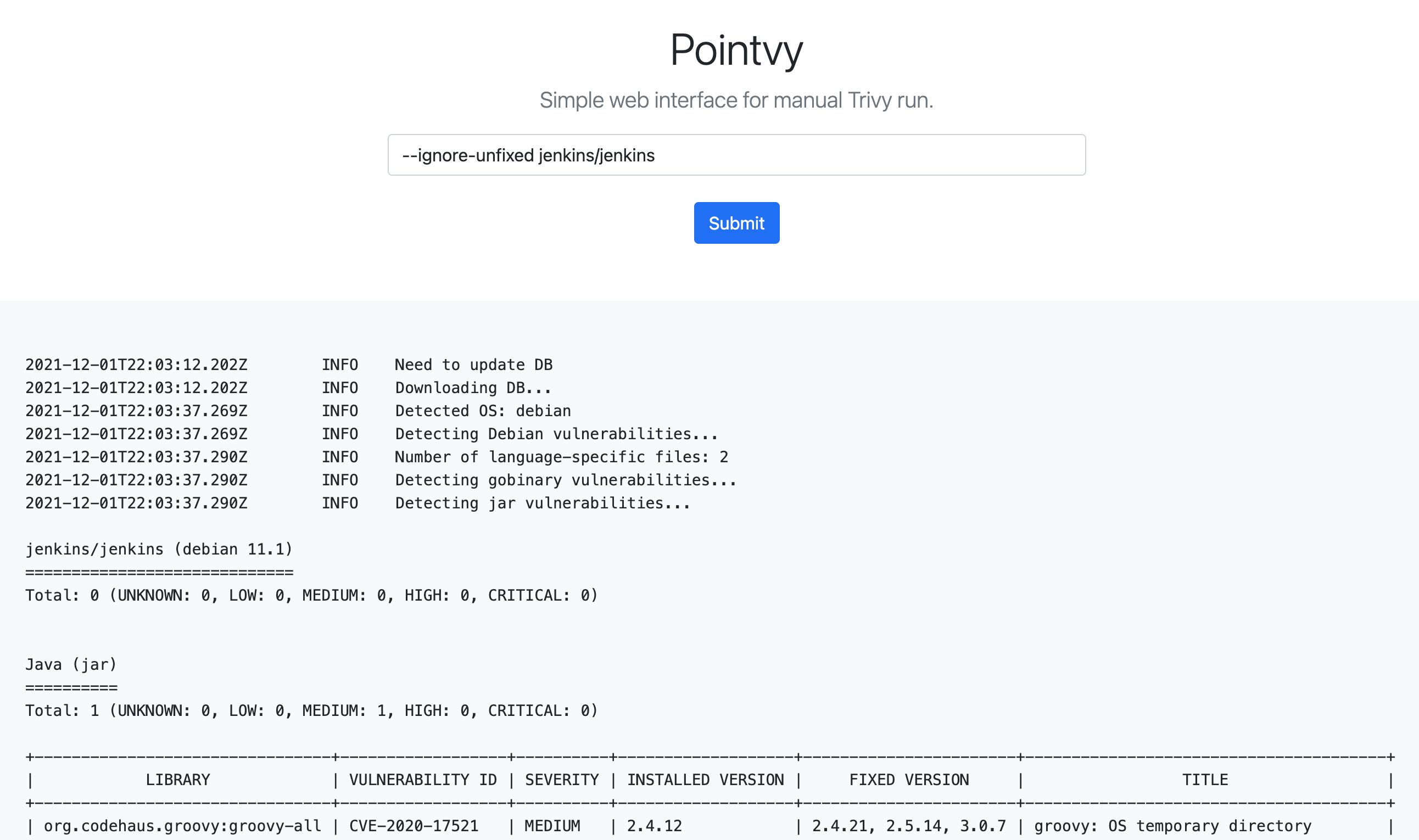
Pointvy is a simple web interface for the execution of the Tri.
Point because sometimes (or often) you need to scan an image and:
* you don't want to or are forbidden to run Trivy on your computer.
* or you can't easily join the Internet thanks to a corporate proxy.
You define the image (optionally add some command options) and you get the result on a web page.
Pointvy is designed to run on a container ser service based on Knative like GCP's *Cloud Run* or Scaleway's *Ser Containers*.
You can also run it in a common Docker / Kubernetes / OpenShift en (without Knative).

Pointvy is not for you if
* You prefer to simply use Trivy in a console. Using Trivy would be a better choice.
* You want to automate Tri in a Kubernetes cluster. A CLI or CI/CD integration of Tri be more appropriate.
Prerequisites
* Docker — required for all deployment options
* gcloud CLI — required for GCP Cloud Run deployment
* A GCP account with billing enabled — required for GCP Cloud Run deployment
* A Scaleway account — required for Scaleway Ser Containers deployment
Deployment of Pointvy 🚀
Several deployment options exist.
Deploying on GCP Cloud Run
First, you need an already up and running GCP account (with billing configured). We won't cover it here.
The easiest way to run Pointvy in Cloud Run is by using gcloud CLI tool.
Here is how to install GCP's Cloud SDK that contains gcloud.
Clone Point and change directory to the newly created folder.
Connect gcloud SDK to your GCP account.
Set your project ID.
Deploy the project, with *pointvy* as name, to your Cloud Run tenant on GCP.
Instructions:
* "Specify a region": the closest to your location might be a good choice.
* "Allow unauthenticated in to": Set "y" to allow people to request without requiring a GCP Cloud Identity and IAM configured. This should only be a temporary unsecure choice.
When the deployment has succeeds, gcloud will display the *Service URL* on which is exposed the service. You will get something similar to:
⚠️ Keep in mind that the execution of the container in Cloud Run and the storage of its image in your GCP Registry is not free!
Depending on your configuration, the service might allow direct and unauthenticated access to anybody from the Internet. Other people might use it as soon as they know the URL and might increase your bill.
Deploying on Scaleway Ser Containers
Clone Point and change directory to the newly created folder.
As Scaleway doesn't provide a container building pipeline, you have to build the Point on your side.
Export locally your secret token that you pre created in the credentials section.
Export the name of your namespace:
⚠️ Of course, replace [name-of-your-registry-namespace] with the name of a namespace you pre created in Scaleway Container Registry.
Connect Docker to the registry:
Locally tag the recently built point with the path to your registry and push the image to your remote Container Registry.
💡 You can't use Docker Hub as a registry or any other public registry, only the Scaleway internal registry can be used.
Finally, deploy the container by using the web console > Ser Container.
The container endpoint will be displayed in the console and be similar to
⚠️ Like with GCP Cloud Run, keep in mind that the use of resources is not free. If unauthenticated access to your endpoint is allowed, people may increase your bill.
Docker
The easiest way is to pull the pre-built image directly from Docker Hub:
Alternatively, you can build the image from source. Clone the repository and change directory to the newly created folder.
Build the image and name it *pointvy*. (Don't forget the point in the command.)
Run the image and bind it on port 8080.
💡 If you want to change the binding port (from which you can reach the service), it is the first 8080 that has to be modified.
⚠️ the full -p 8080:8080 -e PORT=8080 expression *must* be present otherwise the gunicorn server won't be bound to the right TCP port and/or won't be exposed on the good port.
The interface should be reachable at if you run it locally and depends on your configuration if you run it on a remote server.
Keep in mind that direct Internet access is required by the container in order to download the database.
Usage
The query field of Point not just take the image name (by example alpine:3.12.1) but also the same commands and options provided by Trivy as when used in command line mode.
You don't have to write trivy at the beginning of the query. Just start with options or the image description.
Here are some interesting options:
|Command/Option|Comment|
|:---|:---|
|-s HIGH,CRITICAL|Just display high and critical .|
|--ignore-unfixed| Ignore the that aren't fixed by the distribution. (Asking for the update of an image prone to unfixed might be a problem.) |
|--format (table\|json\|template)| Define the output format. |
|-h| Display help page.|
Examples
Test a scan with and without the --ignore-unfixed option to see the difference:
-s is for filtering by *se* (also using latest tag is often a bad idea, especially with the official Python image)
Only scan for in the library packages:
Contributing
Feel free to send a PR to add modifications that you would share and see included in this open-source project.
License
Pointvy is licensed under the Apache License 2.0.
Disclaimer
Pointvy is an open-source project that uses Trivy but is not affiliated with, funded by, or associated with Aqua Security.
项目信息
开发语言:Shell
Star 数:13
技术要点
该项目属于安全软件方向的开源资源,代码结构清晰,适合安全研究人员学习参考。项目围绕Pointvy is a simple web frontend for Trivy vulnerability scanner.展开,提供了可运行的实现,对理解相关安全机制、工具原理与攻防技术具有较高的研究价值。
从技术实现角度看,此类项目的核心在于对底层原理的深入理解与工程化落地。开发者在研究过程中可以结合官方文档与社区讨论,梳理项目的初始化流程、核心模块职责与数据流转,逐步掌握其中的技术细节与设计思路。
使用与学习建议
1. 下载源码压缩包,解压到本地环境。
2. 根据项目类型准备对应的运行环境与依赖。
3. 按照 README 中的步骤完成配置与部署。
4. 在隔离的测试环境中运行验证,避免影响生产系统。
免责声明
本资源来源于开源社区,仅供安全研究、技术学习与合法授权范围内的攻防演练使用,请勿用于任何非法或侵害他人权益的用途。使用本项目产生的一切后果由使用者自行承担。
| 资源标题 | pointvy - Pointvy is a simple web frontend for Trivy vulnera |
| 所属分类 | 安全软件 |
| 发布作者 | admin |
| 发布时间 | 2026-10-05 22:58:21 |
| 下载权限 | 免费下载 |
| 附件数量 | 2 个下载链接 |
| 浏览次数 | 290 |
| 讨论数量 | 0 |
| 主题状态 | 正常讨论中 |