 安全软件
点击放大
AwesomeNmap - A curated knowledge base of Nmap NSE scripts, CVE
项目说明
<di="center">
<img src=" width="420" alt="Awesomenmap">
<br>
A Curated Knowledge Base for Nmap Scripts, C & Automated Reconnaissance Pipelines
![Nmap]()
![NSE]()

![Platform]()
![GitHub stars]()
<br>
<a href=" src=" width="40" alt="Nmap" title="Nmap" /></a>
<a href=" src=" width="40" alt="Lua" title="Lua (NSE Scripts)" /></a>
<a href=" src=" width="40" alt="Python" title="Python" /></a>
<a href=" src=" width="40" alt="Docker" title="Docker" /></a>
<a href=" src=" width="40" alt="Grafana" title="Grafana Dashboard" /></a>
<a href=" src=" height="28" alt="Graphviz" title="Graph" /></a>
<a href=" src=" width="40" alt="SQLite" title="SQLite" /></a>
<a href=" width="40" alt="
<a href=" src=" width="40" alt="Linux" title="Linux" /></a>
<a href=" src=" width="40" alt="Bash" title="Bash" /></a>
*A living reference of essential Nmap extensions, feeds, and reporting tooling — maintained for security analysts, pentesters, and blue teams.*
</div>
---
📑 Table of Contents
---
🎯 O
Awesomenmap is a knowledge-base repository that centralizes the most Nmap NSE scripts, C utilities, and post-scan reporting pipelines into a single, well-organized reference. Instead of hunting across dozens of GitHub repositories and forum posts, security practitioners can use this project as a definiti and automation hub for all things Nmap.
The repository is intentionally kept lightweight — structured README files, shared resources, and upstream references. Third-party scripts are pulled from their original sources and kept up to date through a simple sync process.
| Capability | Description |
|---|---|
| Script Management | Pull and update the latest , default-account, and NSE scripts from trusted upstream sources |
| C | Search known CVEs and exploits directly from the command line without leaving your terminal |
| Automated Scanning | A dashboard-dri assigns scanning targets, executes Nmap with the curated script set, and produces structured output |
| Rich Reporting | Generate HTML scan reports and Graph network topology graphs for every completed scan |
| Real-time Alerts | Push critical findings to a
---
📂 Repository Structure
---
🔧 Core NSE Script Updates
These scripts form the backbone of the detection workflow. Keep them up to date by pulling from their official upstream repositories.
1. — Detection
> Source: /nmap-
Queries the .com API to match detected service against a comprehensi database. Returns associated CVEs, C, and a exploit references in real time.
---
2. Default Accounts — Credential Auditing
> Source: nnposter/nndefaccts
Checks network services for default or well-known credentials using an extensi updated dictionary of default username/password pairs. Covers routers, cameras, IoT devices, industrial controllers, and enterprise software — in during initial reconnaissance to identify services using factory-default authentication.
---
3. Nmap — C
> Source: /
An alternative C engine that cross-references detected software against the database. Complements the script by offering a second opinion on C and surfacing discrepancies. Particularly strong for detecting known in less common or niche software packages that may not recei co in larger databases.
---
🔄 Alternati Integration
> Source: scipag/
A self-contained, offline-capable alternative to the API-dependent script. Ships with local databases and can be extended with custom CSV/JSON feeds. Performs matching against its bundled databases, making it ideal for air-gapped en or scans where internet access during execution is restricted or undesirable.
> Tip: Use *and* together for maximum co — as the offline baseline and for real-time API enrichment.
---
📦 NSE Script Collections
Community-maintained collections that expand Nmap's detection capabilities beyond the official script library. Each has been for quality and relevance — periodically pull the latest to stay current.
| Collection | Source | Focus |
|---|---|---|
| nmap-extra-nse | sighook/nmap-extra-nse | General-purpose auxiliary scripts not yet merged into the official Nmap distribution — custom service probes, brute-force modules, and recon helpers |
| NSE_scripts | icarot/NSE_scripts | detection and information-gathering scripts tailored for web application auditing and service enumeration |
| Custom-Nse | ibrahmsql/Custom-Nse | Indi crafted NSE scripts targeting specific , unusual protocols, and emerging threat landscapes |
| log4shell_nse | righel/log4shell_nse | Dedicated Log4Shell (C) detector for Ja services — performs both header-based and DNS-based |
| ms-exchange- | righel/ms-exchange- | Precise Microsoft Exchange Ser fingerprinting — essential for assessing Patch Tuesday compliance and ProxyShell/ProxyLogon exposure |
| gitlab- | righel/gitlab- | GitLab instance detection with associated C — helps prioritize remediation for self-hosted DevOps infrastructure |
| Official Nmap Scripts | nmap/nmap/scripts | The canonical upstream repository — always ensure your local scripts are at least as recent as this tree |
---
🔎 C CLI Tools
Command-line utilities to search for CVEs and exploits without leaving your terminal. They integrate into shell scripts, CI pipelines, and the Awesomenmap automation workflow.
GetSploit — .com Exploit Finder
> Source: /getsploit
A lightweight Python CLI that queries the .com database for exploit code, shellcode, and proof-of-concept implementations. Returns direct links to exploit source code along with metadata such as publication date, exploit platform, and reliability rating.
---
search_vulns — Multi-Source C
> Source: ra1nb0rn/search_vulns
Aggregates results from multiple databases (N, , and others) into a unified, deduplicated output. Particularly useful when you need a broad o of all known for a gi without manually checking each database separately.
---
📊 Dashboard &
Nmap DID WHAT? — Nmap → Grafana Dashboard
> Source: hackertarget/nmap-did-what · License: GPL-2.0 · Language: Python 3
A lightweight two-part tool by HackerTarget that turns raw Nmap XML scan results into a , interactive Grafana dashboard. It consists of a zero-dependency Python parser that loads scan data into SQLite, and a pre-configured Grafana Docker container with 13 ready-made panels — no manual dashboard building required.
How it works:
What it parses from Nmap XML:
| Data Point | Source |
|---|---|
| Host IPs & hostnames | <address> / <hostnames> elements |
| OS fingerprinting | <osmatch> elements, fallback to ser |
| Port states (open/closed/filtered) | <port state="..."> per host |
| Service name, product, | <service> elements (requires -sV) |
| HTTP page titles | Nmap http-title script output (requires -sC) |
| SSL certificate CN & issuer | Nmap ssl-cert script output (requires -sC) |
| Scan metadata | Nmap , command line, timestamps, elapsed time |
Dashboard panels (13 total):
| Panel | Type | What It Shows |
|---|---|---|
| Hosts Up | Stat | Total li discovered |
| Open Ports | Stat | Total open ports across all hosts |
| Unique Ports | Stat | Distinct port numbers found open |
| Scans | Stat | Total scans loaded into the database |
| Operating Systems | Pie Chart | OS distribution across discovered hosts |
| Unidentified Services | Pie Chart | Open ports with unknown services |
| Open Ports Found | Bar Chart | Ports ranked by frequency |
| Li & Open Ports over Time | Time Series | Scan trends across multiple runs |
| Port Tested Per Second | Bar Gauge | Scan performance per host |
| Identified Services | Table | Service name, product, details |
| Open Services | Table | All open ports with service info |
| Hosts | Table | Per-host breakdown with OS and port counts |
| Scans Loaded | Table | Metadata for every imported scan |
Setup:
Open — login admin/admin. The dashboard is auto-pro with all 13 panels.
Multiple scans accumulate in the same SQLite database over time, so Grafana's time-range filters let you compare trends across scan runs — perfect for tracking how a network's attack surface e between assessments.
> Tutorial: Nmap Dashboard with Grafana — HackerTarget's full written walkthrough with screenshots.
---
📄 Reporting & Notifications
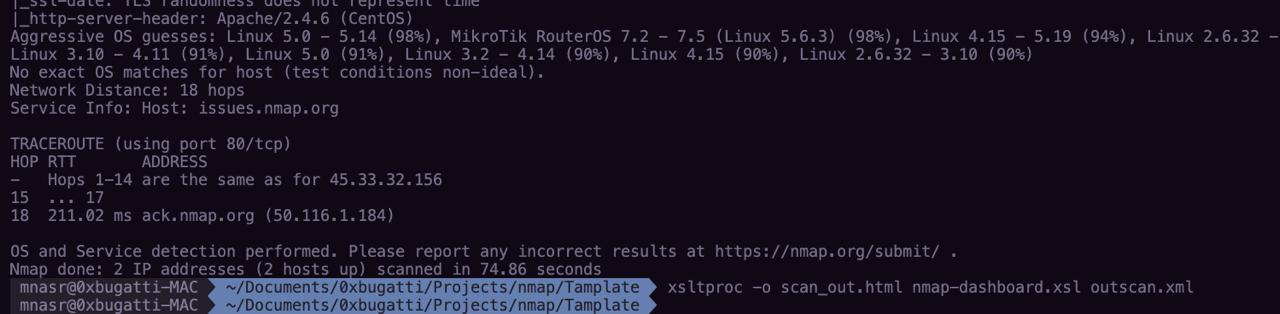
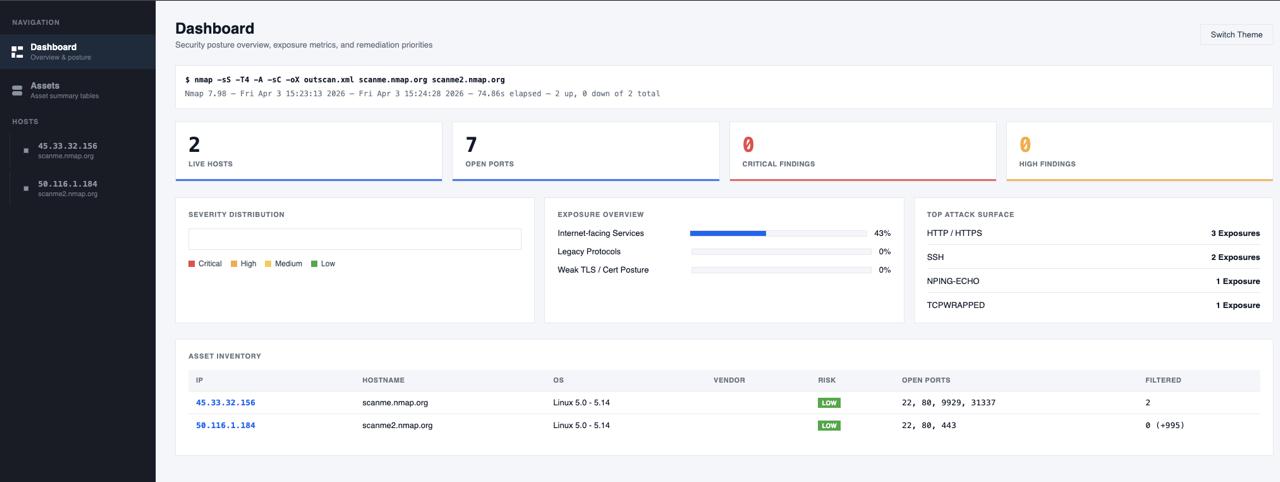
HTML Report Generation
Scan results are transformed into polished, interactive HTML reports using the included XSLT stylesheet — shareable with stakeholders or archived for compliance purposes.
<di="center">
<img src=".github/dash-command.jpg" width="700" alt="Dashboard HTML Report Generation" />
</div>
<di="center">
<img src=".github/dash-main.jpg" width="700" alt="Dashboard O" />
</div>
<di="center">
<img src=".github/dash-sub.png" width="700" alt="Dashboard Host Details" />
</div>
Graph Graphs
> Source: /nmap-formatter
Raw Nmap XML output is con into Graphviz DOT files that render as network topology diagrams — making it immediately clear which hosts are interconnected, which services are exposed, and how cluster across the target network.
<di="center">
<img src=".github/diag-command.jpg" width="700" alt="Graph Generation" />
</div>
<di="center">
<img src=".github/diagram.svg" width="700" alt="Network Topology Diagram" />
</div>
---
<di="center">
Built with 🔥 by @0xBugatti & the security community — for the security community.
<br><br>
<a href=" src=" width="38" alt="GitHub" /></a>
<a href=" src=" width="38" alt="X" /></a>
<a href=" src=" width="38" height="24" alt="LinkedIn" /></a>
</div>
项目信息
开发语言:Lua
Star 数:12
技术要点
该项目属于安全软件方向的开源资源,代码结构清晰,适合安全研究人员学习参考。项目围绕A curated knowledge base of Nmap NSE scripts, CVE intelligence tools, and automated reconnaissance pipelines for security professionals.展开,提供了可运行的实现,对理解相关安全机制、工具原理与攻防技术具有较高的研究价值。
从技术实现角度看,此类项目的核心在于对底层原理的深入理解与工程化落地。开发者在研究过程中可以结合官方文档与社区讨论,梳理项目的初始化流程、核心模块职责与数据流转,逐步掌握其中的技术细节与设计思路。
使用与学习建议
1. 下载源码压缩包,解压到本地环境。
2. 根据项目类型准备对应的运行环境与依赖。
3. 按照 README 中的步骤完成配置与部署。
4. 在隔离的测试环境中运行验证,避免影响生产系统。
免责声明
本资源来源于开源社区,仅供安全研究、技术学习与合法授权范围内的攻防演练使用,请勿用于任何非法或侵害他人权益的用途。使用本项目产生的一切后果由使用者自行承担。
| 资源标题 | AwesomeNmap - A curated knowledge base of Nmap NSE scripts, CVE |
| 所属分类 | 安全软件 |
| 发布作者 | admin |
| 发布时间 | 2026-10-05 23:00:49 |
| 下载权限 | 免费下载 |
| 附件数量 | 2 个下载链接 |
| 浏览次数 | 449 |
| 讨论数量 | 0 |
| 主题状态 | 正常讨论中 |