 安全软件
点击放大
AgentVetter - Sandboxed multi-scanner security for AI skills, MC
项目说明
Agent
> Sandboxed multi-scanner security for AI skills, MCP servers, and package trees — co honesty, SIE judging, heatmap posture, guided triage and fix. Scan what agents install; fail closed.
<!-- badges:start -->
<!-- Group 1: Tech stack -->
!Python
!Node.js
!Docker
!Modal
!Supabase
!Cisco Skill/MCP Scanner
!Snyk
!Tessl
!DepShield
!Ossprey
!Superlinked SIE
!Alibaba Cloud Model Studio
<!-- Group 2: CI / Quality -->
![CI]()
![Nightly]()
![Complexity]()
![Code Review Graph]()
![Security]()
![Stability]()
![Licensing]()
![Release]()
![License]()
![Last Commit]()
![Stars]()
<!-- badges:end -->
Meterian Security / Stability / Licensing badges mirror the public
Meterian project report
(dependency and policy scan for this GitHub repo — not an Agent scan adapter).
CI / Complexity badges reflect GitHub Actions on main. The Nightly badge is
A — comprehensive T4 (daily 02:00 UTC: Semgrep, CodeQL, full secrets/Trivy,
dashboard tests, co snapshots, complexity, dep audit). B — Supply chain
(SBOM / Meterian / Chalk) is weekly Mon 03:00 UTC; C — Mutation
(Stryker / mutmut, non-gating) is 1st+15th 04:00 UTC. PR CI is
ultra-minimal (ship-path co + OS scans) — see
CONTRIBUTING and
docs/README.md § CI workflows.
!Agent banner
Where do you want to go?
| If you want to… | Go here |
|---|---|
| Try a hosted dashboard (no clone) | Live demo on neomatrix369.github.io |
| Watch the demo walkthrough | YouTube — Agent dashboard tour |
| Try a safe demo (no cloud accounts) — Recommended | QUICKSTART — Try the demo |
| Run a real Live scan — Ad | QUICKSTART — Live |
| Change the code | CONTRIBUTING |
| Understand the system | Architecture · docs hub · Status |
What Agent does
Agent helps technical teams assess AI skills, MCP servers, and package
manifests before they rely on them. It discovers targets, runs
the enabled scanner adapters in an isolated Modal sandbox, stores findings in
Supabase, and brings them together in one dashboard (Live or Mock) with co
honesty, optional SIE judging, and a guided triage/fix flow.
Optionally, after each scan batch it runs a tiered router: Superlinked SIE
triages findings, and Alibaba Cloud Model Studio escalates when scanners
disagree or co looks incomplete (ADR-0016).
Pro and scanners
| Layer | Provider / tool | Role |
|---|---|---|
| Platform | Modal | Isolated scan sandbox (Docker image + Python adapters) |
| Platform | Supabase | Postgres + Realtime store for runs, scanners, findings |
| Scanner | Cisco Skill Scanner / MCP Scanner / AI Defense | Skill and MCP security inspection |
| Scanner | Snyk | Skills/MCP: snyk-agent-scan. Packages: snyk test SCA (npm/Python/Go/… — not Rust/Cargo; unsupported trees → not_applicable) |
| Scanner | Tessl | Fi capabilities: Lint (auth-free), Review (Quality), Scenario Generation, Eval, Review (Security) |
| Scanner | Cargo Audit (RustSec) | Rust/Cargo SCA when Cargo.lock / Cargo.toml present |
| Scanner | DepShield (depshield-mcp) | Dependency audit (npm + PyPI via OSV.dev); no credentials; skills, MCP, and packages |
| Scanner | Ossprey (ossprey-cli) | Malware / malicious-package scan (skills, MCP, packages); needs OSSPREY_API_KEY |
| Router (optional) | Superlinked SIE | Cheap post-scan triage on every item |
| Router (optional) | Alibaba Cloud Model Studio | Escalation only when SIE signals |
Missing Snyk / Cisco / Tessl / Ossprey keys → that scanner reports skipped /needs_setup / skipped_missing_credential rather than claiming a complete scan.
DepShield always runs when the sandbox image includes it (no secret sync).
When every package scanner is not_applicable or skipped (e.g. no Cargo Audit
and no other engine completed), the card is NO CO, not green.
UNSCANNED remains for ne / no usable scan record.
Cargo / Rust crates: Cargo Audit (RustSec) runs when Cargo.lock orCargo.toml is present.
Capability honesty and e states: docs/STATUS.md ·
in: ARCHITECTURE §0 ·
Ossprey key allowlist: OPTIONAL_SCANNER_KEYS.
Who Agent is for
Agent is currently an early-adopter tool with a hands-on setup and management
component. It is a good fit if you are comfortable using a terminal and shell,
managing local tooling and en , editing .env and other
configuration files carefully, creating cloud/ accounts, and using command
output to resolve a setup issue.
| You are... | You want to... |
|---|---|
| An AI-tooling de or team | Assess skills, MCP servers, and package trees before using or sharing them |
| A platform, operations, or security practitioner | Run and maintain scans for a team |
| A contributor | Extend scanner support, the CLI, or the dashboard |
You do not need to be a security specialist, but you should be ready to interpret
findings and decide when to escalate them. The optional Mock preview is a
for e the dashboard without accounts; real scans require the setup below.
If you plan to change Agent, start the contributor setup
after cloning: it installs the commit and push hooks before your first change.
Run your first Live scan
Follow this order before running a scan or opening the Li. The
Quickstart supplies the commands; the linked guides
explain each decision before you make it.
1. Check the required tools and install the CLI.
2. Create the accounts you need: Supabase,
Modal, then add Snyk, Tessl, and Cisco
(Skill/MCP LLM + optional AI Defense) credentials with the
en procurement guide.
DepShield needs no keys. Add OSSPREY_API_KEY when you ha access
(otherwise that adapter skips safely). For optional post-scan routing
(ADR-0016),
also set up Superlinked SIE (required for routing)
and optionally Alibaba Cloud Model Studio
(escalation only). Key map for every .env name: en.md
(mirrors .en).
3. Create .env only after you have the , then fill it with
en.md as the single key reference.
4. Bootstrap Supabase and deploy the Modal scan app with the
Li commands.
5. Run a fixture scan and open the Li from the
Quickstart. After routing, use
agent route to
re-run a batch and read router results
for pathway strips and Escalated / SIE-only filters.
Supabase and Modal are required for Li. If Snyk, Tessl, Cisco, or Ossprey
credentials are absent, Agent reports that scanner as skipped rather than calling
the scan complete.
SIE and Model Studio are optional: without SIE keys, scans still complete and auto-route
logs a warning and skips. With SIE but without Model Studio, SIE-only reviews still log.
Preview the dashboard (optional)
Use Mock demo data only when you want a no-account look at the UI; it does not replace
the Li above or produce a scan result. Prefer the
hosted demo when you
do not need a local clone, or watch the
demo walkthrough on YouTube.
Open
On the dashboard toolbar, Skills can be triaged by Tessl quality score using
Quality ≥ 80, Quality < 80, and No quality score tabs (skills only;
MCP servers are excluded from quality buckets but remain on all tabs).
The first visit shows a landing intro screen (threat statistics, architecture o,
shipped skills, and roadmap). Click Open Dashboard → to proceed to the scan results
view (primary Dashboard tab: in KPIs, filters, and cards). Use the secondary
Workflow tab for Run → Triage → In → Fix → → Report. Simple/Expert
on Workflow only changes finding-detail density, not which primary tab you are on.
Operator- judge/co narration and L→R soft-amend (parent target
meta, multi-select, role-labelled models) are IMPLEMENTED / (unit) onmain via Wave R slice 75 (PR #163);
Workflow chrome polish (shared panel typography + denser Triage filters) via
slice 76 (PR #165).
Dismiss the intro with Open Dashboard → before Workflow (the Workflow tab
does not clear the intro o). Slice 77 (branch) hardens Run CTA / count
reconciliation / triage disposition persistence / honesty — see
docs/STATUS.md.
The "About" na toggles the intro back on at any time; the choice is
remembered in sessionStorage.
> identity v2: cream paper, tan primary CTA, and AA-readable ink tokens
> (Fraunces display headings) — shipped via PR #96.
> Screenshots in docs/screenshots/ regenerated 2026-09-21.
After installing the CLI, you can also target discovery locally without
accounts or a scan:
What happens next
Agent’s Live path is a short pipeline. Each hop uses a concrete piece of the
stack (same names as the badges above):
| Step | What runs | Stack | Setup |
|---|---|---|---|
| Discover | CLI finds skills / MCP servers / packages (agent scan --dry-discover or a real scan; Wave P package path on main) | Node.js CLI | setup-commands · prerequisites |
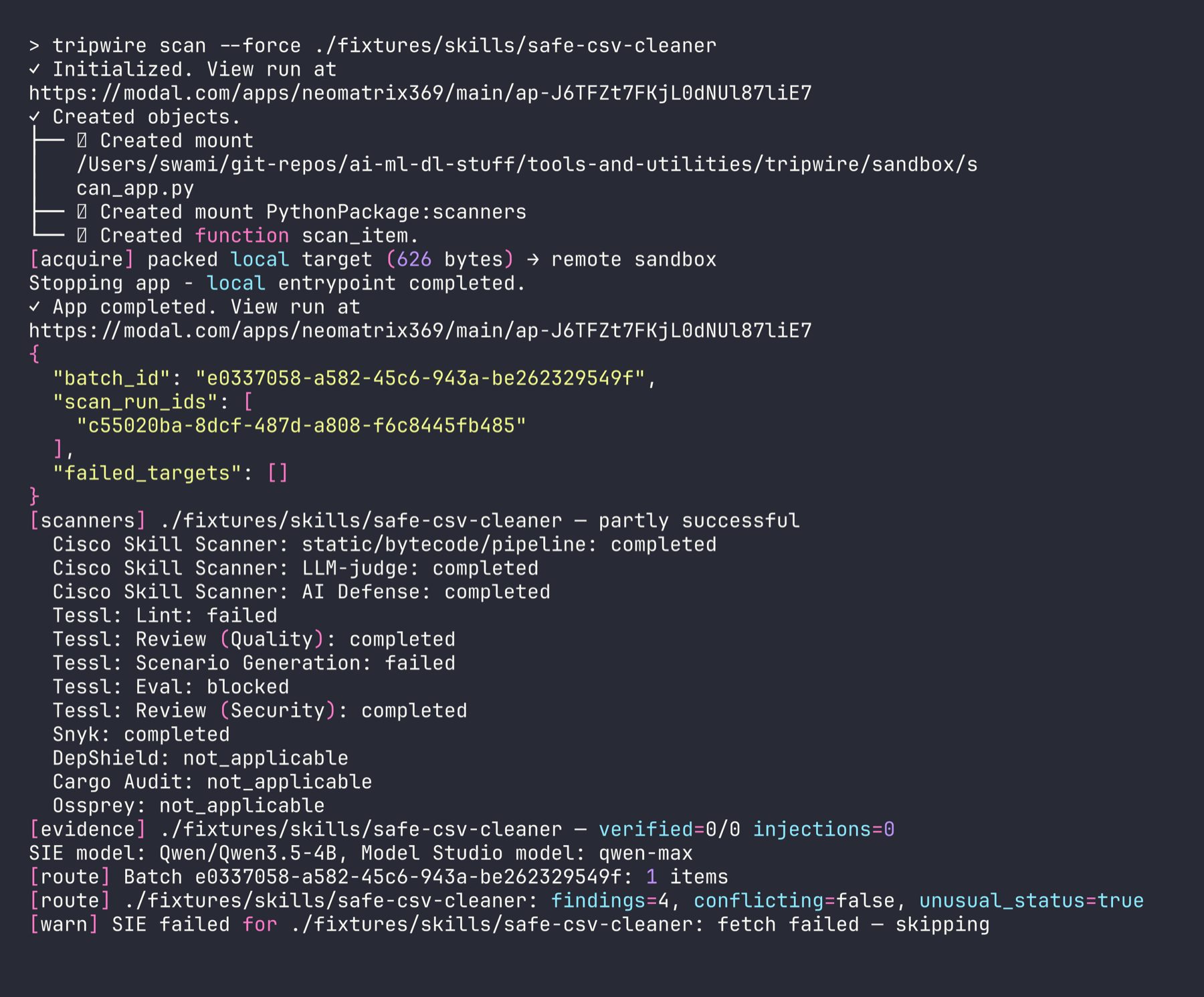
| Scan | Adapters run in an isolated sandbox; CLI prints scanner in, co ledger, and [e] honesty rows (slices 63/65/66); optional agent judge panel (slice 67) | Modal (+ Docker), Cisco / Snyk / Tessl / DepShield / Cargo Audit / Ossprey | modal-setup · en |
| Store | Findings and scan_run rows land for the dashboard | Supabase / Postgres | supabase-setup |
| Route (optional) | Every item through SIE; escalate only when signaled | Superlinked SIE → Alibaba Cloud Model Studio via agent route / auto-route | sie-setup · model-studio-setup |
| Review | Heatmap, drawers, pathway strips, Escalated / SIE-only filters; Run→Report chrome on Workflow tab (slices 75–77 on main #163/#165/#169) | Dashboard (Live or Mock) | reading-router-results · screenshots |
Mock skips Discover→Scan→Store and still shows Review (plus router fixtures).
Without SIE keys, Route warns and skips; scanner results still store. Sample CLIs
for router backends (no full batch): prototypes/sie-studio/,prototypes/model-studio/.
How to read strips and filters after Route:
reading-router-results.md.
Screenshots
<table>
<tr>
<td align="center" width="20%">
<a href="docs/screenshots/01-cli/02-cli-real-scan-modal-sandbox.png">
<img src="docs/screenshots/01-cli/02-cli-real-scan-modal-sandbox.png" width="100%" alt="CLI — real scan with Modal sandbox output">
</a>
<sub><b>CLI scan</b> — Modal (live)</sub>
</td>
<td align="center" width="20%">
<a href="docs/screenshots/02-dashboard/02-dashboard-o.png">
<img src="docs/screenshots/02-dashboard/02-dashboard-o.png" width="100%" alt="Dashboard o grid (Mock demo data)">
</a>
<sub><b>Dashboard</b> — Mock o</sub>
</td>
<td align="center" width="20%">
<a href="docs/screenshots/05-workflow/18-workflow-run.png">
<img src="docs/screenshots/05-workflow/18-workflow-run.png" width="100%" alt="Workflow Run step (Mock)">
</a>
<sub><b>Workflow</b> — Run (Mock)</sub>
</td>
<td align="center" width="20%">
<a href="docs/screenshots/03-skills/04-red-skill-detail-.png">
<img src="docs/screenshots/03-skills/04-red-skill-detail-.png" width="100%" alt="Skill detail — prompt injection finding (Mock)">
</a>
<sub><b>Skill</b> — Red (Mock)</sub>
</td>
<td align="center" width="20%">
<a href="docs/screenshots/04-mcp-servers/10-red-mcp-detail-.png">
<img src="docs/screenshots/04-mcp-servers/10-red-mcp-detail-.png" width="100%" alt="MCP ser — command injection finding (Mock)">
</a>
<sub><b>MCP</b> — Red (Mock)</sub>
</td>
</tr>
</table>
> Full gallery (Escalated / SIE-only, Workflow Triage/, se filters, list view) → docs/screenshots/
Find the right guide
| Your task | Start here |
|---|---|
| Check tools and technical fit | Prerequisites |
| Follow the Install → Live path map | Path commands · onboarding cheatsheet |
| Create the Supabase project | Supabase setup |
| Deploy the Modal scan app | Modal setup |
| Procure scanner and router .env keys | En |
| Run your first Live scan | Quickstart · setup commands |
| Preview Mock UI or dry-disco | Optional local |
| Enable SIE / Model Studio routing | SIE setup · Model Studio setup · agent route |
| Interpret pathway strips / Escalated / SIE-only | Reading router results |
| Browse CLI / dashboard / Workflow screenshots | Screenshot gallery |
| Smoke-test SIE or Model Studio alone | SIE sample CLI · Model Studio sample CLI |
| Understand results and system shape | Capability status · Architecture · ADRs |
| Contribute or maintain | Contributing · command catalog |
| Migrate from Tripwire | Migration guide · ADR-0018 |
| Report a | SECURITY |
Full map (including planning / CI): docs/README.md.
项目信息
开发语言:Python
Star 数:11
技术要点
该项目属于安全软件方向的开源资源,代码结构清晰,适合安全研究人员学习参考。项目围绕Sandboxed multi-scanner security for AI skills, MCP servers, and package trees — coverage honesty, SIE judging, heatmap posture, guided triage and fix. Scan what agents install; fail closed.展开,提供了可运行的实现,对理解相关安全机制、工具原理与攻防技术具有较高的研究价值。
从技术实现角度看,此类项目的核心在于对底层原理的深入理解与工程化落地。开发者在研究过程中可以结合官方文档与社区讨论,梳理项目的初始化流程、核心模块职责与数据流转,逐步掌握其中的技术细节与设计思路。
使用与学习建议
1. 下载源码压缩包,解压到本地环境。
2. 根据项目类型准备对应的运行环境与依赖。
3. 按照 README 中的步骤完成配置与部署。
4. 在隔离的测试环境中运行验证,避免影响生产系统。
免责声明
本资源来源于开源社区,仅供安全研究、技术学习与合法授权范围内的攻防演练使用,请勿用于任何非法或侵害他人权益的用途。使用本项目产生的一切后果由使用者自行承担。
| 资源标题 | AgentVetter - Sandboxed multi-scanner security for AI skills, MC |
| 所属分类 | 安全软件 |
| 发布作者 | admin |
| 发布时间 | 2026-10-05 23:01:56 |
| 下载权限 | 免费下载 |
| 附件数量 | 2 个下载链接 |
| 浏览次数 | 438 |
| 讨论数量 | 0 |
| 主题状态 | 正常讨论中 |