 安全软件
点击放大
automate-with-actions - This project is automate the reconnaissance proces

项目说明
Automate-With-Actions
i got idea for this project from project-discovery's pd-actions that is not a
what is Github actions
how the workflow run
1. installing necessary tools and packages and dependencies
2. enumeration of subdomains using amass, assetfinder, subfinder, crt.sh, subdomain bruteforcing
3. dns resolution: getting CNAME, A,AAAA,PTR records using massdns
4. finding hosting for domains if there by bruteforce host using gobuster
5. checking subdomain or vhost is alive or not by httpx which test for all http methods and gi
6. port scanning using naabu, for fast output we only use nmap's top-1000 port you can specify all port but it will take time
7. fuzz the domains after probing through httprobe for the critical directory, you customize the wordlist in the fuzzing directory
8. final we scan the li using project discovery's nuclei for scanning cves, etc, you can change the configuration file nuclei.yaml in configs/
9. For notification purpose i have used notify but this didn't work in github vm if you running this script in local machine or in vps then it will work. change config for notify in configs/notify.yaml and also see notify's official documentation for how to config it for your own.
how to use
setup workflow
1. fork this repository and make this private since the output is commited in forked repo & you didn't want to make your work public...
2. In 2nd new created repo make add new file
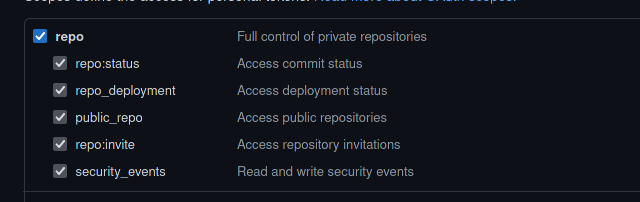
.github/workflows/github-actions.yaml3. create personal Access token for github see documentation be sure to check this other don't need for this project, this will allow read and write actions to private repository
!img0
5. copy the personal access token and add secret in 2nd private repo that we ha documentation
!img1
!img2
!img3
!img4
7. now copy content from
workflow/github-actions.yaml file and paste in second private repo that we ha i.e .github/workflows/github-actions.yaml8. only change this in workflow but
![assets/work-flow.png]
9. now you workflow file is complete just commit the changes and go to actions page
!img5
!img6
10. if your workflow runs successfully and exit than you see this
!img7
otherwise you see like this
!img8
setup notification to get on Discord
For project discovery's notify
configs/notify.yamlconfiguring scripts
gi name
domains.txteg:
then put
in domains.txt
eg
For out of scope then we put it in outofscope.txt as
run workflow
.github/workflows/automate-with-actions.yaml file in your 2nd private repository and edit workflow file like comment or uncomment echo hello DK or or any echo file but don't script file, if you do that script will not run but if you want to not run that script file than you comment itactions tab in that repository, NOTE:
Every time you commit in 2nd repository workflow will run so, take note of this while commit change to workflow file, you only have 2000 min per month NOTE :
if you put domains of large companies break workflow in like in 1 st phase only do sub-enum, httpx, vhost, dns-resolve & port-scan & in 2nd phase do fuzzing and nuclei scan, because if your workflow run for more than 360 min, then github cancel workflow and you lost your result if it is not commited + you lose 360 min from total 2000 minNOTE:
the is created on the basis of workflow file, and this workflow only runs if any push event happened in that repository , where the .github/workflows/your-workflow-file.yaml is presentNOTE:
In every script i have put example email and name you need to modify that email and name acc to your github accout and nameNOTE:
you can add more scripts and tune it as you wish but dont forget to modify workflow file in .github/workflows/*.yaml file unless it dont reflect if you have add new scripts.tools i have used in this project
Author : DK9510
Twitter: DishantKapadiya
Acknowledge : gi to project discovery team for give idea to create similar project like pd-actions, and all the creators of tools who created this fantastic tools
项目信息
开发语言:Shell
Star 数:10
技术要点
该项目属于安全软件方向的开源资源,代码结构清晰,适合安全研究人员学习参考。项目围绕This project is automate the reconnaissance process or process of information gathering about the target domain or company which host bug bounty program. You can run this whole Virtual Private Server but since i don't have any so i dig and found that GitHub will provide 2000 minute/month for running workflow in their virtual machine, they provide windows, mac and ubuntu as Linux distribution, for testing purpose of the development, so we integrate testing phase directly in development process, So i have create custom scripts and workflow file which run install all the necessary tools and run the appropriate scripts, the work is done by this workflow is subdomain enumeration, dns resolution, reverse-dns resolve, port-scanning of all the hosts,findig virtual hosts, fuzzing for content discovery, and run nuclei which is template based scanner by project discovery is to scan the host for any CVE and common vulnerabilities, you can add custom template and custom scripts, and finally Discord integration, so when some work is done it will send message to discord webhook url configure in it. For further details view Repository. 展开,提供了可运行的实现,对理解相关安全机制、工具原理与攻防技术具有较高的研究价值。
从技术实现角度看,此类项目的核心在于对底层原理的深入理解与工程化落地。开发者在研究过程中可以结合官方文档与社区讨论,梳理项目的初始化流程、核心模块职责与数据流转,逐步掌握其中的技术细节与设计思路。
使用与学习建议
1. 下载源码压缩包,解压到本地环境。
2. 根据项目类型准备对应的运行环境与依赖。
3. 按照 README 中的步骤完成配置与部署。
4. 在隔离的测试环境中运行验证,避免影响生产系统。
免责声明
本资源来源于开源社区,仅供安全研究、技术学习与合法授权范围内的攻防演练使用,请勿用于任何非法或侵害他人权益的用途。使用本项目产生的一切后果由使用者自行承担。
| 资源标题 | automate-with-actions - This project is automate the reconnaissance proces |
| 所属分类 | 安全软件 |
| 发布作者 | admin |
| 发布时间 | 2026-10-05 23:02:51 |
| 下载权限 | 免费下载 |
| 附件数量 | 2 个下载链接 |
| 浏览次数 | 354 |
| 讨论数量 | 0 |
| 主题状态 | 正常讨论中 |